

Geekom’s new GeekBook X14 Pro arrives like a feather in the hands and a clamp of power under the hood — a 14‑inch ultralight that aims to reframe what a productivity laptop can be when weight, screen quality, and modern connectivity are prioritized above upgradeability and radical thermal headroom.
Geekom is better known for compact mini‑PCs than clamshell laptops, so the GeekBook X14 Pro represents a deliberate stretch for the company into the competitive ultraportable segment. The X14 Pro pairs an OLED 2.8K panel and a magnesium‑alloy shell with Intel’s Core Ultra series mobile processors (offered in Core Ultra 5 and Core Ultra 9 trims) and soldered LPDDR5x memory, delivering a package that’s light enough to be carried all day yet spec’d to handle content creation, office productivity, and light gaming workloads. These headline attributes — weight, display, CPU choice, and a modern I/O array — are the three things buyers will size up first. Independent lab and press reviews consistently report the machine as weighing roughly a kilogram, having a 2880×1800 14‑inch OLED 120 Hz panel, and including two USB4 ports alongside HDMI and Wi‑Fi 6E connectivity.
What Geekom is selling with the GeekBook X14 Pro is a precise trade: exceptional portability and a premium display in exchange for limited internal serviceability and, in the top configuration, a thermal ceiling that keeps the thin chassis quiet but constrains sustained peak performance. In short, the X14 Pro is designed to be the ultralight “worker‑creator” machine, not a long‑haul workstation or desktop replacement.
On expandability, the tradeoffs are obvious and deliberate: RAM is soldered (up to 32 GB LPDDR5x), and the chassis has limited internal room for additional storage or user upgrades. NotebookCheck explicitly calls out hardly any upgrade options as a downside, so buyers who want future modularity should plan accordingly.
Why the OLED matters:
Performance in real‑world tasks is strong for everyday productivity and many creative workflows. Reviewers report smooth handling of:
The downside: RAM is not user‑serviceable and the device’s limited expansion points mean you cannot add a second SSD or upgrade memory down the line. NotebookCheck stresses the lack of internal upgrade options as a core tradeoff for the weight savings. Buyers who expect to keep a laptop for many years and upgrade parts incrementally should account for this limitation.
The 65 W USB‑C GaN charger provides sensible fast‑charging behavior for a thin ultrabook: quick top‑ups and a single‑charger ecosystem for people who already use USB‑C chargers across devices. The inclusion of PD charging is a practical win for mobile users.
Ergonomically, the keyboard offers defendable travel and layout for a thin machine, and the hinge keeps the screen steady through typing and lap angles. The overall typing experience is good for extended sessions compared with many other ultraportables that sacrifice key travel for thinness. The tradeoff remains the smaller deck area and the absence of a numpad or larger palm rests, which is typical for a 14‑inch ultralight.
Value considerations:
That said, the device’s compromises are not minor: soldered memory, limited internal expandability, and a design tuned for quiet operation rather than sustained peak performance. These are deliberate engineering choices that favor a particular buyer profile. Geekom’s pricing strategy makes those choices easier to swallow, and independent reviews consistently signal that the company delivered the intended experience well.
One additional note on verification: some specific claims in early press materials and aggregated coverage — such as exact HDMI version and certain published benchmark figures attributed to some outlets — show minor inconsistencies between sources. Buyers who require exact port functionality or need published benchmark parity should confirm SKU details at purchase and consult hands‑on reviews that list the same testbed and software state to compare apples to apples. NotebookCheck and TechRadar are reliable, independent reviews that corroborate the major load‑bearing claims about weight, display, CPU options, and memory/storage configuration.
If you travel light, edit on the go, and want a superb OLED screen in a near‑1‑kg chassis, the GeekBook X14 Pro is one of the most compelling options in its class at launch. If you need upgradeability or sustained compute performance without throttling, a larger, better‑cooled system remains the safer choice. Either way, Geekom’s entry signals that thin‑and‑light design tradeoffs can be thoughtfully balanced — and that the ultraportable category still has room to surprise buyers with better displays and smarter connectivity at competitive prices.
Source: TechPowerUp Geekom Geekbook X14 Pro Review - The Ultra-Light Wasp
 Background / Overview
Geekom is better known for compact mini‑PCs than clamshell laptops, so the GeekBook X14 Pro represents a deliberate stretch for the company into the competitive ultraportable segment. The X14 Pro pairs an OLED 2.8K panel and a magnesium‑alloy shell with Intel’s Core Ultra series mobile processors (offered in Core Ultra 5 and Core Ultra 9 trims) and soldered LPDDR5x memory, delivering a package that’s light enough to be carried all day yet spec’d to handle content creation, office productivity, and light gaming workloads. These headline attributes — weight, display, CPU choice, and a modern I/O array — are the three things buyers will size up first. Independent lab and press reviews consistently report the machine as weighing roughly a kilogram, having a 2880×1800 14‑inch OLED 120 Hz panel, and including two USB4 ports alongside HDMI and Wi‑Fi 6E connectivity.What Geekom is selling with the GeekBook X14 Pro is a precise trade: exceptional portability and a premium display in exchange for limited internal serviceability and, in the top configuration, a thermal ceiling that keeps the thin chassis quiet but constrains sustained peak performance. In short, the X14 Pro is designed to be the ultralight “worker‑creator” machine, not a long‑haul workstation or desktop replacement.
Design and build: magnesium alloy, minimal bulk
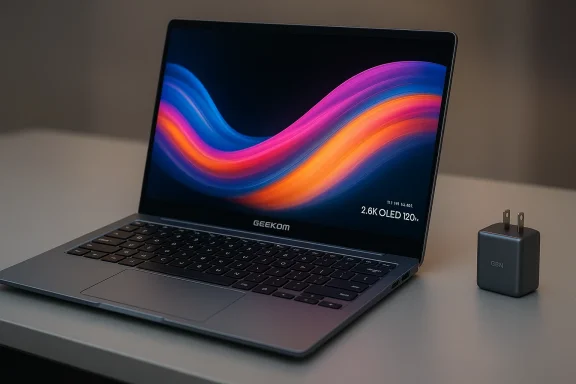
The first impression is tactile. Geekom uses a magnesium‑alloy unibody (often described in reviews as a “lightweight metal” construction), which lets the laptop hit the sub‑1‑kilogram mark without the flex and fragility that sometimes plague ultra‑light plastic devices. The X14 Pro's physical dimensions are thin — approximately 16.9 mm at the thinnest edge — and its finish is restrained and businesslike, leaning into a muted premium aesthetic rather than flashy gamer cues. NotebookCheck and TechRadar note a high‑quality fit and finish consistent with the price class.- Weight: ~999 g (1 kg class). This puts the X14 Pro in direct competition with the lightest 14‑inch machines and makes it one of the most portable Windows laptops in its category.
- Thickness: ~16.9 mm; edge profile is tapered toward the front for a slimmer appearance.
- Chassis: magnesium alloy with soft‑touch or anodized finish; lid and deck are described as rigid with few creaks under normal use.
Ports and expandability
One of the X14 Pro’s commercial strengths is a surprisingly modern I/O collection for a sub‑1‑kg laptop:- 2 × USB4 (high‑bandwidth, supports power delivery and external display)
- 1 × USB‑A 3.2 Gen 2 (or Gen1 depending on SKU reporting)
- HDMI (exact spec reported variably between 2.0 and 2.1 across press previews; NotebookCheck lists HDMI 2.0 while other outlets referenced HDMI 2.1 claims from press materials — this discrepancy is flagged below).
- 3.5 mm combo audio jack
- microSD slot (some SKUs)
- Fingerprint reader in power button, FHD webcam with physical privacy shutter
On expandability, the tradeoffs are obvious and deliberate: RAM is soldered (up to 32 GB LPDDR5x), and the chassis has limited internal room for additional storage or user upgrades. NotebookCheck explicitly calls out hardly any upgrade options as a downside, so buyers who want future modularity should plan accordingly.
Display: 2.8K OLED pitched as the X14 Pro’s crown jewel
The GeekBook X14 Pro’s 14‑inch OLED panel is the spec that most press reviews highlight first. The panel is reported at 2880×1800 (often phrased as “2.8K”) with a 16:10 aspect ratio, 120 Hz refresh capability, and claimed full coverage of the DCI‑P3 color space at up to ~450 nits peak. The effect is immediate: deep blacks, vibrant color, and crisp text that benefits both creative apps and general productivity. Reviews consistently single out the display as a major differentiator for the product.Why the OLED matters:
- High native contrast and true blacks improve perceived sharpness and color pop.
- 16:10 ratio gives more vertical workspace for documents and timelines.
- 120 Hz option smooths UI animations and can help perceived responsiveness during scrolling and light gaming.
Performance: Core Ultra series with Arc integrated graphics
The GeekBook X14 Pro ships with two primary CPU choices across the lineup: the Intel Core Ultra 5 125H (lower power/configuration) and the top‑end Core Ultra 9 185H. Both are part of Intel’s Core Ultra family optimized for mobile thin‑and‑light devices; the Core Ultra 9 in Geekom’s SKU contains multiple performance and efficiency cores and pairs with Intel Arc integrated graphics and an NPU for AI offload tasks. NotebookCheck and HotHardware summarize the configuration: 32 GB LPDDR5x soldered RAM and a PCIe 4.0 NVMe SSD (1 TB in many test units, with larger 2 TB options in some markets).Performance in real‑world tasks is strong for everyday productivity and many creative workflows. Reviewers report smooth handling of:
- Office suites, multi‑tab browsing, and video conferencing
- Image editing and moderate photo workloads (Photoshop, Lightroom)
- 4K video timeline work in lighter editor workflows (Cutting, color grading in DaVinci Resolve or CapCut for shorter sequences)
Thermal behavior and noise
Because the X14 Pro is a near‑kilogram ultralight, Geekom’s thermal headroom is limited. Reviews describe a cooling solution optimized for low noise and user comfort rather than maximum sustained throughput: fans stay quiet during normal use and the chassis remains cool. Under long multi‑core stress tests, the system reduces clock speeds and draws to maintain thermal safety, which limits continuous rendering or heavy compile workloads compared with thicker 14‑inch workstations. NotebookCheck explicitly lists the CPU’s “low Turbo usage” as a reason the SoC sometimes underperforms expectations for long, sustained workloads. If your daily workflow is dominated by long renders, large dataset computations, or continuous heavy virtualization, a thicker, higher‑TDP laptop will outperform the X14 Pro.Storage and memory: fast but fixed
Geekom configures the X14 Pro with fast NVMe Gen4 SSDs (1 TB or 2 TB options in press units) and soldered LPDDR5x RAM at high frequencies (Notebooks report 7,467 MT/s in some configurations). This combination delivers snappy app launches and excellent throughput for scratch and project files. CrystalDiskMark and synthetic storage tests in several reviews show high sequential read/write numbers consistent with modern PCIe 4.0 drives, making the machine responsive for daily tasks and medium video editing.The downside: RAM is not user‑serviceable and the device’s limited expansion points mean you cannot add a second SSD or upgrade memory down the line. NotebookCheck stresses the lack of internal upgrade options as a core tradeoff for the weight savings. Buyers who expect to keep a laptop for many years and upgrade parts incrementally should account for this limitation.
Battery life and charging
Geekom equips the X14 Pro with a battery in the neighborhood of 70–78 Wh depending on the region and configuration, paired with a 65 W GaN USB‑C charger. Real‑world battery numbers in reviews vary by brightness and workload, but the commonly reported headline figure is up to around 15–16 hours for light productivity scenarios (browsing, document editing, video playback at modest brightness). NotebookCheck and TechRadar report solid endurance for the device’s capacity, helped by efficiency of the Core Ultra platform, but underline that heavier CPU/GPU loads and 120 Hz panel use shorten runtime significantly.The 65 W USB‑C GaN charger provides sensible fast‑charging behavior for a thin ultrabook: quick top‑ups and a single‑charger ecosystem for people who already use USB‑C chargers across devices. The inclusion of PD charging is a practical win for mobile users.
Software, security, and ergonomics
Geekom ships the X14 Pro with Windows 11 Pro in press units reviewed, plus a small suite of vendor utilities for driver updates, fan profiles, and basic hardware diagnostics. Important convenience and privacy features include a physical webcam shutter and a fingerprint power‑button for biometric login. The review consensus finds software largely unobtrusive; the system boots quickly and the included utilities are functional without being overbearing.Ergonomically, the keyboard offers defendable travel and layout for a thin machine, and the hinge keeps the screen steady through typing and lap angles. The overall typing experience is good for extended sessions compared with many other ultraportables that sacrifice key travel for thinness. The tradeoff remains the smaller deck area and the absence of a numpad or larger palm rests, which is typical for a 14‑inch ultralight.
Price and market positioning
Geekom positions the GeekBook X14 Pro aggressively on price for what it offers. Reported street pricing in the US at launch placed the Core Ultra 5 model around $999–$1,099 and the Core Ultra 9 around $1,249 in many retailers and direct SKU pages at the time of review coverage. NotebookCheck and TechRadar both list comparable price points and point out that the X14 Pro undercuts many legacy premium rivals while offering similar displays and modern I/O. That makes the X14 Pro compelling for buyers who want maximum portability and display quality per dollar.Value considerations:
- For content creators and road warriors who prize screen quality and portability, the X14 Pro represents strong value.
- For users needing long sustained compute or who want upgrade paths (RAM/dual SSDs), competing devices with thicker chassis might be better long‑term investments.
Strengths — where the X14 Pro really shines
- Weight and portability: At about 999 g, it’s one of the lightest 14‑inch Windows laptops available, easing daily carry.
- Display quality: 2.8K OLED, 16:10 and 120 Hz with wide DCI‑P3 coverage; the panel is a standout for creatives and media consumption.
- Modern connectivity: Dual USB4 ports, HDMI, Wi‑Fi 6E, and a PD GaN charger create a laptop suited for modern docked and mobile workflows.
- Competitive pricing: Compared to category stalwarts, Geekom’s pricing puts a lot of high‑end hardware within reach for budget‑conscious prosumers.
Risks, compromises, and what to watch out for
- Limited upgradeability: Soldered RAM and limited internal expansion mean the machine is effectively frozen at purchase configuration. NotebookCheck calls this a clear downside for long‑term ownership. If you anticipate needing more RAM or multiple drives in future, this model is not ideal.
- Thermal ceiling for sustained loads: The thin chassis favors quiet operation, but sustained CPU/GPU throughput is curtailed by thermal constraints; heavy continuous renders will be slower than on thicker, better‑cooled machines.
- Variability in port specs reporting: Some outlets list HDMI 2.0, others HDMI 2.1. When port specs are critical (e.g., running a 4K@120 Hz external display), buyers should confirm the specific SKU’s HDMI revision before purchase — this is a case where press materials and retailer listings show inconsistent details. Treat HDMI revision claims with caution and verify the exact SKU spec at point of sale.
- OLED considerations: While color and contrast are excellent, OLED’s reflectivity and potential for burn‑in under pathological workloads are technical considerations for some users. Keep brightness and static element usage in mind for long‑term care.
Comparative context: where it sits against competitors
Compared with mainstream ultraportables from established OEMs, the GeekBook X14 Pro’s differentiators are its price, weight, and display, rather than raw sustained thermal throughput or upgradeability.- If your priority is the absolute thinnest and lightest package with a superb OLED screen at an aggressive price, the X14 Pro is a compelling pick.
- If you need a workstation for hours of 3D rendering, compiling, or continuous video exporting, a thicker 14‑ or 16‑inch laptop with higher sustained TDP and better cooling will deliver measurable time savings.
- If futureproofing by upgrading RAM or adding a second SSD is a must, look to models with user‑accessible DIMM/SSD bays.
Real‑world verdict: who should buy the GeekBook X14 Pro?
Buyers who will be happiest with the GeekBook X14 Pro are those who:- Travel frequently and need a capable machine that doesn’t weigh down a bag.
- Value top‑tier display quality for photo and video review, color‑accurate work, or immersive streaming.
- Use primarily bursty workloads (web, documents, light editing, meetings) rather than long, sustained heavy compute jobs.
- Want modern I/O (USB4, HDMI, PD charging) and are comfortable choosing a fixed RAM/storage configuration at purchase.
- You require upgradeable RAM or dual NVMe capacity in the future.
- Your core workflows involve extended heavy CPU/GPU stress (long renders, model training, full‑scale game development).
- You depend on exact HDMI 2.1 features without wanting to verify SKU specifics first.
Final analysis: an ultralight that understands its market
The Geekom GeekBook X14 Pro is a confident first move into laptops by a mini‑PC maker: a machine that makes a clear bet on portability and display quality. For its target audience — road‑bound creatives, knowledge workers, and anyone who prizes the best OLED panel and lightest carry — the X14 Pro offers a package that punches above its weight in practical terms.That said, the device’s compromises are not minor: soldered memory, limited internal expandability, and a design tuned for quiet operation rather than sustained peak performance. These are deliberate engineering choices that favor a particular buyer profile. Geekom’s pricing strategy makes those choices easier to swallow, and independent reviews consistently signal that the company delivered the intended experience well.
One additional note on verification: some specific claims in early press materials and aggregated coverage — such as exact HDMI version and certain published benchmark figures attributed to some outlets — show minor inconsistencies between sources. Buyers who require exact port functionality or need published benchmark parity should confirm SKU details at purchase and consult hands‑on reviews that list the same testbed and software state to compare apples to apples. NotebookCheck and TechRadar are reliable, independent reviews that corroborate the major load‑bearing claims about weight, display, CPU options, and memory/storage configuration.
Quick pros and cons (at a glance)
- Pros:
- Extremely light for a 14‑inch Windows laptop (~999 g).
- High‑quality 2.8K OLED display with 16:10 aspect ratio and 120 Hz option.
- Modern I/O with dual USB4, HDMI, Wi‑Fi 6E, and PD GaN charging.
- Strong out‑of‑the‑box performance for productivity and light creative tasks.
- Aggressive pricing in context of features offered.
- Cons:
- Non‑upgradeable RAM and limited internal expansion.
- Thermal limits for sustained heavy loads reduce long‑duration performance headroom.
- Minor ambiguity in reported HDMI spec across outlets — buyers should verify before purchase if external display specs are critical.
- OLED reflectivity and burn‑in risk remain considerations for very specific, static workloads.
Practical buying checklist
- Decide whether portability and display quality beat the need for internal upgradeability.
- Confirm which CPU SKU you need (Core Ultra 5 vs Core Ultra 9) and whether that SKU’s battery and thermals match your workflow.
- Check the exact HDMI spec for the purchased SKU if you plan to run high‑bandwidth external displays.
- Consider accessories: a small USB4 dock covers multi‑monitor and wired Ethernet needs while preserving the laptop’s thin profile.
- If you’re a long‑term owner, favor a higher storage configuration and the maximum soldered RAM at time of purchase to reduce future constraints.
Conclusion
The Geekom GeekBook X14 Pro stakes a sensible claim: make the lightest possible machine without skimping on screen quality or modern connectivity. For its intended users — professionals and creators who prioritize portability and display excellence — it delivers an enticing mix of features and price. It is not a universal laptop: the fixed memory, constrained thermal envelope, and ultralight compromises are real and intentionally chosen.If you travel light, edit on the go, and want a superb OLED screen in a near‑1‑kg chassis, the GeekBook X14 Pro is one of the most compelling options in its class at launch. If you need upgradeability or sustained compute performance without throttling, a larger, better‑cooled system remains the safer choice. Either way, Geekom’s entry signals that thin‑and‑light design tradeoffs can be thoughtfully balanced — and that the ultraportable category still has room to surprise buyers with better displays and smarter connectivity at competitive prices.
Source: TechPowerUp Geekom Geekbook X14 Pro Review - The Ultra-Light Wasp
