

Google is reportedly preparing an upgrade to Gemini Enterprise’s Google Workspace connectors that could require some users to reauthorize existing connections. The change surfaced in a user-facing notice seen by TestingCatalog on July 19, while Google has not yet published a corresponding product announcement or release-note entry explaining the scope of the update.
The practical issue is simple: organizations that use Gemini Enterprise to search, summarize, or act on Workspace data could see connector access interrupted until affected accounts approve new permissions. Google’s documentation already requires authorization for Gemini Enterprise to access connector data, and administrators control which connector actions the assistant may use.
TestingCatalog also spotted a refreshed, glowing prompt bar in Gemini Enterprise that more closely resembles the consumer Gemini interface. That is cosmetic; the connector notice matters more.
The notice reportedly says Google Workspace connectors are being upgraded and may need reauthorization to continue working. It does not identify revised OAuth scopes, new data-access paths, or an exact rollout schedule. Until Google documents those details, admins should treat the upgrade as an early or phased change rather than a confirmed platform-wide migration.
Google’s own connector catalog shows why permission changes can have a broad effect. Gemini Enterprise can connect to Google Drive, Gmail, Calendar, Chat, and Sites, alongside Microsoft OneDrive, SharePoint, Outlook, Teams, ServiceNow, Jira, Confluence, Slack, Notion, and many other services. Some connectors are read-focused, while others can perform actions such as creating OneDrive folders, updating Zendesk tickets, managing Jira work, or sending Teams messages.
That makes a connector update relevant to mixed Windows environments even if the notice currently concerns Workspace connections. A tenant that has built workflows around Gemini Enterprise may depend on identity mappings, delegated access, connector-specific action permissions, and data-store synchronization schedules. Reauthorization can be routine, but it is also the point at which revised permissions become visible to users and security teams.
Google’s documentation says third-party connector setup can require an administrator of the source application to review credentials, authentication, and permissions. It also distinguishes between federated access and data ingestion, which have different operational and data-governance implications.
The practical issue is simple: organizations that use Gemini Enterprise to search, summarize, or act on Workspace data could see connector access interrupted until affected accounts approve new permissions. Google’s documentation already requires authorization for Gemini Enterprise to access connector data, and administrators control which connector actions the assistant may use.
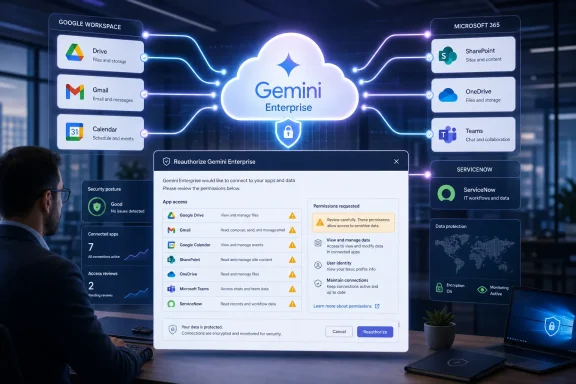 What appears to be changing
TestingCatalog also spotted a refreshed, glowing prompt bar in Gemini Enterprise that more closely resembles the consumer Gemini interface. That is cosmetic; the connector notice matters more.The notice reportedly says Google Workspace connectors are being upgraded and may need reauthorization to continue working. It does not identify revised OAuth scopes, new data-access paths, or an exact rollout schedule. Until Google documents those details, admins should treat the upgrade as an early or phased change rather than a confirmed platform-wide migration.
Google’s own connector catalog shows why permission changes can have a broad effect. Gemini Enterprise can connect to Google Drive, Gmail, Calendar, Chat, and Sites, alongside Microsoft OneDrive, SharePoint, Outlook, Teams, ServiceNow, Jira, Confluence, Slack, Notion, and many other services. Some connectors are read-focused, while others can perform actions such as creating OneDrive folders, updating Zendesk tickets, managing Jira work, or sending Teams messages.
Why Windows and Microsoft 365 shops should care
Gemini Enterprise is not restricted to Google Workspace. Google markets it as a system that can ground answers in business data from both Google and Microsoft 365, and its current catalog includes OneDrive, SharePoint, Outlook, Teams, and Entra ID connectors.That makes a connector update relevant to mixed Windows environments even if the notice currently concerns Workspace connections. A tenant that has built workflows around Gemini Enterprise may depend on identity mappings, delegated access, connector-specific action permissions, and data-store synchronization schedules. Reauthorization can be routine, but it is also the point at which revised permissions become visible to users and security teams.
Google’s documentation says third-party connector setup can require an administrator of the source application to review credentials, authentication, and permissions. It also distinguishes between federated access and data ingestion, which have different operational and data-governance implications.
What admins should do
Organizations using Gemini Enterprise should:- Watch the Gemini Enterprise console and Google Cloud release notes for an official rollout notice.
- Inventory Workspace and third-party connectors, especially those with write actions.
- Review any reauthorization prompt before approving it, comparing requested permissions with the connector’s intended use.
- Test critical search and workflow paths after reauthorization, including SharePoint, OneDrive, Teams, and ServiceNow integrations where deployed.
- Prepare help-desk guidance for users whose Gemini Enterprise results suddenly lose access to Workspace content.
References
- Primary source: TestingCatalog AI News
Published: 2026-07-19T00:05:37+00:00
Google plans to upgrade Gemini Enterprise connectors
Google Gemini Enterprise is rolling out a glowing prompt bar and updating Workspace connectors, preparing support for the Gemini Spark agent. www.testingcatalog.com
- Official source: cloud.google.com
Connectors for Gemini Enterprise app | Google Cloud
Connect Gemini Enterprise app to your favorite business applications and tools.cloud.google.com
- Official source: docs.cloud.google.com