

Google’s push to fold Gemini’s large multimodal model directly into Gmail has crossed the threshold from “convenient novelty” to mission-critical productivity feature for many professionals, reshaping how inboxes are read, summarized, and acted on in everyday workflows.
When Gmail first experimented with AI helpers, the results felt incremental: canned smart replies and basic suggestions that saved seconds but rarely changed workflows. The most recent wave—centered on Gemini 3 and its productized variants—represents a different order of change: models designed for long-context reasoning, multimodal inputs (text, images, video), and agentic workflows that can act across Workspace apps. These capabilities have been rolled into Gmail, Drive, Chat, and side panels, enabling an assistant that reads entire threads, pulls facts from attachments, and drafts deliverables without forcing users to assemble context manually.
That shift matters because it replaces repeated context-switching with a single, queryable knowledge plane inside Google Workspace. For many knowledge workers—product managers, legal teams, account executives—the time saved locating facts, compiling timelines, and composing responses compounds rapidly into measurable productivity gains.
For organizations and professionals, the practical path is clear: pilot the features where they solve the highest-friction problems, measure outcomes carefully, and scale with governance that matches the new operational perimeter. Done right, Gemini in Gmail will shift a daily chore into a decisive competitive advantage; done carelessly, it opens fresh risk vectors that could undermine those gains.
Source: WebProNews Google’s Gemini AI Transforms Gmail into Essential Productivity Tool
 Background and overview
When Gmail first experimented with AI helpers, the results felt incremental: canned smart replies and basic suggestions that saved seconds but rarely changed workflows. The most recent wave—centered on Gemini 3 and its productized variants—represents a different order of change: models designed for long-context reasoning, multimodal inputs (text, images, video), and agentic workflows that can act across Workspace apps. These capabilities have been rolled into Gmail, Drive, Chat, and side panels, enabling an assistant that reads entire threads, pulls facts from attachments, and drafts deliverables without forcing users to assemble context manually.That shift matters because it replaces repeated context-switching with a single, queryable knowledge plane inside Google Workspace. For many knowledge workers—product managers, legal teams, account executives—the time saved locating facts, compiling timelines, and composing responses compounds rapidly into measurable productivity gains.
How Gemini is changing Gmail: core features
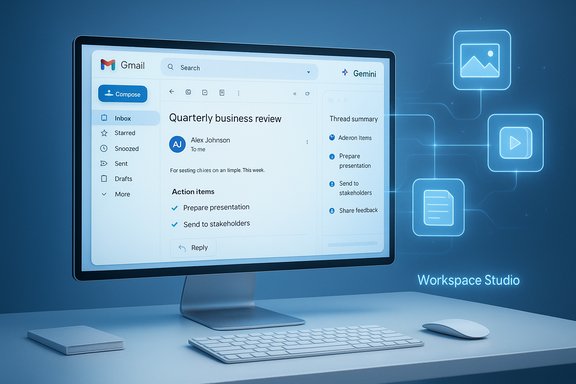
Gemini’s Gmail integration is not one single feature but a set of tightly coupled capabilities that work together to reduce cognitive load and speed execution.- Thread summarization and action extraction. Gemini can condense long email threads into short executive briefs, extract action items, and surface who committed to what—without manual hunting.
- Context-aware drafting. The assistant drafts replies that draw on calendar events, contact history, and prior messages to propose tone‑appropriate, actionable responses.
- Embedded micro-agents and “Gems.” Small, task-focused agents (market research, content drafting, negotiation prep) run inside Gmail to execute multi-step tasks without leaving the inbox.
- Multimodal handling. Genie-style multimodality lets Gemini read images and video attachments and integrate their content into summaries or action plans.
Why speed and context matter
Two improvements in the 2025 product cycle radically changed the user experience: significantly reduced latency for short-turn interactions (the “Flash” variants) and much larger context windows that let models reason across thousands of tokens and multiple documents. The result is a feeling of real-time assistance for micro-tasks (summaries, quick rewrites) and dependable reasoning for longer, multi-document questions. Speed and broader context together convert speculative convenience into a tangible time-saver.The technical lift: Gemini 3 family and multimodality
Gemini 3 is the model family behind many of these Gmail upgrades: a multimodal, long-context architecture that Google has positioned as an enterprise-grade reasoning engine. Productized variants—Flash for latency-sensitive interactions and Pro/Deep-Think versions for heavy reasoning—power distinct use cases inside Workspace. These models support:- Longer context windows that allow cross-thread reasoning and multi-document synthesis.
- Multimodal inputs (text, images, video) so attachments and embedded media are first-class sources of information for Gmail summaries.
- Agentic capabilities—models that can call connectors, invoke steps across apps, and orchestrate workflows.
Subscription tiers, entitlements, and the monetization model
Google has layered these capabilities behind a graded entitlement model that ranges from free-side features to paid “AI” tiers and Workspace editions. The practical effect is that the most capable long-context and agentic behaviors are commonly gated to premium plans, which creates a two-speed experience between casual users and heavy knowledge workers.- Entry-level AI plans make basic summary and draft features widely available.
- Mid-tier (often labeled Pro/Advanced in different reports) unlocks larger context windows, priority access to new variants, and agent tooling.
- Top-tier packages include experimental features—multi-app generative interfaces, video generation, and expanded API/connector access.
Agentic automation: Workspace Studio and the rise of in-app agents
One of the most consequential product bets is Workspace Studio—a no-code environment to build agents that act inside Gmail, Drive, Docs, Sheets, and Chat. These agents can:- Chain multi-step tasks (label an email → create a ticket → append a row to a sheet).
- Use connectors to third-party SaaS (Jira, Salesforce, Asana), enabling true end-to-end automations from inbox triggers.
- Be surfaced directly in-app, increasing discoverability and reducing behavioral friction for users.
Privacy, governance, and data residency: practical concerns
When an assistant gains permission to read mailboxes, Drive files, and Chat history, the privacy calculus changes. Google has attempted to address this with layered controls:- Admin-level toggles in Google Workspace that govern whether Gemini can access tenant data and what features are enabled.
- Consumer settings (often named Gemini/Gemini‑Apps Activity or Keep Activity) that determine whether interactions may be retained for product improvement. Observers have noted this preference can be enabled by default in some regions, which raises discoverability and consent concerns.
- Enterprise contractual protections that can restrict training use of tenant data when properly negotiated.
A word on defaults and discoverability
Multiple reports note that consumer-level defaults and the phrasing of privacy controls can make it non-obvious whether data is being retained or sampled for model improvement. Organizations and individuals should explicitly verify account settings and admin console policies before enabling Deep Research-style features.Real-world experience: where Gemini helps most (and where it still trips up)
Hands-on accounts and community reports highlight several consistent themes:- High-value wins. Summarizing long threads, extracting deadlines and deliverables, and drafting tailored replies save repeated manual work and reduce errors in fast-paced workflows. These wins are most apparent in project-driven roles and client-facing functions.
- Creative plus audit. Marketers and communicators use multimodal generation (images, short videos) from prompts inside Gmail and Canvas to accelerate campaign drafts, but human editing remains necessary for brand and factual accuracy.
- Accuracy gaps. When asked to reason across many documents or interpret ambiguous legal language, Gemini’s outputs can omit qualifiers or conflate provenance. A robust human-in-the-loop process is still required for legal, financial, or regulatory artifacts.
Competitor comparison: why Google’s edge is integration
Comparing Gemini in Gmail with alternatives clarifies what’s unique about Google’s approach:- Microsoft’s Copilot family emphasizes Office integration and Microsoft Graph connectors; it’s strong on enterprise automation and deep app embedding across Word, Excel, and Teams.
- Standalone models and platforms (OpenAI, Claude) excel at generalist creative tasks and are extensible via plugins but lack Google’s breadth of first-party product surfaces inside Gmail, Drive, and Android.
Practical rollout checklist for IT leaders
Deploying Gemini-enabled Gmail features without creating security gaps requires a measured approach. Recommended steps:- Inventory: map which teams handle regulated or contractually restricted data.
- Pilot: enable features for a small cross-functional pilot group and track real tasks and failure modes.
- Entitlement mapping: document which subscription tier unlocks which behaviors for end users. Confirm pricing and entitlements in your admin console.
- Governance: apply least-privilege access to folders and agents; require approvals for agents that write to shared spaces.
- Audit & logging: capture agent actions and model queries to maintain an auditable trail for compliance and post-incident review.
Financial and strategic implications for organizations
Google’s subscription approach—tying the most powerful features to paid plans—creates a direct ROI equation: time saved by knowledge workers versus subscription and governance costs. Early adopters who measure time-to-deliver improvements for recurring tasks often justify the expenditure. At the same time, the paywall can create capability divergence inside organizations: power users get advanced features, while others remain on simpler, manual processes. Track adoption, quantify time savings with baseline metrics, and align procurement with business outcomes before broad rollouts.Risks, limits, and unverifiable claims
A balanced view requires calling out uncertainties and claims that need independent verification:- Vendor claims about exact token windows or comparative speed advantages should be treated as marketing until third-party benchmarks validate them. Several reports recommend skepticism around precise numbers and emphasize the need for independent testing.
- Default privacy settings observed in some consumer accounts (opt-in for activity retention) have been flagged by independent reporting; administrators should not assume default settings align with organizational policy.
- Agentic automations can create operational failure modes—agents making live changes to tickets or documents require safeguards and rollback procedures.
The road ahead: what to watch in 2026
Several trends will determine whether Gemini in Gmail becomes an indispensable productivity layer or an optional convenience:- Deeper offline and local-first modes for privacy and reliability. Current signals show Google experimenting with desktop Live features and offline integrations that may broaden utility beyond always‑online contexts.
- Expanded agent controls and richer administrative tooling. As agents move from experiments to business-critical automations, expect finer-grained governance, cost-metering, and auditing.
- Competitor responses. Microsoft and other vendors will continue to tighten app integrations and pricing models, making cross-platform procurement decisions more complex.
Conclusion
Gemini’s integration into Gmail marks a turning point: AI is no longer a sidebar novelty but a productivity multiplier embedded where work actually happens. The technical advances—longer context windows, multimodality, and agentic capabilities—translate into real, recurring time savings for those who rely on email as their coordination hub. At the same time, the change demands disciplined governance: privacy controls, pilot testing, audit trails, and human oversight remain nonnegotiable.For organizations and professionals, the practical path is clear: pilot the features where they solve the highest-friction problems, measure outcomes carefully, and scale with governance that matches the new operational perimeter. Done right, Gemini in Gmail will shift a daily chore into a decisive competitive advantage; done carelessly, it opens fresh risk vectors that could undermine those gains.
Source: WebProNews Google’s Gemini AI Transforms Gmail into Essential Productivity Tool
