

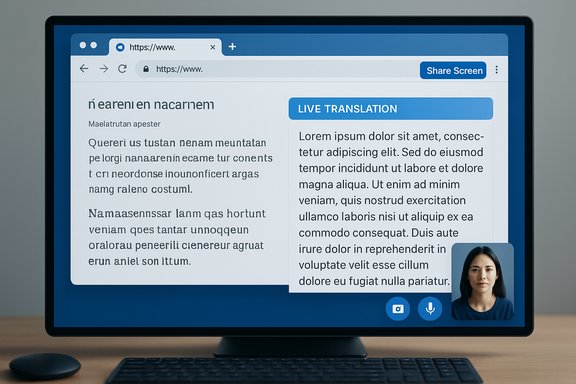
Google’s push to move Gemini Live from phones to the desktop web is quietly gathering momentum — a new “Start sharing your screen for live translation” control discovered in the Gemini web UI suggests Google is preparing to bring the app’s real‑time, multimodal assistance to desktop workflows, with implications for productivity, language learning, accessibility, and enterprise use.
Background / Overview
Gemini Live launched as a mobile‑first experience that lets users talk with Gemini in real time while sharing camera or screen input; that capability turned the assistant into an interactive visual guide for tasks ranging from object recognition and document help to on‑the‑fly translation. Early rollouts and product demos emphasized mobile scenarios — live camera feeds, on‑device screen sharing, and integration with Android features — and Google has repeatedly signaled ambitions to embed Gemini across Chrome, Workspace, and other surfaces. Under the hood, Google’s live multimodal features have been powered by the Gemini 2.5 family (including the Flash and Pro variants) in preview for the Live API and native audio features. Google’s developer and model pages list special “Live” variant model builds in the Gemini 2.5 line designed to handle audio and video inputs for low‑latency, streaming use cases. Those model entries indicate Google already treats live multimodal processing as a distinct capability set that requires tuned variants of its base models.What TestingCatalog (and the breadcrumbs) found
A recent TestingCatalog post reports a new button in the Gemini web interface labeled “Start sharing your screen for live translation,” a UI hint that desktop web may soon support the same live screen/camera sharing features that have been mobile‑only so far. If this control rolls out to users, it would enable Gemini to process a shared desktop tab or window and deliver real‑time translation and commentary — for example translating a PDF, a web page in a foreign language, or software UI text as it is displayed. Additional corroborating signals appear in Chromium strings and earlier feature flags: Chromium localization resources and experimental Chrome flags show text placeholders that reference a Gemini sharing/interaction surface (for example, warnings like “you’re sharing this tab with Gemini”), plus Chrome feature work labeled internally around bringing Gemini into the tab/Chrome surface. These fragments are consistent with a desktop integration that would require browser‑level UX and permission handling for live screen and camera feeds. Caveat: the specific, literal button text reported by TestingCatalog is currently visible in a limited context and — as of this writing — appears to be documented by a small number of outlets and UI artifacts. That means the precise wording, rollout timing, and behavior should be treated as tentative until Google confirms an official release.Why desktop matters: practical use cases and workflows
Bringing Gemini Live to desktop web is not just about screen real estate — it unlocks a distinct class of workflows that are awkward or impossible on phones.- Real‑time translation of web pages, PDFs, slides, and on‑screen text while you work in a browser window. This helps researchers, students, and professionals dealing with foreign‑language content.
- Interactive help inside complex web apps and enterprise software (for example, step‑by‑step guidance inside an admin console, IDE, or SaaS product UI).
- Live collaborative assistance during meetings or screen‑share sessions, where Gemini can annotate or narrate what’s on screen in the attendee’s preferred language.
- Accessibility features for users with low vision or cognitive disabilities — screen narration, contextual summarization, and language conversion on demand.
- Developer and debugging workflows where the assistant can analyze console output, logs, or code snippets visible on the screen while the user describes intent.
Technical underpinnings: which Gemini models power live input?
Google’s public model documentation for the Gemini family makes several things clear:- The Gemini 2.5 family (notably the Flash and Pro variants) is explicitly configured with “Live” preview builds that support audio and video inputs for real‑time scenarios. Google’s model pages show entries such as "gemini-live-2.5-flash-preview" and other live‑oriented variants, with token and input/output limits tailored for streaming scenarios.
- Gemini 2.5 Flash was positioned as the price‑performance workhorse, optimized for speed and low‑latency tasks, while Gemini 2.5 Pro targets heavier reasoning and longer context. Google has also introduced native audio output and affordances like “Thinking” budgets that balance latency and deeper reasoning for the 2.5 family.
- Separately, Google launched Gemini 3 and the Gemini 3 Pro model family in a later drop; Gemini 3 Pro is positioned as a higher‑capability, multimodal reasoning model that could — in principle — be applied to live, low‑latency scenarios if Google provides a Live API variant for it. Google’s rollout of Gemini 3 Pro across the Gemini app and AI Studio indicates the company is actively expanding its model lineup beyond 2.5.
Likely UX and permission model on the desktop web
Integrating real‑time camera and screen sharing into a browser assistant requires careful UI and permission handling. Chromium strings already include user‑facing messages like “you’re sharing this tab with Gemini,” which implies Google plans to provide explicit consent prompts and contextual notices — similar to other screen/camera sharing flows — rather than silently streaming content to servers. Expect:- Explicit browser‑level permission prompts for screen/camera access.
- An in‑UI control to start/stop sharing, with transient indicators and possibly a persistent badge while sharing.
- Clear disclosures about what information is sent to Google AI for processing and whether any content is logged or retained.
- Enterprise controls for admins to restrict or audit sharing capabilities in managed Chrome/Workspace environments.
Strengths: what this move could deliver well
- Productivity gains: Desktop screen sharing with live translation could accelerate comprehension for bilingual teams and reduce friction when working with foreign‑language documentation or interfaces.
- Improved multimodal assistance: Desktop environments expose a richer context (multiple windows, larger files, complex UIs), and Gemini’s multimodal inputs can enable deeper, more actionable responses than text alone. This strengthens Gemini’s positioning as a cross‑platform assistant integrated into both mobile and desktop workflows.
- Accessibility and learning: Real‑time transcription and translation on desktop can help learners and users with disabilities access content without switching devices or workflows.
- Ecosystem leverage: If Gemini in Chrome offers page‑context awareness (as Google has hinted it will), users could get inline help tied to the active web page — a natural extension of Gemini’s mission to be present anywhere users interact with information.
Risks and open questions
Any desktop rollout of Live screen sharing invites a range of security, privacy, UX, and reliability concerns that must be resolved before broad adoption.1. Data privacy and leakage risk
Screen sharing inherently exposes potentially sensitive data (credentials, PII, corporate documents). Key questions include:- What data is transmitted to Google’s servers, and is it stored or used to improve models?
- Are enterprise admins able to block the feature or limit which domains and users may share?
- Are there clear on‑screen indicators and logs for when sharing occurred, and is there retention metadata admins can audit?
2. Permissions and spoofing attacks
A browser‑level assistant that reads the current tab or a full desktop raises the risk of misdirection or malicious UIs attempting to exfiltrate secrets. Chrome’s permission dialogues and visible sharing indicators help, but enterprise IT should expect the need for additional policy controls and DLP (data loss prevention) integration to mitigate insider or malware threats. Chromium strings showing explicit sharing language indicate Google is thinking about permissions, but a secure enterprise deployment will require admin controls and clear documentation.3. Latency, cost, and model selection
Real‑time translation and scene understanding are computationally heavy. Google’s model page shows multiple Live preview variants and even deprecation timelines for specific preview builds, suggesting the live feature set is evolving rapidly. Organizations will face tradeoffs:- Fast Flash variants optimize latency and cost but may produce different quality than Pro/Deep‑think models.
- Upgrading to Gemini 3 Pro for Live could improve accuracy at the expense of higher compute cost and possibly higher latency unless Google ships optimized streaming variants for that model series.
4. Governance and compliance
For healthcare, finance, and government users, sending screen contents to an external AI service will raise compliance questions around HIPAA, GDPR, and contractual data protections. Enterprises should check whether Google provides dedicated enterprise deployments, data residency options, and contractual commitments for live inputs before adopting the feature for sensitive workflows.A practical checklist for IT and power users
For teams and individuals planning to experiment with Gemini Live on desktop when it becomes available, these practical steps will help manage benefits and risks:- Update policies: Work with security and legal to define clear rules for what can be shared with cloud AI assistants.
- Test permissions: Validate browser prompts and consent flows in a controlled environment to ensure they match internal security requirements.
- Audit trails: Plan logging and evidence collection (timestamped indicators and session records) to troubleshoot accidental exposures.
- Pilot with low‑risk content: Start with translation and knowledge tasks that don’t expose credentials or customer data; expand gradually.
- Measure latency and quality: Compare Gemini Live behavior under different model settings (Flash vs Pro) to understand practical tradeoffs.
How this fits into Google’s broader Gemini strategy
Google’s product cadence over 2024–2025 shows a clear strategy: expand Gemini’s multimodal and agentic capabilities across devices, then unify them through platform integrations (Chrome, Workspace, Meet, and Project Mariner/Agent features). Bringing Live to desktop web aligns with that strategy by making Gemini an always‑available assistant inside the browser — a high‑value surface for productivity and search augmentation. Recent model and feature drops (Gemini 2.5 family, native audio, Gemini 3 Pro and other November “Gemini Drop” updates) point to continued investment in both capability and deployment surfaces. Important to note: model availability and the feature set may be gated by subscription tiers. Google’s moves with Gemini 3 Pro show that the most capable models are often rolled out first to paid tiers or selective previews, meaning enterprise and power users may need higher‑tier subscriptions to get the fastest, most accurate live experience.What to watch next (signals that will confirm broader availability)
- Official blog or release notes announcing Gemini Live on the desktop web, with platform and model details.
- Public UI screenshots or feature flags confirmed by multiple independent outlets or Chromium commits showing a stable control surface for screen sharing in Gemini web.
- Developer documentation or API references that list Live API endpoints for browser streaming and the specific model variants recommended for web use.
- Admin and compliance documentation detailing enterprise controls, retention, and DLP integration for shared screen content.
- Any announced performance notes around Gemini 2.5 Flash Live vs Gemini 3 Pro Live, especially latency figures or supported languages for translation.
Final analysis: realistic expectations and recommended posture
Bringing Gemini Live to desktop web is a logical and consequential step for Google’s assistant strategy. The move could materially improve productivity and learning workflows by offering real‑time translation, context‑aware help, and multimodal reasoning inside a browser. The technical groundwork is visible: Live‑capable model variants exist in the Gemini 2.5 family, Chrome strings and flags point toward an in‑browser integration, and Google’s broader Gemini product roadmap has repeatedly prioritized multimodal, low‑latency features. At the same time, practical adoption will hinge on a few factors that remain unresolved in public signals today:- Privacy and retention guarantees — enterprises and privacy‑conscious users will demand clear commitments before turning on desktop screen sharing by default.
- Admin controls and DLP — IT teams will need robust policy tools to control sharing in managed environments.
- Model selection and pricing — users will need guidance on which model family to use for live interactions and whether top‑tier models like Gemini 3 Pro will be available for low‑latency Live use or remain subscription‑gated.
Bringing Gemini Live to the browser would close an important gap between mobile multimodal capabilities and desktop productivity, but organizations and users should evaluate the feature through the lenses of privacy, governance, and the practical tradeoffs of model performance and cost. The technical building blocks are in place, and the next few weeks of developer notes and official product communications will determine whether desktop Gemini Live becomes a mainstream assistant for everyday work — or an advanced preview feature reserved for higher tiers and specific workflows.
Source: TestingCatalog Google prepares Gemini Live with screen sharing for web


 LatestLY