

Google’s Gemini is reshaping how we navigate and Microsoft’s Copilot Fall release is redefining what a personal assistant can be — together these updates mark a pivotal moment in consumer and enterprise AI, where conversational, context-rich helpers move from novelty to platform-level infrastructure with real operational and governance consequences.
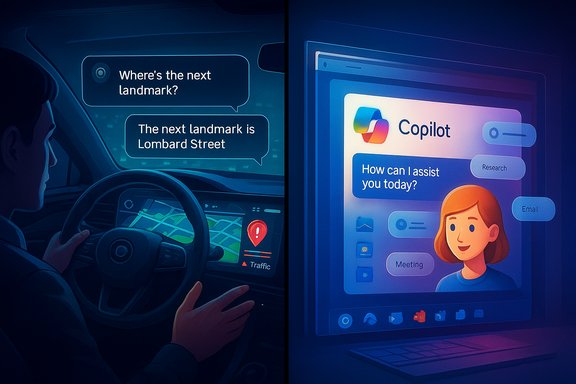
Google and Microsoft used late‑2025 product pushes to fold advanced generative AI into everyday workflows: Google shipped a Gemini-powered upgrade to Google Maps that adds conversational navigation, landmark-based guidance, proactive traffic alerts, and a Google Lens + Gemini visual exploration mode. These features are rolling out incrementally across Android and iOS and are explicitly designed to let users ask Maps questions conversationally and to receive context-aware, hands‑free guidance. At the same time, Microsoft published the Copilot Fall release, a 12‑feature consumer and business update framed as “human‑centered AI.” The package focuses on collaborative sessions called Groups (up to 32 participants), persistent and editable memory, broader cross‑service connectors (OneDrive, Outlook, Gmail, Calendar), improved voice and visual interactions (including a new expressive avatar called Mico), and stronger user controls over privacy and provenance. Microsoft positions these changes to make Copilot more cooperative and contextually useful rather than purely automated. This article synthesises those announcements, verifies the key technical claims against vendor and independent reporting, and provides actionable analysis for Windows users, IT managers, and enthusiasts who must balance productivity gains against security, privacy, and governance risks. The summary below also reflects the snapshot provided in the RSM Technology Monthly Alert for November 2025.
Both vendors have taken sensible steps to emphasize grounding, consent, and user controls, but the devil is in the operational details: how connectors are governed, how memory controls are implemented, and how auditing is enforced. For Windows users and IT leaders, the pragmatic path is clear: pilot early, govern tightly, and assume assistant outputs are suggestions until proven reliable in production.
Enterprises that prepare with clear governance, measurement plans, and portability safeguards will capture productivity gains while limiting privacy and operational risks. For consumers, these features meaningfully improve convenience — but users should treat any AI suggestion (routes, medical info, legal text) as advisory and verify when stakes are high.
Both product moves accelerate a larger trend: assistants are becoming the interface layer between humans and digital systems. That shift offers big gains, but also concentrates decision-making power and risk in new architectural layers that demand rigorous oversight.
Source: RSM Global RSM Technology Monthly Alert - November 2025
 Background
Google and Microsoft used late‑2025 product pushes to fold advanced generative AI into everyday workflows: Google shipped a Gemini-powered upgrade to Google Maps that adds conversational navigation, landmark-based guidance, proactive traffic alerts, and a Google Lens + Gemini visual exploration mode. These features are rolling out incrementally across Android and iOS and are explicitly designed to let users ask Maps questions conversationally and to receive context-aware, hands‑free guidance. At the same time, Microsoft published the Copilot Fall release, a 12‑feature consumer and business update framed as “human‑centered AI.” The package focuses on collaborative sessions called Groups (up to 32 participants), persistent and editable memory, broader cross‑service connectors (OneDrive, Outlook, Gmail, Calendar), improved voice and visual interactions (including a new expressive avatar called Mico), and stronger user controls over privacy and provenance. Microsoft positions these changes to make Copilot more cooperative and contextually useful rather than purely automated. This article synthesises those announcements, verifies the key technical claims against vendor and independent reporting, and provides actionable analysis for Windows users, IT managers, and enthusiasts who must balance productivity gains against security, privacy, and governance risks. The summary below also reflects the snapshot provided in the RSM Technology Monthly Alert for November 2025.Google Maps + Gemini: What changed and why it matters
What Google announced
Google’s official product post describes several concrete feature pillars for Maps powered by Gemini:- Conversational, hands‑free interactions with Maps via voice: ask for stops along a route, nearby services, or directions that take preferences into account.
- Landmark‑based navigation: spoken and visual guidance references visible landmarks (for example, “Turn right after the Thai Siam Restaurant”) instead of only distances. Google says this uses Street View and place metadata to identify reliably visible reference points.
- Proactive traffic alerts: Maps can notify you of unexpected closures or disruptions on routine commutes even when you aren’t actively navigating.
- Lens built with Gemini: point your camera at a building or storefront and get instant, conversational facts — menus, crowd vibe, ratings, or operating details.
The underlying technical claims — verification
Google claims landmark navigation uses its indexed corpus of places (stated as 250 million mapped locations) and billions of Street View images to select visible, reliable landmarks. The company’s product post and independent coverage confirm the data sources and the general approach, but the precise heuristics Google uses to decide a “visible” landmark and the threshold for selection are proprietary and not publicly documented. This makes the system pragmatic but opaque for edge cases (recent storefront closures, newly opened venues, or temporary street signage). Lens with Gemini combines on‑device camera input with server-side grounding to Maps and web data. Google’s blog explicitly warns that generative AI outputs are still experimental and that grounding is used to reduce hallucinations, a point Google repeats across product posts. Independent reporting corroborates that Lens + Gemini replies are augmented by place metadata and user reviews to improve relevance, though final answer accuracy depends on freshness of the underlying index.Practical user impact
- Easier turn instructions: Landmark prompts are more intuitive for many drivers and pedestrians, particularly in urban canyons where GPS distance cues are less helpful.
- Better situational awareness: Proactive alerts aim to reduce surprise reroutes and last‑mile delays.
- Frictionless exploration: Visual discovery via Lens means fewer steps to decide whether to enter a place or move on.
Microsoft Copilot Fall Release: Features and ambitions
The headline features
Microsoft’s Copilot Fall release centers on the concept of human‑centered AI: making AI more assistive, socially capable, and controllable. Key elements include:- Groups: Collaborative Copilot sessions supporting up to 32 participants, enabling live, shared context for brainstorming, co‑writing, voting and task splitting.
- Memory & personalization: Copilot can retain user‑approved details across sessions (preferences, ongoing projects, context) — with user controls to edit or delete those memories.
- Cross‑service connectors: Optional, explicit connectors to OneDrive, Outlook, Gmail, Google Drive and Calendar to let Copilot read and summarize files and messages when permitted.
- Copilot Mode in Edge & Journeys: An “AI browser” mode that can view open tabs with permission, summarize threads, and execute multi‑step web actions (booking, form filling).
- Mico and Real Talk: A new visual avatar (Mico) for voice interactions and a conversational style that can push back (encourage critical thinking) instead of always being agreeable.
Verification and cross‑checks
Microsoft’s Copilot blog provides the canonical feature list and rollout guidance; multiple independent outlets (TechRadar, FoneArena, and industry blogs) reproduce and test‑report many of the new interactions, corroborating key claims such as Groups up to 32 participants and memory/edit controls. Those outlets also describe Mico and Copilot Mode in Edge as central to the update. Because Microsoft’s own posts and broad independent coverage align, the claims are verifiable and likely accurate for the announced rollout windows.Practical benefits
- Team productivity: Groups could simplify collaborative drafting and planning, reducing the friction of sharing prompts or collating multiple people’s inputs.
- Context continuity: Memory reduces the need to re‑explain repeated preferences or past decisions across sessions.
- Cross‑platform reach: Copilot’s connectors and Edge integration let the assistant operate across email, cloud files, and the web — a convenience multiplier for knowledge workers.
Comparative analysis: What both moves mean for the Windows ecosystem
Complementary directions, different philosophies
- Google’s approach pairs model reasoning with intense place and visual data integration. Maps + Lens is a vertical, domain‑specific augmentation: it enhances a single, high‑frequency app with multimodal perception and routing intelligence. That makes it particularly relevant to consumer mobility, OEM navigation stacks, and logistics providers.
- Microsoft’s approach is horizontal and workspace‑centric: Copilot is being treated as an assistant that threads across productivity apps, communications, and browsing. It prioritizes persistent context, social collaboration, and workplace actions that can be audited and controlled within IT boundaries.
Where they compete and where they complement
- Competition: Both vendors are building assistant layers that intercept user intent (search, navigation, scheduling). This creates overlapping value plays in multi‑platform devices, and competition will push richer integrations across ecosystems.
- Complementarity: Enterprise customers frequently use Microsoft productivity suites and consumer mobile apps simultaneously. Copilot’s connectors can reference documents that include Maps links or coordinate with calendar invites, while Google’s local intelligence improves field worker efficiency. When properly integrated, these assistants can complement a hybrid workflow (e.g., Copilot creates a meeting agenda and Maps plans the travel route).
Risks and governance: Practical, measurable concerns
1) Data exposure and connectors
Allowing an AI assistant to read inboxes, drives, and web tabs is powerful — and risky. Copilot’s connectors to OneDrive, Outlook, and third‑party services must be opt‑in, auditable, and accompanied by clear admin controls. Microsoft emphasises consent and visibility, but every connector increases attack surface and potential data exfiltration vectors. Enterprises must revalidate DLP, access reviews, and consent workflows before enabling broad access.2) Hallucinations and safety in high‑stakes contexts
Both vendors state grounding measures to cut hallucinations, but neither system is immune. Landmark navigation relies on accurate place indexes and fresh Street View imagery; when those are stale or incomplete, guidance can be wrong in ways that create safety risks (wrong turns in complex junctions, misidentified hospitals). Similarly, Copilot’s medical or legal summaries must be treated as assistance, not authoritative guidance. Both companies emphasize human oversight, but product design should explicitly reduce automation in safety‑sensitive flows.3) Privacy, retention, and "memory"
Persistent memory increases convenience but raises long‑term privacy tradeoffs. Users must have easy tools to inspect, correct, and purge memories. Administrators should be able to set retention policies for enterprise accounts and enforce role‑based limits on what Copilot may store about customers or regulated data. Microsoft’s stated memory controls are a good start, but companies should demand auditable export logs and deletion guarantees before wide adoption.4) Operational dependency and vendor lock‑in
As assistants embed into workflows, organizations risk entanglement: custom prompts, agentic automations, and data flows can create migration costs. IT leaders should adopt portability strategies — exportable prompts, API‑layer abstractions, and contractual clauses about data egress and non‑training guarantees — to limit long‑term vendor lock‑in. This is especially important for business‑critical automations and compliance logs.Recommendations for Windows admins, IT leaders and power users
Short checklist: Prepare, pilot, govern
- Inventory current workflows that would benefit from conversational assistants (scheduling, travel logistics, help‑desk triage).
- Pilot with narrow scopes: choose low‑risk, high‑value tasks (meeting prep, research summarization, route planning for a delivery pilot).
- Harden connectors: require admin approval for connectors to mailboxes and shared drives; enforce tenant‑level controls and DLP policies.
- Audit & log: enable and export usage logs; require all Copilot actions that modify or route data to be logged and reversible.
- Train staff on assistant limits: document when to escalate to humans and how to detect hallucinations or grounding failures.
- Preserve portability: where agents are used for automation, insist on access to prompts, templates, and logs in standard formats to avoid future lock‑in.
Deployment sequence for enterprise use
- Discovery (2–4 weeks): map departmental needs, regulatory constraints, and potential pilot users.
- Pilot (1–3 months): implement a closed pilot with a small team; measure time saved, error rates, and governance incidents.
- Scale (3–12 months): expand gradually with policy guardrails and automated monitoring; tune retention and connector policies.
- Operationalize (ongoing): embed assistants into change‑management, incident response, and compliance audits.
Use cases Windows users should watch now
- Field service and logistics: Maps landmark navigation plus Copilot scheduling creates efficient dispatch workflows. Trial a pilot where Copilot prepares daily routes and Maps provides turn-by-turn landmark guidance to drivers.
- Hybrid meeting workflows: Use Copilot Groups to co-create agendas, then use Copilot to pull relevant documents from OneDrive and generate a post‑meeting summary. Ensure connectors are consented and admin‑controlled.
- Knowledge worker augmentation: Copilot’s persistent memory can reduce context switching for product teams; test retention for non‑sensitive preferences first and require explicit user approvals for storing customer data.
Strengths and opportunities
- User productivity: Both announcements reduce friction — Google by making navigation more intuitive and visual, Microsoft by making Copilot a social, persistent collaborator. These are real productivity multipliers when used conservatively.
- Platform integration: Embedding AI into Maps and Windows/Edge means high‑frequency usage and network effects that will accelerate feature improvements and developer tooling.
- Accessibility: Landmark navigation and voice‑first Copilot interactions can significantly improve accessibility for users who struggle with traditional interfaces, a socially meaningful gain.
Principal risks and caveats
- Opaque decisioning: Both systems rely on proprietary ranking and grounding heuristics. Without visibility, organizations must treat outputs as assistance and preserve human checkpoints.
- Regulatory scrutiny: Data flows across connectors and agentic actions can attract regulator attention in finance, healthcare, and public sector deployments. Prepare compliance reviews before broad rollouts.
- False confidence and automation misuse: The more assistants can act on behalf of users, the higher the chance of incorrect automated actions having real consequences. Preserve approval gates and error‑handling workflows.
Closing analysis — a balanced verdict
Google Maps’ Gemini integration and Microsoft’s Copilot Fall release are not incremental UI tweaks; they are structural pushes that move AI into core user workflows. Google’s strength is domain depth: Maps and Lens use a massive place graph and imagery to provide practical navigation improvements that are immediately visible to consumers and logistics operators. Microsoft’s strength is workplace breadth: Copilot aims to be a persistent, social, and cross‑service assistant that augments daily office work and group collaboration.Both vendors have taken sensible steps to emphasize grounding, consent, and user controls, but the devil is in the operational details: how connectors are governed, how memory controls are implemented, and how auditing is enforced. For Windows users and IT leaders, the pragmatic path is clear: pilot early, govern tightly, and assume assistant outputs are suggestions until proven reliable in production.
Enterprises that prepare with clear governance, measurement plans, and portability safeguards will capture productivity gains while limiting privacy and operational risks. For consumers, these features meaningfully improve convenience — but users should treat any AI suggestion (routes, medical info, legal text) as advisory and verify when stakes are high.
Both product moves accelerate a larger trend: assistants are becoming the interface layer between humans and digital systems. That shift offers big gains, but also concentrates decision-making power and risk in new architectural layers that demand rigorous oversight.
Practical next steps (for technologists and power users)
- Join vendor preview programs (Google Maps beta and Copilot previews) to test interactions in real environments.
- Build a cross‑functional risk playbook: include DLP, consent flows, agent action audits, and incident response for AI-driven errors.
- Run a 60‑90 day pilot for a concrete productivity use case (e.g., Copilot Groups for project kickoffs; Maps + Lens for field tech route optimization) and measure time saved, error rates, and governance incidents.
- Document portability and exit clauses for any paid tiers or enterprise contracts that expose sensitive data to third‑party models.
Source: RSM Global RSM Technology Monthly Alert - November 2025
