

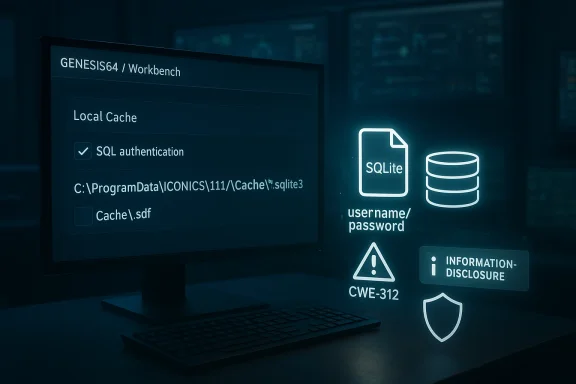
Mitsubishi Electric’s GENESIS64 and ICONICS Suite ecosystem is facing another reminder that industrial software security is often won or lost in the small implementation details. In this case, the issue is not a flashy remote-code-execution flaw, but something more mundane and arguably more dangerous in day-to-day operations: when the local caching feature is enabled and SQL authentication is used, SQL Server credentials can be stored in plaintext inside the local SQLite cache file, creating a CWE-312 cleartext storage problem that can lead to information disclosure, tampering, or denial of service. Mitsubishi Electric’s own product documentation confirms that GENESIS can cache a local copy of a configuration database in a SQLite file under
Industrial visualization and supervisory software has always lived at the awkward intersection of convenience and trust. Platforms like GENESIS64, ICONICS Suite, MobileHMI, Hyper Historian, AnalytiX, and MC Works64 are expected to smooth out operations, replicate data reliably, and keep plants usable even when backend infrastructure becomes unstable. The local cache feature is a classic example of that design philosophy: reduce SQL Server round-trips, preserve availability, and let redundant systems keep working if the database or network hiccups. (documentation.iconics.com)
That same convenience creates an obvious attack surface. A cache that lives locally on Windows and is meant to preserve access to configuration data becomes a sensitive artifact as soon as it contains credentials or session material. Mitsubishi Electric’s documentation for the feature makes clear that the cache is a SQLite database stored on disk, and that the configuration can be toggled in Workbench at the component level. The vendor’s vulnerability guidance then adds the missing piece: when SQL authentication is in use, the cached file can contain SQL Server credentials in plaintext. (documentation.iconics.com)
The broader context matters because Mitsubishi Electric and its former ICONICS business have been under sustained scrutiny for product-security issues across this software family. The company’s factory automation vulnerability page now lists a long history of advisories affecting GENESIS64, ICONICS Suite, MC Works64, and related products, reflecting how widely deployed these tools are in real industrial environments. That history also shows a pattern familiar to anyone who tracks ICS security: once a product becomes central to operations, any defect that weakens confidentiality or integrity becomes operationally significant, even if the flaw is not remotely exploitable by itself. (mitsubishielectric.co.jp)
There is also a branding and organizational angle that helps explain why advisories may appear under slightly different company names. Mitsubishi Electric announced in March 2025 that ICONICS, Inc. would be renamed Mitsubishi Electric Iconics Digital Solutions, Inc. as of April 1, 2025. That means the same product family can now show up in advisories under Mitsubishi Electric, Mitsubishi Electric Iconics Digital Solutions, or simply ICONICS depending on the publication date and the document being referenced.
In practical terms, this turns a local workstation or engineering node into a potentially reusable credential store. That is especially concerning in environments where the workstation is already privileged, long-lived, or shared by multiple staff. It also means the vulnerability may linger long after an operator believes the system is “patched,” because a stale cache file can survive as a forensic artifact or be copied elsewhere before cleanup. (documentation.iconics.com)
For GENESIS64, ICONICS Suite, MobileHMI, Hyper Historian, and AnalytiX, Mitsubishi Electric says the fixed version is 10.98 or later. For GENESIS, the fixed version is 11.03 or later. For MC Works64, the vendor says there is no fixed version planned, and users are instructed to follow the mitigation steps in the advisory instead. That split response matters because it shows the product line is not being remediated uniformly, and some users must rely on configuration hardening rather than a software update.
The mitigation is also unusually procedural, which tells you something about the feature’s design. Users must open Workbench, go to Configure Application(s) Settings, and uncheck the Local Cache box under Available Applications. Then they must delete cache files from either
The existence of a vendor fix and a separate mitigation for unpatched systems is also telling. In industrial security, vendors often reserve formal patch guidance for issues that can be reliably corrected in software, while mitigation guidance covers environments that cannot immediately patch, such as validated or hard-to-service OT networks. Here, Mitsubishi Electric and Mitsubishi Electric Iconics Digital Solutions recommend alternatives like Windows authentication instead of SQL authentication, restricting login rights to administrators, limiting remote access, and using firewalls or VPNs.
The file paths in the vendor guidance make the issue even more concrete. For GENESIS64 and related legacy product lines, the relevant files live under
A local SQLite cache also changes the forensic and operational profile of the host. It is not merely a transient memory object; it is a durable artifact that may be copied during backups, exposed during incident response, or left behind after decommissioning. In other words, the file can outlive the user session, which is exactly why secrets should not be written there in cleartext. (documentation.iconics.com)
The vendor’s recommended workaround to use Windows authentication instead of SQL authentication is a strong clue that the problem is tied to the handling of stored SQL credentials, not just to the cache itself. Windows authentication lets organizations lean on integrated identity and group policy rather than embedding a static database password in a file. That is not a magic fix, but it removes one of the most obvious secrets from the cache. (mitsubishielectric.co.jp)
This is also why the advisory references tampering and DoS alongside disclosure. A stolen database credential may allow an adversary to change configuration tables, remove or poison records, or simply disrupt access to the SQL backend. The vulnerability therefore fits the OT pattern where confidentiality issues are frequently a precursor to reliability failures. (mitsubishielectric.co.jp)
This is a good illustration of a general security principle in industrial software: remediation is often two-part. First, remove the coding flaw or upgrade to a fixed build. Second, assume sensitive state has already been exposed and eliminate it. In this case, the manual deletion step is the real-world acknowledgment that the risk is not hypothetical. (mitsubishielectric.co.jp)
The no-fix-planned status for MC Works64 is another operational pressure point. It means some organizations will be forced to compensate through identity hardening, network segmentation, and access restriction rather than expecting a vendor patch to cleanly eliminate the problem. That is common in OT, but it always raises the stakes for compensating controls because they become the only line of defense. (mitsubishielectric.co.jp)
There is also a physical-security component. Mitsubishi Electric recommends restricting physical access to the machine and the network it connects to. That may sound basic, but in plant-floor environments a stolen USB stick, an unattended console, or a shared engineering workstation can be enough to turn a file-based credential leak into a live compromise. (mitsubishielectric.co.jp)
Here are the steps defenders should treat as immediate priorities:
The recurring lesson is that industrial software failures often cluster around state handling, deserialization, file access, and authentication plumbing. Those are not glamorous bugs, but they are the ones that tend to persist across versions because they live in the glue code that holds the product together. In that sense, this plaintext-storage issue fits an unfortunately familiar pattern. (mitsubishielectric.co.jp)
A third concern is that compensating controls can weaken over time. Firewalls get loosened, VPN exceptions get added, and administrator-only login policies become temporary workarounds that never get revisited. In the real world, temporary controls often become permanent, but rarely with the same level of monitoring that made them effective in the first place. (mitsubishielectric.co.jp)
For now, the key message is clear: this is not a theoretical disclosure issue, and it is not limited to edge cases. It is a file-based credential exposure in a widely used industrial software family, with a vendor-provided fix, concrete cleanup instructions, and a credible path to exploitation if it is left unaddressed. In industrial cybersecurity, that is exactly the kind of problem that rewards fast action and punishes complacency.
Source: CISA Mitsubishi Electric GENESIS64 and ICONICS Suite products | CISA
C:\ProgramData\ICONICS\11\Cache, and that the cache is enabled or disabled per component through Workbench settings. (documentation.iconics.com)
 Background
Industrial visualization and supervisory software has always lived at the awkward intersection of convenience and trust. Platforms like GENESIS64, ICONICS Suite, MobileHMI, Hyper Historian, AnalytiX, and MC Works64 are expected to smooth out operations, replicate data reliably, and keep plants usable even when backend infrastructure becomes unstable. The local cache feature is a classic example of that design philosophy: reduce SQL Server round-trips, preserve availability, and let redundant systems keep working if the database or network hiccups. (documentation.iconics.com)That same convenience creates an obvious attack surface. A cache that lives locally on Windows and is meant to preserve access to configuration data becomes a sensitive artifact as soon as it contains credentials or session material. Mitsubishi Electric’s documentation for the feature makes clear that the cache is a SQLite database stored on disk, and that the configuration can be toggled in Workbench at the component level. The vendor’s vulnerability guidance then adds the missing piece: when SQL authentication is in use, the cached file can contain SQL Server credentials in plaintext. (documentation.iconics.com)
The broader context matters because Mitsubishi Electric and its former ICONICS business have been under sustained scrutiny for product-security issues across this software family. The company’s factory automation vulnerability page now lists a long history of advisories affecting GENESIS64, ICONICS Suite, MC Works64, and related products, reflecting how widely deployed these tools are in real industrial environments. That history also shows a pattern familiar to anyone who tracks ICS security: once a product becomes central to operations, any defect that weakens confidentiality or integrity becomes operationally significant, even if the flaw is not remotely exploitable by itself. (mitsubishielectric.co.jp)
There is also a branding and organizational angle that helps explain why advisories may appear under slightly different company names. Mitsubishi Electric announced in March 2025 that ICONICS, Inc. would be renamed Mitsubishi Electric Iconics Digital Solutions, Inc. as of April 1, 2025. That means the same product family can now show up in advisories under Mitsubishi Electric, Mitsubishi Electric Iconics Digital Solutions, or simply ICONICS depending on the publication date and the document being referenced.
Why this disclosure matters
The security problem here is not abstract. If credentials are written to a local cache file, an attacker who gains local access to the PC may no longer need to intercept traffic or brute-force SQL logons. They can simply read the file and pivot into the backend database, which is exactly the kind of silent privilege amplification defenders dread in OT environments. Mitsubishi Electric’s own remediation language confirms that the vendor considers the cache files sensitive enough that they should be removed after patching.In practical terms, this turns a local workstation or engineering node into a potentially reusable credential store. That is especially concerning in environments where the workstation is already privileged, long-lived, or shared by multiple staff. It also means the vulnerability may linger long after an operator believes the system is “patched,” because a stale cache file can survive as a forensic artifact or be copied elsewhere before cleanup. (documentation.iconics.com)
Overview
The vulnerable behavior is straightforward: when Local Cache is enabled in Workbench and the application is configured to use SQL authentication, the SQLite cache can preserve SQL Server credentials in cleartext. The vendor’s guidance is explicit that the local cache files should be deleted after the fix is installed, which is a strong signal that the issue is not merely cosmetic. It is a credential exposure issue with downstream effects on database access and system integrity. (mitsubishielectric.co.jp)For GENESIS64, ICONICS Suite, MobileHMI, Hyper Historian, and AnalytiX, Mitsubishi Electric says the fixed version is 10.98 or later. For GENESIS, the fixed version is 11.03 or later. For MC Works64, the vendor says there is no fixed version planned, and users are instructed to follow the mitigation steps in the advisory instead. That split response matters because it shows the product line is not being remediated uniformly, and some users must rely on configuration hardening rather than a software update.
The mitigation is also unusually procedural, which tells you something about the feature’s design. Users must open Workbench, go to Configure Application(s) Settings, and uncheck the Local Cache box under Available Applications. Then they must delete cache files from either
C:\ProgramData\ICONICS\Cache\*.sdf or C:\ProgramData\ICONICS\11\Cache\*.sqlite3, depending on the product branch. That is a lot more than a simple checkbox fix; it is a sign that cached data may already be at rest and therefore must be actively scrubbed. (mitsubishielectric.co.jp)What CISA and the vendor are signaling
CISA’s advisory on the issue, referenced by the user-provided material as ICSA-26-097-01, frames the defect as a vulnerability with potential information disclosure, tampering, and DoS impact. That combination is important because it suggests the risk is not limited to leaked passwords. Once credentials are exposed, an attacker can potentially alter configuration data, disrupt operations, or use the trust relationships encoded in the database to move deeper into the environment. (mitsubishielectric.co.jp)The existence of a vendor fix and a separate mitigation for unpatched systems is also telling. In industrial security, vendors often reserve formal patch guidance for issues that can be reliably corrected in software, while mitigation guidance covers environments that cannot immediately patch, such as validated or hard-to-service OT networks. Here, Mitsubishi Electric and Mitsubishi Electric Iconics Digital Solutions recommend alternatives like Windows authentication instead of SQL authentication, restricting login rights to administrators, limiting remote access, and using firewalls or VPNs.
How the Local Cache Works
The local cache exists for a very practical reason: reduce the frequency with which the system must query SQL Server and preserve continuity if the database or network becomes unavailable. Mitsubishi Electric’s documentation says the cache is a local copy of a configuration database, and that it can be enabled or disabled on an individual component basis. That makes it operationally useful, especially in redundant architectures where either server may need to continue functioning if a central database host fails. (documentation.iconics.com)The tradeoff baked into the design
Caching configuration data locally is not inherently unsafe. In fact, in industrial systems it can be a valuable resilience feature because uptime often matters more than architectural purity. But the moment the cache holds secrets, the resilience benefit begins to conflict with the confidentiality model, especially on Windows systems where local admins or malware can often read files from predictable program-data locations. (documentation.iconics.com)The file paths in the vendor guidance make the issue even more concrete. For GENESIS64 and related legacy product lines, the relevant files live under
C:\ProgramData\ICONICS\Cache\*.sdf; for GENESIS 11, the path changes to C:\ProgramData\ICONICS\11\Cache\*.sqlite3. That means defenders can look in a known location for evidence of exposure, but it also means attackers who know the product family can hunt for those files quickly. (mitsubishielectric.co.jp)Why SQLite matters here
SQLite is often chosen because it is compact, self-contained, and easy to deploy. Those are strengths, but in the context of credential storage they can become liabilities because the database file itself is the security boundary. If the application does not encrypt sensitive fields before writing them, then disk access becomes credential access. That is the essence of the CWE-312 concern cited in the advisory. (mitsubishielectric.co.jp)A local SQLite cache also changes the forensic and operational profile of the host. It is not merely a transient memory object; it is a durable artifact that may be copied during backups, exposed during incident response, or left behind after decommissioning. In other words, the file can outlive the user session, which is exactly why secrets should not be written there in cleartext. (documentation.iconics.com)
Impact on Credentials and Access Control
At a surface level, the flaw leaks SQL Server credentials. At a deeper level, it undermines trust in the authentication model that connects the HMI/SCADA application to its data store. If the software is using SQL authentication, then the credential is not just a convenience token; it is a standing key to the configuration database and possibly to connected workflows. (mitsubishielectric.co.jp)Why plaintext storage is especially risky in OT
Industrial environments often have “good enough” access controls on the endpoint but weak controls around adjacent systems. That means a single exposed password may be enough to jump from an engineering workstation into a broader operational database or management plane. In environments where the same SQL account is reused across multiple components, the blast radius can extend well beyond the local machine. (mitsubishielectric.co.jp)The vendor’s recommended workaround to use Windows authentication instead of SQL authentication is a strong clue that the problem is tied to the handling of stored SQL credentials, not just to the cache itself. Windows authentication lets organizations lean on integrated identity and group policy rather than embedding a static database password in a file. That is not a magic fix, but it removes one of the most obvious secrets from the cache. (mitsubishielectric.co.jp)
The difference between exposure and exploitation
It is worth stressing that credential exposure is often the first step in a more serious chain. Once an attacker can read the cache file, they may be able to impersonate the application, modify records, or access downstream assets that trust that SQL account. That can turn a supposedly local weakness into a broader incident involving data integrity or service availability. (mitsubishielectric.co.jp)This is also why the advisory references tampering and DoS alongside disclosure. A stolen database credential may allow an adversary to change configuration tables, remove or poison records, or simply disrupt access to the SQL backend. The vulnerability therefore fits the OT pattern where confidentiality issues are frequently a precursor to reliability failures. (mitsubishielectric.co.jp)
Vendor Response and Patch Strategy
Mitsubishi Electric’s core response is conventional but sensible: patch first, then clean up. For the affected ICONICS-based products, users are told to install version 10.98 or later; for GENESIS, users should move to 11.03 or later. The vendor then requires two post-installation actions: disable the local cache in Workbench and delete the cache files already created on disk. (mitsubishielectric.co.jp)Why post-patch cleanup is non-negotiable
A patch alone is not enough if the old files remain on disk. That is especially true for a vulnerability involving cleartext secrets, because the sensitive material may already have been written before the software was updated. Deleting the cache files closes the loop and prevents the old data from remaining accessible to anyone with file-system access. (mitsubishielectric.co.jp)This is a good illustration of a general security principle in industrial software: remediation is often two-part. First, remove the coding flaw or upgrade to a fixed build. Second, assume sensitive state has already been exposed and eliminate it. In this case, the manual deletion step is the real-world acknowledgment that the risk is not hypothetical. (mitsubishielectric.co.jp)
Product differences matter
The vendor’s handling of GENESIS64-era products versus GENESIS 11 shows how product-line transitions complicate security operations. Administrators must know not only which family they run, but the exact storage format and path the cache uses. For legacy deployments, the extension is.sdf; for newer GENESIS releases, it is .sqlite3. That distinction matters when scripting cleanup, setting monitoring rules, or documenting compliance. (mitsubishielectric.co.jp)The no-fix-planned status for MC Works64 is another operational pressure point. It means some organizations will be forced to compensate through identity hardening, network segmentation, and access restriction rather than expecting a vendor patch to cleanly eliminate the problem. That is common in OT, but it always raises the stakes for compensating controls because they become the only line of defense. (mitsubishielectric.co.jp)
Mitigation Without Immediate Upgrade
For organizations that cannot immediately update, the vendor’s mitigations are practical and layered. The first step is to disable Local Cache through Workbench. The second is to remove any cache files already present on disk. The third is to reduce the chances that an attacker can reach or reuse the affected machine in the first place. (mitsubishielectric.co.jp)Operational hardening steps
The advisory recommends using Windows authentication instead of SQL authentication to reduce exposure. It also advises that affected PCs be configured so that only an administrator can log in, that they remain within the LAN, that remote login from untrusted hosts be blocked, and that firewall or VPN controls be used to restrict inbound access. Those are classic defense-in-depth measures, but they are especially important here because the vulnerability itself lives at the boundary between the application and the local host. (mitsubishielectric.co.jp)There is also a physical-security component. Mitsubishi Electric recommends restricting physical access to the machine and the network it connects to. That may sound basic, but in plant-floor environments a stolen USB stick, an unattended console, or a shared engineering workstation can be enough to turn a file-based credential leak into a live compromise. (mitsubishielectric.co.jp)
Human-factor hygiene
The advisory also includes a reminder not to click links or open attachments from untrusted email. That may seem generic, but the inclusion makes sense because the local-cache file is only one path into a broader compromise. If an attacker can socially engineer a user on the same system, they may gain the foothold needed to search for the cache and extract credentials. (mitsubishielectric.co.jp)Here are the steps defenders should treat as immediate priorities:
- Identify all affected GENESIS64, ICONICS Suite, MobileHMI, Hyper Historian, AnalytiX, GENESIS, and MC Works64 installations.
- Determine whether Local Cache is enabled on any components.
- Confirm whether SQL authentication is used for SQL Server access.
- Upgrade to the fixed vendor release where available.
- Disable local caching and delete the cache files after patching.
- Re-evaluate database authentication, host access, and remote connectivity. (mitsubishielectric.co.jp)
Enterprise and Consumer-Style Impact
Although these products are primarily industrial and enterprise-facing, the operational consequences ripple outward in ways that resemble consumer software risk. A credential leak in a workstation file may sound narrow, but in a plant, facility, or utility context it can affect scheduling, alarms, data historian integrity, and maintenance workflows. That makes the issue more than a privacy concern; it is an availability and trust issue for core operations. (mitsubishielectric.co.jp)Enterprise environments
In enterprise deployments, local cache can be attractive because it improves performance and resiliency across multiple servers. But those same environments usually have more persistent identities, more shared accounts, and more dependence on SQL Server as a central source of truth. A plaintext credential in a cache file can therefore become an enterprise-wide problem if the same account is reused across systems. (documentation.iconics.com)Operator and site-level environments
At the site level, the risk is often less about a large-scale breach and more about a local compromise spreading laterally. A contractor laptop, an engineering workstation, or a maintenance console can become the launching point for credential harvesting. If that machine holds cached SQL credentials, the attacker may not need to interact with the HMI application at all. (mitsubishielectric.co.jp)Why this matters to defenders
The most important lesson is that local does not mean harmless. Industrial systems frequently assume that anything on the host is already trusted, but a local file containing credentials is a trust anchor waiting to be abused. Once defenders accept that, the case for aggressive host hardening becomes much easier to justify. (mitsubishielectric.co.jp)Historical Pattern in the ICONICS/Mitsubishi Line
This advisory should not be viewed in isolation. Mitsubishi Electric’s factory automation vulnerability page shows repeated advisories for the same product lineage across 2024, 2025, and 2026, including issues involving information disclosure, tampering, service denial, and software keyboard behavior. The persistence of these disclosures underscores the complexity of hardening a mature industrial software stack without breaking compatibility or availability. (mitsubishielectric.co.jp)A recurring security profile
The 2022 ICONICS whitepaper already documented vulnerabilities in the suite where exploitation depended on knowing SQL Server credentials, and it emphasized network segmentation, firewalling, and patching as core mitigations. That history matters because it shows the vendor has long recognized that SQL-facing components are a critical boundary. The present issue simply demonstrates that the same boundary can be compromised from the other side: by writing sensitive data locally rather than by attacking the server directly. (iconics.com)The recurring lesson is that industrial software failures often cluster around state handling, deserialization, file access, and authentication plumbing. Those are not glamorous bugs, but they are the ones that tend to persist across versions because they live in the glue code that holds the product together. In that sense, this plaintext-storage issue fits an unfortunately familiar pattern. (mitsubishielectric.co.jp)
The role of naming and product evolution
The 2025 name change from ICONICS to Mitsubishi Electric Iconics Digital Solutions also complicates long-term vulnerability tracking. Documentation, download portals, and advisories may not use the same corporate branding, even when they refer to the same codebase. For administrators, that means asset inventories need to track both the marketing name and the exact version string.Strengths and Opportunities
The vendor response has several strengths that defenders should not overlook. First, Mitsubishi Electric gave a clear technical mitigation path, which is better than vague advice. Second, the vendor distinguished between products with a fixed release and MC Works64, where no fix is planned, which helps operators understand the difference between remediation and compensation. Third, the documentation is specific enough that administrators can automate cleanup and verification if they are disciplined about configuration management. (mitsubishielectric.co.jp)- The remediation is explicit: update, disable cache, delete cache files. (mitsubishielectric.co.jp)
- The cache path is predictable, making verification easier. (documentation.iconics.com)
- The advisory recommends Windows authentication, which reduces password exposure. (mitsubishielectric.co.jp)
- The vendor provides separate guidance for newer GENESIS and legacy ICONICS branches. (mitsubishielectric.co.jp)
- Organizations can strengthen the fix with network segmentation and host lockdown. (mitsubishielectric.co.jp)
- The issue is easier to audit than many OT bugs because it centers on known files and settings. (documentation.iconics.com)
Risks and Concerns
The biggest concern is that a local file disclosure issue is often dismissed as “only local.” In OT, that thinking is dangerous because local workstations are frequently the most privileged and the least replaceable systems in the environment. A cleartext password in a predictable path can become the simplest route to broader compromise. (mitsubishielectric.co.jp)- Cached credentials may already be present before the patch is applied. (mitsubishielectric.co.jp)
- Shared engineering stations can expose the file to multiple users. (mitsubishielectric.co.jp)
- Backups may preserve the sensitive SQLite or SDF file long after deletion on the host. This is an inference based on the file-based design. (documentation.iconics.com)
- Organizations that rely on SQL authentication may have to redesign access patterns, not just patch software. (mitsubishielectric.co.jp)
- The no-fix-planned status for MC Works64 increases long-term exposure. (mitsubishielectric.co.jp)
- If remote login is allowed broadly, attacker reach expands quickly. (mitsubishielectric.co.jp)
A third concern is that compensating controls can weaken over time. Firewalls get loosened, VPN exceptions get added, and administrator-only login policies become temporary workarounds that never get revisited. In the real world, temporary controls often become permanent, but rarely with the same level of monitoring that made them effective in the first place. (mitsubishielectric.co.jp)
Looking Ahead
The immediate priority for affected organizations is straightforward: inventory, patch, scrub, and harden. The long-term question is whether product teams can preserve the convenience of local cache without writing secrets to disk in the clear. That likely means stronger secret handling, tighter encryption boundaries, or a redesign that separates cache availability from credential persistence. (mitsubishielectric.co.jp)What defenders should watch
- Whether Mitsubishi Electric publishes additional clarifications for older ICONICS-based deployments.
- Whether operators find other sensitive artifacts in related local data stores.
- Whether any third-party tools or scripts assume the cache file remains accessible after migration.
- Whether organizations move from SQL authentication to Windows authentication as a permanent policy.
- Whether similar configuration caches in other industrial suites are audited for the same pattern. (mitsubishielectric.co.jp)
For now, the key message is clear: this is not a theoretical disclosure issue, and it is not limited to edge cases. It is a file-based credential exposure in a widely used industrial software family, with a vendor-provided fix, concrete cleanup instructions, and a credible path to exploitation if it is left unaddressed. In industrial cybersecurity, that is exactly the kind of problem that rewards fast action and punishes complacency.
Source: CISA Mitsubishi Electric GENESIS64 and ICONICS Suite products | CISA
Last edited:
