
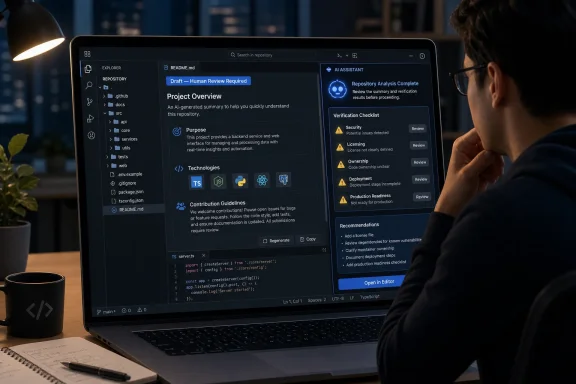
The immediate benefit is faster orientation, but the output remains an AI-generated interpretation rather than maintainer-approved documentation. In particular, a generated README should be treated as a draft, reviewed by someone familiar with the project, and never accepted as evidence of security, licensing, ownership, deployment status, support, or production readiness.
 What Changed and Who Gets It
GitHub’s new Copilot experience appears when a user visits the home page of an eligible repository they have not contributed to before. The page offers an action labeled “Give me a high-level overview.”
According to GitHub’s Changelog announcement, selecting that action opens Copilot Chat, which gathers context from the repository and generates a summary covering three areas:
- The repository’s purpose
- The technologies it uses
- Its contribution guidelines
GitHub says the feature is available to all GitHub Copilot plans. The company’s announcement does not describe the repository-home prompt as appearing on every repository visit, nor does it provide a detailed list of additional eligibility conditions beyond the first-time exploration context it identifies.
The feature can also be accessed without waiting for the repository-page offer. Users can open Copilot from the github.com navigation bar or ask Copilot Chat to generate a repository overview.
How to use it
- Open the home page of an eligible repository on github.com that you have not contributed to.
- Select “Give me a high-level overview.”
- Alternatively, select the Copilot icon in the github.com navigation bar.
- You can also ask Copilot Chat to generate a repository overview.
What the Repository Overview Returns
The overview is designed to answer the first questions a developer commonly has when opening an unfamiliar project: What does this repository do, what is it built with, and what does the project expect from contributors?
That makes the feature more specific than a generic request to summarize some code. GitHub has defined a standard first response around purpose, technologies, and contribution guidance, reducing the need for users to formulate an initial prompt themselves.
The announcement says Copilot Chat gathers context from the repository. It does not specify every source, file type, or weighting method used to produce the answer. Users therefore should not assume that the overview exhaustively examined every file, issue, pull request, release, or historical change.
GitHub’s separate documentation about exploring projects with Copilot describes using Copilot Chat to understand a repository’s purpose, examine files, and investigate particular lines of code. Its codebase-exploration guidance also includes questions about repository languages and architecture. Those broader capabilities can support follow-up investigation, but they should not be presented as a guaranteed list of inputs or outputs for the new one-click overview.
The distinction matters because a high-level overview is an opening explanation, not a complete technical assessment. It can provide useful vocabulary and point a developer toward areas worth examining, but it cannot replace direct review of the project’s maintained documentation and source.
The README Caveat Comes First
If a repository does not already have a README, GitHub says Copilot can generate one to help users understand what the repository does and which technologies it uses.
That can be useful, particularly when an inherited, experimental, or lightly maintained project has no introductory documentation. It gives a maintainer something more concrete than a blank page and may expose obvious gaps in how the repository communicates its purpose.
However, a generated README is a draft.
Before it is committed, published, or treated as project documentation, a person familiar with the repository should verify every substantive statement. The reviewer should confirm that the generated description matches the project’s present purpose—not merely what its files appear to suggest—and should remove claims that cannot be established from reliable project records.
A generated README should not be used as evidence of:
- The repository’s security posture
- License status or legal permission to use the code
- Current deployment status
- Production readiness
- Active maintenance or support
- Organizational ownership
- Regulatory or policy compliance
- Dependency safety
- Operational availability
- Compatibility with particular environments
Source code may show languages, frameworks, entry points, dependencies, and recurring implementation patterns. It may not reveal whether the software is still deployed, whether a listed environment still exists, whether a component has been superseded, or who is accountable for operating it.
This difference becomes especially important once generated text is committed. A temporary Copilot answer is an advisory response shown during a conversation. A committed README becomes durable repository content that developers, search systems, automated tools, and later AI responses may treat as authoritative.
Maintainers should therefore review a generated README through the normal documentation or code-review process, identify an owner for it, and keep it current after the initial commit.
Three Access Paths, With Different Starting Points
GitHub provides three routes to the feature. Only the repository-home offer has a specifically described trigger in the announcement; the other two are manual ways to reach Copilot and request the same type of output.
| Access path | Verified starting action | What GitHub states about context | Practical role |
|---|---|---|---|
| Repository home-page offer | Select “Give me a high-level overview” on an eligible repository home page that you have not contributed to | Copilot Chat gathers context from that repository | One-click orientation during first-time exploration |
| GitHub navigation bar | Select the Copilot icon on github.com | GitHub says this provides access to the feature at any time, but the announcement does not specify how repository context is selected in every navigation state | Manual access without waiting for the home-page offer |
| Copilot Chat request | Ask Copilot Chat to generate a repository overview | The announcement confirms that the overview can be requested through chat but does not define every context-selection step | On-demand or repeat exploration |
The table should not be read as claiming that the navigation-bar route always and automatically attaches the page currently being viewed. GitHub’s brief announcement does not document that behavior in enough detail to make it a universal rule.
Likewise, the chat route should not be reduced to a single assumed workflow in which the user always supplies a repository in a particular way. The exact context available to Copilot may depend on where the chat was opened and the surrounding GitHub interface.
The repository-home button is the clearest path because GitHub explicitly ties it to the repository being visited. The other methods provide alternative entry points, after which users should confirm that Copilot is addressing the intended project.
GitHub Turns Repository Orientation Into a Product Surface
Opening an unfamiliar repository has traditionally required a short investigation. A developer reads the description and README, examines the language breakdown and directory tree, looks for contribution instructions, and decides whether the project is relevant before investing more time.
The new overview compresses some of that initial work into a predefined Copilot action. It does not eliminate the need to inspect the repository, but it can give visitors a starting model of the project before they begin opening files or configuring a local environment.
The placement matters. Repository explanation is no longer available only to users who open a general chat interface and know what to ask. GitHub is presenting the prompt on the repository home page at a moment when a newcomer may need orientation.
That makes the capability part of repository discovery rather than code generation in the conventional Copilot sense. Instead of creating a function or proposing a patch, Copilot is synthesizing an initial description of software that already exists.
The experience may be particularly helpful when a repository’s title and short description do not make its role obvious. Organizations often accumulate prototypes, shared libraries, deployment tools, archived components, forks, internal applications, and successor projects whose relationships are clear only to regular contributors.
A generated overview may expose useful clues through the project’s apparent purpose, technology choices, and documented contribution process. Those clues can help a visitor decide where to investigate next.
They are not a substitute for verification. A plausible explanation can still be incomplete, outdated, or based on repository content that no longer represents how the project is used.
The Summary Is a Starting Point, Not a Verdict
A blank chat interface asks users to know what questions to pose. The repository overview supplies a reasonable first question and a structured first answer.
That is useful because understanding a project is usually iterative. After reading the overview, a developer may want to ask about a particular directory, the build process, test execution, package boundaries, contribution procedures, or an architectural term mentioned in the answer.
GitHub’s announcement does not define the overview as a full repository analysis. It is better understood as the first stage of a conversation that can be followed by more focused questions and direct inspection.
The summary is likely to be most useful when a repository is too involved to understand from its name and top-level file list but not so complex that a short explanation becomes meaningless. Large platforms with multiple services, applications, packages, and historical layers will still require maintained architecture documents and sustained technical investigation.
Even in smaller repositories, the output can reflect only the evidence Copilot can interpret. If documentation is absent, conflicting, or obsolete, the generated explanation may smooth over uncertainty rather than clearly expose it.
Users should therefore check important claims against relevant repository materials, such as:
- The maintained README and documentation
- Contribution instructions
- Dependency and package manifests
- Build and test configuration
- Source directories and entry points
- Release information
- Repository activity and current maintenance notices
- License files and notices
The more consequential the decision, the less appropriate it is to rely on a high-level answer alone.
Contribution Guidance Could Improve First Contact
GitHub’s choice to include contribution guidelines in the overview is notable. An explanation of what software does helps a visitor understand the project, but contribution guidance addresses what the visitor should do next.
For open-source and internal projects alike, unclear contribution procedures can lead to misplaced issues, incomplete pull requests, duplicated work, or proposals that conflict with the maintainers’ plans. Making existing guidance more visible may help newcomers begin with the project’s stated process.
The value depends on the quality of the underlying documentation. If contribution instructions are current and specific, Copilot may make them easier to discover. If they are absent, contradictory, or outdated, an overview cannot create a healthy contribution process by inference.
Maintainers should verify that contribution documents answer practical questions, including where to discuss substantial changes, how to run tests, which branches or packages are active, and whether the project is currently accepting contributions.
A polished Copilot overview cannot compensate for an unresponsive or ambiguous maintenance process. It can improve the first contact with the repository, but the project still needs humans and policies behind the instructions it presents.
Availability Across Copilot Plans Broadens Its Reach
GitHub says repository overviews are available across all GitHub Copilot plans. That gives the feature a broader audience than an enterprise-only administration tool or a premium workflow for intensive Copilot users.
Repository exploration occurs throughout GitHub. Students inspect examples, developers evaluate libraries, occasional contributors assess open-source projects, maintainers revisit unfamiliar parts of an organization, and administrators encounter internal repositories with limited documentation.
The overview also provides a comparatively approachable Copilot interaction. Asking for an explanation of existing material may feel less consequential than generating code that could be executed or merged.
That does not make an explanation automatically correct. It does, however, place the user in the role of evaluating an interpretation rather than immediately deciding whether to accept generated implementation.
Because the feature is presented on github.com, it can reach developers who do not use Copilot continuously in an editor. It addresses a familiar question in the place where that question naturally arises: the repository’s home page.
GitHub has not disclosed adoption targets or success measurements for the feature. Any suggestion that the company will measure whether users proceed into files, issues, pull requests, or contributions is analysis rather than a reported product commitment.
From a product-design perspective, however, the feature appears intended to reduce the effort required to move from encountering a repository to understanding enough of it to continue exploring. Whether that produces greater engagement remains to be demonstrated.
A Generated Overview Creates a Trust Boundary
Copilot’s overview is an interpretation of repository context, not a statement approved by the project’s maintainers.
That distinction can be easy to overlook when purpose, technologies, and contribution guidance appear together in polished prose. Fluency can make uncertain conclusions sound settled, even when the underlying repository contains incomplete or conflicting evidence.
The risk is broader than an obvious factual error. A summary can mention technically accurate details while giving them the wrong weight.
For example, the most frequently represented language may not identify the project’s most important runtime component. Generated files, test fixtures, vendored dependencies, examples, migration artifacts, or infrastructure definitions can affect how a repository appears without defining its central purpose.
Contribution rules may also exist in several places. A general contribution document can conflict with package-specific instructions, while old templates or archived documentation may remain in the repository after the project changes direction.
Users should treat the overview as a hypothesis and ask for supporting evidence when a statement matters. They should then inspect that evidence directly rather than relying only on Copilot’s description of it.
This is essential for security, deployment, licensing, maintenance status, and production readiness. GitHub says the overview covers purpose, technologies, and contribution guidelines. It does not present the feature as a security assessment, license audit, ownership record, support guarantee, or architecture certification.
The overview may help a reviewer identify relevant questions. It cannot settle those questions simply by presenting a confident answer.
Maintainers Are Writing for Humans and AI Systems
Repository maintainers already write for end users, contributors, package managers, search engines, and future team members. Copilot adds another reader capable of synthesizing repository materials into an answer displayed elsewhere in the interface.
Clear structure and consistent documentation therefore become even more valuable. If the README, contribution guide, dependency files, project metadata, and source organization all tell the same story, a generated overview has a stronger basis for describing the project accurately.
If those materials disagree, Copilot may attempt to reconcile contradictions that the maintainers have not resolved. The resulting prose can sound coherent even when the repository is not.
Maintainers should clearly distinguish source code from generated output, archived components, prototypes, examples, and vendored material. They should also mark deprecated projects and explain successor repositories where appropriate.
Documentation drift is not new, but AI-generated synthesis can increase its reach. An obsolete instruction may no longer mislead only the person who opens that file; it may also influence a broader overview presented to newcomers.
A surprising overview can serve as a prompt for maintenance. It may indicate that Copilot misunderstood the repository, but it may also reveal that the repository itself no longer communicates its purpose consistently.
The response should be verification, not automatic acceptance or dismissal: inspect which materials appear to support the answer, correct misleading repository content, and improve the maintained documentation.
Possible Enterprise Uses Require Independent Evidence
Repository overviews could provide a useful starting point during activities such as acquisitions, migrations, application rationalization, incident response, ownership reviews, or preliminary security investigations.
These are possible uses, not demonstrated outcomes of the feature. GitHub’s announcement does not claim that repository overviews have been validated as acquisition, migration, incident-response, or security-review tools.
In those settings, a purpose-and-technology summary might help a team begin triage when repository names and internal descriptions are inadequate. It could point an investigator toward likely frameworks, documentation, or contribution records that deserve closer examination.
The output should not be confused with a software inventory, dependency-management platform, security scanner, or formal code-analysis system. A repository may not reveal where software is deployed, which customers depend on it, who currently owns it, whether secrets have been rotated, or whether checked-in dependencies match production.
Those facts often live in separate systems and require confirmation from accountable people. Enterprise decisions still need evidence from source control, build systems, deployment platforms, asset inventories, security tools, software-composition analysis, licensing records, and operational owners.
Generating a readable README can make an undocumented project easier to discuss, but it does not resolve missing ownership or governance. Documentation can record an understanding of a system; it is not proof that the organization controls or safely operates that system.
Action Checklist for Admins
- Test repository overviews on a representative mix of active, legacy, internal, public, and poorly documented projects.
- Compare Copilot’s description of purpose and technologies with maintained documentation and operational records.
- Require human review before committing or publishing a Copilot-generated README.
- Prohibit treating generated overviews or READMEs as proof of security, licensing, ownership, deployment status, support, or production readiness.
- Check that contribution guidance is current, consistent, and appropriate for the repository’s real maintenance status.
- Verify important claims against source files, manifests, build configuration, deployment records, security tools, and accountable owners.
- Establish ownership for committed generated documentation and include it in normal review and update processes.
- Mark archived, deprecated, experimental, generated, and vendored content clearly so that both people and automated systems can interpret it correctly.
- Tell users to confirm that Copilot is analyzing the intended repository when they enter through the navigation bar or a general chat interface.
- Treat unexpected summaries as signals to inspect both Copilot’s reasoning and the repository’s documentation quality.
The Repository Home Page Is Becoming Conversational
A repository page has traditionally acted as an index of artifacts. It presents files, documentation, activity, releases, contributors, and metadata, leaving visitors to assemble those pieces into an understanding of the software.
The Copilot overview adds a narrative layer. Instead of only navigating the available artifacts, a visitor can ask GitHub to synthesize an initial explanation of them.
That does not replace search, documentation, or code reading. It can help users acquire the vocabulary needed to use those tools more effectively. A newcomer who learns the project’s apparent purpose and technologies can ask narrower questions and inspect more relevant files.
The predefined “Give me a high-level overview” action also reduces prompt-design friction. Users do not need to decide how broad the first question should be or how to phrase a general request for orientation.
The strategic significance is not that GitHub has solved repository understanding. It has not. The change is that AI-generated interpretation is now available at the repository’s front door, before a user opens a file, clones the project, or begins a contribution.
That creates both convenience and responsibility. Developers gain a faster starting point, while maintainers have another reason to ensure that their code, metadata, and documentation communicate a consistent and current account of the project.
The best outcome is not a future in which generated overviews replace READMEs or institutional knowledge. It is one in which Copilot helps visitors ask better questions sooner—and in which maintainers preserve the human review, project context, and accountable judgment needed to answer the questions that repository contents alone cannot resolve.
