

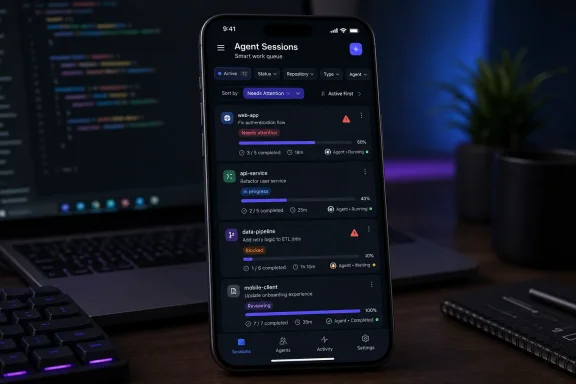
GitHub on July 10, 2026, added improved filtering and sorting to Copilot session lists in the latest production builds of GitHub Mobile for iOS and Android, giving developers faster ways to isolate active, completed, attention-needing, repository-specific, type-specific, and agent-specific work as their queues grow. The update sounds like ordinary interface maintenance, but it addresses a problem created by GitHub’s larger shift from answering coding questions to running many delegated tasks in parallel. Once Copilot becomes a worker rather than a chat box, finding the right session becomes part of operating the development process. GitHub is quietly turning its mobile app into a control surface for agentic software work.
GitHub’s announcement is brief because the visible change is straightforward. GitHub Mobile now offers lightweight filters for Active, Status, Repository, Type, and Agent, alongside sorting options that can place the most recent, oldest, active, or attention-needing sessions first.
The importance lies in why those controls are necessary. A conventional chatbot can afford a chronological history because most conversations are short-lived and independent. A coding agent can work in the background, interact with a repository, produce changes, wait for input, finish a task, or remain available for later inspection.
That creates a fundamentally different information-management problem. The session list is no longer merely a record of what a developer asked Copilot; it is a queue containing work at different stages of execution and review.
GitHub’s own documentation describes agent sessions as objects that developers can monitor, steer, stop, archive, and inspect through their logs. Sessions can represent work initiated from different interfaces, and the surrounding GitHub experience increasingly treats them as persistent units rather than disposable conversations.
A developer handling one task does not need sophisticated navigation. A developer delegating work across several repositories, switching among session types, or monitoring more than one agent does.
That is the threshold this update implicitly acknowledges. GitHub is designing for a world in which session accumulation is normal.
The Active filter is the clearest sign of that transition. GitHub defines it here as showing non-archived sessions, allowing users to cut completed organizational debris out of the immediate view without losing the underlying history.
Status filtering then lets the developer separate active sessions from completed work and sessions that need attention. Repository, Type, and Agent provide additional dimensions for identifying what the work concerns and which system is doing it.
On a desktop, a dense interface can expose several columns, sidebars, and persistent panels at once. On a phone, every additional control competes with the task itself, so GitHub describes these as lightweight filters designed for mobile.
That wording matters. GitHub has not attempted to reproduce a sprawling desktop dashboard on a small screen; it has selected the dimensions most useful for rapid triage.
That cost rises faster than the session count suggests. Five sessions do not simply mean five entries in a list; they may mean five repositories, several execution states, multiple kinds of work, and different agents competing for the developer’s attention.
Chronological ordering is inadequate under those conditions. It answers only one question: which session changed most recently?
That may be useful when a developer has just launched a task, but it does not necessarily identify the work that is blocked, the work awaiting review, the work associated with a production repository, or the task performed by a particular agent. Recency can even obscure urgency when a noisy active session repeatedly appears above an older item that actually requires a human decision.
GitHub’s needs-attention-first option is therefore more consequential than it appears. It allows the list to behave less like message history and more like an incident or ticket queue, where unresolved human intervention should generally outrank passive activity.
Active-first sorting serves a different mode. It helps a developer monitor work currently in motion, especially when the objective is to check what agents are doing rather than to clear pending decisions.
Oldest-first offers another operational perspective. It can expose neglected sessions that have fallen below newer activity and would otherwise remain buried.
Most-recent sorting preserves the familiar feed-like model, which remains useful when the developer wants to resume the task touched last. GitHub is not replacing chronology; it is recognizing that chronology is only one of several legitimate ways to organize delegated work.
The distinction between filtering and sorting is equally important. A filter reduces the population of sessions, while a sort determines the order of that reduced population.
That sounds obvious, but mobile interfaces often make users choose one operation at the expense of another. GitHub says changing the sort order preserves the current filter context, meaning a developer can isolate a repository or session type and then test different orderings without rebuilding the selection.
This is the kind of detail that determines whether a filter system becomes part of a daily workflow or remains an occasional novelty. Losing context after every sorting change would turn a few taps into repetitive setup, particularly for developers moving between sessions during short interruptions or away from their desks.
The controls are not a full project-management system, nor does GitHub claim they are. They do, however, supply the minimum navigation structure needed once an agent session list stops fitting comfortably into a single mental snapshot.
Agentic development changes that balance. If an agent can perform the prolonged mechanical work elsewhere, the human interaction increasingly consists of issuing instructions, checking state, reading summaries and logs, responding to blockers, and deciding whether the result deserves further review.
Those supervisory actions fit a phone much better than writing an implementation from scratch. The mobile device does not have to become a workstation if the workstation-level task is being executed remotely.
GitHub began bringing Copilot coding-agent workflows to mobile before this filtering update. Its earlier announcements and documentation presented the app as a place where developers could start tasks, assign work, track progress, and interact with the resulting changes while away from a traditional development machine.
GitHub later refreshed the mobile Copilot experience and brought session information more directly into the app. The July 10 update follows naturally: once session creation and inspection become easier, list management becomes the next constraint.
June 4, 2025 — GitHub published a dedicated mobile announcement describing the ability to assign Copilot to issues, refine changes through pull requests, and track agent work from a phone.
April 1, 2026 — GitHub announced a refreshed Copilot tab for GitHub Mobile, native session logs, and additional in-app controls for agent sessions.
July 10, 2026 — GitHub added the improved mobile filters and sorting covered here, including persistent filter context when users change the ordering of their session lists.
The sequence reveals a familiar product pattern. First GitHub made agent activity accessible on mobile; then it exposed more of the session itself; now it is making a growing collection of those sessions manageable.
That progression also shows why dismissing this release as a minor quality-of-life update misses the larger direction. A product does not need queue filters until users have enough persistent work to require queues.
The phone is consequently becoming less of a remote notification receiver and more of a pocket operations console. A developer might begin a task elsewhere, later notice that a session requires attention, filter the mobile list to the relevant repository, place attention-needing work first, inspect the session, and decide what should happen next.
The value is not that every stage can or should be completed on a phone. The value is that a developer can regain situational awareness without reconstructing the entire desktop workspace.
That makes the update particularly useful during the fragmented periods in which mobile software is commonly used: between meetings, during a commute, while responding to an alert, or when checking whether background work has completed. In those moments, the cost of finding the correct session can exceed the cost of making the actual decision.
Repository filtering acknowledges that developers will increasingly run agent tasks across multiple codebases. A session list mixing an application, infrastructure repository, documentation project, internal tool, and experimental branch quickly becomes difficult to scan, even if every item has a descriptive label.
Repository context is also a practical risk boundary. Developers often treat repositories differently according to ownership, sensitivity, release cadence, and operational importance.
A task involving a production service should not necessarily compete visually with a documentation change or a disposable experiment. GitHub Mobile’s repository filter does not enforce governance, but it gives the human operator a faster way to narrow attention to the appropriate codebase.
The Agent filter points toward an ecosystem in which Copilot is not the only worker represented in GitHub’s interface. GitHub has already been developing support for sessions associated with different agents, and an agent-specific filter becomes more useful as those workers develop distinct roles, capabilities, and expected outputs.
A developer may eventually care not only that a task is active, but whether it is being handled by the agent appropriate to that kind of work. Even before teams formalize such distinctions, filtering by agent can help investigate behavior, locate a known session, or compare the work currently assigned to different systems.
Type filtering adds another layer. GitHub’s announcement does not enumerate every possible session type in this specific mobile update, so it would be unwise to assume an exhaustive taxonomy from the label alone.
The existence of the filter is nonetheless significant. It suggests that a session list may contain meaningfully different forms of agent activity and that GitHub expects users to distinguish among them rather than treat every session as interchangeable.
Together, Repository, Type, and Agent form a rudimentary multidimensional index. They answer where the work belongs, what kind of session it is, and which agent is associated with it.
Status then answers where the work sits in its lifecycle. Sorting answers which entries should appear first.
This structure resembles the early operational tooling around other scalable systems. As volume increases, the interface evolves from showing objects to classifying, prioritizing, and retrieving them.
GitHub has not announced advanced automation as part of this release. There are no claims here about custom filter presets, team-wide saved views, automatic routing, service-level targets, or policy-driven escalation.
Those omissions define the current limit of the feature. The new mobile controls improve personal navigation, but they do not by themselves turn session management into a governed enterprise queue.
That distinction will matter if organizations begin relying on agents for larger quantities of consequential work. Personal filters help a developer find a session; operational governance must also determine who owns it, who reviews its output, how long it can remain unattended, and what evidence is required before changes proceed.
An agent that repeatedly asks for intervention can become another source of interruption. Yet an agent that needs a decision and cannot surface that need effectively may sit idle while the developer assumes work is continuing.
The interface therefore has to separate routine progress from actionable exceptions. GitHub’s sorting option provides a simple mechanism for doing so by moving attention-needing sessions toward the top of the current filtered view.
For a developer, that can turn a broad status check into a focused review pass. Instead of opening every recent session, the user can isolate the relevant repository or type and prioritize items where human input is required.
For a team lead, the same control may help identify where automated execution has reached a boundary that still depends on judgment. The mobile filter does not explain the underlying issue by itself, but it reduces the time required to reach the session where that explanation can be inspected.
This is an important design principle for agentic tools: the interface should optimize not for observing every action, but for locating the moments when human involvement has the highest value.
Active-first sorting serves the complementary requirement of supervision. If a developer wants to see which tasks are still running or otherwise active, those sessions can be raised without discarding repository, type, or agent filters already in place.
The persistence of filter context is essential here. Consider a developer who filters for one repository, sorts by needs-attention first, handles blockers, and then switches to active-first to monitor the remaining work.
Because the repository filter remains intact, the developer stays within the same operational scope. The list changes priority without changing subject.
That behavior reduces the risk of accidental context switching, which is particularly damaging on mobile. A desktop interface may keep repository names, tabs, and panels visible, but a phone often presents one compact view at a time.
Preserving context is therefore not merely a convenience. It is a safeguard against losing track of what the list currently represents.
Its relevance to Windows developers comes from the cross-device workflow. Many developers may perform their primary coding, testing, administration, or repository work on Windows while using GitHub Mobile as a secondary interface when away from that machine.
The mobile session list can now serve as a filtered window into work initiated from elsewhere. A developer does not need the phone to reproduce the Windows environment; the phone needs to show which delegated task is running, complete, archived, or waiting for input.
That separation could become more useful as development work spans additional interfaces. A session may originate in a desktop tool, a GitHub surface, or a mobile action, but it still needs to be discoverable later.
For Windows-focused IT departments, this is another example of developer workflow becoming less device-bound. The primary workstation remains important for local tools, credentials, debugging, builds, and detailed review, but the orchestration layer increasingly follows the user across devices.
That creates both convenience and governance implications. If an organization permits developers to access repositories and agent sessions through mobile devices, it should treat that access as part of the development environment rather than as an unrelated consumer-app activity.
The new filters do not change permissions, repository access, authentication requirements, or organizational policy. Nothing in GitHub’s announcement suggests that filtering grants new access to sessions a user could not already see.
What changes is usability. Existing accessible work can be located and acted upon more efficiently, which may increase how often developers use the mobile path.
IT administrators should therefore distinguish between feature enablement and access governance. Updating the app makes the controls available; deciding whether, where, and under what conditions mobile repository access is appropriate remains an organizational responsibility.
The same caution applies to review. A session marked completed is not synonymous with code that is tested, approved, or ready for production.
Completion describes the session’s state, not the organization’s acceptance of its output. Mobile convenience should accelerate discovery and triage, not collapse the review process into a glance at a status label.
GitHub has separately invested in greater session visibility, including more detailed logs. That work and the new filters solve different stages of the same problem.
The list helps a developer find the right session. The session view and associated review surfaces help the developer understand what happened.
Neither stage should be skipped. A needs-attention indicator tells the user where to look, not what decision to make.
Similarly, filtering by Agent can locate work performed by a specific system, but it does not establish that the system’s output is correct. Repository filtering narrows scope, but it does not substitute for understanding the repository’s rules and risks.
This becomes especially important when mobile access creates a sense of speed. A phone encourages short interactions, and a prioritized list encourages users to clear items.
That can be productive for straightforward intervention, but consequential code changes still demand proportionate review. The correct workflow may be to identify the blocked session on mobile, provide limited direction, and defer final code approval until the developer can inspect the result in an appropriate environment.
GitHub’s design does not force a lower standard. The risk comes from interpreting convenience as evidence that every action is suitable for a small-screen decision.
The most mature use of these controls will therefore be selective. Developers can use mobile filtering to restore awareness, address simple blockers, archive irrelevant history, and determine what deserves deeper attention later.
In that sense, the filters work best as an attention router. They help decide not only what to open now, but what should wait for a full workstation.
At that point, users may want durable views that reopen with the same filters, clearer ownership, shared queues, richer search, or notifications tied to particular repositories and states. Organizations may also want controls that distinguish experimental agent work from sessions associated with sensitive or production-critical code.
GitHub has not promised those capabilities in this announcement, and they should not be treated as part of the current release. They are, however, logical pressures created by the same growth that made mobile filters necessary.
The Agent filter is especially likely to become more valuable over time. As users encounter sessions created through different agents or interfaces, agent identity may become a practical troubleshooting and governance attribute rather than a simple browsing preference.
Type may follow a similar path. If session types correspond to materially different workflows, teams may eventually want different review expectations or escalation behavior for each category.
Even the Active filter could acquire greater operational weight. Today it provides a lightweight way to focus on non-archived sessions, but a growing archive raises questions about retention, discoverability, and how developers recover useful context from older work.
GitHub’s broader documentation already treats session history as something developers may revisit and query. That makes archival behavior part of knowledge management, not merely inbox hygiene.
The design challenge will be preventing the agent platform from recreating the complexity of issue trackers, build systems, and operations dashboards inside yet another interface. Every added field can improve control while increasing the burden on users to maintain it.
GitHub’s current mobile approach is deliberately modest. Five filter dimensions and four sorting orders provide meaningful structure without requiring developers to configure an elaborate workspace.
That restraint is sensible at this stage. The company first needs to learn which dimensions users repeatedly choose and where session-management friction remains.
But lightweight controls tend to become infrastructure once workflows depend on them. If developers begin using needs-attention-first as the default way to supervise agents, the accuracy and timeliness of that state become more important than the visual placement of the sorting menu.
The next challenge is therefore semantic, not cosmetic: users must be able to trust what Active, completed, and needs attention mean in practice.
That is an important marker in Copilot’s evolution. The product is moving from individual AI interactions toward ongoing orchestration, where developers manage multiple pieces of delegated work and intervene according to state and priority.
 The Session List Has Become a Work Queue
GitHub’s announcement is brief because the visible change is straightforward. GitHub Mobile now offers lightweight filters for Active, Status, Repository, Type, and Agent, alongside sorting options that can place the most recent, oldest, active, or attention-needing sessions first.The importance lies in why those controls are necessary. A conventional chatbot can afford a chronological history because most conversations are short-lived and independent. A coding agent can work in the background, interact with a repository, produce changes, wait for input, finish a task, or remain available for later inspection.
That creates a fundamentally different information-management problem. The session list is no longer merely a record of what a developer asked Copilot; it is a queue containing work at different stages of execution and review.
GitHub’s own documentation describes agent sessions as objects that developers can monitor, steer, stop, archive, and inspect through their logs. Sessions can represent work initiated from different interfaces, and the surrounding GitHub experience increasingly treats them as persistent units rather than disposable conversations.
A developer handling one task does not need sophisticated navigation. A developer delegating work across several repositories, switching among session types, or monitoring more than one agent does.
That is the threshold this update implicitly acknowledges. GitHub is designing for a world in which session accumulation is normal.
The Active filter is the clearest sign of that transition. GitHub defines it here as showing non-archived sessions, allowing users to cut completed organizational debris out of the immediate view without losing the underlying history.
Status filtering then lets the developer separate active sessions from completed work and sessions that need attention. Repository, Type, and Agent provide additional dimensions for identifying what the work concerns and which system is doing it.
On a desktop, a dense interface can expose several columns, sidebars, and persistent panels at once. On a phone, every additional control competes with the task itself, so GitHub describes these as lightweight filters designed for mobile.
That wording matters. GitHub has not attempted to reproduce a sprawling desktop dashboard on a small screen; it has selected the dimensions most useful for rapid triage.
GitHub Is Solving the Operational Cost of Agent Abundance
The basic promise of a coding agent is that a developer can delegate work and move on. The hidden cost is that every delegated task creates another object that must eventually be found, understood, reviewed, redirected, or closed.That cost rises faster than the session count suggests. Five sessions do not simply mean five entries in a list; they may mean five repositories, several execution states, multiple kinds of work, and different agents competing for the developer’s attention.
Chronological ordering is inadequate under those conditions. It answers only one question: which session changed most recently?
That may be useful when a developer has just launched a task, but it does not necessarily identify the work that is blocked, the work awaiting review, the work associated with a production repository, or the task performed by a particular agent. Recency can even obscure urgency when a noisy active session repeatedly appears above an older item that actually requires a human decision.
GitHub’s needs-attention-first option is therefore more consequential than it appears. It allows the list to behave less like message history and more like an incident or ticket queue, where unresolved human intervention should generally outrank passive activity.
Active-first sorting serves a different mode. It helps a developer monitor work currently in motion, especially when the objective is to check what agents are doing rather than to clear pending decisions.
Oldest-first offers another operational perspective. It can expose neglected sessions that have fallen below newer activity and would otherwise remain buried.
Most-recent sorting preserves the familiar feed-like model, which remains useful when the developer wants to resume the task touched last. GitHub is not replacing chronology; it is recognizing that chronology is only one of several legitimate ways to organize delegated work.
The distinction between filtering and sorting is equally important. A filter reduces the population of sessions, while a sort determines the order of that reduced population.
That sounds obvious, but mobile interfaces often make users choose one operation at the expense of another. GitHub says changing the sort order preserves the current filter context, meaning a developer can isolate a repository or session type and then test different orderings without rebuilding the selection.
This is the kind of detail that determines whether a filter system becomes part of a daily workflow or remains an occasional novelty. Losing context after every sorting change would turn a few taps into repetitive setup, particularly for developers moving between sessions during short interruptions or away from their desks.
| Control family | Available choices | Operational purpose |
|---|---|---|
| Session scope | Active, meaning non-archived | Removes archived history from the immediate working set |
| Workflow state | Status | Separates active, completed, and attention-needing sessions |
| Codebase context | Repository | Isolates work associated with a particular repository |
| Work category | Type | Narrows the list to a particular session type |
| Worker identity | Agent | Finds sessions associated with a specific agent |
| Ordering | Most recent, oldest, active first, needs-attention first | Prioritizes the selected sessions without discarding the current filter context |
Mobile Is Becoming the Place Where Developers Supervise Work
GitHub Mobile’s role in software development has traditionally been constrained by the device. Phones are good for notifications, discussions, lightweight review, and urgent interventions; they are less suitable for extended code editing, local testing, or navigating a large codebase.Agentic development changes that balance. If an agent can perform the prolonged mechanical work elsewhere, the human interaction increasingly consists of issuing instructions, checking state, reading summaries and logs, responding to blockers, and deciding whether the result deserves further review.
Those supervisory actions fit a phone much better than writing an implementation from scratch. The mobile device does not have to become a workstation if the workstation-level task is being executed remotely.
GitHub began bringing Copilot coding-agent workflows to mobile before this filtering update. Its earlier announcements and documentation presented the app as a place where developers could start tasks, assign work, track progress, and interact with the resulting changes while away from a traditional development machine.
GitHub later refreshed the mobile Copilot experience and brought session information more directly into the app. The July 10 update follows naturally: once session creation and inspection become easier, list management becomes the next constraint.
Timeline
May 19, 2025 — GitHub said the Copilot coding agent public preview was beginning to roll out to GitHub Mobile users on iOS and Android, as well as to the GitHub command-line experience.June 4, 2025 — GitHub published a dedicated mobile announcement describing the ability to assign Copilot to issues, refine changes through pull requests, and track agent work from a phone.
April 1, 2026 — GitHub announced a refreshed Copilot tab for GitHub Mobile, native session logs, and additional in-app controls for agent sessions.
July 10, 2026 — GitHub added the improved mobile filters and sorting covered here, including persistent filter context when users change the ordering of their session lists.
The sequence reveals a familiar product pattern. First GitHub made agent activity accessible on mobile; then it exposed more of the session itself; now it is making a growing collection of those sessions manageable.
That progression also shows why dismissing this release as a minor quality-of-life update misses the larger direction. A product does not need queue filters until users have enough persistent work to require queues.
The phone is consequently becoming less of a remote notification receiver and more of a pocket operations console. A developer might begin a task elsewhere, later notice that a session requires attention, filter the mobile list to the relevant repository, place attention-needing work first, inspect the session, and decide what should happen next.
The value is not that every stage can or should be completed on a phone. The value is that a developer can regain situational awareness without reconstructing the entire desktop workspace.
That makes the update particularly useful during the fragmented periods in which mobile software is commonly used: between meetings, during a commute, while responding to an alert, or when checking whether background work has completed. In those moments, the cost of finding the correct session can exceed the cost of making the actual decision.
Repository and Agent Filters Reveal GitHub’s Larger Ambition
Status is an obvious filter for any workflow queue. Repository and Agent are more revealing because they expose the two axes around which GitHub’s agent platform is expanding.Repository filtering acknowledges that developers will increasingly run agent tasks across multiple codebases. A session list mixing an application, infrastructure repository, documentation project, internal tool, and experimental branch quickly becomes difficult to scan, even if every item has a descriptive label.
Repository context is also a practical risk boundary. Developers often treat repositories differently according to ownership, sensitivity, release cadence, and operational importance.
A task involving a production service should not necessarily compete visually with a documentation change or a disposable experiment. GitHub Mobile’s repository filter does not enforce governance, but it gives the human operator a faster way to narrow attention to the appropriate codebase.
The Agent filter points toward an ecosystem in which Copilot is not the only worker represented in GitHub’s interface. GitHub has already been developing support for sessions associated with different agents, and an agent-specific filter becomes more useful as those workers develop distinct roles, capabilities, and expected outputs.
A developer may eventually care not only that a task is active, but whether it is being handled by the agent appropriate to that kind of work. Even before teams formalize such distinctions, filtering by agent can help investigate behavior, locate a known session, or compare the work currently assigned to different systems.
Type filtering adds another layer. GitHub’s announcement does not enumerate every possible session type in this specific mobile update, so it would be unwise to assume an exhaustive taxonomy from the label alone.
The existence of the filter is nonetheless significant. It suggests that a session list may contain meaningfully different forms of agent activity and that GitHub expects users to distinguish among them rather than treat every session as interchangeable.
Together, Repository, Type, and Agent form a rudimentary multidimensional index. They answer where the work belongs, what kind of session it is, and which agent is associated with it.
Status then answers where the work sits in its lifecycle. Sorting answers which entries should appear first.
This structure resembles the early operational tooling around other scalable systems. As volume increases, the interface evolves from showing objects to classifying, prioritizing, and retrieving them.
GitHub has not announced advanced automation as part of this release. There are no claims here about custom filter presets, team-wide saved views, automatic routing, service-level targets, or policy-driven escalation.
Those omissions define the current limit of the feature. The new mobile controls improve personal navigation, but they do not by themselves turn session management into a governed enterprise queue.
That distinction will matter if organizations begin relying on agents for larger quantities of consequential work. Personal filters help a developer find a session; operational governance must also determine who owns it, who reviews its output, how long it can remain unattended, and what evidence is required before changes proceed.
The Best New Sort Is the One That Interrupts the Developer
The needs-attention-first option deserves special emphasis because it captures the central tension of background agents. Delegation is useful only while the delegated work does not require constant supervision.An agent that repeatedly asks for intervention can become another source of interruption. Yet an agent that needs a decision and cannot surface that need effectively may sit idle while the developer assumes work is continuing.
The interface therefore has to separate routine progress from actionable exceptions. GitHub’s sorting option provides a simple mechanism for doing so by moving attention-needing sessions toward the top of the current filtered view.
For a developer, that can turn a broad status check into a focused review pass. Instead of opening every recent session, the user can isolate the relevant repository or type and prioritize items where human input is required.
For a team lead, the same control may help identify where automated execution has reached a boundary that still depends on judgment. The mobile filter does not explain the underlying issue by itself, but it reduces the time required to reach the session where that explanation can be inspected.
This is an important design principle for agentic tools: the interface should optimize not for observing every action, but for locating the moments when human involvement has the highest value.
Active-first sorting serves the complementary requirement of supervision. If a developer wants to see which tasks are still running or otherwise active, those sessions can be raised without discarding repository, type, or agent filters already in place.
The persistence of filter context is essential here. Consider a developer who filters for one repository, sorts by needs-attention first, handles blockers, and then switches to active-first to monitor the remaining work.
Because the repository filter remains intact, the developer stays within the same operational scope. The list changes priority without changing subject.
That behavior reduces the risk of accidental context switching, which is particularly damaging on mobile. A desktop interface may keep repository names, tabs, and panels visible, but a phone often presents one compact view at a time.
Preserving context is therefore not merely a convenience. It is a safeguard against losing track of what the list currently represents.
Windows Developers Benefit Even Though This Is Not a Windows Release
The availability statement is unambiguous: the feature is in the latest production build of GitHub Mobile on iOS and Android. It is not a Windows application update, a Windows shell integration, or a change to a desktop development environment.Its relevance to Windows developers comes from the cross-device workflow. Many developers may perform their primary coding, testing, administration, or repository work on Windows while using GitHub Mobile as a secondary interface when away from that machine.
The mobile session list can now serve as a filtered window into work initiated from elsewhere. A developer does not need the phone to reproduce the Windows environment; the phone needs to show which delegated task is running, complete, archived, or waiting for input.
That separation could become more useful as development work spans additional interfaces. A session may originate in a desktop tool, a GitHub surface, or a mobile action, but it still needs to be discoverable later.
For Windows-focused IT departments, this is another example of developer workflow becoming less device-bound. The primary workstation remains important for local tools, credentials, debugging, builds, and detailed review, but the orchestration layer increasingly follows the user across devices.
That creates both convenience and governance implications. If an organization permits developers to access repositories and agent sessions through mobile devices, it should treat that access as part of the development environment rather than as an unrelated consumer-app activity.
The new filters do not change permissions, repository access, authentication requirements, or organizational policy. Nothing in GitHub’s announcement suggests that filtering grants new access to sessions a user could not already see.
What changes is usability. Existing accessible work can be located and acted upon more efficiently, which may increase how often developers use the mobile path.
IT administrators should therefore distinguish between feature enablement and access governance. Updating the app makes the controls available; deciding whether, where, and under what conditions mobile repository access is appropriate remains an organizational responsibility.
The same caution applies to review. A session marked completed is not synonymous with code that is tested, approved, or ready for production.
Completion describes the session’s state, not the organization’s acceptance of its output. Mobile convenience should accelerate discovery and triage, not collapse the review process into a glance at a status label.
Better Navigation Does Not Remove the Need to Understand the Work
Filters can make a queue manageable while still concealing complexity inside each entry. An agent session may include prompts, intermediate actions, environment setup, code changes, and requests for human input.GitHub has separately invested in greater session visibility, including more detailed logs. That work and the new filters solve different stages of the same problem.
The list helps a developer find the right session. The session view and associated review surfaces help the developer understand what happened.
Neither stage should be skipped. A needs-attention indicator tells the user where to look, not what decision to make.
Similarly, filtering by Agent can locate work performed by a specific system, but it does not establish that the system’s output is correct. Repository filtering narrows scope, but it does not substitute for understanding the repository’s rules and risks.
This becomes especially important when mobile access creates a sense of speed. A phone encourages short interactions, and a prioritized list encourages users to clear items.
That can be productive for straightforward intervention, but consequential code changes still demand proportionate review. The correct workflow may be to identify the blocked session on mobile, provide limited direction, and defer final code approval until the developer can inspect the result in an appropriate environment.
GitHub’s design does not force a lower standard. The risk comes from interpreting convenience as evidence that every action is suitable for a small-screen decision.
The most mature use of these controls will therefore be selective. Developers can use mobile filtering to restore awareness, address simple blockers, archive irrelevant history, and determine what deserves deeper attention later.
In that sense, the filters work best as an attention router. They help decide not only what to open now, but what should wait for a full workstation.
Action checklist for admins
- Confirm that managed iOS and Android devices are running the latest production build of GitHub Mobile before documenting or supporting the new controls.
- Review whether mobile access to development repositories and Copilot sessions fits the organization’s existing device, identity, and repository-access policies.
- Teach developers to combine Repository or Agent filtering with needs-attention-first sorting rather than relying exclusively on chronological order.
- Make clear that completed session status does not replace pull-request review, testing, approval, or other required release controls.
- Encourage users to inspect the underlying session and its outputs before acting on a mobile status label.
- Include mobile session triage in internal guidance for teams that routinely delegate multiple concurrent tasks to agents.
The Missing Features Point to the Next Management Problem
The release solves retrieval, but it also exposes what GitHub may eventually have to address as agent usage scales further. Personal filtering is effective until sessions become team-level operational objects.At that point, users may want durable views that reopen with the same filters, clearer ownership, shared queues, richer search, or notifications tied to particular repositories and states. Organizations may also want controls that distinguish experimental agent work from sessions associated with sensitive or production-critical code.
GitHub has not promised those capabilities in this announcement, and they should not be treated as part of the current release. They are, however, logical pressures created by the same growth that made mobile filters necessary.
The Agent filter is especially likely to become more valuable over time. As users encounter sessions created through different agents or interfaces, agent identity may become a practical troubleshooting and governance attribute rather than a simple browsing preference.
Type may follow a similar path. If session types correspond to materially different workflows, teams may eventually want different review expectations or escalation behavior for each category.
Even the Active filter could acquire greater operational weight. Today it provides a lightweight way to focus on non-archived sessions, but a growing archive raises questions about retention, discoverability, and how developers recover useful context from older work.
GitHub’s broader documentation already treats session history as something developers may revisit and query. That makes archival behavior part of knowledge management, not merely inbox hygiene.
The design challenge will be preventing the agent platform from recreating the complexity of issue trackers, build systems, and operations dashboards inside yet another interface. Every added field can improve control while increasing the burden on users to maintain it.
GitHub’s current mobile approach is deliberately modest. Five filter dimensions and four sorting orders provide meaningful structure without requiring developers to configure an elaborate workspace.
That restraint is sensible at this stage. The company first needs to learn which dimensions users repeatedly choose and where session-management friction remains.
But lightweight controls tend to become infrastructure once workflows depend on them. If developers begin using needs-attention-first as the default way to supervise agents, the accuracy and timeliness of that state become more important than the visual placement of the sorting menu.
The next challenge is therefore semantic, not cosmetic: users must be able to trust what Active, completed, and needs attention mean in practice.
A Small Release With a Clear Message About Copilot’s Direction
GitHub’s mobile update should be judged less by the number of controls it adds than by the workflow it assumes. It assumes developers have enough persistent agent sessions, spread across enough contexts, that a flat chronological list is no longer sufficient.That is an important marker in Copilot’s evolution. The product is moving from individual AI interactions toward ongoing orchestration, where developers manage multiple pieces of delegated work and intervene according to state and priority.
- The feature was announced on July 10, 2026, for the latest production build of GitHub Mobile on iOS and Android.
- Filters cover Active, Status, Repository, Type, and Agent.
- The Active filter narrows the list to non-archived sessions.
- Sorting supports most recent, oldest, active first, and needs-attention first.
- Changing the sort order preserves the current filter context.
- The practical benefit is faster mobile triage as Copilot session lists grow across repositories, session types, and agents.