

Technobezz has published a 2026 website-building guide that steers newcomers toward hosted tools rather than a one-size-fits-all platform. Its central advice is sensible: choose the builder based on the job, assemble the core pages, preview the site, and publish from the same service.
The guide groups Google Sites as the low-friction option for basic informational or restricted-access sites; Wix, Squarespace, WordPress.com, GoDaddy and Hostinger for hosted visual builders; Shopify and Square Online for storefronts; Canva for simple design-led pages; and GitHub Pages for users comfortable maintaining files in a repository. It also distinguishes hosted WordPress.com from self-hosted WordPress, where the latter still requires web hosting, a database and an installation process.
For Windows users and small-business admins, the practical point is that “website builder” no longer describes a single type of product. A brochure site, internal documentation page, personal portfolio and online store have materially different requirements around access controls, payment processing, backups, ownership and future migration.
Google’s current Sites documentation supports the basic flow described in the guide: create and edit a site in a desktop browser, preview it, publish it, and set the published site to Public or Restricted. That makes it appropriate for lightweight project hubs, small intranets and public information pages, but it is not a replacement for a full content-management system or store platform.
Wix and Squarespace remain aimed at users who want templates and visual editing without managing hosting. WordPress.com offers the same hosted convenience while retaining the WordPress editing model, themes and patterns. Self-hosted WordPress remains the route for organizations that need control over hosting, plugins, server configuration and migration, but it also shifts patching, backups and security responsibilities to the site owner or provider.
Storefronts should start with commerce platforms, not a generic page builder with a checkout bolted on later. Shopify and Square Online handle product pages and sales workflows from their own administration consoles, which reduces integration work but commits the business to each provider’s pricing and platform limits.
However, repository privacy and site privacy are not the same thing. GitHub says Pages sites are generally public by default even when their source repository is private or internal; private publication is an Enterprise Cloud access-control feature. GitHub Pages is therefore a good fit for documentation, portfolios and static project sites, but not for private client portals or transactional business sites.
The guide also flags obsolete options worth avoiding: new Classic Google Sites creation ended in 2021, Adobe Muse support ended in 2020, and Square Online is the current Square-owned path for new site projects rather than Weebly.
Before committing to any builder, confirm its current plan limits, export options, domain ownership and privacy settings, then publish only after testing the site on desktop and mobile browsers.
The guide groups Google Sites as the low-friction option for basic informational or restricted-access sites; Wix, Squarespace, WordPress.com, GoDaddy and Hostinger for hosted visual builders; Shopify and Square Online for storefronts; Canva for simple design-led pages; and GitHub Pages for users comfortable maintaining files in a repository. It also distinguishes hosted WordPress.com from self-hosted WordPress, where the latter still requires web hosting, a database and an installation process.
For Windows users and small-business admins, the practical point is that “website builder” no longer describes a single type of product. A brochure site, internal documentation page, personal portfolio and online store have materially different requirements around access controls, payment processing, backups, ownership and future migration.
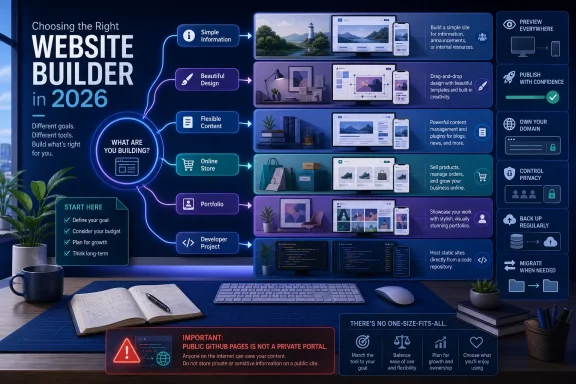 Builder choice still determines the workload
Google’s current Sites documentation supports the basic flow described in the guide: create and edit a site in a desktop browser, preview it, publish it, and set the published site to Public or Restricted. That makes it appropriate for lightweight project hubs, small intranets and public information pages, but it is not a replacement for a full content-management system or store platform.Wix and Squarespace remain aimed at users who want templates and visual editing without managing hosting. WordPress.com offers the same hosted convenience while retaining the WordPress editing model, themes and patterns. Self-hosted WordPress remains the route for organizations that need control over hosting, plugins, server configuration and migration, but it also shifts patching, backups and security responsibilities to the site owner or provider.
Storefronts should start with commerce platforms, not a generic page builder with a checkout bolted on later. Shopify and Square Online handle product pages and sales workflows from their own administration consoles, which reduces integration work but commits the business to each provider’s pricing and platform limits.
One GitHub Pages caveat
The guide correctly notes that GitHub Pages can publish a static site from a repository, including a user site using theusername.github.io naming convention. GitHub’s documentation also says free accounts can use Pages with public repositories, while GitHub Pro, Team and Enterprise offerings can use private repositories.However, repository privacy and site privacy are not the same thing. GitHub says Pages sites are generally public by default even when their source repository is private or internal; private publication is an Enterprise Cloud access-control feature. GitHub Pages is therefore a good fit for documentation, portfolios and static project sites, but not for private client portals or transactional business sites.
The guide also flags obsolete options worth avoiding: new Classic Google Sites creation ended in 2021, Adobe Muse support ended in 2020, and Square Online is the current Square-owned path for new site projects rather than Weebly.
Before committing to any builder, confirm its current plan limits, export options, domain ownership and privacy settings, then publish only after testing the site on desktop and mobile browsers.
References
- Primary source: Technobezz
Published: 2026-07-14T16:28:58.298000+00:00
How to Make a Website in 2026 | Technobezz
How to make a website in 2026 using Google Sites, Wix, Squarespace, WordPress.com, Shopify, Square, Canva, and more.www.technobezz.com