

Glow 26.6 is a meaningful cleanup-and-polish release for one of the more practical hardware-information utilities on Windows, and it does more than just tick a version number. The update removes Visual Basic and .NET Framework dependencies, improves accessibility for screen-reader users, adds a long-requested used-disk-space readout, and tightens several of the app’s diagnostic tools. It also fixes reliability problems in shutdown handling, RAM calculations, sorting, and account detection, while trimming non-functional clutter from the operating-system section and the DNS test tool.
Glow sits in a crowded category, but it occupies a useful middle ground between lightweight system scanners and heavyweight diagnostics suites. Its pitch is straightforward: gather hardware and system details in one place, present them cleanly, and export them for troubleshooting. That matters because the average Windows user may need to identify a motherboard revision, check installed RAM, verify storage capacity, or inspect driver and service inventories without jumping through multiple menus or utilities.
This kind of tool has always had value for both consumers and technicians, but the reasons changed over time. In earlier Windows eras, users often needed external tools simply to answer basic questions about their PCs. Today, many of those details are available through Settings or Device Manager, yet the fragmented presentation still leaves a gap for support workflows. Glow’s usefulness comes from consolidating those details into a single readable report instead of making users stitch information together manually.
Glow 26.6 lands in that context with a clear emphasis on maturity. The changelog reads less like a flashy feature dump and more like a product getting its internals and user experience aligned. Removing Visual Basic dependencies and unnecessary .NET Framework requirements is especially notable because it reduces friction, simplifies the runtime profile, and makes the app more self-contained. For portable utilities, that is not a cosmetic improvement; it is a stability and deployment improvement.
The release also reflects a familiar pattern in systems software: tools become most valuable when they are easiest to use under pressure. Accessibility work, better error reporting, and clearer operational feedback all help in situations where the user is troubleshooting a failing machine, a storage anomaly, or a stubborn repair process. In that sense, Glow 26.6 is as much about trust as it is about features.
The second major pillar is accessibility. Glow now includes extensive improvements intended to help visually impaired users, and the release notes specifically mention screen readers presenting content more accurately and consistently. That matters because system utilities often depend on dense text, tree views, and rapidly changing status information, which can be difficult to parse without strong accessibility support.
A third visible change is the addition of Used Disk Space in the Disk section. Until now, users could infer storage health from total capacity or available space, but the new metric makes the app more immediately useful for disk triage. It reduces the need to cross-check different panels when a user simply wants to know how much of a drive is occupied.
Glow also improves the monitoring of commands run through CMD by showing them in real time without requiring a separate console window. That makes the tool more self-explanatory and easier to use on systems where opening and managing console windows adds unnecessary friction.
The interface itself also benefits from the cleanup. The Operating System section has been reorganized so its features appear in a more accurate and structured order. That sounds small, but in diagnostic software, ordering influences comprehension. Users tend to assume the first fields are the most important or the most current, so a better sequence can make the tool feel more trustworthy.
The app also removes unnecessary, non-functional, and low-value content from that same section. In practice, that usually means fewer distractions and less visual noise. A system-information utility is only as good as the speed with which a user can locate the one field they actually need.
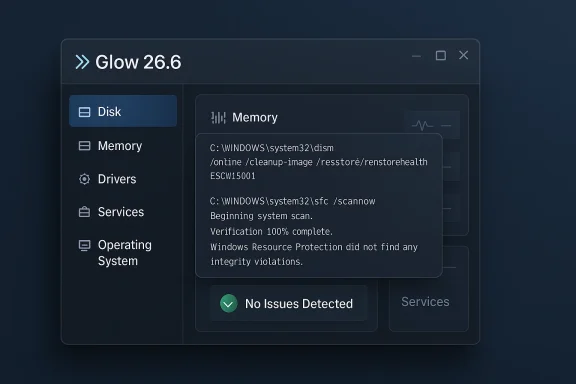
The new “No Issues Detected” notification also matters. It prevents the awkward ambiguity that happens when a repair tool ends without obvious problems but gives the user too little feedback. A diagnostic utility should ideally tell the truth in a way that is both technical and legible, and this release moves Glow closer to that standard.
The ability to watch CMD operations in real time inside the interface is equally important. Many utilities still make users bounce between a GUI and a hidden console, which breaks the flow of troubleshooting. Glow now behaves more like a guided tool and less like a wrapper around command-line output.
Glow’s improvement here is not only technical but psychological. Users are more likely to trust a repair process when they can see what happened, what command ran, and whether the result was a pass, a repair, or a failure.
The Memory Test Tool gets a processing update as well, and the release notes describe it as more stable and more accurate. Memory testing does not need to be flashy; it needs to be repeatable and trustworthy. Any change that improves stability in this area is likely to matter more than a cosmetic addition because false confidence is the real enemy here.
Glow also fixes various RAM calculation issues across the app. That is the kind of bug that can undermine confidence in the entire product because memory figures are among the first stats users check when diagnosing a slowdown, upgrade mismatch, or capacity problem. If the numbers are off, the utility loses credibility quickly.
Glow also fixes a problem where the “Registered User Account” field could appear empty on some systems. It now shows “Unknown” if detection fails, which is a sensible fallback. In diagnostic software, missing data should almost never be presented as blank space if there is a clear semantic alternative.
Another fix addresses the TSNaturalSortKey algorithm, which could sort incorrectly in some languages. That matters more than it may appear because sorting determines how readable lists feel. When a utility claims to present inventory data, a broken sort order can create the impression of broken data even when the underlying records are intact.
The DNS Test Tool also loses its non-functional “Custom DNS Test” feature. That is a healthy decision because dead buttons and broken advanced options erode trust. Users are often willing to accept fewer options if the remaining ones work reliably, and in a troubleshooting tool that trade-off is usually worth making.
There is a broader product lesson here: removing broken or redundant features is not a retreat. It can be a sign that a developer is willing to simplify the mental model and preserve the parts of the app that are actually useful. That is especially important for utilities aimed at quick diagnosis rather than deep laboratory work.
For enterprise users or IT-adjacent power users, the payoff is more subtle but arguably more important. Better driver and service enumeration, more stable shutdown behavior, improved memory testing, and more explicit DISM/SFC reporting make the utility more dependable in real workflows. A tool like this often gets used during incident response, imaging, or remote triage, where confidence and speed matter more than broad feature lists.
The accessibility improvements should not be overlooked in either audience. In corporate environments, accessibility is not just a compliance box; it is part of ensuring that more staff can use the same diagnostic workflows efficiently. In consumer settings, it simply means a more humane tool.
The 26.6 update pushes that position further. Removing dependencies, improving accessibility, and trimming low-value features all make the app more focused. If a user wants a compact utility to answer “what’s in this PC?” rather than a full benchmarking laboratory, Glow becomes a more compelling choice.
The challenge, of course, is that diagnostic software is judged on trust. If another utility presents more fields or more aggressive hardware probing, users may assume it is more complete. Glow’s answer appears to be that completeness should not come at the expense of clarity, reliability, or accessibility.
The most important follow-up would be consistency across sections. If the disk, driver, service, memory, and automation areas continue to converge on the same level of clarity, Glow could develop a reputation for being unusually polished among portable system tools. That sort of reputation is hard to buy and easy to lose.
It will also be worth watching whether the app expands its reporting depth without reintroducing clutter. The smartest path for Glow is probably selective depth: enough detail to be useful, but not so much that the interface becomes a maze.
Source: Neowin Glow 26.6
 Background
Glow sits in a crowded category, but it occupies a useful middle ground between lightweight system scanners and heavyweight diagnostics suites. Its pitch is straightforward: gather hardware and system details in one place, present them cleanly, and export them for troubleshooting. That matters because the average Windows user may need to identify a motherboard revision, check installed RAM, verify storage capacity, or inspect driver and service inventories without jumping through multiple menus or utilities.This kind of tool has always had value for both consumers and technicians, but the reasons changed over time. In earlier Windows eras, users often needed external tools simply to answer basic questions about their PCs. Today, many of those details are available through Settings or Device Manager, yet the fragmented presentation still leaves a gap for support workflows. Glow’s usefulness comes from consolidating those details into a single readable report instead of making users stitch information together manually.
Glow 26.6 lands in that context with a clear emphasis on maturity. The changelog reads less like a flashy feature dump and more like a product getting its internals and user experience aligned. Removing Visual Basic dependencies and unnecessary .NET Framework requirements is especially notable because it reduces friction, simplifies the runtime profile, and makes the app more self-contained. For portable utilities, that is not a cosmetic improvement; it is a stability and deployment improvement.
The release also reflects a familiar pattern in systems software: tools become most valuable when they are easiest to use under pressure. Accessibility work, better error reporting, and clearer operational feedback all help in situations where the user is troubleshooting a failing machine, a storage anomaly, or a stubborn repair process. In that sense, Glow 26.6 is as much about trust as it is about features.
What Glow 26.6 Actually Changes
The headline change is the move to pure C#, with Visual Basic dependencies removed. That sounds technical, but it has direct consequences for maintainability and deployment. A simpler codebase generally means fewer runtime surprises, fewer compatibility headaches, and a cleaner foundation for future updates.The second major pillar is accessibility. Glow now includes extensive improvements intended to help visually impaired users, and the release notes specifically mention screen readers presenting content more accurately and consistently. That matters because system utilities often depend on dense text, tree views, and rapidly changing status information, which can be difficult to parse without strong accessibility support.
A third visible change is the addition of Used Disk Space in the Disk section. Until now, users could infer storage health from total capacity or available space, but the new metric makes the app more immediately useful for disk triage. It reduces the need to cross-check different panels when a user simply wants to know how much of a drive is occupied.
Feature additions with immediate value
The release is not just about new items appearing in menus. It also improves how Glow presents the work done by its built-in repair and diagnostic tools, especially the DISM and SFC automation workflow. The new reporting makes it easier to tell what repaired something, or where an error occurred, which is precisely the kind of context support technicians need.Glow also improves the monitoring of commands run through CMD by showing them in real time without requiring a separate console window. That makes the tool more self-explanatory and easier to use on systems where opening and managing console windows adds unnecessary friction.
- Pure C# architecture replaces the older Visual Basic dependency chain.
- Screen-reader improvements make the interface more usable for accessibility tools.
- Used Disk Space adds a practical storage metric in the Disk section.
- Real-time command monitoring improves the automation experience.
- Better repair-status reporting clarifies DISM and SFC outcomes.
Accessibility and UI Polish
Accessibility changes deserve to be treated as core product work, not side notes. Glow 26.6 improves the experience for visually impaired users by making screen-reader output more accurate and more consistent. For a utility that exposes many nested categories and detailed hardware fields, that can dramatically reduce cognitive friction.The interface itself also benefits from the cleanup. The Operating System section has been reorganized so its features appear in a more accurate and structured order. That sounds small, but in diagnostic software, ordering influences comprehension. Users tend to assume the first fields are the most important or the most current, so a better sequence can make the tool feel more trustworthy.
The app also removes unnecessary, non-functional, and low-value content from that same section. In practice, that usually means fewer distractions and less visual noise. A system-information utility is only as good as the speed with which a user can locate the one field they actually need.
Why accessibility is a real product signal
Accessibility improvements also suggest a broader design philosophy. When software gets better for screen-reader users, it often gets better for keyboard users, power users, and anyone working in cluttered environments. Better labeling and more consistent state changes help everyone, not just the audience explicitly mentioned in the changelog.- Screen readers can now interpret content more reliably.
- Operating System section ordering has been cleaned up.
- Low-value items were removed from the interface.
- Clarity over completeness is the new design bias in several sections.
Diagnostic Tools Get More Serious
Glow’s most interesting evolution in 26.6 may be the treatment of its repair and testing tools. The updated DISM and SFC automation workflow now provides better end-of-process reporting, including the stage at which a problem occurred and whether the repair was performed by a particular command. That is a substantial upgrade for support work because it turns an opaque process into something easier to explain to a user.The new “No Issues Detected” notification also matters. It prevents the awkward ambiguity that happens when a repair tool ends without obvious problems but gives the user too little feedback. A diagnostic utility should ideally tell the truth in a way that is both technical and legible, and this release moves Glow closer to that standard.
The ability to watch CMD operations in real time inside the interface is equally important. Many utilities still make users bounce between a GUI and a hidden console, which breaks the flow of troubleshooting. Glow now behaves more like a guided tool and less like a wrapper around command-line output.
SFC and DISM in context
The mention of compatibility with Microsoft’s latest-generation update for the “sfc /scannow” command suggests the developer is keeping pace with changes in Windows servicing behavior. That matters because diagnostic tools that wrap native system commands can fall behind when Microsoft changes output, timing, or repair semantics. A stale wrapper can be worse than no wrapper at all.Glow’s improvement here is not only technical but psychological. Users are more likely to trust a repair process when they can see what happened, what command ran, and whether the result was a pass, a repair, or a failure.
- Clearer repair attribution reduces uncertainty.
- Failure-stage reporting helps troubleshooting.
- Real-time CMD display removes the need for a separate console.
- “No Issues Detected” prevents ambiguous endings.
- Windows compatibility updates keep the automation layer relevant.
Memory, Drivers, and Services
Glow 26.6 also sharpens some of the app’s high-frequency inventory features. The loading algorithm for the Installed Drivers and Installed Services sections has been improved and finalized, with the stated goal of keeping performance fast even on systems with large inventories. That is the right priority: these sections are useful precisely because they become unwieldy on business-class PCs, gaming rigs, and long-lived systems with a lot of software history.The Memory Test Tool gets a processing update as well, and the release notes describe it as more stable and more accurate. Memory testing does not need to be flashy; it needs to be repeatable and trustworthy. Any change that improves stability in this area is likely to matter more than a cosmetic addition because false confidence is the real enemy here.
Glow also fixes various RAM calculation issues across the app. That is the kind of bug that can undermine confidence in the entire product because memory figures are among the first stats users check when diagnosing a slowdown, upgrade mismatch, or capacity problem. If the numbers are off, the utility loses credibility quickly.
Why speed matters in inventory views
A good hardware scanner should feel instant when opening core views, especially on machines with many installed components. Slow driver or service enumeration can make the app feel outdated even if the underlying data is accurate. By finalizing these loading paths, Glow is sending a message that it can scale beyond simple desktops.- Installed Drivers loads faster on complex systems.
- Installed Services is optimized for large inventories.
- Memory testing is more stable and accurate.
- RAM calculations have been corrected throughout the app.
- Inventory performance now better matches real-world enterprise machines.
Bug Fixes That Improve Trust
The bug-fix list is substantial, and it targets issues that affect everyday confidence more than headline features do. Rare shutdown errors caused by asynchronous conflicts have been resolved, and the shutdown process has been optimized for a more reliable workflow. For a portable utility, clean shutdown behavior is essential because users often launch it briefly, collect data, and exit repeatedly.Glow also fixes a problem where the “Registered User Account” field could appear empty on some systems. It now shows “Unknown” if detection fails, which is a sensible fallback. In diagnostic software, missing data should almost never be presented as blank space if there is a clear semantic alternative.
Another fix addresses the TSNaturalSortKey algorithm, which could sort incorrectly in some languages. That matters more than it may appear because sorting determines how readable lists feel. When a utility claims to present inventory data, a broken sort order can create the impression of broken data even when the underlying records are intact.
Small fixes, large confidence gain
The broader effect of these bug fixes is to make Glow feel less brittle. Users of system tools quickly notice when fields behave inconsistently, when values disappear, or when the app exits with a hiccup. By addressing those edges, the developer is improving the utility’s perceived professionalism.- Shutdown reliability has been strengthened.
- Empty account fields now fall back to “Unknown.”
- RAM calculation issues have been fixed.
- Sorting bugs in certain languages have been corrected.
- Background task conflicts are no longer causing rare failures.
Removed Features and the Case for Less
The removal list is as important as the additions. Glow 26.6 trims unnecessary, non-functional, and low-value content from the Operating System section, which suggests the app is becoming more disciplined about what it shows. System utilities can suffer from feature creep very quickly, especially when every release adds another field, counter, or section.The DNS Test Tool also loses its non-functional “Custom DNS Test” feature. That is a healthy decision because dead buttons and broken advanced options erode trust. Users are often willing to accept fewer options if the remaining ones work reliably, and in a troubleshooting tool that trade-off is usually worth making.
There is a broader product lesson here: removing broken or redundant features is not a retreat. It can be a sign that a developer is willing to simplify the mental model and preserve the parts of the app that are actually useful. That is especially important for utilities aimed at quick diagnosis rather than deep laboratory work.
Why pruning matters
Pruning also makes documentation and support easier. Every unused option left in the interface creates a tiny support burden and a potential confusion point. If a feature does not work and cannot be justified, getting rid of it is often the best maintenance decision.- Operating System clutter has been trimmed.
- Custom DNS Test was removed because it was non-functional.
- Interface complexity is lower after the cleanup.
- Support burden should shrink as a result.
- User trust improves when dead features disappear.
Enterprise and Consumer Impact
For consumers, the main appeal of Glow 26.6 is convenience. It gives them a cleaner way to inspect a PC’s hardware, storage, memory, and operating-system details without needing to jump into multiple Windows components. The new disk-space metric, better RAM reporting, and clearer repair output make it more useful for everyday support calls and self-help troubleshooting.For enterprise users or IT-adjacent power users, the payoff is more subtle but arguably more important. Better driver and service enumeration, more stable shutdown behavior, improved memory testing, and more explicit DISM/SFC reporting make the utility more dependable in real workflows. A tool like this often gets used during incident response, imaging, or remote triage, where confidence and speed matter more than broad feature lists.
The accessibility improvements should not be overlooked in either audience. In corporate environments, accessibility is not just a compliance box; it is part of ensuring that more staff can use the same diagnostic workflows efficiently. In consumer settings, it simply means a more humane tool.
Different audiences, different wins
Glow is not trying to become an all-purpose endpoint management platform, and that is fine. Its value lies in reducing friction for people who need answers quickly. That makes the 26.6 update a pragmatic release for both home users and support teams.- Consumers get clearer system summaries.
- Technicians get better repair reporting.
- Accessibility users get a stronger interface.
- Power users benefit from more stable tooling.
- Portable-use scenarios remain a strong fit.
Competitive Positioning
Glow does not compete by trying to out-muscle the biggest diagnostic suites; it competes by being lighter, cleaner, and easier to approach. That is a smart posture in a category where some tools become bloated with sensors, benchmarks, overlays, and marketing-driven extras. Glow’s restrained interface and portable distribution remain part of its appeal.The 26.6 update pushes that position further. Removing dependencies, improving accessibility, and trimming low-value features all make the app more focused. If a user wants a compact utility to answer “what’s in this PC?” rather than a full benchmarking laboratory, Glow becomes a more compelling choice.
The challenge, of course, is that diagnostic software is judged on trust. If another utility presents more fields or more aggressive hardware probing, users may assume it is more complete. Glow’s answer appears to be that completeness should not come at the expense of clarity, reliability, or accessibility.
Where it stands out
This release does not try to win on spectacle. It tries to win on practical usefulness, which is often the better long-term strategy for utilities that live or die by word of mouth.- Lean structure over feature sprawl.
- Portable workflow over installation-heavy design.
- Readable reporting over dense raw output.
- Accessibility as a differentiator.
- Repair transparency as a trust builder.
Strengths and Opportunities
Glow 26.6’s strongest quality is that it treats polish as product value, not afterthought. That creates opportunities to win users who are tired of bloated utilities and want a tool that feels modern, direct, and dependable.- Pure C# rewrite reduces dependency complexity.
- Accessibility gains widen the potential audience.
- Disk usage visibility makes the app more immediately useful.
- Better command reporting improves troubleshooting value.
- Faster driver/service loading helps on large systems.
- Cleaner OS section structure improves readability.
- Removal of dead features reduces confusion.
- Portable, unzip-and-run workflow remains convenient.
Risks and Concerns
The main risk with a cleanup-focused release is that it can look incremental from the outside, even when the internal value is substantial. Users who only scan changelogs may miss the importance of architecture changes and accessibility improvements.- Feature removals may disappoint users who relied on hidden or niche options.
- Pure C# migration could introduce new edge cases during the transition.
- More explicit reporting may expose failures users previously overlooked.
- Accessibility changes require continuous validation to stay reliable.
- Utility-market expectations are high; any inconsistency hurts trust.
- Portable apps still depend on the user following the unzip-before-use instruction.
- Competition from larger diagnostics suites remains intense.
What to Watch Next
The next version of Glow will be judged less by the number of new items it adds and more by how well this 26.6 foundation holds up in the real world. If the developer continues improving stability, accessibility, and report quality, the app could become even more attractive to users who want a compact diagnostics tool without the baggage of a larger suite.The most important follow-up would be consistency across sections. If the disk, driver, service, memory, and automation areas continue to converge on the same level of clarity, Glow could develop a reputation for being unusually polished among portable system tools. That sort of reputation is hard to buy and easy to lose.
It will also be worth watching whether the app expands its reporting depth without reintroducing clutter. The smartest path for Glow is probably selective depth: enough detail to be useful, but not so much that the interface becomes a maze.
- Accessibility validation should continue in future builds.
- Memory-test accuracy needs to be proven under real workloads.
- Driver/service performance should stay fast on large PCs.
- Further cleanup may continue in the Operating System section.
- Additional repair diagnostics could deepen the DISM/SFC workflow.
Source: Neowin Glow 26.6
