

Glow 26.9 is a portable, open-source Windows 10 and Windows 11 system-information utility release that adds broader processor detection, better RAM vendor identification, public IP and ISP reporting, improved search across drivers, services, and applications, and a batch of updater and preloader fixes. The update is not a reinvention of the PC audit tool, but it says something useful about where the category is going. Hardware reporting is becoming less about listing parts and more about surviving a fragmented, privacy-sensitive, ARM-aware computing world.
The old model of the Windows system-information tool assumed a relatively stable universe: x86 PCs, Intel or AMD processors, DIMMs with recognizable vendor IDs, and a network stack whose public-facing identity was somebody else’s problem. Glow 26.9 lands in a messier world. Windows runs on traditional desktops, thin laptops, handhelds, virtual machines, ARM devices, and increasingly exotic development and AI-adjacent hardware.
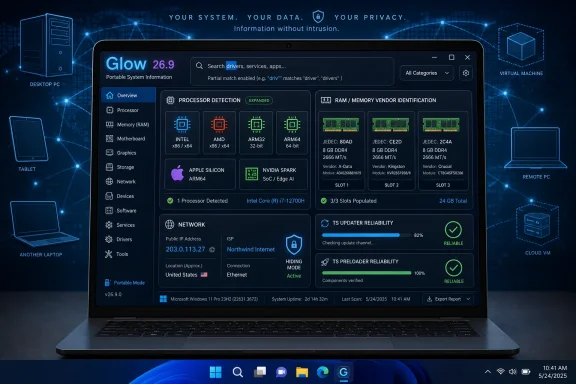
That is why the headline feature in this release is not cosmetic, even though Glow remains a small 1.8 MB download. Its processor detection engine has been expanded beyond the familiar Intel-and-AMD framing to include Apple Silicon, NVIDIA Spark, and more precise ARM32 versus ARM64 identification. For a Windows utility, acknowledging Apple Silicon may sound odd at first glance, but it reflects the practical reality of cross-platform inventories, virtualized environments, remote troubleshooting, and the way modern hardware labels leak across tooling ecosystems.
The important shift is that Glow is trying to avoid the most embarrassing failure mode of diagnostic software: confidently saying something vague. “Unknown processor,” “unknown manufacturer,” or “generic ARM” may be technically safe, but they are operationally weak. A user asking for help on a forum, a technician validating a fleet, or a sysadmin comparing machine reports needs names and architectures that correspond to reality.
Glow 26.9’s changelog reads like a maintenance release, but the maintenance is happening in exactly the places where hardware-reporting tools often age badly. Processor families diversify. JEDEC vendor codes accumulate. Windows Defender gets in the way of first launch. Update routines need to handle edge cases that users only notice when they fail.
Glow 26.9’s native support for modern platforms such as Apple Silicon and NVIDIA Spark is interesting because it broadens the definition of what a “computer report” needs to understand. Even if a typical WindowsForum reader is running Windows 11 on a Ryzen desktop or Core Ultra laptop, the surrounding ecosystem is less homogeneous than it used to be. Developers test across architectures, enthusiasts experiment with emulation, and organizations increasingly blend local devices with cloud, virtual, and edge environments.
The ARM32 and ARM64 distinction is especially practical. “ARM-based” is not a diagnosis; it is a category. For compatibility, driver behavior, application deployment, and support scripts, the difference between 32-bit and 64-bit ARM can matter as much as the difference between x86 and x64 did in an earlier generation of Windows administration.
This is also where small utilities earn trust. Windows itself exposes plenty of system details, and heavyweight commercial inventory products can drown a user in data. The value of a tool like Glow is that it can quickly produce a plain-English report that does not force the user to know which WMI class, registry key, or PowerShell command should be queried first.
The risk, of course, is that supporting more architectures creates more opportunity for wrong assumptions. A processor-detection engine is only as good as its mapping logic, its fallback behavior, and its willingness to distinguish between “not detected” and “not supported.” Glow’s update suggests the project is trying to keep pace with a hardware market that is becoming less forgiving of lazy categorization.
For enthusiasts, memory brand identification is often about validation. Did the installed kit match the invoice? Are two modules from different vendors being mixed? Is an instability report tied to a specific DIMM set? Those questions become harder when the tool in front of the user punts to “Unknown Manufacturer.”
For support communities, the improvement has an even simpler payoff. A forum helper can ask for an exported Glow report and see a more complete description of the machine without walking the user through BIOS screens, command-line tools, or third-party utilities with more aggressive installers. That matters because troubleshooting usually breaks down not at the expert’s end, but at the point where the user cannot reliably describe the system.
There is also a subtle trust dimension. When a system-information app correctly identifies ordinary components from common retail brands, users are more likely to believe the rest of the report. When it fails on a familiar memory module, even if the failure is understandable, the whole output starts to look provisional.
Glow’s implementation matters because the changelog says the data is retrieved through ipwho.is, and that Hiding Mode prevents requests from being sent while also keeping the features hidden. That is the right design instinct. A tool that markets itself around system visibility should not quietly turn local inspection into external lookup without a privacy-aware escape hatch.
The distinction between local and external data is not academic. CPU model, motherboard details, installed services, and storage information can generally be gathered from the machine itself. Public IP and ISP reporting require reaching outside the computer, which creates both a network event and a data point. In a corporate environment, that may implicate policy; in a home setting, it may simply surprise a user who thought the tool was offline-only.
Glow’s Hiding Mode therefore becomes more than a presentation feature. It is part of the trust contract. If users are expected to export reports for troubleshooting, the application needs to make it easy to suppress details that identify a network, account environment, or location-adjacent metadata.
That said, public IP and ISP visibility will be welcomed by many support volunteers. “What does the outside world see?” is often the missing question in home networking threads. By placing it in the same report as adapter, DNS, and connectivity information, Glow reduces the number of separate websites and screenshots a user must juggle.
Search is one of those features that separates a viewer from a working tool. A static inventory dump may be complete, but completeness becomes a liability when the user has to scroll through hundreds of entries. If Glow’s search can tolerate partial memory of a driver name or a service display name, it becomes more usable under the conditions where people actually need it: while diagnosing a fault, following advice, or comparing two machines.
Drivers and services are particularly important because they are where Windows problems often hide. Blue screens, update failures, network weirdness, gaming anti-cheat conflicts, RGB-control software, VPN clients, and storage utilities all leave traces there. A more forgiving search model means the user does not need to know the exact vendor spelling before the tool becomes useful.
There is a broader trend here, too. System utilities used to compete on how much they could expose. Modern utilities compete on how quickly they can get a user from “something is wrong” to “this is the relevant thing.” Glow 26.9’s search update is small, but it moves the program in that second direction.
This is not the kind of material that makes a splashy release note, but it matters because updater bugs corrode confidence quickly. A hardware-reporting tool does not need to be dramatic; it needs to be boringly reliable. If the update process misplaces folders or leaves verification files behind, the user starts wondering whether the diagnostic output is as tidy as the program directory is not.
The new validation step for running applications is particularly sensible. Updating an executable while it is active is an old source of file-locking problems, partial replacement, and confusing failures. A preflight check is basic hygiene, but basic hygiene is what keeps small tools from feeling amateurish.
Windows Defender-related first-launch behavior is also worth calling out because it reflects the reality of unsigned or lesser-known portable utilities. Even benign tools can trigger scanning delays, window flicker, or user anxiety when first opened. Fixing the visible symptoms does not remove the security model, but it can make the experience feel less broken.
But portability is not a magic word. Portable apps still need update discipline, clear extraction instructions, predictable file paths, and sensible behavior when launched from restricted locations. The explicit note to unzip the program before running it is not mere housekeeping; compressed-folder execution can break assumptions about write access, companion files, and update behavior.
This is a familiar Windows support trap. A user double-clicks an executable inside a ZIP archive, the shell makes the experience look normal, and then the program behaves strangely because it is not actually running from a normal extracted directory. Glow’s reminder is therefore practical, not patronizing.
The open-source angle also matters, though it should not be romanticized. Open source does not automatically make software safe, accurate, or well maintained. It does, however, give technical users a way to inspect the project, verify claims, and build confidence that a system-information tool is not doing more than it says.
It would be easy to dismiss this as visual churn. For a diagnostic utility, nobody needs a designer loading bar more than they need accurate SMBIOS parsing or a clean export. Yet presentation still affects adoption, especially among less technical users who may distrust a tool that looks abandoned.
Windows utilities have a long history of being powerful but visually frozen in the XP or Windows 7 era. That can be charming for veterans and alarming for everyone else. If Glow wants to be the tool a forum helper can hand to a nervous user, a modern interface is part of reducing friction.
The trick is balance. A system-information tool should not prioritize rounded corners over correctness, nor should it turn diagnostics into a theme showcase. Glow 26.9 appears to treat the UI work as supporting infrastructure rather than the main event, which is the right hierarchy.
The Türkiye splash image is more idiosyncratic. It gives the release a human fingerprint and reflects the developer’s identity, but it also reminds us that small utilities often carry more personality than enterprise software. That can be a strength, as long as the personality does not obscure the purpose of the tool.
For WindowsForum-style troubleshooting, export matters because it compresses the back-and-forth. Instead of asking a user to provide CPU model, motherboard, BIOS version, RAM configuration, GPU, storage devices, network adapter, drivers, services, and Windows version one screenshot at a time, a helper can review a single report. That does not solve the problem automatically, but it improves the starting point.
The privacy challenge returns here. The more complete the report, the more careful users must be about what they share. Public IP, ISP, serial numbers, usernames, device names, installed applications, and service lists can all reveal more than intended. Glow’s Hiding Mode is therefore not a niche feature; it is part of making export practical.
A good diagnostic workflow should assume that users will paste reports into public places. That means sensitive fields should be hideable, labels should be understandable, and the report should be structured enough that helpers can scan it without demanding raw screenshots. Glow’s direction fits that model, though users still need to review exports before posting them.
Trust is the differentiator. A system-information app asks for attention at a sensitive layer of the machine. It names the hardware, enumerates software, reads configuration, and in some cases now reaches out to external services for network identity. Users need to believe both that the tool is accurate and that it is restrained.
Glow 26.9 strengthens the accuracy argument with better CPU and RAM detection. It strengthens the restraint argument by tying public IP and ISP lookup to Hiding Mode. It strengthens the reliability argument through updater and preloader fixes. None of those changes alone is transformative, but together they make the tool feel more serious.
The open-source and portable distribution model helps, particularly for enthusiasts who dislike installers and background services. But the same model also puts pressure on the project to communicate clearly. Users need to know which executable to run, why extraction matters, what data is external, and what Hiding Mode suppresses.
That is the larger lesson of this release. In 2026, a Windows utility cannot merely be useful. It has to be legible. Users want to know what it sees, what it sends, what it stores, and what it changes.
The release is best understood as a convenience layer over information that is otherwise scattered. Windows can disclose much of this data, but not always in one place and not always in a form that travels well. Glow’s value lies in reducing the labor between “please describe your PC” and “here is a coherent report.”
For administrators, that makes Glow more of an ad hoc inspection tool than a fleet standard. Enterprise environments will still rely on Intune, Configuration Manager, PowerShell, asset databases, RMM tools, or security platforms for managed inventory. But when a single troublesome machine falls outside the neat path, a portable reporter can still save time.
For enthusiasts, the attraction is broader. It offers a quick sanity check after a build, upgrade, BIOS flash, Windows reinstall, driver cleanup, or used-PC purchase. The more accurately it identifies modern processors and memory vendors, the more useful it becomes in exactly those scenarios.
The processor changes are the clearest sign of the times. The Windows ecosystem is no longer cleanly described by the assumptions that powered utilities from the classic desktop era. ARM is not a curiosity, AI-oriented developer hardware is entering the conversation, and virtualization continues to blur what a “PC” even means from the software’s point of view.
The RAM vendor updates show the other side of the same problem. Even mundane components require living databases. A tool that does not keep updating its recognition logic slowly becomes less helpful, not because the interface changed, but because the hardware market did.
The network additions show the trade-off. More information can make troubleshooting faster, but it can also make sharing riskier. Glow’s decision to suppress external IP and ISP lookup under Hiding Mode is the right kind of compromise: useful by default for private inspection, controllable when privacy matters.
 Glow’s Small Update Points at a Bigger Hardware Problem
The old model of the Windows system-information tool assumed a relatively stable universe: x86 PCs, Intel or AMD processors, DIMMs with recognizable vendor IDs, and a network stack whose public-facing identity was somebody else’s problem. Glow 26.9 lands in a messier world. Windows runs on traditional desktops, thin laptops, handhelds, virtual machines, ARM devices, and increasingly exotic development and AI-adjacent hardware.That is why the headline feature in this release is not cosmetic, even though Glow remains a small 1.8 MB download. Its processor detection engine has been expanded beyond the familiar Intel-and-AMD framing to include Apple Silicon, NVIDIA Spark, and more precise ARM32 versus ARM64 identification. For a Windows utility, acknowledging Apple Silicon may sound odd at first glance, but it reflects the practical reality of cross-platform inventories, virtualized environments, remote troubleshooting, and the way modern hardware labels leak across tooling ecosystems.
The important shift is that Glow is trying to avoid the most embarrassing failure mode of diagnostic software: confidently saying something vague. “Unknown processor,” “unknown manufacturer,” or “generic ARM” may be technically safe, but they are operationally weak. A user asking for help on a forum, a technician validating a fleet, or a sysadmin comparing machine reports needs names and architectures that correspond to reality.
Glow 26.9’s changelog reads like a maintenance release, but the maintenance is happening in exactly the places where hardware-reporting tools often age badly. Processor families diversify. JEDEC vendor codes accumulate. Windows Defender gets in the way of first launch. Update routines need to handle edge cases that users only notice when they fail.
The Processor Line Is No Longer a Two-Vendor Story
For decades, PC hardware tools could get a long way by treating processor detection as an Intel-versus-AMD exercise with a few model strings and instruction-set flags sprinkled on top. That was never the whole truth, but it was close enough for the mainstream Windows market. It is not close enough now.Glow 26.9’s native support for modern platforms such as Apple Silicon and NVIDIA Spark is interesting because it broadens the definition of what a “computer report” needs to understand. Even if a typical WindowsForum reader is running Windows 11 on a Ryzen desktop or Core Ultra laptop, the surrounding ecosystem is less homogeneous than it used to be. Developers test across architectures, enthusiasts experiment with emulation, and organizations increasingly blend local devices with cloud, virtual, and edge environments.
The ARM32 and ARM64 distinction is especially practical. “ARM-based” is not a diagnosis; it is a category. For compatibility, driver behavior, application deployment, and support scripts, the difference between 32-bit and 64-bit ARM can matter as much as the difference between x86 and x64 did in an earlier generation of Windows administration.
This is also where small utilities earn trust. Windows itself exposes plenty of system details, and heavyweight commercial inventory products can drown a user in data. The value of a tool like Glow is that it can quickly produce a plain-English report that does not force the user to know which WMI class, registry key, or PowerShell command should be queried first.
The risk, of course, is that supporting more architectures creates more opportunity for wrong assumptions. A processor-detection engine is only as good as its mapping logic, its fallback behavior, and its willingness to distinguish between “not detected” and “not supported.” Glow’s update suggests the project is trying to keep pace with a hardware market that is becoming less forgiving of lazy categorization.
RAM Vendor Detection Is a Quietly Useful Fix
The expanded RAM manufacturer identification algorithm may be the least glamorous part of Glow 26.9, but it is one of the most useful for real-world troubleshooting. The release adds JEDEC vendor codes for brands including Patriot, PNY, Team Group, GeIL, Lexar through Longsys, and Asgard/Gloway. That means fewer reports that reduce installed memory to capacity and speed while leaving the manufacturer as a mystery.For enthusiasts, memory brand identification is often about validation. Did the installed kit match the invoice? Are two modules from different vendors being mixed? Is an instability report tied to a specific DIMM set? Those questions become harder when the tool in front of the user punts to “Unknown Manufacturer.”
For support communities, the improvement has an even simpler payoff. A forum helper can ask for an exported Glow report and see a more complete description of the machine without walking the user through BIOS screens, command-line tools, or third-party utilities with more aggressive installers. That matters because troubleshooting usually breaks down not at the expert’s end, but at the point where the user cannot reliably describe the system.
There is also a subtle trust dimension. When a system-information app correctly identifies ordinary components from common retail brands, users are more likely to believe the rest of the report. When it fails on a familiar memory module, even if the failure is understandable, the whole output starts to look provisional.
Network Reporting Crosses Into Privacy Territory
The new public IP address and ISP fields in Glow’s Network section are useful, but they also cross a line that local hardware reporting tools must treat carefully. A public IP address can help diagnose VPN issues, carrier-grade NAT confusion, ISP routing problems, and remote-access failures. It can also expose information a user may not intend to share.Glow’s implementation matters because the changelog says the data is retrieved through ipwho.is, and that Hiding Mode prevents requests from being sent while also keeping the features hidden. That is the right design instinct. A tool that markets itself around system visibility should not quietly turn local inspection into external lookup without a privacy-aware escape hatch.
The distinction between local and external data is not academic. CPU model, motherboard details, installed services, and storage information can generally be gathered from the machine itself. Public IP and ISP reporting require reaching outside the computer, which creates both a network event and a data point. In a corporate environment, that may implicate policy; in a home setting, it may simply surprise a user who thought the tool was offline-only.
Glow’s Hiding Mode therefore becomes more than a presentation feature. It is part of the trust contract. If users are expected to export reports for troubleshooting, the application needs to make it easy to suppress details that identify a network, account environment, or location-adjacent metadata.
That said, public IP and ISP visibility will be welcomed by many support volunteers. “What does the outside world see?” is often the missing question in home networking threads. By placing it in the same report as adapter, DNS, and connectivity information, Glow reduces the number of separate websites and screenshots a user must juggle.
Better Search Is a Quality-of-Life Feature With Administrative Weight
Glow 26.9 also improves search in the Installed Drivers, Installed Services, and Installed Applications sections, adding support for initials, partial matches, and loosely arranged character sequences. That sounds modest until you consider how often Windows troubleshooting involves finding one awkwardly named driver, service, or vendor utility in a long list.Search is one of those features that separates a viewer from a working tool. A static inventory dump may be complete, but completeness becomes a liability when the user has to scroll through hundreds of entries. If Glow’s search can tolerate partial memory of a driver name or a service display name, it becomes more usable under the conditions where people actually need it: while diagnosing a fault, following advice, or comparing two machines.
Drivers and services are particularly important because they are where Windows problems often hide. Blue screens, update failures, network weirdness, gaming anti-cheat conflicts, RGB-control software, VPN clients, and storage utilities all leave traces there. A more forgiving search model means the user does not need to know the exact vendor spelling before the tool becomes useful.
There is a broader trend here, too. System utilities used to compete on how much they could expose. Modern utilities compete on how quickly they can get a user from “something is wrong” to “this is the relevant thing.” Glow 26.9’s search update is small, but it moves the program in that second direction.
The Updater Fixes Are the Boring Part Users Actually Feel
A large chunk of the changelog is devoted to TS Updater fixes and validation. The updater now checks whether the target application is already running before beginning the update process. It also fixes cases where the updated executable could not be located, outdated SHA-256 files were left behind, subfolders could be moved into the root directory, and first launch could flicker or show a temporary white window due to Windows Defender interactions.This is not the kind of material that makes a splashy release note, but it matters because updater bugs corrode confidence quickly. A hardware-reporting tool does not need to be dramatic; it needs to be boringly reliable. If the update process misplaces folders or leaves verification files behind, the user starts wondering whether the diagnostic output is as tidy as the program directory is not.
The new validation step for running applications is particularly sensible. Updating an executable while it is active is an old source of file-locking problems, partial replacement, and confusing failures. A preflight check is basic hygiene, but basic hygiene is what keeps small tools from feeling amateurish.
Windows Defender-related first-launch behavior is also worth calling out because it reflects the reality of unsigned or lesser-known portable utilities. Even benign tools can trigger scanning delays, window flicker, or user anxiety when first opened. Fixing the visible symptoms does not remove the security model, but it can make the experience feel less broken.
Portable Still Means Responsibility
Glow’s no-install design remains one of its strongest selling points. The user downloads an archive, extracts it, runs the executable, and gets a local system report without committing to a full installation. For Windows enthusiasts and support volunteers, that is exactly the right deployment model.But portability is not a magic word. Portable apps still need update discipline, clear extraction instructions, predictable file paths, and sensible behavior when launched from restricted locations. The explicit note to unzip the program before running it is not mere housekeeping; compressed-folder execution can break assumptions about write access, companion files, and update behavior.
This is a familiar Windows support trap. A user double-clicks an executable inside a ZIP archive, the shell makes the experience look normal, and then the program behaves strangely because it is not actually running from a normal extracted directory. Glow’s reminder is therefore practical, not patronizing.
The open-source angle also matters, though it should not be romanticized. Open source does not automatically make software safe, accurate, or well maintained. It does, however, give technical users a way to inspect the project, verify claims, and build confidence that a system-information tool is not doing more than it says.
Cosmetic Work Is Not Just Cosmetic on Windows 11
Glow 26.9 updates the TS Preloader loading bar using the project’s in-house TS Custom Controls graphics library, with smoother rendering and rounded corners that align with Windows 11. The TS Preloader splash image has also been refreshed with a Türkiye-themed stadium design celebrating Türkiye’s qualification for the 2026 FIFA World Cup. The TS Custom Controls module itself moves to version 26.6, promising stability and polish.It would be easy to dismiss this as visual churn. For a diagnostic utility, nobody needs a designer loading bar more than they need accurate SMBIOS parsing or a clean export. Yet presentation still affects adoption, especially among less technical users who may distrust a tool that looks abandoned.
Windows utilities have a long history of being powerful but visually frozen in the XP or Windows 7 era. That can be charming for veterans and alarming for everyone else. If Glow wants to be the tool a forum helper can hand to a nervous user, a modern interface is part of reducing friction.
The trick is balance. A system-information tool should not prioritize rounded corners over correctness, nor should it turn diagnostics into a theme showcase. Glow 26.9 appears to treat the UI work as supporting infrastructure rather than the main event, which is the right hierarchy.
The Türkiye splash image is more idiosyncratic. It gives the release a human fingerprint and reflects the developer’s identity, but it also reminds us that small utilities often carry more personality than enterprise software. That can be a strength, as long as the personality does not obscure the purpose of the tool.
Exportable Reports Remain the Real Killer Feature
Glow’s ability to export gathered data to a plain text file is still one of the most important things about it. The best diagnostic tool is often not the one with the most beautiful interface, but the one whose output can travel cleanly into a forum post, ticket, chat, or email. Plain text is unfashionable, but it is durable.For WindowsForum-style troubleshooting, export matters because it compresses the back-and-forth. Instead of asking a user to provide CPU model, motherboard, BIOS version, RAM configuration, GPU, storage devices, network adapter, drivers, services, and Windows version one screenshot at a time, a helper can review a single report. That does not solve the problem automatically, but it improves the starting point.
The privacy challenge returns here. The more complete the report, the more careful users must be about what they share. Public IP, ISP, serial numbers, usernames, device names, installed applications, and service lists can all reveal more than intended. Glow’s Hiding Mode is therefore not a niche feature; it is part of making export practical.
A good diagnostic workflow should assume that users will paste reports into public places. That means sensitive fields should be hideable, labels should be understandable, and the report should be structured enough that helpers can scan it without demanding raw screenshots. Glow’s direction fits that model, though users still need to review exports before posting them.
The Windows Utility Market Rewards Trust More Than Novelty
Glow exists in a crowded category. Windows already includes Task Manager, Settings, Device Manager, System Information, Event Viewer, PowerShell, Windows Terminal, and more management surfaces than most users will ever open. Third-party tools add everything from lightweight inventory to full telemetry dashboards. In that market, novelty is not enough.Trust is the differentiator. A system-information app asks for attention at a sensitive layer of the machine. It names the hardware, enumerates software, reads configuration, and in some cases now reaches out to external services for network identity. Users need to believe both that the tool is accurate and that it is restrained.
Glow 26.9 strengthens the accuracy argument with better CPU and RAM detection. It strengthens the restraint argument by tying public IP and ISP lookup to Hiding Mode. It strengthens the reliability argument through updater and preloader fixes. None of those changes alone is transformative, but together they make the tool feel more serious.
The open-source and portable distribution model helps, particularly for enthusiasts who dislike installers and background services. But the same model also puts pressure on the project to communicate clearly. Users need to know which executable to run, why extraction matters, what data is external, and what Hiding Mode suppresses.
That is the larger lesson of this release. In 2026, a Windows utility cannot merely be useful. It has to be legible. Users want to know what it sees, what it sends, what it stores, and what it changes.
The Practical Value Is in the Support Thread
For many readers, the immediate question is simple: should Glow 26.9 replace the tools they already use? The better answer is that it may belong in the support toolkit, especially when dealing with non-expert users or mixed hardware environments. It is not a full endpoint-management platform, and it is not trying to be one.The release is best understood as a convenience layer over information that is otherwise scattered. Windows can disclose much of this data, but not always in one place and not always in a form that travels well. Glow’s value lies in reducing the labor between “please describe your PC” and “here is a coherent report.”
For administrators, that makes Glow more of an ad hoc inspection tool than a fleet standard. Enterprise environments will still rely on Intune, Configuration Manager, PowerShell, asset databases, RMM tools, or security platforms for managed inventory. But when a single troublesome machine falls outside the neat path, a portable reporter can still save time.
For enthusiasts, the attraction is broader. It offers a quick sanity check after a build, upgrade, BIOS flash, Windows reinstall, driver cleanup, or used-PC purchase. The more accurately it identifies modern processors and memory vendors, the more useful it becomes in exactly those scenarios.
Glow 26.9 Is a Reminder That Diagnostics Must Evolve With the PC
Glow 26.9 does not arrive as a massive feature release, and that is part of the point. The update is incremental in size but strategic in where it applies pressure: architecture detection, vendor identification, network visibility, search usability, and update reliability. Those are the seams where diagnostic tools either keep up or decay.The processor changes are the clearest sign of the times. The Windows ecosystem is no longer cleanly described by the assumptions that powered utilities from the classic desktop era. ARM is not a curiosity, AI-oriented developer hardware is entering the conversation, and virtualization continues to blur what a “PC” even means from the software’s point of view.
The RAM vendor updates show the other side of the same problem. Even mundane components require living databases. A tool that does not keep updating its recognition logic slowly becomes less helpful, not because the interface changed, but because the hardware market did.
The network additions show the trade-off. More information can make troubleshooting faster, but it can also make sharing riskier. Glow’s decision to suppress external IP and ISP lookup under Hiding Mode is the right kind of compromise: useful by default for private inspection, controllable when privacy matters.
The 26.9 Upgrade Is Worth It for the Machines That Don’t Fit the Old Assumptions
Glow 26.9 is a sensible update for users who already rely on the tool, and it is a more compelling first look for anyone who needs a portable report of a Windows system without installing a heavier inventory suite. The most concrete improvements are not flashy, but they land in places that affect accuracy and trust.- Glow 26.9 expands processor detection beyond the traditional Intel and AMD desktop frame, including better recognition of modern and ARM-based platforms.
- The update improves RAM manufacturer identification by adding JEDEC vendor codes for several common memory brands.
- Public IP address and ISP reporting are now available in the Network section, but Hiding Mode prevents those external lookups and hides the fields.
- Search is more flexible across installed drivers, services, and applications, which should make troubleshooting long software lists less tedious.
- TS Updater and TS Preloader fixes address several reliability and polish problems that could otherwise make a portable utility feel less dependable.
- Users should extract the archive before running Glow, because launching directly from a compressed ZIP can create avoidable errors.
References
- Primary source: Neowin
Published: 2026-06-06T15:10:23.170683
Glow 26.9 | Neowin
Glow is a powerful, open source alternative to Piriform Speccy, providing comprehensive system analysis and hardware insights for optimal performance. www.neowin.net
- Official source: github.com
GitHub - turkaysoft/glow: Advanced System Analysis Software · GitHub
Advanced System Analysis Software. Contribute to turkaysoft/glow development by creating an account on GitHub. github.com
- Related coverage: turkaysoftware.com
- Related coverage: sourceforge.net
Glow OS - Browse /v26.8 at SourceForge.net
Glow OS /v26.8 files. Browse /v26.8 files for Glow OS, System Analysis Software sourceforge.net
- Related coverage: newreleases.io
turkaysoft/glow v26.4 on GitHub
New release turkaysoft/glow version v26.4 Glow v26.4 is available! [MAJOR UPDATE] on GitHub. newreleases.io
- Related coverage: x-cmd.com
Read README in Terminal? glow Renders Markdown Elegantly in CLI | Get it on X-CMD | glow
Alternative to browser or editor—glow renders Markdown in the terminal with TUI, local and GitHub docs. Install via x-cmd and read in focus.www.x-cmd.com
- Related coverage: glowlifetech.com
- Related coverage: med.unc.edu
