

GMKtec’s NucBox K17, reviewed by Notebookcheck on July 4, 2026, is a compact Windows 11 Pro mini PC built around Intel’s Core Ultra 5 226V, combining low power draw, USB4, soldered LPDDR5x memory, and unusually quiet cooling in a metal chassis. Notebookcheck’s testing makes the K17 look less like a tiny workstation and more like a deliberate rebuttal to the idea that small PCs must either scream under load or throttle themselves into irrelevance. The result is a machine whose most important feature is not raw speed, but restraint. For Windows users tired of hot, noisy deskside boxes, that restraint may matter more than another benchmark win.
The mini PC market has spent years living in Intel’s long shadow. The original NUC line trained buyers to expect small, competent, barebones-friendly desktops that could disappear behind a monitor and still run Windows like a “real” PC. Intel stepped away from that business, but the category did not disappear; it fragmented into a noisy field of Chinese OEMs, boutique workstation vendors, AMD-powered performance boxes, and corporate fleet devices trying to become the spiritual successor to the NUC.
GMKtec’s NucBox K17 lands in that post-NUC world with a familiar pitch: a small metal Windows PC with laptop silicon, modern ports, and enough performance for office work, media, and light creative tasks. What separates it from a dozen similar listings is the processor choice. Instead of chasing the highest-wattage Ryzen mobile chip or cramming a discrete GPU into a shoebox, GMKtec uses Intel’s Lunar Lake-era Core Ultra 5 226V.
That decision defines the machine. Intel’s Core Ultra 5 226V is an eight-core, eight-thread part with four performance cores and four efficiency cores, paired with Intel Arc Graphics 130V and an NPU intended for local AI acceleration. Intel’s own product material positions these Core Ultra chips as AI PC silicon, but in the K17 the more immediate story is mundane in the best possible way: the platform sips power, runs cool, and gives GMKtec enough thermal headroom to keep the fan subdued.
Notebookcheck’s review, written by Sebastian Bade and published with the site’s usual lab-style measurements, gives the K17 an 82 percent score and frames it as one of the more interesting compact PCs in its class for buyers prioritizing quiet operation. That is not the same thing as calling it the fastest mini PC. In fact, much of the review’s value comes from showing where the K17 deliberately does not compete.
That is why Notebookcheck’s noise figures are more than a curiosity. The site measured the NucBox K17 at roughly 25.3 to 26.1 dB(A) while idle and 27.4 to 28.6 dB(A) under load, with an environmental baseline of 25.1 dB(A). In practical terms, the review sample was close to the room’s own noise floor much of the time.
This is the K17’s central achievement. A mini PC does not need to be silent in the abstract; it needs to avoid calling attention to itself while compiling code, running a browser full of tabs, handling Teams calls, driving multiple monitors, or sitting beside a microphone. Notebookcheck specifically notes that the fan control avoids annoying sudden ramp-ups, which is often the difference between a machine that measures well and one that feels well-behaved.
The K17 therefore competes less with high-performance desktops than with the accumulated irritation of modern computing. A loud fan during a video call, a ramping blower during a spreadsheet recalculation, or a box that gets audibly nervous every time Windows Defender wakes up can make a machine feel cheap even when its silicon is expensive. GMKtec appears to have understood that acoustics are part of performance, not an afterthought.
Notebookcheck reports that the K17 runs its Core Ultra 5 226V at a 25-watt sustained power limit under factory settings. That is a modest envelope by desktop standards, but it is enough for a small Windows machine aimed at everyday productivity. It also prevents the design from needing the kind of aggressive cooling that can turn compact PCs into miniature leaf blowers.
The benchmark picture follows from that choice. In Cinebench R15 multi-core testing, Notebookcheck recorded 1,253 points for the K17, well behind Ryzen-based competitors such as the Minisforum AI X1 with Ryzen 7 255 and the Alliwava GH8 with Ryzen 9 8945HS. In the sustained Cinebench R15 loop, however, the K17 averaged 1,226 points, showing that its performance remained stable rather than falling off after the first burst.
That trade-off is important. Many compact PCs look impressive in short benchmarks because they allow a processor to boost hard for a few seconds before physics takes over. The K17’s argument is different: it would rather be predictable. For users who spend their day inside Windows applications rather than benchmark charts, predictable performance with low heat and low noise may be a more honest kind of speed.
That matters because the mini PC category attracts two very different buyers. One wants a small, reliable Windows desktop for office work, browsing, media, remote administration, light coding, and general productivity. The other wants a tiny workstation: something that can crunch exports, run local AI models, handle heavier games, or replace a larger tower in a constrained space.
The K17 is aimed squarely at the first group, even if its AI PC branding gestures toward the second. Its Arc Graphics 130V is useful for media acceleration, display output, light gaming, and general GPU-assisted desktop work, but it does not turn the machine into a graphics powerhouse. Notebookcheck’s gaming and graphics results put it in the realm of competent integrated graphics rather than compact-console replacement.
That distinction is healthy. The mini PC market has become crowded with machines that blur their own identity, promising workstation ambition in cases and cooling systems better suited to office desktops. The K17 is more coherent. It is a low-noise productivity machine that can stretch into multimedia and light creative work, not a stealth gaming rig or a mini rendering farm.
This is exactly where a modern mini PC needs to be good. The box itself is small, but the desktop around it can become complex quickly: dual monitors, a webcam, external SSDs, audio devices, keyboards, mice, card readers, and sometimes a dock that turns a tiny system into a full desk setup. USB4 does not solve every problem, but it prevents the K17 from feeling trapped by its own size.
Networking is more mixed but still broadly credible. The K17 uses a MediaTek Wi-Fi 6E module and Intel I226-V Ethernet, giving it the kind of wired and wireless connectivity expected from a midrange mini PC in 2026. Notebookcheck’s Wi-Fi results vary by test scenario, but the overall impression is not of a machine held back by bargain-bin connectivity.
The conspicuous missing feature is OCuLink. Enthusiasts increasingly look for OCuLink on mini PCs because it provides a more direct path for external GPU setups than USB4 or Thunderbolt-style solutions. Notebookcheck lists the absence of OCuLink as a con, and that is fair. But it is also consistent with the K17’s identity: GMKtec is selling a quiet, efficient desktop, not the most expandable toy box for the external GPU crowd.
There is a technical reason for the compromise. Lunar Lake’s memory strategy ties the platform closely to on-package or integrated low-power memory configurations, emphasizing efficiency and bandwidth rather than user replaceability. That helps the K17 deliver the low power draw and quiet behavior that make it attractive, but it also means buyers must choose the right memory capacity up front.
For many office and home users, 16 GB remains adequate. Windows 11 Pro, Microsoft 365 apps, browser-heavy workflows, remote desktops, media playback, and light photo work can all live comfortably inside that envelope if the system is not abused. But “adequate” is not the same as future-proof, especially as browsers, Electron apps, local AI tools, and creative software continue to inflate their appetites.
This is the K17’s most obvious long-term risk. Storage can be expanded through an additional M.2 slot, and Notebookcheck notes that maintenance access is straightforward once the bottom panel is removed. Memory, however, is fixed. Anyone thinking of using the K17 as a five-year main desktop should treat the soldered 16 GB not as a footnote, but as a buying decision.
This does not necessarily ruin the K17. For ordinary office and browser use, many users will never stress the SSD long enough to care. Windows boots, apps open, and files move quickly enough that the system feels modern. But the finding is a warning against judging mini PCs solely by CPU and port lists.
Storage consistency matters because it shapes the machine’s feel under pressure. A quiet CPU platform paired with a wobbly SSD can still stumble during large downloads, game installs, development environments, virtual machine images, or bulk media transfers. The irony is that the K17’s stable processor behavior makes the SSD variability stand out more clearly.
The good news is that storage is the one major internal component GMKtec leaves room to improve. Notebookcheck notes an additional M.2 slot, which gives buyers a path to expand or reconfigure storage. The bad news is that replacing or supplementing a drive adds cost, and cost is central to whether the K17’s balanced design feels like value or compromise.
This is where the K17’s argument becomes persuasive for real deployments. A mini PC that runs all day in a home office, a small business, a classroom, a reception desk, or a lab bench does not merely need to be fast enough. It needs to be cool enough, quiet enough, and cheap enough to leave on without thinking about it.
Energy use also feeds back into acoustics and reliability. Lower power means less heat, less fan speed, less dust pulled through the chassis, and potentially less stress on internal components over time. None of that is as exciting as a benchmark crown, but it is exactly what many administrators and power users want from always-on endpoint hardware.
The included 100-watt power supply is more than sufficient for the measured behavior. That headroom matters less as a performance promise than as evidence that the machine is not operating on the edge of its power budget. The K17 is not trying to be heroic; it is trying to be composed.
That does not automatically make the K17 an enterprise endpoint. Larger organizations will still care about vendor support, firmware update practices, warranty handling, supply consistency, manageability, and device lifecycle guarantees. GMKtec is not Dell, HP, or Lenovo, and bargain-friendly mini PCs often live outside the procurement comfort zone of managed fleets.
Still, Windows 11 Pro gives the K17 more credibility as a serious desk machine. It can serve as a compact admin workstation, a digital signage controller, a light development box, a conference-room PC, a home lab node, or a secondary desktop for remote access. Its low noise and low power draw make it especially well suited to places where a conventional tower would be overkill.
The AI PC angle may become more relevant over time, but Windows buyers should be sober about that. An NPU is useful only when software meaningfully uses it, and local AI features remain uneven across the Windows ecosystem. Today, the K17’s best Windows feature is not the promise of future AI acceleration; it is that it behaves like a calm, efficient Windows Pro desktop right now.
Its value proposition depends on whether the buyer prices quiet operation, energy efficiency, and compactness as first-class features. If the answer is yes, the K17 makes sense. It is not merely small; it is small without sounding strained. It is not merely efficient; it is efficient while remaining stable under sustained CPU load.
If the buyer’s priority is maximum CPU throughput, the K17 becomes harder to justify. Notebookcheck’s comparison data shows Ryzen systems pulling far ahead in multithreaded tests. If the goal is gaming, the K17 is likewise not the obvious pick. If the goal is memory expandability, the soldered LPDDR5x is a hard stop.
That is not a flaw in the review’s conclusion; it is the conclusion. The K17 is a good machine for a specific kind of user, and a mediocre deal for the wrong one. The mini PC market is mature enough that this kind of specialization should be welcomed. Not every box needs to pretend it can do everything.
That shift turns mini PCs into thermal design contests. The question is no longer whether laptop silicon can run Windows acceptably in a small box. It plainly can. The question is whether a manufacturer can choose the right chip, set the right power limits, tune the fan curve, provide enough ports, and avoid sabotaging the result with bad storage, noisy cooling, or poor firmware.
Notebookcheck’s K17 review suggests GMKtec got more of those decisions right than wrong. The metal chassis is sturdy, access is straightforward, the port selection is modern, and the CPU performance remains stable. The machine’s weaknesses are equally concrete: soldered RAM, SSD inconsistency, no OCuLink, and performance profiles that can only be changed in UEFI rather than through a convenient Windows utility.
That last point is small but revealing. Enthusiasts like control, and mini PC buyers increasingly expect software-level tuning for performance modes, fan profiles, and firmware features. Hiding performance profiles in UEFI makes the K17 feel more appliance-like. That may suit ordinary users, but it limits the kind of tinkering that WindowsForum readers often enjoy.
Boost behavior can be useful, but in small systems it often becomes a kind of performance theater. A processor spikes, a score improves, the fan catches up, clocks drop, and the user is left with a machine that feels inconsistent. The K17’s steady Cinebench loop and modest acoustics suggest a more conservative philosophy.
That philosophy will not win every comparison table. It will, however, win a place on desks where the owner values not noticing the computer. In an office, studio, bedroom, or shared workspace, the best mini PC may be the one that does its job without becoming part of the room’s soundscape.
This is also where Intel’s Core Ultra 5 226V looks better in practice than it might in a spec-war discussion. Lunar Lake is not the answer to every mini PC workload, but it is well matched to a compact, quiet desktop. In the K17, Intel’s efficiency story finally has a form factor that makes the benefit obvious.
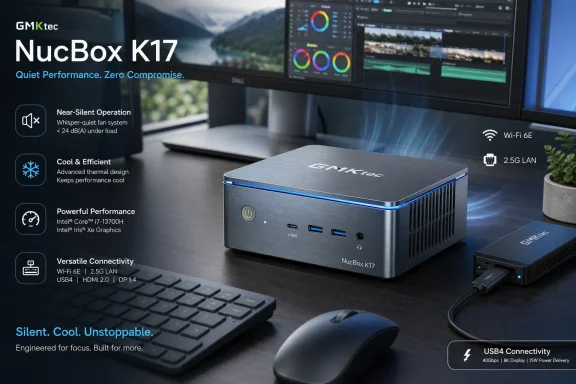 GMKtec Finds a Lane Between NUC Nostalgia and AI PC Hype
The mini PC market has spent years living in Intel’s long shadow. The original NUC line trained buyers to expect small, competent, barebones-friendly desktops that could disappear behind a monitor and still run Windows like a “real” PC. Intel stepped away from that business, but the category did not disappear; it fragmented into a noisy field of Chinese OEMs, boutique workstation vendors, AMD-powered performance boxes, and corporate fleet devices trying to become the spiritual successor to the NUC.GMKtec’s NucBox K17 lands in that post-NUC world with a familiar pitch: a small metal Windows PC with laptop silicon, modern ports, and enough performance for office work, media, and light creative tasks. What separates it from a dozen similar listings is the processor choice. Instead of chasing the highest-wattage Ryzen mobile chip or cramming a discrete GPU into a shoebox, GMKtec uses Intel’s Lunar Lake-era Core Ultra 5 226V.
That decision defines the machine. Intel’s Core Ultra 5 226V is an eight-core, eight-thread part with four performance cores and four efficiency cores, paired with Intel Arc Graphics 130V and an NPU intended for local AI acceleration. Intel’s own product material positions these Core Ultra chips as AI PC silicon, but in the K17 the more immediate story is mundane in the best possible way: the platform sips power, runs cool, and gives GMKtec enough thermal headroom to keep the fan subdued.
Notebookcheck’s review, written by Sebastian Bade and published with the site’s usual lab-style measurements, gives the K17 an 82 percent score and frames it as one of the more interesting compact PCs in its class for buyers prioritizing quiet operation. That is not the same thing as calling it the fastest mini PC. In fact, much of the review’s value comes from showing where the K17 deliberately does not compete.
The Quiet PC Is Not a Luxury Feature Anymore
For years, noise has been treated as a secondary specification: something reviewers measure, enthusiasts complain about, and mainstream buyers discover only after the return window closes. That hierarchy made sense when desktops lived under desks and laptops were the devices expected to behave politely. Mini PCs change the equation because they often sit on the desk, behind a monitor, in a bedroom, in a home office, or next to audio equipment.That is why Notebookcheck’s noise figures are more than a curiosity. The site measured the NucBox K17 at roughly 25.3 to 26.1 dB(A) while idle and 27.4 to 28.6 dB(A) under load, with an environmental baseline of 25.1 dB(A). In practical terms, the review sample was close to the room’s own noise floor much of the time.
This is the K17’s central achievement. A mini PC does not need to be silent in the abstract; it needs to avoid calling attention to itself while compiling code, running a browser full of tabs, handling Teams calls, driving multiple monitors, or sitting beside a microphone. Notebookcheck specifically notes that the fan control avoids annoying sudden ramp-ups, which is often the difference between a machine that measures well and one that feels well-behaved.
The K17 therefore competes less with high-performance desktops than with the accumulated irritation of modern computing. A loud fan during a video call, a ramping blower during a spreadsheet recalculation, or a box that gets audibly nervous every time Windows Defender wakes up can make a machine feel cheap even when its silicon is expensive. GMKtec appears to have understood that acoustics are part of performance, not an afterthought.
Lunar Lake’s Real Win Is Discipline, Not Drama
Intel’s Core Ultra branding has been dragged into the AI PC marketing cycle, where TOPS figures, NPUs, and future Windows features tend to dominate the brochure. The K17 is a useful reminder that Lunar Lake’s more persuasive near-term value may be efficiency. A quiet mini PC is not built by slogans; it is built by matching silicon behavior to cooling capacity and power limits.Notebookcheck reports that the K17 runs its Core Ultra 5 226V at a 25-watt sustained power limit under factory settings. That is a modest envelope by desktop standards, but it is enough for a small Windows machine aimed at everyday productivity. It also prevents the design from needing the kind of aggressive cooling that can turn compact PCs into miniature leaf blowers.
The benchmark picture follows from that choice. In Cinebench R15 multi-core testing, Notebookcheck recorded 1,253 points for the K17, well behind Ryzen-based competitors such as the Minisforum AI X1 with Ryzen 7 255 and the Alliwava GH8 with Ryzen 9 8945HS. In the sustained Cinebench R15 loop, however, the K17 averaged 1,226 points, showing that its performance remained stable rather than falling off after the first burst.
That trade-off is important. Many compact PCs look impressive in short benchmarks because they allow a processor to boost hard for a few seconds before physics takes over. The K17’s argument is different: it would rather be predictable. For users who spend their day inside Windows applications rather than benchmark charts, predictable performance with low heat and low noise may be a more honest kind of speed.
AMD Still Owns the Heavy Lifting
The K17’s quiet competence should not be mistaken for category dominance. Notebookcheck’s own comparison data makes clear that AMD-powered systems remain stronger choices for buyers who regularly need high multithreaded CPU performance or more powerful integrated graphics. The review specifically points to newer Ryzen AI systems such as the Minisforum AI X1 and Alliwava GH8 as better options for those workloads.That matters because the mini PC category attracts two very different buyers. One wants a small, reliable Windows desktop for office work, browsing, media, remote administration, light coding, and general productivity. The other wants a tiny workstation: something that can crunch exports, run local AI models, handle heavier games, or replace a larger tower in a constrained space.
The K17 is aimed squarely at the first group, even if its AI PC branding gestures toward the second. Its Arc Graphics 130V is useful for media acceleration, display output, light gaming, and general GPU-assisted desktop work, but it does not turn the machine into a graphics powerhouse. Notebookcheck’s gaming and graphics results put it in the realm of competent integrated graphics rather than compact-console replacement.
That distinction is healthy. The mini PC market has become crowded with machines that blur their own identity, promising workstation ambition in cases and cooling systems better suited to office desktops. The K17 is more coherent. It is a low-noise productivity machine that can stretch into multimedia and light creative work, not a stealth gaming rig or a mini rendering farm.
The Port Selection Is Sensible, With One Enthusiast Omission
Notebookcheck’s spec table gives the K17 a practical set of connections: USB4 at 40 Gbps, multiple USB-A ports, HDMI outputs, DisplayPort, Ethernet, Wi-Fi 6E, Bluetooth 5.2, and USB-C Power Delivery. The inclusion of USB4 is particularly important because it gives a small system a high-speed escape hatch for docks, storage, displays, and other peripherals. Notebookcheck measured strong USB4 external storage performance with an ADATA SE920, placing the K17 near the top of its comparison set.This is exactly where a modern mini PC needs to be good. The box itself is small, but the desktop around it can become complex quickly: dual monitors, a webcam, external SSDs, audio devices, keyboards, mice, card readers, and sometimes a dock that turns a tiny system into a full desk setup. USB4 does not solve every problem, but it prevents the K17 from feeling trapped by its own size.
Networking is more mixed but still broadly credible. The K17 uses a MediaTek Wi-Fi 6E module and Intel I226-V Ethernet, giving it the kind of wired and wireless connectivity expected from a midrange mini PC in 2026. Notebookcheck’s Wi-Fi results vary by test scenario, but the overall impression is not of a machine held back by bargain-bin connectivity.
The conspicuous missing feature is OCuLink. Enthusiasts increasingly look for OCuLink on mini PCs because it provides a more direct path for external GPU setups than USB4 or Thunderbolt-style solutions. Notebookcheck lists the absence of OCuLink as a con, and that is fair. But it is also consistent with the K17’s identity: GMKtec is selling a quiet, efficient desktop, not the most expandable toy box for the external GPU crowd.
Soldered Memory Is the Price of the Platform
The K17’s 16 GB of LPDDR5x-8533 memory is fast, but it is soldered. Notebookcheck flags that as a limitation, and many WindowsForum readers will instinctively agree. Upgradeable RAM is one of the old virtues of the desktop PC, and mini PCs that abandon it inherit one of the worst habits of laptops.There is a technical reason for the compromise. Lunar Lake’s memory strategy ties the platform closely to on-package or integrated low-power memory configurations, emphasizing efficiency and bandwidth rather than user replaceability. That helps the K17 deliver the low power draw and quiet behavior that make it attractive, but it also means buyers must choose the right memory capacity up front.
For many office and home users, 16 GB remains adequate. Windows 11 Pro, Microsoft 365 apps, browser-heavy workflows, remote desktops, media playback, and light photo work can all live comfortably inside that envelope if the system is not abused. But “adequate” is not the same as future-proof, especially as browsers, Electron apps, local AI tools, and creative software continue to inflate their appetites.
This is the K17’s most obvious long-term risk. Storage can be expanded through an additional M.2 slot, and Notebookcheck notes that maintenance access is straightforward once the bottom panel is removed. Memory, however, is fixed. Anyone thinking of using the K17 as a five-year main desktop should treat the soldered 16 GB not as a footnote, but as a buying decision.
The SSD Is the Weak Link in an Otherwise Controlled Design
Notebookcheck’s review identifies another blemish: the Huawei eKitStor Xtreme 200E SSD shows unstable performance under sustained load. That is the kind of problem that can be invisible in spec sheets and obvious in real workflows. A 1 TB PCIe SSD sounds fine until prolonged transfers, indexing, installs, or scratch-heavy workloads reveal that the drive cannot hold its pace.This does not necessarily ruin the K17. For ordinary office and browser use, many users will never stress the SSD long enough to care. Windows boots, apps open, and files move quickly enough that the system feels modern. But the finding is a warning against judging mini PCs solely by CPU and port lists.
Storage consistency matters because it shapes the machine’s feel under pressure. A quiet CPU platform paired with a wobbly SSD can still stumble during large downloads, game installs, development environments, virtual machine images, or bulk media transfers. The irony is that the K17’s stable processor behavior makes the SSD variability stand out more clearly.
The good news is that storage is the one major internal component GMKtec leaves room to improve. Notebookcheck notes an additional M.2 slot, which gives buyers a path to expand or reconfigure storage. The bad news is that replacing or supplementing a drive adds cost, and cost is central to whether the K17’s balanced design feels like value or compromise.
Power Draw Makes the Case Better Than the Marketing Does
The strongest numbers in Notebookcheck’s review may be the least glamorous. The K17 drew 4.7 to 9.6 watts at idle and 32.7 to 41.3 watts under load, according to the site’s measurements. In Cyberpunk 2077 testing on an external monitor, the system drew 39.5 watts, far below several more powerful AMD-based comparison machines.This is where the K17’s argument becomes persuasive for real deployments. A mini PC that runs all day in a home office, a small business, a classroom, a reception desk, or a lab bench does not merely need to be fast enough. It needs to be cool enough, quiet enough, and cheap enough to leave on without thinking about it.
Energy use also feeds back into acoustics and reliability. Lower power means less heat, less fan speed, less dust pulled through the chassis, and potentially less stress on internal components over time. None of that is as exciting as a benchmark crown, but it is exactly what many administrators and power users want from always-on endpoint hardware.
The included 100-watt power supply is more than sufficient for the measured behavior. That headroom matters less as a performance promise than as evidence that the machine is not operating on the edge of its power budget. The K17 is not trying to be heroic; it is trying to be composed.
Windows 11 Pro Gives the Box a Business Accent
The K17 ships with Windows 11 Pro, according to Notebookcheck’s spec listing. That is a practical advantage over consumer-focused mini PCs that arrive with Windows Home or vague licensing arrangements. For IT-minded buyers, Windows 11 Pro means BitLocker, Remote Desktop host capability, domain join, Group Policy support, Hyper-V availability, and a smoother fit into small business or lab environments.That does not automatically make the K17 an enterprise endpoint. Larger organizations will still care about vendor support, firmware update practices, warranty handling, supply consistency, manageability, and device lifecycle guarantees. GMKtec is not Dell, HP, or Lenovo, and bargain-friendly mini PCs often live outside the procurement comfort zone of managed fleets.
Still, Windows 11 Pro gives the K17 more credibility as a serious desk machine. It can serve as a compact admin workstation, a digital signage controller, a light development box, a conference-room PC, a home lab node, or a secondary desktop for remote access. Its low noise and low power draw make it especially well suited to places where a conventional tower would be overkill.
The AI PC angle may become more relevant over time, but Windows buyers should be sober about that. An NPU is useful only when software meaningfully uses it, and local AI features remain uneven across the Windows ecosystem. Today, the K17’s best Windows feature is not the promise of future AI acceleration; it is that it behaves like a calm, efficient Windows Pro desktop right now.
The Price Is Fair Only If Silence Has Value
Notebookcheck lists the NucBox K17 at $619.99 on Amazon and starting at $559 through GMKtec’s own online store at the time of publication. That puts it in a competitive midrange band where buyers can find faster AMD mini PCs, cheaper older-generation boxes, and refurbished business desktops with stronger serviceability. The K17 therefore cannot win purely on dollars per benchmark point.Its value proposition depends on whether the buyer prices quiet operation, energy efficiency, and compactness as first-class features. If the answer is yes, the K17 makes sense. It is not merely small; it is small without sounding strained. It is not merely efficient; it is efficient while remaining stable under sustained CPU load.
If the buyer’s priority is maximum CPU throughput, the K17 becomes harder to justify. Notebookcheck’s comparison data shows Ryzen systems pulling far ahead in multithreaded tests. If the goal is gaming, the K17 is likewise not the obvious pick. If the goal is memory expandability, the soldered LPDDR5x is a hard stop.
That is not a flaw in the review’s conclusion; it is the conclusion. The K17 is a good machine for a specific kind of user, and a mediocre deal for the wrong one. The mini PC market is mature enough that this kind of specialization should be welcomed. Not every box needs to pretend it can do everything.
The Small Desktop Is Becoming a Thermal Design Contest
The K17 arrives at an interesting moment for Windows desktops. Tower PCs still matter for gaming, workstations, and expansion-heavy use, but many ordinary desktops are now mostly empty space wrapped around modest workloads. At the same time, laptops have become powerful enough that their chips can run credible desktop experiences when given even slightly better cooling.That shift turns mini PCs into thermal design contests. The question is no longer whether laptop silicon can run Windows acceptably in a small box. It plainly can. The question is whether a manufacturer can choose the right chip, set the right power limits, tune the fan curve, provide enough ports, and avoid sabotaging the result with bad storage, noisy cooling, or poor firmware.
Notebookcheck’s K17 review suggests GMKtec got more of those decisions right than wrong. The metal chassis is sturdy, access is straightforward, the port selection is modern, and the CPU performance remains stable. The machine’s weaknesses are equally concrete: soldered RAM, SSD inconsistency, no OCuLink, and performance profiles that can only be changed in UEFI rather than through a convenient Windows utility.
That last point is small but revealing. Enthusiasts like control, and mini PC buyers increasingly expect software-level tuning for performance modes, fan profiles, and firmware features. Hiding performance profiles in UEFI makes the K17 feel more appliance-like. That may suit ordinary users, but it limits the kind of tinkering that WindowsForum readers often enjoy.
The K17’s Best Trick Is Knowing When Not to Boost
There is a temptation to describe the K17 as underpowered because faster mini PCs exist. That misses the more interesting engineering choice. GMKtec appears to have built a machine that avoids the modern PC industry’s bad habit of borrowing against tomorrow’s thermals for today’s benchmark burst.Boost behavior can be useful, but in small systems it often becomes a kind of performance theater. A processor spikes, a score improves, the fan catches up, clocks drop, and the user is left with a machine that feels inconsistent. The K17’s steady Cinebench loop and modest acoustics suggest a more conservative philosophy.
That philosophy will not win every comparison table. It will, however, win a place on desks where the owner values not noticing the computer. In an office, studio, bedroom, or shared workspace, the best mini PC may be the one that does its job without becoming part of the room’s soundscape.
This is also where Intel’s Core Ultra 5 226V looks better in practice than it might in a spec-war discussion. Lunar Lake is not the answer to every mini PC workload, but it is well matched to a compact, quiet desktop. In the K17, Intel’s efficiency story finally has a form factor that makes the benefit obvious.
The Numbers Point to a Very Specific Buyer
The practical read on Notebookcheck’s review is not that everyone should buy the NucBox K17. It is that the machine is unusually coherent for buyers who know exactly what they need. Its strengths and compromises line up cleanly enough that the buying decision should be straightforward.- The NucBox K17 is best suited to Windows users who prioritize quiet operation, low power draw, and stable everyday performance over peak multithreaded speed.
- The Core Ultra 5 226V gives the machine enough performance for office work, browsing, media, light creative tasks, and compact desktop duty without forcing loud cooling.
- The soldered 16 GB of LPDDR5x memory is the biggest long-term limitation for buyers who expect heavy multitasking, local AI experimentation, or a five-year primary desktop.
- The USB4 port, multiple display outputs, Windows 11 Pro license, and accessible M.2 storage make the K17 more useful than its small chassis suggests.
- The unstable sustained SSD performance and lack of OCuLink keep it from being an enthusiast dream box, even though it remains a polished productivity machine.
- Faster Ryzen mini PCs remain better choices for users who care more about rendering, compiling, heavier integrated graphics, or benchmark-per-dollar value.
References
- Primary source: Notebookcheck
Published: Sat, 04 Jul 2026 08:47:00 GMT
Loading…
www.notebookcheck.net - Related coverage: intel.com
Loading…
www.intel.com - Related coverage: nanoreview.net
Loading…
nanoreview.net - Related coverage: nanoreview.info
Loading…
nanoreview.info - Related coverage: notebookcheck.com
Loading…
www.notebookcheck.com - Related coverage: intel.co.jp
Loading…
www.intel.co.jp
- Related coverage: laptopmedia.com
Loading…
laptopmedia.com - Related coverage: intel.de
Loading…
www.intel.de - Related coverage: eatyourbytes.com
Loading…
www.eatyourbytes.com - Related coverage: intel.la
Loading…
www.intel.la - Related coverage: download.intel.com
Loading…
download.intel.com - Related coverage: builders.intel.com
Loading…
builders.intel.com