

Google’s new Windows desktop app is a smart idea that also exposes one of the oldest truths in personal computing: the best assistant is the one that can find your stuff quickly. On paper, Gemini now has a real foothold on Windows, with an Alt + Space shortcut, support for local files, installed apps, Google Drive, and screen sharing via Lens. In practice, though, the first wave of feedback suggests a more mixed reality: better visual understanding than Microsoft Copilot Vision, but weaker file search outside Google’s own ecosystem.
Google has spent years trying to move Gemini from “chatbot” into something closer to an operating system layer, and the new Windows app is the clearest sign yet that the company wants the assistant to live where work happens. The launch matters because Windows is still the default desktop for millions of people, and desktop search is one of the most valuable friction points in computing. The moment a user starts relying on a single shortcut for files, apps, and web lookup, the product is no longer just a feature; it becomes part of the workflow.
That ambition is not new, but the execution now looks more direct than before. Google says the desktop app can search the web, computer files, installed apps, and Google Drive, and can also use Lens to analyze what is on screen. The company is positioning the app as a quick way to find information without breaking focus, and that is exactly the kind of promise that wins attention on Windows, where power users live and die by keyboard shortcuts.
The timing also matters because Microsoft has already spent a long stretch trying to make Copilot feel native to Windows. Recent Copilot changes have been framed as a broader effort to make the assistant more integrated, more controllable, and less visually noisy, which is another way of saying Microsoft knows there is a trust and usability problem to solve. In that context, Google’s move is not just a product launch; it is an entry into an already crowded, politically loaded design battle over who gets to mediate the desktop.
Yet the very thing that makes the app attractive also reveals its weakness. The search layer is only as good as the data sources it can interpret well, and early reporting suggests that Gemini is strongest when it stays close to Google’s own services. That is the central contradiction: Google is excellent at building a broad AI surface, but Windows users often live in a mixed ecosystem of OneDrive, local folders, third-party apps, and legacy file structures that do not map neatly onto a Google-first model.
There is also a branding implication here. Google has begun collapsing many of its AI experiences into a broader “Google app” and Gemini identity, which makes the product feel less like a standalone experiment and more like a layer across the company’s services. The challenge is that layer products are only powerful when they are consistent, and the Windows desktop is not naturally consistent with Google’s cloud-first assumptions.
Google is trying the same play from the opposite direction. Instead of owning the operating system, it wants to own the moment of intent. If the user thinks, “I need to find something,” and Gemini is the first panel that opens, Google wins a surprisingly important slice of the desktop experience.
That is why the criticism matters so much. If Gemini finds Drive content easily but struggles with ordinary Windows folders, it becomes less of a universal search tool and more of a Google services portal with AI branding. That may still be useful, but it is a narrower proposition than the launch framing suggests.
That is especially problematic because search is a trust product. Users do not care how elegant the interface is if the answer is buried or wrong. Microsoft’s own File Explorer and taskbar search have long been criticized for inconsistency, but that does not mean a competitor can get away with the same weakness just by adding AI.
That has practical implications. Users are far more likely to ask an AI to help with something if the AI can directly inspect the thing in front of them. The desktop becomes a live workspace rather than a pile of disconnected files, and that is exactly the kind of product behavior AI companies want to encourage.
This is also where Google’s broader AI stack gives it a real advantage. The company has been steadily pushing Gemini deeper into visual, document, and productivity workflows, including Drive, Docs, Sheets, Slides, and other Workspace surfaces. A desktop app that understands what is on the screen fits naturally into that broader strategy.
But integration cuts both ways. The more Microsoft puts Copilot in front of users, the more it risks feeling intrusive or overbearing. That tension has become part of the Windows AI conversation, and it helps explain why Microsoft has also been trying to clean up branding and refine the user experience.
The problem is that the Windows desktop is not just a consumer space. It is also a workplace environment, and that is where Microsoft’s deep integration and admin story remain formidable. A clever app can win attention; a platform-controlled assistant can win policy.
Language support is equally important. English-only availability is fine for a pilot, but desktop assistants become dramatically more useful when they can handle multilingual environments, especially on personal machines that blend work, school, and family usage. Until then, the audience remains narrower than Google’s global brand suggests.
That gap is why the app’s current boundaries are strategic. Google can learn from real usage in a lower-risk setting before asking businesses to trust Gemini with more serious workloads. That is prudent, but it also means the product’s biggest claim still has to wait for broader proof.
This is especially true for sensitive material. A desktop assistant that can read your screen is powerful, but that power is hard to justify if the surrounding policy feels vague. Google has done more than some rivals to explain how its consumer AI features work, yet the consumer-versus-work boundary remains a source of concern.
For many users that will be acceptable. For others, especially those dealing with confidential or intermittent-access workflows, it will be a hard limit. Convenient is not the same as dependable, and Windows users tend to notice that difference quickly.
That is why the shortcuts matter so much. A single keystroke can become the gateway to an ecosystem, and ecosystems are where the real competition lives. Once users trust a launcher to find files, explain content, and retrieve context, they may stop caring which app did the heavy lifting under the hood.
The strongest desktop AI products will likely be the ones that can unify local, cloud, visual, and app-based context without privileging one ecosystem too aggressively. Right now, Google is part of that conversation, but it is not yet the complete answer. That is a promising start, not a finish line.
The other thing to watch is whether Google expands beyond English personal accounts and begins adapting the product for corporate use. That would force the company to address policy, compliance, and trust concerns more directly, but it would also unlock the part of the market where desktop AI could have the most enduring value. In that sense, the launch is less a conclusion than a test of seriousness.
Source: razomua.media Google Entered Windows with Gemini — and Immediately Lost in File Search
 Overview
Google has spent years trying to move Gemini from “chatbot” into something closer to an operating system layer, and the new Windows app is the clearest sign yet that the company wants the assistant to live where work happens. The launch matters because Windows is still the default desktop for millions of people, and desktop search is one of the most valuable friction points in computing. The moment a user starts relying on a single shortcut for files, apps, and web lookup, the product is no longer just a feature; it becomes part of the workflow.That ambition is not new, but the execution now looks more direct than before. Google says the desktop app can search the web, computer files, installed apps, and Google Drive, and can also use Lens to analyze what is on screen. The company is positioning the app as a quick way to find information without breaking focus, and that is exactly the kind of promise that wins attention on Windows, where power users live and die by keyboard shortcuts.
The timing also matters because Microsoft has already spent a long stretch trying to make Copilot feel native to Windows. Recent Copilot changes have been framed as a broader effort to make the assistant more integrated, more controllable, and less visually noisy, which is another way of saying Microsoft knows there is a trust and usability problem to solve. In that context, Google’s move is not just a product launch; it is an entry into an already crowded, politically loaded design battle over who gets to mediate the desktop.
Yet the very thing that makes the app attractive also reveals its weakness. The search layer is only as good as the data sources it can interpret well, and early reporting suggests that Gemini is strongest when it stays close to Google’s own services. That is the central contradiction: Google is excellent at building a broad AI surface, but Windows users often live in a mixed ecosystem of OneDrive, local folders, third-party apps, and legacy file structures that do not map neatly onto a Google-first model.
How Google Is Framing the Windows App
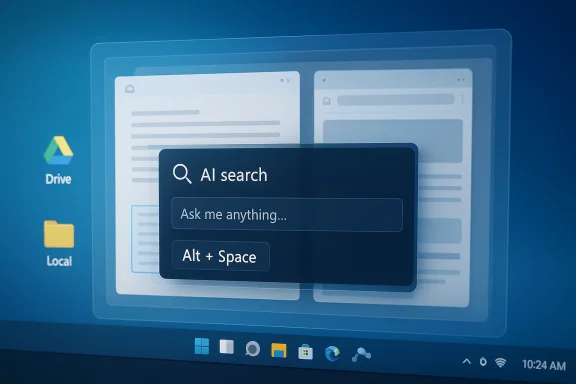
The public message from Google is straightforward: this is a desktop launcher for Google intelligence, not just a chatbot in disguise. The app uses Alt + Space to surface a floating search box, and Google says it can reach across files, apps, Drive, and the web. That is a meaningful design choice because it turns Gemini into a persistent, keyboard-first utility rather than another tab you open and forget.A search box with AI layered on top
Google is not trying to compete with Windows by replacing it. Instead, it is trying to become the fastest route through it. That is why the shortcut matters so much: a launcher that appears in a few hundred milliseconds feels less like software and more like reflex, which is exactly the kind of habit-forming behavior desktop platforms crave.There is also a branding implication here. Google has begun collapsing many of its AI experiences into a broader “Google app” and Gemini identity, which makes the product feel less like a standalone experiment and more like a layer across the company’s services. The challenge is that layer products are only powerful when they are consistent, and the Windows desktop is not naturally consistent with Google’s cloud-first assumptions.
Why the shortcut strategy matters
A launcher shortcut is more than convenience. It is a claim on habit, because the fastest tool is often the one people remember to use first. Microsoft understands this well, which is why Copilot keeps appearing in Windows and Edge in ways intended to feel native rather than optional.Google is trying the same play from the opposite direction. Instead of owning the operating system, it wants to own the moment of intent. If the user thinks, “I need to find something,” and Gemini is the first panel that opens, Google wins a surprisingly important slice of the desktop experience.
- Alt + Space is a smart shortcut because it reduces friction.
- A floating panel feels faster than opening a browser tab.
- Keyboard-first access is especially appealing to power users.
- The launcher model is easier to understand than a sprawling assistant UI.
- Habit formation is the real prize, not the shortcut itself.
The File Search Paradox
The most interesting part of the early reaction is not that the app can search files, but that it appears to do so unevenly. Google is the company synonymous with search, yet the Windows app reportedly struggles most when asked to find local material that lives outside Google’s own cloud surfaces. That is a bad look on a platform where users expect search to work across whatever they have saved, synced, or forgotten.Why local search is the hardest problem
Search inside a personal computer is not the same as web search. On the web, Google can rely on crawling, ranking, and index-based retrieval. On a Windows desktop, however, the assistant has to cope with file naming habits, disconnected storage, sync conflicts, and the messy reality of users who split work between OneDrive, local folders, network shares, and browser downloads.That is why the criticism matters so much. If Gemini finds Drive content easily but struggles with ordinary Windows folders, it becomes less of a universal search tool and more of a Google services portal with AI branding. That may still be useful, but it is a narrower proposition than the launch framing suggests.
Ecosystem bias cuts both ways
This is one of those cases where Google’s strengths can become product weaknesses. The company is exceptionally good at keeping users inside its own surfaces, but Windows users are often not inside those surfaces by default. The result is an awkward fit: the app feels modern, but the underlying search behavior can still resemble a walled garden.That is especially problematic because search is a trust product. Users do not care how elegant the interface is if the answer is buried or wrong. Microsoft’s own File Explorer and taskbar search have long been criticized for inconsistency, but that does not mean a competitor can get away with the same weakness just by adding AI.
- File search is judged against user memory, not technical elegance.
- Windows users expect breadth across local and cloud storage.
- Google Drive integration helps only if the user already lives in Google.
- Mixed environments make ranking and retrieval harder.
- Search failures are remembered longer than search successes.
Screen Sharing and Visual Understanding
If file search is where Gemini looks incomplete, screen understanding is where it looks surprisingly strong. Google has built a product that can analyze a window or the whole screen, and early testing suggests it can do a better job than Copilot Vision in at least some visual tasks. That matters because AI on the desktop is no longer just about text; it is about context, and visual context is often the difference between a useful assistant and a frustrating one.The appeal of seeing what you see
Screen sharing makes the assistant feel collaborative. Instead of pasting text into a prompt box, the user can let Gemini interpret an actual app window, document, or webpage. Google also uses Lens-style image analysis, which broadens the app’s usefulness beyond plain search and into explanation, translation, and object recognition.That has practical implications. Users are far more likely to ask an AI to help with something if the AI can directly inspect the thing in front of them. The desktop becomes a live workspace rather than a pile of disconnected files, and that is exactly the kind of product behavior AI companies want to encourage.
Why visual tasks may matter more than file lookup
A screen-aware assistant can sometimes sidestep file search weaknesses by helping users identify information faster in the moment. If the assistant can read a window, parse a chart, describe a UI element, or recognize a pattern on screen, it may still feel highly capable even when its search index is less impressive. That is probably why some early impressions sound more favorable on vision tasks than on file retrieval.This is also where Google’s broader AI stack gives it a real advantage. The company has been steadily pushing Gemini deeper into visual, document, and productivity workflows, including Drive, Docs, Sheets, Slides, and other Workspace surfaces. A desktop app that understands what is on the screen fits naturally into that broader strategy.
What the visual layer changes
- It reduces the need to describe context manually.
- It makes the assistant feel more immediate and conversational.
- It favors tasks that are visual, procedural, or instructional.
- It can outshine text search even when file lookup is weak.
- It increases the perceived intelligence of the product.
Copilot Versus Gemini on Windows
Microsoft and Google are now fighting over the same behavior pattern: “Press a shortcut and ask the machine.” That makes the comparison especially intense, because both companies are effectively claiming that the future Windows interface is not the Start menu or taskbar but the AI entry point. In that competition, Microsoft still has structural advantages, but Google can argue it has a cleaner consumer AI brand and better web search instincts.Microsoft’s deeper integration
Copilot’s biggest advantage is native presence. Microsoft has been embedding it into Windows, Edge, and Microsoft 365, which means it can appear closer to where enterprise and consumer users already work. That kind of system-level integration is hard for a third party to replicate, especially when the third party is trying to enter through a separate desktop app.But integration cuts both ways. The more Microsoft puts Copilot in front of users, the more it risks feeling intrusive or overbearing. That tension has become part of the Windows AI conversation, and it helps explain why Microsoft has also been trying to clean up branding and refine the user experience.
Google’s consumer advantage
Google’s advantage is that many people already think of it as the default answer engine. If Gemini can feel faster or more natural than Copilot for consumer tasks, especially with screen analysis and web reasoning, then Google can win by quality even without the same OS privileges. That is not a trivial edge, particularly for people who use Windows but still live in Chrome, Gmail, and Drive.The problem is that the Windows desktop is not just a consumer space. It is also a workplace environment, and that is where Microsoft’s deep integration and admin story remain formidable. A clever app can win attention; a platform-controlled assistant can win policy.
Competitive takeaway
- Microsoft has the system.
- Google has the search brand.
- Microsoft has enterprise trust scaffolding.
- Google has stronger consumer intuition in many users’ minds.
- The winner will be the assistant that feels least like overhead and most like utility.
Availability, Language, and Account Limits
The launch is also narrower than the headline might suggest. Google says the app is rolling out in English and, at least initially, is available in the U.S. and Canada for personal accounts, not corporate Workspace accounts. That makes the release feel more like a consumer pilot than a broad enterprise invasion of Windows.Why the rollout boundaries matter
These limits tell you a lot about Google’s immediate priorities. The company seems to want scale, but it is still being careful about where the assistant can interact with user data and how quickly it expands across regulated or managed environments. That caution is sensible, but it also means the app will not immediately compete for the most lucrative enterprise workflows.Language support is equally important. English-only availability is fine for a pilot, but desktop assistants become dramatically more useful when they can handle multilingual environments, especially on personal machines that blend work, school, and family usage. Until then, the audience remains narrower than Google’s global brand suggests.
Personal versus enterprise expectations
Consumer users will likely judge the app on convenience, while enterprise users will judge it on control. Those are very different tests. A consumer may accept occasional rough edges if the shortcut is delightful, but an IT department will care about compliance, data handling, and whether the assistant can be constrained when needed.That gap is why the app’s current boundaries are strategic. Google can learn from real usage in a lower-risk setting before asking businesses to trust Gemini with more serious workloads. That is prudent, but it also means the product’s biggest claim still has to wait for broader proof.
Privacy and Cloud Dependence
The privacy story is one of the most important parts of this launch, because desktop AI is only as trustworthy as the data policy behind it. Google’s consumer Gemini policies allow chats to be stored and used to improve products, which is materially different from the stricter expectations many businesses have around enterprise tools. That does not make the product unusable, but it does mean users need to understand the trade-off.Why trust is now a product feature
People are increasingly willing to let AI see documents, screens, and workflows, but only if they believe the boundaries are clear. If a tool is analyzing local files, screen contents, and cloud data, the user wants to know where the information goes and what it can be used for. In that sense, privacy is no longer just a legal notice; it is part of the user experience.This is especially true for sensitive material. A desktop assistant that can read your screen is powerful, but that power is hard to justify if the surrounding policy feels vague. Google has done more than some rivals to explain how its consumer AI features work, yet the consumer-versus-work boundary remains a source of concern.
Cloud-only processing is both a strength and a weakness
Google’s app reportedly relies on the cloud for processing, which helps keep the client lightweight and the feature set consistent across devices. But cloud dependence also means the experience is only as good as the network connection, and it ensures the product cannot function as an offline desktop utility. That makes Gemini feel more like an intelligent portal than a true local companion.For many users that will be acceptable. For others, especially those dealing with confidential or intermittent-access workflows, it will be a hard limit. Convenient is not the same as dependable, and Windows users tend to notice that difference quickly.
- Consumer policies are not the same as enterprise defaults.
- Screen-aware AI increases both usefulness and sensitivity.
- Cloud processing simplifies the client but adds dependency.
- Sensitive documents require clearer boundaries than casual use.
- Privacy clarity can be a competitive advantage.
Why This Matters for the Windows Desktop
The bigger story is not whether Google shipped a Windows app. It is that the Windows desktop is being redefined as a battleground for assistants rather than apps. Microsoft has the operating system and the enterprise channel; Google has the search DNA and a strong consumer ecosystem. What users are really choosing is not just an AI model, but a philosophy of how the desktop should work.The desktop is becoming a command surface
For decades, the desktop was a place where users clicked icons and launched applications. Now it is increasingly a place where users ask questions and expect the system to route them to the answer. That changes the economics of software discovery, because the assistant that can surface the right file, app, or web result fastest effectively becomes the new front door.That is why the shortcuts matter so much. A single keystroke can become the gateway to an ecosystem, and ecosystems are where the real competition lives. Once users trust a launcher to find files, explain content, and retrieve context, they may stop caring which app did the heavy lifting under the hood.
Why Google’s approach feels incomplete
Still, the app’s current shape suggests Google is entering Windows as a service layer rather than a fully committed platform citizen. That may be enough for now, but it leaves the company vulnerable to accusations that it is pulling users toward Google properties instead of truly serving Windows workflows. In a world where file search is the first test, that vulnerability matters.The strongest desktop AI products will likely be the ones that can unify local, cloud, visual, and app-based context without privileging one ecosystem too aggressively. Right now, Google is part of that conversation, but it is not yet the complete answer. That is a promising start, not a finish line.
Strengths and Opportunities
The launch is still strategically important because it shows Google moving from abstract AI positioning to practical desktop utility. Even with the file search concerns, the app gives Google a chance to build habits on Windows, which is where a huge amount of daily work still happens. The strongest opportunities are not only about features; they are about making Gemini feel indispensable over time.- Fast access through Alt + Space gives Gemini a memorable entry point.
- Screen sharing and Lens make the assistant more context-aware than text-only tools.
- Google Drive integration helps users already embedded in the Google ecosystem.
- The app can become a habit-forming launcher if Google improves retrieval quality.
- Google has a strong opportunity to convert Gemini into a workflow layer, not just a chat product.
- Better visual understanding could make Gemini feel superior in day-to-day assistance tasks.
- The launch reinforces Google’s broader push to make Gemini the intelligence layer across its services.
Risks and Concerns
The launch also carries obvious risks, and the biggest one is credibility. If Google cannot reliably search local Windows files, users may conclude that Gemini is a polished portal to Google services rather than a serious desktop assistant. That perception would be hard to shake, especially if Microsoft continues improving Copilot and Windows search around the edges.- Weak local search undermines the core promise of a desktop assistant.
- The app may feel biased toward Google-owned surfaces rather than Windows-native workflows.
- Consumer privacy policies could deter users from handling sensitive files.
- Cloud dependence means the tool is not useful when offline or poorly connected.
- Limited language and account support restrict the initial audience.
- Microsoft’s deeper Windows integration may make Gemini feel second-tier by comparison.
- Search failures are especially damaging because users remember them as proof of unreliability.
Looking Ahead
The key question now is whether Google treats this app as a genuine Windows product or as a thin access layer to the rest of its cloud stack. If the company invests in broader local indexing, better mixed-storage search, and stronger enterprise-ready controls, Gemini could become a serious Windows utility rather than a curiosity. If it does not, the app will likely remain impressive in demos and frustrating in real-world file retrieval.The other thing to watch is whether Google expands beyond English personal accounts and begins adapting the product for corporate use. That would force the company to address policy, compliance, and trust concerns more directly, but it would also unlock the part of the market where desktop AI could have the most enduring value. In that sense, the launch is less a conclusion than a test of seriousness.
- Watch for better local file indexing.
- Watch for enterprise account support.
- Watch for new language rollouts.
- Watch for whether Google adds more Windows-native behavior.
- Watch for Microsoft’s response in Copilot and File Explorer.
Source: razomua.media Google Entered Windows with Gemini — and Immediately Lost in File Search
