

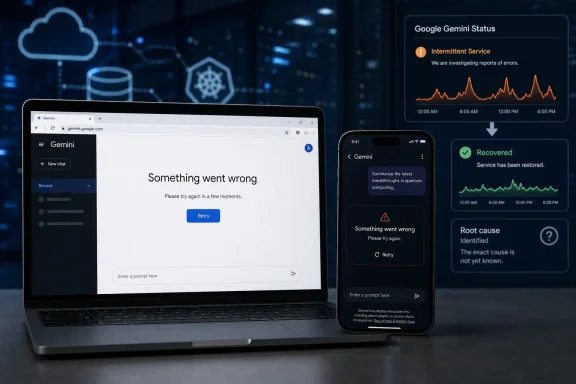
Google Gemini experienced a short, user-reported disruption on Friday, July 17, affecting both the Gemini website and mobile app for some customers. Reports began climbing during the afternoon in the United States, with users describing failed prompts, slow responses, and generic error messages; service appears to have recovered later the same day.
The initial report came from the Asbury Park Press, republished by AOL.com, which noted more than 100 Downdetector reports by 3:25 p.m. Eastern Time. Independent outage monitoring subsequently logged several distinct report spikes through the evening, rather than one clean, continuous failure. The largest window began around 4:00 p.m. ET and was followed by additional bursts of error reports after 7:00 p.m. ET.
By early Saturday, July 18, Google’s Workspace Status Dashboard listed no active Gemini incident. That distinction matters: the dashboard’s green status means Google had not publicly designated an ongoing Workspace service disruption at the time of the latest check. It does not necessarily establish that every consumer-facing Gemini request succeeded during the earlier report spikes.
Google has not published an incident notice or root-cause report for the July 17 problem. As a result, it is not yet possible to say whether the failure involved Gemini’s consumer app, Workspace-connected Gemini services, a regional routing issue, account authentication, or a downstream dependency.
The available evidence supports a narrower conclusion: some users were unable to reliably use Gemini across more than one client surface, and the symptoms were sufficiently widespread to produce visible third-party monitoring spikes. The incident’s apparent duration also varied based on the monitor used. One service recorded a roughly two-hour affected period followed by a shorter secondary interruption; another characterized the event as a 48-minute outage.
That is normal for crowd-sourced outage data. These services measure complaints and user-submitted signals, not Google’s internal availability metrics. A surge can reveal a real issue quickly, but it cannot define the exact blast radius, error rate, root cause, or service-level impact without a vendor acknowledgement.
For Windows users, the practical implication is that a Gemini failure may show up in more places than the standalone web page. Gemini is used through gemini.google.com, the Windows browser experience, Google Workspace workflows, Android and iOS apps, and Google Chrome integrations. An error in one path is not definitive proof that every other path is down, but broad reports across web and app clients should rule out the usual first suspect: an isolated local browser problem.
Google’s subsequent incident report attributed the June event to extreme read contention in a foundational database service used to manage tool-deployment metadata. An index design issue created a hot shard condition, concentrating demand on a small set of database partitions. Google said the service was under heavy load, cache effectiveness fell, database calls surged, and prompt failures rose sharply.
That June incident is not evidence that the same technical failure caused the July 17 outage. It is, however, a useful reminder that Gemini is not a single endpoint with a single dependency. A prompt can depend on authentication, model routing, tool catalogs, file access, extensions, browser integration, Workspace permissions, and supporting database services. The familiar “Something went wrong” screen is deliberately generic, which makes independent diagnosis difficult for users and help desks.
Google reported that the June issue affected web, macOS, iOS, Android, and Chrome-integrated Gemini experiences. It also said there was no immediate customer workaround while engineering teams mitigated the backend issue. For organizations that have made Gemini a routine part of drafting, search, document summarization, and internal support workflows, that is the real operational lesson: a failed prompt should be treated as a potential SaaS availability event, not automatically as an employee device issue.
For IT teams, the response should be more deliberate. Google’s own Workspace documentation directs administrators to its Status Dashboard for current and historical service information, and it offers RSS and JSON feeds for monitoring integrations. The Admin console can also deliver system-defined Apps outage alerts to the alert center, email recipients, or both.
A small operational checklist is more valuable than an improvised response during the next incident:
That leaves the key question unresolved: whether Google will add the event to Gemini’s official incident history. If it does, administrators will get a clearer view of the affected services, timestamps, and any recommended corrective action. If it does not, the episode will remain a useful but limited reminder that cloud AI features can fail in ways that are visible to users before the vendor’s public status machinery catches up.
The initial report came from the Asbury Park Press, republished by AOL.com, which noted more than 100 Downdetector reports by 3:25 p.m. Eastern Time. Independent outage monitoring subsequently logged several distinct report spikes through the evening, rather than one clean, continuous failure. The largest window began around 4:00 p.m. ET and was followed by additional bursts of error reports after 7:00 p.m. ET.
By early Saturday, July 18, Google’s Workspace Status Dashboard listed no active Gemini incident. That distinction matters: the dashboard’s green status means Google had not publicly designated an ongoing Workspace service disruption at the time of the latest check. It does not necessarily establish that every consumer-facing Gemini request succeeded during the earlier report spikes.
 A Brief Incident With an Unclear Root Cause
Google has not published an incident notice or root-cause report for the July 17 problem. As a result, it is not yet possible to say whether the failure involved Gemini’s consumer app, Workspace-connected Gemini services, a regional routing issue, account authentication, or a downstream dependency.The available evidence supports a narrower conclusion: some users were unable to reliably use Gemini across more than one client surface, and the symptoms were sufficiently widespread to produce visible third-party monitoring spikes. The incident’s apparent duration also varied based on the monitor used. One service recorded a roughly two-hour affected period followed by a shorter secondary interruption; another characterized the event as a 48-minute outage.
That is normal for crowd-sourced outage data. These services measure complaints and user-submitted signals, not Google’s internal availability metrics. A surge can reveal a real issue quickly, but it cannot define the exact blast radius, error rate, root cause, or service-level impact without a vendor acknowledgement.
For Windows users, the practical implication is that a Gemini failure may show up in more places than the standalone web page. Gemini is used through gemini.google.com, the Windows browser experience, Google Workspace workflows, Android and iOS apps, and Google Chrome integrations. An error in one path is not definitive proof that every other path is down, but broad reports across web and app clients should rule out the usual first suspect: an isolated local browser problem.
The June Outage Shows Why Admins Should Watch the Official Dashboard
The July 17 disruption follows a much more substantial Gemini incident on June 10. In that case, Google’s Workspace Status Dashboard confirmed errors across Gemini web and mobile clients, Gemini in Chrome, and Workspace-related Gemini services. Google said users encountered “Something went wrong” messages, including error codes 1099 and 1076.Google’s subsequent incident report attributed the June event to extreme read contention in a foundational database service used to manage tool-deployment metadata. An index design issue created a hot shard condition, concentrating demand on a small set of database partitions. Google said the service was under heavy load, cache effectiveness fell, database calls surged, and prompt failures rose sharply.
That June incident is not evidence that the same technical failure caused the July 17 outage. It is, however, a useful reminder that Gemini is not a single endpoint with a single dependency. A prompt can depend on authentication, model routing, tool catalogs, file access, extensions, browser integration, Workspace permissions, and supporting database services. The familiar “Something went wrong” screen is deliberately generic, which makes independent diagnosis difficult for users and help desks.
Google reported that the June issue affected web, macOS, iOS, Android, and Chrome-integrated Gemini experiences. It also said there was no immediate customer workaround while engineering teams mitigated the backend issue. For organizations that have made Gemini a routine part of drafting, search, document summarization, and internal support workflows, that is the real operational lesson: a failed prompt should be treated as a potential SaaS availability event, not automatically as an employee device issue.
Treat Gemini as a Dependency, Not a Convenience Feature
For individual users, the sensible response to a short Gemini outage is simple: wait, retry later, and avoid repeatedly changing browser or account settings while reports indicate a broader problem. Clearing cookies, resetting Chrome, disabling extensions, or reinstalling an app during a provider-side incident can turn a temporary cloud fault into a local support task.For IT teams, the response should be more deliberate. Google’s own Workspace documentation directs administrators to its Status Dashboard for current and historical service information, and it offers RSS and JSON feeds for monitoring integrations. The Admin console can also deliver system-defined Apps outage alerts to the alert center, email recipients, or both.
A small operational checklist is more valuable than an improvised response during the next incident:
- Confirm whether Gemini failures occur in a private browser window, a second browser, and a separate network before classifying the problem as local.
- Check Google’s Workspace Status Dashboard, but do not assume the absence of an incident banner proves users are unaffected.
- Capture the exact error text, time zone, affected client, account type, and whether the failure involves ordinary prompting, uploads, extensions, or Workspace data.
- Preserve an alternate workflow for time-sensitive work, especially where Gemini is used to summarize documents, prepare communications, or assist with support triage.
- Avoid asking users to submit confidential content repeatedly while a service is unstable, particularly when prompts may contain internal material.
The Official Record Is Still Missing
As of July 18, the July 17 event remains a brief, externally observed disruption rather than a confirmed Google incident with published technical details. The Asbury Park Press report correctly identified a live surge in user reports, while Google’s status dashboard now indicates normal service.That leaves the key question unresolved: whether Google will add the event to Gemini’s official incident history. If it does, administrators will get a clearer view of the affected services, timestamps, and any recommended corrective action. If it does not, the episode will remain a useful but limited reminder that cloud AI features can fail in ways that are visible to users before the vendor’s public status machinery catches up.
References
- Primary source: aol.com
Published: 2026-07-17T19:40:29+00:00
Is Google Gemini down? Is Gemini down? Google Gemini outage reported - AOL
Users are reporting issues with Google Gemini as outage reports spike on Downdetector on Friday.www.aol.com - Independent coverage: Asbury Park Press
Published: 2026-07-17T19:40:29+00:00
Is Gemini down right now? Gemini is down
Users are reporting issues with Google Gemini as outage reports spike on Downdetector on Friday.www.app.com - Related coverage: downforeveryoneorjustme.com
Is Google Gemini down? Live status and problems past 24 hours
Live problems for Google Gemini. Error received? Down? Slow? Check what is going on. downforeveryoneorjustme.com
- Related coverage: isdown.app
Is Google Gemini Down? Check current status and user reports | IsDown
Check if Google Gemini is down right now. Live Google Gemini status, real-time outage detection, and instant alerts when Google Gemini has issues. Free 14-day trial. isdown.app
- Related coverage: isitdownchecker.com
Is Google Gemini Down? Check Status Now | Is it down checker
Is Google Gemini down right now? Check live gemini.google.com server status, response time, uptime history & outage reports — a free down detector updated every 60 seconds. isitdownchecker.com
- Related coverage: techradar.com
Google Gemini recovering after outage that lasted for hours — here's what we know about the 'error 1076' outage | TechRadar
Tired of 'error 1076' and 'error 1099' messages yet?www.techradar.com