

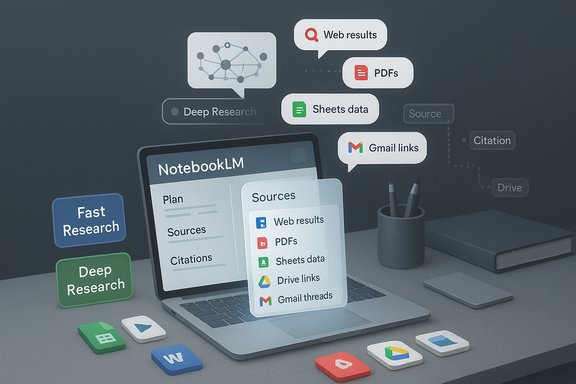
Google has folded Gemini’s agentic research engine into NotebookLM, turning the notebook app from a source‑first summarizer into a full‑blown research workbench that can sweep public web results and your private Workspace data to build single‑click briefings, timelines, and citation‑backed reports. Announced on November 13, 2025 and scheduled to reach all users within a week, the update pairs NotebookLM’s provenance‑oriented notebook model with Deep Research’s multi‑step agentic search, while also expanding supported file types to include Google Sheets, .docx, Drive URLs and more. The result is a fundamentally different research workflow for knowledge workers — faster discovery on routine queries, and a transparent, iterative “deep” mode for high‑stakes analysis that attempts to preserve auditability and source traceability.
Google first positioned NotebookLM as a source‑constrained research assistant: upload a corpus of files and links, then ask questions that are answered strictly from that curated corpus. Gemini, meanwhile, has been evolving agentic features — called Deep Research — that can plan multi‑step investigations across many web sources and internal documents. Combining the two creates a hybrid model: users can direct agentic searches to gather high‑quality materials and then import that evidence directly into a NotebookLM notebook for constrained, auditable analysis.
This change was rolled out via Google’s product channels on November 13, 2025 and widely reported by major tech outlets the same day. According to Google, the update will be available to all users over the following week, and it introduces two distinct research styles inside NotebookLM: Fast Research for quick scans and Deep Research for comprehensive, source‑driven investigations. The release also adds several file‑type and workflow improvements that reduce friction for enterprise adoption.
This is powerful for cases such as:
Key differentiators to watch:
Caveat: exact per‑region dates, enterprise edition gating and model variant availability can vary. Always confirm in your Workspace admin console and contractual materials.
However, the feature also crystallizes the critical operational questions enterprise IT must answer: who can grant an agent access to internal mail and chat, how that data is protected, and what contractual safeguards exist for non‑training and retention. The tools are powerful, but their responsible use requires careful governance, verification rituals and clarity on licensing and privacy.
Organizations that test the feature cautiously, pair it with clear admin controls and verification processes, and use the Sheets and URL integrations to keep data live and auditable will gain the most immediate value. For everyone else, the arrival of agentic, Workspace‑aware research inside a source‑constrained notebook is a signal: the next wave of productivity tools will be judged less by standalone generative polish and more by how safely and transparently they turn corporate knowledge into verifiable, reusable insight.
The integration is not a magic bullet, but it is a meaningful step toward embedding multi‑step, context‑aware research workflows directly into the tools knowledge workers use every day.
Source: The Tech Buzz https://www.techbuzz.ai/articles/google-supercharges-notebooklm-with-deep-research-integration/
 Background
Google first positioned NotebookLM as a source‑constrained research assistant: upload a corpus of files and links, then ask questions that are answered strictly from that curated corpus. Gemini, meanwhile, has been evolving agentic features — called Deep Research — that can plan multi‑step investigations across many web sources and internal documents. Combining the two creates a hybrid model: users can direct agentic searches to gather high‑quality materials and then import that evidence directly into a NotebookLM notebook for constrained, auditable analysis.This change was rolled out via Google’s product channels on November 13, 2025 and widely reported by major tech outlets the same day. According to Google, the update will be available to all users over the following week, and it introduces two distinct research styles inside NotebookLM: Fast Research for quick scans and Deep Research for comprehensive, source‑driven investigations. The release also adds several file‑type and workflow improvements that reduce friction for enterprise adoption.
What the Gemini Deep Research integration actually delivers
Two research modes: fast and deep
- Fast Research is optimized for speed: it performs a lightweight scan of web and available sources to surface candidate links you can immediately import. Use this when you need quick orientation or a short annotated bibliography.
- Deep Research is agentic and multi‑step: it presents a research plan before execution, then performs iterative searches, refines queries, and synthesizes a structured report while continuing to crawl and evaluate hundreds of sources in the background.
Workspace context: Gmail, Drive, and Chat become research signals
Deep Research can be directed to pull context from your Google Workspace assets — Gmail threads, Drive documents, and Google Chat conversations — alongside public web results. That capability changes the provenance model: research outputs can now blend public sources and private organizational context to produce highly contextualized reports, timelines, or slide decks tailored to a specific project or team.This is powerful for cases such as:
- reconstructing a project timeline from email threads and a planning spreadsheet,
- compiling a competitive landscape that pairs internal win/loss notes with external market reports,
- producing a regulatory briefing that combines public guidance with internal compliance memos.
Background planning and iterative source curation
Deep Research gives you a plan before it runs and lets you add additional sources while the agent continues work. Final outputs include citations formatted for easy import into NotebookLM notebooks — retaining links, article metadata and the ability to query the resulting notebook later in NotebookLM’s constrained Q&A flows.Expanded file support: why the small additions matter
The update does more than add an agent: it expands NotebookLM’s input set in practical ways that remove real workflow friction.- Google Sheets linking: Notebooks can now link to Sheets, allowing NotebookLM to compute statistics, summarize tables, and generate insights from structured data without manual reformatting. For analysts and researchers working with numerical data, this reduces copy/paste steps and preserves the authoritative source.
- Microsoft Word (.docx) support: Direct .docx ingestion addresses a common enterprise pain point; many organizations still produce drafts and reports in Word and were previously constrained by PDF-only flows or cumbersome conversion.
- Drive files via URL: Instead of downloading and re‑uploading, you can paste Drive links (even multiple URLs separated by commas) and have NotebookLM ingest those sources directly. This reduces duplication, preserves Drive metadata, and keeps collaboration friction low.
- PDFs from Drive and image uploads: The update simplifies adding papers, reports and scanned documents from Drive. Image uploads — including photos of handwritten notes or brochures — expand the range of real‑world source materials.
How this changes research workflows — practical scenarios
Researchers, consultants, product managers and legal teams stand to gain distinct benefits from the new flow. Below are pragmatic, repeatable workflows that illustrate the platform’s power.- Fast literature scan (10–30 minutes)
- Start a NotebookLM notebook and use Fast Research to generate an initial list of recent articles and reports.
- Rapidly vet and import 6–10 high‑quality sources into the notebook.
- Use NotebookLM to create a concise executive summary and bulletized recommendations.
- Deep project brief (hours)
- Ask Deep Research to produce a research plan for a specific question (e.g., “Regulatory risks for Product X in Market Y”).
- Allow the agent to search the public web plus your Drive and Gmail (when permitted) and assemble a citation‑backed report.
- Import the report and source list into NotebookLM, then use the notebook to generate slides, a timeline, and an audio briefing for offsite review.
- Data‑driven analysis
- Link a Google Sheet containing KPIs to your notebook.
- Ask NotebookLM to compute trends, produce statistical summaries and surface anomalies — all while preserving the live link to the Sheet.
- Export charts or summarized tables into a report or presentation.
Strengths: where Google’s approach stands out
- Integrated provenance pipeline — The Deep Research → NotebookLM path produces reports with explicit citations that can be imported into notebooks, preserving source metadata and audit trails.
- Workspace connectivity — Tapping Gmail, Drive and Chat as searchable material enables truly contextualized briefs tied to organizational knowledge.
- Lowered friction for mixed formats — Native support for Sheets, .docx and Drive URLs removes routine impedance mismatches in enterprise workflows.
- Two‑mode research model — Users can pick speed or depth depending on need, reducing wasted compute and time when a quick answer is sufficient.
- Iterative transparency — Research plans and background processing let humans intervene early if search scope or source quality needs correction.
Risks and limitations IT teams and research buyers must weigh
- Data governance and privacy — Allowing an AI agent to read Gmail, Drive and Chat introduces clear governance questions. Admins need to validate whether this access is tenant-wide, opt‑in per user, or governed by Workspace admin policies. For regulated or highly sensitive data, conservative opt‑in and thorough contractual assurances are essential.
- Training and retention policies — Understand whether and how data accessed during Deep Research may be retained or used for model training under consumer vs. enterprise contracts. Defaults can differ across account types.
- Hallucinations and misattribution — Grounding responses in discovered sources reduces hallucination, but it doesn’t eliminate it. Research outputs still require human verification of load‑bearing facts, especially where synthesis involves reconciling conflicting sources.
- Licensing and copyright — Importing and summarizing third‑party articles, papers, or multimedia raises reuse and licensing questions. NotebookLM outputs are derivative summaries and may not be redistributable without permission.
- Staged rollouts and feature parity — Availability can be region‑ and tier‑dependent. Admins should expect staged deployments and should confirm exact availability in their Workspace admin consoles.
- Overdependence on context sweep — The power to analyze internal communications can lead to overly broad sweeps. Organizations must adopt clear policies and audits to avoid indiscriminate data access.
Enterprise governance checklist (for IT admins)
- Review Workspace admin controls and confirm whether Deep Research access requires explicit admin enablement or user opt‑in.
- Negotiate explicit contractual terms on data retention, telemetry, and non‑training guarantees when handling regulated data.
- Implement DLP (Data Loss Prevention) rules and OAuth app reviews to track which notebooks or agents access sensitive folders and inboxes.
- Create a pilot with non‑sensitive projects, and measure output quality, verification burden and telemetry.
- Train power users on validation practices: always require two independent primary sources for load‑bearing claims and preserve original links/metadata in notebooks.
- Define an acceptable use policy that outlines what content may be analyzed (e.g., internal memos vs. classified project files).
Competitive context: how this stacks up against Microsoft Copilot and others
Microsoft has leaned into deep Office/Graph integration with Copilot — an approach that excels when organizations are already Office‑centric and require tenant‑aware governance. Google’s strategy is different: create a dedicated hub for research that tightly links to Workspace and Search, and pair that with agentic discovery. For many knowledge workers who prioritize deep, reproducible analysis over ad‑hoc drafting inside Word or Teams, NotebookLM’s notebook‑first model with Deep Research may be more attractive.Key differentiators to watch:
- Copilot’s tight in‑app behavior vs. NotebookLM’s notebook + agent pipeline.
- How each vendor implements enterprise controls and non‑training guarantees.
- Native support for structured data (Sheets) and Drive URL workflows — an area where Google has immediate product advantage for Drive‑centric teams.
Practical advice for researchers and teams
- Treat Deep Research as a discovery accelerator, not an oracle. Use it to produce a vetted nominee list of sources, then import the highest‑quality items into a notebook for constrained synthesis.
- Use Google Sheets links rather than pasted tables where possible — the live link helps preserve numerics and avoids transcription errors.
- Where legal or compliance stakes exist, run research on sanitized, non‑sensitive test data until governance and retention settings are fully validated.
- Keep a verification ritual: any claim that will be published or used for decision‑making should be cross‑checked against at least two primary sources and the original documents in Drive or the web.
- If you’re an instructor or academic, respect copyright and avoid using NotebookLM outputs as a substitute for original source citations in publications.
Implementation timeline and rollout expectations
Google indicated the feature was announced on November 13, 2025 and planned to roll the update out to all users within roughly a week, meaning broader availability by around November 20, 2025 — subject to region and Workspace editioning. Enterprises should expect staggered availability and should confirm whether their admin console shows enablement options or extra controls for Deep Research. Where immediate, organization‑wide enablement is desired, plan for admin policy reviews, pilot tests and user training in the first 30–60 days after rollout.Caveat: exact per‑region dates, enterprise edition gating and model variant availability can vary. Always confirm in your Workspace admin console and contractual materials.
Final assessment: why this matters for WindowsForum readers
For Windows‑centered professionals — many of whom use a mix of Office and cloud services — Google’s NotebookLM + Deep Research integration raises the stakes in the research assistant category. If you live in Google Drive and value provenance, the unified pipeline from agentic discovery to auditable notebook analysis is compelling. It promises measurable time savings for multi‑document synthesis and reduces friction for mixed‑format workflows (Sheets, Word, PDFs).However, the feature also crystallizes the critical operational questions enterprise IT must answer: who can grant an agent access to internal mail and chat, how that data is protected, and what contractual safeguards exist for non‑training and retention. The tools are powerful, but their responsible use requires careful governance, verification rituals and clarity on licensing and privacy.
Organizations that test the feature cautiously, pair it with clear admin controls and verification processes, and use the Sheets and URL integrations to keep data live and auditable will gain the most immediate value. For everyone else, the arrival of agentic, Workspace‑aware research inside a source‑constrained notebook is a signal: the next wave of productivity tools will be judged less by standalone generative polish and more by how safely and transparently they turn corporate knowledge into verifiable, reusable insight.
The integration is not a magic bullet, but it is a meaningful step toward embedding multi‑step, context‑aware research workflows directly into the tools knowledge workers use every day.
Source: The Tech Buzz https://www.techbuzz.ai/articles/google-supercharges-notebooklm-with-deep-research-integration/
