

Google’s new push to turn aging Windows PCs into ChromeOS Flex machines is more than a clever recycling story. It is a direct challenge to the enormous installed base of Windows 10-era hardware that has either missed the Windows 11 cutoff or not yet migrated, and it arrives at a moment when Microsoft’s own transition plan is already under pressure. The combination of a free operating system, a low-cost USB installer kit, and a sustainability pitch gives Google a clean marketing lane into a messy upgrade cycle. It also forces a harder question: for millions of users, is the best “new” computer actually the one they already own?
The timing of this move is impossible to ignore. Microsoft says Windows 10 reached end of support on October 14, 2025, which means the operating system no longer gets free security updates, technical assistance, or feature updates. Microsoft still allows the software to run, but the company is clear that unsupported PCs are exposed to greater security risk and should move either to Windows 11, a newer device, or the Extended Security Updates program.
That leaves a very large population of older machines in a difficult middle ground. Microsoft has spent much of 2025 steering consumers toward Windows 11, Copilot+ PCs, Windows 365, or the consumer ESU option, which protects eligible Windows 10 devices for one additional year at no extra cost under some enrollment paths, or for $30 USD otherwise. For organizations, Microsoft’s commercial ESU program starts at $61 per device for the first year and can be renewed annually for up to three years. (blogs.windows.com)
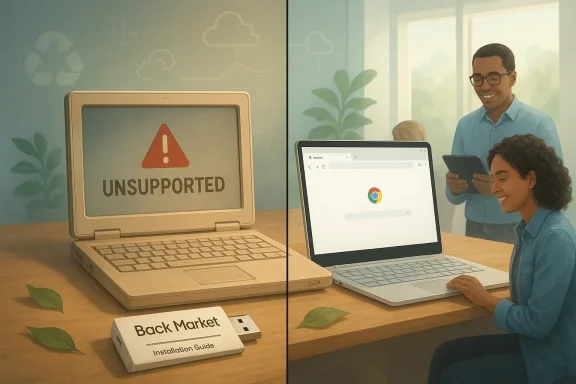
Google’s answer is ChromeOS Flex, which the company has positioned for years as a lightweight operating system for older laptops and desktops. The new Back Market partnership adds a physical USB kit for around $3, along with installation guides and video tutorials, making the handoff less intimidating for casual users. Google frames the plan as a way to extend hardware life, reduce e-waste, and avoid the emissions associated with buying new laptops. (blog.google)
This is not the first time Google has used ChromeOS Flex as a repurposing story. The software itself launched in 2022, but the current push matters because it lands after the Windows 10 deadline, when the pain of staying put is no longer theoretical. In other words, Google is not merely offering an alternative; it is offering a migration path at the exact point where Windows users are most likely to feel urgency. (blog.google)
There is also a broader PC industry context. Dell COO Jeffrey Clarke said in November that roughly 500 million PCs in the installed base can run Windows 11 but have not upgraded, while another 500 million are too old to run it. That is a massive split between devices that could be refreshed with software and devices that will likely be forced into a replacement cycle. Google is trying to capture part of the latter group, and perhaps even some of the former.
The company is also exploiting a psychological gap in the Windows transition. Microsoft’s messaging is about compliance, support, and security, which are necessary but not especially exciting. Google’s messaging is about simplicity, thrift, and sustainability, which are easier to share and easier to understand. That distinction matters because consumer upgrade behavior is rarely driven by lifecycle policy alone. It is driven by convenience, cost, and the perception that the replacement is good enough. (blog.google)
For many users, especially households with secondary PCs, the idea is seductive. A machine that is too old for Windows 11 may still be perfectly adequate for browsing, streaming, schoolwork, email, and cloud-based productivity. ChromeOS Flex does not need to replace a high-end workstation to be successful. It only needs to be good enough for the enormous number of users whose actual desktop work is relatively modest. That is the key commercial insight.
Google says the platform supports many PCs and Macs from the last 10 years, but support is not universal. Google’s help pages stress that only certified models are officially maintained, and that the availability of features such as TPM-backed protection depends on the specific device. In other words, compatibility is broader than a strict one-to-one hardware rebuild, but narrower than “install it anywhere and forget about the details.”
Google is also honest about the platform’s limits. ChromeOS Flex does not support dual booting, and installation wipes the existing operating system, programs, settings, and files. The company recommends trying a live boot first, but says that live boot is only for temporary exploration and that full installation is the preferred experience. For many users, that is a serious commitment, not a casual experiment.
That limitation matters more than it may sound. A lot of consumers don’t think of themselves as app-dependent until they encounter a tool, peripheral, or workflow that only exists on Windows. Specialty printing utilities, school software, tax packages, niche medical tools, and older business applications are all common stumbling blocks. ChromeOS Flex can be a great browser appliance, but it cannot magically recreate a mature Windows software catalog. That is where the migration story gets complicated.
For home users, the biggest challenge is usually not operating-system quality but expectation management. People often want their old laptop to behave like the machine they already know, only lighter and safer. ChromeOS Flex instead asks them to adapt to a different model of computing where most of the heavy lifting lives in the browser or in web services. That can be liberating, but it can also be limiting.
That means Google is competing not against abandonment, but against a structured bridge. For consumers who want to delay hardware replacement, Microsoft’s message is: stay in the Windows world for one more year. For organizations, the pitch is even clearer: buy time, manage the transition, and avoid a sudden platform jump. ChromeOS Flex has to persuade people that leaving the Microsoft ecosystem now is better than accepting one more year of status quo. (blogs.windows.com)
That creates a weird competitive wedge. Microsoft’s ESU buys time, but it also reinforces the idea that Windows 10 is a temporary problem to be managed. Google’s offer reframes the same machine as a platform asset that can be repurposed immediately. One approach extends the clock; the other changes the clock entirely.
That is potentially disruptive because the PC industry has long relied on operating-system transitions to stimulate replacement demand. If enough users decide that ChromeOS Flex is “good enough,” some portion of the replacement cycle disappears. But the effect is likely uneven. Some devices will be converted, some will be enrolled in ESU, and some will be replaced anyway because they are genuinely too slow, too broken, or too tied to Windows software. This is a market shift, not a market overthrow.
There is also a sustainability angle that may resonate with enterprise procurement teams and public-sector buyers. If a machine can safely serve another two or three years in a browser-centric role, the environmental case for reuse becomes much easier to make. That does not eliminate the business case for new hardware, but it weakens the assumption that every unsupported PC must be replaced immediately.
Google knows this, which is why ChromeOS Flex has historically been strongest in schools and managed environments where the workload is predictable. But enterprise migration still depends on application fit. If a business depends on local Windows software, there is little chance ChromeOS Flex will become a drop-in solution. The better use case is for thin-client roles, kiosk-like deployments, call centers, shared devices, and web-heavy workflows.
Still, IT departments will see the trade-offs immediately. ChromeOS Flex lacks the depth of Windows management ecosystems that many organizations rely on, and its compatibility profile is narrower than a full Windows deployment. That means the deployment conversation will likely stay tactical rather than transformational. It will be a way to salvage specific hardware pools, not rewrite the whole endpoint strategy.
The company’s claim that ChromeOS consumes less energy on average than comparable systems also fits neatly into this narrative, even if most buyers will care more about battery life and simplicity than carbon accounting. The bigger point is that the environmental case becomes a business case when the machine in question is already owned. Reuse is cheaper than replacement, and that is true whether the buyer is a parent, a student, or a procurement officer. (blog.google)
The partnership with Back Market adds credibility because refurbished electronics already imply a second life. Google is not asking people to think about sustainability as a sacrifice. It is asking them to think of it as a cheaper upgrade path.
The opportunity is broad but not universal. Google can appeal to households, schools, nonprofits, and IT teams looking for short-term reuse or low-friction managed devices. It can also lean on sustainability messaging in a way that feels concrete rather than symbolic. The more the PC market frames “old but usable” as a legitimate category, the more ChromeOS Flex benefits.
There is also a trust issue around compatibility and security. Google says unsupported TPM configurations can still encrypt data but may leave it more exposed, which is the sort of detail that matters most on older hardware. Enterprises will also hesitate if app support and fleet-management requirements are not cleanly aligned. The risk, in short, is that the offer is compelling only until users hit the first non-web dependency.
Microsoft still has the stronger gravity because Windows remains the default for much of the world’s desktop software. But Google has found an opening in the transition gap, and transition gaps are where rival platforms make their best moves. If Windows 11 migration continues to lag and more users decide their old machine only needs to browse, stream, and sync, ChromeOS Flex could quietly become one of the most practical afterlives for aging PCs.
Source: Bez Kabli Google Targets 500 Million Stranded Windows 10 PCs With ChromeOS Flex
 Background
The timing of this move is impossible to ignore. Microsoft says Windows 10 reached end of support on October 14, 2025, which means the operating system no longer gets free security updates, technical assistance, or feature updates. Microsoft still allows the software to run, but the company is clear that unsupported PCs are exposed to greater security risk and should move either to Windows 11, a newer device, or the Extended Security Updates program.That leaves a very large population of older machines in a difficult middle ground. Microsoft has spent much of 2025 steering consumers toward Windows 11, Copilot+ PCs, Windows 365, or the consumer ESU option, which protects eligible Windows 10 devices for one additional year at no extra cost under some enrollment paths, or for $30 USD otherwise. For organizations, Microsoft’s commercial ESU program starts at $61 per device for the first year and can be renewed annually for up to three years. (blogs.windows.com)
Google’s answer is ChromeOS Flex, which the company has positioned for years as a lightweight operating system for older laptops and desktops. The new Back Market partnership adds a physical USB kit for around $3, along with installation guides and video tutorials, making the handoff less intimidating for casual users. Google frames the plan as a way to extend hardware life, reduce e-waste, and avoid the emissions associated with buying new laptops. (blog.google)
This is not the first time Google has used ChromeOS Flex as a repurposing story. The software itself launched in 2022, but the current push matters because it lands after the Windows 10 deadline, when the pain of staying put is no longer theoretical. In other words, Google is not merely offering an alternative; it is offering a migration path at the exact point where Windows users are most likely to feel urgency. (blog.google)
There is also a broader PC industry context. Dell COO Jeffrey Clarke said in November that roughly 500 million PCs in the installed base can run Windows 11 but have not upgraded, while another 500 million are too old to run it. That is a massive split between devices that could be refreshed with software and devices that will likely be forced into a replacement cycle. Google is trying to capture part of the latter group, and perhaps even some of the former.
Why Google Sees an Opening
Google’s strategy is best understood as a low-friction exit ramp. Instead of asking users to buy a new laptop, it asks them to reuse the machine already sitting on the desk. That is a powerful pitch in a market where even budget PCs can feel expensive once you add setup time, data migration, and the possibility of a learning curve. ChromeOS Flex turns hardware that still works into the centerpiece of the upgrade story. (blog.google)The company is also exploiting a psychological gap in the Windows transition. Microsoft’s messaging is about compliance, support, and security, which are necessary but not especially exciting. Google’s messaging is about simplicity, thrift, and sustainability, which are easier to share and easier to understand. That distinction matters because consumer upgrade behavior is rarely driven by lifecycle policy alone. It is driven by convenience, cost, and the perception that the replacement is good enough. (blog.google)
The recycled-PC narrative
Back Market is a smart partner for this kind of campaign because it already speaks the language of refurbishment and reuse. Google’s release says the kit is meant to transform “aging, unsupported” laptops into secure machines, while Back Market frames the effort as a way to keep functional hardware out of landfills. That pairing turns the install process into a story about environmental responsibility as much as technical migration. (blog.google)For many users, especially households with secondary PCs, the idea is seductive. A machine that is too old for Windows 11 may still be perfectly adequate for browsing, streaming, schoolwork, email, and cloud-based productivity. ChromeOS Flex does not need to replace a high-end workstation to be successful. It only needs to be good enough for the enormous number of users whose actual desktop work is relatively modest. That is the key commercial insight.
- Lower upfront cost than a new device
- Less setup than moving to a different Windows PC
- Strong appeal for secondary or family computers
- Simple sales message: reuse what you already own
- Sustainability benefit that feels tangible
What ChromeOS Flex Actually Offers
ChromeOS Flex is not a full ChromeOS clone and not a desktop Linux distribution in disguise. It is a cloud-first operating system built to be quick to provision, easy to manage, and relatively resistant to the sort of maintenance overhead that makes aging Windows systems feel brittle. That makes it especially attractive to schools, businesses, and users who spend most of their time in the browser. (blog.google)Google says the platform supports many PCs and Macs from the last 10 years, but support is not universal. Google’s help pages stress that only certified models are officially maintained, and that the availability of features such as TPM-backed protection depends on the specific device. In other words, compatibility is broader than a strict one-to-one hardware rebuild, but narrower than “install it anywhere and forget about the details.”
Security and hardware requirements
The TPM issue is especially important. Google’s documentation says ChromeOS Flex supports only certain TPM 1.2 and TPM 2.0 chipsets, and that some security-related functions, including encryption safeguards, benefit from a supported TPM. If the hardware lacks a supported chip, encryption still works, but the data may be more exposed to attack. That is a significant caveat for older fleets and one reason Google emphasizes certified models.Google is also honest about the platform’s limits. ChromeOS Flex does not support dual booting, and installation wipes the existing operating system, programs, settings, and files. The company recommends trying a live boot first, but says that live boot is only for temporary exploration and that full installation is the preferred experience. For many users, that is a serious commitment, not a casual experiment.
- Official support depends on certified devices
- TPM support is partial, not universal
- Installation is destructive
- Live boot is for testing, not long-term use
- Strongest fit is for browser-centric computing
Where ChromeOS Flex Falls Short
ChromeOS Flex is deliberately narrow, and that narrowness is both its strength and its weakness. It is good at what it is designed to do, but it is not a replacement for every Windows workflow. Google says ChromeOS Flex does not support Google Play or Android apps in the way many consumers might expect, which immediately excludes a chunk of app-centric use cases.That limitation matters more than it may sound. A lot of consumers don’t think of themselves as app-dependent until they encounter a tool, peripheral, or workflow that only exists on Windows. Specialty printing utilities, school software, tax packages, niche medical tools, and older business applications are all common stumbling blocks. ChromeOS Flex can be a great browser appliance, but it cannot magically recreate a mature Windows software catalog. That is where the migration story gets complicated.
Consumer friction points
Google’s own documentation warns that live booting has lowered performance, limited storage, and no OS updates, and that full installation erases everything. These are not theoretical annoyances; they are the kinds of friction points that can turn a “simple” project into a weekend of troubleshooting. That makes ChromeOS Flex feel more like an intentional conversion than a painless rescue.For home users, the biggest challenge is usually not operating-system quality but expectation management. People often want their old laptop to behave like the machine they already know, only lighter and safer. ChromeOS Flex instead asks them to adapt to a different model of computing where most of the heavy lifting lives in the browser or in web services. That can be liberating, but it can also be limiting.
- No Windows app compatibility layer
- No dual boot for side-by-side testing
- Destructive install process
- Limited value for specialized local software
- Better fit for simple, web-first tasks
Microsoft’s Countermove
Microsoft is not giving users no options; it is giving them Microsoft-shaped options. The consumer ESU program exists specifically to soften the Windows 10 cutoff, and Microsoft says eligible personal devices can receive security coverage through October 13, 2026 under that program. The enrollment options include a no-cost path tied to Windows Backup, a 1,000-point Microsoft Rewards redemption, or a $30 payment. (blogs.windows.com)That means Google is competing not against abandonment, but against a structured bridge. For consumers who want to delay hardware replacement, Microsoft’s message is: stay in the Windows world for one more year. For organizations, the pitch is even clearer: buy time, manage the transition, and avoid a sudden platform jump. ChromeOS Flex has to persuade people that leaving the Microsoft ecosystem now is better than accepting one more year of status quo. (blogs.windows.com)
Consumer versus enterprise math
For home users, the math is often emotional and budget-driven. A $30 ESU fee is modest, but it is still a fee attached to an aging platform with a known expiration date. For businesses, the calculation is more formal: licensing, compliance, app compatibility, training, and endpoint management all matter. Google is trying to win the consumer argument first and the managed-device argument second. (blogs.windows.com)That creates a weird competitive wedge. Microsoft’s ESU buys time, but it also reinforces the idea that Windows 10 is a temporary problem to be managed. Google’s offer reframes the same machine as a platform asset that can be repurposed immediately. One approach extends the clock; the other changes the clock entirely.
- Microsoft keeps users inside the Windows ecosystem
- Google offers a route out of the upgrade cycle
- ESU is a bridge; ChromeOS Flex is a conversion
- Consumer and enterprise motivations diverge
- Cost is only part of the decision
The Hardware Economics
The biggest strategic implication is that Google is targeting the economics of obsolescence. A huge number of devices are “old” only because the software layer has moved on, not because the hardware has failed. ChromeOS Flex is designed to monetize that gap by making old machines feel newly useful without forcing a hardware refresh. (blog.google)That is potentially disruptive because the PC industry has long relied on operating-system transitions to stimulate replacement demand. If enough users decide that ChromeOS Flex is “good enough,” some portion of the replacement cycle disappears. But the effect is likely uneven. Some devices will be converted, some will be enrolled in ESU, and some will be replaced anyway because they are genuinely too slow, too broken, or too tied to Windows software. This is a market shift, not a market overthrow.
What this means for PC makers
For Dell, HP, Lenovo, and their channel partners, the Google move is a reminder that hardware value can be extended beyond the Windows lifecycle. It also underlines a challenge for OEMs: when software support ends, buyers do not always respond by buying a new PC. Sometimes they look for the cheapest viable way to keep the old one alive. That can compress the replacement market at the low end even if premium upgrades continue to do well. (blog.google)There is also a sustainability angle that may resonate with enterprise procurement teams and public-sector buyers. If a machine can safely serve another two or three years in a browser-centric role, the environmental case for reuse becomes much easier to make. That does not eliminate the business case for new hardware, but it weakens the assumption that every unsupported PC must be replaced immediately.
- Extends the useful life of eligible hardware
- Can delay replacement spending
- May reduce e-waste and energy use
- Hits the entry-level refresh cycle hardest
- Leaves high-performance Windows demand intact
Enterprise Adoption Will Be Slower
Businesses are more complicated customers than households, and that makes them less likely to jump to ChromeOS Flex in a hurry. A corporate laptop is not just a device; it is an endpoint inside a policy environment with identity controls, compliance expectations, software standards, and support contracts. That is why Microsoft’s commercial ESU exists in the first place. (blogs.windows.com)Google knows this, which is why ChromeOS Flex has historically been strongest in schools and managed environments where the workload is predictable. But enterprise migration still depends on application fit. If a business depends on local Windows software, there is little chance ChromeOS Flex will become a drop-in solution. The better use case is for thin-client roles, kiosk-like deployments, call centers, shared devices, and web-heavy workflows.
The managed-device sweet spot
This is where ChromeOS Flex becomes more interesting. In managed settings, simplicity is often more valuable than flexibility. If the device is primarily a browser terminal with centralized identity, cloud apps, and minimal local storage, the operating system matters less than reliability and update discipline. Google’s platform is built for that reality. (blog.google)Still, IT departments will see the trade-offs immediately. ChromeOS Flex lacks the depth of Windows management ecosystems that many organizations rely on, and its compatibility profile is narrower than a full Windows deployment. That means the deployment conversation will likely stay tactical rather than transformational. It will be a way to salvage specific hardware pools, not rewrite the whole endpoint strategy.
- Good fit for simple managed roles
- Better for browser-first work than legacy apps
- Easier to standardize in some environments
- Not ideal for line-of-business Windows software
- Likely to complement, not replace, Windows fleets
Sustainability as a Sales Tool
Google’s environmental framing is not accidental. A lot of sustainability messaging fails because it feels abstract or moralistic. ChromeOS Flex avoids that trap by making the benefit visible: an old laptop gets another life, a user spends less, and one more device avoids the landfill. That is a rare case where the green message and the practical message are the same thing. (blog.google)The company’s claim that ChromeOS consumes less energy on average than comparable systems also fits neatly into this narrative, even if most buyers will care more about battery life and simplicity than carbon accounting. The bigger point is that the environmental case becomes a business case when the machine in question is already owned. Reuse is cheaper than replacement, and that is true whether the buyer is a parent, a student, or a procurement officer. (blog.google)
Why this message works now
The Windows 10 deadline gave the sustainability pitch a deadline-driven hook. Without a forced transition point, “reuse your old laptop” can sound like a niche hobbyist idea. With end of support in the rearview mirror, it becomes a concrete solution to a real problem. That is what makes this campaign feel commercially mature rather than merely ideological.The partnership with Back Market adds credibility because refurbished electronics already imply a second life. Google is not asking people to think about sustainability as a sacrifice. It is asking them to think of it as a cheaper upgrade path.
- Reuse is easier to sell than abstract green policy
- Lower energy use strengthens the value proposition
- End-of-support gives the message urgency
- Back Market adds consumer-facing trust
- Sustainability and thrift reinforce each other
Strengths and Opportunities
ChromeOS Flex’s biggest strength is that it solves a real problem with a relatively simple proposition: keep the hardware, change the software. That matters because many PC users do not need a new machine so much as a safer one, and the combination of free download plus low-cost installer kit lowers the barrier to trying Google’s path. The timing, just months after Windows 10 support ended, gives Google a rare chance to intercept users at the exact moment they are making a decision. (blog.google)The opportunity is broad but not universal. Google can appeal to households, schools, nonprofits, and IT teams looking for short-term reuse or low-friction managed devices. It can also lean on sustainability messaging in a way that feels concrete rather than symbolic. The more the PC market frames “old but usable” as a legitimate category, the more ChromeOS Flex benefits.
- Very low entry cost
- Familiar browser-based workflows
- Sustainability story with practical value
- Strong fit for secondary devices
- Useful in managed or educational settings
- Good answer to Windows 10 retirement fatigue
- Potential to slow hardware waste
Risks and Concerns
The main risk is that ChromeOS Flex is still a conversion, not a rescue. It erases data, does not support every app workflow, and depends on certified hardware for the best experience. Users who expect a Windows replacement may feel stranded again, just on a different platform. That mismatch could create support headaches and disappointment if the message oversells what the product can do.There is also a trust issue around compatibility and security. Google says unsupported TPM configurations can still encrypt data but may leave it more exposed, which is the sort of detail that matters most on older hardware. Enterprises will also hesitate if app support and fleet-management requirements are not cleanly aligned. The risk, in short, is that the offer is compelling only until users hit the first non-web dependency.
- Not a drop-in Windows substitute
- Data loss during install is a major hurdle
- TPM support is incomplete on some devices
- Limited app compatibility can block adoption
- Managed deployments may need extra planning
- Consumer expectations may exceed reality
- Microsoft’s ESU reduces urgency for some users
Looking Ahead
The next phase will be determined less by launch-day hype than by adoption patterns. If Google’s kit sells well and ChromeOS Flex installations grow in the consumer and refurb markets, other hardware partners may rush to build similar “save your old PC” offers. If uptake is modest, the campaign may remain a well-executed but limited sustainability play rather than a serious competitive threat to Windows. Either way, the launch is a signal that the post-Windows-10 era is already creating new product categories. (blog.google)Microsoft still has the stronger gravity because Windows remains the default for much of the world’s desktop software. But Google has found an opening in the transition gap, and transition gaps are where rival platforms make their best moves. If Windows 11 migration continues to lag and more users decide their old machine only needs to browse, stream, and sync, ChromeOS Flex could quietly become one of the most practical afterlives for aging PCs.
- Watch ChromeOS Flex kit availability and adoption
- Watch whether certified-device support broadens
- Watch for enterprise pilot programs and refurb bundles
- Watch Microsoft’s ESU take-up rates
- Watch whether Windows 11 migration accelerates in 2026
Source: Bez Kabli Google Targets 500 Million Stranded Windows 10 PCs With ChromeOS Flex
