

Google introduced platform properties in Search Console on July 7, adding a new property type that lets creators and publishers track how supported Instagram, TikTok, X, and YouTube content appears and performs across Google Search and Discover inside a familiar reporting interface.
The direct answer: if your organization publishes on one of those supported platforms, you should check Search Console, add the account if the option is available, verify the connection, and treat the resulting data as Google-side discovery reporting — not as a promise of better ranking or a replacement for native platform analytics.
That makes the launch useful without making it magical. Google is not giving creators TikTok analytics, Instagram analytics, X analytics, or YouTube Studio in a new wrapper. It is showing the slice of those accounts that Google Search and Discover can see, display, and send traffic to — a narrower view, but one that has been mostly invisible to many creators and social teams until now.
For marketers, newsroom audience teams, creators, brands, and the IT staff who govern account access, the practical consequence is immediate: Search Console is no longer only a place to measure owned websites. It can now measure Google-facing performance for selected off-site platform accounts as well.
If your organization publishes material on Instagram, TikTok, X, or YouTube and cares how that material appears in Google Search or Discover, you should check whether platform properties are available in your Search Console account.
The setup path is straightforward: open Search Console, use the property selector, choose Add property, then look for the supported platform options. The supported platforms in this launch are Instagram, TikTok, X, and YouTube.
After rollout reaches your account, click Search Console → property selector → Add property, choose the supported platform account, complete the authorization flow, then verify that the new platform property appears in the property selector and begins showing eligible Search or Discover performance data; success means the account is connected, visible as its own property, and reporting Google-side impressions, clicks, queries, or content performance when data is available.
Before anyone clicks through authorization, decide who should own the property. For an individual creator, that may be simple. For a publisher, brand, agency, school, newsroom, nonprofit, or enterprise team, it is an access-management decision. The person who can post to a social account may not be the right person to own a Search Console property tied to that account.
The immediate checklist is:
Platform properties add a third category. The “property” can now be a supported social or video account, verified through the Search Console flow rather than through DNS, an HTML file, or a conventional site-verification step.
That is the conceptual shift, and it should be kept precise: Search Console is expanding from measuring only web properties that organizations directly control to also measuring Google-facing performance for supported platform accounts that they administer. This does not make Search Console a universal social analytics suite, and it does not make off-site content equivalent to an owned website. It gives account owners and publishers a way to see how selected platform content performs on Google surfaces.
The comparison matters because it prevents a common overreading of the launch. Google has not turned Search Console into an all-purpose creator dashboard. It has added a property type for Google-facing performance of selected external platforms. That distinction will shape whether this feature becomes indispensable or merely another underused report.
That makes the learning curve deceptively low. SEO teams already know how to read a high-impression, low-click result, how to watch position movement, and how to compare query intent across pages. The difference is that the “page” may now be a TikTok video, an Instagram post, an X post, or a YouTube item appearing in Search or Discover.
The Insights report takes the more editorial view. According to Google’s announcement, it gives a higher-level look at recent traffic trends, top-performing posts, and how people are finding the account through Google. For creator teams and publishers, that may be the more immediately useful surface, because it translates search behavior into content planning rather than forcing every user into the full Performance-report grammar.
Then there is Achievements, which tracks milestones such as reaching new click thresholds from Search over a given period. This is the most creator-oriented part of the release because it uses a more growth-oriented vocabulary than classic Search Console. Traditional Search Console is full of diagnostic language: indexing, coverage, sitemaps, enhancements, and security issues. Achievements speaks more directly to creators and audience teams that want a quick read on whether discovery is growing.
The practical workflow is easy to imagine. A food creator sees that an older short video keeps surfacing for a specific query. A publisher notices that a YouTube explainer is attracting search demand for a topic that has not yet been covered on the main site. A brand finds that Instagram posts are showing for product-adjacent searches where its own product pages are not earning clicks. The point is not that social posts replace web pages; it is that search intent can now be observed around both.
That creates a useful feedback loop. Social teams tend to optimize for platform-native signals: watch time, likes, shares, comments, saves, reposts, follower growth, and recommendation performance. SEO teams optimize for query demand, titles, snippets, durable discovery, and search-result presentation. Platform properties make it easier to spot the overlap — the social asset that behaves like evergreen search content.
The supplied record also describes Google’s June launch of Search profiles, public creator and publisher profile pages. That distinction is important. Search profiles are audience-facing; platform properties are analytics-facing. One is about how a creator or publisher may appear to users. The other is about how that creator or publisher can measure discovery from Google.
Confusing the two will lead to bad expectations. Viewing or claiming a public-facing profile is not the same thing as receiving Search Console performance data. Adding a platform property is not the same thing as creating a public Google landing page. The two features may serve related audiences, but they solve different problems.
June — According to the supplied record, Google launched Search profiles, public creator and publisher profile pages that are separate from platform properties.
July 7 — Google introduced platform properties, a Search Console property type for supported Instagram, TikTok, X, and YouTube performance in Google Search and Discover.
The pattern is worth watching, but it should not be overstated. The supported conclusion is that Google is adding more ways for creators and publishers to present and measure their activity across Google surfaces. That is not proof of a hidden ranking change.
Users did not respect those boundaries. They search Google for videos, creators, posts, explainers, reactions, and how-to material. They find YouTube results for practical problems. They encounter social posts surfaced in search results. They discover publishers through Discover cards and then follow creators elsewhere. Platform properties recognize that this journey can cross from Google to social and video platforms long before a user ever reaches a traditional website.
For publishers, this matters because the article page is no longer the only durable search artifact. A video clip, social post, or platform-native explainer can become the thing Google surfaces when a query has visual, timely, or personality-driven intent. Without Search Console data, those assets were measurable mostly inside the platform, where the question is usually “how did this perform in the feed?” rather than “what did people search before finding this?”
For creators, the change is even more direct. A creator without a website may now have a way to see Google discovery signals for supported accounts. That does not erase the advantages of owning a domain, building an email list, controlling a publishing stack, or maintaining first-party analytics. It does mean that Search Console is no longer limited to people who operate traditional websites.
For brands, the value is messier but potentially large. Many brands already publish heavily across YouTube, Instagram, TikTok, and X, yet evaluate those efforts through platform engagement and paid-media metrics. Search Console can expose whether those posts are answering actual search demand. A high-performing YouTube post might justify a support article, a product landing page, or a longer buying guide. A post getting impressions but few clicks may suggest a mismatch between caption, title, thumbnail, and query intent.
For WindowsForum’s IT-heavy audience, the governance angle should not be ignored. Connecting platform accounts to Search Console is an identity and access-management event, not just a marketing experiment. If a social lead authorizes the wrong Google account, leaves the company, or loses platform access, reporting continuity becomes a business process problem. Treat the setup like any other analytics or publishing-system integration: assign ownership, record who authorized access, and avoid tying long-term reporting to an unmanaged personal account.
That boundary should shape every interpretation of the data. If a YouTube video has huge views in YouTube Studio but weak Search Console performance, that does not mean the video failed. It means Google Search and Discover were not major discovery paths for it. Conversely, a modest social post with strong Google impressions might be doing a specific job that platform-native analytics understate.
The metrics themselves also carry Search Console’s usual caveats. Clicks and impressions are not the same as sessions or platform views. Average position is a search-result reporting concept, not a promise that the same user will see the same thing in the same place. Click-through rate depends on the query, result type, snippet, media treatment, and competing results.
This is where audience teams need discipline. The immediate temptation will be to rank every social post by Search clicks and declare winners. That is too crude. A post can be valuable because it earns branded discovery, answers a support query, appears in Discover, supports a public profile, or identifies demand for a larger piece of owned content. Search Console data is directional intelligence; it is not the entire performance truth.
It is also not a replacement for platform analytics. Instagram, TikTok, X, and YouTube will still own the deepest data about in-platform reach, engagement, retention, recommendations, and follower behavior. Google owns the data about Google surfaces. The power comes from putting those views next to each other and asking why they diverge.
A video that performs well in YouTube but poorly in Google may be optimized for subscribers and recommendations rather than search intent. A post that performs in Google but not in a platform feed may have durable informational value but little viral appeal. A topic that does well in both is the rare content asset that satisfies algorithmic distribution and search demand. Those are the pieces worth studying.
The setup flow is straightforward in principle. Open Search Console, use the property selector, choose Add property, select Instagram, TikTok, X, or YouTube if available, then follow the on-screen verification steps to authorize the connection. In practice, large organizations should not treat that as a casual click-through.
A publisher may have dozens of YouTube channels, regional Instagram accounts, legacy X accounts, and brand or newsroom TikTok handles. Agencies may have access to client properties but not the underlying platform credentials. Creators may have personal Google accounts, brand Google accounts, and channel-management arrangements that blur ownership. The difference between “can post” and “can authorize analytics access” is not trivial.
The second win is naming discipline. A domain property, a URL-prefix property, and a platform property for the same brand may all appear in Search Console. If dashboards simply say “Search Console clicks,” the resulting reports will blur website traffic, platform-content clicks, Discover exposure, and social-account discovery into one unreliable number.
The safer reading is more boring and more useful. Google has introduced a reporting mechanism. The supplied material says adding a platform property lets creators and publishers track how posts show up in Google Search and Discover. It does not say that adding one changes ranking, indexing, eligibility, or distribution.
It is reasonable to expect teams to use the data in planning, but that should be framed as a workflow effect rather than a confirmed Google objective. Once creators see which queries lead people to their posts, some may adjust titles, captions, descriptions, or follow-up posts with those queries in mind. Once publishers see which social assets pull search demand, some may use that information to decide whether a topic deserves a full article, explainer, or support page. Those are plausible editorial responses to better reporting, not proof that the connection itself changes how Google ranks content.
In that sense, platform properties may become ranking-adjacent in practice without being a ranking signal. The dashboard does not need to change how Google ranks a TikTok, Instagram post, X post, or YouTube result in order to change how teams publish. Better measurement can influence editorial planning, title discipline, caption strategy, video topics, and the decision to convert a successful platform post into an owned article, support page, or product guide.
There is also a competitive context, but it should be labeled as analysis rather than stated as confirmed intent. Google Search increasingly coexists with social search behavior, especially among users who search TikTok, YouTube, Reddit, Instagram, or X directly for firsthand experience. By giving creators Google-side analytics for some of those platforms, Google may make Search Console more relevant to planning content that no longer lives only on websites. That is an interpretation of the product direction, not an announced ranking change.
The verified fact is narrower: Search Console now supports platform properties for selected accounts, and those properties report Google Search and Discover performance.
LinkedIn is absent. Facebook is absent. Reddit is absent. Pinterest is absent. Podcast platforms are absent. Messaging and newsletter platforms are absent. For many publishers and B2B brands, LinkedIn would be at least as important as X. For consumer search behavior, Reddit’s absence is notable because Reddit results often occupy valuable search real estate and shape product, troubleshooting, and opinion queries.
Google has not, in the supplied material, announced whether support will expand. So the honest conclusion is that platform properties are a meaningful start, not a complete map of off-site discovery. The supported list tells us where the first use cases are available now, not where the product will necessarily end up.
YouTube’s inclusion is also unusual because YouTube already has its own analytics ecosystem. But YouTube Studio and Search Console answer different questions. YouTube Studio can tell you a great deal about YouTube discovery. Search Console can show how Google Search and Discover lead people to YouTube content. For publishers with both article and video operations, that distinction matters because it can expose whether a topic is better served by video, text, or both.
TikTok and Instagram are culturally significant additions. Their content often functions as search answers even when it was not produced with old-school SEO in mind. Travel recommendations, recipes, product demos, outfit ideas, local business clips, repairs, news reactions, and explainers all live there. Google surfacing those assets is not new; giving account owners Search Console reporting for supported platform content is the new operational layer.
X remains a real-time publishing surface for journalists, companies, politicians, developers, and incident responders. For breaking topics, Google visibility into X posts can matter. For brands and publishers, the ability to see whether X content produces Search impressions may help separate habitual posting from discoverable publishing.
The absence of a platform should not lead teams to wait. The supported four already cover enough surface area to change reporting practice. But teams should avoid designing a creator analytics strategy that assumes platform properties are comprehensive. They are not.
This is not new. Website owners have lived with Search Console’s partial view for years. The tool shows search performance, not full user behavior. Teams accept those constraints because the alternative is having no first-party Google Search data at all.
Platform properties extend that bargain to social content. The danger is that teams may start optimizing only for the queries Google reveals while neglecting audiences that find them natively, through communities, newsletters, subscriptions, recommendations, or direct follows. The data is powerful precisely because it is query-rich, but it represents one discovery system.
For publishers, there is another concern: Google may increasingly mediate both presentation and measurement. Public-facing profile features address how creators and publishers appear to audiences. Platform properties address how those same actors measure off-site discovery from Google. Both can be useful, but neither should become the whole audience strategy.
The right response is not to reject the data. It is to contextualize it. Put Search Console platform-property reporting next to native platform analytics, website analytics, newsletter metrics, subscriber data, direct traffic, community engagement, and revenue outcomes. If Search Console says a social post is visible but the platform says users are not engaging, that is a different editorial signal than a post that performs everywhere. If a platform says a video is popular but Google sends little discovery, that may still be a successful platform-native asset.
The healthiest teams will use platform properties as one more instrument, not as the cockpit. Search Console can show what Google surfaces. It cannot tell the full story of audience loyalty, trust, conversion, retention, or community value.
Start with queries. Which searches are causing Google to surface your platform content? Are they branded, informational, product-related, local, troubleshooting-oriented, or news-driven? A branded query that leads to an Instagram account may support reputation and identity. A troubleshooting query that leads to a YouTube video may reveal demand for a written support article. A product query that leads to a TikTok clip may suggest that users want demonstration before documentation.
Then look at the content format. Are the strongest Google-facing assets videos, short posts, image-heavy posts, explainers, reactions, or real-time updates? If a format repeatedly earns impressions for evergreen queries, it may deserve a more deliberate production workflow. If a post gets impressions but no clicks, the asset may be visible without being compelling in the result context.
Next, compare platform-property data with your owned site. If Google is surfacing a YouTube explainer for a query where your site has no strong page, that is an editorial gap. If your site ranks well but an Instagram or TikTok post also earns impressions, that may mean the query has mixed intent. Users may want both a conventional answer and a visual demonstration. That is not a problem; it is a planning opportunity.
Finally, check whether Search Console data changes internal attribution. Social teams often get judged by engagement inside the platform, while SEO teams get judged by search clicks to the site. Platform properties create a middle layer: social content that performs in Google. That activity should not be credited as website SEO, but it also should not disappear inside platform-only reporting. It belongs in a separate bucket: Google discovery of off-site content.
Use managed accounts where possible. For organizations using Google Workspace, a role-based account or group is usually safer than a single employee’s personal login. Make sure the person authorizing the connection has the right to do so, especially in agencies, franchises, schools, media groups, and distributed brands.
Record the basics: platform account, Search Console property name, Google owner or group, date connected, person who authorized it, and any internal business owner. That small amount of documentation prevents confusion later when someone asks why a property exists, who can remove users, or why reporting stopped.
Review access on the same schedule you review analytics, CMS, ad-platform, and social-publishing access. If an employee leaves, an agency contract ends, a brand account is renamed, or a channel changes ownership, platform-property access should be part of the offboarding and transition checklist.
The goal is not bureaucracy. The goal is to prevent avoidable reporting gaps. A platform property that becomes central to audience reporting should not depend on a single employee’s forgotten authorization path.
Do not conclude that Search Console now measures all social performance. It measures Google Search and Discover performance for supported platform accounts.
Do not conclude that unsupported platforms are coming next. That may happen, but the supplied material does not announce it.
Do not conclude that a low Search Console number means a platform post failed. It may have succeeded through platform-native distribution, subscribers, followers, shares, embeds, or paid promotion.
Do not conclude that a high Search Console number means the asset is strategically complete. It may be a signal to create a better owned page, a more durable video, a clearer support article, or a more complete product answer.
The better conclusion is narrower and more actionable: platform properties give teams a new view of how selected off-site content performs across Google surfaces. That view is valuable when it is compared against other data, and misleading when it is treated as the whole truth.
For creators, that means Google discovery can become visible even when the primary publishing surface is not a traditional website. For publishers, it means social and video assets can be evaluated alongside articles and owned pages without pretending they are the same thing. For brands, it means product-adjacent and support-adjacent social content can be tested against real search behavior. For IT and admin teams, it means one more integration that deserves clear ownership and access discipline.
The best next step is practical: check the Search Console property selector, use Add property when the platform option is available, connect only the accounts your organization actually governs, and verify that the new property begins reporting Search or Discover performance. Then keep the data in its lane.
The concrete takeaway is this: add platform properties where they are available, label them clearly, compare them with native analytics, and use the results to understand Google discovery — not to chase an imagined ranking boost or replace the rest of your audience measurement stack.
The direct answer: if your organization publishes on one of those supported platforms, you should check Search Console, add the account if the option is available, verify the connection, and treat the resulting data as Google-side discovery reporting — not as a promise of better ranking or a replacement for native platform analytics.
That makes the launch useful without making it magical. Google is not giving creators TikTok analytics, Instagram analytics, X analytics, or YouTube Studio in a new wrapper. It is showing the slice of those accounts that Google Search and Discover can see, display, and send traffic to — a narrower view, but one that has been mostly invisible to many creators and social teams until now.
For marketers, newsroom audience teams, creators, brands, and the IT staff who govern account access, the practical consequence is immediate: Search Console is no longer only a place to measure owned websites. It can now measure Google-facing performance for selected off-site platform accounts as well.
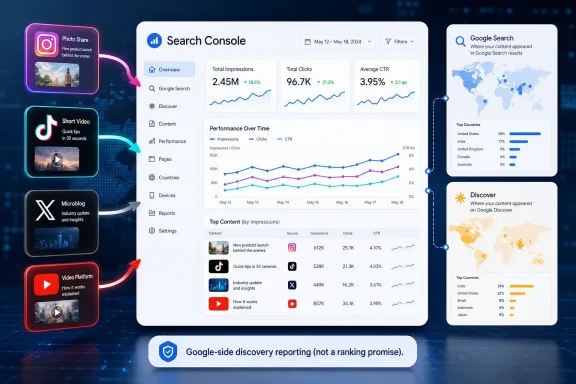 What to Do Now
If your organization publishes material on Instagram, TikTok, X, or YouTube and cares how that material appears in Google Search or Discover, you should check whether platform properties are available in your Search Console account.The setup path is straightforward: open Search Console, use the property selector, choose Add property, then look for the supported platform options. The supported platforms in this launch are Instagram, TikTok, X, and YouTube.
After rollout reaches your account, click Search Console → property selector → Add property, choose the supported platform account, complete the authorization flow, then verify that the new platform property appears in the property selector and begins showing eligible Search or Discover performance data; success means the account is connected, visible as its own property, and reporting Google-side impressions, clicks, queries, or content performance when data is available.
Before anyone clicks through authorization, decide who should own the property. For an individual creator, that may be simple. For a publisher, brand, agency, school, newsroom, nonprofit, or enterprise team, it is an access-management decision. The person who can post to a social account may not be the right person to own a Search Console property tied to that account.
The immediate checklist is:
- Check whether your official Instagram, TikTok, X, or YouTube accounts are eligible in Search Console.
- Use the property selector and Add property flow to look for platform-property options.
- Confirm which Google account or Workspace group should own each property before authorization.
- Keep website properties and platform properties clearly separated in reporting.
- Compare Search Console platform-property data with native platform analytics before drawing conclusions.
Google Just Redrew the Boundary of “Your Property”
For years, Search Console understood two primary kinds of property: a whole domain or a specific URL prefix. A domain property captured a site broadly; a URL-prefix property narrowed reporting to a particular protocol, host, or path. Both assumed the same basic truth: you were measuring something you owned or administered on the web.Platform properties add a third category. The “property” can now be a supported social or video account, verified through the Search Console flow rather than through DNS, an HTML file, or a conventional site-verification step.
That is the conceptual shift, and it should be kept precise: Search Console is expanding from measuring only web properties that organizations directly control to also measuring Google-facing performance for supported platform accounts that they administer. This does not make Search Console a universal social analytics suite, and it does not make off-site content equivalent to an owned website. It gives account owners and publishers a way to see how selected platform content performs on Google surfaces.
| Property type | What it represents | Typical scope | Why it mattered before | What changes now |
|---|---|---|---|---|
| Domain property | A whole website domain | Broad site coverage across the domain | Best for sitewide SEO monitoring | Still the anchor for owned-web visibility |
| URL-prefix property | A specific URL prefix | A narrower site section or protocol/path | Best for segmented reporting | Still useful for controlled website slices |
| Platform property | A supported social or video account | Instagram, TikTok, X, or YouTube account/channel | Did not exist as a Search Console property type | Brings Google Search and Discover visibility data to supported off-site content |
The Reports Are Familiar, but the Object Being Measured Is Not
Once a supported account is added and verified, platform properties flow into reports that Search Console users already understand. The Performance report can show clicks, impressions, click-through rate, and average position. Users can filter and sort to see which posts and queries drive traffic, then export the data for analysis elsewhere.That makes the learning curve deceptively low. SEO teams already know how to read a high-impression, low-click result, how to watch position movement, and how to compare query intent across pages. The difference is that the “page” may now be a TikTok video, an Instagram post, an X post, or a YouTube item appearing in Search or Discover.
The Insights report takes the more editorial view. According to Google’s announcement, it gives a higher-level look at recent traffic trends, top-performing posts, and how people are finding the account through Google. For creator teams and publishers, that may be the more immediately useful surface, because it translates search behavior into content planning rather than forcing every user into the full Performance-report grammar.
Then there is Achievements, which tracks milestones such as reaching new click thresholds from Search over a given period. This is the most creator-oriented part of the release because it uses a more growth-oriented vocabulary than classic Search Console. Traditional Search Console is full of diagnostic language: indexing, coverage, sitemaps, enhancements, and security issues. Achievements speaks more directly to creators and audience teams that want a quick read on whether discovery is growing.
The practical workflow is easy to imagine. A food creator sees that an older short video keeps surfacing for a specific query. A publisher notices that a YouTube explainer is attracting search demand for a topic that has not yet been covered on the main site. A brand finds that Instagram posts are showing for product-adjacent searches where its own product pages are not earning clicks. The point is not that social posts replace web pages; it is that search intent can now be observed around both.
That creates a useful feedback loop. Social teams tend to optimize for platform-native signals: watch time, likes, shares, comments, saves, reposts, follower growth, and recommendation performance. SEO teams optimize for query demand, titles, snippets, durable discovery, and search-result presentation. Platform properties make it easier to spot the overlap — the social asset that behaves like evergreen search content.
Search Profiles and Platform Properties Are Not the Same Thing
Platform properties did not appear in isolation. The supplied record describes an earlier Search Console experiment in December 2025 that brought social-channel data into a unified Search Console Insights view. The July 7 feature is broader and cleaner because platform accounts can now become their own property type rather than appearing only as part of a smaller website-associated experience.The supplied record also describes Google’s June launch of Search profiles, public creator and publisher profile pages. That distinction is important. Search profiles are audience-facing; platform properties are analytics-facing. One is about how a creator or publisher may appear to users. The other is about how that creator or publisher can measure discovery from Google.
Confusing the two will lead to bad expectations. Viewing or claiming a public-facing profile is not the same thing as receiving Search Console performance data. Adding a platform property is not the same thing as creating a public Google landing page. The two features may serve related audiences, but they solve different problems.
Timeline
December 2025 — According to the supplied record, Google ran a smaller Search Console experiment that brought social-channel data into a unified Search Console Insights view.June — According to the supplied record, Google launched Search profiles, public creator and publisher profile pages that are separate from platform properties.
July 7 — Google introduced platform properties, a Search Console property type for supported Instagram, TikTok, X, and YouTube performance in Google Search and Discover.
The pattern is worth watching, but it should not be overstated. The supported conclusion is that Google is adding more ways for creators and publishers to present and measure their activity across Google surfaces. That is not proof of a hidden ranking change.
The Feature Is Useful Because Social Search Has Stopped Being Separate
The old organizational split between “SEO” and “social” was always artificial, but it used to be administratively convenient. SEO teams handled web pages and Google rankings. Social teams handled platform feeds. Analytics teams tried to reconcile everything after the fact with referral data, UTM parameters, and dashboards that rarely matched.Users did not respect those boundaries. They search Google for videos, creators, posts, explainers, reactions, and how-to material. They find YouTube results for practical problems. They encounter social posts surfaced in search results. They discover publishers through Discover cards and then follow creators elsewhere. Platform properties recognize that this journey can cross from Google to social and video platforms long before a user ever reaches a traditional website.
For publishers, this matters because the article page is no longer the only durable search artifact. A video clip, social post, or platform-native explainer can become the thing Google surfaces when a query has visual, timely, or personality-driven intent. Without Search Console data, those assets were measurable mostly inside the platform, where the question is usually “how did this perform in the feed?” rather than “what did people search before finding this?”
For creators, the change is even more direct. A creator without a website may now have a way to see Google discovery signals for supported accounts. That does not erase the advantages of owning a domain, building an email list, controlling a publishing stack, or maintaining first-party analytics. It does mean that Search Console is no longer limited to people who operate traditional websites.
For brands, the value is messier but potentially large. Many brands already publish heavily across YouTube, Instagram, TikTok, and X, yet evaluate those efforts through platform engagement and paid-media metrics. Search Console can expose whether those posts are answering actual search demand. A high-performing YouTube post might justify a support article, a product landing page, or a longer buying guide. A post getting impressions but few clicks may suggest a mismatch between caption, title, thumbnail, and query intent.
For WindowsForum’s IT-heavy audience, the governance angle should not be ignored. Connecting platform accounts to Search Console is an identity and access-management event, not just a marketing experiment. If a social lead authorizes the wrong Google account, leaves the company, or loses platform access, reporting continuity becomes a business process problem. Treat the setup like any other analytics or publishing-system integration: assign ownership, record who authorized access, and avoid tying long-term reporting to an unmanaged personal account.
What Google Gives You Is Not What the Platforms Give You
The most important limitation is also the easiest to miss: platform properties measure Google-side discovery, not platform-native consumption. In plain English, this will not tell you how often a TikTok appeared in TikTok’s feed, how Instagram’s recommendation system treated a post, or how YouTube’s internal discovery surfaces performed inside YouTube Studio.That boundary should shape every interpretation of the data. If a YouTube video has huge views in YouTube Studio but weak Search Console performance, that does not mean the video failed. It means Google Search and Discover were not major discovery paths for it. Conversely, a modest social post with strong Google impressions might be doing a specific job that platform-native analytics understate.
The metrics themselves also carry Search Console’s usual caveats. Clicks and impressions are not the same as sessions or platform views. Average position is a search-result reporting concept, not a promise that the same user will see the same thing in the same place. Click-through rate depends on the query, result type, snippet, media treatment, and competing results.
This is where audience teams need discipline. The immediate temptation will be to rank every social post by Search clicks and declare winners. That is too crude. A post can be valuable because it earns branded discovery, answers a support query, appears in Discover, supports a public profile, or identifies demand for a larger piece of owned content. Search Console data is directional intelligence; it is not the entire performance truth.
It is also not a replacement for platform analytics. Instagram, TikTok, X, and YouTube will still own the deepest data about in-platform reach, engagement, retention, recommendations, and follower behavior. Google owns the data about Google surfaces. The power comes from putting those views next to each other and asking why they diverge.
A video that performs well in YouTube but poorly in Google may be optimized for subscribers and recommendations rather than search intent. A post that performs in Google but not in a platform feed may have durable informational value but little viral appeal. A topic that does well in both is the rare content asset that satisfies algorithmic distribution and search demand. Those are the pieces worth studying.
The Rollout Will Create a Messy First Month of Partial Access
Google says platform properties are rolling out gradually over the coming weeks, so not every account will see the option immediately. That matters because early reactions will inevitably be inconsistent. Some users will find the property type, some will not, and some organizations will discover that the person who can authorize a platform account is not the person who manages Search Console.The setup flow is straightforward in principle. Open Search Console, use the property selector, choose Add property, select Instagram, TikTok, X, or YouTube if available, then follow the on-screen verification steps to authorize the connection. In practice, large organizations should not treat that as a casual click-through.
A publisher may have dozens of YouTube channels, regional Instagram accounts, legacy X accounts, and brand or newsroom TikTok handles. Agencies may have access to client properties but not the underlying platform credentials. Creators may have personal Google accounts, brand Google accounts, and channel-management arrangements that blur ownership. The difference between “can post” and “can authorize analytics access” is not trivial.
Action Checklist for Admins
- Inventory official Instagram, TikTok, X, and YouTube accounts before adding properties.
- Decide which Google account or Workspace group should own each platform property.
- Use the Search Console property selector and Add property flow only after ownership is clear.
- Document who authorized each connection and which account or group owns it.
- Label reports so website properties and platform properties do not collapse into one vague “Search Console clicks” number.
- Review access when employees, agencies, or social-account owners change.
The second win is naming discipline. A domain property, a URL-prefix property, and a platform property for the same brand may all appear in Search Console. If dashboards simply say “Search Console clicks,” the resulting reports will blur website traffic, platform-content clicks, Discover exposure, and social-account discovery into one unreliable number.
The SEO Industry Will Overstate the Ranking Signal Before It Understands the Reporting Signal
Any time Google adds a Search Console report, the SEO industry asks the same question: is this a ranking factor? Platform properties will be no different. Expect speculation that connecting a social account will improve visibility, that posts with Search Console data will rank differently, or that Google is rewarding creators who bind their platform identities to its systems.The safer reading is more boring and more useful. Google has introduced a reporting mechanism. The supplied material says adding a platform property lets creators and publishers track how posts show up in Google Search and Discover. It does not say that adding one changes ranking, indexing, eligibility, or distribution.
It is reasonable to expect teams to use the data in planning, but that should be framed as a workflow effect rather than a confirmed Google objective. Once creators see which queries lead people to their posts, some may adjust titles, captions, descriptions, or follow-up posts with those queries in mind. Once publishers see which social assets pull search demand, some may use that information to decide whether a topic deserves a full article, explainer, or support page. Those are plausible editorial responses to better reporting, not proof that the connection itself changes how Google ranks content.
In that sense, platform properties may become ranking-adjacent in practice without being a ranking signal. The dashboard does not need to change how Google ranks a TikTok, Instagram post, X post, or YouTube result in order to change how teams publish. Better measurement can influence editorial planning, title discipline, caption strategy, video topics, and the decision to convert a successful platform post into an owned article, support page, or product guide.
There is also a competitive context, but it should be labeled as analysis rather than stated as confirmed intent. Google Search increasingly coexists with social search behavior, especially among users who search TikTok, YouTube, Reddit, Instagram, or X directly for firsthand experience. By giving creators Google-side analytics for some of those platforms, Google may make Search Console more relevant to planning content that no longer lives only on websites. That is an interpretation of the product direction, not an announced ranking change.
The verified fact is narrower: Search Console now supports platform properties for selected accounts, and those properties report Google Search and Discover performance.
The Supported Platform List Is Telling — and Incomplete
The first supported platforms are Instagram, TikTok, X, and YouTube. That list covers short video, social posts, creator identity, real-time publishing, and Google’s own major video platform. It also leaves obvious gaps.LinkedIn is absent. Facebook is absent. Reddit is absent. Pinterest is absent. Podcast platforms are absent. Messaging and newsletter platforms are absent. For many publishers and B2B brands, LinkedIn would be at least as important as X. For consumer search behavior, Reddit’s absence is notable because Reddit results often occupy valuable search real estate and shape product, troubleshooting, and opinion queries.
Google has not, in the supplied material, announced whether support will expand. So the honest conclusion is that platform properties are a meaningful start, not a complete map of off-site discovery. The supported list tells us where the first use cases are available now, not where the product will necessarily end up.
YouTube’s inclusion is also unusual because YouTube already has its own analytics ecosystem. But YouTube Studio and Search Console answer different questions. YouTube Studio can tell you a great deal about YouTube discovery. Search Console can show how Google Search and Discover lead people to YouTube content. For publishers with both article and video operations, that distinction matters because it can expose whether a topic is better served by video, text, or both.
TikTok and Instagram are culturally significant additions. Their content often functions as search answers even when it was not produced with old-school SEO in mind. Travel recommendations, recipes, product demos, outfit ideas, local business clips, repairs, news reactions, and explainers all live there. Google surfacing those assets is not new; giving account owners Search Console reporting for supported platform content is the new operational layer.
X remains a real-time publishing surface for journalists, companies, politicians, developers, and incident responders. For breaking topics, Google visibility into X posts can matter. For brands and publishers, the ability to see whether X content produces Search impressions may help separate habitual posting from discoverable publishing.
The absence of a platform should not lead teams to wait. The supported four already cover enough surface area to change reporting practice. But teams should avoid designing a creator analytics strategy that assumes platform properties are comprehensive. They are not.
The Real Risk Is Letting Google Define the Whole Audience Picture
The launch is useful, but it also deepens a familiar dependency. Creators and publishers want Google query data because it is uniquely valuable. Google decides what data is visible, how it is aggregated, when reports appear, which platforms qualify, and which surfaces are included. That makes Search Console indispensable and incomplete at the same time.This is not new. Website owners have lived with Search Console’s partial view for years. The tool shows search performance, not full user behavior. Teams accept those constraints because the alternative is having no first-party Google Search data at all.
Platform properties extend that bargain to social content. The danger is that teams may start optimizing only for the queries Google reveals while neglecting audiences that find them natively, through communities, newsletters, subscriptions, recommendations, or direct follows. The data is powerful precisely because it is query-rich, but it represents one discovery system.
For publishers, there is another concern: Google may increasingly mediate both presentation and measurement. Public-facing profile features address how creators and publishers appear to audiences. Platform properties address how those same actors measure off-site discovery from Google. Both can be useful, but neither should become the whole audience strategy.
The right response is not to reject the data. It is to contextualize it. Put Search Console platform-property reporting next to native platform analytics, website analytics, newsletter metrics, subscriber data, direct traffic, community engagement, and revenue outcomes. If Search Console says a social post is visible but the platform says users are not engaging, that is a different editorial signal than a post that performs everywhere. If a platform says a video is popular but Google sends little discovery, that may still be a successful platform-native asset.
The healthiest teams will use platform properties as one more instrument, not as the cockpit. Search Console can show what Google surfaces. It cannot tell the full story of audience loyalty, trust, conversion, retention, or community value.
How Publishers Should Read the First Reports
The first month of data will tempt teams to look for quick winners. That is understandable, but the more useful approach is to group the data into questions.Start with queries. Which searches are causing Google to surface your platform content? Are they branded, informational, product-related, local, troubleshooting-oriented, or news-driven? A branded query that leads to an Instagram account may support reputation and identity. A troubleshooting query that leads to a YouTube video may reveal demand for a written support article. A product query that leads to a TikTok clip may suggest that users want demonstration before documentation.
Then look at the content format. Are the strongest Google-facing assets videos, short posts, image-heavy posts, explainers, reactions, or real-time updates? If a format repeatedly earns impressions for evergreen queries, it may deserve a more deliberate production workflow. If a post gets impressions but no clicks, the asset may be visible without being compelling in the result context.
Next, compare platform-property data with your owned site. If Google is surfacing a YouTube explainer for a query where your site has no strong page, that is an editorial gap. If your site ranks well but an Instagram or TikTok post also earns impressions, that may mean the query has mixed intent. Users may want both a conventional answer and a visual demonstration. That is not a problem; it is a planning opportunity.
Finally, check whether Search Console data changes internal attribution. Social teams often get judged by engagement inside the platform, while SEO teams get judged by search clicks to the site. Platform properties create a middle layer: social content that performs in Google. That activity should not be credited as website SEO, but it also should not disappear inside platform-only reporting. It belongs in a separate bucket: Google discovery of off-site content.
How IT and Admin Teams Should Govern the Connection
The governance work does not need to be heavy, but it needs to be deliberate. Platform properties connect a Google reporting surface to external social or video accounts. That creates ownership, continuity, and access questions.Use managed accounts where possible. For organizations using Google Workspace, a role-based account or group is usually safer than a single employee’s personal login. Make sure the person authorizing the connection has the right to do so, especially in agencies, franchises, schools, media groups, and distributed brands.
Record the basics: platform account, Search Console property name, Google owner or group, date connected, person who authorized it, and any internal business owner. That small amount of documentation prevents confusion later when someone asks why a property exists, who can remove users, or why reporting stopped.
Review access on the same schedule you review analytics, CMS, ad-platform, and social-publishing access. If an employee leaves, an agency contract ends, a brand account is renamed, or a channel changes ownership, platform-property access should be part of the offboarding and transition checklist.
The goal is not bureaucracy. The goal is to prevent avoidable reporting gaps. A platform property that becomes central to audience reporting should not depend on a single employee’s forgotten authorization path.
What Not to Conclude
Do not conclude that adding a platform property improves ranking. The supplied material does not support that.Do not conclude that Search Console now measures all social performance. It measures Google Search and Discover performance for supported platform accounts.
Do not conclude that unsupported platforms are coming next. That may happen, but the supplied material does not announce it.
Do not conclude that a low Search Console number means a platform post failed. It may have succeeded through platform-native distribution, subscribers, followers, shares, embeds, or paid promotion.
Do not conclude that a high Search Console number means the asset is strategically complete. It may be a signal to create a better owned page, a more durable video, a clearer support article, or a more complete product answer.
The better conclusion is narrower and more actionable: platform properties give teams a new view of how selected off-site content performs across Google surfaces. That view is valuable when it is compared against other data, and misleading when it is treated as the whole truth.
The Bottom Line
Platform properties are one of those Search Console changes that will look small to casual users and large to teams that live inside reporting workflows. The interface may feel familiar, but the measured object has changed. Search Console can now describe Google-facing performance not only for websites, but also for supported platform accounts on Instagram, TikTok, X, and YouTube.For creators, that means Google discovery can become visible even when the primary publishing surface is not a traditional website. For publishers, it means social and video assets can be evaluated alongside articles and owned pages without pretending they are the same thing. For brands, it means product-adjacent and support-adjacent social content can be tested against real search behavior. For IT and admin teams, it means one more integration that deserves clear ownership and access discipline.
The best next step is practical: check the Search Console property selector, use Add property when the platform option is available, connect only the accounts your organization actually governs, and verify that the new property begins reporting Search or Discover performance. Then keep the data in its lane.
The concrete takeaway is this: add platform properties where they are available, label them clearly, compare them with native analytics, and use the results to understand Google discovery — not to chase an imagined ranking boost or replace the rest of your audience measurement stack.
References
- Primary source: H2S Media
Published: 2026-07-08T06:20:08.105169
Google Search Console Can Now Track Your Instagram, TikTok, X, and YouTube Performance - H2S Media
Google's new Search Console "platform properties" let creators track how their Instagram, TikTok, X, and YouTube posts perform in Search and Discover, even without a website.www.how2shout.com - Official source: support.google.com

About platform properties in Search Console - Search Console Help
If you’re a creator or publisher who posts on platforms like Instagram, TikTok, X, and YouTube, you can use Search Console to monitor how people find your content when searching on Google. You can cr
support.google.com
- Related coverage: searchenginejournal.com
Google Search Console Adds Reports For Social Posts
Google is adding platform properties to Search Console, letting creators track how their Instagram, TikTok, X, and YouTube posts perform in Search and Discover.www.searchenginejournal.com - Related coverage: en.softonic.com
Google Search Console rolls out platform properties: social profile traffic reports - Softonic
Google says Search Console is starting to roll out platform properties, a new addition that brings social discovery analytics into the product for supen.softonic.com - Related coverage: readkernel.com
Google adds Search Console stats for creators’ social and video posts | Kernel
Platform properties will show creators and publishers which Google queries send users to their Instagram, TikTok, X and YouTube content. readkernel.com
- Official source: developers.google.com
- Related coverage: ad-hoc-news.de
Google Search Console: Platform Properties verknüpft Social-Media ab Juli
Google bündelt Instagram-, TikTok-, X- und YouTube-Daten in der Search Console für umfassende Performance-Analysen.www.ad-hoc-news.de - Related coverage: seoperthexperts.com.au
- Related coverage: dotmirror.com
- Related coverage: gadgets360.com
- Related coverage: phonearena.com
Google introduces a way to make Search more useful for many - PhoneArena
Google introduces new Search profiles that will initially launch in the U.S.www.phonearena.com - Related coverage: semrush.com
Google launches Search Profiles for publishers and creators
Google‘s new Search profiles give publishers and creators a dedicated landing page in Discover. Here‘s what it means for brands.www.semrush.com - Related coverage: blog.google
A new profile to help publishers and creators highlight their work on Search
We’re introducing a new, dedicated space for creators, publishers and brands.blog.google - Related coverage: creators.google
Google for Creators | Search Profile
A new way for creators, brands, and publishers to stand out on Search.creators.google - Related coverage: memeburn.com
Google's New Search Profiles: Gave Creators Their Own Page in Search - Memeburn
Google just launched Search profiles for creators and publishers in 2026. Here's what they are, how to claim yours, and why it matters as AI erodes search traffic.memeburn.com - Related coverage: dynamitenews.com
Google launches ‘search profiles’ for creators, publishers to boost online visibility | Dynamite News
Google has launched Search Profiles, a new feature allowing creators and publishers to showcase articles, videos, websites and social media accounts across Google Search and Discover.www.dynamitenews.com
- Related coverage: seohandbook.co.uk
Google Launches Search Profiles for Publishers and Creators | the seo handbook
Google has officially launched Search Profiles, letting publishers and creators with 100,000+ followers claim a customisable page in Search and Discover.seohandbook.co.uk
- Related coverage: androidcentral.com
Google gets a dose of social media with 'Search Profiles' to capture new audiences | Android Central
You can control what's going on in your feed.www.androidcentral.com - Related coverage: phys.org
- Related coverage: juzaweb.com
Mystery in Google Search Console: New 'Platform Property Tooltips' Feature Teased - Juzaweb - Premium Themes & Scripts for MMO Websites
An Unexpected Discovery in Google’s Help Documentation The world of Search Engine Optimization (SEO) is often driven by the discovery of undocumented changes and subtle hints dropped within Google’s ecosystem. Recently, a mysterious new entry appeared in the Google Search Console... juzaweb.com
- Related coverage: isp.today
Google drops FAQ rich results from Search Console
Google has confirmed it is removing FAQ rich results from Search Console in June, with Search Console API support ending in August. Full timeline inside.isp.today - Related coverage: thepromptinsider.com
Google Deprecates FAQ Rich Results: What It Means for AEO
Google stopped showing FAQ rich results on May 7, 2026. Here's what changed, why your FAQPage schema still matters for AI search, and what to do next.thepromptinsider.com - Related coverage: obenan.ai
Google turned AI visibility into a control plane | Obenan Briefings
Google shipped Search Console generative AI performance reports and an eligibility control on June 3, 2026. They report AI impressions and participation, not clicks, recommendation quality, or business outcomes.www.obenan.ai - Related coverage: elementera.com
Google has removed FAQ rich results | Elementera AI
The May 2026 change ends a three-year rollback and forces a more mature schema strategy: less chasing SERP decoration, more focusing on machine clarity, measurement, and durable search visibility.www.elementera.com
