

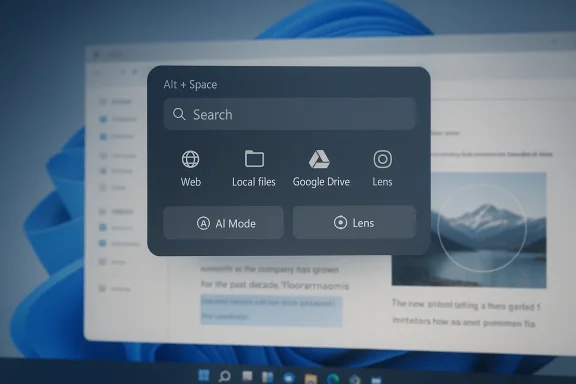
Google’s Spotlight-style desktop search has arrived on Windows, and this time it is not just another experiment tucked away in a lab. Google has now made its desktop app for Windows available globally in English, turning Alt+Space into a quick-launch gateway for web search, local files, installed apps, Google Drive content, and contextual help from AI Mode and Google Lens. For Windows users who have long watched macOS Spotlight evolve into a daily productivity habit, the move is more than a feature drop; it is a direct challenge to how search should feel on a modern desktop.
Desktop search has always been one of those features that seems small until it becomes indispensable. Apple’s Spotlight helped define the modern expectation that a keyboard shortcut should surface not just apps and files, but answers, calculations, and web results without breaking the user’s flow. On Windows, the experience has historically been more fragmented, split between Start menu search, File Explorer search, browser omniboxes, and third-party launchers.
Google’s latest Windows app is part of a broader effort to make Search feel less like a destination and more like an always-available layer. The company’s official description emphasizes that the app brings web search, Google Drive, installed applications, and files on the PC into one interface. It also adds Lens for on-screen selection and AI Mode for deeper responses and follow-up questions.
The new release also matters because it follows an experiment-first rollout. Google initially surfaced the app through Search Labs, where it was positioned as a Windows experiment with known limitations, English-only availability, and US-only eligibility. That experimental framing is important: it shows Google testing not just a product, but a workflow. The company wanted to see whether users would accept a floating search bar that sits above whatever they are doing and becomes an entry point for files, apps, and AI-assisted answers.
What changed in the official version is confidence. Google is no longer presenting the app as an awkward trial for early adopters; it is now calling it a full desktop app for Windows users. The messaging stresses speed, continuity, and context, all of which are central to the new desktop paradigm. The goal is not merely to find things faster, but to keep users from leaving the task they are already in the middle of.
There is also a strategic subtext here. Google has spent the past year and a half weaving AI Mode into more surfaces, from Search on the web to mobile and now desktop. That pattern suggests an effort to make Google Search the connective tissue across devices, while also making Gemini-era capabilities feel native to everyday productivity rather than confined to a chatbot tab.
It also reflects a broader industry lesson: AI features win when they are close to the workflow. A standalone chatbot is useful, but a shortcut that quietly lives behind Alt+Space and understands what is on your screen is more likely to become habitual.
The biggest practical distinction from ordinary Windows search is that Google is blending multiple modes into one surface. Traditional launcher-style tools usually focus on files and apps. Google’s version adds the company’s search infrastructure, Lens, and AI Mode, meaning the same shortcut can lead to a document, a translation, or a synthesized answer with links. That integration is the heart of the product’s appeal.
The app also supports screen sharing for context, allowing users to select a window or the full screen and continue asking questions without leaving the task at hand. That is a significant design choice because it shifts search from a passive query box into an interactive assistant that can observe a user’s current context. In practical terms, this can help with documents, webpages, homework-style questions, or troubleshooting.
Google Lens is another meaningful layer. With on-screen selection, users can highlight content to search or translate instantly. That makes the app more than a launcher and more than a search bar; it becomes a bridge between visual information and text-based understanding. For users who regularly deal with screenshots, PDFs, foreign-language content, or UI elements they do not recognize, that bridge could be the most valuable part of the product.
In that sense, the app looks like Google’s answer to a long-standing productivity expectation on Windows: one shortcut, many destinations.
The original beta experience reportedly felt unfinished to some testers, with awkward installation and update behavior. Google’s current release language does not dwell on those rough edges; instead, it frames the app as polished and ready for wider use. That shift suggests the company believes the core interaction has cleared the threshold from prototype to product.
The experiment likely helped Google refine several design questions:
That choice also places Google into a long-running category battle with PowerToys Run, Wox-style launchers, the Windows Start menu, and third-party productivity tools. Each of those products has tried, in different ways, to be the fastest route from thought to action. Google’s advantage is not just speed, but access to the company’s broader search graph and AI stack. The company is essentially saying that the best launcher is the one that knows both your local machine and the web.
That is especially relevant for people who move between browser tabs, cloud documents, and local software all day. The app’s appeal is that it offers one search gesture for many different kinds of intent.
AI Mode is also part of Google’s broader Search strategy. Over the past year, Google has steadily expanded AI features across Search, including AI Overviews and AI Mode experiments, and it has pushed those capabilities into more contexts. The Windows desktop app fits that trajectory by turning the desktop itself into a place where AI-assisted search can begin.
The challenge is that AI search works best when the user trusts the quality of the response. If the app feels too eager to summarize, too opaque about sources, or too loose with context, users may revert to classic search results. So the balance between answer and evidence will be critical.
The more the app behaves like a digital coworker, the more users will expect it to understand when to answer and when to defer.
Google’s decision to include Drive is smart from a platform perspective. It makes the app more useful to people already invested in Google’s ecosystem and gives the company a reason for the app to remain a recurring part of the workflow. If your files live partly on the PC and partly in Drive, a launcher that spans both is more compelling than one that only sees the local disk.
That is important for productivity because the fastest search tool is not the one with the most features; it is the one people actually remember to use. By attaching the experience to Alt+Space, Google reduces behavioral overhead.
The screen-sharing feature adds another layer by allowing the app to keep asking questions about what the user is viewing. This is a notable shift from classic desktop search because it introduces a semi-visual, semi-conversational mode of interaction. Instead of manually describing a problem, users can show it.
The feature also reinforces a broader truth about AI tools: context is everything. A search box that knows what is on the screen can produce more relevant answers than a generic query box ever could.
That kind of gating is not unusual for Google experiments, but it does shape who can benefit first. Consumers will likely see the product before many managed enterprise environments do, especially those with stricter account policies. The company’s rollout language suggests a gradual broadening of access rather than a fully open free-for-all.
That said, Google has a pattern of expanding product language coverage after the first public release. The current version should therefore be read as a starting point, not a final state.
This does not necessarily mean Google intends to replace Windows Search. But it does mean the company is willing to compete for the first place users look when they need something. In platform terms, that is a meaningful aspiration. Whoever owns the search habit often owns the attention that comes with it.
Google’s move also makes AI search feel less abstract. Instead of being a feature tucked into a web page, it becomes a direct productivity tool. That can put pressure on competitors to make their own AI experiences feel equally immediate.
Several signals will matter in the coming months. First, broader language support would indicate that Google sees real global demand. Second, more robust enterprise-friendly options would suggest the company wants the product to move beyond consumer novelty. Third, any tighter integration with Gemini-like experiences could show that desktop search is becoming one of Google’s most important AI surfaces.
Google’s Windows desktop app is best understood as a quiet but meaningful escalation in the search wars. It is not flashy in the way a chatbot launch is flashy, but it may prove more influential because it targets a habit rather than a headline. If the company can make Alt+Space feel as natural on Windows as Spotlight feels on Mac, it will have done more than release another app; it will have changed how a generation of users starts looking for answers.
Source: Techloy Google’s New AI Desktop Search App Brings Spotlight-Style Search to Windows
 Background
Desktop search has always been one of those features that seems small until it becomes indispensable. Apple’s Spotlight helped define the modern expectation that a keyboard shortcut should surface not just apps and files, but answers, calculations, and web results without breaking the user’s flow. On Windows, the experience has historically been more fragmented, split between Start menu search, File Explorer search, browser omniboxes, and third-party launchers.Google’s latest Windows app is part of a broader effort to make Search feel less like a destination and more like an always-available layer. The company’s official description emphasizes that the app brings web search, Google Drive, installed applications, and files on the PC into one interface. It also adds Lens for on-screen selection and AI Mode for deeper responses and follow-up questions.
The new release also matters because it follows an experiment-first rollout. Google initially surfaced the app through Search Labs, where it was positioned as a Windows experiment with known limitations, English-only availability, and US-only eligibility. That experimental framing is important: it shows Google testing not just a product, but a workflow. The company wanted to see whether users would accept a floating search bar that sits above whatever they are doing and becomes an entry point for files, apps, and AI-assisted answers.
What changed in the official version is confidence. Google is no longer presenting the app as an awkward trial for early adopters; it is now calling it a full desktop app for Windows users. The messaging stresses speed, continuity, and context, all of which are central to the new desktop paradigm. The goal is not merely to find things faster, but to keep users from leaving the task they are already in the middle of.
There is also a strategic subtext here. Google has spent the past year and a half weaving AI Mode into more surfaces, from Search on the web to mobile and now desktop. That pattern suggests an effort to make Google Search the connective tissue across devices, while also making Gemini-era capabilities feel native to everyday productivity rather than confined to a chatbot tab.
Why this launch matters
The launch is not just about convenience. It is about control of the default search experience on Windows, a platform where Microsoft owns the shell but Google still dominates search. By embedding a Google-branded search layer directly into the desktop, the company is making a bid to intercept intent before users open a browser or reach for another app. That is a subtle but powerful shift.It also reflects a broader industry lesson: AI features win when they are close to the workflow. A standalone chatbot is useful, but a shortcut that quietly lives behind Alt+Space and understands what is on your screen is more likely to become habitual.
Overview
At a functional level, the app is straightforward. Press Alt+Space, and a compact search interface appears over your current window. From there, you can query the web, open installed apps, search local files, inspect Google Drive content, and invoke AI-powered results for more complex questions. Google says the app works on Windows 10 and Windows 11, is currently available in English, and requires users to meet age and account eligibility rules.The biggest practical distinction from ordinary Windows search is that Google is blending multiple modes into one surface. Traditional launcher-style tools usually focus on files and apps. Google’s version adds the company’s search infrastructure, Lens, and AI Mode, meaning the same shortcut can lead to a document, a translation, or a synthesized answer with links. That integration is the heart of the product’s appeal.
The app also supports screen sharing for context, allowing users to select a window or the full screen and continue asking questions without leaving the task at hand. That is a significant design choice because it shifts search from a passive query box into an interactive assistant that can observe a user’s current context. In practical terms, this can help with documents, webpages, homework-style questions, or troubleshooting.
Google Lens is another meaningful layer. With on-screen selection, users can highlight content to search or translate instantly. That makes the app more than a launcher and more than a search bar; it becomes a bridge between visual information and text-based understanding. For users who regularly deal with screenshots, PDFs, foreign-language content, or UI elements they do not recognize, that bridge could be the most valuable part of the product.
The product’s identity
Google is trying to position the Windows app as a desktop utility, not just a search experiment. That distinction matters because utility software must be reliable, fast, and predictable before it becomes trusted. The company’s current pitch is that the app helps you stay in your flow and get back to work without switching windows.In that sense, the app looks like Google’s answer to a long-standing productivity expectation on Windows: one shortcut, many destinations.
- Search the web without opening a browser.
- Launch installed apps from a single command box.
- Find local files and Drive documents from the same place.
- Use Lens to search what is visible on the screen.
- Ask follow-up questions through AI Mode when the initial result is not enough.
From Experiment to Official App
The transition from Labs experiment to official release is the most important signal in the story. Early access programs often function as product triage, letting a company learn where the friction is before it commits to broader distribution. Google’s Labs page described the Windows app as experimental, known to have limitations, and restricted to users in the US who meet specific requirements.The original beta experience reportedly felt unfinished to some testers, with awkward installation and update behavior. Google’s current release language does not dwell on those rough edges; instead, it frames the app as polished and ready for wider use. That shift suggests the company believes the core interaction has cleared the threshold from prototype to product.
Why Labs mattered
Labs gave Google a way to validate the most important question: do users want Google Search as a native desktop layer on Windows? The answer, at least from the company’s behavior, appears to be yes. Search Labs also let Google test a product that sits at the intersection of operating system behavior, search infrastructure, and AI-generated responses. That is a risky combination to launch cold.The experiment likely helped Google refine several design questions:
- How quickly should the interface appear after Alt+Space?
- Which sources should be prioritized first: files, apps, Drive, or web?
- How prominently should AI Mode surface versus classic search results?
- How much context should Lens and screen sharing expose before users feel uneasy?
- Which account and region restrictions are necessary for the first public release?
The Alt+Space Interface
The shortcut is the feature’s clearest statement of intent. Alt+Space is one of the most muscle-memory-friendly key combinations on the keyboard, and Google is clearly betting that familiarity will lower adoption friction. Users do not need to remember a new launcher pattern or navigate a web page; they simply summon the tool where they already are.That choice also places Google into a long-running category battle with PowerToys Run, Wox-style launchers, the Windows Start menu, and third-party productivity tools. Each of those products has tried, in different ways, to be the fastest route from thought to action. Google’s advantage is not just speed, but access to the company’s broader search graph and AI stack. The company is essentially saying that the best launcher is the one that knows both your local machine and the web.
How it changes workflow
The real value of a launcher is not in single searches. It is in reducing context switching over the course of a day. If a user can check a file name, open an app, inspect a Drive document, and ask a follow-up question from the same floating box, then the app becomes part of the rhythm of work rather than an interruption.That is especially relevant for people who move between browser tabs, cloud documents, and local software all day. The app’s appeal is that it offers one search gesture for many different kinds of intent.
- Open something.
- Find something.
- Understand something.
- Translate something.
- Continue thinking without leaving the desktop.
AI Mode and Search Results
Google’s desktop app is not just about retrieval; it is about interpretation. The company says the app includes AI Mode, which can provide deeper, AI-powered responses with helpful links. That matters because it changes the expectation from “show me where the thing is” to “help me understand the thing.”AI Mode is also part of Google’s broader Search strategy. Over the past year, Google has steadily expanded AI features across Search, including AI Overviews and AI Mode experiments, and it has pushed those capabilities into more contexts. The Windows desktop app fits that trajectory by turning the desktop itself into a place where AI-assisted search can begin.
The upside of AI-assisted search
For many questions, traditional keyword search is enough. But the minute the query becomes multi-step, ambiguous, or context-heavy, AI can shorten the path to an answer. That is where Google’s new desktop app may shine: broad questions, mixed media, and tasks that need synthesis rather than a list of links.The challenge is that AI search works best when the user trusts the quality of the response. If the app feels too eager to summarize, too opaque about sources, or too loose with context, users may revert to classic search results. So the balance between answer and evidence will be critical.
Consumer and enterprise implications
For consumers, AI Mode is mostly about convenience. It reduces friction for homework, travel planning, translation, and general curiosity. For enterprise users, however, the stakes are higher because AI-generated answers can touch on work files, internal documents, and operational workflows. That makes source transparency and data boundaries especially important.The more the app behaves like a digital coworker, the more users will expect it to understand when to answer and when to defer.
Files, Apps, and Google Drive
One of the app’s most practical features is its ability to surface local files, installed apps, and Google Drive documents from the same interface. That kind of unification is where desktop search tools often make the biggest difference, because users spend an enormous amount of time just locating what they already know exists.Google’s decision to include Drive is smart from a platform perspective. It makes the app more useful to people already invested in Google’s ecosystem and gives the company a reason for the app to remain a recurring part of the workflow. If your files live partly on the PC and partly in Drive, a launcher that spans both is more compelling than one that only sees the local disk.
Why this matters on Windows
Windows users have long relied on a patchwork of search behaviors. Some use Start menu search, some use File Explorer, some use browser bookmarks, and some depend on third-party tools. Google’s app attempts to collapse those habits into a single search layer with a more web-native brain.That is important for productivity because the fastest search tool is not the one with the most features; it is the one people actually remember to use. By attaching the experience to Alt+Space, Google reduces behavioral overhead.
- Less hunting through menus.
- Less switching between apps.
- Less duplication between local and cloud search.
- Less dependence on separate utilities for search and launch.
Google Lens and Screen Context
Lens is where the app starts to feel genuinely modern. Google says users can select and search anything on their screen, including text and images, which opens up translation, identification, and context lookup from within the current window. That makes the tool useful not just for search, but for comprehension.The screen-sharing feature adds another layer by allowing the app to keep asking questions about what the user is viewing. This is a notable shift from classic desktop search because it introduces a semi-visual, semi-conversational mode of interaction. Instead of manually describing a problem, users can show it.
Practical use cases
For everyday users, this could help with screenshots, instructions, settings screens, invoices, charts, and foreign-language pages. For students, it could be useful for homework and diagram interpretation. For knowledge workers, it may be a faster way to clarify unfamiliar UI elements or extract meaning from a document without retyping the whole thing.The feature also reinforces a broader truth about AI tools: context is everything. A search box that knows what is on the screen can produce more relevant answers than a generic query box ever could.
Availability and Account Rules
Google’s official release says the app is available globally in English for Windows users, while the Labs page still spells out various eligibility requirements for the experiment itself, including US-only access during the test phase, a minimum age of 13, a Windows 10+ desktop, and a personal Google Account. It also notes that Search Labs is not available to Google Workspace accounts, including Workspace for Education.That kind of gating is not unusual for Google experiments, but it does shape who can benefit first. Consumers will likely see the product before many managed enterprise environments do, especially those with stricter account policies. The company’s rollout language suggests a gradual broadening of access rather than a fully open free-for-all.
What the limitations imply
The current language around English-only availability is especially important for adoption outside the US. Even when a product is globally available, language support often determines whether it can become part of daily routine. Desktop search is deeply local and highly habitual; if a user cannot rely on it in their preferred language, they will default back to existing tools.That said, Google has a pattern of expanding product language coverage after the first public release. The current version should therefore be read as a starting point, not a final state.
Competitive Pressure on Windows Search
The competitive implications are obvious. Google is offering a polished shortcut into its own search ecosystem on a platform where Windows users already have a built-in search experience. That means Microsoft now faces a familiar but uncomfortable reality: users may prefer a third-party layer when it is faster, more useful, or more AI-forward than the native option.This does not necessarily mean Google intends to replace Windows Search. But it does mean the company is willing to compete for the first place users look when they need something. In platform terms, that is a meaningful aspiration. Whoever owns the search habit often owns the attention that comes with it.
Why rivals should care
Microsoft, third-party launcher makers, and even browser vendors should all pay attention. Once users become comfortable invoking a search layer from the desktop itself, they may be less loyal to any single app. The launcher becomes a gateway, and gateways are valuable because they shape what happens next.Google’s move also makes AI search feel less abstract. Instead of being a feature tucked into a web page, it becomes a direct productivity tool. That can put pressure on competitors to make their own AI experiences feel equally immediate.
- Microsoft must defend the relevance of built-in search.
- Launcher developers may need deeper AI and cloud integrations.
- Browser vendors may need to think beyond the address bar.
- AI assistants will need stronger desktop context to stay competitive.
Strengths and Opportunities
Google’s desktop app has several strengths that make it genuinely interesting rather than merely redundant. It combines the company’s biggest advantage — search scale — with everyday desktop utility, and it does so behind a shortcut people can remember without thinking. The opportunity lies in making the app feel so natural that it becomes invisible until needed.- Fast access through a familiar shortcut lowers adoption friction.
- Unified search across web, files, apps, and Drive saves time.
- AI Mode can answer complex questions without leaving the desktop.
- Google Lens integration expands the app into visual search and translation.
- Context-aware screen sharing improves relevance for real-world tasks.
- Cloud plus local coverage makes the tool more useful than single-purpose launchers.
- Habit potential is strong because the app can become part of muscle memory.
Why the opportunity is bigger than it looks
If Google gets this right, the app could become a daily utility for a wide range of users, not just tech enthusiasts. That matters because utility software tends to spread quietly, then suddenly becomes hard to live without. The best version of this product is one people stop noticing because it is always there when they need it.Risks and Concerns
The biggest risk is trust. A search app that reaches across files, apps, Drive, and screen context has to handle permissions, privacy expectations, and result quality with extreme care. If users feel the tool is too intrusive or too eager to infer meaning, they may disable it quickly or avoid signing in. Convenience only works when it feels safe.- Privacy concerns around screen sharing and contextual access.
- Result quality risk if AI responses are inconsistent or overconfident.
- Limited language support could slow adoption outside English-speaking users.
- Enterprise friction may arise because Workspace accounts are excluded from Labs.
- Overlap with Windows search could confuse users about the best default tool.
- Battery and background-process concerns may matter on laptops.
- Expectation mismatch could hurt if users assume full Spotlight parity immediately.
The long-term challenge
Google also has a history of launching useful products that fail when the novelty wears off and the rough edges remain. Desktop software is unforgiving because it is judged every time it starts, every time it lags, and every time it misses a query. The app will have to prove that it is not just a demo of Google’s AI ambition, but a dependable part of daily work.What to Watch Next
The next phase will reveal whether this is a genuine desktop platform move or simply a polished experiment with limited staying power. The key questions are less about the existence of the app and more about how quickly Google expands it, how deeply it integrates with more workflows, and whether users adopt it as a routine tool rather than a curiosity.Several signals will matter in the coming months. First, broader language support would indicate that Google sees real global demand. Second, more robust enterprise-friendly options would suggest the company wants the product to move beyond consumer novelty. Third, any tighter integration with Gemini-like experiences could show that desktop search is becoming one of Google’s most important AI surfaces.
The milestones to monitor
- Expansion beyond English-only availability.
- Broader rollout to more regions and account types.
- Tighter Drive and Google Workspace integration.
- Better support for contextual AI across documents and webpages.
- Performance improvements for startup speed and result latency.
- Clearer privacy controls for screen sharing and search history.
- Possible alignment with future Gemini desktop experiences.
The broader strategic question
The real question is whether Google wants Windows users to think of Search as a browser feature, a cloud service, or a desktop utility. This app suggests the answer may be all three. If that strategy works, Google could turn desktop search into another durable entry point for its ecosystem, one that is always present, always one shortcut away, and increasingly hard to ignore.Google’s Windows desktop app is best understood as a quiet but meaningful escalation in the search wars. It is not flashy in the way a chatbot launch is flashy, but it may prove more influential because it targets a habit rather than a headline. If the company can make Alt+Space feel as natural on Windows as Spotlight feels on Mac, it will have done more than release another app; it will have changed how a generation of users starts looking for answers.
Source: Techloy Google’s New AI Desktop Search App Brings Spotlight-Style Search to Windows
Last edited:
