

Google’s desktop search app for Windows is no longer a small Labs curiosity. It is now a globally available English-language release that puts a Spotlight-style launcher on top of Windows 10 and newer PCs, with Alt + Space as the core shortcut and a bundle of search, AI, Drive, and Lens features folded into a single surface. The timing matters: Google is trying to make its search and AI stack feel like an operating-system utility rather than a browser destination, and that puts fresh pressure on both Microsoft and Apple’s long-established desktop paradigms. (blog.google)
Google has been inching toward this kind of desktop integration for years, even if it has rarely described the strategy in those exact terms. The company has steadily pushed more search behavior into the surfaces where users already work, whether that means mobile app shortcuts, image-based search, or AI-powered answer boxes. The new Windows app is best understood as the culmination of that broader effort: less a standalone utility than a distribution channel for Search, AI Mode, Google Drive, and Lens. (blog.google)
The immediate predecessor to this launch was Google’s Labs experiment for Windows, which framed the product as a fast way to search “information from your computer files, installed apps, Google Drive files — and of course, the web.” That experiment also emphasized the Alt + Space keyboard shortcut and built-in screen search, signaling that Google wanted this to feel native rather than browser-bound. The new release appears to be the graduation of that test into a wider deployment.
Google’s own product messaging now makes the strategic intent hard to miss. The company says the desktop app is available globally in English, that it includes AI Mode, and that users can search “the web, your computer files, installed apps, and Google Drive files” from one box. In other words, Google is trying to compress multiple workflows into one launcher, which is very much the kind of convenience layer that can become habit-forming if it works well. (blog.google)
The move also fits into a broader era of search becoming more multimodal and more ambient. Google has been expanding Lens and AI-powered search experiences across phones and browsers, and it has repeatedly positioned image and screen understanding as a natural extension of search. The Windows app simply extends that philosophy to the desktop, where users still spend a large share of their working day.
That matters because desktop search tools are no longer just about finding files. They are becoming experience layers that sit between the user and the operating system. When a company owns that layer, it can influence what the user notices first, what gets suggested, and which ecosystem feels easiest to stay inside. That is the real prize behind a feature that, on the surface, looks like a simple search bar. (blog.google)
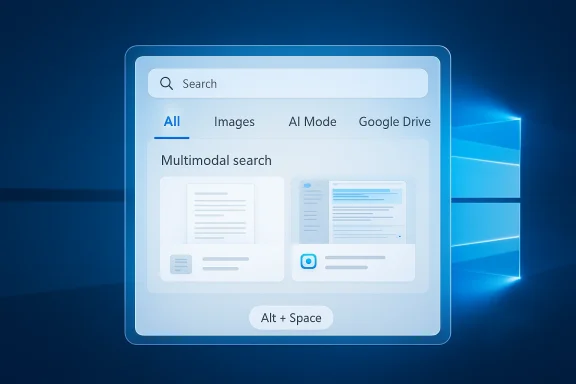
At the center of the experience is the search box, summoned by Alt + Space. That shortcut is important because it lowers friction; it lets Google compete for attention without forcing users to hunt through menus, browser tabs, or taskbar icons. In desktop software, the smallest shortcut can become the most powerful retention mechanism if it gets used reflexively. (blog.google)
The feature set is broader than a simple launcher. Google says users can search the web, local files, installed apps, and Google Drive files from the same interface. The app also includes AI Mode, which allows question-and-answer style searches with links to the web, making it part search box, part AI assistant, and part content discovery layer. (blog.google)
The app’s interface includes different views such as All, Images, and AI Mode, which means the user is not locked into a single search paradigm. Instead, Google is building a fluid experience that can shift between traditional search, visual search, and generative assistance. That flexibility is likely designed to keep users from bouncing into a browser tab or another app. (blog.google)
The phrase “Spotlight-like” captures the product’s strategic ambition better than any marketing copy would. Users already understand the value of a universal keyboard command that surfaces files, apps, and answers instantly. Google’s challenge is not to explain the concept; it is to make its version feel more useful, more intelligent, and more deeply connected to the user’s day. (blog.google)
That also means Google is entering a field where platform defaults matter enormously. Microsoft already owns the Windows shell, while Apple owns Spotlight on macOS. Google’s app has to earn a place in a user’s muscle memory without the benefit of controlling the OS itself, which makes the quality of the shortcut experience critical. (blog.google)
This changes the search funnel in subtle but important ways. Traditional search separates the act of asking from the act of browsing, but AI Mode compresses those steps by giving the user a synthesized response immediately. Google still includes links to the web, which helps preserve the broader search ecosystem, but the framing nudges the user toward a more guided experience. (blog.google)
It also creates a stronger path from curiosity to action. Search results can be overwhelming when a user only wants a quick explanation or a direction; AI Mode offers a shorter path to the next decision. The risk, of course, is that the answer becomes too complete and users stop exploring the underlying web. (blog.google)
That matters because desktop workflows are increasingly visual. People work across documents, browser tabs, screenshots, video calls, and mixed media all day long. A search tool that can understand what is displayed on screen is therefore much closer to how real users think than a plain keyword box. (blog.google)
There is also a broader strategic benefit here. Screen search creates a new opportunity for Google to interpret user intent at the exact moment the intent appears. That is valuable because it increases the number of situations in which Google can be helpful without waiting for a formal query. Convenience is the point, but data richness is the dividend. (blog.google)
For enterprises, the implications are more complicated. A company-managed Windows fleet may welcome a faster search workflow, but IT departments will want clarity on data handling, privacy, and whether screen sharing or local file access fits organizational policy. In other words, consumer enthusiasm does not automatically translate into corporate adoption. (blog.google)
Enterprises, however, tend to see a desktop search tool as part productivity feature, part policy surface. Anything that can search files and capture screen context raises questions about permissions, auditing, and whether the app is appropriate for regulated environments. Even if Google has solid controls, the procurement conversation will be more cautious than the consumer pitch. That is standard enterprise behavior, and it is unlikely to change. (blog.google)
Apple faces a different kind of pressure. Spotlight has long been a signature macOS feature, and Google’s Windows app borrows enough of that model to highlight the portability of the concept. If Google eventually brings the app to macOS, as The Verge noted is unclear but plausible given Google’s reported Gemini work on the platform, it would create a more direct challenge to Apple’s desktop search assumptions. (blog.google)
Apple, meanwhile, benefits from a tightly integrated ecosystem where Spotlight, Siri, and macOS search behaviors reinforce one another. Google’s move suggests that it believes users are willing to layer a separate utility on top of Windows if it gives them better results or faster access. That is a vote of confidence in cross-platform services over single-OS refinement. (blog.google)
That defense is especially important because search behavior is fragmenting. Users can ask a chatbot, use Lens, search inside apps, query voice assistants, or rely on OS-level search. Google’s response is to be present in as many of those moments as possible, and the desktop app is a neat way to bundle several of them together. (blog.google)
It also provides a more direct route for Google to showcase AI features without waiting for users to seek them out. The company has spent years trying to make search more conversational and more visual, and this app bundles both directions into a single launch point. That means each keyboard press can become a tiny demonstration of Google’s broader product vision. (blog.google)
It will also be worth watching how Google positions the app relative to Chrome, Gemini, Drive, and its web search surface. If the desktop launcher becomes the most natural entry point to Google’s ecosystem, it could shift how the company thinks about search distribution in an AI-first era. If not, it will still be a useful feature, but one that stops short of becoming a platform-level habit. (blog.google)
Source: The Verge Google’s Spotlight-like desktop search bar for Windows is available for everyone
 Background
Google has been inching toward this kind of desktop integration for years, even if it has rarely described the strategy in those exact terms. The company has steadily pushed more search behavior into the surfaces where users already work, whether that means mobile app shortcuts, image-based search, or AI-powered answer boxes. The new Windows app is best understood as the culmination of that broader effort: less a standalone utility than a distribution channel for Search, AI Mode, Google Drive, and Lens. (blog.google)The immediate predecessor to this launch was Google’s Labs experiment for Windows, which framed the product as a fast way to search “information from your computer files, installed apps, Google Drive files — and of course, the web.” That experiment also emphasized the Alt + Space keyboard shortcut and built-in screen search, signaling that Google wanted this to feel native rather than browser-bound. The new release appears to be the graduation of that test into a wider deployment.
Google’s own product messaging now makes the strategic intent hard to miss. The company says the desktop app is available globally in English, that it includes AI Mode, and that users can search “the web, your computer files, installed apps, and Google Drive files” from one box. In other words, Google is trying to compress multiple workflows into one launcher, which is very much the kind of convenience layer that can become habit-forming if it works well. (blog.google)
The move also fits into a broader era of search becoming more multimodal and more ambient. Google has been expanding Lens and AI-powered search experiences across phones and browsers, and it has repeatedly positioned image and screen understanding as a natural extension of search. The Windows app simply extends that philosophy to the desktop, where users still spend a large share of their working day.
That matters because desktop search tools are no longer just about finding files. They are becoming experience layers that sit between the user and the operating system. When a company owns that layer, it can influence what the user notices first, what gets suggested, and which ecosystem feels easiest to stay inside. That is the real prize behind a feature that, on the surface, looks like a simple search bar. (blog.google)
What Google Actually Released
The new Google app for desktop is available to Windows users worldwide, but only in English for now. It runs on Windows 10 or newer, which gives Google a broad install base without requiring the company to support every older system still in circulation. The app is distributed directly from Google, which suggests the company wants more control over updates, iteration, and the product’s public identity. (blog.google)At the center of the experience is the search box, summoned by Alt + Space. That shortcut is important because it lowers friction; it lets Google compete for attention without forcing users to hunt through menus, browser tabs, or taskbar icons. In desktop software, the smallest shortcut can become the most powerful retention mechanism if it gets used reflexively. (blog.google)
The feature set is broader than a simple launcher. Google says users can search the web, local files, installed apps, and Google Drive files from the same interface. The app also includes AI Mode, which allows question-and-answer style searches with links to the web, making it part search box, part AI assistant, and part content discovery layer. (blog.google)
A Launcher, Not Just a Search Field
This is where the app starts to feel more like a desktop operating-layer than a tool. Search boxes are often useful because they collapse complexity, but Google is also trying to own the decision point where a user chooses whether to search locally, search the web, or ask an AI system. That is a subtle but meaningful form of product control. (blog.google)The app’s interface includes different views such as All, Images, and AI Mode, which means the user is not locked into a single search paradigm. Instead, Google is building a fluid experience that can shift between traditional search, visual search, and generative assistance. That flexibility is likely designed to keep users from bouncing into a browser tab or another app. (blog.google)
- The shortcut-first design reduces friction.
- The search scope spans local and cloud data.
- AI Mode turns the launcher into a conversational layer.
- The app tries to keep users inside Google’s ecosystem longer.
Why Spotlight Comparisons Matter
The obvious comparison is macOS Spotlight, and that comparison is not accidental. Spotlight has long been one of Apple’s quiet power tools because it can launch apps, locate files, and answer quick queries from a single keyboard shortcut. Google’s Windows app is clearly chasing that same mental model, but it is doing so in a way that keeps the user inside Google services rather than Apple’s operating system. (blog.google)The phrase “Spotlight-like” captures the product’s strategic ambition better than any marketing copy would. Users already understand the value of a universal keyboard command that surfaces files, apps, and answers instantly. Google’s challenge is not to explain the concept; it is to make its version feel more useful, more intelligent, and more deeply connected to the user’s day. (blog.google)
The Shortcut Economy
On desktop, shortcuts are not just about speed. They are about permission: permission to skip the normal interface and go directly to an answer. If Google can make Alt + Space feel as habitual as opening the Start menu, it gains a recurring touchpoint that is far more valuable than a browser bookmark. (blog.google)That also means Google is entering a field where platform defaults matter enormously. Microsoft already owns the Windows shell, while Apple owns Spotlight on macOS. Google’s app has to earn a place in a user’s muscle memory without the benefit of controlling the OS itself, which makes the quality of the shortcut experience critical. (blog.google)
- Spotlight set the usability benchmark.
- Start menu search is still a default habit for many Windows users.
- Google is betting that its cross-service knowledge graph gives it an edge.
- The app must feel instant to compete with native OS tools.
AI Mode and the New Search Funnel
One of the most important parts of the app is AI Mode, which Google has brought directly into the desktop experience. Instead of forcing users to go to a browser page, the company can now surface AI-assisted responses from the same launcher that handles files and apps. That means the user’s first search impulse may no longer be “open Chrome,” but “press Alt + Space.” (blog.google)This changes the search funnel in subtle but important ways. Traditional search separates the act of asking from the act of browsing, but AI Mode compresses those steps by giving the user a synthesized response immediately. Google still includes links to the web, which helps preserve the broader search ecosystem, but the framing nudges the user toward a more guided experience. (blog.google)
Search, Answer, Refine
The appeal of AI Mode is speed, but its deeper value is reducing context switching. If a user can ask a question, see a useful answer, and then continue working without opening a browser window, Google has removed a source of cognitive friction. That matters more on Windows desktops, where multitasking is constant and attention is fragmented. (blog.google)It also creates a stronger path from curiosity to action. Search results can be overwhelming when a user only wants a quick explanation or a direction; AI Mode offers a shorter path to the next decision. The risk, of course, is that the answer becomes too complete and users stop exploring the underlying web. (blog.google)
- AI Mode shortens the time from question to answer.
- The app keeps links to the web, preserving some browsing behavior.
- Desktop usage makes context switching more expensive, which improves the feature’s appeal.
- A smoother answer layer can change how users perceive search quality.
Google Lens and Screen Understanding
The app’s Google Lens integration is arguably its most differentiating feature. Google says users can select and search anything on their screen, which makes it possible to translate text, identify images, and get help with homework problems or other visual tasks. This pushes the desktop search bar beyond text input and into the realm of on-screen context. (blog.google)That matters because desktop workflows are increasingly visual. People work across documents, browser tabs, screenshots, video calls, and mixed media all day long. A search tool that can understand what is displayed on screen is therefore much closer to how real users think than a plain keyword box. (blog.google)
From Text Search to Context Search
Lens has been one of Google’s strongest bridges between the physical and digital worlds, and the desktop version extends that bridge into a productivity setting. Instead of taking a screenshot, copying text, and pasting it into a browser, a user can now search directly from the object or phrase in front of them. That is a meaningful reduction in friction. (blog.google)There is also a broader strategic benefit here. Screen search creates a new opportunity for Google to interpret user intent at the exact moment the intent appears. That is valuable because it increases the number of situations in which Google can be helpful without waiting for a formal query. Convenience is the point, but data richness is the dividend. (blog.google)
- Lens turns screenshots into queries.
- The app can help with translation and visual identification.
- Screen understanding supports more natural desktop workflows.
- Visual search makes the app feel less like a search bar and more like an assistant.
Enterprise and Consumer Impact
For consumers, the value proposition is straightforward: one shortcut, one box, many answers. That is easy to explain and easy to demo. If you have a Windows PC and live in Google’s ecosystem for search, Drive, or web discovery, the app could become a convenience layer you open dozens of times a day. (blog.google)For enterprises, the implications are more complicated. A company-managed Windows fleet may welcome a faster search workflow, but IT departments will want clarity on data handling, privacy, and whether screen sharing or local file access fits organizational policy. In other words, consumer enthusiasm does not automatically translate into corporate adoption. (blog.google)
Consumer Convenience vs IT Control
Consumers are likely to focus on speed and simplicity. The ability to search installed apps, local files, Drive, and the web from one place is exactly the sort of feature that makes a product feel indispensable. It is especially appealing for users who already depend on Google Drive and Google Search in daily life. (blog.google)Enterprises, however, tend to see a desktop search tool as part productivity feature, part policy surface. Anything that can search files and capture screen context raises questions about permissions, auditing, and whether the app is appropriate for regulated environments. Even if Google has solid controls, the procurement conversation will be more cautious than the consumer pitch. That is standard enterprise behavior, and it is unlikely to change. (blog.google)
- Consumers will judge the app by speed and usefulness.
- IT buyers will judge it by governance and compliance.
- Google Drive integration may help in Google-first workplaces.
- Screen sharing could create policy questions in managed environments.
- The app may spread faster in small teams than in heavily regulated firms.
Competitive Pressure on Microsoft and Apple
Google’s release creates pressure on Microsoft in a particularly interesting way. Windows already has built-in search and launcher functionality, but Google is now offering a parallel experience that is arguably more familiar to users who spend their lives in Search, Gmail, Drive, and Chrome. That does not replace Windows Search, but it does give users a viable alternative that could siphon off quick queries and file lookups. (blog.google)Apple faces a different kind of pressure. Spotlight has long been a signature macOS feature, and Google’s Windows app borrows enough of that model to highlight the portability of the concept. If Google eventually brings the app to macOS, as The Verge noted is unclear but plausible given Google’s reported Gemini work on the platform, it would create a more direct challenge to Apple’s desktop search assumptions. (blog.google)
Platform Ownership vs Service Ownership
Microsoft owns the operating system, but Google increasingly owns the service habits users bring to that system. That distinction is important. Platform ownership gives Microsoft default placement, but service ownership can still win when the user wants a specific answer, specific files, or a specific AI workflow. (blog.google)Apple, meanwhile, benefits from a tightly integrated ecosystem where Spotlight, Siri, and macOS search behaviors reinforce one another. Google’s move suggests that it believes users are willing to layer a separate utility on top of Windows if it gives them better results or faster access. That is a vote of confidence in cross-platform services over single-OS refinement. (blog.google)
- Microsoft’s weakness is fragmentation between OS search, web search, and AI tools.
- Apple’s strength is tight integration, but it is limited to its own hardware.
- Google’s advantage is ecosystem reach across files, cloud, web, and AI.
- The competitive center is shifting from search pages to search surfaces.
Why This Matters for Google Search Strategy
This launch is not just about Windows. It is part of a larger effort to keep Google Search central in a world where users increasingly ask questions through AI assistants, chatbots, and multimodal interfaces rather than in a traditional browser search box. By bringing a Google-branded desktop app to Windows, the company is defending its core business in a place where work actually happens. (blog.google)That defense is especially important because search behavior is fragmenting. Users can ask a chatbot, use Lens, search inside apps, query voice assistants, or rely on OS-level search. Google’s response is to be present in as many of those moments as possible, and the desktop app is a neat way to bundle several of them together. (blog.google)
A Habit Engine in Disguise
The app is easy to describe as a utility, but it is also a habit engine. Once users associate Alt + Space with finding anything, Google has inserted itself into the muscle memory of the desktop. That is a powerful form of distribution because it reduces the chance that a user will start their search journey elsewhere. (blog.google)It also provides a more direct route for Google to showcase AI features without waiting for users to seek them out. The company has spent years trying to make search more conversational and more visual, and this app bundles both directions into a single launch point. That means each keyboard press can become a tiny demonstration of Google’s broader product vision. (blog.google)
- The app protects Google’s search habit from being displaced.
- It gives AI Mode a front-door presence on Windows.
- It broadens the meaning of search beyond the browser.
- It aligns with Google’s push toward multimodal assistance.
Strengths and Opportunities
Google’s desktop app arrives with a rare combination of broad availability, clear utility, and a familiar interaction pattern. It is also timed to ride the wave of user interest in AI-assisted search, which gives it a strong chance of becoming a daily tool for people already immersed in Google’s services.- Alt + Space is intuitive and easy to remember.
- Search spans local files, apps, Drive, and the web.
- AI Mode reduces friction for quick questions.
- Lens makes the app more useful for screenshots and visual context.
- The app may deepen Google Drive and Search loyalty.
- A Windows release gives Google access to a massive installed base.
- The product is simple enough to demo, but broad enough to stick.
Risks and Concerns
The product still faces serious questions about differentiation, privacy, and whether it can win against built-in Windows behavior. A search bar is only valuable if it feels faster or smarter than what users already have, and that is a high bar when the operating system itself is optimized for quick access.- Users may not switch habits from Windows Search or browser search.
- Privacy concerns could arise around screen sharing and file access.
- Enterprises may hesitate to approve another desktop utility.
- The English-only launch limits immediate global adoption outside English workflows.
- The app could feel redundant if AI responses are inconsistent.
- Too much reliance on Google services may narrow its audience.
- If the launcher is slow, the entire value proposition weakens.
Looking Ahead
The next phase will be about expansion, refinement, and proof. Google will need to show that the app is not just a launch-day novelty but a durable part of the Windows workflow, especially as it evaluates whether to bring the experience to more languages, more regions, or even other desktop platforms. The company’s willingness to expand beyond Windows will tell us a lot about whether this is a serious desktop strategy or a clever experiment with limited scope. (blog.google)It will also be worth watching how Google positions the app relative to Chrome, Gemini, Drive, and its web search surface. If the desktop launcher becomes the most natural entry point to Google’s ecosystem, it could shift how the company thinks about search distribution in an AI-first era. If not, it will still be a useful feature, but one that stops short of becoming a platform-level habit. (blog.google)
What to Watch
- Whether Google brings the app to more languages beyond English.
- Whether macOS or Linux versions ever materialize.
- How quickly users adopt Alt + Space as a habit.
- Whether enterprises embrace or block the app.
- Whether AI Mode becomes central to the launcher experience.
- How Microsoft responds in Windows Search and Copilot surfaces.
- Whether Google keeps adding more on-screen and multimodal controls.
Source: The Verge Google’s Spotlight-like desktop search bar for Windows is available for everyone
Last edited:
