

Today’s Google app for desktop launch on Windows is a deceptively small product announcement with outsized strategic implications. Google says the upgraded app is now available globally in English for Windows users, and it folds AI Mode, Google Lens, and a system-wide search box into a single desktop experience. On the surface, it looks like a convenience feature; in practice, it is Google’s clearest attempt in years to make Windows itself a more Google-shaped operating surface. (blog.google)
The timing matters. Microsoft has spent the last two years aggressively pushing Copilot across Windows, Office, Edge, and its own hardware narrative, while Google has mostly focused its AI story on the browser, mobile apps, and cloud services. By shipping a native Windows utility that can search files, apps, Drive content, and whatever is visible on the screen, Google is signaling that it does not intend to cede the desktop AI layer to Redmond. (blog.google)
This is also more than a search shortcut. The new app combines a launcher-style interface with screen-aware assistance, which makes it feel closer to a desktop productivity companion than a traditional Google Search frontend. If Google can make this sticky, it gains a direct path to user intent on Windows — and that is one of the most valuable positions in consumer software. (blog.google)
Google has long had a complicated relationship with Windows. For decades, the company’s strongest desktop foothold came indirectly through Chrome, Search, and web apps, while its own first-party experiences tended to live on Android, iOS, and the browser. That strategy worked well enough when the web was the center of gravity, but the current AI era has made the desktop shell itself strategically important again. (blog.google)
The new app should be understood as part of a broader rethinking of where AI lives. Google has been steadily weaving AI into Search, Lens, and Chrome, including multimodal search, richer visual interactions, and desktop-facing AI features in the browser. The Windows app is the next logical step: instead of forcing users to open a browser tab and then search, Google is bringing the search-and-answer loop directly into the operating system workflow.
That shift also reflects the competitive pressure of the last few years. Microsoft’s AI pitch is not just about chat; it is about ambient availability — Copilot in the taskbar, Copilot in Edge, Copilot in apps, Copilot in enterprise tools. Google’s answer has often been more fragmented, with AI distributed across products rather than anchored in one desktop presence. A dedicated Windows app helps unify that experience.
The app’s immediate appeal is practical. Google says users can summon it with a keyboard shortcut, search across the web, local files, installed apps, and Google Drive, share a specific window or the full screen for follow-up questions, and use Lens to select anything on screen for translation, homework help, and more. That combination makes it feel closer to a universal command bar than a mere search box. (blog.google)
The larger context is that desktop users are once again being asked to trust AI to mediate between them and their data. That is why this release matters beyond the marketing language: it turns Google’s AI into an always-available layer on top of Windows, and that is a design choice with both convenience and privacy consequences. That duality will shape how the product is received. (blog.google)
The app also includes AI Mode, which Google describes as providing helpful AI-powered responses with links to the web. In other words, the app is not just indexing content; it is interpreting intent, summarizing, and routing users back to sources. That “answer plus evidence” model is important because it keeps Google Search central even as the interface becomes more conversational. (blog.google)
The app’s screen-sharing feature is equally significant. Users can select a window or the whole screen and continue asking questions without breaking focus, which reduces the awkwardness of copying and pasting text into a browser tab. In practice, this is exactly the kind of small UX refinement that can make AI feel useful instead of theatrical. (blog.google)
Google’s move is therefore not just about convenience; it is about relevance. If users already spend much of their day inside Microsoft’s ecosystem, Google needs a desktop-native way to appear before the browser open, before the Office document launch, and before the manual search begins. That is the logic behind launchers, and Google is now playing that game more seriously. (blog.google)
There is also a symbolic dimension. Google has sometimes looked like the company that owns the web but not the desktop, while Microsoft has looked like the company that owns the desktop but is trying to own the web and AI too. This release is Google’s reminder that the desktop is not Microsoft’s private territory, even if Microsoft has the louder narrative. (blog.google)
That coherence matters because users do not experience products as a corporate org chart. They experience them as moments of need. If someone wants to translate text in a screenshot, find a file, or ask a question about a document, the ideal product is one that feels immediate and context-aware. Google is clearly trying to make its AI system feel like a helper that follows the user rather than a destination they have to visit. (blog.google)
The app also fits Google’s long-standing preference for distribution through usefulness. Chrome, Search, Gmail, Drive, and Android have all succeeded partly because they solve immediate problems while feeding a larger ecosystem. A Windows desktop app does the same thing: it solves a daily problem while keeping Google at the center of the interaction. (blog.google)
The competitive logic is straightforward. If the company can keep users inside Google-owned touchpoints during moments of search, translation, image recognition, and file discovery, it lowers the odds that those users will drift toward Microsoft, OpenAI, or third-party desktop assistants. That makes the app strategically small but commercially meaningful. (blog.google)
Lens has been steadily expanding across Google products for years, including mobile and Chrome experiences, so its appearance in the Windows app is not surprising. What is noteworthy is the context: on a desktop, Lens becomes a bridge between a static visual environment and a dynamic AI response. That is a much more compelling use case than simply “search the image.”
There is also an accessibility angle that should not be overlooked. Visual search and screen-based translation can be helpful for users who struggle with language barriers, unfamiliar interfaces, or small text. When done well, this is one of those features that can quietly improve the experience for a broad audience without demanding much attention. (blog.google)
Google’s advantage here is that it does not need to explain a platform vision. It only needs to make the app useful. If the experience is fast, accurate, and context-aware, it can win users by being the cleaner solution, even if Microsoft retains the default OS surface. That is often how utility software takes hold. (blog.google)
That difference may seem subtle, but it is commercially important. Users are more likely to adopt tools that solve a specific workflow pain point than tools that ask them to reinterpret their whole computing model. Google appears to understand that narrow usefulness often beats broad ambition at launch. (blog.google)
The challenge for Microsoft is that Google’s app targets the gaps between existing Windows utilities. Windows Search, browser search, file search, and visual query tools all exist separately, but few are tied together with this much consumer-friendly polish. If Google maintains that integration advantage, Copilot will have a harder time becoming the obvious choice for everyday discovery. (blog.google)
It also fits the way many people now work and learn. A student can use Lens to interpret a problem on screen, a remote worker can search across Drive and local files, and a casual user can ask the app a question without deciding whether it belongs in a browser, a chat window, or a search bar. That flexibility is a genuine consumer advantage. (blog.google)
That said, consumer adoption will depend on trust. Users will need confidence that the app is fast enough to justify installing, smart enough to reduce effort, and respectful enough not to feel invasive. Those are high bars, but they are the same bars every AI assistant now faces. (blog.google)
In practical terms, the likely early adopters are power users, students, knowledge workers, and people who already live inside Google services. That is a strong starting base, because those users are most likely to appreciate a tool that connects Search, Drive, and screen context in one step. (blog.google)
On the upside, the app could make it easier for employees to find information already stored in Google Drive and on their PCs. That could reduce time spent digging through folders, Slack threads, or separate browser searches. For organizations already standardized on Google services, the integration story is attractive. (blog.google)
There is also the matter of overlap with existing security and compliance tooling. Desktop AI that can inspect content may create new review points for IT teams, especially in regulated industries. In that sense, Google is not just shipping a product; it is inviting enterprise scrutiny over a new class of context-aware assistance. That scrutiny is unavoidable. (blog.google)
Still, the enterprise case is real. If the app can save even a few minutes per user per day, the productivity gains can scale quickly across a large organization. That is exactly the kind of productivity math that enterprise software vendors like to present, and it is one reason this release should not be dismissed as consumer fluff. (blog.google)
The good news is that the product description emphasizes user-initiated actions rather than background surveillance. Google describes keyboard-triggered access, selected-window sharing, and explicit Lens selection, which suggests a relatively deliberate interaction model. That is a positive sign, though it does not eliminate the need for careful documentation and transparent controls. (blog.google)
There is another subtle issue: because the app blends search, screen content, and cloud data, it could create a false sense of certainty. Users may overtrust answers that are summarized from partial context or assume the app has seen everything relevant when it has not. AI confidence is not the same as AI correctness, and that is a risk Google will need to manage. (blog.google)
Good product design can reduce that risk by keeping sources visible and interactions transparent. Google’s emphasis on web links inside AI Mode is therefore more than a UX flourish; it is part of the trust model. If the app makes it easy to verify answers, it has a better chance of being taken seriously. (blog.google)
There is also platform risk. Google is building on Windows, but it does not control the operating system, and Microsoft can change defaults, incentives, and integration priorities. That means Google’s app will always be somewhat dependent on a rival platform’s goodwill and technical boundaries, which is a real strategic limitation. (blog.google)
The most important signal to watch is whether Google expands the app beyond English and into deeper enterprise management features. Broader language support would make the product immediately more relevant worldwide, while stronger admin controls would make it easier for companies to approve at scale. Those two expansions would turn a promising utility into a platform play. (blog.google)
Source: afterdawn.com AfterDawn - Software downloads, reviews, tech news and guides
The timing matters. Microsoft has spent the last two years aggressively pushing Copilot across Windows, Office, Edge, and its own hardware narrative, while Google has mostly focused its AI story on the browser, mobile apps, and cloud services. By shipping a native Windows utility that can search files, apps, Drive content, and whatever is visible on the screen, Google is signaling that it does not intend to cede the desktop AI layer to Redmond. (blog.google)
This is also more than a search shortcut. The new app combines a launcher-style interface with screen-aware assistance, which makes it feel closer to a desktop productivity companion than a traditional Google Search frontend. If Google can make this sticky, it gains a direct path to user intent on Windows — and that is one of the most valuable positions in consumer software. (blog.google)
 Background
Google has long had a complicated relationship with Windows. For decades, the company’s strongest desktop foothold came indirectly through Chrome, Search, and web apps, while its own first-party experiences tended to live on Android, iOS, and the browser. That strategy worked well enough when the web was the center of gravity, but the current AI era has made the desktop shell itself strategically important again. (blog.google)The new app should be understood as part of a broader rethinking of where AI lives. Google has been steadily weaving AI into Search, Lens, and Chrome, including multimodal search, richer visual interactions, and desktop-facing AI features in the browser. The Windows app is the next logical step: instead of forcing users to open a browser tab and then search, Google is bringing the search-and-answer loop directly into the operating system workflow.
That shift also reflects the competitive pressure of the last few years. Microsoft’s AI pitch is not just about chat; it is about ambient availability — Copilot in the taskbar, Copilot in Edge, Copilot in apps, Copilot in enterprise tools. Google’s answer has often been more fragmented, with AI distributed across products rather than anchored in one desktop presence. A dedicated Windows app helps unify that experience.
The app’s immediate appeal is practical. Google says users can summon it with a keyboard shortcut, search across the web, local files, installed apps, and Google Drive, share a specific window or the full screen for follow-up questions, and use Lens to select anything on screen for translation, homework help, and more. That combination makes it feel closer to a universal command bar than a mere search box. (blog.google)
The larger context is that desktop users are once again being asked to trust AI to mediate between them and their data. That is why this release matters beyond the marketing language: it turns Google’s AI into an always-available layer on top of Windows, and that is a design choice with both convenience and privacy consequences. That duality will shape how the product is received. (blog.google)
What Google Actually Shipped
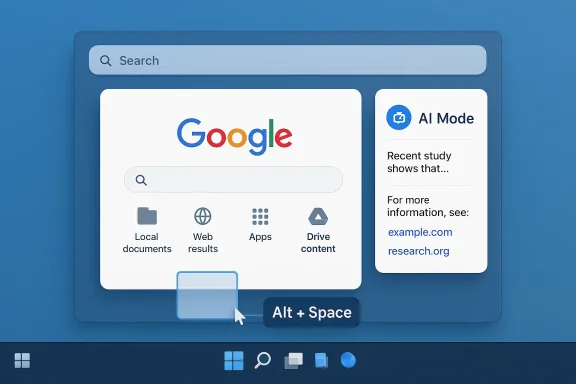
At the core of the release is a search box that can be invoked quickly and used to query multiple sources at once. Google says the app can pull in web results, computer files, installed apps, and Google Drive content, which means it is designed to collapse several common discovery tasks into one interface. That matters because desktop productivity friction often comes from context switching, not from a lack of information. (blog.google)The app also includes AI Mode, which Google describes as providing helpful AI-powered responses with links to the web. In other words, the app is not just indexing content; it is interpreting intent, summarizing, and routing users back to sources. That “answer plus evidence” model is important because it keeps Google Search central even as the interface becomes more conversational. (blog.google)
A launcher, not just a chatbot
The most interesting detail is the keyboard shortcut, Alt + Space, which brings the app into play without leaving the current workflow. That is a classic desktop power-user move, and it suggests Google is targeting the same muscle-memory territory occupied by launchers, command palettes, and OS search. It is a strong signal that the company wants this product to become habitual rather than occasional. (blog.google)The app’s screen-sharing feature is equally significant. Users can select a window or the whole screen and continue asking questions without breaking focus, which reduces the awkwardness of copying and pasting text into a browser tab. In practice, this is exactly the kind of small UX refinement that can make AI feel useful instead of theatrical. (blog.google)
- Alt + Space is the main entry point.
- Search spans web, files, apps, and Google Drive.
- Screen sharing supports continued questioning in context.
- Lens allows search over anything visible on screen. (blog.google)
Why Windows Matters
Windows remains the world’s most strategically important desktop platform for consumer and small-business computing. Even in an era of mobile-first behavior, Windows still dominates in offices, schools, home productivity, and enthusiast PCs, which makes it a prime battlefield for AI assistants. Whoever controls the workflow layer on Windows gets first crack at the user’s next action. (blog.google)Google’s move is therefore not just about convenience; it is about relevance. If users already spend much of their day inside Microsoft’s ecosystem, Google needs a desktop-native way to appear before the browser open, before the Office document launch, and before the manual search begins. That is the logic behind launchers, and Google is now playing that game more seriously. (blog.google)
Enterprise and consumer readouts
For consumers, the appeal is obvious: a single place to ask questions, search files, interpret screenshots, and get answers quickly. For enterprises, the appeal is more nuanced, because the new app can become yet another information gateway layered over managed data and internal workflows. That creates productivity upside, but it also raises governance questions about data access and auditability. (blog.google)There is also a symbolic dimension. Google has sometimes looked like the company that owns the web but not the desktop, while Microsoft has looked like the company that owns the desktop but is trying to own the web and AI too. This release is Google’s reminder that the desktop is not Microsoft’s private territory, even if Microsoft has the louder narrative. (blog.google)
Why desktop AI is different
Desktop AI is not just chatbot AI on a bigger screen. It can operate across files, windows, apps, and the visual field of the machine, which makes it a much more context-rich surface than mobile in many work scenarios. That context is valuable, but it also increases the chance of accidental disclosure, mistaken summaries, and overbroad data access. The better the assistant gets, the more it must be trusted. (blog.google)- Windows is still the most important desktop battlefield.
- Google wants a place in the workflow before browser-based search.
- Enterprise use cases depend on governance and visibility.
- Consumer use cases depend on speed and convenience. (blog.google)
How It Fits Google’s AI Strategy
Google has been building toward this moment in pieces. Search gained richer AI features, Lens became more capable as a visual understanding layer, and Chrome started receiving desktop AI enhancements and Gemini integration. The Windows app pulls those threads together into a single, more coherent desktop story.That coherence matters because users do not experience products as a corporate org chart. They experience them as moments of need. If someone wants to translate text in a screenshot, find a file, or ask a question about a document, the ideal product is one that feels immediate and context-aware. Google is clearly trying to make its AI system feel like a helper that follows the user rather than a destination they have to visit. (blog.google)
AI Mode as the connective tissue
The presence of AI Mode is especially important because it signals that the app is not merely a search launcher with Lens bolted on. It is a Google Search front end that can synthesize, explain, and link out to the web. That makes the product more durable than a one-feature utility, because it can evolve as Search itself evolves. (blog.google)The app also fits Google’s long-standing preference for distribution through usefulness. Chrome, Search, Gmail, Drive, and Android have all succeeded partly because they solve immediate problems while feeding a larger ecosystem. A Windows desktop app does the same thing: it solves a daily problem while keeping Google at the center of the interaction. (blog.google)
The competitive logic is straightforward. If the company can keep users inside Google-owned touchpoints during moments of search, translation, image recognition, and file discovery, it lowers the odds that those users will drift toward Microsoft, OpenAI, or third-party desktop assistants. That makes the app strategically small but commercially meaningful. (blog.google)
- It unifies Search, Lens, and AI Mode.
- It extends Google’s ecosystem into native Windows workflows.
- It creates more opportunities for sticky daily use.
- It keeps Google visible at high-intent moments. (blog.google)
Lens on the Desktop: The Real Differentiator
If Search is the headliner, Lens is the feature that gives the app personality. Windows users already have plenty of ways to search the web, but far fewer easy ways to interrogate what is on their screen in a natural, visually aware way. Google is leaning hard into that gap. (blog.google)Lens has been steadily expanding across Google products for years, including mobile and Chrome experiences, so its appearance in the Windows app is not surprising. What is noteworthy is the context: on a desktop, Lens becomes a bridge between a static visual environment and a dynamic AI response. That is a much more compelling use case than simply “search the image.”
Visual search becomes workflow search
A desktop screenshot can contain a chart, an error message, a homework problem, or a web page with dense text. Lens turns that visual content into queryable material without forcing the user to transcribe it manually. That reduces friction in a way that is obvious in demos but even more valuable in real-world multitasking. (blog.google)There is also an accessibility angle that should not be overlooked. Visual search and screen-based translation can be helpful for users who struggle with language barriers, unfamiliar interfaces, or small text. When done well, this is one of those features that can quietly improve the experience for a broad audience without demanding much attention. (blog.google)
Where Lens could win
Lens is strongest when the user does not know how to frame a question in words. That is particularly true for homework help, product identification, translation, UI troubleshooting, and reading unfamiliar documents. Google has a long head start in this category, and the Windows app gives it a bigger stage. (blog.google)- Works well for screenshots and on-screen text.
- Reduces manual copy-and-paste.
- Helps with translation and interpretation.
- Makes AI feel more visual and less abstract. (blog.google)
Microsoft’s Copilot Problem
This release lands squarely in Microsoft’s territory at a moment when Microsoft is still trying to define what Copilot means across Windows and the wider PC ecosystem. Microsoft has been pushing AI features into the operating system, but the user experience remains a mix of branding, product integration, and occasional confusion about what is actually local, web-based, or account-dependent. Google’s app enters that same space with a more focused job description.Google’s advantage here is that it does not need to explain a platform vision. It only needs to make the app useful. If the experience is fast, accurate, and context-aware, it can win users by being the cleaner solution, even if Microsoft retains the default OS surface. That is often how utility software takes hold. (blog.google)
Branding versus utility
Microsoft has recently made moves that suggest even it is willing to simplify some of its AI branding in Windows applications, which is a tacit acknowledgment that the market may be tiring of labels that outpace the underlying experience. Google’s Windows app sidesteps that problem by centering the user outcome instead of the brand story. The pitch is “find and understand faster,” not “enter the Copilot era.”That difference may seem subtle, but it is commercially important. Users are more likely to adopt tools that solve a specific workflow pain point than tools that ask them to reinterpret their whole computing model. Google appears to understand that narrow usefulness often beats broad ambition at launch. (blog.google)
The challenge for Microsoft is that Google’s app targets the gaps between existing Windows utilities. Windows Search, browser search, file search, and visual query tools all exist separately, but few are tied together with this much consumer-friendly polish. If Google maintains that integration advantage, Copilot will have a harder time becoming the obvious choice for everyday discovery. (blog.google)
- Google is competing on usefulness, not slogans.
- Microsoft still owns the OS layer, but not necessarily the best workflow layer.
- Brand fatigue may favor simpler products.
- The winner may be the best daily utility, not the loudest AI platform. (blog.google)
Consumer Appeal and Everyday Use
For ordinary users, the appeal is immediate. The app reduces the number of places you have to look when you are trying to remember a file, understand an image, or get a quick explanation. In a world full of tabs and apps, less context switching is a strong value proposition. (blog.google)It also fits the way many people now work and learn. A student can use Lens to interpret a problem on screen, a remote worker can search across Drive and local files, and a casual user can ask the app a question without deciding whether it belongs in a browser, a chat window, or a search bar. That flexibility is a genuine consumer advantage. (blog.google)
Frictionless discovery
The best desktop tools are the ones users forget they are using. Google’s new app has a chance to become that kind of layer if the shortcut works reliably and the results feel consistently relevant. If it does, the app will stop being “the Google app” and start feeling like part of the computer. (blog.google)That said, consumer adoption will depend on trust. Users will need confidence that the app is fast enough to justify installing, smart enough to reduce effort, and respectful enough not to feel invasive. Those are high bars, but they are the same bars every AI assistant now faces. (blog.google)
In practical terms, the likely early adopters are power users, students, knowledge workers, and people who already live inside Google services. That is a strong starting base, because those users are most likely to appreciate a tool that connects Search, Drive, and screen context in one step. (blog.google)
- Strong fit for students and knowledge workers.
- Useful for people who already use Google Drive heavily.
- Good for quick translation and screenshot interpretation.
- Best suited to users who value speed over interface minimalism. (blog.google)
Enterprise Implications
Enterprises will look at this release through a different lens. The question is not only whether the app is helpful, but whether it is manageable inside a corporate environment where data access, logging, and policy enforcement matter. Any desktop AI tool that touches files and screens enters a sensitive zone. (blog.google)On the upside, the app could make it easier for employees to find information already stored in Google Drive and on their PCs. That could reduce time spent digging through folders, Slack threads, or separate browser searches. For organizations already standardized on Google services, the integration story is attractive. (blog.google)
Governance and controls
The harder question is control. Enterprises will want to know how the app handles local files, what is sent to Google services, whether screen-sharing interactions are retained, and how administrators can govern the experience. Those questions will likely determine whether the app becomes a niche power tool or a broadly approved workplace utility. (blog.google)There is also the matter of overlap with existing security and compliance tooling. Desktop AI that can inspect content may create new review points for IT teams, especially in regulated industries. In that sense, Google is not just shipping a product; it is inviting enterprise scrutiny over a new class of context-aware assistance. That scrutiny is unavoidable. (blog.google)
Still, the enterprise case is real. If the app can save even a few minutes per user per day, the productivity gains can scale quickly across a large organization. That is exactly the kind of productivity math that enterprise software vendors like to present, and it is one reason this release should not be dismissed as consumer fluff. (blog.google)
- Could improve internal file discovery.
- May reduce time spent toggling between apps.
- Raises policy and privacy questions.
- Strongest for Google-centric workplaces. (blog.google)
Privacy, Security, and Trust
Any app that can see the screen, search local files, and connect to cloud content will attract scrutiny, and Google knows it. Even if the feature set is limited and permission-based, the optics of a search giant sitting on top of your desktop will always trigger privacy questions. That is especially true in a period when users are more aware than ever of how AI products ingest and summarize data. (blog.google)The good news is that the product description emphasizes user-initiated actions rather than background surveillance. Google describes keyboard-triggered access, selected-window sharing, and explicit Lens selection, which suggests a relatively deliberate interaction model. That is a positive sign, though it does not eliminate the need for careful documentation and transparent controls. (blog.google)
Security expectations
Security teams will immediately ask how the app is packaged, updated, authenticated, and isolated from other system processes. They will also want to understand whether Drive access respects enterprise policies and whether the app can be centrally managed. Those are standard questions for desktop software, but they become higher stakes when AI is involved. (blog.google)There is another subtle issue: because the app blends search, screen content, and cloud data, it could create a false sense of certainty. Users may overtrust answers that are summarized from partial context or assume the app has seen everything relevant when it has not. AI confidence is not the same as AI correctness, and that is a risk Google will need to manage. (blog.google)
Good product design can reduce that risk by keeping sources visible and interactions transparent. Google’s emphasis on web links inside AI Mode is therefore more than a UX flourish; it is part of the trust model. If the app makes it easy to verify answers, it has a better chance of being taken seriously. (blog.google)
- Permission clarity will be crucial.
- Enterprise administrators will need policy controls.
- Source visibility helps counter overtrust.
- Screen-aware AI increases both utility and sensitivity. (blog.google)
Strengths and Opportunities
The biggest strength of the new Windows app is that it solves multiple problems with one workflow: search, visual understanding, cloud file discovery, and contextual follow-up. That makes it more than a point solution and gives Google a chance to establish a daily habit on the desktop. It also arrives at a moment when users are increasingly open to assistant-like tools, provided they feel useful rather than gimmicky. (blog.google)- Unified search surface across web, local files, apps, and Drive.
- Lens integration makes visual tasks easier.
- AI Mode keeps Google Search central.
- Keyboard shortcut access supports power-user adoption.
- Screen sharing reduces context switching.
- Windows reach gives Google access to a massive user base.
- Enterprise potential exists where Google services are already embedded. (blog.google)
Risks and Concerns
The most obvious risk is trust. A desktop assistant that can inspect screens and search files may make users uneasy, especially if the boundaries around data access are not crystal clear. Even a strong product can stall if people are not fully comfortable with what it can see and what it sends back to the cloud. (blog.google)- Privacy concerns may slow adoption.
- Users could overestimate answer accuracy.
- Enterprises may hesitate without strong controls.
- Overlap with browser and OS search could confuse some users.
- Availability limited to English at launch may constrain uptake.
- Google must avoid feature bloat if it wants to stay approachable.
- Microsoft may respond quickly with tighter Copilot integration. (blog.google)
There is also platform risk. Google is building on Windows, but it does not control the operating system, and Microsoft can change defaults, incentives, and integration priorities. That means Google’s app will always be somewhat dependent on a rival platform’s goodwill and technical boundaries, which is a real strategic limitation. (blog.google)
Looking Ahead
The next few months will tell us whether Google is testing a feature or planting a flag. If the app becomes widely used, it could mark the beginning of a more serious Google presence on Windows, one built around AI-assisted discovery rather than just browser-based search. If not, it may still serve as a useful experiment that informs future integration across Search, Lens, and Chrome. (blog.google)The most important signal to watch is whether Google expands the app beyond English and into deeper enterprise management features. Broader language support would make the product immediately more relevant worldwide, while stronger admin controls would make it easier for companies to approve at scale. Those two expansions would turn a promising utility into a platform play. (blog.google)
Watch for these developments
- Additional language and region support.
- Enterprise policy and admin tooling.
- Tighter integration with other Google services.
- Microsoft responses in Copilot and Windows Search.
- User feedback on privacy, accuracy, and speed. (blog.google)
Source: afterdawn.com AfterDawn - Software downloads, reviews, tech news and guides
