

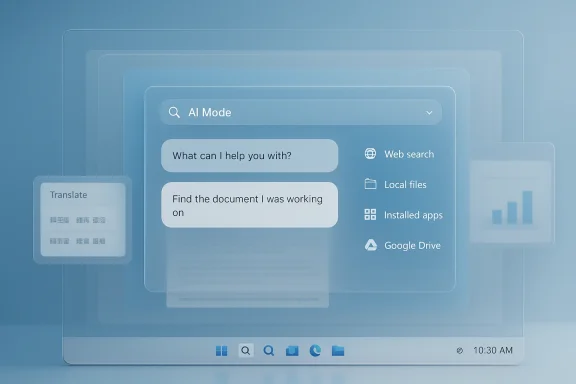
Google’s upgraded Windows desktop app is a small product move with outsized strategic implications. What looks at first like a faster way to search files, the web, and your screen is really Google’s clearest attempt yet to make Windows a first-class surface for AI-powered Search, not just a place where people open Chrome and type a query. The app now spans Alt + Space access, Lens-based screen search, AI Mode, and direct hooks into local files, installed apps, and Google Drive, all in English and available globally on Windows 10 and later.
For years, Google’s desktop story on Windows has been oddly incomplete. The company dominated search, browser traffic, email, maps, cloud storage, and mobile apps, yet it rarely shipped a dedicated Windows utility that felt native to the platform. That changed only when Google began treating Search itself as an interface layer, not just a website, and the Windows app became part of that broader shift toward ambient search and multimodal AI assistance.
The first public version of the app arrived as a Search Labs experiment in September 2025. At launch, Google framed it as a way to search without breaking flow: press Alt + Space, look across the web, Google Drive, local files, and installed apps, then use built-in Lens to search anything visible on screen. The core pitch was convenience, but the real signal was integration: Google wanted to reduce the gap between desktop work and Search consumption by making Search feel like a system feature rather than a destination site.
That design tracks with Google’s broader AI rollout during 2025. The company spent much of the year expanding AI Mode, adding multimodal capabilities, visual exploration, and more conversational interactions. It also pushed Search Live and related features that let users speak to Search and share camera or screen context. The Windows app is therefore not a one-off experiment so much as a distribution channel for a wider product philosophy: search should understand intent, context, and what is already on your screen.
Google’s own Labs listing makes the app’s ambitions plain. It describes a Windows 10+ desktop app for English-speaking users in the U.S., accessible only to users 13 or older with a personal Google account, and explicitly excludes Google Workspace accounts for now. It also emphasizes user control over what is shared, while nudging people toward Search history and Web & App Activity for the best experience. That combination of convenience and data dependence is a recurring theme in modern consumer AI software.
The latest update, announced in April 2026, expands the app globally in English and upgrades its AI capabilities without spelling out every internal change. That lack of detail is not unusual for Google, but it does mean the news should be read less as a feature dump and more as a milestone in product maturation. The company is signaling that the app has moved from an invitation-only curiosity to a wider strategic bet on Windows as a front door for Search.
The second change is deeper AI integration. Google says AI Mode is built into the app, allowing users to ask natural-language questions and receive AI responses with links to the web. That matters because it turns the app into a launchpad for the newer Search experience Google has been promoting throughout 2025, rather than a simple launcher or file-search utility.
That stack matters because it blends three product categories that are usually separate on Windows: launcher, search tool, and AI assistant. Users do not have to decide whether they are searching the web or searching their machine; Google wants those to feel like one workflow. That may sound incremental, but in desktop software, removing context switches often matters more than adding a headline feature.
The shortcut strategy is also deliberate. Alt + Space is familiar enough to become muscle memory and light enough to avoid fighting the Windows shell directly. In practice, Google is trying to own a keyboard gesture the same way PowerToys Run, Spotlight on macOS, or Command Palette-style tools own quick access on their platforms. That puts the app in a very competitive lane, even if Google does not yet describe it that way.
The company also hasn’t clarified exactly how screen sharing works in relation to AI Mode, how much local context is processed, or whether there are enterprise-grade controls on data use. Given the sensitivity of searching on-screen content and local files, that silence is understandable but not ideal. Users and IT admins will want more than a marketing summary before they trust the app with work data.
There is also a defensive reason. Microsoft has spent years weaving Copilot, Windows Search, Edge, and cross-device features into a more integrated experience. Google’s app looks like a response to that reality. Rather than fighting Microsoft only in the browser, Google is trying to occupy the moments when users need to find something quickly and are least likely to care which vendor owns the interface.
This also helps Google repackage Search for an era where traditional keyword search is under pressure. When users can ask full questions, share context, and get synthesized answers with citations or links, the old “type query, click blue link” flow looks dated. Google’s desktop app is one more attempt to make Search feel adaptive rather than reactive.
The competitive angle is straightforward. Microsoft wants Windows to be a destination for its own AI stack. Google wants Windows users to continue reaching for Google-backed answers even when they are nowhere near Chrome. That makes the app less about utility and more about distribution control.
That evolution matters because it shows Google learned something important. Raw desktop search was never enough on its own. What users really want is the combination of speed, relevance, and immediate next steps. AI Mode and Lens are Google’s answer to that demand.
This is important because AI Mode changes the economics of search behavior. A traditional query often returns a page of options, but AI Mode can compress discovery, interpretation, and follow-up into one interaction. That reduces friction for users and increases the chance that Google remains the default information layer even when the task is complex or visually ambiguous.
Google has been building toward this for months. The company expanded AI Mode, pushed multimodal search, and added visual exploration features in Search during 2025. The Windows app simply places those capabilities in a place where desktop users can encounter them more frequently and with less friction.
There is, however, a subtle risk in making AI Mode more ambient. The more often users receive synthesized responses, the less often they may inspect original sources. Google says the answers include links to the web, which helps, but the interface still nudges people toward summary-first consumption. That may be efficient, but it also changes the shape of information literacy.
Google is also betting that AI responses can help the Windows app feel indispensable. If the app can answer a question, find a file, and interpret the screen all in one place, then it becomes sticky. The challenge, of course, is making sure those answers are fast, accurate, and trustworthy enough that users prefer them to simply opening the browser.
Screen sharing raises the stakes. It lets users keep asking questions about a document or page while showing the app a window or the entire screen. That creates a more continuous support loop than traditional search, because the AI can respond with the current context instead of forcing the user to describe it from scratch. It is a textbook example of how multimodal interfaces are becoming more useful than pure text boxes.
This is exactly why Google has framed the app around “staying in your flow.” The phrase may sound like marketing, but there is a real product insight underneath it. Every time a user switches apps, tabs, or devices, friction grows. If Google can reduce that friction, it improves the odds that the app becomes part of the daily routine.
The catch is that screen-aware features can also feel intrusive if users do not fully understand what is being shared. Google says users control what they share, and that matters, but the burden of trust remains high. The more the app can see, the more carefully it must explain what it does with what it sees.
That tension is not unique to Google. It is the central tradeoff of the AI desktop era. The more context an assistant gets, the more useful it becomes, but the more responsibility the vendor bears for protecting and explaining that context.
For enterprises, the story is more complicated. Google’s Labs page explicitly says the experiment is not available to Workspace accounts, including Workspace for Education, which tells you this is not yet a managed, organization-ready deployment. That limits immediate IT value, but it also suggests Google is avoiding the hardest governance questions until the product matures.
There is also a behavioral element. Consumers are more willing to try a tool that saves a few seconds if it appears to be lightweight and optional. That is very different from enterprise software, where admins ask whether the tool introduces new support burdens, privacy risks, or policy conflicts.
Until Google publishes more detailed admin guidance, the app will likely stay in the consumer and prosumer lane. That may be fine for now, but it also means Microsoft retains an advantage in the managed desktop space, where the company can tie AI features into existing Windows and Microsoft 365 administration.
That may be the real objective: not to replace Windows Search, but to ensure Google still owns a large slice of intent when the desktop user is not already in a browser.
It also gives Google a chance to compete where Microsoft is strongest: the desktop itself. That is not a trivial move. Winning relevance on Windows is one of the few ways Google can hedge against a future in which users increasingly ask AI agents instead of typing into a browser search box.
The other major concern is data expectation mismatch. Users may understand web search, but local file search plus screen awareness feels more intimate. If Google’s messaging does not clearly explain what is indexed, what is sent to the cloud, and what stays local, the app could trigger the kind of hesitation that kills good ideas before they scale.
The other thing to watch is whether the company expands beyond English and beyond consumer accounts. Right now, the global English rollout is an important step, but true scale will require broader language support, enterprise documentation, and perhaps more explicit controls for organizations. If those come later, the current release may be remembered as the beginning of Google’s serious Windows push rather than the final form of the product.
Google’s Windows app may never become a universal must-have, and it does not need to. Its real value is strategic: it gives Google a native foothold on the world’s dominant desktop platform at a moment when AI search is still being defined. If the company keeps improving speed, transparency, and usefulness, this could be remembered as the point where Google stopped treating Windows as merely another client and started treating it as a serious battleground for the future of search.
Source: Neowin Google upgrades its desktop app for Windows
 Background
For years, Google’s desktop story on Windows has been oddly incomplete. The company dominated search, browser traffic, email, maps, cloud storage, and mobile apps, yet it rarely shipped a dedicated Windows utility that felt native to the platform. That changed only when Google began treating Search itself as an interface layer, not just a website, and the Windows app became part of that broader shift toward ambient search and multimodal AI assistance.The first public version of the app arrived as a Search Labs experiment in September 2025. At launch, Google framed it as a way to search without breaking flow: press Alt + Space, look across the web, Google Drive, local files, and installed apps, then use built-in Lens to search anything visible on screen. The core pitch was convenience, but the real signal was integration: Google wanted to reduce the gap between desktop work and Search consumption by making Search feel like a system feature rather than a destination site.
That design tracks with Google’s broader AI rollout during 2025. The company spent much of the year expanding AI Mode, adding multimodal capabilities, visual exploration, and more conversational interactions. It also pushed Search Live and related features that let users speak to Search and share camera or screen context. The Windows app is therefore not a one-off experiment so much as a distribution channel for a wider product philosophy: search should understand intent, context, and what is already on your screen.
Google’s own Labs listing makes the app’s ambitions plain. It describes a Windows 10+ desktop app for English-speaking users in the U.S., accessible only to users 13 or older with a personal Google account, and explicitly excludes Google Workspace accounts for now. It also emphasizes user control over what is shared, while nudging people toward Search history and Web & App Activity for the best experience. That combination of convenience and data dependence is a recurring theme in modern consumer AI software.
The latest update, announced in April 2026, expands the app globally in English and upgrades its AI capabilities without spelling out every internal change. That lack of detail is not unusual for Google, but it does mean the news should be read less as a feature dump and more as a milestone in product maturation. The company is signaling that the app has moved from an invitation-only curiosity to a wider strategic bet on Windows as a front door for Search.
What Google Actually Changed
The biggest observable change is availability. Google says the upgraded desktop app is now available globally in English for Windows users, which is a meaningful step beyond the initial Labs experiment that was limited to the U.S. and English users. The broader footprint suggests Google is now willing to test whether the Windows app can scale beyond an enthusiast audience and into mainstream use across markets where English remains the operating language.The second change is deeper AI integration. Google says AI Mode is built into the app, allowing users to ask natural-language questions and receive AI responses with links to the web. That matters because it turns the app into a launchpad for the newer Search experience Google has been promoting throughout 2025, rather than a simple launcher or file-search utility.
The Feature Stack
The app’s feature set now centers on three pillars. First is a universal search box that can reach the web, Google Drive, files stored locally, and installed apps. Second is screen-aware assistance, where users can share a window or the full screen while continuing a conversation. Third is Lens, which can identify and search content selected on the screen, including translated text and homework problems.That stack matters because it blends three product categories that are usually separate on Windows: launcher, search tool, and AI assistant. Users do not have to decide whether they are searching the web or searching their machine; Google wants those to feel like one workflow. That may sound incremental, but in desktop software, removing context switches often matters more than adding a headline feature.
The shortcut strategy is also deliberate. Alt + Space is familiar enough to become muscle memory and light enough to avoid fighting the Windows shell directly. In practice, Google is trying to own a keyboard gesture the same way PowerToys Run, Spotlight on macOS, or Command Palette-style tools own quick access on their platforms. That puts the app in a very competitive lane, even if Google does not yet describe it that way.
- Alt + Space enables instant access.
- AI Mode adds conversational answers.
- Lens adds screen-based search.
- Drive integration ties the app to Google’s cloud ecosystem.
- Local file search makes the app feel useful outside the browser.
What Google Didn’t Explain
Google’s announcement is notably light on implementation details. It does not say whether the upgrade includes a major redesign, performance changes, broader language support, deeper indexing, or new privacy controls. That omission leaves open an important question: is this a polished release or mainly a distribution expansion with incremental backend tuning? The answer may vary by market, but Google has not provided enough detail to know yet.The company also hasn’t clarified exactly how screen sharing works in relation to AI Mode, how much local context is processed, or whether there are enterprise-grade controls on data use. Given the sensitivity of searching on-screen content and local files, that silence is understandable but not ideal. Users and IT admins will want more than a marketing summary before they trust the app with work data.
Why Windows Is the Right Battlefield
Windows remains the dominant desktop platform, and that alone makes it attractive to Google. If the company wants Search to stay central in a world of copilots, launchers, and on-device AI, it cannot rely only on Chrome or mobile apps. A Windows-native surface gives Google a way to intercept intent earlier in the workflow, before the user chooses a browser tab, a file manager, or Microsoft’s own tools.There is also a defensive reason. Microsoft has spent years weaving Copilot, Windows Search, Edge, and cross-device features into a more integrated experience. Google’s app looks like a response to that reality. Rather than fighting Microsoft only in the browser, Google is trying to occupy the moments when users need to find something quickly and are least likely to care which vendor owns the interface.
A Desktop Assistant by Another Name
In some ways, the app behaves more like a desktop command line for search than a classic search box. That framing helps explain the appeal. Users can launch it, ask a question, inspect what is on the screen, and then pivot into a web-backed answer without opening a browser first. It is the kind of micro-efficiency that sounds minor until you repeat it dozens of times a day.This also helps Google repackage Search for an era where traditional keyword search is under pressure. When users can ask full questions, share context, and get synthesized answers with citations or links, the old “type query, click blue link” flow looks dated. Google’s desktop app is one more attempt to make Search feel adaptive rather than reactive.
The competitive angle is straightforward. Microsoft wants Windows to be a destination for its own AI stack. Google wants Windows users to continue reaching for Google-backed answers even when they are nowhere near Chrome. That makes the app less about utility and more about distribution control.
- Google gains a shortcut into desktop intent.
- Microsoft faces another external layer on Windows.
- Users get less friction, but more ecosystem overlap.
- The browser becomes less central to first-touch search.
- AI-assisted search becomes a platform battleground.
The Old Google Desktop Echo
Longtime Windows users may hear echoes of Google Desktop, the long-retired product that once indexed local files and surfaced information from the PC itself. The new app is not a resurrection of that product, but the family resemblance is hard to miss. What has changed is the context: today’s app is AI-first, cloud-linked, and built for a world in which users expect multimodal understanding rather than mere indexing.That evolution matters because it shows Google learned something important. Raw desktop search was never enough on its own. What users really want is the combination of speed, relevance, and immediate next steps. AI Mode and Lens are Google’s answer to that demand.
The AI Mode Strategy
AI Mode is the clearest indication that Google does not see this Windows app as a simple launcher. By integrating conversational answers with links to the web, Google is extending the same AI search model it has been rolling out across Search Labs and the Google app on mobile. The Windows app becomes another access path into a unified search experience rather than a separate product line.This is important because AI Mode changes the economics of search behavior. A traditional query often returns a page of options, but AI Mode can compress discovery, interpretation, and follow-up into one interaction. That reduces friction for users and increases the chance that Google remains the default information layer even when the task is complex or visually ambiguous.
From Query to Conversation
The shift from query to conversation is not just a UI tweak. It changes how people think about search itself. Instead of searching for a term and then refining it, users can ask a more complete question up front, which is especially useful in work contexts where the problem is not obvious or the relevant file might be buried across devices.Google has been building toward this for months. The company expanded AI Mode, pushed multimodal search, and added visual exploration features in Search during 2025. The Windows app simply places those capabilities in a place where desktop users can encounter them more frequently and with less friction.
There is, however, a subtle risk in making AI Mode more ambient. The more often users receive synthesized responses, the less often they may inspect original sources. Google says the answers include links to the web, which helps, but the interface still nudges people toward summary-first consumption. That may be efficient, but it also changes the shape of information literacy.
How This Differs from Ordinary Search
The distinction between ordinary search and AI Mode is not merely a matter of polish. Ordinary search assumes the user knows how to frame the problem. AI Mode assumes the user may need help framing it at all. On Windows, where many users are juggling documents, browser tabs, and local files, that difference becomes particularly valuable.Google is also betting that AI responses can help the Windows app feel indispensable. If the app can answer a question, find a file, and interpret the screen all in one place, then it becomes sticky. The challenge, of course, is making sure those answers are fast, accurate, and trustworthy enough that users prefer them to simply opening the browser.
Lens and Screen Sharing
The inclusion of Google Lens is arguably the most practical part of the release. Being able to select anything on your screen and search it immediately is a classic productivity win, especially for users dealing with screenshots, diagrams, foreign-language text, or copied passages that are hard to identify. Google has been pushing this kind of visual search for years, and the Windows app gives it a more direct desktop home.Screen sharing raises the stakes. It lets users keep asking questions about a document or page while showing the app a window or the entire screen. That creates a more continuous support loop than traditional search, because the AI can respond with the current context instead of forcing the user to describe it from scratch. It is a textbook example of how multimodal interfaces are becoming more useful than pure text boxes.
Why This Matters for Everyday Work
For consumers, the appeal is obvious. You might use it to translate signage, identify a product, understand a math problem, or summarize a confusing dialog on screen. For knowledge workers, the use cases are more procedural: interpreting a dashboard, comparing a report with a draft, or getting quick help without leaving the workflow.This is exactly why Google has framed the app around “staying in your flow.” The phrase may sound like marketing, but there is a real product insight underneath it. Every time a user switches apps, tabs, or devices, friction grows. If Google can reduce that friction, it improves the odds that the app becomes part of the daily routine.
The catch is that screen-aware features can also feel intrusive if users do not fully understand what is being shared. Google says users control what they share, and that matters, but the burden of trust remains high. The more the app can see, the more carefully it must explain what it does with what it sees.
- Lens is useful for images and text.
- Screen sharing improves contextual help.
- Window-level sharing is safer than full-screen in many workflows.
- Translation is a clear consumer use case.
- Homework support is likely to be one of the stickiest features.
The Privacy Tradeoff
Visual and contextual search are powerful precisely because they see more than typed queries. That also makes them more sensitive than plain search. Users may be comfortable typing a question into Google, but they may be less comfortable letting an app inspect a work document, meeting notes, or a sensitive browser session.That tension is not unique to Google. It is the central tradeoff of the AI desktop era. The more context an assistant gets, the more useful it becomes, but the more responsibility the vendor bears for protecting and explaining that context.
Enterprise and Consumer Impact
For consumers, the new app is easiest to understand as a shortcut to better search. It reduces the number of steps between a question and an answer, and it makes Google services feel more accessible on a Windows PC. If you already live in Gmail, Drive, and Search, the app offers an elegant way to stitch those habits together on the desktop.For enterprises, the story is more complicated. Google’s Labs page explicitly says the experiment is not available to Workspace accounts, including Workspace for Education, which tells you this is not yet a managed, organization-ready deployment. That limits immediate IT value, but it also suggests Google is avoiding the hardest governance questions until the product matures.
Consumer Convenience First
The consumer angle is easy to sell because it is intuitive. People already understand Alt + Space launchers, screen search, and AI-assisted answers, even if they have not seen them combined in one app. The app therefore benefits from familiarity while still feeling novel enough to spark curiosity.There is also a behavioral element. Consumers are more willing to try a tool that saves a few seconds if it appears to be lightweight and optional. That is very different from enterprise software, where admins ask whether the tool introduces new support burdens, privacy risks, or policy conflicts.
Enterprise Readiness Remains Unclear
The biggest question for business users is not whether the app is useful. It is whether Google can prove it is manageable. Enterprises need control over data retention, visibility into AI interactions, and assurances about how files, screens, and Drive content are indexed or processed.Until Google publishes more detailed admin guidance, the app will likely stay in the consumer and prosumer lane. That may be fine for now, but it also means Microsoft retains an advantage in the managed desktop space, where the company can tie AI features into existing Windows and Microsoft 365 administration.
The Competitive Subtext
Google’s move also pressures Windows power users in a different way. It gives them another reason to compare Google’s ecosystem favorably against Microsoft’s native search experience. If the Google app can actually feel faster or smarter than the built-in options, that becomes a small but persistent vote for Google’s relevance on Windows.That may be the real objective: not to replace Windows Search, but to ensure Google still owns a large slice of intent when the desktop user is not already in a browser.
Strengths and Opportunities
Google has several clear advantages here, and they are more strategic than cosmetic. The app is positioned at the intersection of search, AI, file access, and visual understanding, which gives it multiple reasons to exist. In an environment where many AI tools struggle to justify themselves, that breadth is a real strength.- Fast access through a memorable shortcut.
- Unified search across web, local files, apps, and Drive.
- Multimodal AI that fits how people actually work.
- Better discovery for text in images and on-screen content.
- Stronger Google ecosystem lock-in for users already invested in Drive and Search.
- A credible Windows presence that Google has historically lacked.
- A path to future enterprise expansion if Google adds admin controls later.
It also gives Google a chance to compete where Microsoft is strongest: the desktop itself. That is not a trivial move. Winning relevance on Windows is one of the few ways Google can hedge against a future in which users increasingly ask AI agents instead of typing into a browser search box.
Risks and Concerns
The same features that make the app attractive also create real concerns. A product that can inspect files, apps, windows, and screen content necessarily touches sensitive user data. Even if Google handles that responsibly, the perception of risk alone may slow adoption among cautious users and organizations.- Privacy concerns around screen and file context.
- Unclear enterprise controls for managed environments.
- Potential over-reliance on AI summaries instead of original sources.
- Limited transparency about the upgrade’s exact technical changes.
- Possible redundancy for users already happy with Chrome and browser search.
- Trust gaps for users who do not want a search app touching local desktop content.
- Feature creep risk if the app becomes too broad to understand.
The other major concern is data expectation mismatch. Users may understand web search, but local file search plus screen awareness feels more intimate. If Google’s messaging does not clearly explain what is indexed, what is sent to the cloud, and what stays local, the app could trigger the kind of hesitation that kills good ideas before they scale.
What to Watch Next
The next phase of this story will be less about the launch itself and more about whether Google can turn the app into a dependable Windows habit. The key questions are practical: does it stay fast, does it remain trustworthy, and does it add enough value to displace other shortcuts users already know? If Google can answer those in the affirmative, the app may become one of the company’s more successful desktop experiments.The other thing to watch is whether the company expands beyond English and beyond consumer accounts. Right now, the global English rollout is an important step, but true scale will require broader language support, enterprise documentation, and perhaps more explicit controls for organizations. If those come later, the current release may be remembered as the beginning of Google’s serious Windows push rather than the final form of the product.
Signals That Matter Most
- Broader language availability beyond English.
- Support for Workspace and managed enterprise accounts.
- More detail on privacy, indexing, and screen-sharing behavior.
- Deeper integration with Google Drive and local workflows.
- Faster response times and fewer AI hallucinations.
- Adoption by power users who already rely on launchers and search tools.
- Whether Microsoft responds with changes to Windows Search or Copilot.
Google’s Windows app may never become a universal must-have, and it does not need to. Its real value is strategic: it gives Google a native foothold on the world’s dominant desktop platform at a moment when AI search is still being defined. If the company keeps improving speed, transparency, and usefulness, this could be remembered as the point where Google stopped treating Windows as merely another client and started treating it as a serious battleground for the future of search.
Source: Neowin Google upgrades its desktop app for Windows
Last edited:
