

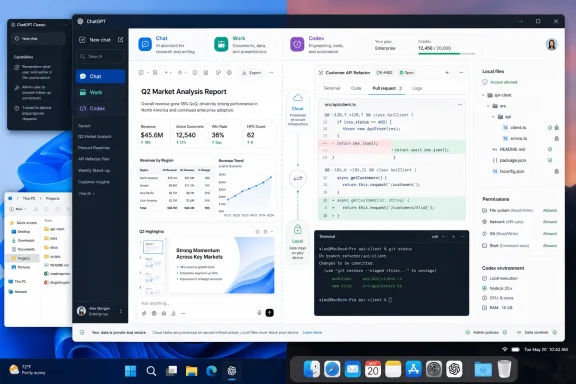
OpenAI has folded its standalone Codex application into a new ChatGPT desktop app for Windows and macOS, adding a dedicated ChatGPT Work mode intended to produce documents, spreadsheets, presentations, reports, and web apps alongside the existing Chat and Codex experiences. The change arrived with GPT-5.6 on July 9, and it is more consequential for Windows users than a mere interface refresh: OpenAI is turning ChatGPT from a conversational assistant into a single desktop surface for cloud research, local-file work, and software development.
Quasa.io characterized the update as a full merger of ChatGPT and Codex after the GPT-5.6 release. OpenAI’s own announcement confirms the central premise, but the details matter. The company is not eliminating ordinary ChatGPT or transforming Codex into a generic office assistant; it is creating a three-mode application in which Chat remains the fast general-purpose interface, Work handles longer agent-driven deliverables, and Codex remains the development-focused agent.
For Windows users already running the Codex app, the update is delivered through the normal app-update path and changes that installation into the new ChatGPT desktop app. Existing Codex projects and tasks are intended to remain available, and Codex users can keep Codex as their default launch view and even retain the Codex application icon.
The sharpest correction to early complaints is that the old full-screen desktop experience has not been removed. According to OpenAI’s migration guidance, the prior client will be renamed ChatGPT Classic and may coexist with the new application. No migration is required at launch; Classic will continue receiving model updates, security patches, bug fixes, support, and its existing Enterprise capabilities.
That distinction should relieve organizations that have standardized on the existing client, or users who simply prefer its interface for long-form conversations. OpenAI is clearly reserving future agent features for the new application, but it is not making the old client immediately obsolete.
The new app’s navigation is more specialized. On desktop, users switch between Work and Codex from the upper-left mode selector, while ordinary Chat starts through a new “Quick chat” control in the left navigation area. On mobile, Chat and Work are selectable, but Codex is not a full mobile mode; supported remote desktop Codex tasks can instead be checked through a Remote tab.
That design explains some of the confusion seen in early feedback. Someone expecting every Codex conversation, local project, and agent task to appear in the familiar cross-device ChatGPT history will find hard boundaries instead.
The practical target is clear: a user might ask Work to assemble a sales briefing, analyze an uploaded data set, create a spreadsheet, draft a report, or build an internal web app. On desktop, Work can use local files and desktop applications only with the user’s permission. On the web and mobile, Work operates in the cloud and cannot directly reach files on the computer.
That local-versus-cloud split is crucial for IT teams. A Work thread started in the cloud on a phone or browser can continue on supported cloud surfaces, but it does not initially appear inside desktop Work. Conversely, desktop Work threads and local files remain on that device. Codex desktop tasks also do not become normal web or mobile chat history.
For enthusiasts, that may feel like an unfinished sync story. For enterprise administrators, it is a meaningful data-boundary decision. It means the new app can be useful for local documents and applications without silently turning every desktop task into a cloud-synced conversation, though organizations will still need to validate permissions, retention, connected apps, and account controls before encouraging broad deployment.
OpenAI says Work is powered by GPT-5.6, its latest frontier-model family, while GPT-5.5 Instant remains the default for everyday fast responses. Eligible paid plans can use GPT-5.6 Sol for more demanding tasks, and Work can expose the Sol, Terra, and Luna variants on Plus, Pro, Business, and Enterprise plans. Model availability is rolling out gradually, so the presence of the new app does not guarantee that every account will immediately see every Work capability.
For Windows developers, the strongest case for the unified client is less about conversational convenience than reducing tool switching. A developer can retain Codex as the default experience, run technical work in a local project, and move to Work when the task becomes a release report, project tracker, presentation, or analysis rather than a code change.
OpenAI’s own usage figures suggest that boundary is already blurring. The company says more than 5 million people use Codex weekly, and more than 1 million use it for work outside software development. Those are vendor-reported metrics, not an independent measurement of developer adoption, but they explain why OpenAI is bringing Codex technology into a broader productivity product rather than leaving it isolated in a developer-only app.
The distinction still matters. Work is the outcome-oriented agent for knowledge work; Codex is the technical agent for engineering tasks. Administrators should avoid treating them as interchangeable simply because they now share a desktop shell and usage structure.
That makes the “do more” pitch inseparable from cost governance. OpenAI says a typical GPT-5.5 Codex task may consume between 5 and 45 credits, while its rate-card guidance says average Codex spending can range from roughly $100 to $200 per developer each month depending on models, parallel agents, automations, and fast-mode usage. Work usage will vary by task, but elaborate slide decks, data analysis, and iterative research are exactly the sort of workloads that could make consumption unpredictable.
The $100-credit promotion described in the Quasa.io report should be treated carefully. OpenAI does have official $100 credit offers, but the verified programs are narrower: one gives eligible verified students in the United States and Canada $100 in ChatGPT credits for Codex, while another lets eligible ChatGPT Business workspaces earn up to $100 in Codex credits per newly added Codex seat, capped at $500 per workspace. OpenAI’s published material does not substantiate a broad offer in which any subscriber paying at least $8 per month receives $100 by posting a social-media review through the third-party “switch” site cited by Quasa.io.
That is not a minor caveat. Users should not enter credentials, authorize payment changes, or connect a ChatGPT account through an unfamiliar promotional domain merely because it resembles an OpenAI campaign. Verify offers from inside ChatGPT, OpenAI’s official product pages, or established account and billing channels.
But the rollout’s success will depend on execution rather than packaging. Work needs reliable deliverables, transparent permissions, coherent cross-device continuity, and predictable credit consumption. Codex users need assurance that the engineering workspace remains fast and focused rather than buried under productivity features. And organizations need controls that match the enlarged scope of what the client can access and create.
For now, Windows users do not have to choose between embracing the new app and losing the familiar one. ChatGPT Classic remains available, while the new client offers a parallel path to test whether Work is genuinely useful for documents and analysis—or simply another mode that creates more output to review.
Quasa.io characterized the update as a full merger of ChatGPT and Codex after the GPT-5.6 release. OpenAI’s own announcement confirms the central premise, but the details matter. The company is not eliminating ordinary ChatGPT or transforming Codex into a generic office assistant; it is creating a three-mode application in which Chat remains the fast general-purpose interface, Work handles longer agent-driven deliverables, and Codex remains the development-focused agent.
For Windows users already running the Codex app, the update is delivered through the normal app-update path and changes that installation into the new ChatGPT desktop app. Existing Codex projects and tasks are intended to remain available, and Codex users can keep Codex as their default launch view and even retain the Codex application icon.
 ChatGPT Classic Is Not Being Forced Out
The sharpest correction to early complaints is that the old full-screen desktop experience has not been removed. According to OpenAI’s migration guidance, the prior client will be renamed ChatGPT Classic and may coexist with the new application. No migration is required at launch; Classic will continue receiving model updates, security patches, bug fixes, support, and its existing Enterprise capabilities.That distinction should relieve organizations that have standardized on the existing client, or users who simply prefer its interface for long-form conversations. OpenAI is clearly reserving future agent features for the new application, but it is not making the old client immediately obsolete.
The new app’s navigation is more specialized. On desktop, users switch between Work and Codex from the upper-left mode selector, while ordinary Chat starts through a new “Quick chat” control in the left navigation area. On mobile, Chat and Work are selectable, but Codex is not a full mobile mode; supported remote desktop Codex tasks can instead be checked through a Remote tab.
That design explains some of the confusion seen in early feedback. Someone expecting every Codex conversation, local project, and agent task to appear in the familiar cross-device ChatGPT history will find hard boundaries instead.
Work Is an Agent Workspace, Not a Better Prompt Box
OpenAI positions Work as the place to hand off multi-step outcomes rather than ask isolated questions. The company says it can research topics, gather information across apps and workflows, create finished materials, and stay on a project for hours by breaking work into smaller steps.The practical target is clear: a user might ask Work to assemble a sales briefing, analyze an uploaded data set, create a spreadsheet, draft a report, or build an internal web app. On desktop, Work can use local files and desktop applications only with the user’s permission. On the web and mobile, Work operates in the cloud and cannot directly reach files on the computer.
That local-versus-cloud split is crucial for IT teams. A Work thread started in the cloud on a phone or browser can continue on supported cloud surfaces, but it does not initially appear inside desktop Work. Conversely, desktop Work threads and local files remain on that device. Codex desktop tasks also do not become normal web or mobile chat history.
For enthusiasts, that may feel like an unfinished sync story. For enterprise administrators, it is a meaningful data-boundary decision. It means the new app can be useful for local documents and applications without silently turning every desktop task into a cloud-synced conversation, though organizations will still need to validate permissions, retention, connected apps, and account controls before encouraging broad deployment.
OpenAI says Work is powered by GPT-5.6, its latest frontier-model family, while GPT-5.5 Instant remains the default for everyday fast responses. Eligible paid plans can use GPT-5.6 Sol for more demanding tasks, and Work can expose the Sol, Terra, and Luna variants on Plus, Pro, Business, and Enterprise plans. Model availability is rolling out gradually, so the presence of the new app does not guarantee that every account will immediately see every Work capability.
Codex Keeps Its Developer Identity
The merger is not a signal that OpenAI has abandoned Codex’s coding-first role. Codex remains the mode for working with repositories, local folders, terminals, developer tools, commands, tests, and code review. The updated desktop application adds features such as inline editing in diffs, side-panel pull-request review, faster computer use enabled by GPT-5.6, and support for multiple repositories in one project.For Windows developers, the strongest case for the unified client is less about conversational convenience than reducing tool switching. A developer can retain Codex as the default experience, run technical work in a local project, and move to Work when the task becomes a release report, project tracker, presentation, or analysis rather than a code change.
OpenAI’s own usage figures suggest that boundary is already blurring. The company says more than 5 million people use Codex weekly, and more than 1 million use it for work outside software development. Those are vendor-reported metrics, not an independent measurement of developer adoption, but they explain why OpenAI is bringing Codex technology into a broader productivity product rather than leaving it isolated in a developer-only app.
The distinction still matters. Work is the outcome-oriented agent for knowledge work; Codex is the technical agent for engineering tasks. Administrators should avoid treating them as interchangeable simply because they now share a desktop shell and usage structure.
Usage Credits Will Become the Friction Point
Work follows Codex’s usage model, so complex or long-running tasks can consume more of a plan’s included capacity than conventional chat. OpenAI has moved Codex pricing toward token-based metering and provides usage monitoring, credit purchasing, and automatic reload options depending on plan and workspace role.That makes the “do more” pitch inseparable from cost governance. OpenAI says a typical GPT-5.5 Codex task may consume between 5 and 45 credits, while its rate-card guidance says average Codex spending can range from roughly $100 to $200 per developer each month depending on models, parallel agents, automations, and fast-mode usage. Work usage will vary by task, but elaborate slide decks, data analysis, and iterative research are exactly the sort of workloads that could make consumption unpredictable.
The $100-credit promotion described in the Quasa.io report should be treated carefully. OpenAI does have official $100 credit offers, but the verified programs are narrower: one gives eligible verified students in the United States and Canada $100 in ChatGPT credits for Codex, while another lets eligible ChatGPT Business workspaces earn up to $100 in Codex credits per newly added Codex seat, capped at $500 per workspace. OpenAI’s published material does not substantiate a broad offer in which any subscriber paying at least $8 per month receives $100 by posting a social-media review through the third-party “switch” site cited by Quasa.io.
That is not a minor caveat. Users should not enter credentials, authorize payment changes, or connect a ChatGPT account through an unfamiliar promotional domain merely because it resembles an OpenAI campaign. Verify offers from inside ChatGPT, OpenAI’s official product pages, or established account and billing channels.
The New Desktop App Has a Clear Windows Test Ahead
OpenAI has made a sensible product bet: agentic work is easier to supervise when chat, local context, cloud tasks, files, apps, and coding tools are available from one desktop client. The company’s Windows release is especially relevant because practical office work often still lands in Windows-native files, business applications, browser-based services, and developer environments.But the rollout’s success will depend on execution rather than packaging. Work needs reliable deliverables, transparent permissions, coherent cross-device continuity, and predictable credit consumption. Codex users need assurance that the engineering workspace remains fast and focused rather than buried under productivity features. And organizations need controls that match the enlarged scope of what the client can access and create.
For now, Windows users do not have to choose between embracing the new app and losing the familiar one. ChatGPT Classic remains available, while the new client offers a parallel path to test whether Work is genuinely useful for documents and analysis—or simply another mode that creates more output to review.