

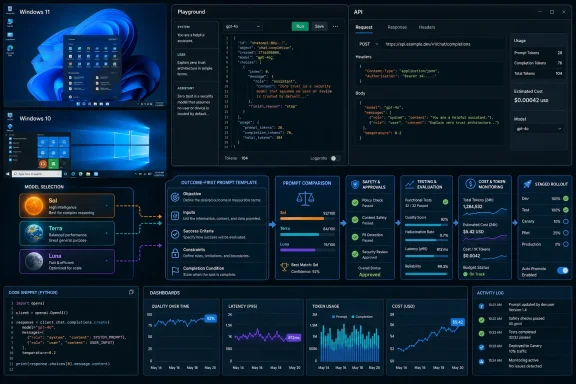
You can apply OpenAI’s GPT-5.6 outcome-first prompting method by defining the required result, constraints, available inputs, and completion conditions—without prescribing every reasoning step. This guide covers GPT-5.6 Sol, Terra, and Luna in the OpenAI API and Playground on Windows 11 and Windows 10. It also explains how to migrate existing prompts safely and verify whether shorter prompts actually improve quality, token use, and cost.
OpenAI made the GPT-5.6 family generally available on July 9, 2026. API access remains subject to your organization’s billing status, usage tier, rate limits, and workspace permissions.
The three API models serve different workloads:
An outcome-first replacement would be:
The second prompt still controls the result, but it does not force the model through an arbitrary internal sequence.
Use this process to rewrite an existing prompt:
Keep each requirement measurable. “Write a good report” is difficult to evaluate. “Produce a report containing an executive summary, three evidence-backed findings, and a recommended action” provides a testable target.
For a Windows log-analysis agent, the prompt could be:
Keep explicit instructions for:
This is a necessary control, not unwanted micromanagement.
Likewise, an automated agent should have a bounded failure path:
Use
Use
OpenAI lists the standard per-million-token rates as:
Your test set should include:
For each test, record:
 Check model and account availability
OpenAI made the GPT-5.6 family generally available on July 9, 2026. API access remains subject to your organization’s billing status, usage tier, rate limits, and workspace permissions.The three API models serve different workloads:
gpt-5.6-sol: flagship model for complex professional, coding, and reasoning work.gpt-5.6-terra: balanced option for cost-conscious general workloads.gpt-5.6-luna: fastest, lowest-cost option for focused or high-volume tasks.gpt-5.6: alias that currently routes to GPT-5.6 Sol.
- Sign in to the OpenAI platform using the organization that owns the application.
- Confirm that billing is active and the GPT-5.6 model appears in the Playground or model list.
- Record the exact model ID, reasoning setting, tools, prompt, and test inputs used by the existing application.
- Save a copy of the current prompt so you can restore it if the new version performs worse.
- Remove passwords, API keys, private customer records, and other unnecessary sensitive data from test cases.
Rewrite a prompt around the outcome
An outcome-first prompt should answer four questions:- What result must the model produce?
- What inputs and tools may it use?
- What constraints must it obey?
- What conditions indicate that the task is complete?
Code:
First read the ticket. Then list the symptoms. Next identify three possible
causes. Compare the causes. Select the most likely cause. Write five numbered
steps. Check the steps for clarity. Rewrite any unclear step. End with a
verification statement.
Code:
Resolve the Windows support ticket using the supplied ticket details.

Success criteria:
- Identify the most likely cause supported by the evidence.
- Give the user an ordered recovery procedure.
- Include exact Windows menu paths where known.
- Include a verification step.
- Do not invent missing settings, errors, or device details.

Stop when the user has either a verified fix or a clearly identified
escalation path.Use this process to rewrite an existing prompt:
- Copy the original prompt into a separate document.
- Highlight statements that describe the final deliverable.
- Highlight genuine restrictions, such as output format, prohibited actions, and data boundaries.
- Identify completion conditions, including validation or escalation requirements.
- Remove instructions that merely dictate how the model should think.
- Remove duplicated requirements expressed in several different ways.
- Keep necessary tool rules, approval boundaries, and safety checks.
- Test the shortened prompt before replacing the production version.
Use a reusable outcome-first template
The following template works for many API and agent tasks:
Code:
Objective:
[Describe the result to produce.]

Context and inputs:
[List the supplied files, records, variables, or user information.]

Success criteria:
- [Requirement 1]
- [Requirement 2]
- [Requirement 3]

Constraints:
- [Actions or sources that are permitted]
- [Actions that require approval]
- [Actions that are prohibited]
- [Required output format]

Completion condition:
Stop when [the result has been produced and verified].
If completion is impossible, return [the required failure or escalation result].For a Windows log-analysis agent, the prompt could be:
Code:
Objective:
Determine the most likely cause of the failed Windows service startup.

Inputs:
- The service configuration
- Relevant System event log entries
- The service application's log file

Success criteria:
- Cite the evidence used for the diagnosis.
- Distinguish confirmed facts from likely causes.
- Provide the least disruptive supported repair.
- Include rollback and verification steps.

Constraints:
- Do not recommend registry changes unless the supplied evidence requires them.
- Do not disable Windows security controls.
- Do not claim the service is fixed without verification evidence.

Completion condition:
Stop when a supported repair and verification procedure are available.
If the evidence is insufficient, identify the exact additional log or setting
needed.
Keep instructions that protect the workflow
Outcome-first prompting does not mean removing every procedural instruction. Retain steps when their order is operationally or legally significant.Keep explicit instructions for:
- Obtaining approval before deleting, purchasing, publishing, or sending data.
- Creating backups before changing storage, boot, networking, registry, or security settings.
- Authenticating before accessing protected systems.
- Validating data before committing a database transaction.
- Using a required company system of record.
- Applying regulatory, privacy, or retention requirements.
- Preventing an agent from repeatedly calling a tool.
- Defining retry limits, budgets, and timeout behavior.
- Requiring human review for high-impact actions.
Code:
Do not send the message immediately. Prepare a draft, show the recipients and
attachments, and wait for explicit user approval before calling the email tool.Likewise, an automated agent should have a bounded failure path:
Code:
Retry a failed read-only request no more than twice. Do not retry purchases,
deletions, account changes, or other state-changing actions automatically.
Return the error and request human review.
Select the appropriate GPT-5.6 model
Start with the model that meets the task’s quality requirement, then test whether a less expensive model can pass the same evaluation.Use
gpt-5.6-sol when the workload involves:- Complex coding or debugging
- Long-running professional work
- Ambiguous evidence
- Multiple tools or dependencies
- High-value decisions requiring stronger reasoning
gpt-5.6-terra when you need a balance between quality and cost, including routine document processing, support triage, extraction, summarization, and structured business workflows.Use
gpt-5.6-luna for focused, high-volume tasks such as classification, routing, normalized extraction, and straightforward transformations. Do not select Luna solely because it has the lowest token price; verify that it meets the required accuracy threshold.OpenAI lists the standard per-million-token rates as:
- Sol: $5 input and $30 output
- Terra: $2.50 input and $15 output
- Luna: $1 input and $6 output
Test the new prompt in the Playground
The OpenAI Playground provides the safest way to compare prompts without immediately changing application code.- Open the OpenAI platform in a supported Windows browser.
- Select the same organization and project used by the application.
- Open the Playground.
- Select the Responses API configuration if the application uses Responses.
- Choose the production model, such as
gpt-5.6-terra. - Match the application’s reasoning effort and tool configuration.
- Paste the original prompt.
- Run a representative test case and save the output and usage information.
- Replace only the prompt with the outcome-first version.
- Run the identical test case again.
- Repeat the comparison across normal, difficult, incomplete, and adversarial inputs.
Your test set should include:
- A common successful request
- A complex but valid request
- An incomplete request
- Conflicting input data
- A tool failure
- A request requiring approval
- A request that should be refused or escalated
- An input near the expected size limit
Measure quality and cost separately
Claims that outcome-first prompting can reduce tokens or cost describe particular evaluations, not a guaranteed discount for every application. Your results depend on prompt length, model choice, output length, reasoning effort, caching, retries, and tool usage.For each test, record:
- Whether all success criteria were met
- Unsupported or fabricated claims
- Input tokens
- Output tokens
- Cached tokens, if applicable
- Tool-call count
- End-to-end latency
- Number of retries
- Estimated total cost
- Whether human correction was required
- Correctly identifies the affected Windows component
- Uses a supported repair method
- Includes exact actionable steps
- Places warnings before risky changes
- Includes rollback where required
- Includes a final verification
- Does not invent an error code or menu item
Roll out the revised prompt safely
Treat a production prompt as application code.- Assign the revised prompt a new version number.
- Store the old and new versions in source control or your prompt-management system.
- Run the fixed evaluation set against both versions.
- Define the minimum acceptable quality score before deployment.
- Test the new prompt with a small portion of production traffic.
- Monitor errors, tool calls, latency, tokens, and user corrections.
- Expand deployment only after the results remain stable.
- Roll back to the saved prompt version if quality or safety falls below the threshold.
gpt-5.6 alias, model behavior may evolve as OpenAI updates routing. Use an available snapshot identifier when repeatability is more important than automatically receiving model updates.Troubleshoot weak outcome-first prompts
If the output is too broad or generic:- Make the objective more specific.
- Add measurable success criteria.
- Supply the missing context or source material.
- State the intended audience and deliverable type.
- Require the model to separate facts from assumptions.
- Define the completion condition more precisely.
- Require validation against the success criteria.
- Specify what to return when evidence is missing.
- Confirm that a tool limit or output limit is not ending the request.
- Add an explicit approval boundary.
- Separate read-only tools from state-changing tools.
- Require a preview before execution.
- Add retry and spending limits.
- Enforce permissions in application code rather than relying only on prompt text.
- Check whether the model is producing longer answers.
- Remove unnecessary repeated context.
- Set a concise output requirement.
- Verify that failed tool calls are not causing repeated attempts.
- Compare reasoning settings.
- Review whether prompt caching is configured appropriately.
- Restore the previous prompt version.
- Identify which evaluation cases failed.
- Add only the missing constraint or acceptance criterion.
- Avoid restoring every old step automatically.
- Rerun the complete evaluation set.
- Deploy again only after the revised prompt meets the established threshold.
References
- Primary source: Crypto Briefing
Published: 2026-07-13T22:52:11+00:00
OpenAI's GPT-5.6 prompting guide tells developers to get out of the model's way
OpenAI's GPT-5.6 prompting guide cuts token costs by up to 66% and spending by 67%, reshaping economics for AI agents and crypto infrastructure builders.cryptobriefing.com - Official source: developers.openai.com
GPT-5.6 Terra Model | OpenAI API
 developers.openai.com
