

Verdict: Windows players should stick to a legitimate local copy of Grand Theft Auto: Vice City and avoid unaffiliated “play free in browser” mirrors. The DOS Zone experiment was a short-lived WebAssembly demonstration, not a dependable replacement for owning and running the game locally—and sites that promise the full game with no ownership check and an automatic 701 MB download should be treated as both a legal and security warning.
The practical move is simple:
WindowsForum covered the original demo while it was live in its earlier report, Play GTA Vice City in Your Browser with a WebAssembly Demo. That report captured the appeal: near-instant access, no conventional installation process, and a proof that WebAssembly can carry surprisingly substantial legacy software into the browser. But the removal turns that novelty into a far more ordinary Windows question: where does a player place trust after the legitimate-looking demonstration is no longer the obvious destination?
DOS Zone’s WebAssembly-based Vice City demonstration surfaced on December 19, 2025. It used a browser adaptation of the community reVC engine, making the underlying technology the main attraction: a classic Windows-era game running through a browser rather than through its original desktop executable.
The service’s original setup also mattered. The limited demonstration did not initially require users to provide their own files, but fuller play and save functionality was tied to validation using an original game file. That distinction was not merely cosmetic. It created at least some boundary between a technical showcase and a site simply redistributing the entire game.
Reporting from Tom’s Hardware and GamesRadar in late December 2025 described Take-Two’s action through a brand-protection representative, requiring DOS Zone to remove Vice City-related content and functionality. Whatever one thinks of the takedown, it exposes the weakness of depending on a hosted browser port: the service exists only while its operator can keep it online.
That is why a replacement site should not inherit DOS Zone’s credibility merely because it can load Vice City in a browser. A site can copy the visual idea, the game title, or the “no download” pitch without sharing the original project’s ownership validation model, technical care, or even basic trustworthiness.
A large automatic game-data transfer does not become safer because it happens through a tab rather than an installer. The practical question is still the same: who is hosting the files, what exactly is being delivered, whether the distribution is authorized, and whether the player has any reason to trust the operator with browser permissions, downloads, or account details.
The ownership-free pitch is particularly revealing. DOS Zone’s full-function approach reportedly depended on validating an original game file. A mirror offering the complete experience with no equivalent check is not providing a smoother version of that model; it is abandoning the part that made the original project at least attempt to distinguish between a demo and a supplied game.
For security-minded enthusiasts and IT staff, the safest default is not to investigate which mirror seems most polished. It is to avoid the category entirely. A browser tab has a lower psychological barrier than a downloaded executable, but it is still a delivery channel for untrusted content and potentially large data transfers.
That does not mean every independent project is malicious. It means the available facts are insufficient to treat any unaffiliated full-game host as safe, authorized, or stable. Convenience is not provenance.
First, it gives the player offline access. A hosted demo depends on the service remaining reachable, the browser continuing to support the required features, and the host keeping the game available. A local installation depends primarily on files already in the player’s possession.
Second, it is better suited to persistent use. Browser gaming can be excellent for a short demonstration, but save behavior is inherently tied to the browser implementation and its storage model. DOS Zone itself separated limited access from fuller functionality tied to validation of an original game file. That alone should tell players not to assume that every browser-hosted save is durable or portable.
Third, local copies are the sensible foundation for players who want to experiment with mods. Modding requires file-level control, repeatable setup, and the ability to recover after a change breaks something. A web host can update, remove content, alter its validation rules, or disappear; a local copy can be backed up before changes are made.
A minimal preservation routine is enough:
But a technical proof of concept is not automatically a long-term distribution method. The game’s rights holder can challenge a host. The operator can receive a complaint. A demo can change its rules. And a search engine can quickly fill the resulting gap with sites that imitate the old experience while removing its ownership safeguards.
That is the sharper lesson from the shutdown. Browser delivery can reduce installation friction, but it also centralizes trust in a site that may have no enduring right—or ability—to provide the game. A local copy shifts the practical risk in the opposite direction: the player has to manage files and compatibility, but is no longer dependent on one domain staying online.
They should not treat a site’s use of WebAssembly, retro styling, or a familiar game logo as evidence that the host is affiliated with DOS Zone, Rockstar Games, Take-Two, or the reVC community. The original Vice City demonstration’s removal makes impersonation and confusion more likely, not less.
For administrators, the incident is also a useful reminder that browser-based software can bypass the usual mental model of “downloads versus no downloads.” A game page that automatically transfers hundreds of megabytes is still consuming bandwidth and delivering unverified content, even if users never see a traditional setup wizard.
The original DOS Zone demo showed what a browser could do with GTA: Vice City. Its disappearance shows why Windows players should not build their playtime, saves, or mod setup around a third-party tab.
The practical move is simple:
- Keep or obtain a legitimate local copy of GTA: Vice City rather than relying on a browser host.
- Preserve the game’s original files somewhere you control, including any save data you care about.
- Do not enter credentials, upload files, or approve a large automatic download on an unaffiliated browser clone.
- Treat a browser project that validates your existing game file very differently from a site that supplies the entire game without checking ownership.
- If a browser demo disappears, assume availability can change again without notice; your local install is the only option that remains available offline and under your control.
WindowsForum covered the original demo while it was live in its earlier report, Play GTA Vice City in Your Browser with a WebAssembly Demo. That report captured the appeal: near-instant access, no conventional installation process, and a proof that WebAssembly can carry surprisingly substantial legacy software into the browser. But the removal turns that novelty into a far more ordinary Windows question: where does a player place trust after the legitimate-looking demonstration is no longer the obvious destination?
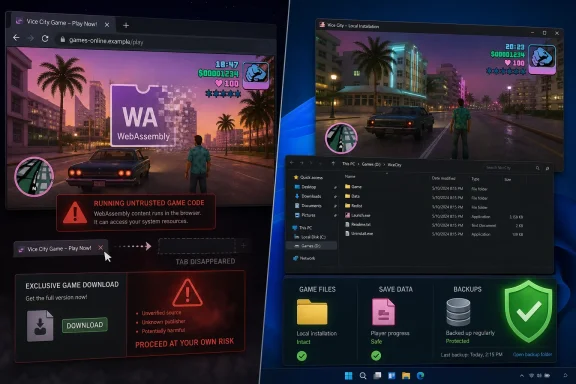 Why the DOS Zone Demo Was Not the Same as a Random Browser Clone
DOS Zone’s WebAssembly-based Vice City demonstration surfaced on December 19, 2025. It used a browser adaptation of the community reVC engine, making the underlying technology the main attraction: a classic Windows-era game running through a browser rather than through its original desktop executable.The service’s original setup also mattered. The limited demonstration did not initially require users to provide their own files, but fuller play and save functionality was tied to validation using an original game file. That distinction was not merely cosmetic. It created at least some boundary between a technical showcase and a site simply redistributing the entire game.
Reporting from Tom’s Hardware and GamesRadar in late December 2025 described Take-Two’s action through a brand-protection representative, requiring DOS Zone to remove Vice City-related content and functionality. Whatever one thinks of the takedown, it exposes the weakness of depending on a hosted browser port: the service exists only while its operator can keep it online.
That is why a replacement site should not inherit DOS Zone’s credibility merely because it can load Vice City in a browser. A site can copy the visual idea, the game title, or the “no download” pitch without sharing the original project’s ownership validation model, technical care, or even basic trustworthiness.
A “No Ownership Check” Browser Port Is a Red Flag, Not an Upgrade
Search results in 2026 include unaffiliated sites claiming to offer a complete Vice City browser version without an ownership check, while automatically downloading roughly 701 MB of game data. For Windows users, that is the moment to stop treating the browser label as a convenience feature.A large automatic game-data transfer does not become safer because it happens through a tab rather than an installer. The practical question is still the same: who is hosting the files, what exactly is being delivered, whether the distribution is authorized, and whether the player has any reason to trust the operator with browser permissions, downloads, or account details.
The ownership-free pitch is particularly revealing. DOS Zone’s full-function approach reportedly depended on validating an original game file. A mirror offering the complete experience with no equivalent check is not providing a smoother version of that model; it is abandoning the part that made the original project at least attempt to distinguish between a demo and a supplied game.
For security-minded enthusiasts and IT staff, the safest default is not to investigate which mirror seems most polished. It is to avoid the category entirely. A browser tab has a lower psychological barrier than a downloaded executable, but it is still a delivery channel for untrusted content and potentially large data transfers.
That does not mean every independent project is malicious. It means the available facts are insufficient to treat any unaffiliated full-game host as safe, authorized, or stable. Convenience is not provenance.
Local Copies Win on Reliability, Saves, and Control
A legitimate local copy does not solve every compatibility issue automatically, but it solves the core problems created by the browser-port shutdown.First, it gives the player offline access. A hosted demo depends on the service remaining reachable, the browser continuing to support the required features, and the host keeping the game available. A local installation depends primarily on files already in the player’s possession.
Second, it is better suited to persistent use. Browser gaming can be excellent for a short demonstration, but save behavior is inherently tied to the browser implementation and its storage model. DOS Zone itself separated limited access from fuller functionality tied to validation of an original game file. That alone should tell players not to assume that every browser-hosted save is durable or portable.
Third, local copies are the sensible foundation for players who want to experiment with mods. Modding requires file-level control, repeatable setup, and the ability to recover after a change breaks something. A web host can update, remove content, alter its validation rules, or disappear; a local copy can be backed up before changes are made.
A minimal preservation routine is enough:
- Keep a backup of the original game files before making changes.
- Keep a separate backup of saves before trying mods or alternate engines.
- Record which changes you made so a working configuration can be recreated later.
- Avoid mixing files from unknown browser packages into an otherwise legitimate local installation.
The Browser Port Still Proved Something Useful
The DOS Zone episode should not be dismissed as a gimmick. WebAssembly demonstrated a real possibility: old PC software can be adapted for a browser environment with remarkably little friction for the user. For Windows enthusiasts, that is a meaningful technical achievement even if the specific Vice City deployment did not last.But a technical proof of concept is not automatically a long-term distribution method. The game’s rights holder can challenge a host. The operator can receive a complaint. A demo can change its rules. And a search engine can quickly fill the resulting gap with sites that imitate the old experience while removing its ownership safeguards.
That is the sharper lesson from the shutdown. Browser delivery can reduce installation friction, but it also centralizes trust in a site that may have no enduring right—or ability—to provide the game. A local copy shifts the practical risk in the opposite direction: the player has to manage files and compatibility, but is no longer dependent on one domain staying online.
What Windows Players Should Watch Next
Players should watch for an official or clearly documented project that explains exactly what it requires from an existing local copy and what it does with those files. Transparency about ownership validation, local storage, and save handling is more important than a flashy “instant play” claim.They should not treat a site’s use of WebAssembly, retro styling, or a familiar game logo as evidence that the host is affiliated with DOS Zone, Rockstar Games, Take-Two, or the reVC community. The original Vice City demonstration’s removal makes impersonation and confusion more likely, not less.
For administrators, the incident is also a useful reminder that browser-based software can bypass the usual mental model of “downloads versus no downloads.” A game page that automatically transfers hundreds of megabytes is still consuming bandwidth and delivering unverified content, even if users never see a traditional setup wizard.
The original DOS Zone demo showed what a browser could do with GTA: Vice City. Its disappearance shows why Windows players should not build their playtime, saves, or mod setup around a third-party tab.
Frequently Asked Questions
Should I use a Vice City browser mirror after DOS Zone’s removal?
No. Avoid unaffiliated mirrors that offer the full game with no ownership check, especially those that automatically download large amounts of game data.Was the DOS Zone demo a full replacement for a local copy?
No. It initially offered a limited experience, while fuller play and save functionality were reportedly tied to validation using an original game file.Why is a local copy better for modding?
A local copy gives you control over the files, lets you back up a known-good setup, and does not depend on a browser host remaining online.Is every browser-based Vice City project unsafe?
Not necessarily, but the available facts do not justify trusting unaffiliated full-game hosts. Verify ownership requirements and project provenance before considering any browser-based option.References
- Primary source: aventurauniversal.com
GTA Vice City in your browser: web demo and how to play legally
Play GTA Vice City in your browser with a WebAssembly demo. We'll tell you how it works, what its limitations are, and how to legally unlock the full game.aventurauniversal.com - Independent coverage: club386.com
You can now play GTA Vice City directly from your browser, and it runs smoothly | Club386
Grand Theft Auto: Vice City now runs in a web browser thanks to DOS Zone, with full game access available if you can prove ownership. www.club386.com
- Independent coverage: geekysoumya.com
Play GTA Vice City in Browser – No Download, Free & Working! - GEEKY SOUMYA
Play GTA Vice City directly in your browser without downloading. Learn how to run it on any device with this simple guide.geekysoumya.com - Independent coverage: windowscentral.com
Play GTA Vice City in your web browser | Windows Central
A browser based demo lets you play GTA Vice City across multiple devices, highlighting just how far web technology and game preservation have come.www.windowscentral.com - Independent coverage: theunitedbuzz.com
GTA Vice City Browser Port: Now Play on Any Device - The United Buzz
GTA Vice City is now playable in a browser via a fan-made port. Learn how it works, limitations, legality, and who should try it.theunitedbuzz.com - Independent coverage: pokde.net
23 Years On, GTA Vice City Is Now Playable In A Web Browser - Pokde.Net
Feeling nostalgic? Too impatient waiting for GTA 6? There's GTA Vice City now available to play in a web browser while you enjoy the good old Vice City and waiting for the new one to arrive.pokde.net