

HackerNoon’s Learn Repo has published a ranked collection of 58 Bash articles, positioning it as a quick discovery list rather than a structured training course. The July 12 post orders entries using the site’s reader-engagement data and pulls together material ranging from shell fundamentals and aliases to automation, SSH tunnels, cron jobs, Docker, Kubernetes and scripting from Python, Node.js and TypeScript.
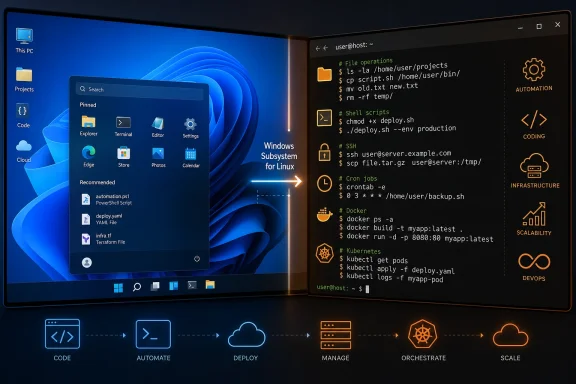
For Windows users, the list is useful mainly as a source of practical Bash patterns that transfer cleanly to Windows Subsystem for Linux (WSL). Several entries cover basic scripting, Linux permissions, shell history, command-line navigation and task automation—the kinds of topics that remain relevant whether Bash is running on a server, CI runner, container or an Ubuntu instance on a Windows PC.
The collection is deliberately broad. It includes beginner walkthroughs alongside one-off fixes, personal workflow posts, DevOps automation examples and language-specific integrations. That makes it suitable for browsing by problem, but less useful as a sequential curriculum.
Readers looking to build competence should start with posts on file operations, variables, quoting, loops, functions, exit codes and permissions before moving to automation examples. A Bash one-liner that works in a blog post can be fragile when it encounters spaces in file names, unexpected input or partial failures. The more operationally focused articles—covering SSH notifications, scheduled tasks, Kubernetes secrets and deployment scripts—are best read after those basics.
There is also a predictable amount of dated material. One item focuses on installing Bash on Windows 10 through Microsoft’s original Canonical partnership, framing WSL as a new feature. That was accurate for its time, but it is not the setup path most readers should follow now.
That makes the list’s Linux-centric examples more immediately relevant to Windows developers and administrators than they were when WSL first arrived. Scripts relying on GNU utilities,
The collection is a reasonable starting point for finding Bash topics worth learning, but Windows users should pair it with Microsoft’s current WSL documentation and test scripts in a disposable directory or non-production environment first.
For Windows users, the list is useful mainly as a source of practical Bash patterns that transfer cleanly to Windows Subsystem for Linux (WSL). Several entries cover basic scripting, Linux permissions, shell history, command-line navigation and task automation—the kinds of topics that remain relevant whether Bash is running on a server, CI runner, container or an Ubuntu instance on a Windows PC.
 A broad list, with uneven depth
The collection is deliberately broad. It includes beginner walkthroughs alongside one-off fixes, personal workflow posts, DevOps automation examples and language-specific integrations. That makes it suitable for browsing by problem, but less useful as a sequential curriculum.Readers looking to build competence should start with posts on file operations, variables, quoting, loops, functions, exit codes and permissions before moving to automation examples. A Bash one-liner that works in a blog post can be fragile when it encounters spaces in file names, unexpected input or partial failures. The more operationally focused articles—covering SSH notifications, scheduled tasks, Kubernetes secrets and deployment scripts—are best read after those basics.
There is also a predictable amount of dated material. One item focuses on installing Bash on Windows 10 through Microsoft’s original Canonical partnership, framing WSL as a new feature. That was accurate for its time, but it is not the setup path most readers should follow now.
The Windows angle
Microsoft’s current WSL guidance supports installing a Linux distribution and its Bash tools directly on Windows 11, or Windows 10 version 2004 and later, withwsl --install. Microsoft documents Ubuntu as the default distribution, while allowing other supported distributions to be selected. The result is a full Linux user environment for command-line utilities and Bash scripts without setting up a traditional virtual machine or dual boot.That makes the list’s Linux-centric examples more immediately relevant to Windows developers and administrators than they were when WSL first arrived. Scripts relying on GNU utilities,
ssh, cron-style scheduling concepts, Docker workflows or common Unix text-processing tools can be tested in WSL before being promoted to a Linux host or CI environment.Use it as a reading queue, not a runbook
HackerNoon says the ranking reflects reader engagement, not technical review, freshness or production suitability. That distinction matters for shell code: copying commands that manipulate files, usesudo, change permissions or connect to remote systems without understanding them is an efficient route to a bad afternoon.The collection is a reasonable starting point for finding Bash topics worth learning, but Windows users should pair it with Microsoft’s current WSL documentation and test scripts in a disposable directory or non-production environment first.
References
- Primary source: HackerNoon
Published: 2026-07-12T00:00:00+00:00
58 Blog Posts To Learn About Bash | HackerNoon
Learn everything you need to know about Bash via these 58 free HackerNoon blog posts.hackernoon.com - Related coverage: learnrepo.com

433 Blog Posts To Learn About Business Growth
www.learnrepo.com