
The discovery that a sophisticated espionage group is running covert Linux virtual machines inside compromised Windows 10 hosts marks a notable escalation in adversary tradecraft: rather than installing traditional on‑host malware, the attackers enable Hyper‑V, import a minimal Alpine Linux VM and run their remote‑access implants entirely inside that guest — effectively hiding from host‑focused EDR tooling.
In a joint investigation, Bitdefender Labs and the Georgian Computer Emergency Response Team (CERT) documented a campaign attributed to an actor they call Curly COMrades, active since mid‑2024 and operating with goals aligned to Russian geopolitical interests. The operation uses legitimate Windows virtualization — Microsoft Hyper‑V — as the delivery and execution layer for covert, persistent remote access on Windows 10 machines. What makes this campaign notable is not a flashy new zero‑day but an operational design that combines small, tailored Linux guests with compact, well‑crafted implants. By isolating the malicious code inside a VM that routes traffic through the host’s network stack, the attackers significantly reduce the efficacy of endpoint detection and response (EDR) solutions that do not inspect guest‑level behavior.
High‑priority detection signals:
Source: Cyber Press Curly COMrades’ Latest Toolset Installs Undetected Remote Access on Windows 10 Systems
 Background
In a joint investigation, Bitdefender Labs and the Georgian Computer Emergency Response Team (CERT) documented a campaign attributed to an actor they call Curly COMrades, active since mid‑2024 and operating with goals aligned to Russian geopolitical interests. The operation uses legitimate Windows virtualization — Microsoft Hyper‑V — as the delivery and execution layer for covert, persistent remote access on Windows 10 machines. What makes this campaign notable is not a flashy new zero‑day but an operational design that combines small, tailored Linux guests with compact, well‑crafted implants. By isolating the malicious code inside a VM that routes traffic through the host’s network stack, the attackers significantly reduce the efficacy of endpoint detection and response (EDR) solutions that do not inspect guest‑level behavior. Overview of the technique
How the attack unfolds (high level)
- The adversary obtains remote execution on a Windows 10 host using conventional access vectors (details of initial access are not the primary focus of the published analysis).
- Using remote command execution, they enable Hyper‑V on the host and intentionally disable the Hyper‑V management clients to reduce obvious management telemetry.
- The attackers download and import a lightweight Alpine Linux VM (≈120 MB on disk; configured with roughly 256 MB RAM) and start it under Hyper‑V on the victim machine.
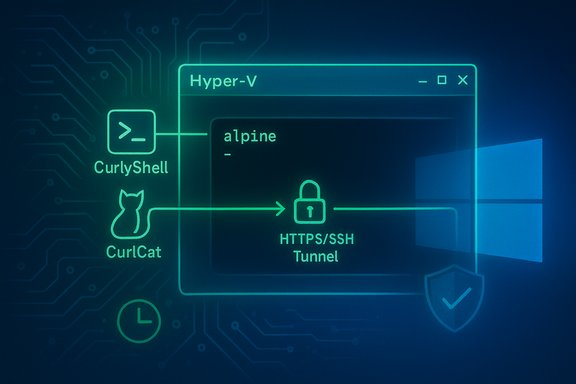
- Inside that guest, they run two custom implants — CurlyShell (an HTTPS reverse shell/persistent implant) and CurlCat (an SSH tunneling/proxy component that encapsulates SSH inside HTTP to blend traffic).
- The VM’s network adapter is attached to Hyper‑V’s Default Switch, which uses NAT so VM outbound traffic is routed through the host IP, making all malicious traffic appear to originate from the legitimate host address.
Why virtualization is effective here
- EDR blind spot: Most EDR/XDR products primarily instrument and inspect host processes, kernel hooks and common persistence artifacts on the Windows file system and process space. A logically isolated Linux guest reduces those host‑visible artifacts to VM processes (vmms.exe and related Hyper‑V infrastructure) rather than the malicious processes themselves. This separation weakens signature and behavioral detections that assume malware executes on the native host.
- Network camouflage: Using the Default Switch’s NAT hides the VM’s true source IP. From a network perspective, traffic leaves under the host’s legitimate IP and standard ports (HTTPS), complicating network blocking and attribution. The Default Switch behavior — a NAT‑backed internal switch created by Hyper‑V on Windows 10 — is well‑documented and used by the adversary to blend traffic.
- Small forensic footprint: The Alpine VM is intentionally minimal (tiny disk and RAM footprint) and implants are minimalist C++ binaries built with libcurl and lightweight logic, producing very few on‑disk traces and keeping forensic noise low.
The implants: CurlyShell and CurlCat
CurlyShell — a compact HTTPS reverse shell
CurlyShell is a C++ implant built around libcurl. Its primary role is to establish a persistent reverse shell to a command‑and‑control (C2) endpoint over HTTPS, using intentionally minimalist behavior and an atypical Base64 variant for command encoding. Persistence in the VM is achieved with a cron entry that executes a small init script, ensuring the implant is relaunched on a schedule with root privileges. Key technical features:- Written in C++ and using libcurl for HTTP/S transport.
- Persistent via a cron job inside the Alpine guest (root‑level cron entry).
- Commands encoded with a non‑standard Base64 variant to increase analysis friction.
- HTTPS communications that can be made to blend with legitimate web traffic.
CurlCat — SSH tunneling wrapped in HTTP
CurlCat is functionally a reverse proxy / SSH tunneling helper. It acts as a ProxyCommand hook for SSH client configurations inside the VM, wrapping SSH streams into HTTP(S) payloads and relaying them to a remote SSH endpoint. This allows the attackers to pivot from the VM into internal hosts or other network targets while making the tunneling traffic look like ordinary web requests. Bitdefender’s analysis found libcurl options in CurlCat that disabled TLS certificate verification — a design choice consistent with using compromised infrastructure (arbitrary certs) as relays. Notable operational detail:- CurlCat is not necessarily persistent by itself; it can be invoked on demand by commands sent through CurlyShell, enabling on‑demand proxying without a constantly running tunnel process.
Evidence, collaboration and infrastructure
The campaign’s forensic picture was assembled through cooperation between Bitdefender and the Georgian CERT. Analysts in Georgia detected CurlCat traffic associated with a local website that attackers had compromised and used as a relay. Forensic analysis of that server uncovered NGINX and iptables rules redirecting victim connections, an sshd instance on a nonstandard port for tunnel termination, and traces showing the use of arbitrary TLS certificates to decrypt encapsulated SSH traffic. Those findings strongly corroborate the implant behavior observed inside the Alpine guests. The operation demonstrates deliberate infrastructure hygiene by the attacker:- Use of compromised, geographically appropriate relays (a Georgian site in this case) to obscure the true infrastructure.
- Simple but robust iptables and NGINX configurations that selectively route tunneled SSH traffic while leaving other site traffic intact.
- Deletion or suppression of shell history inside the guest to limit forensic artifacts.
What defenders need to know: detection and indicators
This technique shifts the detection surface. Effective detection will require looking beyond classic host process monitoring and incorporating host network telemetry, virtualization state changes and artifacts that indicate VM creation on a desktop or server that normally shouldn’t host VMs.High‑priority detection signals:
- Unexpected enabling of the Hyper‑V feature or changes to Hyper‑V management settings via remote commands that disable management clients (example DISM commands were observed in the forensic record).
- Creation or import of VHD/VHDX files, especially small, unusual images stored under system or user directories (ProgramData, C:\Users\Public, etc..
- New or sudden vmms.exe or vmcompute.exe activity on endpoints that usually don’t run virtual machines.
- Outbound HTTPS traffic patterns that consistently originate from a host and correlate with times when a Hyper‑V guest is running; look for small, frequent requests, or oddly long HTTP payloads that encapsulate tunneled traffic.
- Presence of SSH tunneling behavior disguised as HTTP/S, especially when TLS certificate validation is disabled or when SSH sessions appear transported over standard ports.
- Scheduled tasks or cron‑style persistence inside a guest (if guest artifacts are recoverable) — Bitdefender found a cron entry running an alpine_init script that launches CurlyShell on a cadence.
- Audit Windows feature states across endpoints for unexpected Hyper‑V activation (Get‑WindowsOptionalFeature /online or DISM histories).
- Scan file systems for recently created VHD/VHDX files and unusual VM configuration files.
- Correlate vmms.exe process start/stops with network sessions in the perimeter/NIDS logs.
- Inspect host NAT/Default Switch traffic flows for consistent, encrypted requests that lack normal TLS validation patterns or that encapsulate SSH payload shapes.
- Collect and analyze web server logs for compromised relays that may be redirecting traffic to unfamiliar SSH ports.
Hardening and mitigation — prioritized plan
This campaign underlines the need to treat hypervisor features on endpoints as crown‑jewel attack surface when those features are not required in an environment. The following practical, prioritized steps help reduce risk:- Inventory and minimize virtualization features
- Identify endpoints with Hyper‑V enabled. If Hyper‑V is not required on a desktop or user workstation fleet, consider disabling it centrally or using Group Policy to limit which machines can enable Hyper‑V.
- Restrict who can enable Hyper‑V
- Enforce least privilege so only a small set of administrators (or managed build systems) can enable Hyper‑V. Monitor for administrative calls to DISM or PowerShell that toggle Hyper‑V features.
- Network‑level inspection for VM escaped traffic
- Deploy egress filtering and inspect outbound TLS metadata. Network IDS/IPS and proxy logs should be tuned to detect long‑lived or frequent small POST/GETs that carry opaque payloads and to flag hosts that suddenly start generating such traffic after VM creation.
- Monitor for Default Switch anomalies
- The Hyper‑V Default Switch uses NAT and routes VM traffic through the host’s interface. Monitor hosts for new NAT allocations and unexpected connections that map to a host’s IP but originate from ephemeral VM addresses. Blocking unnecessary outbound ports or using a web proxy that enforces TLS validation can disrupt tunneled SSH-over-HTTP traffic.
- Harden Group Policy and Kerberos usage
- Audit Group Policy changes and the use of PowerShell scripts pushed via GPO. The attackers also abused Kerberos tickets in PowerShell scripts for remote authentication — monitoring abnormal Kerberos service ticket requests and SPN usage is important.
- Improve logging and EDR/XDR coverage
- Augment host EDR with network‑level visibility and hypervisor telemetry where possible. Detect unusual vmms.exe command lines, scheduled VM imports, and unexpected virtual switch manipulations.
- Prepare an incident playbook for VM‑backed compromises
- Include steps to identify and isolate infected hosts without immediately destroying evidence. Because the malicious execution happens in a guest, live response should preserve the VHD/VHDX and guest disk images for forensic analysis.
Practical detection examples and quick hunts
- Run a search for VHD/VHDX files modified during suspicious windows:
- Windows: Get‑ChildItem -Path C:\ -Filter *.vhdx -Recurse -ErrorAction SilentlyContinue
- Check locations under C:\ProgramData and user profiles.
- Look for recent DISM usage that enables Hyper‑V:
- Inspect PowerShell and command history for DISM /online /enable‑feature /FeatureName:microsoft‑hyper‑v or similar invocations.
- Correlate vmms.exe process events with outbound TLS sessions:
- Identify times when vmms.exe starts on an endpoint.
- Pull corresponding flow logs or proxy logs for those time windows and inspect for small, repeated HTTPS requests to uncommon domains or to domains hosted on known compromised relays.
- Hunt for TLS sessions where certificate validation is disabled or for TLS sessions to domains that present inconsistent certificates (self‑signed or mismatched CNs). CurlCat and related tooling were observed to disable TLS checks in libcurl options — a detectable anomaly.
Attribution and operational context — caveats
The reporting describes Curly COMrades as “aligned with Russian geopolitical interests,” but it does not present an unequivocal government attribution; the phrasing indicates analyst judgements based on targeting, operational patterns and prior activity rather than a direct claim of state sponsorship. Attribution at this level should be treated as probabilistic and handled with appropriate caution. The observed operational hygiene (selective targeting, use of geographically relevant relays) is consistent with espionage‑level behavior, but the precise sponsorship and full global scope remain uncertain.Strategic implications — why this matters
This campaign is important for defenders, enterprises and security teams for three reasons:- It demonstrates a widening of the adversary playbook to include abuse of legitimate virtualization features as a stealth layer, a technique that does not require exotic zero‑days and can be executed with common OS tools.
- The method raises the bar for defenders: traditional host‑centric EDR/XDR approaches must be complemented by network‑level inspection, virtualization telemetry and administrative change monitoring to remain effective.
- The operational simplicity and low forensic noise mean this pattern could be adopted widely by other espionage groups or criminal operators if left unaddressed — a small, portable Alpine VM plus a few compact C++ binaries gives an adversary a highly stealthy remote access platform with very little code surface exposed on the Windows host.
Strengths and limitations of the reporting
Strengths:- The highly technical, sample‑level analysis provides concrete artifacts (cron entries, VHD usage patterns, libcurl configuration and iptables rules) that defenders can use to hunt and remediate.
- The joint analysis with a national CERT produced direct infrastructure evidence (compromised Georgian site, NGINX/iptables configuration), strengthening confidence in the telemetry and conclusions.
- The public reporting does not enumerate the full set of initial compromise vectors nor provide a comprehensive list of affected organizations. The real operational scale — how many hosts were compromised — remains unclear.
- Attribution remains probabilistic: “aligned with Russian geopolitical interests” is a reasonable analytic assessment given targeting choices, but does not equal definitive state sponsorship.
- The reliance on a small number of samples and seized relays means there may be other, unseen variants or additional tooling in other clusters that were not observed during this investigation.
Final takeaways for Windows 10 defenders
- Treat Hyper‑V and virtualization features on endpoints as part of your attack surface. Where Hyper‑V is not required, disable it centrally or restrict who can enable it.
- Expand detection beyond host processes: include virtualization telemetry, VHD/VHDX discovery hunts, and network behavior analysis that correlates new VM activity with outbound HTTPS sessions.
- Harden Group Policy workflows and watch for PowerShell abuse and Kerberos anomalies — the adversary used both script‑based GPO persistence techniques and Kerberos ticket abuse.
- Coordinate with national/local CERTs and share indicators quickly; international collaboration enabled seizure and analysis of a compromised relay in this case and materially improved the investigative outcome.
Source: Cyber Press Curly COMrades’ Latest Toolset Installs Undetected Remote Access on Windows 10 Systems
