

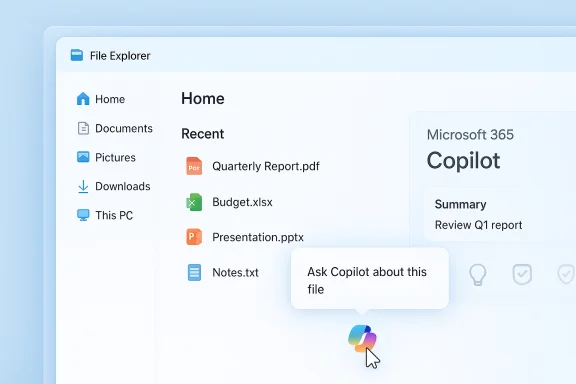
Microsoft has quietly added a new, context-aware way to query Copilot from inside File Explorer: hover over a recent file in the Home view, click a faint “Ask M365 Copilot” icon, and the Microsoft 365 Copilot app opens to summarize, identify, or act on the file without forcing you to open it first — a feature Microsoft announced at Ignite 2025 and is already appearing for Windows Insiders.
Microsoft’s Ignite 2025 keynote and follow-up documentation framed Windows as moving toward a tightly integrated AI experience, where Copilot is not just a sidebar but a first-class productivity surface across the OS. Among the rollout items was a promise that File Explorer would gain an on-hover “Ask M365 Copilot” affordance in the Home view to provide on-demand assistance or insights about files — rolling out before the end of 2025. That plan is reflected in Microsoft’s Windows IT Pro / community announcements and the preview behavior showing up in Insider builds. File Explorer has already been a focus for Copilot integration for months: right‑click context-menu "Ask Copilot" actions, AI-assisted image edits, and export paths into Word/Excel/PowerPoint have been appearing in previews and builds aimed at Windows Insiders. The new hover-targeted Ask M365 Copilot option tightens Microsoft 365 Copilot’s connection to local file discovery and Microsoft 365–backed contextual reasoning, offering a single-click path from a file thumbnail to an AI-backed summary or transformation.
Until those questions have clear, verifiable answers — ideally in writing and contractually enforceable for enterprise customers — the pragmatic approach is a measured one: enable Insiders and early adopters to validate productivity wins, but hold off on broad automatic enablement for managed fleets until compliance checks and telemetry baselines are established.
At the same time, the feature amplifies important questions about privacy, governance, and UI bloat that organizations and power users must treat seriously. The coming months of Insider testing and documentation releases will determine whether this addition becomes a trusted, ubiquitous productivity tool or simply another prominent but divisive AI surface in an increasingly agent-saturated OS. For now, the right stance is cautious optimism: try it, measure it, and only widen deployment once your compliance and audit requirements are fully satisfied.
Source: Windows Report Hands-on With New "Ask M365 Copilot" Feature in Windows 11 File Explorer
 Background / Overview
Microsoft’s Ignite 2025 keynote and follow-up documentation framed Windows as moving toward a tightly integrated AI experience, where Copilot is not just a sidebar but a first-class productivity surface across the OS. Among the rollout items was a promise that File Explorer would gain an on-hover “Ask M365 Copilot” affordance in the Home view to provide on-demand assistance or insights about files — rolling out before the end of 2025. That plan is reflected in Microsoft’s Windows IT Pro / community announcements and the preview behavior showing up in Insider builds. File Explorer has already been a focus for Copilot integration for months: right‑click context-menu "Ask Copilot" actions, AI-assisted image edits, and export paths into Word/Excel/PowerPoint have been appearing in previews and builds aimed at Windows Insiders. The new hover-targeted Ask M365 Copilot option tightens Microsoft 365 Copilot’s connection to local file discovery and Microsoft 365–backed contextual reasoning, offering a single-click path from a file thumbnail to an AI-backed summary or transformation.What the feature does — hands-on behavior and UX
The interaction, step by step
- Hover over a file in File Explorer Home. A grayed Copilot icon appears near the file entry.
- Move the pointer onto that icon and a tooltip or microcopy says “Ask Copilot about this file.”
- Click the icon: the Microsoft 365 Copilot app opens (often in the background), ingests or references the file, and returns a conversational response, summary, or an action suggestion without launching the file in a separate app. Early hands-on notes from preview testers show image analysis (names of items in an image), quick summaries of PDFs, and extraction of key points from documents.
Why Microsoft framed this as Microsoft 365 Copilot (not just “Copilot”)
The naming — Ask M365 Copilot — signals deeper coupling with Microsoft 365 capabilities, connectors, and the retrieval-augmented reasoning used for tenant-aware file access. In practice that means the feature is positioned to pull context beyond the local file (when allowed), using Microsoft 365 semantics, account permissions, and connectors to enrich answers. The UI aims to keep you in the same context: glance at a file, get AI assistance, and remain in File Explorer rather than switching back and forth between apps.Why this matters: productivity wins and real-world use cases
Immediate benefits
- Faster triage of content: Quickly verify what a file contains (e.g., extract slide titles, list items in a banner image) without opening large PDFs or image editors.
- Reduced context switching: Users save time by not opening multiple apps just to check a single file.
- Better thumbnail-to-action flow: Designers, legal reviewers, and knowledge workers who sift many files can get rapid metadata, summaries, or suggested next steps (e.g., “create brief,” “extract table”) directly from Explorer.
Typical scenarios where this helps
- Sorting hundreds of marketing assets: hover an image to extract alt text or list titles it contains before moving it into the production pipeline.
- Reviewing long meeting PDFs: ask Copilot to summarize sections or extract action items from a PDF without waiting for it to open.
- Triaging shared drives: surface the most relevant files and let Copilot suggest which docs require immediate attention.
Technical design and guardrails — what Microsoft says
Microsoft’s public documentation and Ignite materials emphasize an opt‑in, permissioned model. The approach repeatedly noted in official posts is that Copilot does not gain blanket special access to files beyond what Windows Search and user consent already permit. Vision and contextual analysis are session-based and require explicit user action to share content with Copilot. The company also described staged rollouts and server-side gating for many features, which explains why behavior and availability vary by Insider rings and accounts. On the hardware side, Microsoft continues to promote the Copilot+ device tier for lower-latency, more private on‑device inference. Those Copilot+ claims — that certain local models and NPU acceleration (40+ TOPS thresholds and similar metrics in Microsoft messaging) change the performance and privacy profile — are important context when assessing latency and where sensitive processing occurs. Enterprises should treat Copilot+ qualification and feature parity as procurement criteria if local inference is a priority.Critical analysis: strengths, tradeoffs, and risks
Strengths — what Microsoft got right
- Context-first productivity: The hover action is a sensible microinteraction: it surfaces help exactly where users need it, reducing friction.
- Tight M365 integration: Making Microsoft 365 Copilot the backend for these summaries allows richer, tenant-aware answers (when permitted), which is an advantage for knowledge workers in organizations.
- Incremental rollout model: Staging via Windows Insiders, server-side gating, and opt-in defaults are prudent engineering choices that allow telemetry-driven tuning and safety checks before enterprise-wide rollout.
UX and product questions (design friction)
- Redundancy vs. discoverability: File Explorer already exposed “Ask Copilot” in the context menu; adding a hover icon addresses discoverability, but it also increases surface area. Users will see Copilot affordances in multiple places (taskbar, context menu, hover icon); for seasoned users this redundancy is noisy, while for novices it may be discoverable and helpful.
- Visual clutter: The hover icon and persistent agent presence on the taskbar (part of the broader Copilot strategy) risk UI creep when too many prompts are shown across the OS.
- Workflow inertia: For many tasks, people already have streamlined workflows (search tools, macros, Everything, PowerToys). To dislodge those habits, the Copilot UX must be faster and more reliable — not just available.
Privacy, compliance, and security risks
- What actually leaves the device: Microsoft repeatedly says vision and summarization are permissioned and session-based, but the specifics — exactly which bytes are uploaded, how long they are retained, and when tenant connectors are invoked — remain implementation details administrators must review against company policy.
- Licensing and data residency: Several advanced Copilot experiences require Microsoft 365 (Copilot) licenses or tenant configurations. Organizations must confirm data handling contracts and compliance with regulatory obligations before enabling Copilot connectors for shared drives. Early documentation hints at tenant-based consent models but does not replace a formal compliance review.
- Agentic attack surface: Copilot Actions and agentic features that interact with files and web services introduce a new attack vector if agents or their connectors are compromised. Microsoft has described sandboxing and logging, but those controls need independent validation and enterprise telemetry to be trustworthy at scale.
Performance and stability concerns
- Background processing and battery: Calling Copilot from Explorer may trigger background app activity and network calls that impact performance or battery life, especially on machines without Copilot+ hardware.
- Server-side gating inconsistencies: Users on Insiders may see inconsistent behavior due to server-side enablement, which complicates testing and documentation for IT teams.
Practical guidance for testers and admins
How to try the hover Ask M365 Copilot (Insider preview)
- Join the Windows Insider Program and set a device to a Dev/Beta channel where the feature has been surfaced.
- Install the latest preview build that includes the Copilot/Explorer updates — many hands-on reports tie these features to the 26220.x preview wave or similar KB preview packages.
- Open File Explorer and look at the Home view; hover on a recent file to reveal the Copilot icon. If the option does not appear, the feature may be server‑gated for your account. Avoid toggling hidden flags on production machines.
Safeguards IT should mandate before broad enablement
- Policy-first testing: Evaluate Copilot behavior with representative sensitive files in a controlled environment and verify whether content is uploaded, where it is processed, and how retention is handled.
- Audit and logging: Ensure agent/exposed-action logs are collected by enterprise telemetry tools. Microsoft’s documentation describes visible logs and agent workspaces for Actions, but enterprises should require centralized logs for compliance.
- Restrict connectors: Only allow Microsoft 365 connectors for tenants after legal and security sign-off. Turning connectors on by default can expose cross-cloud discovery that violates organizational policies.
- User training: Communicate opt‑in mechanisms and clear guidance on what can and cannot be shared with Copilot to minimize accidental data exfiltration.
Where the unknowns remain — claims that need confirmation
- The exact data flows and data retention policies for file summaries generated via the hover action are not fully documented in public consumer-facing posts. Organizations should request formal documentation or contractual guarantees before enabling M365 Copilot connectors for sensitive repositories.
- Microsoft’s performance and privacy differentiation for Copilot+ hardware is documented as a capability baseline (on-device acceleration, 40+ TOPS thresholds), but how specific features fall back to cloud processing varies by build and OEM. Verify feature qualification on device specification pages before promising low-latency local inference.
- Whether the hover affordance will replace or simply duplicate the context-menu Ask Copilot is an unanswered product decision; current previews show both available, and Microsoft’s broader strategy seems to favor multiple entry points for discoverability. Treat any claims about imminent deprecation of the context menu as speculative.
Opinionated verdict: tactical acceptance with strategic caution
The File Explorer hover “Ask M365 Copilot” is a pragmatic and useful addition for many workflows. It’s a natural extension of the hybrid search + Copilot strategy Microsoft has been executing across the OS: place AI where users already operate, reduce friction, and tap Microsoft 365 contextual signals for better answers. Early hands‑on demonstrations show the feature doing exactly what it promises — pulling titles out of images, summarizing documents, and saving a handful of clicks. However, the value proposition is matched by legitimate governance and UX questions. The addition intensifies Copilot’s presence across the shell, increasing the number of surfaces where AI touches user content. That’s fine where consent, logging, and enterprise controls are clear, but the real test will be how Microsoft answers three enterprise‑scale questions: (1) Can organizations fully audit what Copilot sees and does? (2) Are the default privacy boundaries sufficiently conservative for regulated data? (3) Will performance and reliability be consistent across hardware tiers and global markets?Until those questions have clear, verifiable answers — ideally in writing and contractually enforceable for enterprise customers — the pragmatic approach is a measured one: enable Insiders and early adopters to validate productivity wins, but hold off on broad automatic enablement for managed fleets until compliance checks and telemetry baselines are established.
Recommendations for power users and Windows enthusiasts
- Enable the feature on a test machine first, not on your daily-driver device that contains production credentials or regulated data.
- Use the hover Ask M365 Copilot for triage, quick metadata extraction, or drafting inside Microsoft 365 workflows. Don’t rely on it for final legal or compliance judgments — treat the output as a helpful assistant, not a definitive authority.
- If you manage a lab or community, gather empirical measurements: latency on Copilot+ vs. standard hardware, data residency behaviors, and UX differences between context menu and hover triggers.
- Keep the Copilot app and Windows up to date; Microsoft’s rollout is staged and many behaviors are controlled server-side, so the experience is liable to change quickly.
Final thoughts
The new “Ask M365 Copilot” hover capability in File Explorer is emblematic of Microsoft’s broader strategy: make AI an innate part of everyday Windows workflows and leverage Microsoft 365 integrations to make AI responses more useful. The feature strikes a pragmatic balance between discoverability and non-intrusiveness, and early Insider experiences show real productivity dividends.At the same time, the feature amplifies important questions about privacy, governance, and UI bloat that organizations and power users must treat seriously. The coming months of Insider testing and documentation releases will determine whether this addition becomes a trusted, ubiquitous productivity tool or simply another prominent but divisive AI surface in an increasingly agent-saturated OS. For now, the right stance is cautious optimism: try it, measure it, and only widen deployment once your compliance and audit requirements are fully satisfied.
Source: Windows Report Hands-on With New "Ask M365 Copilot" Feature in Windows 11 File Explorer
