
Windows 7 How do I remove the border from a JPG file?

The Lighthouse

Active Member
Joined
Jan 21, 2016
Messages
3
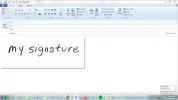
I wrote my signature with a Sharpie and scanned it to a JPG file to insert into my emails. But the righthand side and bottom of the JPG file appears when I insert it. See attached screenshot.

I attempted to crop it using both Paint and the Microsoft Office Picture Manager but no luck. I don't think it's a setting on my scanner or all four borders would appear. Any ideas?
 

Attachments

  • email with test signature.webp
    email with test signature.webp
    47.3 KB · Views: 451

patcooke

Microsoft MVP
Microsoft MVP
Joined
May 16, 2010
Messages
5,703
Use the snipping tool to snip the portion of the jpg inside of the border area and save it as a new jpg.
 

Solution

The Lighthouse

Active Member
Joined
Jan 21, 2016
Messages
3
Hmmm. That's exactly what I did and in fact the shading does not appear in the snipping tool screen. But then when I save the image and insert it into an email, there is it. Is this possibly a setting in Windows Live Mail? For what it's worth, the shading also appears when I open the file using Paint.


An image from 'How do I remove the border from a JPG file?'. Screenshot of an email draft window with an inserted image labeled 'my signature.'
 

Last edited by a moderator:
Back
Top