

Threat actors are increasingly turning Microsoft Teams into a social-engineering launch pad, using cross-tenant chat and voice calls to impersonate helpdesk staff, coax users into approving remote-assistance sessions, and then pivot from that “trusted” foothold into lateral movement and data theft. Microsoft’s latest playbook shows how a human-operated intrusion can move from first contact to Quick Assist, DLL sideloading, WinRM-based movement, and Rclone-driven exfiltration while blending into ordinary IT support and administration activity. The uncomfortable lesson is that this is not primarily a platform-exploit story; it is a trust story, and one that defenders now need to read across collaboration, identity, endpoint, and cloud telemetry.
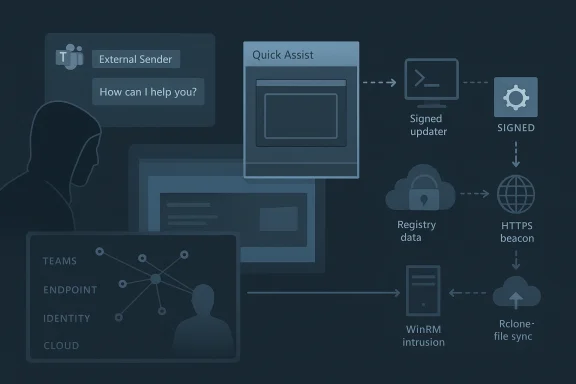
The campaign Microsoft described is best understood as a modern social-engineering chain rather than a single malware event. Attackers initiate contact from an external tenant in Teams, pose as internal IT or helpdesk personnel, and use that credibility to convince a victim to accept a remote support session. Once the user grants access through Quick Assist or a similar tool, the operator shifts from persuasion to hands-on keyboard control, using built-in Windows tooling, trusted binaries, and native remote management protocols to avoid obvious red flags. That matters because it collapses the traditional gap between “initial access” and “post-compromise activity” into one continuous workflow.
This technique sits at the intersection of collaboration abuse and human-operated intrusion. Microsoft’s guidance on Teams already emphasizes external-sender labeling, Accept/Block prompts, malicious URL warnings, and Safe Links protections for chats, but the attackers’ success depends on users overriding those friction points. In other words, the platform is warning the user, yet the attack works when the user is socially engineered into treating the warning as routine admin friction rather than a stop sign. Microsoft’s own Teams security guidance reinforces that external first-contact messages should be treated cautiously and that users should not circumvent Safe Links or other blocking pages.
What makes the intrusion especially dangerous is the downstream tradecraft. Microsoft says observed intrusions involved trusted vendor-signed applications loading attacker-supplied modules, registry-backed loader state, outbound HTTPS beaconing, WinRM lateral movement toward high-value assets such as domain controllers, and remote deployment of commercial management tooling before Rclone moved data to external cloud storage. That combination is powerful because it allows the intruder to appear legitimate at nearly every phase: a helpdesk call, a support session, a signed process, an admin protocol, a remote-management platform, and finally a cloud sync utility.
For defenders, the most important shift is analytical. The incident should not be investigated as “a Teams phish” or “a rogue support session” in isolation. It should be hunted as a cross-domain attack sequence that correlates collaboration events, endpoint process trees, identity telemetry, and network connections into a single narrative. Microsoft Defender XDR is designed for exactly that kind of correlation, and Microsoft now explicitly positions automatic attack disruption, user containment, and incident unification as central defenses against human-operated attacks.
That trust also extends to remote support. Tools such as Quick Assist are legitimate and useful, especially in distributed support models, but they create a bridge between conversational trust and device control. Once a victim willingly launches a support tool and approves prompts, the attacker no longer needs to defeat endpoint protections in the conventional sense; they can piggyback on the user’s own permissions and attention. This is why Microsoft’s latest guidance stresses user education alongside technical control, because the attack is enabled by consent rather than a bug.
The playbook fits a broader pattern Microsoft has documented for years: human-operated campaigns that rely on interactive compromise, lateral movement, and exfiltration rather than mass deployment of noisy malware. Microsoft’s attack-disruption work has repeatedly focused on stopping lateral movement and remote encryption by containing compromised users and devices before the operator can expand control. That broader history helps explain why this campaign is so significant; it leverages familiar post-compromise techniques, but it gets there through a collaboration workflow that many organizations still don’t treat as a security boundary.
The technical composition also matters. The attackers are not depending on one flashy custom implant. They are layering ordinary-seeming elements: Teams first contact, Quick Assist, cmd.exe or PowerShell recon, vendor-signed binaries loading DLLs from unusual paths, WinRM, commercial remote management, and Rclone. That means the campaign survives because each stage looks plausible in isolation, especially in environments where IT support, endpoint management, and remote administration are already common. The defender’s challenge is to interpret the sequence, not merely the components.
This is a subtle but important evolution. Traditional phishing tries to get the victim to click a link or open a file. Here, the attacker is trying to create a live support interaction, which is more interactive, more persuasive, and often more difficult for users to mentally classify as malicious. Microsoft’s Teams guidance notes that when users receive a new chat from an external person, they are presented with Accept or Block prompts, and that external contacts should be treated with skepticism.
Attackers benefit from a second psychological edge: urgency. Claims about security updates, account issues, or mailbox remediation create pressure to act fast, which can override the user’s inclination to verify. That urgency is the crack in the defense. The built-in warning is still present, but the attacker reframes it as a harmless administrative step rather than a warning about an external party.
The significance of that pivot is that consent becomes the malware delivery mechanism. The user is no longer merely a victim of deception; they are the execution path. That makes endpoint detections harder because the remote-access application itself is allowed, launched interactively, and often associated with support workflows that IT teams do not want to break. Microsoft’s research on human-operated attacks repeatedly underscores that attacker speed and interactivity are critical: once the support session is active, the operator can immediately begin reconnaissance and staging.
Defenders should care about timing as much as process names. A Quick Assist launch followed almost instantly by command-line recon is highly suspicious, especially if the session is associated with a cross-tenant Teams event. Microsoft’s hunting logic specifically suggests correlating Teams message events with remote access software launches and subsequent endpoint activity.
The reconnaissance burst is important because it turns an apparently ordinary support session into a diagnostic fingerprint. The operator is not opening documents or helping the user; they are running whoami, systeminfo, reg queries, nltest, ipconfig /all, and similar commands to map the environment. Microsoft’s hunting examples explicitly include these commands as indicators of suspicious interactive access after remote support begins.
This technique is effective because signed binaries often carry an assumption of legitimacy. If a trusted application is launched from an unusual path such as ProgramData and then loads an unexpected DLL from the same directory, many environments will permit that chain unless they have hardened execution policy. Microsoft notes that Defender for Endpoint may surface this as an unexpected DLL load, service-path execution outside the vendor installation directory, or execution from user-writable locations.
This is where Windows hardening becomes operationally meaningful. Attack Surface Reduction rules, WDAC policies, and path restrictions are not abstract best practices here; they directly constrain the attack chain. Microsoft’s guidance on ASR and WDAC is explicit that organizations should block risky execution paths, audit unusual behavior, and restrict trust to approved software sources.
This approach aligns with a broader design pattern seen in modern loader frameworks: keep the disk footprint minimal, keep the config opaque, and reconstruct runtime state only when the process needs it. Microsoft notes that the behavior resembles frameworks such as Havoc, where encrypted configuration may be externalized to registry storage and restored dynamically by a sideloaded intermediary. In practice, that makes the implant more flexible and harder to triage from a single artifact snapshot.
Microsoft’s hunting examples call out suspicious registry modification and anomalous keys as indicators worth tracking. That is valuable because it gives defenders a place to correlate process ancestry, file writes, and privilege context rather than treating registry activity as noise.
The use of cloud-backed endpoints is a further advantage for the attacker. It gives them flexibility to rotate infrastructure, change hostnames, and move the control plane without needing to replace the implant. Microsoft notes that this behavior indicates attacker-controlled infrastructure rather than legitimate vendor update workflows, particularly when the destination domains are unknown or dynamically hosted.
The significance of this stage is that the operator has moved from endpoint compromise to domain-level reach. If a compromised user-context session can launch WinRM interactions toward higher-value machines, the attacker can potentially execute commands, deploy tooling, and expand access without relying on additional malware families. Microsoft’s automatic attack-disruption guidance explicitly notes that containing a compromised user can help block lateral movement and remote encryption before the attacker reaches more critical assets.
The final visible step in the chain was data exfiltration using Rclone to transfer files to external cloud storage. Microsoft notes that exclusion patterns suggested a targeted effort to move business-relevant data while reducing transfer size and likely lowering detection risk. This is a common exfiltration strategy: choose a broadly trusted synchronization utility, shape the file set, and blend the upload into legitimate cloud activity.
Defender XDR is built to do exactly this kind of correlation, and Microsoft’s newer automatic attack-disruption capability is designed to interrupt human-operated attacks before they spread. If Defender sees credential-backed lateral movement after a suspicious support session, it can contain the compromised user and limit access paths while the SOC investigates. That is particularly valuable in campaigns where the attacker’s next move is likely to be a privileged pivot toward domain controllers.
The most important next step for defenders is to operationalize the sequence. Teams first-contact events, remote support launches, suspicious shell activity, unexpected DLL loads, WinRM pivots, and cloud sync exfiltration should be treated as parts of one story, not separate queues for different teams. The more quickly those teams can share a timeline, the less room the attacker has to move.
Source: Microsoft Cross‑tenant helpdesk impersonation to data exfiltration: A human-operated intrusion playbook | Microsoft Security Blog
 Overview
The campaign Microsoft described is best understood as a modern social-engineering chain rather than a single malware event. Attackers initiate contact from an external tenant in Teams, pose as internal IT or helpdesk personnel, and use that credibility to convince a victim to accept a remote support session. Once the user grants access through Quick Assist or a similar tool, the operator shifts from persuasion to hands-on keyboard control, using built-in Windows tooling, trusted binaries, and native remote management protocols to avoid obvious red flags. That matters because it collapses the traditional gap between “initial access” and “post-compromise activity” into one continuous workflow.This technique sits at the intersection of collaboration abuse and human-operated intrusion. Microsoft’s guidance on Teams already emphasizes external-sender labeling, Accept/Block prompts, malicious URL warnings, and Safe Links protections for chats, but the attackers’ success depends on users overriding those friction points. In other words, the platform is warning the user, yet the attack works when the user is socially engineered into treating the warning as routine admin friction rather than a stop sign. Microsoft’s own Teams security guidance reinforces that external first-contact messages should be treated cautiously and that users should not circumvent Safe Links or other blocking pages.
What makes the intrusion especially dangerous is the downstream tradecraft. Microsoft says observed intrusions involved trusted vendor-signed applications loading attacker-supplied modules, registry-backed loader state, outbound HTTPS beaconing, WinRM lateral movement toward high-value assets such as domain controllers, and remote deployment of commercial management tooling before Rclone moved data to external cloud storage. That combination is powerful because it allows the intruder to appear legitimate at nearly every phase: a helpdesk call, a support session, a signed process, an admin protocol, a remote-management platform, and finally a cloud sync utility.
For defenders, the most important shift is analytical. The incident should not be investigated as “a Teams phish” or “a rogue support session” in isolation. It should be hunted as a cross-domain attack sequence that correlates collaboration events, endpoint process trees, identity telemetry, and network connections into a single narrative. Microsoft Defender XDR is designed for exactly that kind of correlation, and Microsoft now explicitly positions automatic attack disruption, user containment, and incident unification as central defenses against human-operated attacks.
Background
Microsoft Teams has become a high-trust channel in many enterprises precisely because it is embedded in everyday work. Users expect helpdesk tickets, internal notices, support chats, and quick calls to arrive there, which means a believable external impersonation can feel less suspicious than a classic phishing email. Microsoft’s own guidance on external collaboration recognizes this risk and recommends that organizations manage who can chat and meet across tenants, label external interactions clearly, and give users enough context to identify suspicious first contact.That trust also extends to remote support. Tools such as Quick Assist are legitimate and useful, especially in distributed support models, but they create a bridge between conversational trust and device control. Once a victim willingly launches a support tool and approves prompts, the attacker no longer needs to defeat endpoint protections in the conventional sense; they can piggyback on the user’s own permissions and attention. This is why Microsoft’s latest guidance stresses user education alongside technical control, because the attack is enabled by consent rather than a bug.
The playbook fits a broader pattern Microsoft has documented for years: human-operated campaigns that rely on interactive compromise, lateral movement, and exfiltration rather than mass deployment of noisy malware. Microsoft’s attack-disruption work has repeatedly focused on stopping lateral movement and remote encryption by containing compromised users and devices before the operator can expand control. That broader history helps explain why this campaign is so significant; it leverages familiar post-compromise techniques, but it gets there through a collaboration workflow that many organizations still don’t treat as a security boundary.
The technical composition also matters. The attackers are not depending on one flashy custom implant. They are layering ordinary-seeming elements: Teams first contact, Quick Assist, cmd.exe or PowerShell recon, vendor-signed binaries loading DLLs from unusual paths, WinRM, commercial remote management, and Rclone. That means the campaign survives because each stage looks plausible in isolation, especially in environments where IT support, endpoint management, and remote administration are already common. The defender’s challenge is to interpret the sequence, not merely the components.
Why this campaign stands out
- It abuses enterprise trust relationships rather than exploiting a software vulnerability.
- It uses legitimate tools to hide in plain sight.
- It turns helpdesk procedures into an attack surface.
- It can cross from user support into domain infrastructure in minutes.
- It creates a multi-stage incident that spans identity, endpoint, and cloud telemetry.
Stage 1: Cross-tenant social engineering in Teams
The initial maneuver begins with external Teams contact. Microsoft describes the attacker as operating from a separate tenant while impersonating IT or helpdesk personnel, often using lure themes such as security updates, account verification, or spam-filter remediation. The goal is not to trick the user into opening a malicious attachment, but to persuade them into moving the conversation into a channel of control that the attacker can directly exploit.This is a subtle but important evolution. Traditional phishing tries to get the victim to click a link or open a file. Here, the attacker is trying to create a live support interaction, which is more interactive, more persuasive, and often more difficult for users to mentally classify as malicious. Microsoft’s Teams guidance notes that when users receive a new chat from an external person, they are presented with Accept or Block prompts, and that external contacts should be treated with skepticism.
Why Teams is attractive to attackers
Teams short-circuits the reflexive suspicion that many users reserve for email. The message arrives in a collaboration tool they use every day, often with a display name that can be made to look like an internal function or role. If the adversary also layers voice phishing, the result is even more convincing because real-time conversation feels operational rather than fraudulent. Microsoft notes that this sort of abuse may come with first-contact chat events followed quickly by suspicious chats, vishing, or other alerts.Attackers benefit from a second psychological edge: urgency. Claims about security updates, account issues, or mailbox remediation create pressure to act fast, which can override the user’s inclination to verify. That urgency is the crack in the defense. The built-in warning is still present, but the attacker reframes it as a harmless administrative step rather than a warning about an external party.
Practical implications for defenders
A strong response begins before the first message lands. Organizations should treat cross-tenant collaboration policy as a security control, not just an IT convenience setting. Blocking unnecessary federation, tightening external access, and limiting who can initiate external chats or calls can shrink the attack surface dramatically. Microsoft’s current Teams guidance on external collaboration and tenant blocking supports exactly that approach.- Limit external chat to known business partners.
- Review tenant allow/block policies regularly.
- Train users to verify helpdesk identity out-of-band.
- Treat first-contact support requests as suspicious.
- Preserve chat evidence for correlation with endpoint and identity events.
Stage 2: User-approved remote access and the trust pivot
Once the victim is engaged, the adversary shifts to remote support. Microsoft says the attacker often persuades the user to open Quick Assist, enter a session key, and follow prompts that grant access. From the user’s perspective, this is a legitimate help process; from the attacker’s perspective, it is an operator-controlled bridge into the endpoint. The transition can happen in under a minute, which is one reason these attacks are so hard to interrupt once the conversation has succeeded.The significance of that pivot is that consent becomes the malware delivery mechanism. The user is no longer merely a victim of deception; they are the execution path. That makes endpoint detections harder because the remote-access application itself is allowed, launched interactively, and often associated with support workflows that IT teams do not want to break. Microsoft’s research on human-operated attacks repeatedly underscores that attacker speed and interactivity are critical: once the support session is active, the operator can immediately begin reconnaissance and staging.
What this looks like on the endpoint
Microsoft’s description of the process tree is telling. QuickAssist.exe appears first, followed by standard Windows elevation prompts such as Consent.exe, then cmd.exe or PowerShell activity as the attacker explores privileges and host context. That sequence is powerful because it is easy to rationalize as admin troubleshooting if you only look at one process at a time. The danger is the immediate chaining of remote support into shell activity.Defenders should care about timing as much as process names. A Quick Assist launch followed almost instantly by command-line recon is highly suspicious, especially if the session is associated with a cross-tenant Teams event. Microsoft’s hunting logic specifically suggests correlating Teams message events with remote access software launches and subsequent endpoint activity.
Why consent-based access defeats complacency
This stage is where many organizations overestimate the value of traditional malware controls. If the endpoint is fully patched and EDR is active, that still does not prevent a user from approving a remote session. The attacker may not need an exploit at all. They only need enough legitimate access to start using the machine as if they were the user, which is often enough to render the session operationally equivalent to a successful compromise.- Quick Assist can be abused as a trusted ingress path.
- Consent dialogs are not a guarantee of safety.
- User training must explain why helpdesk identity matters.
- Support sessions should be logged and correlated centrally.
- High-friction approvals should trigger analyst review.
Stage 3: Reconnaissance and environment validation
Microsoft says the first 30 to 120 seconds after remote access is established are often spent on interactive reconnaissance. The attacker checks host identity, privileges, domain membership, OS version, and network reachability. That makes sense: before planting additional payloads or moving laterally, an operator wants to know whether they have landed on a useful machine or a dead end. On some low-value systems, the attacker may simply abandon the foothold and move on.The reconnaissance burst is important because it turns an apparently ordinary support session into a diagnostic fingerprint. The operator is not opening documents or helping the user; they are running whoami, systeminfo, reg queries, nltest, ipconfig /all, and similar commands to map the environment. Microsoft’s hunting examples explicitly include these commands as indicators of suspicious interactive access after remote support begins.
Recon as an operational signal
A single shell command is not always actionable. Multiple recon commands in quick succession are. When they appear immediately after Quick Assist or another remote-management process, they often signal that the session has moved from social engineering into active intrusion. Microsoft’s sample hunting logic for recon bursts is built around that exact principle: repeated admin-style commands within a short interval, especially when they cluster after a support tool launch.Common validation steps observed in these campaigns
- Confirm current user and group membership.
- Check host name and OS build.
- Test domain join status and nearby systems.
- Query network configuration and routing.
- Inspect registry values for environment details.
The importance of short dwell time
The short dwell time is not just operational efficiency; it is a detection problem. If analysts are waiting for malware hashes or known malicious binaries, they may miss the earliest and most decisive phase of the attack. The better approach is to alert on the sequence of support tool, recon commands, and follow-on payload staging. That is where the pattern emerges.Stage 4: Staging payloads and abusing trusted binaries
After reconnaissance, Microsoft says the actors introduce a staging bundle onto disk and begin executing it via DLL sideloading through trusted signed applications. Examples in the report include AcroServicesUpdater2_x64.exe loading a staged msi.dll, ADNotificationManager.exe loading vcruntime140_1.dll, DlpUserAgent.exe loading mpclient.dll, and werfault.exe loading Faultrep.dll. The key point is not any single filename; it is the abuse of trusted execution paths and vendor-signed wrappers to make attacker code look like ordinary application behavior.This technique is effective because signed binaries often carry an assumption of legitimacy. If a trusted application is launched from an unusual path such as ProgramData and then loads an unexpected DLL from the same directory, many environments will permit that chain unless they have hardened execution policy. Microsoft notes that Defender for Endpoint may surface this as an unexpected DLL load, service-path execution outside the vendor installation directory, or execution from user-writable locations.
Why sideloading still works so well
DLL sideloading is not glamorous, but it is durable. Enterprises often trust signed applications more than they trust the file paths those applications use. Attackers exploit that trust gap by putting malicious modules where the application will find them first. If the binary is allowed to run, and the DLL search order is not tightly controlled, the result is code execution under a seemingly legitimate process name.This is where Windows hardening becomes operationally meaningful. Attack Surface Reduction rules, WDAC policies, and path restrictions are not abstract best practices here; they directly constrain the attack chain. Microsoft’s guidance on ASR and WDAC is explicit that organizations should block risky execution paths, audit unusual behavior, and restrict trust to approved software sources.
Defender-relevant indicators
- Signed executable loading an unexpected DLL.
- Service-path execution from a non-standard directory.
- User-writable staging in ProgramData or AppData.
- Archive-based payload placement before execution.
- Process names that resemble vendor updaters or support tools.
Stage 5: Registry-backed loader state and hidden configuration
Microsoft reports that the operators wrote a large encoded value into a user-context registry location, where it served as a staging container for encrypted configuration data to be recovered later in memory. That is a classic loader trick, but one that is especially useful in a hands-on intrusion because it avoids writing obvious plaintext configuration files to disk. The loader can recover execution context when needed, which makes the malicious component more resilient to cleanup that only targets files.This approach aligns with a broader design pattern seen in modern loader frameworks: keep the disk footprint minimal, keep the config opaque, and reconstruct runtime state only when the process needs it. Microsoft notes that the behavior resembles frameworks such as Havoc, where encrypted configuration may be externalized to registry storage and restored dynamically by a sideloaded intermediary. In practice, that makes the implant more flexible and harder to triage from a single artifact snapshot.
Why registry use matters to defenders
Registry-backed state is attractive to attackers because it blends into routine Windows behavior. Enterprises expect applications to store settings in the registry, and many system components do exactly that. The issue is not registry persistence in the abstract; it is suspicious registry writes tied to uncommon values, unexpected processes, and unusual execution timing after a remote support event.Microsoft’s hunting examples call out suspicious registry modification and anomalous keys as indicators worth tracking. That is valuable because it gives defenders a place to correlate process ancestry, file writes, and privilege context rather than treating registry activity as noise.
Detection and control ideas
- Audit registry writes by non-installer processes.
- Alert on encoded or oversized values in odd locations.
- Correlate registry writes with new DLL loads.
- Block execution from user-writable paths.
- Restrict support workflows that permit unaudited scripting.
Stage 6: Command and control over HTTPS
Once the sideloaded component is live, Microsoft observed the updater-themed process initiating outbound HTTPS connections to externally hosted infrastructure over TCP 443. That is a familiar tactic, but it remains highly effective because encrypted web traffic is normal in enterprise networks. A malicious beacon hidden inside HTTPS can appear close enough to ordinary application traffic to avoid casual inspection, especially when the host process itself looks like an updater or support utility.The use of cloud-backed endpoints is a further advantage for the attacker. It gives them flexibility to rotate infrastructure, change hostnames, and move the control plane without needing to replace the implant. Microsoft notes that this behavior indicates attacker-controlled infrastructure rather than legitimate vendor update workflows, particularly when the destination domains are unknown or dynamically hosted.
Why HTTPS is a concealment layer, not a guarantee of safety
Encrypted traffic is not inherently suspicious. The problem arises when encrypted connections originate from processes that should not be beaconing to the public internet, especially after a chain of remote support and sideloading activity. In those cases, defenders should care less about the protocol and more about the process, destination reputation, timing, and surrounding telemetry. Microsoft’s network protection guidance specifically calls out the use of network-layer blocking against malicious or suspicious destinations.Key signals to correlate
- Non-browser process making outbound web connections.
- Connections to newly observed or low-reputation domains.
- Vendor-themed executable contacting unknown infrastructure.
- HTTPS traffic immediately following payload staging.
- Repeated beacons with consistent cadence.
Stage 7: Internal discovery and WinRM lateral movement
After external communications were established, Microsoft observed internal remote management connections over WinRM toward domain-joined systems, including identity infrastructure such as domain controllers. This is the moment the incident becomes enterprise-wide rather than device-local. WinRM is a legitimate administrative protocol, which makes it valuable to attackers who want to blend into normal IT operations while moving from one host to another.The significance of this stage is that the operator has moved from endpoint compromise to domain-level reach. If a compromised user-context session can launch WinRM interactions toward higher-value machines, the attacker can potentially execute commands, deploy tooling, and expand access without relying on additional malware families. Microsoft’s automatic attack-disruption guidance explicitly notes that containing a compromised user can help block lateral movement and remote encryption before the attacker reaches more critical assets.
Why WinRM is so dangerous in the wrong hands
WinRM is built for administration, automation, and remote management. That is exactly why it is effective for attackers: it looks like ordinary administrative work if used from the right account or the right context. When defenders see WinRM from a non-administrative application or from a session that originated in a user-directed support event, they should treat it as a possible sign of credential-backed lateral movement.What to monitor closely
- WinRM traffic to privileged infrastructure.
- Remote management from unusual source hosts.
- Activity from accounts not expected to manage servers.
- Rapid movement from user endpoints toward domain controllers.
- Chains that pair Quick Assist with internal admin protocols.
Stage 8: Remote administration tooling and data exfiltration
Microsoft says the actors also remotely installed additional commercial management tooling using Windows Installer, creating a second control channel independent of the original payload. That is operationally smart from the attacker’s perspective because it reduces dependence on the initial compromise path. Even if the original implant is removed, the remote management platform can remain as a more durable foothold.The final visible step in the chain was data exfiltration using Rclone to transfer files to external cloud storage. Microsoft notes that exclusion patterns suggested a targeted effort to move business-relevant data while reducing transfer size and likely lowering detection risk. This is a common exfiltration strategy: choose a broadly trusted synchronization utility, shape the file set, and blend the upload into legitimate cloud activity.
Why Rclone matters
Rclone is not malicious by default, which is exactly why it is attractive to threat actors. It can be used for syncing, copying, and moving data to cloud services, and it often looks like administrative automation rather than theft. In a hands-on intrusion, that ambiguity is useful. The attacker can exfiltrate documents without dropping a custom exfiltration binary that would stand out more clearly in telemetry.The exfiltration pattern to watch
- File-sync utilities appearing on non-admin endpoints.
- Command lines that reference cloud storage configuration.
- Exclusion rules that omit certain file types.
- Transfers that occur after lateral movement or privilege discovery.
- Cloud uploads from hosts not usually used for bulk data movement.
Detection and correlation strategy
The strongest defense against this playbook is not any one alert, but the ability to correlate across telemetry domains. Microsoft’s hunting examples show how to join Teams message events with remote-access launches, then validate follow-on recon, sideloading, network beacons, WinRM activity, and exfiltration. That is a sensible approach because the attack only becomes obvious when the pieces are considered together.Defender XDR is built to do exactly this kind of correlation, and Microsoft’s newer automatic attack-disruption capability is designed to interrupt human-operated attacks before they spread. If Defender sees credential-backed lateral movement after a suspicious support session, it can contain the compromised user and limit access paths while the SOC investigates. That is particularly valuable in campaigns where the attacker’s next move is likely to be a privileged pivot toward domain controllers.
High-value correlation points
- External Teams first contact followed by remote support.
- Remote support followed by cmd.exe or PowerShell recon.
- Recon followed by DLL sideloading or registry writes.
- Sideloaded execution followed by outbound HTTPS beaconing.
- Beaconing followed by WinRM lateral movement.
- Lateral movement followed by Rclone or cloud-sync use.
Sequential triage approach
- Confirm whether the Teams contact was external and first-touch.
- Check whether Quick Assist or another remote tool launched soon after.
- Review command-line history and process ancestry for recon bursts.
- Look for unsigned or unexpected DLL loads from writable paths.
- Trace outbound HTTPS and internal WinRM activity from the same host.
- Search for Rclone or other sync tooling used after the lateral movement stage.
Enterprise response priorities
The best response is layered and specific. Microsoft’s mitigation guidance emphasizes external collaboration controls in Teams, Safe Links and ZAP in Defender for Office 365, ASR and WDAC on endpoints, Conditional Access and device compliance in Entra ID, and user education that explains how helpdesk should genuinely behave. That mix is sensible because the attack spans identity, collaboration, and endpoint trust.Controls that deserve immediate attention
- Restrict external Teams collaboration to known business needs.
- Enable and reinforce external-sender indicators and first-contact prompts.
- Train employees not to accept unsolicited support calls or chats.
- Limit Quick Assist and similar tools to managed support workflows.
- Harden endpoints with ASR and WDAC.
- Restrict WinRM to authorized management networks and devices.
- Monitor for Rclone and other bulk-transfer tooling.
Why user education still matters
Security education is often dismissed because it feels soft compared with controls like MFA or EDR. In this scenario, though, the user is not merely the target; the user is the gatekeeper to remote execution. A well-trained employee who recognizes an external support contact, understands Teams warnings, and knows how legitimate helpdesk contact should look can stop the attack at the point where the adversary is still asking for cooperation.Strengths and Opportunities
This campaign is a useful wake-up call because it reveals how much business risk can be introduced through normal collaboration tools and legitimate support processes. The same attributes that make Teams and Quick Assist valuable for productivity also make them attractive to operators who want to blend into expected activity. If defenders respond well, they can improve both security and operational hygiene at the same time.- Cross-domain visibility becomes more valuable when collaboration, identity, and endpoint events are unified.
- Automatic attack disruption can buy time before lateral movement reaches critical assets.
- Teams federation controls can reduce the number of outside actors who can initiate first contact.
- ASR and WDAC can narrow the execution paths abused by sideloaded binaries.
- Network protection can help block suspicious C2 and exfiltration destinations.
- Helpdesk verification phrases give employees a concrete way to challenge impersonation.
- Behavior-based hunting can spot the chain even when filenames change.
Risks and Concerns
The most obvious risk is that many organizations still treat collaboration platforms as a soft layer outside core security monitoring. That is a mistake. Teams is not just a messaging app; it is a place where trust can be engineered in real time, and where a user’s approval can unlock device control faster than many defensive controls can react. If that first-contact warning is ignored, the rest of the chain can unfold with alarming speed.- User consent can bypass traditional phishing defenses.
- Legitimate tools make malicious activity harder to classify.
- WinRM misuse can reach domain controllers without obvious exploit signatures.
- Cloud sync utilities can move data while resembling admin or backup traffic.
- Signed binaries may be trusted too readily by security teams.
- Telemetry silos can hide the sequence if Teams, identity, and endpoint data are not correlated.
- Support-tool exceptions can become permanent holes in policy.
Looking Ahead
This playbook will likely keep evolving because it is cost-effective for adversaries and frustrating for defenders. It does not depend on a rare vulnerability or expensive custom malware; it depends on credibility, timing, and the abuse of ordinary enterprise workflows. That makes it portable across victims and adaptable across sectors, which is exactly why Microsoft framed it as a human-operated intrusion model rather than a one-off phishing case.The most important next step for defenders is to operationalize the sequence. Teams first-contact events, remote support launches, suspicious shell activity, unexpected DLL loads, WinRM pivots, and cloud sync exfiltration should be treated as parts of one story, not separate queues for different teams. The more quickly those teams can share a timeline, the less room the attacker has to move.
What to watch next
- Changes in external collaboration abuse across Teams and similar chat platforms.
- Variations in remote-support tooling used for initial access.
- New sideloading binaries and path choices in future intrusions.
- More aggressive use of WinRM and other native admin protocols.
- Broader use of cloud sync tools for selective exfiltration.
- Faster containment responses driven by Defender XDR automation.
Source: Microsoft Cross‑tenant helpdesk impersonation to data exfiltration: A human-operated intrusion playbook | Microsoft Security Blog
