Windows 7 how to have 2 seperate windows open on your sreen

pablo70

New Member
Joined
Nov 16, 2009
Messages
12
how to have 2 separate windows open in windows 7 using firefox ? , iam sure i have read this some where as it would be a good addition to use , can it be done and yes how do you do it
 

Solution
Perhaps you mean to use a 3rd party virtual monitor software or something ?


i must have worded that wrong ,thats not what i want to know , 2 separate pages open full on split screen on my monitor thats what was trying to ask about

I don't see how you can possibly have 2 separate pages open full on split screen on 1 monitor.

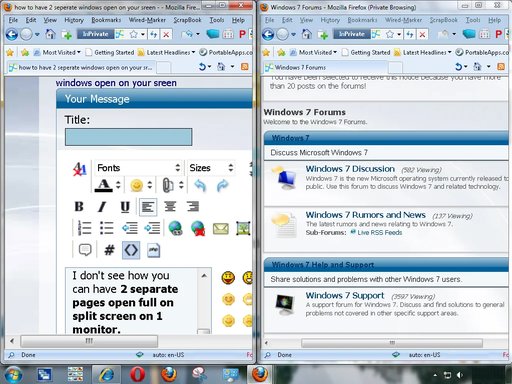
With 2 monitors connected to your video card, you can have 2 firefox maximized windows each placed separately in its own monitor.

With only 1 monitor, you may want to follow these steps :

1. Open Firefox window and maximize it and press Win-Left
2. File => New Window
3. Maximize the new FF window and Press Win-Right

Like this:

DA.webp

RAK

Extraordinary Member
Joined
Jul 6, 2009
Messages
2,502
Open Firefox (or any other program) now right clcik the icon on the taskbar and you can reselect Firefox (left clcik) from the first menu item. You can do this until you are bored with the number of windows.
If you want them all separated, right clcik the taskbar in any blank spot, and show windows stacked or side by side
 

pablo70

New Member
Joined
Nov 16, 2009
Messages
12
i must have worded that wrong ,thats not what i want to know , 2 separate pages open full on split screen on my monitor thats what was trying to ask about
 

Mike

Windows Forum Admin
Staff member
Premium Supporter
Joined
Jul 22, 2005
Messages
9,250
This thread was moved to the correct forum (Not Tweaks and Guides).
 

RAK

Extraordinary Member
Joined
Jul 6, 2009
Messages
2,502
Sorry. I still do not understand what it is you are trying to do. Maybe someone else? perhaps an attachment might help?
 

cybercore

New Member
Joined
Jul 7, 2009
Messages
15,641
Perhaps you mean to use a 3rd party virtual monitor software or something ?


i must have worded that wrong ,thats not what i want to know , 2 separate pages open full on split screen on my monitor thats what was trying to ask about

I don't see how you can possibly have 2 separate pages open full on split screen on 1 monitor.

With 2 monitors connected to your video card, you can have 2 firefox maximized windows each placed separately in its own monitor.

With only 1 monitor, you may want to follow these steps :

1. Open Firefox window and maximize it and press Win-Left
2. File => New Window
3. Maximize the new FF window and Press Win-Right

Like this:


DA.webp
 

Solution
Back
Top
