

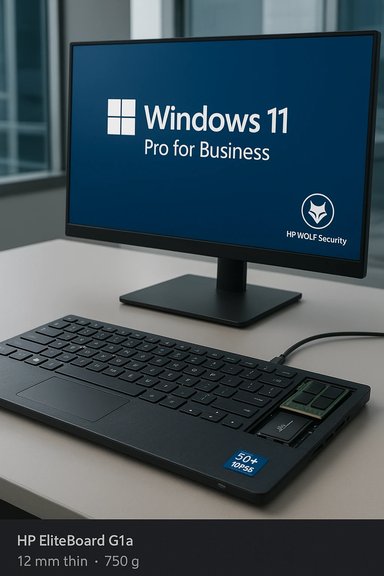
HP’s EliteBoard G1a compresses a full Windows PC into a slim membrane keyboard, bringing AMD’s Ryzen AI 300-series silicon, a dedicated Neural Processing Unit (NPU) rated at over 50 TOPS, and Copilot+ PC capabilities to a 12 mm, 750 g chassis that’s designed to be carried between desks and plugged into any monitor — a radical reimagining of the desktop for hybrid work that blends portability, on-device AI, and enterprise manageability.
The concept of a keyboard-integrated computer is a familiar one to retro enthusiasts — think Commodore and BBC Micro — but the category re-emerged in recent years as a practical, low-cost desktop alternative with the Raspberry Pi 400 and, later, the Pi 500 and 500+ variants. Those devices target hobbyists and Linux users; HP’s EliteBoard G1a is the first major keyboard-PC aimed squarely at enterprise customers, shipping as a Copilot+ PC capable of running Windows 11 Pro for Business and certified to meet Microsoft’s on-device AI requirements. OEMs and chipmakers have been racing to put AI acceleration into mainstream PCs. Microsoft’s Copilot+ PC specification requires an NPU capable of roughly 40+ TOPS to enable many local AI experiences, and AMD’s Ryzen AI 300-series processors — the silicon HP selected for the EliteBoard — deliver the NPU performance necessary to qualify. HP’s marketing positions the EliteBoard as delivering “over 50 TOPS” of on-device inferencing, a claim that places it above Microsoft’s baseline for Copilot+ certification.
HP’s emphasis is on serviceability: the keyboard module is top-mount and reportedly replaceable in under ten minutes without specialized tools, which should help IT departments refresh or repair units without full chassis replacement. For enterprise fleets, modular keyboard replacement could reduce downtime and total cost of ownership.
However, its success will hinge on execution: real-world thermal performance, battery life, keyboard ergonomics, and total cost of ownership. If HP’s serviceability and security promises hold true and drivers mature to support smooth NPU-enabled experiences, the EliteBoard could find a niche in hybrid work fleets. For consumers and budget-conscious buyers, Raspberry Pi keyboard systems remain the low-cost hobbyist alternative; for heavy compute users, a traditional laptop or desktop with larger thermal headroom will still be the right tool.
The EliteBoard G1a is a clear signal that OEMs see value in rethinking the desktop for the AI era — compressing capable compute into novel form factors while prioritizing on-device AI. Whether the keyboard-PC becomes a mainstream enterprise standard or an interesting footnote in the evolution of PC design will depend on the next few months of hands-on testing, pricing clarity, and feedback from IT buyers and end users alike.
Source: Ars Technica HP’s EliteBoard G1a is a Ryzen-powered Windows 11 PC in a membrane keyboard
 Background
The concept of a keyboard-integrated computer is a familiar one to retro enthusiasts — think Commodore and BBC Micro — but the category re-emerged in recent years as a practical, low-cost desktop alternative with the Raspberry Pi 400 and, later, the Pi 500 and 500+ variants. Those devices target hobbyists and Linux users; HP’s EliteBoard G1a is the first major keyboard-PC aimed squarely at enterprise customers, shipping as a Copilot+ PC capable of running Windows 11 Pro for Business and certified to meet Microsoft’s on-device AI requirements. OEMs and chipmakers have been racing to put AI acceleration into mainstream PCs. Microsoft’s Copilot+ PC specification requires an NPU capable of roughly 40+ TOPS to enable many local AI experiences, and AMD’s Ryzen AI 300-series processors — the silicon HP selected for the EliteBoard — deliver the NPU performance necessary to qualify. HP’s marketing positions the EliteBoard as delivering “over 50 TOPS” of on-device inferencing, a claim that places it above Microsoft’s baseline for Copilot+ certification. Overview: what HP announced
HP unveiled the EliteBoard G1a at CES 2026 as a “Next-Gen AI PC” that fits inside a functioning membrane keyboard. Key public details from HP’s announcement and product pages include:- A 12 mm thin keyboard chassis weighing about 750 g.
- Powered by an AMD Ryzen AI 300-series processor with an integrated NPU rated at up to ~50+ TOPS.
- Marketed as a Copilot+ PC with HP recommending Windows 11 Pro for Business as the OS.
- Optional 32 W internal battery (configured at purchase) and modular design intended for serviceability (RAM, SSD, keyboard swaps).
- Enterprise features including HP Wolf Security for Business, tetherable locks, and full manageability for IT.
What’s inside the EliteBoard G1a
CPU, NPU, GPU and memory
HP’s product literature confirms the EliteBoard uses AMD Ryzen AI 300-series processors — the same family AMD launched for laptops and AI-capable devices — which pair Zen-class CPU cores, RDNA graphics, and an on-die NPU (XDNA 2 architecture) able to deliver 50 TOPS or more on many SKU configurations. AMD’s own materials show top Ryzen AI 300 Pro SKUs with NPUs rated up to 50–55 TOPS, so HP’s “over 50 TOPS” messaging is consistent with AMD’s published figures for those chips. Memory and storage choices appear enterprise-focused: HP lists DDR5 RAM options up to high capacities and up to 2 TB of internal storage on product pages, plus standard I/O like Thunderbolt and multiple display outputs for dual 4K monitors. The integrated Radeon 800M-series graphics block handles display and media tasks while offloading AI-specific workloads to the NPU.Battery and mobility
HP describes an optional 32 W internal battery as a configuration choice, intended to let the EliteBoard move between workspaces without a full reboot. Third-party reporting suggests battery capacity could be modest compared with laptops — early coverage mentions runtimes in the low single-digit hours on battery depending on use — which is expected given the keyboard’s compact form factor. HP’s materials emphasize the device as a desktop that moves, not a laptop replacement.Design, ergonomics and input
Membrane keyboard vs. mechanical
HP opted for a membrane keyboard design rather than the higher-end mechanical key switches used by some hobbyist keyboard-PCs. This choice keeps the EliteBoard thin and light and reduces manufacturing complexity, but it will leave typists divided: membrane keys are quieter and cheaper to produce, while many professional typists and programmers prefer the tactile feedback and durability of mechanical switches.HP’s emphasis is on serviceability: the keyboard module is top-mount and reportedly replaceable in under ten minutes without specialized tools, which should help IT departments refresh or repair units without full chassis replacement. For enterprise fleets, modular keyboard replacement could reduce downtime and total cost of ownership.
I/O and expandability
Despite the small footprint, HP includes a surprising amount of I/O:- Thunderbolt 4 / USB-C display connectivity supporting single or dual external displays;
- Multiple USB ports and wired Ethernet options;
- Optional fingerprint sensor and integrated microphones/speakers for conferencing.
Performance and local AI: the NPU story
HP’s headline feature is its NPU-enabled AI functionality. Microsoft’s Copilot+ program requires an NPU roughly equivalent to 40 TOPS to enable local AI experiences like Recall, Click-to-Do, real-time assistance, and on-device model execution. AMD’s Ryzen AI 300-series — and the specific SKUs HP lists as compatible — meet or exceed that target, giving the EliteBoard potential access to the full Copilot+ feature set.What “50 TOPS” means in practice
- TOPS (trillions of operations per second) is a raw throughput number for a neural engine; it is a useful marketing shorthand but not a complete performance metric. Actual performance depends on model type, memory bandwidth, driver maturity, power/thermal headroom, and software optimization.
- AMD’s XDNA 2 NPU and Microsoft’s Copilot+ software layer aim to translate this throughput into real-world features such as on-device text summarization, image generation, context-aware suggestions, and faster local inference for productivity tasks.
- For many enterprise scenarios — e.g., privacy-sensitive document search, offline summarization, and quick client-side model execution — on-device NPU acceleration can meaningfully improve latency and data control compared with cloud-only approaches.
Thermal constraints and sustained performance
A keyboard-sized 12 mm chassis and a thin, portable profile create thermal and power limits that desktop or laptop chassis don’t face. Sustained NPU-heavy workloads could trigger throttling, reducing performance over time unless HP’s cooling and AMD’s Auto State Management are highly efficient. HP’s Smart Sense and ASM (AMD Auto State Management) are meant to adapt performance and cooling dynamically, but real-world workloads will determine whether the EliteBoard sustains peak NPU performance or primarily delivers brief, bursty acceleration for interactive tasks.Windows, Copilot+ features and enterprise readiness
HP positions the EliteBoard as a Copilot+ PC and recommends Windows 11 Pro for Business, which signals enterprise-targeted deployment: centralized management, security baselines, and compatibility with corporate tools. Copilot+ features like local Recall, improved Search, and Click-to-Do will be available to compatible hardware, and Microsoft has been expanding these features to AMD and Intel NPUs that meet the 40+ TOPS spec.Security and management
HP emphasizes HP Wolf Security for Business, Pluton/TPM-level protections, tethered locks, and fleet manageability. For IT teams the key selling points are:- Centralized provisioning and management with existing Windows tools.
- Hardware-enforced security features designed to limit firmware and supply-chain risks.
- Serviceability claims (e.g., replaceable battery, RAM, SSD, keyboard module) that lower repair complexity and can improve lifecycle economics.
Practical use cases: who should consider an EliteBoard?
The EliteBoard’s form factor suggests a set of targeted scenarios where the compromise between power and portability makes sense:- Hot-desking and hybrid office workers who switch between fixed monitors and need a consistent, personal compute environment they can carry.
- Call centers and kiosks where a keyboard-sized PC is easy to secure, tether, and manage centrally.
- Designers and creators who want an unobtrusive desktop with the option to connect to large external displays while offloading AI-assisted tasks locally.
- Security-conscious teams that prefer local AI processing to reduce cloud data movement for sensitive documents.
Comparison with Raspberry Pi keyboard PCs and hobbyist alternatives
Raspberry Pi’s keyboard-computer line (Raspberry Pi 400, 500, 500+) proved the keyboard-PC concept for enthusiasts: low-cost, Linux-first, and ideal for education and makers. The Pi devices are ARM-based, use microSD/NVMe for storage (Pi 500+ adds NVMe SSD), and prioritize affordability over raw performance. HP’s EliteBoard is the professional answer: an x86 Windows Copilot+ PC with enterprise security and manageability, higher price expectations, and a different audience entirely. Key distinctions:- HP EliteBoard G1a: Windows-first, AMD Ryzen AI silicon, enterprise-grade security, serviceability, Copilot+ certification, optional battery, and higher expected price.
- Raspberry Pi keyboard PCs: Linux-first, ARM SoC, hobbyist-friendly, much lower cost, aimed at education and DIY projects.
Strengths: what HP gets right
- Novelty with purpose: HP repackages a full PC around a keyboard to create a truly portable desktop for hybrid work, which maps directly to current corporate hybrid-desktop trends.
- Copilot+ readiness: Selecting AMD Ryzen AI 300-series silicon ensures the EliteBoard can unlock Microsoft’s local AI features, delivering low-latency, on-device inference for productivity workflows.
- Enterprise tooling: HP Wolf Security, optional tethered cable, and manageability features are critical for corporate adoption and reduce a major barrier to deploying unconventional form factors.
- Serviceability: Modular, replaceable components promise lower maintenance costs and shorter repair turnarounds for IT. If the serviceability claims hold up in commercial rollouts, this is a significant plus.
Risks and limitations: realistic caveats for buyers
- Thermals and sustained workload: A 12 mm keyboard chassis constrains cooling. Peak NPU bursts may be possible, but sustained multi-minute AI loads could throttled, reducing the benefit for heavy inference workloads. HP’s Smart Sense and AMD’s ASM aim to manage this, but only hands-on tests will confirm sustained throughput.
- Battery trade-offs: The optional 32 W internal battery will help mobility between desks, but early reports suggest single-digit hours under mixed use; this device principally remains a plug-in desktop. Organizations expecting laptop-like autonomy will be disappointed.
- Keyboard feel and user acceptance: Membrane keys will be a sticking point for users who prefer mechanical feel and durability. HP’s replaceable module reduces risk, but the first impressions of typing comfort matter for daily users.
- Price and ROI unknown: HP has not announced MSRP. Given the inclusion of Ryzen AI silicon, NPU capabilities, and enterprise software, expect pricing well above hobbyist keyboard-PCs — enterprises will weigh per-seat savings against conventional laptops or mini-PCs.
- Software maturity and drivers: On-device AI experiences depend heavily on driver maturity and Windows integration. Early Copilot+ feature parity across silicon is improving, but stable enterprise deployments require sustained driver and firmware updates.
Deployment considerations for IT
- Validate driver and firmware update channels with HP and AMD before broad rollout to ensure NPU and security fixes are delivered promptly.
- Pilot Copilot+ features with representative workloads to measure real-world NPU performance, battery behavior, and throttling under expected usage.
- Assess procurement trade-offs: EliteBoard’s serviceability may reduce spare-part burden, but per-unit cost and licensing for Windows 11 Pro for Business must be modeled.
- Integrate security policy: enable HP Wolf Security controls and confirm compatibility with endpoint management, zero-trust policies, and Pluton/TPM expectations.
- Train users: ensure employees understand the EliteBoard’s intended usage model — a portable desktop for desks and monitors, not a laptop replacement.
Verdict: where the EliteBoard fits in the PC landscape
The HP EliteBoard G1a is an intriguing experiment that takes a proven historical concept and applies modern AI-capable silicon, enterprise security, and Windows Copilot+ integration. For organizations seeking a simple way to carry a personal computing environment between meeting rooms and home offices, it promises a compelling mix of portability and centralized manageability.However, its success will hinge on execution: real-world thermal performance, battery life, keyboard ergonomics, and total cost of ownership. If HP’s serviceability and security promises hold true and drivers mature to support smooth NPU-enabled experiences, the EliteBoard could find a niche in hybrid work fleets. For consumers and budget-conscious buyers, Raspberry Pi keyboard systems remain the low-cost hobbyist alternative; for heavy compute users, a traditional laptop or desktop with larger thermal headroom will still be the right tool.
The EliteBoard G1a is a clear signal that OEMs see value in rethinking the desktop for the AI era — compressing capable compute into novel form factors while prioritizing on-device AI. Whether the keyboard-PC becomes a mainstream enterprise standard or an interesting footnote in the evolution of PC design will depend on the next few months of hands-on testing, pricing clarity, and feedback from IT buyers and end users alike.
Quick spec snapshot (as announced)
- Form factor: Keyboard PC, 12 mm thin, ~750 g.
- Processor: AMD Ryzen AI 300-series (various SKUs).
- NPU: ~50+ TOPS (AMD/HP figures vary by SKU).
- Graphics: Radeon 800M-series integrated.
- Memory/Storage: DDR5 options; up to 2 TB SSD in configurable builds.
- Battery: Optional 32 W internal battery (configurable at purchase).
- OS: Windows 11 Pro for Business recommended (Copilot+ PC certified).
- Availability: Expected on HP.com in March; pricing TBD.
Source: Ars Technica HP’s EliteBoard G1a is a Ryzen-powered Windows 11 PC in a membrane keyboard
