

HP’s 2026 OmniBook Ultra 14 is now shipping as a 14-inch premium Windows clamshell with Intel Panther Lake or Qualcomm Snapdragon X2 options, and its clearest win over Dell’s XPS 14 is a 3K OLED panel rated for dramatically brighter HDR playback. That sounds like a spec-sheet footnote until you remember where the premium laptop market has been heading: thinner machines, similar silicon, similar memory ceilings, and fewer obvious ways to stand apart. In that world, the screen is no longer just the part you look at. It is the product.
The Dell XPS 14 remains the more recognizable machine, helped by years of XPS cachet and Dell’s attempt to restore the brand after its awkward “Dell Premium” detour. But HP’s latest OmniBook Ultra 14 makes a sharper argument for buyers who care about the actual experience of using a high-end Windows laptop every day. Its advantage is not that it has OLED; Dell and Asus do too. Its advantage is that HP appears to have chosen the more balanced OLED implementation: bright enough to make HDR matter, glossy enough to preserve clarity, and still conventional enough not to turn the display into a compromise disguised as innovation.
The premium 14-inch Windows laptop has become a game of small differences. Intel’s Panther Lake generation and Qualcomm’s Snapdragon X2 platform have given manufacturers fresh silicon to market, but the machines around those chips are converging fast. A high-end 2026 ultraportable is expected to have a sharp display, a thin chassis, a competent webcam, AI branding somewhere on the box, and enough battery life to survive a workday without public embarrassment.
That makes the OmniBook Ultra 14’s display story more important than it first appears. HP is not merely claiming parity with Dell’s XPS 14 or Asus’ ExpertBook Ultra. It is exploiting the one area where the user can see the difference immediately, whether in an HDR video, a photo workflow, a bright office, or a hotel room where the laptop doubles as a media screen.
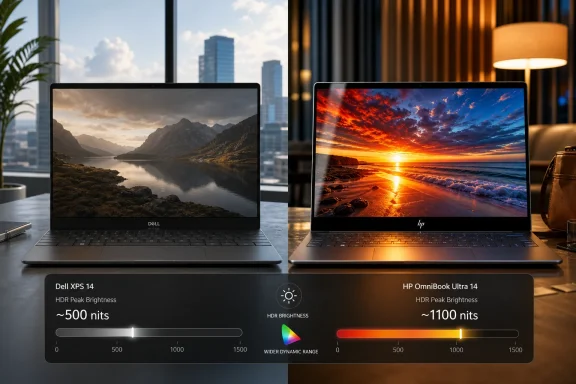
Notebookcheck’s comparison puts the contrast plainly: the XPS 14, ExpertBook Ultra, and OmniBook Ultra 14 all use OLED panels, but their HDR brightness targets differ sharply. Dell’s XPS 14 is listed at up to 500 nits HDR, HP’s OmniBook Ultra 14 at up to 1100 nits, and Asus’ ExpertBook Ultra at up to 1500 nits. On paper, that makes Asus the brightness champion, but paper is not where people edit documents, watch video, or squint through glossy reflections.
HP’s position is subtler and arguably more useful. The OmniBook Ultra 14 is far brighter than Dell’s OLED implementation while avoiding the matte OLED trade-off that makes the Asus unusually practical but slightly less crisp. It is the kind of middle ground laptop makers often miss: not the highest number, not the most radical surface treatment, but the best-looking compromise for the broadest set of premium buyers.
The 2026 XPS 14 appears to be part of Dell’s course correction after its broader branding misadventure, and by many accounts it remains a polished, desirable machine. But the XPS line’s challenge is that its old strengths are no longer unique. Everyone now knows how to machine a thin chassis, tune an OLED display, ship a high-resolution webcam, and talk about AI acceleration. The XPS 14 cannot rely on being the obvious premium Windows choice simply because it looks expensive.
That is where the display comparison hurts Dell. A 500-nit HDR ceiling is not bad in isolation; for many office tasks, it is entirely adequate. But in a premium OLED laptop fight, it makes Dell look conservative just as rivals are pushing the experience forward.
HDR is not only about blinding brightness. It is about headroom: the ability to render highlights, preserve contrast, and make video look less compressed by the limits of the panel. When two laptops both claim OLED richness but one has roughly twice the HDR brightness target, the weaker machine starts to feel like it is selling the label more than the experience.
A laptop that can hit high HDR brightness can make streaming video look more convincing, but that is only the obvious use case. It also helps with photography, design review, presentation work, and simply using the device in a mixed-light environment. The best laptop screens today are not just accurate in a dark room; they are resilient in the real world.
OLED complicates that conversation. Its perfect blacks and pixel-level contrast can make a lower-brightness panel look better than an LCD with a higher generic brightness number. But once premium OLED laptops are being compared against one another, brightness again matters. The difference between 500 nits and 1100 nits HDR is not academic if the panel, power management, and thermals can sustain a meaningful portion of that advantage during real use.
HP’s OmniBook Ultra 14 therefore benefits from timing. OLED is no longer exotic. HDR support is no longer rare. The new battlefield is whether the HDR implementation is good enough that users notice it without opening a benchmark chart.
But displays are systems, not numbers. Asus’ use of a matte overlay changes the experience in ways that are both beneficial and costly. Matte OLED is appealing because it cuts reflections, which is especially useful in office lighting, airports, conference rooms, and anywhere else glossy screens become mirrors. For enterprise buyers who spend their days under ceiling LEDs, that choice makes sense.
The trade-off is texture. Matte overlays can introduce a visible grain or diffusion that slightly softens the image, especially on OLED panels where users expect inky blacks and glassy sharpness. That does not make the ExpertBook Ultra a bad display; it makes it a display with a priority. Asus is choosing practical glare reduction over the most pristine image surface.
HP’s glossy OLED avoids that penalty. It will reflect more, but it should also preserve the crispness that many buyers associate with premium OLED panels. In other words, Asus has the peak-brightness bragging rights, Dell has the brand recognition, and HP may have the most broadly pleasing panel.
For Windows enthusiasts and IT pros, that dual-platform approach matters. Intel remains the safe choice for compatibility, mature drivers, legacy enterprise software, and workflows that still assume x86 without saying so. Qualcomm, meanwhile, keeps pressing the Windows-on-Arm case: longer battery life, strong neural processing, quiet operation, and a future where more software is native or at least good enough under emulation.
HP does not need every buyer to choose Snapdragon for the strategy to make sense. It needs the OmniBook Ultra 14 to be perceived as a modern premium platform rather than a single Intel laptop with refreshed branding. By offering both camps, HP gives the same external product two internal identities: the familiar high-performance office ultralight and the Arm-forward AI PC.
That also makes the display more central. If buyers are choosing between processor ecosystems, they need confidence that the rest of the machine is worth living with for several years. A strong screen is the common denominator that makes both configurations feel premium.
This is where HP’s OmniBook Ultra 14 can appeal to the cautious buyer. The Intel model gives admins and power users the compatibility story they already understand. It also promises enough graphical competence to make the machine feel less constrained than older thin-and-light systems.
The word “office laptop” used to imply a machine optimized for email, spreadsheets, browser tabs, and meetings. That definition is obsolete. Today’s office laptop may be asked to run local AI features, handle multiple high-resolution displays, process media, drive collaboration software all day, and still look good on a plane tray table. HP seems to understand that the premium office device is now a general-purpose workstation in miniature.
Dell understands this too, of course. But HP’s advantage is that its display gives the performance story a better stage. Fast graphics and strong HDR output are more persuasive when the panel can actually show the benefit.
The risk is also familiar. Even in 2026, Windows on Arm still lives under the shadow of compatibility anxiety. Many mainstream apps run well, and emulation has improved, but the buyers who get burned are usually the ones with niche utilities, old drivers, VPN clients, security agents, or line-of-business applications that never made it into the marketing brief.
That makes HP’s Intel-or-Qualcomm strategy practical rather than indecisive. The company is not forcing the Arm transition; it is letting buyers self-select. Consumers and mobile professionals who prioritize endurance may gravitate toward Snapdragon. IT departments with strict compatibility requirements can stay with Intel without leaving the OmniBook family.
For WindowsForum readers, that distinction is not minor. The most exciting chip is not always the best deployment choice. HP’s smartest move may be that it lets the buyer decide which future they are ready for.
The OmniBook Ultra 14 is a good candidate for that job because it has a clear identity. It is not simply “HP’s premium 14-inch laptop.” It is the bright OLED one, the Intel-or-Snapdragon one, the ultralight office machine with enough graphics muscle to be taken seriously. Those are sharper signals than a generic AI PC badge.
This matters because Dell’s XPS brand remains powerful even when individual design decisions are controversial. People know what an XPS is supposed to represent. HP has to teach buyers what OmniBook Ultra means, and the best way to do that is with concrete advantages.
Brightness, refresh rate, weight, processor choice, and panel surface are concrete. AI branding is not. HP’s display advantage helps the OmniBook name escape the fog of corporate renaming and attach itself to something users can evaluate with their eyes.
That framing is more useful than declaring a single universal winner. A buyer who values Dell’s design language, support relationship, or ecosystem familiarity may still choose the XPS 14 and be perfectly happy. A corporate fleet buyer who needs glare reduction, security features, and business-class manageability may prefer the ExpertBook Ultra. A user who wants a vivid glossy OLED with stronger HDR than Dell offers may find the OmniBook Ultra 14 the more compelling personal machine.
The key is that HP’s advantage is not obscure. Laptop comparisons often hinge on details that only matter under lab conditions: a few percentage points of CPU performance, a slightly faster SSD, a chassis temperature under synthetic load. Display quality is different because it is always present. Every app, every browser tab, every video call, and every movie runs through it.
That is why HP’s 1100-nit HDR claim matters even if most users will not run HDR content all day. It tells buyers the panel has more headroom. It tells them the premium price is buying something visible.
OLED is now common enough in premium machines that it cannot carry the whole sales pitch. That forces vendors to refine the implementation. Is the panel bright enough? Is the refresh rate variable? Is the surface glossy, matte, anti-reflective, or something in between? Does HDR have enough peak luminance to matter? Does the display choice destroy battery life?
Those questions are more mature than the old “OLED or not” debate. They also help buyers avoid false equivalence. Two laptops can both advertise OLED and still deliver meaningfully different experiences.
HP’s advantage over Dell is therefore a warning to the broader market. Once a feature becomes common, the implementation becomes the story. The XPS 14 may still be premium, but HP has found a place where “premium” can be measured in more than aluminum and brand memory.
The Dell XPS 14 remains the more recognizable machine, helped by years of XPS cachet and Dell’s attempt to restore the brand after its awkward “Dell Premium” detour. But HP’s latest OmniBook Ultra 14 makes a sharper argument for buyers who care about the actual experience of using a high-end Windows laptop every day. Its advantage is not that it has OLED; Dell and Asus do too. Its advantage is that HP appears to have chosen the more balanced OLED implementation: bright enough to make HDR matter, glossy enough to preserve clarity, and still conventional enough not to turn the display into a compromise disguised as innovation.
 HP Finds Its Opening in a Market Full of Beautiful Sameness
The premium 14-inch Windows laptop has become a game of small differences. Intel’s Panther Lake generation and Qualcomm’s Snapdragon X2 platform have given manufacturers fresh silicon to market, but the machines around those chips are converging fast. A high-end 2026 ultraportable is expected to have a sharp display, a thin chassis, a competent webcam, AI branding somewhere on the box, and enough battery life to survive a workday without public embarrassment.That makes the OmniBook Ultra 14’s display story more important than it first appears. HP is not merely claiming parity with Dell’s XPS 14 or Asus’ ExpertBook Ultra. It is exploiting the one area where the user can see the difference immediately, whether in an HDR video, a photo workflow, a bright office, or a hotel room where the laptop doubles as a media screen.
Notebookcheck’s comparison puts the contrast plainly: the XPS 14, ExpertBook Ultra, and OmniBook Ultra 14 all use OLED panels, but their HDR brightness targets differ sharply. Dell’s XPS 14 is listed at up to 500 nits HDR, HP’s OmniBook Ultra 14 at up to 1100 nits, and Asus’ ExpertBook Ultra at up to 1500 nits. On paper, that makes Asus the brightness champion, but paper is not where people edit documents, watch video, or squint through glossy reflections.
HP’s position is subtler and arguably more useful. The OmniBook Ultra 14 is far brighter than Dell’s OLED implementation while avoiding the matte OLED trade-off that makes the Asus unusually practical but slightly less crisp. It is the kind of middle ground laptop makers often miss: not the highest number, not the most radical surface treatment, but the best-looking compromise for the broadest set of premium buyers.
Dell’s XPS Problem Is No Longer Just the Keyboard
Dell has spent years trying to make the XPS line look and feel like the future. The minimal design language, hidden touchpad, capacitive function row in some generations, and edge-to-edge keyboard have all communicated a familiar Dell ambition: make Windows hardware feel as deliberate as Apple’s. The problem is that “deliberate” can curdle into “stubborn” when the design starts taking more than it gives.The 2026 XPS 14 appears to be part of Dell’s course correction after its broader branding misadventure, and by many accounts it remains a polished, desirable machine. But the XPS line’s challenge is that its old strengths are no longer unique. Everyone now knows how to machine a thin chassis, tune an OLED display, ship a high-resolution webcam, and talk about AI acceleration. The XPS 14 cannot rely on being the obvious premium Windows choice simply because it looks expensive.
That is where the display comparison hurts Dell. A 500-nit HDR ceiling is not bad in isolation; for many office tasks, it is entirely adequate. But in a premium OLED laptop fight, it makes Dell look conservative just as rivals are pushing the experience forward.
HDR is not only about blinding brightness. It is about headroom: the ability to render highlights, preserve contrast, and make video look less compressed by the limits of the panel. When two laptops both claim OLED richness but one has roughly twice the HDR brightness target, the weaker machine starts to feel like it is selling the label more than the experience.
HDR Has Become the New Premium-Laptop Shibboleth
For years, laptop display marketing revolved around resolution and color gamut. Buyers were trained to look for 4K, 100 percent DCI-P3, or factory calibration numbers that sounded reassuring even when few users had the tools to verify them. In 2026, the more meaningful premium differentiator is brightness — not because everyone needs a miniature sun in a notebook lid, but because modern content and modern workspaces demand flexibility.A laptop that can hit high HDR brightness can make streaming video look more convincing, but that is only the obvious use case. It also helps with photography, design review, presentation work, and simply using the device in a mixed-light environment. The best laptop screens today are not just accurate in a dark room; they are resilient in the real world.
OLED complicates that conversation. Its perfect blacks and pixel-level contrast can make a lower-brightness panel look better than an LCD with a higher generic brightness number. But once premium OLED laptops are being compared against one another, brightness again matters. The difference between 500 nits and 1100 nits HDR is not academic if the panel, power management, and thermals can sustain a meaningful portion of that advantage during real use.
HP’s OmniBook Ultra 14 therefore benefits from timing. OLED is no longer exotic. HDR support is no longer rare. The new battlefield is whether the HDR implementation is good enough that users notice it without opening a benchmark chart.
Asus Wins the Number, HP Wins the Argument
The Asus ExpertBook Ultra is the wildcard in this comparison because its claimed HDR brightness target is even higher than HP’s. A 1500-nit-class OLED laptop panel is an impressive flex, particularly for a business machine that also emphasizes security and enterprise readiness. If the only question were maximum HDR output, Asus would have the easy headline.But displays are systems, not numbers. Asus’ use of a matte overlay changes the experience in ways that are both beneficial and costly. Matte OLED is appealing because it cuts reflections, which is especially useful in office lighting, airports, conference rooms, and anywhere else glossy screens become mirrors. For enterprise buyers who spend their days under ceiling LEDs, that choice makes sense.
The trade-off is texture. Matte overlays can introduce a visible grain or diffusion that slightly softens the image, especially on OLED panels where users expect inky blacks and glassy sharpness. That does not make the ExpertBook Ultra a bad display; it makes it a display with a priority. Asus is choosing practical glare reduction over the most pristine image surface.
HP’s glossy OLED avoids that penalty. It will reflect more, but it should also preserve the crispness that many buyers associate with premium OLED panels. In other words, Asus has the peak-brightness bragging rights, Dell has the brand recognition, and HP may have the most broadly pleasing panel.
The Processor Choice Makes the OmniBook More Interesting Than a Display Story
The OmniBook Ultra 14’s display would be enough for a straightforward comparison, but the larger product strategy is more interesting. HP is offering the machine with Intel Panther Lake or Qualcomm Snapdragon X2 processors, which turns one chassis into a referendum on the state of Windows computing itself.For Windows enthusiasts and IT pros, that dual-platform approach matters. Intel remains the safe choice for compatibility, mature drivers, legacy enterprise software, and workflows that still assume x86 without saying so. Qualcomm, meanwhile, keeps pressing the Windows-on-Arm case: longer battery life, strong neural processing, quiet operation, and a future where more software is native or at least good enough under emulation.
HP does not need every buyer to choose Snapdragon for the strategy to make sense. It needs the OmniBook Ultra 14 to be perceived as a modern premium platform rather than a single Intel laptop with refreshed branding. By offering both camps, HP gives the same external product two internal identities: the familiar high-performance office ultralight and the Arm-forward AI PC.
That also makes the display more central. If buyers are choosing between processor ecosystems, they need confidence that the rest of the machine is worth living with for several years. A strong screen is the common denominator that makes both configurations feel premium.
Panther Lake Gives HP a Conventional Weapon With Unconventional Graphics Upside
Notebookcheck’s positive experience with the Intel version is particularly notable because office laptops have historically treated graphics performance as an afterthought. The 2026 crop of premium Windows machines is changing that, not by turning every ultrabook into a gaming laptop, but by making integrated graphics less of a liability. For users who touch creative apps, light 3D work, external displays, or GPU-accelerated workflows, that matters.This is where HP’s OmniBook Ultra 14 can appeal to the cautious buyer. The Intel model gives admins and power users the compatibility story they already understand. It also promises enough graphical competence to make the machine feel less constrained than older thin-and-light systems.
The word “office laptop” used to imply a machine optimized for email, spreadsheets, browser tabs, and meetings. That definition is obsolete. Today’s office laptop may be asked to run local AI features, handle multiple high-resolution displays, process media, drive collaboration software all day, and still look good on a plane tray table. HP seems to understand that the premium office device is now a general-purpose workstation in miniature.
Dell understands this too, of course. But HP’s advantage is that its display gives the performance story a better stage. Fast graphics and strong HDR output are more persuasive when the panel can actually show the benefit.
Snapdragon X2 Keeps the Arm Bet Alive, but Windows Still Has Homework
The Qualcomm option is just as important, even if it will not be the right fit for every buyer. Snapdragon X2 machines are part of the continuing effort to make Windows on Arm feel less like a science project and more like a mainstream premium choice. The promise is familiar: better efficiency, instant-on responsiveness, strong AI acceleration, and less fan noise.The risk is also familiar. Even in 2026, Windows on Arm still lives under the shadow of compatibility anxiety. Many mainstream apps run well, and emulation has improved, but the buyers who get burned are usually the ones with niche utilities, old drivers, VPN clients, security agents, or line-of-business applications that never made it into the marketing brief.
That makes HP’s Intel-or-Qualcomm strategy practical rather than indecisive. The company is not forcing the Arm transition; it is letting buyers self-select. Consumers and mobile professionals who prioritize endurance may gravitate toward Snapdragon. IT departments with strict compatibility requirements can stay with Intel without leaving the OmniBook family.
For WindowsForum readers, that distinction is not minor. The most exciting chip is not always the best deployment choice. HP’s smartest move may be that it lets the buyer decide which future they are ready for.
The OmniBook Name Is Still Doing the Hard Work of Reintroduction
HP’s branding shift from Spectre, Envy, Pavilion, and related consumer labels into the OmniBook era still feels like a company trying to simplify a shelf that had become too crowded. The name itself has history, but for many modern buyers it remains effectively new. That puts pressure on each product to define the brand quickly.The OmniBook Ultra 14 is a good candidate for that job because it has a clear identity. It is not simply “HP’s premium 14-inch laptop.” It is the bright OLED one, the Intel-or-Snapdragon one, the ultralight office machine with enough graphics muscle to be taken seriously. Those are sharper signals than a generic AI PC badge.
This matters because Dell’s XPS brand remains powerful even when individual design decisions are controversial. People know what an XPS is supposed to represent. HP has to teach buyers what OmniBook Ultra means, and the best way to do that is with concrete advantages.
Brightness, refresh rate, weight, processor choice, and panel surface are concrete. AI branding is not. HP’s display advantage helps the OmniBook name escape the fog of corporate renaming and attach itself to something users can evaluate with their eyes.
The Real Buyer Choice Is Between Polish, Practicality, and Picture Quality
The Dell XPS 14, Asus ExpertBook Ultra, and HP OmniBook Ultra 14 are not identical machines with different logos. They represent three philosophies of premium 14-inch Windows design. Dell is selling polish and brand continuity. Asus is selling enterprise seriousness with unusually aggressive display technology. HP is selling a balanced premium machine that tries to be more visually impressive than Dell without adopting Asus’ matte-screen compromise.That framing is more useful than declaring a single universal winner. A buyer who values Dell’s design language, support relationship, or ecosystem familiarity may still choose the XPS 14 and be perfectly happy. A corporate fleet buyer who needs glare reduction, security features, and business-class manageability may prefer the ExpertBook Ultra. A user who wants a vivid glossy OLED with stronger HDR than Dell offers may find the OmniBook Ultra 14 the more compelling personal machine.
The key is that HP’s advantage is not obscure. Laptop comparisons often hinge on details that only matter under lab conditions: a few percentage points of CPU performance, a slightly faster SSD, a chassis temperature under synthetic load. Display quality is different because it is always present. Every app, every browser tab, every video call, and every movie runs through it.
That is why HP’s 1100-nit HDR claim matters even if most users will not run HDR content all day. It tells buyers the panel has more headroom. It tells them the premium price is buying something visible.
Windows Laptop Makers Are Finally Competing Where Users Notice
The encouraging part of this comparison is that Windows laptop makers are no longer treating the display as a box to tick. For years, premium laptops could ship with frustrating compromises: dim panels, poor color, slow response times, awkward aspect ratios, or glossy reflections without enough brightness to compensate. The current generation is imperfect, but the baseline has risen dramatically.OLED is now common enough in premium machines that it cannot carry the whole sales pitch. That forces vendors to refine the implementation. Is the panel bright enough? Is the refresh rate variable? Is the surface glossy, matte, anti-reflective, or something in between? Does HDR have enough peak luminance to matter? Does the display choice destroy battery life?
Those questions are more mature than the old “OLED or not” debate. They also help buyers avoid false equivalence. Two laptops can both advertise OLED and still deliver meaningfully different experiences.
HP’s advantage over Dell is therefore a warning to the broader market. Once a feature becomes common, the implementation becomes the story. The XPS 14 may still be premium, but HP has found a place where “premium” can be measured in more than aluminum and brand memory.
The Spec That Makes HP’s Premium Pitch Feel Real
The OmniBook Ultra 14’s display edge does not make Dell irrelevant or Asus misguided, but it does make HP’s 2026 premium pitch easier to understand. The useful conclusions are concrete:- The 2026 HP OmniBook Ultra 14 is available with either Intel Panther Lake or Qualcomm Snapdragon X2 processors, giving buyers a choice between x86 familiarity and Arm efficiency.
- The OmniBook Ultra 14’s 3K OLED option is rated for up to 1100 nits HDR brightness, putting it well above the Dell XPS 14’s cited 500-nit HDR level.
- The Asus ExpertBook Ultra may reach a higher HDR brightness target than HP, but its matte OLED surface trades some perceived clarity for glare reduction.
- Dell’s XPS 14 remains a premium and recognizable Windows laptop, but its OLED brightness ceiling gives HP an obvious experiential advantage for HDR and visual punch.
- For buyers choosing among these machines, the most important distinction is not whether they have OLED, but how each company has implemented OLED.
- HP’s strongest argument is balance: brighter HDR than Dell, crisper glossy presentation than matte OLED rivals, and a chassis that can be configured for either the Intel or Qualcomm version of the Windows future.
References
- Primary source: Notebookcheck
Published: 2026-06-16T23:20:18.818549
New HP OmniBook Ultra 14 has one key advantage over the Dell XPS 14 - Notebookcheck News
The XPS 14 may be the more popular option, but this year's OmniBook Ultra 14 is twice as bright for superior HDR support than the Dell alternative. www.notebookcheck.net
- Related coverage: notebookcheck.com
Dieses Notebook hat einen großen Vorteil gegenüber dem Dell XPS 14 - Notebookcheck News
Das XPS 14 mag die populärere Option sein, das diesjährige OmniBook Ultra 14 leuchtet für eine bessere HDR-Unterstützung aber doppelt so hell wie die Dell-Alternative. www.notebookcheck.com
- Related coverage: asus.com
ASUS ExpertBook Ultra (B9406)|AI PC for Business | ASUS USA
Elevate productivity with the ASUS ExpertBook Ultra, a premium Copilot+ PC with Intel Core Ultra, secure computing for seamless work-from-home experiences.www.asus.com - Related coverage: nanoreview.net
HP OmniBook Ultra 14 (2026) vs Dell XPS 14 (2026): which is better? | NR
We put the HP OmniBook Ultra 14 (2026) to the test against the Dell XPS 14 (2026) to find out which laptop is the best for you.nanoreview.net - Related coverage: tomshardware.com
HP's new OmniBook Ultra 14 gets Panther Lake and Snapdragon X2 options inside — exclusive variant of Qualcomm chip has 85 TOPS | Tom's Hardware
Many OmniBook laptops are seeing refreshes at CES 2025.www.tomshardware.com - Related coverage: press.asus.com
ASUS Announces ExpertBook Ultra | ASUS Pressroom - Official Global News & Updates
ASUS ExpertBook Ultra: Ultralight, AI-powered Intel Core Ultra X9, 50 TOPS NPU & enterprise-grade security. The pinnacle for next-gen professionals! Subscribe to ASUS Pressroom for the latest tech updates! press.asus.com
- Related coverage: gadgets360.com
- Related coverage: windowscentral.com
Dell XPS 14 (2026) vs. XPS 16 (2026) | Windows Central
Dell's new XPS 14 and XPS 16 for 2026 have landed, and you want to be sure you're getting the right model.www.windowscentral.com - Related coverage: tomsguide.com
Dell XPS 14 (2026) review: Call it a comeback | Tom's Guide
The Dell XPS 14 delivers thanks to its smart new design, zippy performance, strong battery life, and vivid OLED panel. It’s one of the best Windows laptops, period.www.tomsguide.com - Related coverage: techradar.com
Asus ExpertBook Ultra business laptop review | TechRadar
A stunning design that packs a powerful punch in the performance departmentwww.techradar.com - Related coverage: itpro.com
Asus comes to CES 2026 with an 'Ultra' ExpertBook built for the modern worker | IT Pro
A thin yet durable chassis with noise and heat dissipation technology takes the ExpertBook to new heightswww.itpro.com - Related coverage: img.enaa.com
