

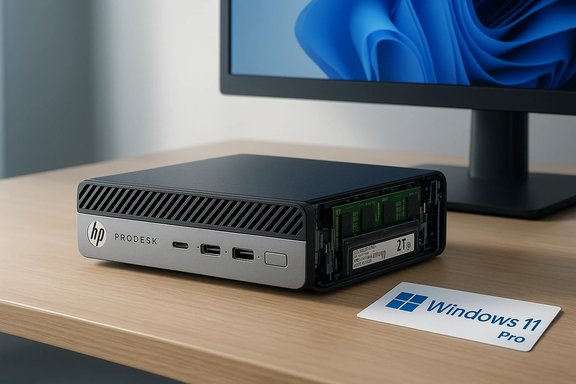
The refurbished listing for an HP ProDesk 600 G4 Mini — advertised with an Intel Core i5‑8500T, 32 GB RAM, 2 TB SSD, and Windows 11/10 Pro with Wi‑Fi and Bluetooth — is the kind of compact business‑grade bargain that catches the eye. On paper the combination reads like a generous refresh of a capable corporate mini‑PC: a six‑core Coffee Lake CPU, room for NVMe storage, and upgradable SO‑DIMM memory. The question for buyers is practical and precise: which of the listing’s claims are plausible, which require verification, and what are the trade‑offs of buying a refurbished G4 Mini today? This feature walks through the technical facts, verifies the key claims, highlights seller red flags, and offers a step‑by‑step buyer checklist and upgrade plan so you can decide with confidence.
The HP ProDesk 600 G4 Mini is a compact business micro‑desktop introduced by HP for corporate fleets. It uses Intel 8th‑generation desktop CPUs (Coffee Lake) on a Q370 chipset, and was designed to be VESA‑mountable, easy to service, and to support standard business features like TPM and wired Gigabit Ethernet. The platform typically ships with:
In short: the hardware claims are plausible and technically supported by the ProDesk 600 G4 Mini platform and the Intel i5‑8500T CPU, but the seller must prove the installation and activation details. With proper verification and a reasonable warranty, this refurbished configuration can deliver excellent value; without that proof, the risk of receiving a downgraded or poorly configured unit makes the purchase unwise.
Source: intrattenimento.eu https://www.intrattenimento.eu/shop/product/review/add/?ID=758480
 Background / Overview
The HP ProDesk 600 G4 Mini is a compact business micro‑desktop introduced by HP for corporate fleets. It uses Intel 8th‑generation desktop CPUs (Coffee Lake) on a Q370 chipset, and was designed to be VESA‑mountable, easy to service, and to support standard business features like TPM and wired Gigabit Ethernet. The platform typically ships with:- SODIMM DDR4 memory (two slots), often 2666 MT/s.
- M.2 NVMe storage options plus room for a 2.5‑inch drive in some SKUs.
- A small 65 W external power supply.
- Display outputs like DisplayPort and legacy VGA on some SKUs.
These platform characteristics mean the device can be shaped into a snappy office desktop if the refurbisher installs quality components. Hardware reference pages and retailer spec sheets confirm the ProDesk 600 G4 Mini’s basic layout and upgradeability.
Key claims in the listing — immediate verification
Before you click “buy,” treat these as the load‑bearing claims that need verification:- Intel Core i5‑8500T CPU (6 cores, 2.1–3.5 GHz). This is a real 8th‑generation Coffee Lake desktop CPU; Intel’s official spec sheet and independent CPU databases list it as a 6‑core, 6‑thread part with a 35 W TDP and Intel UHD 630 integrated graphics. That makes the i5‑8500T credible for a ProDesk 600 G4 Mini SKU.
- 32 GB RAM. The G4 Mini supports SO‑DIMM DDR4 memory and commonly has two SODIMM slots. With two 16 GB SO‑DIMMs, 32 GB is technically achievable on the platform; hardware overviews list a 32 GB maximum for G4‑class minis. But whether a specific refurbished unit contains two 16 GB sticks (and whether they are single/dual‑channel populated) is a seller claim that needs photographic/system proof.
- 2 TB SSD. The chassis supports M.2 NVMe drives and (depending on the variant) additional drives. A 2 TB M.2 NVMe is a common aftermarket upgrade and fully plausible for a refurb. The unit may ship with a single 2 TB M.2 or a combination (e.g., 1 TB NVMe + 1 TB SATA) — the type and brand of SSD materially affects performance and endurance and should be verified.
- Windows 11 / Windows 10 Pro. Because the ProDesk 600 G4 Mini commonly ships with 8th‑gen Intel processors, many SKUs are included on Microsoft’s supported‑processors list for Windows 11, but verify activation and TPM/UEFI status before trusting a Windows 11 claim. Microsoft and Intel guidance both recommend using PC Health Check or a BIOS/Settings screenshot to prove active Windows 11 support.
The ProDesk 600 G4 Mini — what the hardware actually supports
CPU and platform
The i5‑8500T is a bona fide Coffee Lake desktop part: 6 cores, 9 MB cache, base 2.1 GHz and turbo up to 3.5 GHz, 35 W TDP. It plugs into an LGA1151 socket and pairs with the Q370 chipset in many commercial HP builds. That means reasonable single‑thread and multi‑thread performance for office workloads, light content work, and multimedia. It’s not a modern high‑efficiency U‑series mobile chip, but for office workloads it still delivers capable responsiveness.Memory and storage
- Memory: The chassis uses DDR4 SO‑DIMMs, usually in two slots. Official platform documents and credible hardware references show support up to 32 GB (2 × 16 GB) at 2666 MHz on many G4 minis. That makes a 32 GB configuration realistic if the seller truly installed two 16 GB modules.
- Storage: The mini commonly includes at least one M.2 2280 NVMe slot with additional M.2 or 2.5‑inch options depending on the exact sub‑model. Installing a 2 TB NVMe SSD is a straightforward upgrade or refurbisher action — performance and endurance depend on the SSD model (TLC vs QLC, DRAMless vs DRAM‑equipped). Ask for the exact model number if write endurance or sustained throughput matters.
Connectivity and power
- Wi‑Fi/Bluetooth: Many refurbished listings ship either with an internal M.2 2230 Wi‑Fi module (e.g., Intel AC/AX family) or with USB Wi‑Fi/Bluetooth dongles supplied by the refurbisher. Internal modules give better performance and driver integration; dongles are cheaper and less elegant. Verify by asking for Device Manager or a photo of the internals.
- Power: The platform commonly uses a 65 W external brick. That’s adequate for the CPU and integrated graphics, but keep this in mind if a busy refurb adds a high‑performance NVMe drive or other power‑hungry peripherals.
Windows 11: compatibility and activation realities
Microsoft’s supported processors list for Windows 11 includes many 8th‑generation Intel desktop chips, and the i5‑8500T appears on those lists. Intel’s guidance mirrors Microsoft’s: Intel maintains that 8th‑gen Core processors and later meet Windows 11 minimum processor expectations. However, Windows 11 requires more than CPU generation: you need TPM 2.0, Secure Boot, UEFI, and an activated license. That means:- A listing that claims Windows 11 Pro should be able to show an activated license (Settings → System → About or Activation), and ideally a BIOS screenshot showing TPM 2.0 enabled.
- If a refurbisher has simply installed Windows 11 on an unsupported platform via a bypass, that device will be less likely to receive future cumulative updates and may have driver or stability quirks. Community refurb threads recommend insisting on proof of activation and TPM/UEFI status before committing.
Strengths of this specific configuration
- Compact, business‑grade chassis: VESA mounting and small footprint make the G4 Mini excellent for tight desks, kiosks, and multi‑display setups. The chassis is designed for serviceability relative to some modern soldered minis.
- Potential for solid real‑world performance: With an i5‑8500T, 32 GB of dual‑channel RAM, and a 2 TB NVMe, the unit can be an excellent everyday productivity system (heavy web browsing, office apps, multiple monitors, and occasional light photo editing). The NVMe SSD will make the system feel “instant.”
- Business features: When legitimately supplied with Windows 10/11 Pro and TPM support, you get BitLocker, Remote Desktop host capability, and Group Policy features handy for power users and small business deployments. Community guides highlight these as real advantages for refurbished business class PCs.
Risks, common refurb pitfalls, and red flags
- SKU and copy‑paste errors. Many refurb listings recycle descriptions across SKUs. Mixed CPU or storage references in one ad are a common sign the listing may not match the shipped unit. Ask for the exact product number and serial label photo. Community posts show this is a frequent source of buyer complaints.
- Unverified Windows 11 claims. Some refurb units either lack TPM 2.0 or rely on workarounds to run Windows 11. A seller that claims Windows 11 without an activation screenshot or BIOS photo should be treated as not fully transparent.
- Wi‑Fi and Bluetooth “may be included.” Retailers and refurb sellers sometimes list Wi‑Fi and Bluetooth generically while shipping a USB dongle instead of an internal M.2 module. That affects performance and driver stability. Confirm whether the wireless adapter is internal or an external dongle.
- Non‑OEM power supplies and accessories. Many refurb units ship in plain boxes with third‑party bricks, keyboards, or mice. While this is common and often fine, non‑OEM power adapters can be lower quality and shorter lived. Check return/warranty windows.
- Activation and license type. Refurbished machines may come with OEM, volume, or transferred retail licenses; test activation and clarify who provides support if activation fails after a hardware change. Community guidance recommends asking for a screenshot showing “Windows is activated” before purchase.
A practical pre‑purchase checklist (do this before you buy)
- Ask for the exact model number / serial (SKU or HP part number). Match it to HP’s support page or to a retailer spec page to confirm the advertised layout.
- Request a screenshot of Settings → System → About showing CPU, installed RAM, Windows edition, and activation status. Don’t accept text descriptions alone.
- Request a Device Manager screenshot showing Network adapters (to verify internal Wi‑Fi vs USB dongle) and Security devices (to check for TPM 2.0).
- Ask for a photo of the underside sticker showing serial/part numbers and the rear I/O so you can confirm port selection.
- Demand the SSD model number (e.g., Samsung 970 EVO Plus, WD SN750, Crucial P5) so you can assess endurance and performance. QLC vs TLC and presence/absence of DRAM are meaningful differences.
- Confirm warranty/return window and who provides support (seller, marketplace, refurbisher). Prefer at least a 30–90 day warranty from a reputable refurbisher.
On‑arrival checklist — what to test in the first 48 hours
- Verify CPU, RAM (size and channel), storage model, and Windows activation using Settings → System → About and Device Manager. Run a short CrystalDiskMark or equivalent to confirm SSD performance roughly matches the model’s expected behavior.
- Run Windows Update and install vendor drivers from HP’s support page for the exact SKU — not generic drivers from third parties. BIOS updates sometimes fix Wi‑Fi or TPM quirks.
- Test wired networking, Wi‑Fi performance (if internal), and Bluetooth pairing. If the listing promised internal Wi‑Fi but you received a USB dongle, that’s grounds for a return if internal Wi‑Fi was a listed selling point.
- Validate power integrity and noise: small minis rely on compact fans; a loud or rattling fan in the first days is often a sign of a returning unit that was not properly serviced.
Upgrade and optimization recommendations
If you buy the ProDesk 600 G4 Mini and want to get the best value from it, prioritize upgrades that deliver the most noticeable improvements:- 1) Ensure dual‑channel RAM. If unit ships with 1 × 16 GB or 1 × 8 GB, add a matched SODIMM to enable dual‑channel mode — the real‑world responsiveness gains, especially for integrated GPU workloads and heavy multitasking, are meaningful.
- 2) Prefer NVMe SSDs for OS and applications. Replace 128–256 GB SATA drives with a 500 GB–2 TB NVMe SSD when possible. Choose mainstream TLC drives from known brands for better endurance.
- 3) If you need better Wi‑Fi, install an internal M.2 2230 Wi‑Fi module (if the board has the slot) rather than relying on USB dongles. Confirm antenna attachments and driver compatibility with HP’s support downloads.
- 4) Keep BIOS and drivers up to date. HP publishes UEFI, chipset, and wireless driver updates that resolve stability and compatibility issues on this platform. Apply them after verifying your SKU and backup.
Pricing and value — how to judge the deal
Refurbished minis like the ProDesk 600 G4 can be an excellent value when they combine a healthy SSD, adequate RAM, and a verified OS license. That said:- Compare the total price (including shipping and refurb warranty) to recent retailer listings for similar SKUs and to new low‑cost mini‑PCs. Modern mini‑PCs with newer CPUs, Wi‑Fi 6/6E, and USB4 support may cost more but deliver longer‑term connectivity value. Community comparisons show refurbished business minis often win on price but lose on future‑proofing.
- If the refurbisher charges a premium for “32 GB + 2 TB + Windows 11 Pro,” make the seller prove it. Paying extra without proof is paying for risk. A well‑documented 32 GB/2 TB unit at a sensible discount compared to new alternatives can be a fine buy for office and home‑office use.
Special note on the listing’s odd paragraph about copper wire
The product text you pasted includes an unrelated paragraph describing pure bare copper wire for crafting — clearly not part of a PC listing. Such mismatched copy can indicate lazy aggregation or automated scraping in the marketplace listing; it’s a symptomatic red flag. When sellers combine unrelated descriptions it’s often because they reuse templates or automatically populate listings — another reason to request hard proof of configuration and activation before purchasing. Treat listing noise like a reliability signal: inconsistent or sloppy listings correlate with inconsistent product delivery.Final assessment — who should buy and who should avoid this refurb
Buy if:- You want a compact, VESA‑mountable office desktop for web work, streaming, virtual meetings, and general productivity.
- The seller can prove the advertised components with screenshots and photos (System → About, Device Manager, SSD model, and serial/part number).
- The price, warranty window, and return policy are reasonable compared with other refurbished offers and current new mini‑PC options.
- The seller refuses to provide screenshots or part numbers.
- The listing mixes multiple CPU/storage references (copy/paste) and you can’t confirm which configuration you’ll receive.
- You require long‑term Windows 11 vendor support and want the absolute latest connectivity (Wi‑Fi 6E, Thunderbolt) — a new mini might make more sense for future‑proofing.
Quick buyer checklist recap (printable)
- Get the exact HP part number / serial and verify it against HP support pages.
- Ask for Settings → About and Device Manager screenshots (CPU, RAM, activation, Network adapters, Security devices).
- Request SSD model number and a photo of the rear I/O / serial label.
- Confirm shipping accessories (OEM/third‑party PSU; USB dongle vs internal Wi‑Fi).
- Verify warranty/returns and insist on at least a short trial period to test the unit under your workload.
Conclusion
An HP ProDesk 600 G4 Mini fitted with an Intel Core i5‑8500T, 32 GB of RAM, and a 2 TB NVMe SSD can be a very attractive compact desktop for business and home users — provided the refurbisher actually supplies those components and an activated, supported Windows license. The platform is capable and upgradable, but buyers must insist on concrete verification: screenshots showing Windows activation and hardware inventory, photos of serial labels, and SSD model numbers. The presence of mixed or irrelevant copy in the listing (like a paragraph about copper wire) is an additional cautionary signal: treat the headline specs as provisional until verified.In short: the hardware claims are plausible and technically supported by the ProDesk 600 G4 Mini platform and the Intel i5‑8500T CPU, but the seller must prove the installation and activation details. With proper verification and a reasonable warranty, this refurbished configuration can deliver excellent value; without that proof, the risk of receiving a downgraded or poorly configured unit makes the purchase unwise.
Source: intrattenimento.eu https://www.intrattenimento.eu/shop/product/review/add/?ID=758480
