

CPUID’s HWMonitor 1.65.1 now exposes hotspot temperature readings on NVIDIA GeForce RTX 50-series cards, giving Windows users a diagnostic value that was absent from mainstream monitoring tools throughout most of Blackwell’s first 17 months on sale. The immediate practical consequence is straightforward: owners can finally compare the GPU’s ordinary reported temperature with its hottest detected point and spot cooling problems that an average reading may conceal.
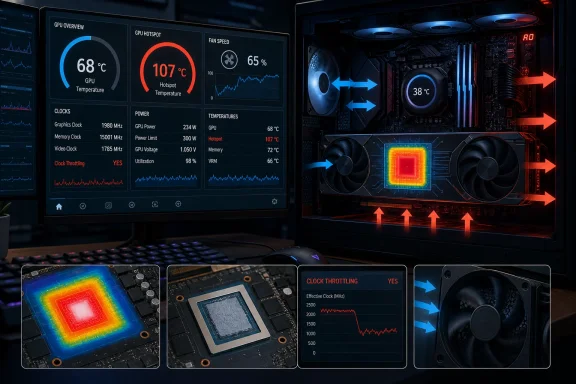
The update matters because the first cases discussed publicly are not simple “my card runs warm” anecdotes. As reported by Tom’s Hardware, Brazilian repair specialist Paulo Gomes used NVIDIA’s internal MODS diagnostic software on an RTX 5070 Ti that appeared normal in Windows at roughly 67–68°C. MODS reportedly showed a hotspot at 107°C, with the card repeatedly reducing clocks to protect itself. After the cooler was removed, the repair team found thermal paste concentrated around the die perimeter and little material at its center; repasting reduced the peak reading to about 100°C.
That is a compelling example of why hotspot telemetry exists. It is not, however, proof that every GeForce RTX 50 card has a thermal defect—or that NVIDIA deliberately withheld the sensor to hide one. The new readings remain early, partly undocumented, and in need of validation across more cards and tools.
A GPU’s standard temperature is not necessarily the temperature at its most stressed point. Modern GPUs use multiple on-die sensors, and monitoring applications often present a general core or edge temperature. A hotspot, sometimes described as junction temperature, represents the highest value reported among the relevant sensors.
A gap between those figures can be useful diagnostic evidence. A normal-looking GPU average can coexist with a much hotter localized area if the cooler does not contact the die evenly, if the thermal interface material has shifted, or if mounting pressure is poor. High hotspot values alone are not an automatic failure verdict; workload, ambient temperature, fan curve, cooler design, power target and the exact sensor being queried all matter.
What has changed is that RTX 50-series owners can now see candidate hotspot values in consumer Windows software. CPUID’s own changelog says HWMonitor 1.65.1, released July 16, fixed its RTX 50 hotspot implementation and credits PauloGomesTeam for help with the reading and decoding. That correction is significant: it means screenshots and conclusions drawn from the initial July 14 HWMonitor 1.65 release should be treated carefully.
VideoCardz reports that NVIDIA does not expose RTX 50 hotspot data through its supported NVAPI interface, the API commonly used by Windows monitoring utilities. The new implementations reportedly rely on direct register access or undocumented interfaces instead. That explains why a reading can suddenly appear without an NVIDIA driver feature announcement—and why software support remains more fragile than an officially documented sensor path.
The distinction also tempers the most dramatic version of the story. There is evidence that conventional tools lacked consumer access to this telemetry after the RTX 50 launch in January 2025, while MODS could read it in a service environment. But NVIDIA has not publicly explained the design decision, and there is no public statement establishing that it was a deliberate 18-month consumer block undertaken for warranty or diagnostic asymmetry.
In the reported test, the regular GPU temperature sat in a range many owners would consider comfortable. The hotspot instead reached the alleged 107°C protection threshold and corresponded with repeated throttling. The repair finding—thermal paste pushed away from the center of the die—offered a plausible mechanical explanation for the discrepancy.
That does not establish whether the paste migrated over time through pump-out, was applied unevenly at the factory, or was affected by the card’s cooler mounting. Nor does it establish a widespread issue for Gigabyte, NVIDIA, or RTX 5070 Ti cards generally. It does establish that a single, prominent average GPU temperature can fail to reveal a localized cooling problem.
PC Gamer tested an Asus TUF Gaming RTX 5070 Ti OC with the newly surfaced HWMonitor values and saw a conventional GPU temperature around 62–63°C, a brief hotspot spike into the mid-80s, and a more settled 75–80°C range during a demanding 4K path-traced game session. That is the other half of the story: a hotspot reading above core temperature is expected, and healthy results can show a meaningful but non-alarming difference.
The focus should therefore be on sustained behavior, performance symptoms and the relationship between readings—not on declaring every result above a particular number defective.
According to the screenshots described by VideoCardz, the representative regarded a temperature at or above 95°C for more than 10 minutes under heavy load as a condition worth inspecting. A separate report involving a Colorful iGame RTX 5090 D Advanced OC claimed a 112°C hotspot and about a 35°C gap from the normal GPU temperature.
Those reports are worth watching, but their limits are clear. They concern two individual cards, at least one support exchange, an unofficially accessed sensor, and no published board-partner engineering specification. Tom’s Hardware Italy explicitly notes that the 95°C figure came from an individual customer-service conversation, not a public threshold applicable to every RTX 50 model or market.
For administrators and support teams handling enthusiast workstations, the practical lesson is to avoid turning a single community threshold into a fleet policy. A card that is quiet, stable, at expected clocks and showing a repeatable—but moderate—difference between core and hotspot may be behaving normally. A card with a rapidly rising hotspot, excessive fan speed, unexplained frame-time instability or clock drops under a repeatable load warrants investigation.
HWiNFO developers have reportedly identified more than one potentially relevant Blackwell thermal value and have not finalized every sensor’s exact identity. HWMonitor itself needed a follow-up correction in 1.65.1 only two days after the initial release. That is normal for reverse-engineered or newly decoded telemetry, but it is a reason to avoid making warranty demands based on a lone reading from an early build.
MSI Afterburner remains the conspicuous exception among mainstream enthusiast tools. Its developer, Alexey “Unwinder” Nicolaychuk, has said that Afterburner is constrained by the supported interfaces available through its NVIDIA relationship. Until NVIDIA documents the relevant Blackwell sensor access—or Afterburner adopts an unsupported approach—many users’ default overlay will continue to omit this metric.
That leaves NVIDIA with the central unanswered question. The company has not publicly said whether it will add RTX 50 hotspot telemetry back to supported NVAPI, endorse the values now shown by third-party tools, or alter future drivers in ways that affect direct register access.
For now, RTX 50 owners should update to HWMonitor 1.65.1 or later, run a sustained, repeatable game or benchmark, and record GPU temperature, hotspot value, clocks, fan speed and performance together. If a large, persistent gap accompanies throttling or abnormal fan behavior after basic airflow checks, contact the card maker before opening the cooler. The new sensor is useful because it makes that conversation possible—not because it has already proven a Blackwell-wide fault.
The update matters because the first cases discussed publicly are not simple “my card runs warm” anecdotes. As reported by Tom’s Hardware, Brazilian repair specialist Paulo Gomes used NVIDIA’s internal MODS diagnostic software on an RTX 5070 Ti that appeared normal in Windows at roughly 67–68°C. MODS reportedly showed a hotspot at 107°C, with the card repeatedly reducing clocks to protect itself. After the cooler was removed, the repair team found thermal paste concentrated around the die perimeter and little material at its center; repasting reduced the peak reading to about 100°C.
That is a compelling example of why hotspot telemetry exists. It is not, however, proof that every GeForce RTX 50 card has a thermal defect—or that NVIDIA deliberately withheld the sensor to hide one. The new readings remain early, partly undocumented, and in need of validation across more cards and tools.
 The Important Change Is Access, Not a New Sensor
A GPU’s standard temperature is not necessarily the temperature at its most stressed point. Modern GPUs use multiple on-die sensors, and monitoring applications often present a general core or edge temperature. A hotspot, sometimes described as junction temperature, represents the highest value reported among the relevant sensors.A gap between those figures can be useful diagnostic evidence. A normal-looking GPU average can coexist with a much hotter localized area if the cooler does not contact the die evenly, if the thermal interface material has shifted, or if mounting pressure is poor. High hotspot values alone are not an automatic failure verdict; workload, ambient temperature, fan curve, cooler design, power target and the exact sensor being queried all matter.
What has changed is that RTX 50-series owners can now see candidate hotspot values in consumer Windows software. CPUID’s own changelog says HWMonitor 1.65.1, released July 16, fixed its RTX 50 hotspot implementation and credits PauloGomesTeam for help with the reading and decoding. That correction is significant: it means screenshots and conclusions drawn from the initial July 14 HWMonitor 1.65 release should be treated carefully.
VideoCardz reports that NVIDIA does not expose RTX 50 hotspot data through its supported NVAPI interface, the API commonly used by Windows monitoring utilities. The new implementations reportedly rely on direct register access or undocumented interfaces instead. That explains why a reading can suddenly appear without an NVIDIA driver feature announcement—and why software support remains more fragile than an officially documented sensor path.
The distinction also tempers the most dramatic version of the story. There is evidence that conventional tools lacked consumer access to this telemetry after the RTX 50 launch in January 2025, while MODS could read it in a service environment. But NVIDIA has not publicly explained the design decision, and there is no public statement establishing that it was a deliberate 18-month consumer block undertaken for warranty or diagnostic asymmetry.
One Repair Case Shows the Blind Spot
The RTX 5070 Ti repair case deserves attention precisely because it demonstrates a failure mode Windows enthusiasts already understand from CPUs and prior GPU generations: thermal readings can be technically accurate yet diagnostically incomplete.In the reported test, the regular GPU temperature sat in a range many owners would consider comfortable. The hotspot instead reached the alleged 107°C protection threshold and corresponded with repeated throttling. The repair finding—thermal paste pushed away from the center of the die—offered a plausible mechanical explanation for the discrepancy.
That does not establish whether the paste migrated over time through pump-out, was applied unevenly at the factory, or was affected by the card’s cooler mounting. Nor does it establish a widespread issue for Gigabyte, NVIDIA, or RTX 5070 Ti cards generally. It does establish that a single, prominent average GPU temperature can fail to reveal a localized cooling problem.
PC Gamer tested an Asus TUF Gaming RTX 5070 Ti OC with the newly surfaced HWMonitor values and saw a conventional GPU temperature around 62–63°C, a brief hotspot spike into the mid-80s, and a more settled 75–80°C range during a demanding 4K path-traced game session. That is the other half of the story: a hotspot reading above core temperature is expected, and healthy results can show a meaningful but non-alarming difference.
The focus should therefore be on sustained behavior, performance symptoms and the relationship between readings—not on declaring every result above a particular number defective.
Colorful’s Support Reply Is a Service Clue, Not a Universal Specification
The first warranty-related development comes from a reported exchange between a Colorful iGame GeForce RTX 5080 Vulcan White owner and the company’s Chinese-language support channel. VideoCardz says the owner recorded a hotspot near 100°C with HWMonitor, and that Colorful support advised checking case airflow and dust before applying for after-sales inspection if temperatures stayed elevated.According to the screenshots described by VideoCardz, the representative regarded a temperature at or above 95°C for more than 10 minutes under heavy load as a condition worth inspecting. A separate report involving a Colorful iGame RTX 5090 D Advanced OC claimed a 112°C hotspot and about a 35°C gap from the normal GPU temperature.
Those reports are worth watching, but their limits are clear. They concern two individual cards, at least one support exchange, an unofficially accessed sensor, and no published board-partner engineering specification. Tom’s Hardware Italy explicitly notes that the 95°C figure came from an individual customer-service conversation, not a public threshold applicable to every RTX 50 model or market.
For administrators and support teams handling enthusiast workstations, the practical lesson is to avoid turning a single community threshold into a fleet policy. A card that is quiet, stable, at expected clocks and showing a repeatable—but moderate—difference between core and hotspot may be behaving normally. A card with a rapidly rising hotspot, excessive fan speed, unexplained frame-time instability or clock drops under a repeatable load warrants investigation.
Windows Monitoring Is Still Catching Up
HWMonitor is no longer the only route. Reporting from VideoCardz and IT Home indicates that a HWiNFO pre-release, AIDA64 beta builds and a community MSI Afterburner plugin have also begun exposing related RTX 50 sensor data. But tool availability should not be confused with settled sensor naming.HWiNFO developers have reportedly identified more than one potentially relevant Blackwell thermal value and have not finalized every sensor’s exact identity. HWMonitor itself needed a follow-up correction in 1.65.1 only two days after the initial release. That is normal for reverse-engineered or newly decoded telemetry, but it is a reason to avoid making warranty demands based on a lone reading from an early build.
MSI Afterburner remains the conspicuous exception among mainstream enthusiast tools. Its developer, Alexey “Unwinder” Nicolaychuk, has said that Afterburner is constrained by the supported interfaces available through its NVIDIA relationship. Until NVIDIA documents the relevant Blackwell sensor access—or Afterburner adopts an unsupported approach—many users’ default overlay will continue to omit this metric.
That leaves NVIDIA with the central unanswered question. The company has not publicly said whether it will add RTX 50 hotspot telemetry back to supported NVAPI, endorse the values now shown by third-party tools, or alter future drivers in ways that affect direct register access.
For now, RTX 50 owners should update to HWMonitor 1.65.1 or later, run a sustained, repeatable game or benchmark, and record GPU temperature, hotspot value, clocks, fan speed and performance together. If a large, persistent gap accompanies throttling or abnormal fan behavior after basic airflow checks, contact the card maker before opening the cooler. The new sensor is useful because it makes that conversation possible—not because it has already proven a Blackwell-wide fault.
References
- Primary source: Tech Times
Published: 2026-07-17T11:52:03+00:00
Loading…
www.techtimes.com - Related coverage: pcgamer.com
Loading…
www.pcgamer.com - Related coverage: hwbusters.com
Loading…
hwbusters.com - Related coverage: my.ua
Loading…
my.ua - Related coverage: videocardz.com
Loading…
videocardz.com - Related coverage: tomshardware.com
Loading…
www.tomshardware.com