

Windows users have long envied the tactile precision and gesture-friendly surface of Apple’s Magic Trackpad — and now a crowdfunded contender claims to deliver that same feel plus Windows-focused features: the HyperSpace Trackpad Pro, launched on Kickstarter by Hyper, pledges full-force sensing, contextual piezo haptics, a 240 Hz response rate, and deeply customizable app profiles via its Hydra Connect software. The campaign hit its funding goal within minutes, early-backer pricing undercuts the planned retail cost, and Hyper is positioning the Trackpad Pro as the first premium external trackpad built specifically for Windows 10 and Windows 11 users — a product category that has been thinly served until now.
Windows has historically lacked a mainstream, standalone trackpad that mirrors what Apple offers with the Magic Trackpad. Laptop manufacturers built excellent precision touchpads into devices, but external trackpads — compact, high-fidelity surfaces for desktop users or those who prefer a touch-oriented workflow — were rare. That gap created demand among creators, designers, and productivity power users who want the muscle memory and gesture shortcuts of a trackpad without switching to macOS.
Hyper’s HyperSpace Trackpad Pro arrives into that gap with an explicit target: deliver the tactile, click-anywhere experience Mac users enjoy while adding advanced Windows-only controls — app-specific gesture mapping, configurable action zones, and force sensing that claims to work across up to ten touch points. The company pitches the hardware and an accompanying app, Hydra Connect, as a unified system for boosting workflow speed and replacing repetitive mouse actions with a few fingers and a press.
Key differentiators Hyper advertises:
The dimensions cited by Hyper (widely repeated across preview coverage) place the pad in the same neighborhood as the Magic Trackpad, with a low profile that keeps wrists straighter than a conventional mouse. Claimed weight and exact dimensions vary slightly in coverage, and those manufacturer numbers should be treated as provisional until measured in independent reviews.
However, the product’s early status as a Kickstarter offering means buyers and reviewers should treat claims cautiously. Crowdfunded electronics commonly undergo specification changes, shipping delays, and software refinements after launch. Driver reliability, Bluetooth stability, and cloud privacy are the most important near-term unknowns. For cautious buyers, waiting for independent long-term reviews and post‑retail firmware maturity is the prudent path. For early adopters who can tolerate iteration and value the early-backer price, the HyperSpace Trackpad Pro could be a game‑changing accessory — provided the software and support infrastructure prove capable of matching the hardware’s promise.
Source: New Atlas Windows users are finally getting their version of Apple’s Magic Trackpad
 Background
Windows has historically lacked a mainstream, standalone trackpad that mirrors what Apple offers with the Magic Trackpad. Laptop manufacturers built excellent precision touchpads into devices, but external trackpads — compact, high-fidelity surfaces for desktop users or those who prefer a touch-oriented workflow — were rare. That gap created demand among creators, designers, and productivity power users who want the muscle memory and gesture shortcuts of a trackpad without switching to macOS.Hyper’s HyperSpace Trackpad Pro arrives into that gap with an explicit target: deliver the tactile, click-anywhere experience Mac users enjoy while adding advanced Windows-only controls — app-specific gesture mapping, configurable action zones, and force sensing that claims to work across up to ten touch points. The company pitches the hardware and an accompanying app, Hydra Connect, as a unified system for boosting workflow speed and replacing repetitive mouse actions with a few fingers and a press.
What the HyperSpace Trackpad Pro promises
Core hardware highlights
- Full-force sensing across the pad surface, enabling different actions for light, medium, and deep presses.
- Gen‑3 piezo haptics that emulate a click without mechanical switches, allowing the surface to be clickable anywhere.
- 240 Hz report rate for low-latency tracking and smoother cursor movement.
- Soda‑lime glass surface with rubber feet and a CNC aluminum chassis for stability and a premium feel.
- Compact footprint and low profile: manufacturer‑listed dimensions and a sub‑kilogram weight (manufacturer numbers vary by outlet).
- Connectivity: Bluetooth (modern versions reported) and USB‑C wired use for zero‑latency or charging.
- Battery life claimed in the range of three to four weeks under typical usage, with pass-through usability while charging.
Software and workflow features
- Hydra Connect app for Windows 10 and Windows 11: deep customization, app-specific profiles, cloud profile sharing, and a widget for quick profile switching.
- Action zones and edge scrollers: the pad is virtually partitioned so corners, edges, and zones can be mapped to shortcuts (mute/unmute, undo/redo, screenshot, etc..
- Multi‑finger force mapping: assign one-, two-, or three‑finger “deep clicks” to distinct functions.
- Palm rejection: smart detection to ignore incidental palm or wrist contact.
- Out‑of‑box Windows compatibility: advertised to work immediately with Windows touch gestures; Hydra Connect unlocks advanced mapping.
- Basic macOS support for point‑and‑click; advanced Hydra features are Windows‑only at launch. Linux support is not yet available.
How it stacks up to the Apple Magic Trackpad and other options
The Apple Magic Trackpad has set user expectations for clickable, haptic surfaces and reliable gesture recognition. Hyper aims to match that tactile baseline while adding Windows‑centric features Apple does not prioritize.Key differentiators Hyper advertises:
- Pressure/force sensing across more touches — Hyper claims independent force detection on many more fingers than typical consumer trackpads.
- App‑specific customization via Hydra Connect — assign application-level gestures and automatically switch profiles when focus changes.
- Action zones and edge scrollers — a layer of shortcut mapping that can reduce cursor travel and streamline frequent tasks.
- Cross‑platform basic compatibility — the trackpad will work for basic pointing on macOS, but advanced features are Windows-first.
Design and build: premium on paper
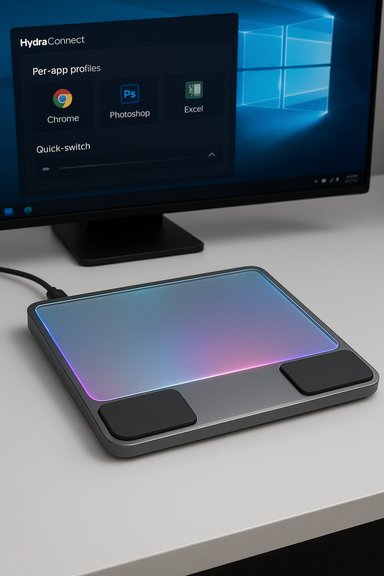
Hyper’s product pages and press materials present a premium build: soda‑lime glass surface, CNC aluminum chassis, and magnetic palm rests (where included) for ergonomic support. Rubber feet are called out to prevent slipping during forceful presses, and the click mechanism is haptic rather than mechanical — meaning the entire surface can be clickable without dome switches that wear unevenly.The dimensions cited by Hyper (widely repeated across preview coverage) place the pad in the same neighborhood as the Magic Trackpad, with a low profile that keeps wrists straighter than a conventional mouse. Claimed weight and exact dimensions vary slightly in coverage, and those manufacturer numbers should be treated as provisional until measured in independent reviews.
The software story: Hydra Connect is the competitive moat
Hydra Connect is central to Hyper’s pitch. The companion app promises:- Deep customization of haptics and click force.
- Per‑app profiles that switch automatically.
- Cloud storage and sharing of gesture profiles.
- Widget- or tray-based quick switching and visualization.
- Zone mapping and complex macros tied to deep clicks and multi‑finger gestures.
Realistic benefits for Windows users
- Faster workflows for creators: switch brushes, undo/redo, zoom and pan, or trigger complex macros without hunting menus.
- Reduced wrist travel: edge scrollers and action zones cut the distance the cursor must travel, which can matter on large displays.
- Intuitive gestures for presentation and meetings: mute/unmute or slide navigation with a discreet gesture.
- More natural hand posture for some users: for users who find mice aggravate wrist pain, a flat trackpad surface can be a lower‑strain option.
Risks, caveats, and what could go wrong
- Kickstarter and manufacturing risk
- This is a crowdfunded launch. Manufacturing delays, shipping slips, changes to specifications, or production cancellations are real possibilities.
- Timelines reported across preview coverage vary (estimates have ranged from late 2025 to Q1 2026 and March 2026). Backers should expect schedule shifts until mass production reports and shipping updates are confirmed.
- Software and driver maturity
- Hydra Connect is the differentiator, but it’s also unproven at scale. Early driver bugs, conflicts with Windows updates, and fragile profile switching would blunt the product’s advantages.
- Proprietary drivers sometimes conflict with Windows Precision Touchpad drivers or with other input utilities, causing inconsistent gesture recognition.
- Functionality variance across platforms
- While the hardware may operate in basic mode on macOS, advanced features are Windows‑first. Linux support is unconfirmed and may lag, limiting cross‑platform appeal for developers and power users who use multiple OSes.
- Latency and wireless behavior
- A 240 Hz report rate is a strong specification on paper, but Bluetooth throughput, host drivers, and OS input stacks affect real‑world latency. Wired USB‑C mode should be zero‑latency, but user setups vary.
- Long‑term durability and service
- Piezo haptics and force sensors are mechanically different from physical switches. They can be very durable, but long‑term failure modes are different and warranty/service pathways for Kickstarter products can be messy.
- Privacy and cloud profiles
- Cloud sharing for gesture profiles creates convenience but raises questions about what metadata is stored, whether profiles include executable macros, and how securely that cloud is operated.
- Price vs. value balance
- With planned retail near the same tier as Apple’s Magic Trackpad, the Trackpad Pro must offer stable, polished software and durable hardware to justify the premium for Windows users.
What to test when a review unit is available
When independent reviewers or backers receive units, the following checks will determine whether the Trackpad Pro is a practical purchase or an ambitious prototype:- Haptic uniformity: test click feel at the center and edges of the pad; check for dead zones or inconsistent vibration.
- Force sensing accuracy: map different force levels to actions and verify reproducibility across multiple fingers.
- Latency: evaluate pointer smoothness and gesture responsiveness over Bluetooth vs USB‑C wired mode.
- Palm rejection: rest palms and type while using gestures and deep clicks to see if false inputs are avoided.
- Hydra Connect stability: create app profiles, switch active windows, and validate automatic profile switching.
- Battery life: measure real-world battery duration under various usage patterns, including heavy gesture use and long meetings.
- Compatibility with other input software: test with third‑party utilities like AutoHotkey, gaming overlays, and accessibility tools.
- Firmware update process: check ease of updates, rollback options, and update size/requirements.
Buying guidance: early backer vs wait-for-retail
- If you need a high‑quality external trackpad today and you’re comfortable with Kickstarter's risks, the early price can look attractive versus expected retail.
- If you prefer minimal risk and strong aftersales support, waiting for mass retail and independent reviews is prudent. Many first‑run crowdfunded hardware products see staggered firmware and driver updates before they reach stable maturity.
- For professionals whose work depends on reliable input devices (e.g., production studios, mission-critical workflows), treat early units as experimental hardware until broader deployment and long‑term reviews verify stability.
Alternatives to consider
- Apple Magic Trackpad (for macOS or cross-platform pointing with a Mac-centric workflow).
- Laptop precision touchpads (built‑in and often already finely tuned on modern Windows laptops).
- Graphics tablets (Wacom and others) for pressure‑sensitive drawing work — these still rule for pen input even if trackpads are excellent for gestures.
- Legacy external trackpads (older Logitech or Microsoft peripherals) — functional but generally lacking modern haptics or force sensing.
Practical scenarios where a Windows trackpad shines
- Creative editing: In Photoshop or Illustrator, pressure and force mapping can emulate brush sizing or tool switching without cramming palettes on screen.
- Spreadsheet navigation: Quickly insert rows, switch sheets, or jump between panes with gesture macros mapped to action zones.
- Hybrid meetings: Mute/unmute or toggle cameras with discreet edge swipes rather than hunting system tray icons.
- Presentation control: One‑finger gestures to flip slides while standing or presenting, keeping hands free and movement natural.
- Multitasking: Profile switching for productivity apps can make frequently repeated actions faster and reduce keyboard dependency.
Final assessment: promise is high, but the proof is in the software and shipping
The HyperSpace Trackpad Pro is an ambitious attempt to bring a Magic Trackpad for Windows to market. Hardware specifications — force sensing, gen‑3 piezo haptics, a high report rate, glass surface, and USB‑C connectivity — check the right boxes on paper. The product’s real differentiator is the Hydra Connect ecosystem: app-specific profiles, cloud sharing, and customizable action zones. If Hydra Connect is stable, secure, and stays current with Windows updates, the Trackpad Pro could genuinely reshape how Windows power users interact with creative and productivity apps.However, the product’s early status as a Kickstarter offering means buyers and reviewers should treat claims cautiously. Crowdfunded electronics commonly undergo specification changes, shipping delays, and software refinements after launch. Driver reliability, Bluetooth stability, and cloud privacy are the most important near-term unknowns. For cautious buyers, waiting for independent long-term reviews and post‑retail firmware maturity is the prudent path. For early adopters who can tolerate iteration and value the early-backer price, the HyperSpace Trackpad Pro could be a game‑changing accessory — provided the software and support infrastructure prove capable of matching the hardware’s promise.
Practical next steps for interested buyers
- Reserve cautiously: consider a refundable deposit or the lowest-risk pledge tier.
- Follow campaign updates: monitor manufacturer communications about production milestones and firmware plans.
- Plan validation tests: when a unit arrives, check haptics, force sensing, battery, and software stability.
- Keep backups: trackpad profiles and macros that are critical to work should be exported where possible.
- Watch for reviews: wait for multiple independent long-term reviews before adopting the device in mission‑critical workflows.
Source: New Atlas Windows users are finally getting their version of Apple’s Magic Trackpad
