

When a motoring podcaster likened Microsoft Word’s unpredictable table behaviour to the idiosyncrasies of an Alfa Romeo, he opened a productive line of thought: if Microsoft—the company that gave us Windows, Office, Azure and Copilot—decided to build a car, what would it actually be like? The question is more than a joke; it’s a useful thought experiment that reveals how big‑tech design choices translate into real‑world product trade‑offs. The short answer: it would be a princely, hyper‑connected executive car—ossified with decades of legacy compatibility, stuffed with features that sometimes save the day and sometimes confuse it, updated over‑the‑air the way a Tesla is, but maintained by the kind of enterprise tooling you’d expect from Azure and Microsoft 365. That car would be brilliant, bewildering, secure, and occasionally infuriating. The Register ran the podcast anecdote that kicked this off, and the comparison is an apt place to start.
Microsoft’s product portfolio today reads like a transportation stack: the operating system (Windows), the productivity suite (Microsoft 365, Word/Excel/PowerPoint), hardware (Surface), a gaming ecosystem (Xbox), an enterprise cloud (Azure), and a growing set of AI assistants (Copilot). Over the last few years the company has doubled down on integrating AI as a first‑class feature across apps and even refreshed its product identity—new icons, a Copilot everywhere strategy—to signal that shift. Those moves are deliberate and visible. Microsoft’s Copilot rollout began as an enterprise preview and has since been woven into Word, Excel, Outlook and Teams as a commercial product aimed at reimagining productivity.
Meanwhile Microsoft has been positioning itself as a partner to automakers rather than a carmaker—its Microsoft Connected Vehicle Platform (MCVP) and Azure‑based services aim to be the cloud backbone for telematics, in‑vehicle AI and OTA management. That’s important context: Microsoft already supplies the cloud brains and connectivity that could plausibly underpin a “Microsoft car.”
That combination—platform engineering, enterprise governance, aggressive feature creep, and a consumer‑facing product aesthetic—frames the car you can expect. Below I map concrete Microsoft product behaviours to automotive design decisions so you can imagine driving a vehicle that behaves like Word, Windows, Excel and Copilot rolled into one.
But good design doesn’t erase complexity. Expect surfaces and controls that look minimalistic until you press an edge, opening multi‑layered menus and an intelligence layer that offers suggestions—some helpful, others surprising. That approach mirrors Microsoft’s app UX ethos: make primary actions obvious, bury the rest behind discoverable affordances.
The Copilot assistant would be omnipresent: context‑aware suggestions, meeting recaps, navigation recalculations, and prompts to "summarize that spreadsheet" would arrive as cards or voice cues. Microsoft’s Copilot is designed to operate in that context—integrating documents, calendar and chat to offer helpful summaries—but enterprise deployments have shown that Copilot sometimes needs human supervision and tuning to avoid hallucinations or privacy slipups. Expect an assistant that can generate brilliant shortcuts and occasionally invent a dubious shortcut that you should verify.
OTA updates would be a highlight and a liability. On the plus side, the car would improve over time: new Copilot features, better navigation, security patches. On the minus side, the update cadence would sometimes produce regressions or surprises—just like the occasional Windows Update or Office change that doesn’t land well for every user. When software is the product, updates are recalls in disguise; Microsoft’s model of phased rollouts and diagnostics makes those repairs less dramatic, but not less disruptive. The company’s diagnostic telemetry and phased rollouts are designed to minimise harm, but they also rely on data exchange that some users will find intrusive.
The trade‑off shows up in Windows on Arm: emulation is increasingly capable (Prism), but kernel‑mode drivers and certain low‑level components still need native ports—an honest reflection of the limits of translation. Microsoft’s car would be the same: you’d be able to run decades‑old infotainment apps in emulation, but hardware drivers (critical sensors, cameras, third‑party ECUs) would need native support to be reliable. Expect great compatibility for user‑mode features, and occasional splutters for kernel‑level or deeply embedded integrations.
Excel for the web is another good example. The browser edition does a lot, but it intentionally omits or modifies features that exist in the desktop app. For people who expect parity, that discrepancy feels like a bug; for Microsoft, it’s a pragmatic engineering constraint. Features like macros, some external data connections, and certain chart behaviours remain desktop‑only. That’s the software equivalent of making a lower‑spec trim for city driving—fine for many, but confounding if you expect full‑spec performance.
That’s not necessarily a bad thing—telemetry enables safer, more resilient service—but it requires transparent controls and clear user consent. Microsoft already exposes Diagnostic Data Viewer tools for Windows and Office; a Microsoft vehicle would need similarly clear dashboards for owners and fleet managers to view and purge data. The company’s enterprise playbook supports this model; the challenge is making privacy understandable to everyday drivers.
A realistic Microsoft vehicle would therefore ship with:
But as with many Microsoft products, the delight would coexist with friction: surprising behaviours born of legacy compatibility, telemetry that needs careful governance, and repairability choices that favour polished integration over tinkerability. Imagine a luxurious S‑Class comfort level with Tesla‑like software updates and a corporate IT console in the glovebox—brilliant when it works, occasionally exasperating when the software tries to be clever without context.
That, ultimately, is Microsoft’s car: powerful, connected, and unavoidably opinionated.
Source: theregister.com If Microsoft made a car... what would it be?
 Background / Overview
Microsoft’s product portfolio today reads like a transportation stack: the operating system (Windows), the productivity suite (Microsoft 365, Word/Excel/PowerPoint), hardware (Surface), a gaming ecosystem (Xbox), an enterprise cloud (Azure), and a growing set of AI assistants (Copilot). Over the last few years the company has doubled down on integrating AI as a first‑class feature across apps and even refreshed its product identity—new icons, a Copilot everywhere strategy—to signal that shift. Those moves are deliberate and visible. Microsoft’s Copilot rollout began as an enterprise preview and has since been woven into Word, Excel, Outlook and Teams as a commercial product aimed at reimagining productivity.Meanwhile Microsoft has been positioning itself as a partner to automakers rather than a carmaker—its Microsoft Connected Vehicle Platform (MCVP) and Azure‑based services aim to be the cloud backbone for telematics, in‑vehicle AI and OTA management. That’s important context: Microsoft already supplies the cloud brains and connectivity that could plausibly underpin a “Microsoft car.”
That combination—platform engineering, enterprise governance, aggressive feature creep, and a consumer‑facing product aesthetic—frames the car you can expect. Below I map concrete Microsoft product behaviours to automotive design decisions so you can imagine driving a vehicle that behaves like Word, Windows, Excel and Copilot rolled into one.
Exterior: design language, logo and first impressions
If Microsoft made a car, it would not be anonymous nor wilfully retro. The company has spent the last decade building a consistent visual and interaction language—Fluent Design, iconography updates and a steady stream of polish—so the vehicle would look contemporary, approachable and designed to be read at a glance. Recent icon redesigns tied to Copilot demonstrate how Microsoft uses small visual cues to signal a radical functional shift: the company deliberately pairs softer shapes and richer gradients with a message that AI is baked in, not bolted on. That same visual discipline would produce a car that looks modern, friendly and unmistakably Microsoft.But good design doesn’t erase complexity. Expect surfaces and controls that look minimalistic until you press an edge, opening multi‑layered menus and an intelligence layer that offers suggestions—some helpful, others surprising. That approach mirrors Microsoft’s app UX ethos: make primary actions obvious, bury the rest behind discoverable affordances.
Interior and ergonomics: sensory overload vs discoverability
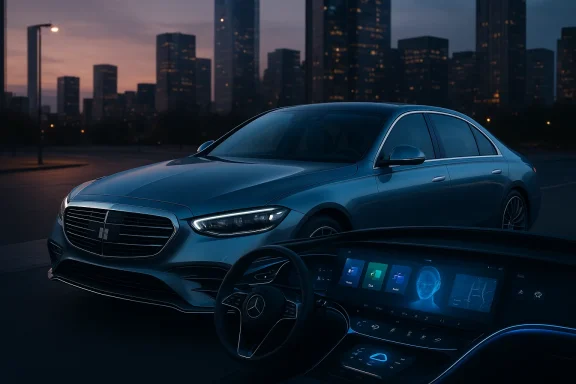
Microsoft’s software is often lauded for depth: tens of features exist to solve nearly any workflow, but they aren’t always discoverable without a search. That paradox defines the cabin. You’d get a comfortable, well‑engineered driving seat and a polished centre console that integrates a multi‑window productivity surface (a big screen that runs Word, Excel, Teams and Copilot simultaneously). Secondary physical controls would be conservative—steering, pedals, a mode dial—while the main interface would be software‑first.The Copilot assistant would be omnipresent: context‑aware suggestions, meeting recaps, navigation recalculations, and prompts to "summarize that spreadsheet" would arrive as cards or voice cues. Microsoft’s Copilot is designed to operate in that context—integrating documents, calendar and chat to offer helpful summaries—but enterprise deployments have shown that Copilot sometimes needs human supervision and tuning to avoid hallucinations or privacy slipups. Expect an assistant that can generate brilliant shortcuts and occasionally invent a dubious shortcut that you should verify.
- Benefits you’d notice:
- Rapid document drafting or in‑car note taking via Copilot.
- Deep integration with your Office life—emails, calendars, spreadsheets—available from the dash.
- Contextual safety nudges (seatbelt, ADAS reminders) surfaced by the cloud.
- Frictions you’d notice:
- Frequent suggestions that interrupt rather than help.
- A learning curve: real value appears only after you configure data access and privacy.
Powertrain, updates and over‑the‑air behaviour
If Microsoft built the drivetrain, it would be electric—and updated continually. The company already supplies vehicle platforms with MCVP and Azure, which include OTA update capabilities, telemetry, and in‑vehicle AI. Those services make it clear Microsoft thinks in terms of cloud‑connected fleets, remote management and continuous deployment rather than static hardware releases.OTA updates would be a highlight and a liability. On the plus side, the car would improve over time: new Copilot features, better navigation, security patches. On the minus side, the update cadence would sometimes produce regressions or surprises—just like the occasional Windows Update or Office change that doesn’t land well for every user. When software is the product, updates are recalls in disguise; Microsoft’s model of phased rollouts and diagnostics makes those repairs less dramatic, but not less disruptive. The company’s diagnostic telemetry and phased rollouts are designed to minimise harm, but they also rely on data exchange that some users will find intrusive.
- You’ll get OTA improvements shipped via Azure back‑end, instrumented with diagnostic telemetry.
- Microsoft will roll features behind feature flags, "gradually enabling" them for a subset of users before scaling.
- If you’re enterprise‑managed (company fleet), admins will control update channels; if you’re a private owner, expect a default Microsoft push.
Reliability, legacy compatibility and the ‘it just works’ test
One of Microsoft’s long‑standing engineering priorities is compatibility. Windows runs billions of legacy apps, and Microsoft still invests heavily in application compatibility, emulation (Prism on Arm), and driver support. In a car, that translates to an obsessive backward‑compatibility posture: the Microsoft car would support an enormous array of accessories, adapters and third‑party modules—some native, some emulated. You could plug in older peripherals or dashboards, and the system would make a best effort to support them. That’s admirable but also a source of complexity: the more you support, the more brittle the system can become at the edges.The trade‑off shows up in Windows on Arm: emulation is increasingly capable (Prism), but kernel‑mode drivers and certain low‑level components still need native ports—an honest reflection of the limits of translation. Microsoft’s car would be the same: you’d be able to run decades‑old infotainment apps in emulation, but hardware drivers (critical sensors, cameras, third‑party ECUs) would need native support to be reliable. Expect great compatibility for user‑mode features, and occasional splutters for kernel‑level or deeply embedded integrations.
The cockpit: Word, Excel and “character”
The podcaster’s gripe—Word randomly changing fonts to Wingdings, Excel web behaving oddly—is instructive because it shows the difference between characterful behaviour that delights and quirky behaviour that annoys. Microsoft Word contains thousands of interlocking features: styles, autoformatting, advanced paste options, and document templates. Many of those features are indispensable for power users, and Microsoft exposes them because they solve real problems, but they can surprise newcomers. Microsoft documents the paste options (Keep Source Formatting, Merge Formatting, Keep Text Only) and provides settings to control defaults—yet surprises still happen when source styles invade destination documents. That is a design trade‑off: powerful features plus legacy behaviour equals occasional user fury.Excel for the web is another good example. The browser edition does a lot, but it intentionally omits or modifies features that exist in the desktop app. For people who expect parity, that discrepancy feels like a bug; for Microsoft, it’s a pragmatic engineering constraint. Features like macros, some external data connections, and certain chart behaviours remain desktop‑only. That’s the software equivalent of making a lower‑spec trim for city driving—fine for many, but confounding if you expect full‑spec performance.
Telemetry, privacy and enterprise controls
A Microsoft car would be deeply instrumented. Microsoft’s documentation about diagnostic and optional telemetry in Windows is blunt and explicit: the company collects required diagnostic data to keep devices secure and optionally collects extra data to improve services. For a car, that means route telemetry, sensor health, feature usage and crash data would flow back to Azure to support security, OTA, and diagnostics. Admins could tune data collection in fleet environments, but for private owners the default will likely favour more telemetry because it enables better managed updates and feature rollouts. Expect generous diagnostics—and the corresponding privacy trade‑offs.That’s not necessarily a bad thing—telemetry enables safer, more resilient service—but it requires transparent controls and clear user consent. Microsoft already exposes Diagnostic Data Viewer tools for Windows and Office; a Microsoft vehicle would need similarly clear dashboards for owners and fleet managers to view and purge data. The company’s enterprise playbook supports this model; the challenge is making privacy understandable to everyday drivers.
Repairability and service model
Microsoft’s hardware lineage—Surface devices—teaches a cautionary lesson on hardware repairability. Surfaces have repeatedly scored poorly on teardown and repairability reviews because of glued displays and soldered components. If the Microsoft car borrowed that philosophy, you’d get sleek manufacturing and tight integration at the cost of easy repair by independent technicians. On the other hand, Microsoft’s enterprise focus suggests the company would push authorised service channels, remote diagnostics, and part replacement programs backed by cloud device management. In a fleet context, that could work well; for independent owners, it risks higher repair costs and the feeling of lock‑in.A realistic Microsoft vehicle would therefore ship with:
- Very tight integration between hardware and software.
- Authorised repair channels and an emphasis on remote fixes.
- Likely challenges for DIY repairability unless the company embraces right‑to‑repair policies.
Safety, driver assistance and legal exposure
Microsoft would not skimp on safety systems. With Azure and MCVP, Microsoft has the building blocks for telemetry, maps, and in‑vehicle AI that could support advanced driver assistance and over‑the‑air driving model improvements. The company’s enterprise relationships with OEMs suggest it understands regulatory complexity and the need for demonstrable safety systems. That said, integrating machine learning into live driving is intrinsically risky; Microsoft’s engineering focus on measured rollouts and telemetry would be an advantage, because it lets the firm collect the data necessary to refine safety features iteratively.The real‑world analogy: what car would it be?
If I had to pick a single existing car to stand in for a hypothetical Microsoft vehicle, it would be a Mercedes‑class executive saloon that has been crossbred with Tesla’s OTA culture and then outfitted with the IT management stack of a corporate fleet vehicle.- From Mercedes (or a similarly precise German luxury maker) it would borrow design polish, ergonomic refinement, and a feature list that prioritises comfort and a premium experience.
- From Tesla it would inherit OTA software management, rapid feature delivery, and an AI‑forward cockpit that gets new capabilities in updates.
- From enterprise fleet management it would inherit remote diagnostics, telemetry, and granular admin controls that let corporate IT tune behaviour.
Strengths, risks and how to manage them
Strengths
- Depth of integration. Copilot tied into the car’s context could change productivity on the move—summaries, action items and prompts could be genuinely useful.
- Continuous improvement. The Azure/MCVP/OTA stack supports rapid bug fixes and feature delivery.
- Enterprise readiness. Fleet admins get policies, telemetry and update channels to manage large deployments.
Risks
- Unexpected behaviour. Power users love features; casual users find them baffling. Word’s paste‑and‑style surprises are an emblematic example. Flagged as anecdotal in a podcast, they reflect a real usability tension.
- Telemetry and privacy. Diagnostic data powers improvements but requires clear consent and easy controls. Microsoft’s documentation shows both the capability and the trade‑offs.
- Repairability and vendor lock‑in. Tight hardware‑software integration can increase costs for non‑authorised repairs. Surface device reviews demonstrate the industry trend—and the consumer frustration—around glued and soldered hardware.
How to manage those risks (for buyers or fleet managers)
- Insist on transparency: require clear dashboards for telemetry collection and retention policies.
- Use staged update channels for critical fleet vehicles—test updates before broad rollout.
- Keep fallback procedures: ensure you can open vehicle systems offline and restore factory images.
- Negotiate repairability and spare‑parts commitments into fleet contracts.
Conclusion: an aspirational, complicated masterpiece
A Microsoft car would not be a bargain hatchback or a scrappy Alfa. It would be an ambitious, feature‑heavy executive vehicle designed to be the hub of your digital life—complete with Copilot‑assisted workflows, Azure‑backed connectivity, and a fleet‑grade backend. It would come with the benefits of continuous improvement, deep integration with Office and enterprise tooling, and a modern design sensibility that reflects Microsoft’s recent visual refresh.But as with many Microsoft products, the delight would coexist with friction: surprising behaviours born of legacy compatibility, telemetry that needs careful governance, and repairability choices that favour polished integration over tinkerability. Imagine a luxurious S‑Class comfort level with Tesla‑like software updates and a corporate IT console in the glovebox—brilliant when it works, occasionally exasperating when the software tries to be clever without context.
That, ultimately, is Microsoft’s car: powerful, connected, and unavoidably opinionated.
Source: theregister.com If Microsoft made a car... what would it be?
