

Microsoft’s Ignite announcements pushed Copilot from a helpful sidebar into the center of everyday work — introducing an intelligence layer called Work IQ, built-in agents inside Word, Excel and PowerPoint that can act (not just answer), deeper Outlook triage and voice features, and a major expansion of Security Copilot that is now tied into the Microsoft 365 E5 security stack.
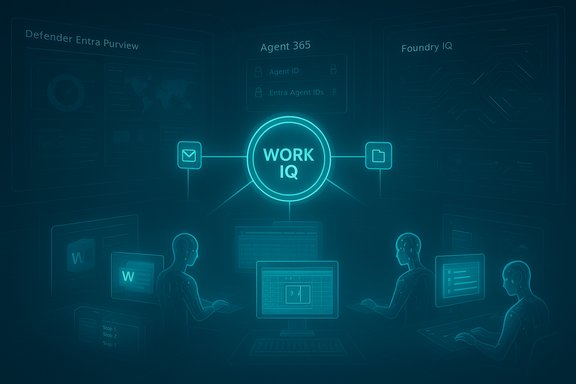
Microsoft framed the 2025 Ignite updates as a shift from assistant-oriented AI to an “agentic” platform: a set of identity-bound, auditable agents that plan, act, and are governed inside the Microsoft 365 ecosystem. That strategic pivot bundles new client features (in‑canvas Agent Mode, Office Agents, mobile voice triage) with platform-level controls (Agent 365, Entra Agent ID) and a multi-layer intelligence fabric (Work IQ, Fabric IQ, Foundry IQ).
These changes are both product and commercial: Microsoft is broadening which Copilot capabilities are available to standard Microsoft 365 subscribers while also introducing lower‑cost Copilot Business SKUs for small and midsize customers and moving advanced agentic workflows behind Copilot licensing and preview programs. Availability is staged and regionally phased — some features are preview-first, with broader rollouts promised in the coming months. Treat published timelines as provisional and watch tenant messages for precise GA dates.
Key user-facing capabilities include:
Organizations that have mature content tagging will see more relevant Copilot responses; those without standardized metadata should temper expectations until taxonomy is improved. Metadata discipline remains the cheapest way to materially improve grounding for Copilot answers.
All agent activity is tied into Microsoft’s auditing and reporting tooling so defenders can see what actions were taken and review or roll back automated decisions. The product positioning treats Security Copilot as a core platform capability rather than an optional add‑on.
For IT leaders, the priority is not whether to adopt Copilot — that moment has arrived — but how to adopt responsibly: treat agents as software‑defined workers with identities, policies, telemetry and human oversight. Start small, instrument heavily, and expand only after the error modes, compliance impacts, and cost patterns are well understood.
Microsoft’s agent era for Microsoft 365 brings a tangible productivity promise and a new set of operational responsibilities; organizations that pair creativity with control will capture the upside while minimizing the risks.
Source: THE Journal: Technological Horizons in Education Microsoft Copilot Gets Expanded Role in Office, Outlook, and Security -- THE Journal
 Background / Overview
Microsoft framed the 2025 Ignite updates as a shift from assistant-oriented AI to an “agentic” platform: a set of identity-bound, auditable agents that plan, act, and are governed inside the Microsoft 365 ecosystem. That strategic pivot bundles new client features (in‑canvas Agent Mode, Office Agents, mobile voice triage) with platform-level controls (Agent 365, Entra Agent ID) and a multi-layer intelligence fabric (Work IQ, Fabric IQ, Foundry IQ).These changes are both product and commercial: Microsoft is broadening which Copilot capabilities are available to standard Microsoft 365 subscribers while also introducing lower‑cost Copilot Business SKUs for small and midsize customers and moving advanced agentic workflows behind Copilot licensing and preview programs. Availability is staged and regionally phased — some features are preview-first, with broader rollouts promised in the coming months. Treat published timelines as provisional and watch tenant messages for precise GA dates.
Work IQ: the intelligence layer that binds context to action
What Work IQ does
Work IQ is described as an intelligence layer that models how you work by ingesting signals from files, e‑mails, calendar events, meetings and interaction patterns. Its role is to ground Copilot and its agents with role-aware context so agents can pick relevant data sources, remember preferences, and persist conversational memory across sessions. This memory is editable and user‑controllable.Why this matters for enterprise accuracy and governance
- Work IQ is the mechanism that reduces prompt friction and improves agent routing by exposing the right context to the right agent.
- It also becomes the single most consequential control for enterprise deployments because it affects grounding, permissioning, and auditability — every organization needs clear policies on how Work IQ accesses and retains telemetry, prompts, and intermediate artifacts.
Office agents and Agent Mode: agents that can write, calculate and format
Agent Mode — in‑canvas, auditable automation
Agent Mode brings the agent into the document canvas (Word, Excel, PowerPoint) so it can decompose a brief into stepwise tasks, execute edits directly in the file, and show intermediate artifacts and a visible plan for human inspection and rollback. The intent is to reduce opacity and increase control compared with one‑shot generated text.Key user-facing capabilities include:
- In Word: aggregate sources (files, emails, meeting notes), draft sections, apply brand templates, and iterate tone and structure directly in‑document.
- In Excel: run multi‑step data transforms, create formulas, clean data and generate charts with an auditor‑friendly plan view.
- In PowerPoint: generate or update decks using corporate templates, insert styled tables and images, rearrange slides, and produce speaker notes. PowerPoint parity follows web‑first Word/Excel rollouts.
Office Agents — chat‑first, near‑final artifacts
Alongside in‑canvas Agent Mode, Microsoft added Word, Excel and PowerPoint agents inside Copilot Chat. These chat‑first Office Agents can research, assemble deliverables and hand near‑final documents to native apps with a single click — supporting workflows that begin in conversation and end in an editable Office file.Model choice and routing
Microsoft is expanding model options for agentic tasks. Certain workloads may be routed to Anthropic models while others use OpenAI‑lineage models; tenants will receive controls for model routing and must opt into third‑party model endpoints. Microsoft’s messaging emphasizes a multi‑model strategy rather than a single fixed model name — treat exact model lineage as configurable and tenant‑dependent.Outlook: from summarization to scheduling and voice triage
One‑tap triage and mobile voice
Outlook’s Copilot capabilities now go beyond summarization to active inbox and calendar management. One‑tap prompts like “Triage my inbox” or “Summarize and reply” are available across clients, and the Outlook mobile app adds hands‑free voice experiences that summarize mail and guide actions (reply, flag, delete). These features aim to make mobile inbox management feasible while commuting or between meetings.Scheduling and conflict resolution
Copilot can schedule meetings from chat, reserve rooms, draft agendas and — in early access — resolve conflicts by automatically rescheduling flexible 1:1 meetings based on users’ stated preferences. These scheduling automations rely on Work IQ’s access to calendar context and tenant policies for booking resources. Administrators should confirm room‑booking policies and delegate settings before enabling autonomous scheduling.Practical impacts for knowledge workers
- Faster meeting prep: cross‑document and inbox analysis to assemble briefings and action lists.
- Reduced triage time: voice triage and one‑tap actions for high‑volume mailboxes.
- Potential automation hazards: auto‑rescheduling requires clear user preferences and predictable calendar etiquette to avoid unintended double‑books or missed approvals.
SharePoint metadata reasoning and content management gains
Microsoft has improved Copilot’s ability to reason over structured metadata in SharePoint libraries so answers can leverage fields like category, status or owner. This makes Copilot more accurate for intranet searches and library‑based queries, increasing the ROI of investments in taxonomy and metadata hygiene.Organizations that have mature content tagging will see more relevant Copilot responses; those without standardized metadata should temper expectations until taxonomy is improved. Metadata discipline remains the cheapest way to materially improve grounding for Copilot answers.
Security Copilot: now a platform component inside Microsoft 365 E5
Built‑in security agents and platform integrations
Security Copilot has been elevated from a single chat assistant to a suite of prebuilt agents embedded across Defender, Entra, Intune and Purview. These agents are designed to handle routine SOC tasks — phishing triage, alert prioritization, conditional access recommendations, Intune policy automation and sensitive data remediation — while operating under the organization’s existing security rules and auditing frameworks. Microsoft announced inclusion plans for Microsoft 365 E5 customers.All agent activity is tied into Microsoft’s auditing and reporting tooling so defenders can see what actions were taken and review or roll back automated decisions. The product positioning treats Security Copilot as a core platform capability rather than an optional add‑on.
Control plane: Agent 365, Entra Agent IDs, and observability
Security announcements were paired with platform-level governance: Agent 365 provides a tenant registry and control plane that gives inventory, quarantine, policy enforcement and telemetry for agent fleets. Agents receive Entra Agent IDs so identity controls, conditional access and lifecycle management apply to them the same way they apply to human users. This is central to making autonomous agents manageable in production.Why defenders should be optimistic — and cautious
- Optimistic: automation reduces time‑to‑detect and time‑to‑respond for high‑volume, low‑context alerts, letting human analysts focus on higher‑value investigations. Integration with Defender/Entra/Purview centralizes telemetry and controls.
- Cautious: automated remediations should be staged in progressive modes (suggest-first, then semi‑automated, then fully automated) and instrumented with clear rollback paths. Expect early false positives and tuning cycles; treat agent behavior as another component in your incident response runbooks.
Copilot Studio, Foundry and the agent lifecycle
Copilot Studio: build, tune, deploy
Copilot Studio is Microsoft’s low‑code/no‑code hub for creating, tuning and deploying agents. It connects to Microsoft Graph, Dataverse, SharePoint and external APIs, and it surfaces Defender/Purview policies during development so security is a first‑class consideration. Agents built here can be published to Agent 365 and receive Entra Agent IDs.Foundry IQ, Fabric IQ and grounding
Microsoft explained three IQ layers:- Work IQ — people- and work-centric personalization and context.
- Fabric IQ — a semantic data layer within Microsoft Fabric mapping analytic entities to business meaning.
- Foundry IQ — an aggregated grounding service that supplies knowledge endpoints for agents.
Privacy, compliance and risk: what IT must verify before widening agent permissions
Key governance checklist
- Confirm which Copilot features are tenant‑aware versus web‑grounded and map their required licensing.
- Validate Work IQ data flows: what is stored, how long memory persists, and how to purge conversational memory.
- Enforce least‑privilege for Entra Agent IDs and apply conditional access policies where agents access sensitive resources.
- Stage Security Copilot agents in suggest‑only mode, audit all actions, and integrate logs into SIEM/SOAR playbooks.
- Review model routing and third‑party model opt‑ins: understand which workloads route to which model vendors and what contractual obligations apply.
Specific compliance flags
- Conversational memory and Work IQ retention may create new personal data retention vectors; ensure Purview and DLP controls classify and protect those artifacts.
- Agent-sourced document edits should carry provenance — include agent identifiers and execution plans inside document metadata to maintain audit trails.
- Any automatic scheduling or room booking by Copilot must respect resource reservation policies and delegated approver flows to avoid compliance or financial exposure.
Practical rollout guidance: pilot, govern, scale
Recommended pilot sequence (1–3 months)
- Select a bounded pilot team (10–50 power users) with high-volume email, document creation, and security alert workloads.
- Enable Work IQ for the pilot tenant in read‑only or limited write modes, and turn on conversation memory with strict retention settings.
- Deploy Office Agents in suggest‑only or review mode so users can see agent plans but require explicit approval before changes are committed.
- Run Security Copilot agents in alert‑enrichment and recommend mode, integrating agent outputs into existing SOC triage runs before permitting automated remediation.
- Capture metrics: time saved per activity, error rate on automated edits, SOC mean time to respond (MTTR) before and after automation. Use these to justify scaling and to tune policies.
Governance artifacts to produce early
- Agent inventory and owner register in Agent 365.
- Model routing policy document that specifies which classes of tasks route to which models and why.
- Acceptable use policy for conversational memory and personal data handling.
Strengths, risks and the balanced conclusion
Strengths (clear, practical wins)
- Productivity gains: Agent Mode and Office Agents promise big time savings for repetitive document, spreadsheet and slide tasks by turning multi‑step processes into auditable agent workflows.
- Unified governance: Agent 365 + Entra Agent ID let organizations treat agents as first‑class subjects of governance, enabling lifecycle control and observability.
- Security integration: Embedding Security Copilot into Defender, Entra, Intune and Purview reduces friction and helps SOCs automate low‑value tasks while keeping human oversight.
Risks (real and manageable)
- Over‑automation hazard: Agents that act autonomously (scheduling, remediations, document edits) can make mistakes at scale. Progressive deployment with suggest‑first modes is mandatory.
- Data governance complexity: Work IQ and conversational memory introduce new data flows that must be classified, monitored and purgeable. Mistakes here create legal and privacy exposures.
- Model routing ambiguity: Multi‑model routing creates operational complexity — organizations must document which models are used for which tasks and the trade‑offs (accuracy, style, safety).
Final verdict: adopt, but do not release on sight
Microsoft’s Ignite 2025 updates materially shift Copilot from an assistant into an operational platform of agents that write, schedule, triage and secure — and they provide the governance tooling needed to make that practical. These are useful, enterprise-ready capabilities, but they are only safe and productive when paired with disciplined pilot programs, clear governance artifacts, and incremental permissioning.For IT leaders, the priority is not whether to adopt Copilot — that moment has arrived — but how to adopt responsibly: treat agents as software‑defined workers with identities, policies, telemetry and human oversight. Start small, instrument heavily, and expand only after the error modes, compliance impacts, and cost patterns are well understood.
Microsoft’s agent era for Microsoft 365 brings a tangible productivity promise and a new set of operational responsibilities; organizations that pair creativity with control will capture the upside while minimizing the risks.
Source: THE Journal: Technological Horizons in Education Microsoft Copilot Gets Expanded Role in Office, Outlook, and Security -- THE Journal
