

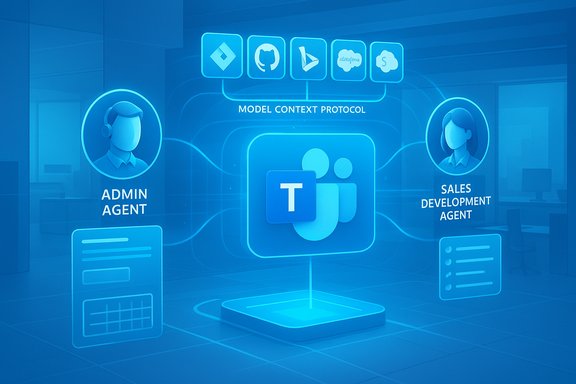
Microsoft’s Ignite 2025 keynote threaded one clear message through its new product mix: agents are no longer an experiment — they’re being stitched into the day‑to‑day fabric of Microsoft 365 and Teams, with third‑party app connectivity, role‑specific agents for IT and sales, and expanded Copilot capabilities intended to put actionable AI at the center of collaboration. The practical outcome announced at Ignite is that Teams channel agents can now connect to third‑party apps and other agents via the Model Context Protocol (MCP), enabling contextual, cross‑platform automation inside Teams — and Microsoft paired that technical bridge with new prebuilt agents such as a Teams Admin Agent for IT workflows and a Sales Development Agent for revenue teams.
Microsoft’s agent strategy is an evolution of the Copilot story: Copilot has moved from a single assistant to a family of specialized, automatable agents that are integrated across Microsoft 365 apps. The company positioned these agents to help automate repetitive tasks, orchestrate multi‑step business processes, and provide role‑targeted assistance — from project management and meeting facilitation to sales outreach and IT operations. Microsoft’s Copilot and Copilot Studio roadmap already included mechanisms to build and govern agents; Ignite’s announcements make those agents more interoperable with external systems using MCP. Two pieces of infrastructure matter for this next stage:
However, the transition from pilot to production will be decided by governance and trust. Administrators must treat agents like software services with identities, permissions, audit trails, and lifecycle controls. Without that governance, the convenience agents bring could easily create new compliance, security, and reputational risks.
For IT pros planning next steps:
Conclusion
Ignite 2025 accelerated a shift already underway: Teams is becoming a platform for agentic collaboration rather than just chats and meetings. The Model Context Protocol provides the interoperability layer, and purpose‑built agents (admin, sales, meeting facilitator) provide the immediate business value. The upside — measurable productivity gains and reduced context switching — is real, but so are the governance and security obligations that come with agentic automation. Thoughtful pilots, strict permissioning, and mature observability will determine whether an organization captures the benefits of Teams agents safely and sustainably.
Source: Petri IT Knowledgebase Ignite 2025: Microsoft Teams Agents Now Support Third-Party Apps and Agents - Petri IT Knowledgebase
 Background / Overview
Microsoft’s agent strategy is an evolution of the Copilot story: Copilot has moved from a single assistant to a family of specialized, automatable agents that are integrated across Microsoft 365 apps. The company positioned these agents to help automate repetitive tasks, orchestrate multi‑step business processes, and provide role‑targeted assistance — from project management and meeting facilitation to sales outreach and IT operations. Microsoft’s Copilot and Copilot Studio roadmap already included mechanisms to build and govern agents; Ignite’s announcements make those agents more interoperable with external systems using MCP. Two pieces of infrastructure matter for this next stage:- A standard communication bridge — the Model Context Protocol (MCP) — that lets agents securely request and receive context and data from external apps and services.
- A growing catalog of role‑focused agents (Facilitator, Project Manager, Researcher/Analyst, Teams Admin Agent, Sales Development Agent, etc. that can act inside Teams and other Microsoft 365 surfaces.
What Microsoft announced at Ignite 2025: the quick summary
- Agents in Microsoft Teams channels now support third‑party apps and external agents through MCP servers, enabling agents to pull data and take actions across services like Jira, Asana, and GitHub without leaving Teams. This capability is live in public preview for commercial tenants.
- Teams Admin Agent: a new agent surfaced to assist IT administrators with routine and complex operations (meeting monitoring, provisioning workflows and device management), available in public preview inside Teams admin experiences and device management flows. Microsoft also continues to expand the Teams admin agent family used for Teams Rooms and device management.
- Sales Development Agent (and related Sales Chat/Agents): autonomous sales agents that research prospects, qualify leads, and perform personalized outreach by interfacing with CRM systems such as Dynamics 365 and Salesforce. Microsoft has positioned sales agents to act autonomously on low‑risk tasks and to provide summarized, actionable insights to sellers. Public preview windows were announced for several sales agent features.
- Continued investments in Copilot enhancements, including collaborative features (Teams Mode, Facilitator agent for meetings), Copilot Studio improvements for building multi‑agent workflows, and new SMB‑focused offerings referenced as a Copilot Business tier in some briefings — the SMB subscription detail remains less clearly documented in Microsoft’s public channels at the time of reporting and should be treated as pending confirmation.
Model Context Protocol (MCP): the glue for agentic teamwork
What MCP is and why it matters
The Model Context Protocol is an open application‑layer protocol designed to standardize tool and data access for AI agents. Introduced by the community and driven originally by Anthropic, MCP defines a client/server exchange pattern that allows agents to discover available tools, request protected data, and call functions on behalf of users — using well‑defined JSON‑RPC semantics and transport options. Because it’s a neutral standard, MCP’s promise is to let different LLM providers and agent runtimes operate against the same set of connectors and data gates. Why that matters for Teams and Copilot:- MCP removes much of the custom plumbing previously required to let an AI agent peek into Jira tickets, CRM records, or private SharePoint documents — the agent simply talks to an MCP server/window that exposes controlled capabilities and metadata.
- Standardized connectors enable composability: a Teams agent can orchestrate a workflow that includes a ticket lookup in Jira, policies from SharePoint, and a calendar booking in Exchange — and it can do that consistently across tenants that expose the same MCP servers.
Adoption and ecosystem
By mid‑2025 MCP had attracted broad industry attention: OpenAI, Google/DeepMind, and several tool vendors referenced MCP compatibility, and Microsoft integrated MCP concepts into Copilot Studio and agent tooling to simplify one‑click connections and tracing. MCP also sparked early security research about new classes of risks (prompt injection via tool chains, permission composition problems, and replacement of trusted tools by lookalike endpoints), so adoption has been accompanied by governance guidance.How Teams channels will use third‑party apps and agents
What changes in the user experience
With MCP servers available to Teams channel agents, users can ask a channel‑scoped agent a question and the agent can:- Query issue trackers (e.g., “What are the current blockers in Jira for Release 2?”),
- Pull live CRM data (e.g., “Which accounts are overdue this quarter?”),
- Fetch pull request status from GitHub,
- And then act — by creating tasks, scheduling a follow‑up meeting with the right people, or posting a summarized action plan back into the channel.
Security and governance mechanics to watch
- MCP servers act as gateways and are intended to enforce data access control so that agents never receive indiscriminate credentials; instead, permissions are scoped and observable.
- Microsoft pairs agent interactions with Purview governance, DSPM and audit trails so tenant admins can discover which agents accessed what content and which operations they executed. That auditing is essential because agents can be granted actions (for example, creating calendar events or creating records) that create compliance and downstream data‑sharing implications.
Teams Admin Agent — IT’s new teammate (with caveats)
What it does
The Teams Admin Agent is presented as a purpose‑built assistant for tenant administrators. Its advertised capabilities include:- Automating routine IT tasks like user provisioning, license assignment, and policy checks;
- Monitoring meeting health and device status (particularly for Teams Rooms and Teams devices), surfacing anomalies and automating remediation workflows;
- Executing repeatable operations with consistent policy enforcement to reduce human error.
Why IT should care
- Operational efficiency: agents can reduce the time admins spend on repetitive tasks and surface problems faster than manual monitoring.
- Standardization: agents can apply the same provisioning steps every time, lowering configuration drift and compliance gaps.
- Observability: when agent actions are logged and traceable, the organization gains visibility into automated activity and can integrate that into SOC/ITSM workflows.
Practical limits and unanswered details
- The Admin Agent’s scope depends on what the tenant authorizes. Granting broad rights to an agent without scoped permissions is risky.
- Some announcements reference “public preview” availability for admin agent capabilities inside the Teams admin UI and device‑agent updates; device‑level admin agent apps have a separate release cadence and security model that IT must reconcile. The specific role‑based access and lifecycle controls for Agents in Entra and admin centers are still evolving and administrators should wait for documentation that outlines exact RBAC, service principal usage, and lifecycle management before large‑scale deployment.
Sales Development Agent: revenue automation meets CRM
What the sales agent promises
Microsoft introduced sales‑oriented agents that:- Research prospects and suggest qualification criteria,
- Rank and qualify leads automatically,
- Compose personalized outreach using CRM records, pricing sheets, and meeting histories,
- Engage with prospects via configurable outreach flows, and in some scenarios, complete “low‑impact” transactions autonomously.
Opportunities and ROI signals
- The ability to automate low‑complexity outreach and lead qualification can free sellers to spend more time on high‑value negotiation and closing.
- Sales agents that integrate with CRM and meeting data can improve pipeline hygiene by surfacing at‑risk deals and suggesting prioritized next actions.
Risks and governance for revenue teams
- Data correctness: agents synthesizing outreach must always be grounded in authoritative CRM facts. If connectors surface stale or incorrect pricing or commitment data, customer outreach could cause reputational damage.
- Regulatory and consent considerations: automated outreach must respect spam and privacy laws in target geographies, and organizations must ensure agents include audit trails and human approval gates where required.
- Automation thresholds: Microsoft’s own guidance and early adopters stress configuring autonomy tiers — what an agent can do unattended versus when it must escalate to human approval.
Copilot enhancements and SMB positioning — confirmable and unconfirmed pieces
Microsoft continues to extend Copilot:- Collaborative features such as Teams Mode and the Facilitator agent (meeting notes, agenda management, shared Loop pages) are active parts of the Copilot roadmap and are rolling out in preview to tenants with Copilot licensing.
- Copilot Studio enhancements and the Agent Store aim to let organizations publish and share agents across Microsoft 365.
Security, compliance, and operational risks — what IT leaders must plan for
1) Permission composition and escalation
MCP and agent tooling create new attack surfaces: composed flows can combine seemingly innocuous tool permissions into an operation that exfiltrates data. Security researchers have already highlighted potential prompt‑injection and permission composition vulnerabilities in MCP‑style architectures, and Microsoft’s guidance emphasizes strict least‑privilege models and observability. Enterprises must define explicit permission scopes for MCP servers and agents and ensure that agents never receive long‑lived credentials they don’t need.2) Auditability and identity
Agent actions must be traceable. Microsoft is exposing agent identities and lifecycle controls in Entra and admin centers so tenant teams can track which agent performed an operation. IT and security teams should integrate agent telemetry into SIEM and ITSM systems and ensure agent identities are handled like any service principal with lifecycle policies and access expiration.3) Data grounding and hallucination risk
Autonomous agents that compose messages or take actions based on unverified sources can produce inaccurate outputs (so‑called hallucinations). For use cases such as sales outreach and provisioning, those inaccuracies can have direct business impact. Guardrails are required: require confirmation steps for high‑risk actions, enable authoritative‑source checks, and use fine‑grained connectors that limit the agent to specific fields rather than full database access.4) Compliance and data residency
When agents access external MCP servers or third‑party apps, data can cross systems and jurisdictions. Organizations operating under strict residency or regulatory regimes must enforce tenant‑level controls to prevent data moves that breach local compliance rules and must confirm that connectors honor retention and eDiscovery requirements. Microsoft’s Purview and DSPM tooling are being positioned as governance mechanisms, but the customer’s configuration determines actual compliance posture.Recommendations for IT leaders and Teams admins
- Establish an agent governance framework before enabling previews:
- Define agent tiers (read‑only, assisted action, autonomous action).
- Map which roles or owners can create, publish, or approve agents.
- Start small with low‑risk pilots:
- Trial Teams channel agents for information aggregation tasks first (ticket lookups, meeting follow‑ups) before enabling any outbound actions.
- Lock down MCP connectors:
- Use service accounts, short‑lived tokens, and principle of least privilege for MCP servers and restrict which agents can call which MCP endpoints.
- Integrate agent telemetry into existing observability:
- Route agent activity to SIEM and ITSM systems, and require agent audit logs for any action that touches production data.
- Train sellers and IT staff:
- For sales agents, ensure outreach templates and pricing data are validated periodically and human approvals are enforced for non‑standard deals.
- For admin agents, build runbooks that include rollback and escalation steps.
- Validate compliance with legal and privacy teams:
- Confirm automated outreach and data use aligns with local laws (spam, consumer consent, data transfer rules).
Strengths and business potential
- Productivity: Agents can remove tedious context switching and reduce time lost to repetitive operational tasks.
- Composability: MCP standardization increases reuse of connectors and reduces bespoke integration costs.
- Scalability: Once governed, agents can scale repeatable processes across large user bases with consistent policy enforcement.
- Practical ROI in line jobs: Sales and admin tasks are particularly well‑suited to agent automation because they are high volume, patternable, and often rules‑based.
Weaknesses, unknowns, and adoption friction
- Complexity of governance: Effective agent governance requires IAM, Purview, DSPM, SIEM integration, and updated operational playbooks — not trivial for many SMBs.
- Security exposure: New attack vectors via MCP tool chains and permissions composition require new threat models and testing disciplines.
- Accuracy and trust: Unless agents are carefully grounded and audited, user trust will erode quickly when mistakes occur in customer‑facing or compliance‑sensitive contexts.
- Licensing and cost uncertainty: Microsoft’s licensing footprint for agents and Copilot offerings is evolving; some SMB pricing and subscription details reported in the press remain unconfirmed by formal Microsoft commercial documentation at the moment. Organizations should avoid assumptions and confirm with Microsoft or partners before committing to enterprise rollouts.
Final assessment: pragmatic optimism with governance first
Ignite 2025 made a pragmatic claim: agents should be useful teammates rather than black‑box assistants. The combination of MCP and Teams channel agents is a technical milestone — it reduces integration friction and enables meaningful automation inside collaboration workflows. Early role‑specific agents (Admin Agent, Sales Development Agent, Facilitator) demonstrate the immediate business use cases where agents can save time and scale expertise.However, the transition from pilot to production will be decided by governance and trust. Administrators must treat agents like software services with identities, permissions, audit trails, and lifecycle controls. Without that governance, the convenience agents bring could easily create new compliance, security, and reputational risks.
For IT pros planning next steps:
- Trial Teams channel agents under a managed pilot with strict MCP connector scopes;
- Integrate agent logs into security monitoring and ITSM processes;
- Enforce human approval gates for high‑risk decisions; and
- Confirm licensing and entitlement terms with Microsoft for your tenant before broad deployment.
Conclusion
Ignite 2025 accelerated a shift already underway: Teams is becoming a platform for agentic collaboration rather than just chats and meetings. The Model Context Protocol provides the interoperability layer, and purpose‑built agents (admin, sales, meeting facilitator) provide the immediate business value. The upside — measurable productivity gains and reduced context switching — is real, but so are the governance and security obligations that come with agentic automation. Thoughtful pilots, strict permissioning, and mature observability will determine whether an organization captures the benefits of Teams agents safely and sustainably.
Source: Petri IT Knowledgebase Ignite 2025: Microsoft Teams Agents Now Support Third-Party Apps and Agents - Petri IT Knowledgebase
