

Cornerstone’s new integration puts personalized, skills‑based learning and instant knowledge discovery directly inside Microsoft 365 Copilot, promising to move upskilling “in the flow of work” rather than off in separate portals or LMS silos—an important shift at a time when employers and workers alike say speed of learning and access to relevant knowledge are strategic priorities.
Employees today are under relentless pressure to learn fast while staying productive. The World Economic Forum’s Future of Jobs Report finds that employers expect roughly 39% of workers’ core skills to change by 2030, pushing continuous learning from a nicety to a necessity for workforce resilience. HR industry research reinforces the urgency: SHRM reports that rising pace-of-work pressures have accelerated the demand for new skills, with about 43% of employers saying faster work expectations drove new skill requirements in recent hiring. Meanwhile, ADP’s People at Work research shows only 24% of global workers feel confident they currently have the skills needed for career advancement—highlighting a wide gap between employer needs and worker confidence. Cornerstone’s product announcement positions “Cornerstone for Microsoft Copilot” as a response to these market signals: an AI agent that surfaces learning and organizational knowledge inside Microsoft 365 Copilot, so employees can discover training, launch microlearning, and fetch contextual answers without breaking focus.
Key technical considerations that often define these integrations:
For organizations that treat this as a channel and apply the governance and measurement rigour L&D and IT teams already use for other enterprise platforms, Cornerstone’s Copilot agent can accelerate learning at the speed the market now demands—helping close the gap WEF, SHRM and ADP highlight between rapid skill change, employer needs, and worker confidence.
Conclusion
Embedding skills intelligence and on‑demand knowledge into Microsoft 365 Copilot is a pragmatic next step for enterprise learning: it meets employees where they already are and shortens the loop from discovery to application. The approach aligns with major industry trends and the hard evidence that continuous, contextualized learning is essential to manage the rapid shift in core skills. Yet success will depend less on the novelty of an agent and more on the discipline with which organizations govern, validate and measure the outcomes of that agent. When done correctly, Cornerstone for Microsoft Copilot may move the needle on adoption and impact—if, and only if, it's deployed with clear outcomes, fed with trusted content, and kept under active human oversight.
Source: Cornerstone Cornerstone for Microsoft Copilot: Learning in the flow of work
 Background / Overview
Employees today are under relentless pressure to learn fast while staying productive. The World Economic Forum’s Future of Jobs Report finds that employers expect roughly 39% of workers’ core skills to change by 2030, pushing continuous learning from a nicety to a necessity for workforce resilience. HR industry research reinforces the urgency: SHRM reports that rising pace-of-work pressures have accelerated the demand for new skills, with about 43% of employers saying faster work expectations drove new skill requirements in recent hiring. Meanwhile, ADP’s People at Work research shows only 24% of global workers feel confident they currently have the skills needed for career advancement—highlighting a wide gap between employer needs and worker confidence. Cornerstone’s product announcement positions “Cornerstone for Microsoft Copilot” as a response to these market signals: an AI agent that surfaces learning and organizational knowledge inside Microsoft 365 Copilot, so employees can discover training, launch microlearning, and fetch contextual answers without breaking focus. Why “learning in the flow of work” matters
The friction that stops learning
Traditional learning programs struggle with three persistent frictions that block impact:- Unfocused learning: courses live in LMS portals or catalogs that take learners out of the moment of need.
- Misaligned growth: training that isn’t mapped to the learner’s role or current skills loses engagement.
- Fragmented knowledge: answers are scattered across SharePoint, wikis, drives and emails, slowing decision-making.
The pedagogical payoff
Applied learning research and modern L&D practice both emphasize just‑in‑time and task‑based learning as higher‑impact than generic courses. By connecting skill profiles and role taxonomies to in‑context prompts, in‑flow learning nudges practice and transfer into the job — the core of what workforce agility requires. The WEF and industry studies cited above underline why this matters at scale: organizations that can align role needs, skills intelligence and accessible learning tools will be better positioned as core skills evolve.What Cornerstone for Microsoft Copilot delivers
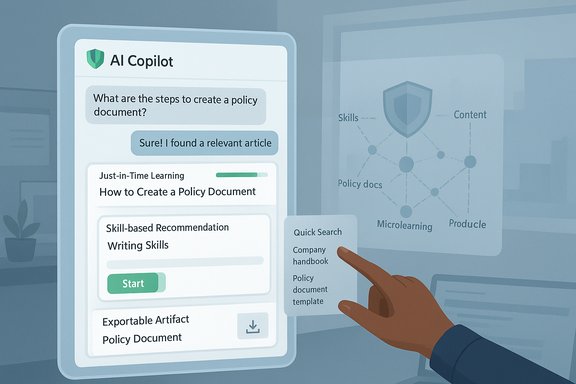
Cornerstone describes three headline capabilities delivered as a Copilot agent: In‑the‑flow learning, Skill‑based recommendations, and Knowledge discovery. Each feature targets one of the frictions L&D teams face.In‑the‑flow learning
- Employees can discover and launch learning directly within Microsoft 365 Copilot experiences (Teams, Word, Outlook, etc..
- The experience is meant to require no additional logins or app switching: learning appears as actionable responses inside the Copilot chat or contextual pane.
- This preserves focus and reduces barriers to microlearning adoption.
Skill‑based recommendations
- Cornerstone’s skills engine maps content to skill profiles and role definitions so recommendations are targeted rather than generic.
- Recommendations can be surfaced according to the user’s current skill gaps, career interests, or organizational priorities—keeping learning personal and aligned to on‑the‑job needs.
Knowledge discovery
- Employees can ask natural‑language questions and receive answers that surface organizational learning content, policy artifacts, or curated resources.
- The agent uses topic, keyword, and interest signals to rank and deliver relevant materials, turning distributed knowledge into actionable intelligence where work happens.
Technical context and integration patterns
Cornerstone’s approach leverages the tenant‑aware capabilities of Microsoft 365 Copilot and Copilot agents, which are designed to consume organizational context, connectors, and indexed content to return grounded answers and actions. That pattern is now common across enterprise Copilot use cases: connectors (OAuth‑based) bring in mail, calendar and files; semantic indexing and retrieval‑augmented generation (RAG) create a searchable knowledge layer; and agent frameworks publish functionality into the Copilot surface for end users.Key technical considerations that often define these integrations:
- Authentication and consent: Connectors typically use standard OAuth consent flows; tenants and users explicitly enable access.
- Grounding and export: Copilot integrations increasingly support producing native Office artifacts (Word, Excel, PowerPoint, PDF) directly from chat, which streamlines turning learning outputs or knowledge summaries into shareable deliverables.
- Data indexing and RAG: Successful knowledge discovery relies on a semantic index (vectors + metadata) and policies that determine what content is queryable by the agent.
Strengths and potential upside
1. Removes the biggest adoption barrier: context switching
By surfacing learning where employees already work — inside Copilot — Cornerstone reduces the cognitive and logistical cost of seeking help. That’s a direct lever for improving engagement with microlearning and informal knowledge.2. Better personalization through skills intelligence
Mapping content to skill profiles and job roles improves relevance. When recommendations are tied to measurable competencies, L&D can show clearer links between activity and real business outcomes like time-to‑competency or promotion readiness.3. Faster application of knowledge
Instant answers and quick access to training at the point of need accelerate transfer — learners can apply a micro‑lesson immediately, which strengthens retention and reduces costly rework. This addresses the WEF’s call for continuous learning as skills shift.4. Organizational reuse of tribal knowledge
Automated discovery across learning assets, wikis, and course libraries helps pull hidden insights into everyday workflows, improving operational efficiency and reducing duplicate work.Risks, limitations, and what to watch closely
No embedded agent is risk‑free. Several important caveats and potential pitfalls must be managed before scaling a Cornerstone + Copilot deployment.1. Data governance, privacy and leakage risk
Copilot agents that can see organizational documents, email or training content create governance questions: which assets should be queryable, how is PII or IP protected, and how are access controls enforced? Implementation must define clear scopes, use tenant controls and adhere to data residency/compliance needs. Microsoft’s connector model is opt‑in, but enterprise governance still requires planning and enforcement.2. Model accuracy and hallucination
Generative agents can produce plausible but incorrect responses. When learning or policy guidance is consumed directly inside a productivity surface, errors can propagate quickly. L&D teams should implement human‑in‑the‑loop validation, editorial review workflows, and audit trails for any AI‑generated or AI‑augmented learning artifacts.3. Shadow AI and overreliance
If the agent becomes the primary source of quick answers, workers may stop verifying outputs or lean on it for tasks that require human judgment—raising legal and quality risks. Training programs must teach how to use Copilot and when to escalate or verify.4. Measurement and proof of impact
Vendor claims about faster upskilling or adoption rates need pilot data tied to clear KPIs: time‑to‑competency, error rates, promotion velocity, and business metrics. Treat initial rollouts as pilots with control groups to produce defensible ROI estimates.5. Vendor lock‑in and metadata portability
Skills taxonomies and role mappings are valuable IP. L&D leaders should insist on exportable skill and role metadata to avoid future lock‑in and support multi‑vendor competence strategies.Implementation checklist — technical and organizational steps
- Define business outcomes and KPIs. Map learning goals to measurable outcomes: reduced time‑to‑competency, decreased customer escalation, faster onboarding ramp, etc.
- Inventory knowledge assets. Catalog learning libraries, policies, wikis, and essential documents; classify sensitivity and determine which assets are safe to surface inside Copilot.
- Set governance controls. Establish who can publish to the agent, review cycles, and retention policies. Ensure Purview/PIM/PACS-like policies align with the agent’s retrieval scope.
- Pilot with targeted user groups. Start with role‑specific pilots (e.g., sales reps, support agents) to validate relevance and measure business impact.
- Build human‑in‑the‑loop review. Route AI‑generated learning modules or answers through content SMEs before broad publication.
- Train users on verification patterns. Teach validation heuristics — how to check sources, when to escalate, and how to use outputs as draft material rather than final answers.
- Monitor and iterate. Use usage analytics and Copilot telemetry to refine recommendations, plug content gaps and measure uplift against KPIs.
Governance, security and compliance: practical notes
- Use tenant controls to limit which connectors and content stores the agent can access; prefer explicit opt‑in at user or group level.
- Treat training and policy artifacts differently: policy documents may need stricter access and approval gates than general learning modules.
- Implement logging and audit trails for all agent interactions and content exports; these are critical for incident response and compliance reviews.
- Maintain an editorial workflow and versioning for AI‑generated learning; never publish mission‑critical or regulatory content without human verification.
Realistic business cases and quick wins
- Sales enablement: Deliver product microlearning or objection‑handling snippets during CRM conversations in Teams; cue role‑specific talking points or compliance checks just before a call.
- Customer support: Surface troubleshooting guides and micro‑courses inside help desk workflows to reduce resolution time and minimize knowledge gaps.
- Onboarding: Short, task‑aligned learning nudge cards embedded in the new hire’s day‑to‑day apps to accelerate ramp without adding calendar clutter.
How to measure success — recommended KPIs
- Usage and adoption: number of Copilot agent invocations per user, completed microlearning modules launched from Copilot, and recurring active users.
- Time‑to‑competency: days or weeks to reach a defined proficiency threshold for key roles.
- Performance impact: reduction in error rates, improved first‑call resolution, sales win rates, or productivity metrics tied to the learning content.
- Quality and trust: user satisfaction scores for recommended content and human review error rates on AI‑generated modules.
- Risk indicators: number of flagged hallucinations, content rollback events, and policy‑violation incidents.
Strategic recommendations for L&D and IT leaders
- Treat the agent as a channel, not a replacement for a content strategy. The in‑flow model amplifies existing content and makes quality control more important, not less.
- Start with role‑aligned pilots and measurable KPIs; use early adopters to refine prompts, taxonomies, and approval gates.
- Maintain portability: insist on exportable skills metadata and open formats so learning artifacts and skill maps remain usable across platforms.
- Pair Copilot access with an organizational campaign: managers who model use, validate outputs, and reward learning behavior materially increase adoption.
Final assessment: promising but not plug‑and‑play
Cornerstone for Microsoft Copilot represents a logical and potentially high‑impact evolution in enterprise learning: moving relevant training and organizational knowledge directly to employees inside the tools they use every day. That alignment with on‑the‑job needs addresses three of the biggest barriers to effective upskilling: friction, relevance and discoverability. But the technology is not a turnkey solution. The upside depends squarely on disciplined implementation: careful governance, human review of AI outputs, measurable pilots, and a clear mapping between skills, content and business outcomes. Without those safeguards, organizations risk propagating errors, leaking sensitive content, or producing learning experiences that feel disconnected from real work.For organizations that treat this as a channel and apply the governance and measurement rigour L&D and IT teams already use for other enterprise platforms, Cornerstone’s Copilot agent can accelerate learning at the speed the market now demands—helping close the gap WEF, SHRM and ADP highlight between rapid skill change, employer needs, and worker confidence.
Conclusion
Embedding skills intelligence and on‑demand knowledge into Microsoft 365 Copilot is a pragmatic next step for enterprise learning: it meets employees where they already are and shortens the loop from discovery to application. The approach aligns with major industry trends and the hard evidence that continuous, contextualized learning is essential to manage the rapid shift in core skills. Yet success will depend less on the novelty of an agent and more on the discipline with which organizations govern, validate and measure the outcomes of that agent. When done correctly, Cornerstone for Microsoft Copilot may move the needle on adoption and impact—if, and only if, it's deployed with clear outcomes, fed with trusted content, and kept under active human oversight.
Source: Cornerstone Cornerstone for Microsoft Copilot: Learning in the flow of work
