

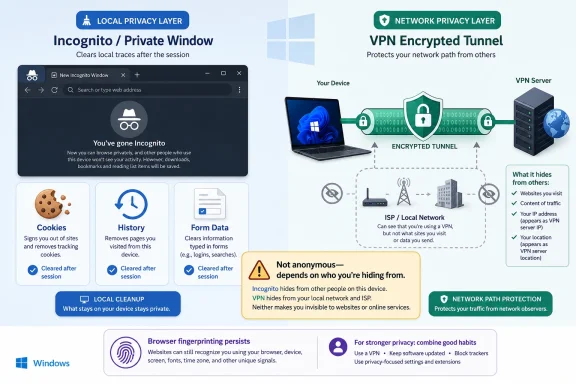
Incognito mode is better for hiding browser traces from other people using the same computer, while a VPN is better for hiding your network location and traffic path from local networks and internet providers. Neither tool makes you anonymous, and treating either one as a magic privacy switch is how users get burned. The real answer is not “Incognito versus VPN,” but which layer of exposure you are trying to reduce.
That distinction matters because browser vendors, VPN companies, advertisers, employers, schools, ISPs, and websites all occupy different places in the privacy chain. Incognito mode mostly changes what your browser keeps after a session ends; a VPN changes how your connection reaches the wider internet. Confusing those two jobs turns a useful browser feature into a false sense of invisibility.
The modern private-browsing window is one of the most misunderstood features in consumer software. Chrome calls it Incognito, Edge calls it InPrivate, Firefox calls it Private Browsing, and Safari uses its own private-window language. The names vary, but the bargain is essentially the same: the browser tries not to keep local session artifacts such as history, cookies, temporary files, and form entries after the private window closes.
That is useful, but it is not mysterious. Microsoft says Edge InPrivate browsing does not save browsing history, cookies, site data, or form entries on the device after the session ends, while downloaded files and saved favorites can remain behind (Microsoft Support). Mozilla is even more blunt, warning that Firefox Private Browsing does not stop websites from seeing where you are physically located or prevent your ISP from logging what you do (Mozilla). Google’s own Chrome help similarly frames Incognito as a local-data feature, not a universal anonymity layer (Google Chrome Help).
That local focus is why Incognito is genuinely handy on a shared family PC, a borrowed laptop, a kiosk machine, or a workbench system in an IT room. It keeps a gift search out of the browser history. It prevents a one-off login from staying attached to the next session. It reduces cookie carryover between normal browsing and a temporary session.
But privacy is always a question of from whom. Incognito helps against the next person who opens the browser profile. It does little against the site you visit, the network you are using, the DNS resolver involved, the employer or school running the network, or the ISP carrying the connection.
That is a meaningful upgrade in some situations. NIST’s telework guidance tells users to use an organization’s VPN on telework devices when available because it provides stronger protection for remote connections (NIST). For administrators, that is not merely about hiding browsing from an ISP; it is about routing traffic through managed access controls, logging points, identity policies, and corporate security inspection.
For consumers, the benefit is narrower but still real. A VPN can mask your public IP address from websites, obscure destination patterns from the local network, and reduce exposure on untrusted Wi-Fi. It can also make a user appear to be connecting from another city or country, which is why VPNs became associated with streaming workarounds, censorship resistance, and location shifting.
The catch is that a VPN does not abolish trust. It transfers a portion of trust from the ISP or local network to the VPN provider. If the VPN provider logs aggressively, injects advertising, mishandles metadata, or responds broadly to legal demands, the user has not become private; the user has simply chosen a different middleman.
That is why “use a VPN” is incomplete advice. A reputable paid provider with transparent ownership, audited no-logs claims, modern protocols, and sane apps is a different product from a free VPN with vague data practices. The latter may be worse than doing nothing, because it invites users to send sensitive traffic through a company whose entire business model may depend on monetizing attention.
Google’s Incognito controversy put that gap under a legal microscope. In 2024, Google agreed to delete or remediate billions of records as part of a settlement over allegations that Chrome users were tracked while using Incognito mode; Google denied wrongdoing, but the settlement required clearer disclosures and data-handling changes (Associated Press). Ars Technica reported that the deal also required Google to maintain a change that blocks third-party cookies by default in Incognito mode (Ars Technica).
That case did not prove that Incognito was useless. It proved that the word “private” carries an expectation that many users interpret far beyond local history deletion. When ordinary users open a dark-themed browser window and see language about private browsing, they are not parsing data flows between browser state, website analytics, advertising scripts, DNS, TLS, IP addresses, and account logins. They are assuming they have stepped outside normal tracking.
They have not. If you sign in to a Google account, Microsoft account, Reddit account, bank account, or streaming account inside a private window, the service can still know who you are. If you visit a site directly, that site still sees your IP address unless another network-layer tool is involved. If the site embeds analytics or advertising code, those systems may still receive signals, subject to browser restrictions and privacy settings.
The private window is therefore best understood as a disposable browser compartment. It is a clean room for cookies and history, not a witness-protection program for the web.
Edge’s InPrivate mode can keep local browser history from being saved after the window closes, but it cannot prevent extensions from saving data if those extensions are allowed to run in private sessions, and it does not remove files users intentionally download (Microsoft Support). Chrome and Firefox have similar caveats. In other words, the browser can promise a limited session behavior, but it cannot govern every other process, account, extension, or network appliance watching the machine.
The same is true in reverse for VPNs. A VPN app can route traffic through a tunnel, but it does not stop Windows from keeping local artifacts, the browser from storing downloads, the user from logging into identifying accounts, or malware from exfiltrating data. A VPN does not make a compromised endpoint trustworthy. It also does not turn a managed corporate laptop into a private personal device.
That distinction matters in offices. If an employer manages the endpoint through Intune, Group Policy, Defender for Endpoint, a secure web gateway, or a corporate VPN client, a private browser window is not a shield against administrative visibility. It may prevent casual local history review, but it will not override enterprise logging, endpoint telemetry, DNS controls, or web-filtering infrastructure.
It also matters at home. A VPN may hide destination information from the ISP, but parents using router-level controls, security appliances, or DNS filtering may still see categories, blocked domains, or device-level activity depending on how the network is configured. A user’s privacy model must include the device, browser, account, network, and service — not just the icon in the toolbar.
A VPN adds another encrypted layer between the device and the VPN server. That can hide DNS requests and destination metadata from the local network if configured properly, and it can prevent a hostile Wi-Fi operator from easily mapping all traffic destinations. But once the traffic exits the VPN server, it still goes to the destination service, usually over HTTPS.
The site still sees a connection. It may see the VPN provider’s exit IP rather than the user’s home IP, but it can still receive cookies, login status, device characteristics, tracking pixels, and behavioral signals. If the user signs into a personal account, the masked IP becomes only one data point in a much larger identity graph.
This is where the word “anonymous” becomes dangerous. A VPN can improve privacy against some observers. It can support anonymity in specific threat models when combined with careful browser isolation, no identifying logins, hardened settings, and payment/account discipline. But the average user who opens a VPN, logs into Gmail, checks Facebook, shops with a saved account, and reuses the same browser profile is not anonymous in any meaningful sense.
The better claim is more modest: a good VPN can reduce IP-based tracking and protect traffic from local network observers. That is valuable. It is also not the same as disappearing.
The Electronic Frontier Foundation’s Cover Your Tracks project explains that tracking sites can stitch small browser and device characteristics into a fingerprint that may distinguish one user from others (EFF). That is precisely the sort of technique that makes simplistic privacy advice age badly. Clearing cookies helps. Changing IP addresses helps. But a distinctive browser configuration can still leak continuity.
A VPN is especially weak against fingerprinting because it mostly operates below the browser. It can change the apparent network origin, but it does not automatically change the browser’s canvas behavior, font list, window size, locale, logged-in accounts, or extension set. In some cases, unusual privacy add-ons can even make a browser more distinctive if few people use the same combination.
Private browsing helps by starting a temporary cookie jar, but it does not necessarily make the browser look generic. Firefox, Brave, Safari, Chrome, and Edge all approach tracking prevention differently, and their protections change over time. For ordinary users, that means privacy is a moving target rather than a product category.
The harsh lesson is that the web’s advertising and analytics ecosystem is built to survive partial countermeasures. Delete cookies, and it leans on fingerprints. Change IP addresses, and it leans on logins. Block third-party scripts, and sites push first-party tracking relationships. No single consumer feature defeats an ecosystem whose financial incentive is to recognize users across contexts.
That does not mean every free VPN is malicious. Some are limited tiers of reputable paid services. Some are subsidized by broader privacy businesses. Some are transparent about caps, locations, and restrictions. But the category is full of products that ask users to route intimate traffic through opaque infrastructure while making grand claims about privacy.
Regulators have noticed the broader privacy-software problem. In 2024, the FTC ordered Avast to pay $16.5 million and banned it from selling browsing data for advertising purposes after alleging that the company sold detailed, re-identifiable browsing data while marketing products as privacy-protective (FTC). Avast’s case was not a simple “all VPNs are bad” story, but it was a reminder that privacy branding and privacy practice can diverge sharply.
That lesson should shape VPN selection. Users should look for independent audits, clear ownership, minimal logging, modern protocols such as WireGuard or IKEv2/IPsec, kill-switch behavior, DNS leak protection, transparent warrant canaries or legal-process reporting where appropriate, and a business model that does not depend on behavioral advertising. For enterprise users, procurement should go further: architecture reviews, contract language, jurisdictional risk, identity integration, logging controls, and incident response procedures all matter.
The worst VPN is not merely ineffective. It is privileged. It sits between the user and the internet, sees connection metadata, may operate DNS, and can shape or break traffic. Installing a random VPN because a YouTube sponsor code promised “military-grade privacy” is not a security strategy.
Using both can make sense. Start the VPN first, confirm it is connected, then open a private browser window. That sequence gives the private session a clean local state while routing traffic through the VPN tunnel. It is particularly reasonable on hotel Wi-Fi, conference networks, airports, shared households, or any environment where both local browser traces and network observation are concerns.
But layering only works if users understand the remaining gaps. If you log into the same account, the service knows it is you. If you download a file, it may remain on disk. If you allow extensions in private windows, those extensions may observe activity. If your device is infected, neither Incognito nor a VPN rescues the session. If your VPN provider is untrustworthy, the tunnel becomes a liability.
This is also where Windows hygiene becomes privacy hygiene. Keep the OS patched. Keep browsers current. Remove sketchy extensions. Use reputable DNS where appropriate. Prefer HTTPS-only mode. Enable multi-factor authentication. Use separate browser profiles for work and personal activity. Consider a privacy-focused browser configuration for sensitive research rather than expecting a single private tab to sanitize everything.
For many users, the highest-value move is not buying yet another subscription. It is separating identities. Do not use the same browser profile, logged-in account, and extension set for every context. A private window is a start, but compartmentalization is the principle.
If the concern is the website itself, neither tool is enough by itself. The site can still see your account login, browser behavior, fingerprinting signals, and whatever data you submit. If the concern is a corporate administrator on a managed machine, assume the organization may have visibility far beyond browser history. If the concern is law enforcement, litigation, or a hostile state actor, consumer VPN marketing is not a threat model.
That may sound deflating, but it is actually liberating. Users do not need to buy every privacy product or distrust every browser feature. They need to stop asking one tool to solve five different problems.
That distinction matters because browser vendors, VPN companies, advertisers, employers, schools, ISPs, and websites all occupy different places in the privacy chain. Incognito mode mostly changes what your browser keeps after a session ends; a VPN changes how your connection reaches the wider internet. Confusing those two jobs turns a useful browser feature into a false sense of invisibility.
 The Privacy Button Was Never a Cloaking Device
The modern private-browsing window is one of the most misunderstood features in consumer software. Chrome calls it Incognito, Edge calls it InPrivate, Firefox calls it Private Browsing, and Safari uses its own private-window language. The names vary, but the bargain is essentially the same: the browser tries not to keep local session artifacts such as history, cookies, temporary files, and form entries after the private window closes.That is useful, but it is not mysterious. Microsoft says Edge InPrivate browsing does not save browsing history, cookies, site data, or form entries on the device after the session ends, while downloaded files and saved favorites can remain behind (Microsoft Support). Mozilla is even more blunt, warning that Firefox Private Browsing does not stop websites from seeing where you are physically located or prevent your ISP from logging what you do (Mozilla). Google’s own Chrome help similarly frames Incognito as a local-data feature, not a universal anonymity layer (Google Chrome Help).
That local focus is why Incognito is genuinely handy on a shared family PC, a borrowed laptop, a kiosk machine, or a workbench system in an IT room. It keeps a gift search out of the browser history. It prevents a one-off login from staying attached to the next session. It reduces cookie carryover between normal browsing and a temporary session.
But privacy is always a question of from whom. Incognito helps against the next person who opens the browser profile. It does little against the site you visit, the network you are using, the DNS resolver involved, the employer or school running the network, or the ISP carrying the connection.
A VPN Moves the Trust Boundary, It Does Not Erase It
A VPN solves a different problem. Instead of asking the browser not to remember a session, a VPN creates an encrypted tunnel between the device and the VPN provider’s server. To the local coffee-shop Wi-Fi, hotel network, campus network, or ISP, the traffic appears to be going to the VPN endpoint rather than directly to every site and service you access.That is a meaningful upgrade in some situations. NIST’s telework guidance tells users to use an organization’s VPN on telework devices when available because it provides stronger protection for remote connections (NIST). For administrators, that is not merely about hiding browsing from an ISP; it is about routing traffic through managed access controls, logging points, identity policies, and corporate security inspection.
For consumers, the benefit is narrower but still real. A VPN can mask your public IP address from websites, obscure destination patterns from the local network, and reduce exposure on untrusted Wi-Fi. It can also make a user appear to be connecting from another city or country, which is why VPNs became associated with streaming workarounds, censorship resistance, and location shifting.
The catch is that a VPN does not abolish trust. It transfers a portion of trust from the ISP or local network to the VPN provider. If the VPN provider logs aggressively, injects advertising, mishandles metadata, or responds broadly to legal demands, the user has not become private; the user has simply chosen a different middleman.
That is why “use a VPN” is incomplete advice. A reputable paid provider with transparent ownership, audited no-logs claims, modern protocols, and sane apps is a different product from a free VPN with vague data practices. The latter may be worse than doing nothing, because it invites users to send sensitive traffic through a company whose entire business model may depend on monetizing attention.
The Incognito Lawsuit Made the Branding Problem Impossible to Ignore
The confusion around private browsing is not only a user-education failure. It is also a product-marketing problem. For years, browsers leaned on names that sounded more absolute than the underlying feature deserved. “Private” and “Incognito” are technically defensible only if the user understands the implied phrase: private on this device, incognito to this browser profile.Google’s Incognito controversy put that gap under a legal microscope. In 2024, Google agreed to delete or remediate billions of records as part of a settlement over allegations that Chrome users were tracked while using Incognito mode; Google denied wrongdoing, but the settlement required clearer disclosures and data-handling changes (Associated Press). Ars Technica reported that the deal also required Google to maintain a change that blocks third-party cookies by default in Incognito mode (Ars Technica).
That case did not prove that Incognito was useless. It proved that the word “private” carries an expectation that many users interpret far beyond local history deletion. When ordinary users open a dark-themed browser window and see language about private browsing, they are not parsing data flows between browser state, website analytics, advertising scripts, DNS, TLS, IP addresses, and account logins. They are assuming they have stepped outside normal tracking.
They have not. If you sign in to a Google account, Microsoft account, Reddit account, bank account, or streaming account inside a private window, the service can still know who you are. If you visit a site directly, that site still sees your IP address unless another network-layer tool is involved. If the site embeds analytics or advertising code, those systems may still receive signals, subject to browser restrictions and privacy settings.
The private window is therefore best understood as a disposable browser compartment. It is a clean room for cookies and history, not a witness-protection program for the web.
Windows Users Live in the Gap Between Browser Privacy and Network Privacy
For WindowsForum readers, the practical distinction is especially important because Windows machines often sit at the intersection of personal browsing, Microsoft account services, enterprise management, and endpoint security. A home Windows 11 laptop may sync Edge history through a Microsoft account, run third-party browser extensions, connect to a work VPN, and use a DNS resolver selected by the router or security suite. Privacy is not controlled by a single switch in that environment.Edge’s InPrivate mode can keep local browser history from being saved after the window closes, but it cannot prevent extensions from saving data if those extensions are allowed to run in private sessions, and it does not remove files users intentionally download (Microsoft Support). Chrome and Firefox have similar caveats. In other words, the browser can promise a limited session behavior, but it cannot govern every other process, account, extension, or network appliance watching the machine.
The same is true in reverse for VPNs. A VPN app can route traffic through a tunnel, but it does not stop Windows from keeping local artifacts, the browser from storing downloads, the user from logging into identifying accounts, or malware from exfiltrating data. A VPN does not make a compromised endpoint trustworthy. It also does not turn a managed corporate laptop into a private personal device.
That distinction matters in offices. If an employer manages the endpoint through Intune, Group Policy, Defender for Endpoint, a secure web gateway, or a corporate VPN client, a private browser window is not a shield against administrative visibility. It may prevent casual local history review, but it will not override enterprise logging, endpoint telemetry, DNS controls, or web-filtering infrastructure.
It also matters at home. A VPN may hide destination information from the ISP, but parents using router-level controls, security appliances, or DNS filtering may still see categories, blocked domains, or device-level activity depending on how the network is configured. A user’s privacy model must include the device, browser, account, network, and service — not just the icon in the toolbar.
Encryption Is Not the Same Thing as Anonymity
One reason VPNs get oversold is that encryption is easy to market. “Encrypted traffic” sounds like “nobody can see anything,” but the real picture is more layered. HTTPS already encrypts the contents of most mainstream web sessions between the browser and the site, which means a local network generally cannot read the contents of a banking page or webmail inbox just because the user skipped a VPN.A VPN adds another encrypted layer between the device and the VPN server. That can hide DNS requests and destination metadata from the local network if configured properly, and it can prevent a hostile Wi-Fi operator from easily mapping all traffic destinations. But once the traffic exits the VPN server, it still goes to the destination service, usually over HTTPS.
The site still sees a connection. It may see the VPN provider’s exit IP rather than the user’s home IP, but it can still receive cookies, login status, device characteristics, tracking pixels, and behavioral signals. If the user signs into a personal account, the masked IP becomes only one data point in a much larger identity graph.
This is where the word “anonymous” becomes dangerous. A VPN can improve privacy against some observers. It can support anonymity in specific threat models when combined with careful browser isolation, no identifying logins, hardened settings, and payment/account discipline. But the average user who opens a VPN, logs into Gmail, checks Facebook, shops with a saved account, and reuses the same browser profile is not anonymous in any meaningful sense.
The better claim is more modest: a good VPN can reduce IP-based tracking and protect traffic from local network observers. That is valuable. It is also not the same as disappearing.
Fingerprinting Keeps Following Where Cookies Stop
Private browsing and VPNs both run into the same modern adversary: browser fingerprinting. Instead of relying only on cookies, fingerprinting systems collect combinations of attributes — browser version, operating system, screen size, installed fonts, graphics behavior, time zone, language settings, audio characteristics, and more — to infer that the same browser is returning across sessions.The Electronic Frontier Foundation’s Cover Your Tracks project explains that tracking sites can stitch small browser and device characteristics into a fingerprint that may distinguish one user from others (EFF). That is precisely the sort of technique that makes simplistic privacy advice age badly. Clearing cookies helps. Changing IP addresses helps. But a distinctive browser configuration can still leak continuity.
A VPN is especially weak against fingerprinting because it mostly operates below the browser. It can change the apparent network origin, but it does not automatically change the browser’s canvas behavior, font list, window size, locale, logged-in accounts, or extension set. In some cases, unusual privacy add-ons can even make a browser more distinctive if few people use the same combination.
Private browsing helps by starting a temporary cookie jar, but it does not necessarily make the browser look generic. Firefox, Brave, Safari, Chrome, and Edge all approach tracking prevention differently, and their protections change over time. For ordinary users, that means privacy is a moving target rather than a product category.
The harsh lesson is that the web’s advertising and analytics ecosystem is built to survive partial countermeasures. Delete cookies, and it leans on fingerprints. Change IP addresses, and it leans on logins. Block third-party scripts, and sites push first-party tracking relationships. No single consumer feature defeats an ecosystem whose financial incentive is to recognize users across contexts.
Free VPNs Deserve the Most Suspicion
If Incognito’s weakness is overpromising through language, the VPN industry’s weakness is overpromising through incentives. A browser vendor can offer private windows as a feature inside a larger product. A VPN company, especially a free one, must pay for bandwidth, servers, app development, support, abuse handling, and marketing. If the user is not paying, someone else usually is.That does not mean every free VPN is malicious. Some are limited tiers of reputable paid services. Some are subsidized by broader privacy businesses. Some are transparent about caps, locations, and restrictions. But the category is full of products that ask users to route intimate traffic through opaque infrastructure while making grand claims about privacy.
Regulators have noticed the broader privacy-software problem. In 2024, the FTC ordered Avast to pay $16.5 million and banned it from selling browsing data for advertising purposes after alleging that the company sold detailed, re-identifiable browsing data while marketing products as privacy-protective (FTC). Avast’s case was not a simple “all VPNs are bad” story, but it was a reminder that privacy branding and privacy practice can diverge sharply.
That lesson should shape VPN selection. Users should look for independent audits, clear ownership, minimal logging, modern protocols such as WireGuard or IKEv2/IPsec, kill-switch behavior, DNS leak protection, transparent warrant canaries or legal-process reporting where appropriate, and a business model that does not depend on behavioral advertising. For enterprise users, procurement should go further: architecture reviews, contract language, jurisdictional risk, identity integration, logging controls, and incident response procedures all matter.
The worst VPN is not merely ineffective. It is privileged. It sits between the user and the internet, sees connection metadata, may operate DNS, and can shape or break traffic. Installing a random VPN because a YouTube sponsor code promised “military-grade privacy” is not a security strategy.
The Smart Move Is Layering, Not Choosing a Team
The original “Incognito vs. VPN” framing is tempting because it promises a winner. In reality, the two tools are complementary because they defend different surfaces. Incognito reduces what the browser profile retains. A VPN reduces what the local network and ISP can infer about destinations and IP origin.Using both can make sense. Start the VPN first, confirm it is connected, then open a private browser window. That sequence gives the private session a clean local state while routing traffic through the VPN tunnel. It is particularly reasonable on hotel Wi-Fi, conference networks, airports, shared households, or any environment where both local browser traces and network observation are concerns.
But layering only works if users understand the remaining gaps. If you log into the same account, the service knows it is you. If you download a file, it may remain on disk. If you allow extensions in private windows, those extensions may observe activity. If your device is infected, neither Incognito nor a VPN rescues the session. If your VPN provider is untrustworthy, the tunnel becomes a liability.
This is also where Windows hygiene becomes privacy hygiene. Keep the OS patched. Keep browsers current. Remove sketchy extensions. Use reputable DNS where appropriate. Prefer HTTPS-only mode. Enable multi-factor authentication. Use separate browser profiles for work and personal activity. Consider a privacy-focused browser configuration for sensitive research rather than expecting a single private tab to sanitize everything.
For many users, the highest-value move is not buying yet another subscription. It is separating identities. Do not use the same browser profile, logged-in account, and extension set for every context. A private window is a start, but compartmentalization is the principle.
The Right Tool Depends on Who You Are Hiding From
The practical answer becomes clear once the adversary is named. If the concern is another person using the same Windows account later, Incognito or InPrivate is the right first tool. If the concern is a hotel Wi-Fi operator, school network, coffee-shop attacker, or ISP-level destination visibility, a reputable VPN is more relevant.If the concern is the website itself, neither tool is enough by itself. The site can still see your account login, browser behavior, fingerprinting signals, and whatever data you submit. If the concern is a corporate administrator on a managed machine, assume the organization may have visibility far beyond browser history. If the concern is law enforcement, litigation, or a hostile state actor, consumer VPN marketing is not a threat model.
That may sound deflating, but it is actually liberating. Users do not need to buy every privacy product or distrust every browser feature. They need to stop asking one tool to solve five different problems.
The Browser Window and the Tunnel Each Have Their Place
A sensible privacy setup for most Windows users is not exotic. It is a layered routine that treats private browsing as local cleanup, VPNs as network-path protection, and account discipline as the foundation. The closer a user gets to sensitive work — journalism, activism, regulated business, medical research, legal matters, or high-risk travel — the more those layers need to be planned rather than improvised.- Incognito, InPrivate, and Private Browsing are best understood as temporary browser sessions that reduce local traces after the window closes.
- A VPN is usually the stronger tool against local network observers and ISP-level destination visibility, but it shifts trust to the VPN provider.
- Neither Incognito nor a VPN prevents websites from identifying users who log in, submit personal data, or carry a distinctive browser fingerprint.
- Browser extensions, downloads, synced accounts, endpoint management tools, and malware can all defeat the privacy expectations users attach to private windows.
- Free or opaque VPN services deserve special caution because the provider occupies a privileged position in the user’s traffic path.
- The strongest everyday setup combines private sessions, a reputable VPN when needed, hardened browser settings, careful account separation, and basic Windows security hygiene.
References
- Primary source: AOL.com - Incognito Mode Vs. VPN: Which Is Better For Your Online Privacy?
Published: 2026-05-17T17:36:51.102355
Incognito Mode Vs. VPN: Which Is Better For Your Online Privacy? - AOL
Incognito mode and VPNs both promise more private browsing, but they don't work the same way. A closer look at the details behind each option shows why.www.aol.com - Official source: Microsoft Support - Browse InPrivate in Microsoft Edge
States that Edge InPrivate deletes browsing history, cookies, and site data when all InPrivate windows are closed.
Browse InPrivate in Microsoft Edge | Microsoft Support
Learn how to use InPrivate browsing in Microsoft Edge if you don't want your browsing data saved on your PC. support.microsoft.com
- Official source: Google Chrome Help - How Chrome Incognito keeps your browsing private
Explains Incognito does not save activity to the device/Google Account if not signed in, and that websites can still know users they have signed in to.

Browse in Incognito mode - Computer - Google Chrome Help
You can browse the web more privately in Incognito mode. Incognito limits what’s saved to your device When you’re browsing in Incognito, Chrome limits the information that’s saved to your device. Th
support.google.com
- Official source: Mozilla - Firefox private browsing mode
Clarifies that private browsing does not prevent websites from seeing the user’s physical location or stop the ISP from logging what they do.
Firefox private browsing mode — Firefox.com
 www.mozilla.org
- Official source: NIST - Telework Security Basics
Recommends using an organization’s VPN on telework devices for stronger protection (per organization telework rules/policies).
Telework Security Basics
Your employer has unexpectedly directed you to telework—and you are feeling overwhelmed.www.nist.gov - Official source: NIST - Guide to Enterprise Telework, Remote Access, and Bring Your Own Device (BYOD) Security (NIST SP 800-46 Rev. 2)
Primary NIST guidance document on securing telework/remote access, including remote access communications and security practices relevant to VPN use.
Guide to Enterprise Telework, Remote Access, and Bring Your Own Device (BYOD) Security
For many organizations, their employees, contractors, business partners, vendors, and/or others use enterprise telework or remote access technologies to perform work from external locations. All components of these technologies, including organization-issued and bring your own device (BYOD)...nvlpubs.nist.gov
