

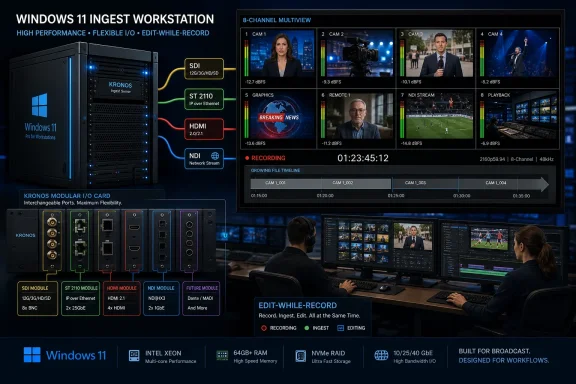
Bluefish444 has released IngeSTore 2.0 for Windows 11, a multichannel recording package for professional live production and archival workflows that expands capture to eight channels and adds support for KRONOS cards, ST 2110, HDMI, SDI, and NDI inputs. The announcement is not a consumer Windows story, but it is a useful marker of where Windows 11 now sits in the production stack. Broadcast ingest, once treated as a fixed-function appliance problem, is increasingly a software-defined workstation problem. IngeSTore 2.0 makes that shift explicit: one Windows box, several interface standards, and a promise that the file written to storage should not care which cable brought the picture in.
The easiest way to read IngeSTore 2.0 is as a version bump: more channels, more cards, more layouts, more monitoring. That undersells what Bluefish444 is trying to package. The company is positioning the software as a common capture layer for facilities that are juggling legacy SDI, newer IP video, HDMI feeds, and NDI sources in the same operational week.
That matters because production environments rarely modernize all at once. A studio may still have SDI routers and tape machines, a live-events rack may have HDMI sources from laptops and cameras, and a larger facility may be testing SMPTE ST 2110 as part of an IP migration. IngeSTore 2.0’s central pitch is that those paths can land in the same ingest application and produce the same production, archival, or streaming format.
The Windows 11 angle is also more than a compatibility checkbox. Professional video hardware has long had a complicated relationship with Windows upgrades, because capture cards, driver packages, codec stacks, GPU behavior, and storage performance all have to align. By shipping IngeSTore 2.0 inside Bluefish444’s Windows installer package 2026.14.1, the company is effectively telling facilities that the supported platform is not a loose bundle of parts, but a defined driver-and-application combination.
That is the part sysadmins should notice. When vendors in the pro-video space talk about Windows support, they are often talking about the entire chain: card firmware, kernel drivers, plug-ins, application binaries, and third-party NLE compatibility. In that context, “Windows 11 support” is less a marketing line than a support boundary.
But the more strategic addition is the expanded choice of input formats. IngeSTore 2.0 supports recording from SDI, ST 2110, HDMI, and NDI, with KRONOS Optikos3G hardware allowing interchangeable video interfaces across SDI, fiber, HDMI 1.4, and SMPTE 2110/2022 using suitable modules. That is a very specific kind of flexibility: not a promise that every workflow is magically identical, but an attempt to reduce the number of capture applications and recorders a facility has to maintain.
For broadcast engineers, SDI is not going away quickly. It is robust, familiar, deterministic, and already embedded in enormous quantities of infrastructure. At the same time, ST 2110 is the direction of travel for high-end IP production, while NDI remains attractive in software-centric and network-friendly environments that can tolerate its trade-offs.
IngeSTore 2.0 sits in the middle of that messy transition. Its value proposition is not that one interface wins. It is that facilities should not need a different recording workflow every time a signal arrives through a different transport.
Windows-based production servers never disappeared, of course, but the conversation has changed. Modern facilities increasingly expect commodity compute, fast local or networked storage, GPU acceleration, and software-defined routing to do jobs that once belonged to purpose-built boxes. The appeal is not merely lower cost; it is the ability to reconfigure the same hardware for production, post, streaming, archive, and monitoring tasks.
IngeSTore 2.0 plays directly into that. Bluefish444 says the software can capture to local or network storage and supports workflows around growing files, where editors can begin working with media while recording continues. That feature is especially important in news, sports, live events, and quick-turnaround production, where the delay between capture and edit can matter more than almost anything else.
This is where Windows 11 becomes relevant to the WindowsForum audience. Microsoft’s desktop operating system is no longer just the workstation under an editor’s NLE; in setups like this, it becomes part of the live acquisition path. That raises the stakes for driver discipline, update management, network configuration, storage tuning, and monitoring.
One room buys standalone recorders. Another uses capture cards tied to an NLE. A streaming team uses NDI tools. An archive team has a VTR ingest station with its own conventions. Over time, the facility ends up with multiple operator interfaces, multiple support paths, multiple failure modes, and inconsistent media-handling practices.
IngeSTore 2.0’s answer is consolidation. If the same system can record SDI, ST 2110, HDMI, and NDI, duplicate live inputs into multiple formats, chunk recordings by time, show audio levels in dBFS, and play through recordings to an external monitor for live QA, it becomes more than a capture button. It becomes a facility-standard ingest environment.
That does not mean it will replace every dedicated recorder. Appliances still have a place when simplicity, portability, or isolation is the top priority. But the direction is obvious: the more heterogeneous the signal environment becomes, the more attractive a single ingest control plane becomes.
The KRONOS Optikos3G support is especially telling. Interchangeable interfaces between SDI, ST 2110, and HDMI are not a small convenience in a production environment. They are a hedge against uncertain infrastructure planning.
Facilities rarely get to choose one clean migration path. A venue may have HDMI sources from presentation systems, SDI cameras and routers, and a roadmap toward IP production that is not fully funded yet. Hardware that can be adapted between those worlds makes the software licensing and operational training more durable.
This is also a reminder that Windows software in pro video is rarely generic software. The application, the card, the driver package, and the physical interface all form one supported system. That is less flexible than a purely software-defined dream, but it is more realistic for facilities that need repeatable recordings rather than experiments.
Growing-file workflows collapse that gap. If media can be written directly to shared storage in a format that editing systems can access while recording continues, editors can begin assembling packages before an event ends. That can change staffing, deadline pressure, and even how producers think about live coverage.
The catch is that this kind of workflow depends on more than the ingest application. Storage throughput, network reliability, file locking behavior, codec choice, NLE compatibility, and operator discipline all matter. A software vendor can make the workflow possible; a facility still has to engineer it correctly.
That is why IngeSTore 2.0’s value is likely to be highest in environments with serious infrastructure already in place. A Windows 11 workstation with a capture card is not automatically a production server. But paired with the right network storage, monitoring, and support model, it can become one.
Multiview is useful when the operator needs situational awareness across several sources. Split view helps when managing a smaller group of feeds with more detail. Full screen makes sense when one source demands attention, especially during QA or archival transfer.
The updated Media Bin layout and reporting also point to operational concerns beyond the moment of capture. Recording is only half the job. Operators need to know what was recorded, where it landed, whether it matched expectations, and how to hand it off.
Audio metering in dBFS is another small but meaningful detail. In digital production, clipping is unforgiving. A clear meter that helps operators avoid distortion is not glamourous, but it is exactly the kind of improvement that can prevent avoidable failures.
Time-based chunking helps tame that. It can make long legislative sessions, conferences, worship services, surveillance-style production, or tape archival jobs easier to manage. It also reduces the blast radius of a single file problem.
There are trade-offs, of course. Chunking needs to be handled carefully so that downstream systems, naming conventions, metadata, and editorial expectations remain consistent. A poorly designed chunking workflow can create confusion rather than clarity.
Still, the feature belongs in this release because it reinforces the broader theme. IngeSTore 2.0 is not just chasing headline capture specs. It is trying to make the boring parts of professional ingest less fragile.
The free-download angle should not be misunderstood. In this market, the expensive parts are often the hardware, storage, integration, and operational confidence around the software. A no-cost application download can lower the barrier to testing, but it does not remove the need for validated systems.
Per-channel licensing also reflects how facilities actually scale. A small archive station may not need eight inputs. A larger live-production environment may need all of them. Tying licensing to channels lets Bluefish444 sell into both without forcing a one-size-fits-all package.
The turnkey server option, meanwhile, is the comfort blanket for organizations that do not want to assemble and validate the platform themselves. For many IT departments, that may be the more attractive path, because it gives them a clearer support story when a recording failure becomes a business problem.
A live ingest workstation should not reboot for maintenance in the middle of a shoot. A driver update should not be casually applied before a major event. Storage paths should not depend on a mapped drive that disappears after a credential change. These are basic IT principles, but in media environments they collide with real-time operations.
The friction often comes from ownership. Broadcast teams understand signal flow and production urgency. IT teams understand Windows, networking, identity, storage, and patch governance. In a software-defined ingest world, neither side can fully outsource responsibility to the other.
IngeSTore 2.0’s Windows 11 support is therefore both an opportunity and a warning. It gives facilities a modern, flexible platform. It also pulls Windows operations deeper into rooms where downtime is visible instantly.
By supporting ST 2110 alongside SDI, HDMI, and NDI, IngeSTore 2.0 acknowledges that most facilities are hybrid. They may have IP islands, traditional SDI cores, and software-based NDI workflows living side by side. The release does not require customers to declare allegiance to one future.
That is commercially smart. Vendors that demand a clean break from legacy infrastructure can sound visionary while being impractical. Vendors that support the messy middle are often the ones facilities actually buy.
The inclusion of ST 2110 also positions IngeSTore for longer procurement cycles. A facility buying capture infrastructure in 2026 has to ask whether the system can survive a gradual migration toward IP production. Bluefish444’s answer is that the same ingest environment can participate in that transition rather than being stranded by it.
For Windows users, NDI is also familiar territory. It often lives in software tools, production apps, screen captures, remote contribution workflows, and hybrid event setups. IngeSTore 2.0’s ability to bring NDI into the same recording environment as SDI and HDMI makes the package more relevant outside traditional broadcast machine rooms.
That could broaden the addressable market. The same organization might record SDI cameras in a studio, HDMI feeds from presentation equipment, and NDI sources from software production tools. A unified ingest package reduces operator context switching.
The risk is that “supporting everything” can encourage overconfidence. NDI workflows still require network planning, and they may not satisfy every quality or latency requirement. The virtue of IngeSTore 2.0 is not that all inputs become equal; it is that they can be managed through a common recording approach when the workflow permits.
A Windows 11 ingest station with professional I/O, time-based chunking, audio metering, external monitoring, and consistent file output can be valuable in that environment. Archival work prizes repeatability. Operators need to capture accurately, monitor quality, and produce files that can be stored, cataloged, and used later.
The ability to play through SDI and ST 2110 recordings to an external monitor for live QA is especially relevant here. Archival capture is not just about hitting record; it is about confirming that what is being captured is usable. Visual confidence during recording can save hours of rework.
This is where Bluefish444’s hardware heritage helps. The company is not entering ingest from the purely software side. It is extending a video I/O business into a software package that makes those cards more operationally useful.
What facilities want is not novelty. They want fewer bespoke workflows, fewer operator surprises, and fewer points where a technical difference upstream creates a handoff problem downstream. If the ingest layer can normalize that complexity into predictable files, it earns its place.
The important caveat is that “same format” does not mean “same engineering conditions.” An SDI feed, an NDI source, and an ST 2110 flow may differ in timing, compression, network dependency, and failure behavior. The recording application can abstract some of that complexity, but it cannot abolish it.
That distinction matters because pro-video marketing often compresses hard engineering into tidy phrases. IngeSTore 2.0’s promise is valuable precisely when buyers understand where the abstraction ends.
The machine should be treated as a controlled endpoint. Administrators should validate Bluefish444’s driver package, freeze known-good configurations before major productions, and coordinate Windows updates around real production calendars. Security matters, but so does operational predictability.
Network storage deserves the same seriousness. Recording multiple channels directly to shared storage can be powerful, but throughput and latency assumptions need to be tested under real load. The difference between “works in a demo” and “survives an eight-channel event” is often hidden in storage behavior.
Monitoring should also be part of the deployment plan. Audio meters, external playback, media bin reporting, and UI layouts are useful only if operators are trained to act on them. A modern ingest tool can surface the right information; it cannot replace operational discipline.
That niche strength is easy to overlook. Professional media users do not always want the newest general-purpose operating system feature. They want a platform that can host drivers, talk to hardware, run editing and ingest software, and remain stable under pressure.
For Microsoft, this is the kind of workload that makes Windows sticky. For Bluefish444, Windows is the base on which it can sell higher-value software and systems. For customers, the benefit is choice: build around existing Epoch or KRONOS cards, license per channel, or buy a turnkey server.
The trade-off is complexity. A Windows-based pro-video stack can be more flexible than a closed appliance, but it asks more of the people maintaining it. That is acceptable in facilities with the expertise to manage it and dangerous in facilities that treat it like a consumer PC.
The custom server option may appeal to buyers who want Bluefish444 to own more of the integration risk. The per-channel license may appeal to shops that already understand their hardware and want to scale gradually. The free version for Epoch and KRONOS cards is useful for evaluation, but evaluation should mean more than opening the app and recording a test clip.
The most important tests are boring ones. Record the maximum number of channels. Write to the intended storage. Confirm edit-while-record behavior in the actual NLE. Simulate long sessions. Test chunking. Verify audio monitoring. Confirm what happens when a source drops or a network path misbehaves.
That work is not glamorous, but it is how a promising release becomes a reliable facility standard.
 Bluefish444 Is Selling a Workflow, Not Just a Recorder
The easiest way to read IngeSTore 2.0 is as a version bump: more channels, more cards, more layouts, more monitoring. That undersells what Bluefish444 is trying to package. The company is positioning the software as a common capture layer for facilities that are juggling legacy SDI, newer IP video, HDMI feeds, and NDI sources in the same operational week.That matters because production environments rarely modernize all at once. A studio may still have SDI routers and tape machines, a live-events rack may have HDMI sources from laptops and cameras, and a larger facility may be testing SMPTE ST 2110 as part of an IP migration. IngeSTore 2.0’s central pitch is that those paths can land in the same ingest application and produce the same production, archival, or streaming format.
The Windows 11 angle is also more than a compatibility checkbox. Professional video hardware has long had a complicated relationship with Windows upgrades, because capture cards, driver packages, codec stacks, GPU behavior, and storage performance all have to align. By shipping IngeSTore 2.0 inside Bluefish444’s Windows installer package 2026.14.1, the company is effectively telling facilities that the supported platform is not a loose bundle of parts, but a defined driver-and-application combination.
That is the part sysadmins should notice. When vendors in the pro-video space talk about Windows support, they are often talking about the entire chain: card firmware, kernel drivers, plug-ins, application binaries, and third-party NLE compatibility. In that context, “Windows 11 support” is less a marketing line than a support boundary.
Eight Channels Is the Headline, but Interface Agnosticism Is the Strategy
The move from four to eight recording channels is the most obvious improvement. In live production, ISO recording, house-of-worship capture, legislative recording, education, and sports-adjacent workflows, channel count determines whether a facility needs one ingest server or several. Doubling that ceiling changes rack planning, licensing decisions, and the economics of building a centralized recording node.But the more strategic addition is the expanded choice of input formats. IngeSTore 2.0 supports recording from SDI, ST 2110, HDMI, and NDI, with KRONOS Optikos3G hardware allowing interchangeable video interfaces across SDI, fiber, HDMI 1.4, and SMPTE 2110/2022 using suitable modules. That is a very specific kind of flexibility: not a promise that every workflow is magically identical, but an attempt to reduce the number of capture applications and recorders a facility has to maintain.
For broadcast engineers, SDI is not going away quickly. It is robust, familiar, deterministic, and already embedded in enormous quantities of infrastructure. At the same time, ST 2110 is the direction of travel for high-end IP production, while NDI remains attractive in software-centric and network-friendly environments that can tolerate its trade-offs.
IngeSTore 2.0 sits in the middle of that messy transition. Its value proposition is not that one interface wins. It is that facilities should not need a different recording workflow every time a signal arrives through a different transport.
Windows 11 Moves Deeper Into Broadcast Rooms That Used to Fear General-Purpose PCs
A decade ago, many production managers instinctively preferred dedicated appliances for critical ingest. That bias was understandable. General-purpose computers had too many variables, too many updates, and too many opportunities for a background process to ruin a recording.Windows-based production servers never disappeared, of course, but the conversation has changed. Modern facilities increasingly expect commodity compute, fast local or networked storage, GPU acceleration, and software-defined routing to do jobs that once belonged to purpose-built boxes. The appeal is not merely lower cost; it is the ability to reconfigure the same hardware for production, post, streaming, archive, and monitoring tasks.
IngeSTore 2.0 plays directly into that. Bluefish444 says the software can capture to local or network storage and supports workflows around growing files, where editors can begin working with media while recording continues. That feature is especially important in news, sports, live events, and quick-turnaround production, where the delay between capture and edit can matter more than almost anything else.
This is where Windows 11 becomes relevant to the WindowsForum audience. Microsoft’s desktop operating system is no longer just the workstation under an editor’s NLE; in setups like this, it becomes part of the live acquisition path. That raises the stakes for driver discipline, update management, network configuration, storage tuning, and monitoring.
The Real Competition Is the Patchwork Workflow
Bluefish444 is not merely competing with other recording software. It is competing with the patchwork of workflows that grow inside production facilities when each new need gets solved in isolation.One room buys standalone recorders. Another uses capture cards tied to an NLE. A streaming team uses NDI tools. An archive team has a VTR ingest station with its own conventions. Over time, the facility ends up with multiple operator interfaces, multiple support paths, multiple failure modes, and inconsistent media-handling practices.
IngeSTore 2.0’s answer is consolidation. If the same system can record SDI, ST 2110, HDMI, and NDI, duplicate live inputs into multiple formats, chunk recordings by time, show audio levels in dBFS, and play through recordings to an external monitor for live QA, it becomes more than a capture button. It becomes a facility-standard ingest environment.
That does not mean it will replace every dedicated recorder. Appliances still have a place when simplicity, portability, or isolation is the top priority. But the direction is obvious: the more heterogeneous the signal environment becomes, the more attractive a single ingest control plane becomes.
KRONOS Support Gives the Release Its Hardware Center of Gravity
The addition of KRONOS support is central to this release because professional capture software is only as useful as the hardware path beneath it. Bluefish444’s KRONOS line gives IngeSTore 2.0 a more modern hardware base for hybrid interface workflows, especially where facilities want to mix or change transport standards without rebuilding an entire ingest station.The KRONOS Optikos3G support is especially telling. Interchangeable interfaces between SDI, ST 2110, and HDMI are not a small convenience in a production environment. They are a hedge against uncertain infrastructure planning.
Facilities rarely get to choose one clean migration path. A venue may have HDMI sources from presentation systems, SDI cameras and routers, and a roadmap toward IP production that is not fully funded yet. Hardware that can be adapted between those worlds makes the software licensing and operational training more durable.
This is also a reminder that Windows software in pro video is rarely generic software. The application, the card, the driver package, and the physical interface all form one supported system. That is less flexible than a purely software-defined dream, but it is more realistic for facilities that need repeatable recordings rather than experiments.
Edit-While-Record Is Still the Killer Feature for Time-Sensitive Production
Bluefish444’s emphasis on edit-while-record is not new, but it remains one of the most practical parts of the IngeSTore story. The traditional recorder workflow creates a dead zone: capture happens first, then media gets copied, then editors can work. In fast-turnaround environments, that gap is operationally expensive.Growing-file workflows collapse that gap. If media can be written directly to shared storage in a format that editing systems can access while recording continues, editors can begin assembling packages before an event ends. That can change staffing, deadline pressure, and even how producers think about live coverage.
The catch is that this kind of workflow depends on more than the ingest application. Storage throughput, network reliability, file locking behavior, codec choice, NLE compatibility, and operator discipline all matter. A software vendor can make the workflow possible; a facility still has to engineer it correctly.
That is why IngeSTore 2.0’s value is likely to be highest in environments with serious infrastructure already in place. A Windows 11 workstation with a capture card is not automatically a production server. But paired with the right network storage, monitoring, and support model, it can become one.
The UI Changes Tell You Operators Were Part of the Feedback Loop
Three UI layout options — multiview, split view, and full screen — sound mundane until you imagine the operator’s day. Ingest software sits at a stressful junction: feeds are arriving, audio may clip, storage paths must be correct, timecode matters, and a missed recording can be unrecoverable. The interface has to communicate confidence quickly.Multiview is useful when the operator needs situational awareness across several sources. Split view helps when managing a smaller group of feeds with more detail. Full screen makes sense when one source demands attention, especially during QA or archival transfer.
The updated Media Bin layout and reporting also point to operational concerns beyond the moment of capture. Recording is only half the job. Operators need to know what was recorded, where it landed, whether it matched expectations, and how to hand it off.
Audio metering in dBFS is another small but meaningful detail. In digital production, clipping is unforgiving. A clear meter that helps operators avoid distortion is not glamourous, but it is exactly the kind of improvement that can prevent avoidable failures.
Chunk Recording Solves the Problem Nobody Wants to Notice During a Long Event
The ability to record chunks of video according to time may not look as exciting as eight-channel capture, but long-running recordings create practical problems. Files get large. Transfers get awkward. Recovery becomes more painful if something goes wrong. Archival workflows may prefer predictable segments rather than monolithic recordings.Time-based chunking helps tame that. It can make long legislative sessions, conferences, worship services, surveillance-style production, or tape archival jobs easier to manage. It also reduces the blast radius of a single file problem.
There are trade-offs, of course. Chunking needs to be handled carefully so that downstream systems, naming conventions, metadata, and editorial expectations remain consistent. A poorly designed chunking workflow can create confusion rather than clarity.
Still, the feature belongs in this release because it reinforces the broader theme. IngeSTore 2.0 is not just chasing headline capture specs. It is trying to make the boring parts of professional ingest less fragile.
Free Software Does Not Mean Free Infrastructure
Bluefish444 says a free version of IngeSTore 2.0 can be downloaded for Epoch and KRONOS cards, while the product is also available as a two-, four-, six-, or eight-channel customizable turnkey video server or as a per-channel license tied to an individual Epoch or KRONOS card. That model gives the company multiple routes into a facility: existing card owners can try the software, while buyers who want a supported appliance can buy a server.The free-download angle should not be misunderstood. In this market, the expensive parts are often the hardware, storage, integration, and operational confidence around the software. A no-cost application download can lower the barrier to testing, but it does not remove the need for validated systems.
Per-channel licensing also reflects how facilities actually scale. A small archive station may not need eight inputs. A larger live-production environment may need all of them. Tying licensing to channels lets Bluefish444 sell into both without forcing a one-size-fits-all package.
The turnkey server option, meanwhile, is the comfort blanket for organizations that do not want to assemble and validate the platform themselves. For many IT departments, that may be the more attractive path, because it gives them a clearer support story when a recording failure becomes a business problem.
Windows Administrators Become Part of the Production Chain
For Windows administrators, the lesson is straightforward: if Windows 11 is now trusted for multichannel ingest, it has to be treated like production infrastructure rather than a desktop fleet member. That means update windows, driver freezes, imaging, backup plans, and hardware monitoring need to be aligned with production schedules.A live ingest workstation should not reboot for maintenance in the middle of a shoot. A driver update should not be casually applied before a major event. Storage paths should not depend on a mapped drive that disappears after a credential change. These are basic IT principles, but in media environments they collide with real-time operations.
The friction often comes from ownership. Broadcast teams understand signal flow and production urgency. IT teams understand Windows, networking, identity, storage, and patch governance. In a software-defined ingest world, neither side can fully outsource responsibility to the other.
IngeSTore 2.0’s Windows 11 support is therefore both an opportunity and a warning. It gives facilities a modern, flexible platform. It also pulls Windows operations deeper into rooms where downtime is visible instantly.
The ST 2110 Angle Is About Optionality, Not Instant IP Utopia
SMPTE ST 2110 has become the reference point for professional IP video infrastructure, but adoption is uneven for good reasons. It can deliver powerful routing and facility-wide flexibility, yet it demands careful network engineering, timing, multicast behavior, and operational knowledge. It is not simply “video over Ethernet” in the casual sense.By supporting ST 2110 alongside SDI, HDMI, and NDI, IngeSTore 2.0 acknowledges that most facilities are hybrid. They may have IP islands, traditional SDI cores, and software-based NDI workflows living side by side. The release does not require customers to declare allegiance to one future.
That is commercially smart. Vendors that demand a clean break from legacy infrastructure can sound visionary while being impractical. Vendors that support the messy middle are often the ones facilities actually buy.
The inclusion of ST 2110 also positions IngeSTore for longer procurement cycles. A facility buying capture infrastructure in 2026 has to ask whether the system can survive a gradual migration toward IP production. Bluefish444’s answer is that the same ingest environment can participate in that transition rather than being stranded by it.
NDI Support Pulls the Software Toward the Creator-Production Borderlands
NDI support is notable for a different reason. While ST 2110 speaks to broadcast infrastructure, NDI speaks to software-driven production, corporate media, education, streaming, and smaller teams that need flexible video transport over existing networks. It is not the same engineering proposition as uncompressed SDI or a properly designed ST 2110 plant, but it has become difficult to ignore.For Windows users, NDI is also familiar territory. It often lives in software tools, production apps, screen captures, remote contribution workflows, and hybrid event setups. IngeSTore 2.0’s ability to bring NDI into the same recording environment as SDI and HDMI makes the package more relevant outside traditional broadcast machine rooms.
That could broaden the addressable market. The same organization might record SDI cameras in a studio, HDMI feeds from presentation equipment, and NDI sources from software production tools. A unified ingest package reduces operator context switching.
The risk is that “supporting everything” can encourage overconfidence. NDI workflows still require network planning, and they may not satisfy every quality or latency requirement. The virtue of IngeSTore 2.0 is not that all inputs become equal; it is that they can be managed through a common recording approach when the workflow permits.
The Archival Use Case May Be the Quiet Winner
Live production tends to get the attention, but VTR archival workflows are explicitly part of the IngeSTore 2.0 pitch. That is important because archives are under pressure. Tape collections are aging, playback machines are disappearing, and organizations need reliable ways to digitize material before both media and equipment become harder to service.A Windows 11 ingest station with professional I/O, time-based chunking, audio metering, external monitoring, and consistent file output can be valuable in that environment. Archival work prizes repeatability. Operators need to capture accurately, monitor quality, and produce files that can be stored, cataloged, and used later.
The ability to play through SDI and ST 2110 recordings to an external monitor for live QA is especially relevant here. Archival capture is not just about hitting record; it is about confirming that what is being captured is usable. Visual confidence during recording can save hours of rework.
This is where Bluefish444’s hardware heritage helps. The company is not entering ingest from the purely software side. It is extending a video I/O business into a software package that makes those cards more operationally useful.
The Vendor’s Claim Is Plausible Because the Industry Is Already There
Bluefish444 Managing Director Craige Mott frames IngeSTore 2.0 around a simple proposition: the same production, archival, or streaming format can be written regardless of whether the video input is SDI, ST 2110, HDMI, or NDI. That is a vendor quote, but it lands because it matches a real industry pain point. Signal diversity is no longer exceptional; it is normal.What facilities want is not novelty. They want fewer bespoke workflows, fewer operator surprises, and fewer points where a technical difference upstream creates a handoff problem downstream. If the ingest layer can normalize that complexity into predictable files, it earns its place.
The important caveat is that “same format” does not mean “same engineering conditions.” An SDI feed, an NDI source, and an ST 2110 flow may differ in timing, compression, network dependency, and failure behavior. The recording application can abstract some of that complexity, but it cannot abolish it.
That distinction matters because pro-video marketing often compresses hard engineering into tidy phrases. IngeSTore 2.0’s promise is valuable precisely when buyers understand where the abstraction ends.
The Windows 11 Production Box Needs a Different Kind of Care
A Windows 11 workstation doing office work can tolerate inconvenience. A Windows 11 ingest system cannot. That should shape how organizations deploy IngeSTore 2.0.The machine should be treated as a controlled endpoint. Administrators should validate Bluefish444’s driver package, freeze known-good configurations before major productions, and coordinate Windows updates around real production calendars. Security matters, but so does operational predictability.
Network storage deserves the same seriousness. Recording multiple channels directly to shared storage can be powerful, but throughput and latency assumptions need to be tested under real load. The difference between “works in a demo” and “survives an eight-channel event” is often hidden in storage behavior.
Monitoring should also be part of the deployment plan. Audio meters, external playback, media bin reporting, and UI layouts are useful only if operators are trained to act on them. A modern ingest tool can surface the right information; it cannot replace operational discipline.
Bluefish444’s Release Shows Where Niche Windows Software Is Still Thriving
It is fashionable to talk about Windows in terms of AI PCs, Copilot features, gaming, and enterprise endpoint management. IngeSTore 2.0 is a reminder that Windows also persists because of specialized hardware ecosystems. Capture cards, plug-ins, certified workflows, and industry-specific applications remain a durable part of the platform’s value.That niche strength is easy to overlook. Professional media users do not always want the newest general-purpose operating system feature. They want a platform that can host drivers, talk to hardware, run editing and ingest software, and remain stable under pressure.
For Microsoft, this is the kind of workload that makes Windows sticky. For Bluefish444, Windows is the base on which it can sell higher-value software and systems. For customers, the benefit is choice: build around existing Epoch or KRONOS cards, license per channel, or buy a turnkey server.
The trade-off is complexity. A Windows-based pro-video stack can be more flexible than a closed appliance, but it asks more of the people maintaining it. That is acceptable in facilities with the expertise to manage it and dangerous in facilities that treat it like a consumer PC.
The Fine Print That Buyers Should Read Before Calling It a Standard
IngeSTore 2.0 appears to be a serious upgrade, but buyers should still approach it like production infrastructure. The feature list is compelling, yet every facility will have its own constraints: codecs, storage targets, NLE integration, monitoring paths, network design, operator habits, and support expectations.The custom server option may appeal to buyers who want Bluefish444 to own more of the integration risk. The per-channel license may appeal to shops that already understand their hardware and want to scale gradually. The free version for Epoch and KRONOS cards is useful for evaluation, but evaluation should mean more than opening the app and recording a test clip.
The most important tests are boring ones. Record the maximum number of channels. Write to the intended storage. Confirm edit-while-record behavior in the actual NLE. Simulate long sessions. Test chunking. Verify audio monitoring. Confirm what happens when a source drops or a network path misbehaves.
That work is not glamorous, but it is how a promising release becomes a reliable facility standard.
The IngeSTore 2.0 Checklist for Windows-Centric Production Rooms
IngeSTore 2.0 is best understood as a consolidation play for facilities that are already living with mixed signal standards and Windows-based production infrastructure. Its appeal is practical rather than flashy: fewer ingest silos, more channels, and a clearer bridge between legacy SDI and newer IP or software-driven workflows.- IngeSTore 2.0 expands Bluefish444’s multichannel recording ceiling from four channels to eight channels.
- The release adds KRONOS support and is designed to work across SDI, ST 2110, HDMI, and NDI recording workflows.
- The software is distributed through Bluefish444’s Windows installer package 2026.14.1 and is positioned for Windows 11 systems.
- The biggest operational gains are likely to come from edit-while-record workflows, direct recording to storage, input duplication, chunk recording, and improved monitoring.
- Facilities should validate storage, drivers, Windows update policy, and NLE behavior before treating the system as production-critical.
- The product’s real promise is not replacing every recorder, but reducing the number of separate ingest workflows a modern production team has to maintain.
References
- Primary source: Content + Technology
Published: Wed, 10 Jun 2026 05:44:39 GMT
Bluefish444 IngeSTore 2.0 Windows 11 Recording Software - Content + Technology
Bluefish444 has released IngeSTore 2.0 for Windows 11, adding KRONOS support, eight-channel recording, SDI, ST 2110, HDMI and NDI workflows. content-technology.com
- Related coverage: bluefish444.com
- Related coverage: inbroadcast.com
Bluefish444 release IngeSTore 2.0 | InBroadcast
Your ever-present eZine & News Hub - keeping you up-to-date with breaking news, exclusive feature articles and key developments within the industry! inbroadcast.com
- Related coverage: bhphotovideo.com
Bluefish444 Video I/O Cards and IngeSTore Software
IngeSTore software is a simple, yet professional, video capture solution from Bluefish444, and is available for free with any purchase of a Bluefish444 video I/O card. IngeSTore integrates Bluefish444 hardware into a dedicated SDI capture system, or directly into your existing editing system...www.bhphotovideo.com
