

Do not replace Intune Discovered apps as your operational software inventory yet. App inventory must be explicitly enabled through a Windows 10 and later Properties catalog policy, while Discovered apps remains available in parallel. That operational distinction is the concrete reason to run both datasets side by side during a controlled migration.
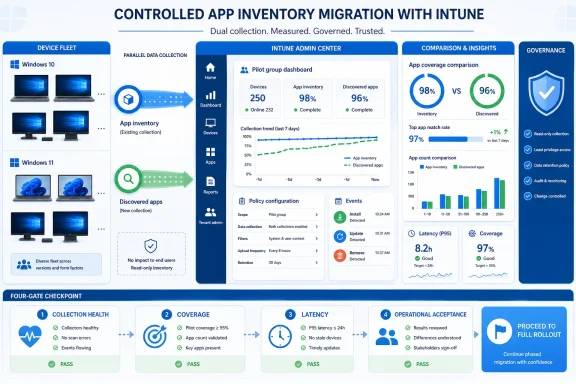
The verdict is straightforward: enable App inventory for a representative pilot, but do not cut over immediately. Move each workflow only after it passes four gates: collection health, coverage, latency, and operational acceptance.
That overlap is a migration window. It allows administrators to activate the newer collection, compare results, investigate material differences, and determine whether individual workflows are ready to change.
Product direction alone does not establish that vulnerability queries, audit evidence, asset reports, licensing processes, or service-desk procedures are ready for immediate migration. Each consumer can have different requirements for fields, evidence age, matching, counting, and false-positive tolerance.
WindowsForum’s April 2026 Windows update coverage included Intune inventory improvements among a broader set of enterprise changes. Its June 2026 Intune update report covered application auto-updates, Endpoint Privilege Management enhancements, and enrollment changes. Those reports illustrate the wider direction of Intune application management, but they do not eliminate the need to test App inventory against a tenant’s existing workflows.
WindowsForum has also reported on new Windows Update alerts in Intune and additional hardware checks associated with Windows 11 security. These are examples of Intune providing administrators with additional signals. App inventory should likewise be evaluated as a new operational input, not assumed to be a drop-in replacement merely because it exposes more information.
Intune admin center > Devices > Windows > Configuration > Create > New policy > Windows 10 and later > Properties catalog
Then:
The prerequisites for a useful pilot are therefore:
Begin with the smallest property set that can satisfy the acceptance tests. Expand it only when a documented gap justifies collecting another field.
After assignment, validate individual policy status and inventory results before interpreting aggregate counts. A fleet total can conceal devices that have not received the intended policy or have not yet produced usable evidence.
Depending on what is available and configured, that context can include architecture, installation scope, location, installation date, estimated size, language, identifiers, or commands associated with modifying or removing software.
Do not assume every selected property will be populated for every record. During the pilot, classify an absent field as unavailable or unresolved until evidence establishes a more specific cause. Do not automatically interpret it as proof that the application is absent or collection has failed.
Likewise, treat identity matching as a testable tenant-specific problem. The supplied facts do not establish a universal rule for converting application display names into package identities. Preserve original values, document any normalization rules, and use stronger identifiers where they are available and validated.
This distinction matters when inventory can trigger action. A broad match may be suitable for creating an analyst review queue. It should not automatically become the sole basis for enterprise removal, compliance action, or audit reporting.
Commands and paths shown in inventory are investigative evidence, not authorization to execute them. Packaging engineers should validate any removal or modification operation in a controlled environment before using it against production devices.
It does not make Intune a real-time endpoint detection system or guarantee a fixed number of minutes between an application event and portal visibility.
The supplied facts support describing reporting in terms of cadence and active-device behavior. They do not establish a complete causal list for every delayed or missing result. When evidence does not appear as expected, record the observation and investigate policy status, the device’s reporting state, and the relevant test conditions without claiming an unverified cause.
Describe the result as freshness-aware inventory, not live inventory. Every consuming workflow should define:
Security teams still need affected-product criteria, version logic, risk context, evidence-age rules, and a tested remediation process. A defensible workflow is:
WindowsForum’s June 2026 coverage of Intune application auto-updates and Endpoint Privilege Management describes related application-management capabilities. Those capabilities can affect available response options, but App inventory must still be tested for the particular decisions an organization wants it to support.
As a WindowsForum risk assessment, paths and commands should be treated as potentially sensitive because tenant-specific values could reveal information that an organization does not want broadly distributed. The supplied material does not establish that these fields always expose user names, departments, projects, or nonstandard installations. The appropriate control is to inspect representative data during the pilot and classify it according to the organization’s own policies.
Apply data minimization:
Governance must continue after data leaves Intune. Spreadsheets, tickets, email attachments, analyst workspaces, and scripts can create additional copies with different access and retention controls.
A workflow is not ready for cutover if its owners cannot state which properties it needs, who can access them, where exports are stored, and when temporary copies are deleted.
Do not require a permanent one-for-one row match unless testing proves that standard appropriate for a specific workflow. Differences should be investigated according to their operational importance.
The following comparison method is a WindowsForum recommendation, not a Microsoft-prescribed matching algorithm:
Shared and multi-user devices need their own test category. Whether a row corresponds to a device-wide installation, user-scoped instance, package identity, or another unit should be treated as a pilot hypothesis to verify, not an assumed product rule.
Define the unit each workflow counts:
For each workflow, document:
Treat the following as hypotheses to test:
Useful stop conditions include:
There is no need to invent a universal dual-run duration. Continue until the pilot has captured representative connection patterns, controlled software changes, critical application classes, and any business cycle relevant to the workflow.
The exit criterion is documented evidence: material mismatches are classified, latency is acceptable, access is governed, rollback has been exercised, and the affected owners have approved the result.
The verdict is straightforward: enable App inventory for a representative pilot, but do not cut over immediately. Move each workflow only after it passes four gates: collection health, coverage, latency, and operational acceptance.
Minimum viable pilot
- Pilot group: Representative Windows 10 and Windows 11 devices, including fresh and long-lived endpoints, user- and device-scoped installations, shared PCs, and intermittently connected devices.
- Policy path: Intune admin center > Devices > Windows > Configuration > Create > New policy > Windows 10 and later > Properties catalog.
- Configuration: Search for and select the App inventory settings, configure only the required properties, assign the policy to the pilot group, and verify policy status per device.
- Baseline: Export Discovered apps and the first usable App inventory results before making test changes.
- Controlled events: Install, update, and remove known test applications.
- Comparison fields: Device identity, publisher, application name, version, architecture, installation scope, and any stronger identifiers available in both datasets.
- Sign-off: Obtain approval from the owner of each workflow before changing its authoritative data source.
- Rollback condition: Pause cutover if a critical coverage gap, unacceptable delay, unsafe match, governance objection, or unrecoverable reporting problem remains unexplained.
 Implementation Checklist: Start Here
- Define the pilot. Select a manageable group representing common device types, deployment methods, software histories, installation scopes, and connection patterns.
- Create the policy. In the Intune admin center, go to Devices > Windows > Configuration > Create > New policy > Windows 10 and later > Properties catalog. Search for and select the App inventory settings, then configure the properties required by the pilot.
- Assign and verify. Assign the policy to the pilot group and verify its status per device before relying on fleet-level totals.
- Export a baseline. Capture Discovered apps and the first usable App inventory dataset before generating test events.
- Run controlled changes. Install, update, and remove known applications. Record each event time and when each report reflects it.
- Compare consistently. Review additions, removals, versions, architecture, scope, duplicates, missing records, and evidence age on a fixed cadence.
- Classify discrepancies. Mark each important mismatch as understood behavior, expected timing, unavailable data, collection or policy problem, normalization issue, accepted limitation, or unresolved defect.
- Obtain owner acceptance. Require the owners of security, support, reporting, privacy, licensing, and other affected workflows to approve the evidence relevant to them.
- Cut over individually. Keep Discovered apps available until each workflow has passed its acceptance tests and demonstrated a usable rollback procedure.
Microsoft Has Shipped a Migration Window, Not a Cutover Date
Microsoft identifies App inventory as the intended long-term replacement for Discovered apps, but the older feature remains available. App inventory does not simply take over when an administrator opens the portal: it must be configured through a Windows 10 and later Properties catalog policy. Discovered apps continues to operate in parallel.That overlap is a migration window. It allows administrators to activate the newer collection, compare results, investigate material differences, and determine whether individual workflows are ready to change.
Product direction alone does not establish that vulnerability queries, audit evidence, asset reports, licensing processes, or service-desk procedures are ready for immediate migration. Each consumer can have different requirements for fields, evidence age, matching, counting, and false-positive tolerance.
WindowsForum’s April 2026 Windows update coverage included Intune inventory improvements among a broader set of enterprise changes. Its June 2026 Intune update report covered application auto-updates, Endpoint Privilege Management enhancements, and enrollment changes. Those reports illustrate the wider direction of Intune application management, but they do not eliminate the need to test App inventory against a tenant’s existing workflows.
WindowsForum has also reported on new Windows Update alerts in Intune and additional hardware checks associated with Windows 11 security. These are examples of Intune providing administrators with additional signals. App inventory should likewise be evaluated as a new operational input, not assumed to be a drop-in replacement merely because it exposes more information.
Enable App Inventory Deliberately
Use this exact path:Intune admin center > Devices > Windows > Configuration > Create > New policy > Windows 10 and later > Properties catalog
Then:
- Search for and select the App inventory settings.
- Configure the properties required by the pilot’s named workflows.
- Assign the policy to the defined pilot group.
- Review policy status for each target device.
- Confirm that usable App inventory records are appearing before beginning controlled tests.
The prerequisites for a useful pilot are therefore:
- Eligible managed Windows 10 and Windows 11 devices
- A defined pilot device group
- Permission to create and assign the Windows configuration policy
- A documented list of required App inventory properties
- Access to inspect policy status per device
- Access to both App inventory and Discovered apps results
- Owners who can evaluate the affected operational workflows
- A baseline export and controlled test plan
- Freshly provisioned and long-lived endpoints
- Frequently and intermittently connected devices
- Conventional Win32 applications
- 32-bit and 64-bit software
- User-scoped and device-scoped installations
- Shared or multi-user PCs
- Applications delivered through common organizational workflows
- Devices with known software upgrade and removal histories
Begin with the smallest property set that can satisfy the acceptance tests. Expand it only when a documented gap justifies collecting another field.
After assignment, validate individual policy status and inventory results before interpreting aggregate counts. A fleet total can conceal devices that have not received the intended policy or have not yet produced usable evidence.
Richer Metadata Expands the Pilot’s Questions
Discovered apps helps administrators identify applications and versions that appear on managed devices. App inventory can add context that may help analysts investigate an installation record.Depending on what is available and configured, that context can include architecture, installation scope, location, installation date, estimated size, language, identifiers, or commands associated with modifying or removing software.
Do not assume every selected property will be populated for every record. During the pilot, classify an absent field as unavailable or unresolved until evidence establishes a more specific cause. Do not automatically interpret it as proof that the application is absent or collection has failed.
Likewise, treat identity matching as a testable tenant-specific problem. The supplied facts do not establish a universal rule for converting application display names into package identities. Preserve original values, document any normalization rules, and use stronger identifiers where they are available and validated.
This distinction matters when inventory can trigger action. A broad match may be suitable for creating an analyst review queue. It should not automatically become the sole basis for enterprise removal, compliance action, or audit reporting.
Commands and paths shown in inventory are investigative evidence, not authorization to execute them. Packaging engineers should validate any removal or modification operation in a controlled environment before using it against production devices.
Faster Reporting Is Not Real-Time Reporting
Microsoft documents App inventory as reporting multiple times per day for active devices, compared with the slower general cadence associated with Discovered apps. That can make App inventory more useful when a workflow depends on relatively current application evidence.It does not make Intune a real-time endpoint detection system or guarantee a fixed number of minutes between an application event and portal visibility.
The supplied facts support describing reporting in terms of cadence and active-device behavior. They do not establish a complete causal list for every delayed or missing result. When evidence does not appear as expected, record the observation and investigate policy status, the device’s reporting state, and the relevant test conditions without claiming an unverified cause.
Describe the result as freshness-aware inventory, not live inventory. Every consuming workflow should define:
- The maximum acceptable evidence age
- How evidence age is checked
- What analysts do when evidence is too old
- Whether an action requires additional endpoint confirmation
- Who can accept an exception
- Record when a known test application is installed.
- Record when its new inventory entry becomes visible.
- Update the application and note when the version change appears.
- Remove the application and note when the removal is reflected.
- Repeat the sequence across representative device classes.
Use Inventory as an Input to Software-Risk Decisions
App inventory can help security teams identify devices that may contain affected software, particularly when version and installation context are useful to the investigation. It is not a universal vulnerability engine.Security teams still need affected-product criteria, version logic, risk context, evidence-age rules, and a tested remediation process. A defensible workflow is:
- Security defines the affected product and version criteria.
- Endpoint administrators query relevant inventory records.
- Analysts check evidence freshness and investigate ambiguous matches.
- Application owners confirm package identity and business use where necessary.
- Remediation owners test the upgrade, deployment, or removal action.
- Security confirms that affected records move to an accepted version or no longer appear after the approved observation window.
- Exceptions receive an owner and review date.
WindowsForum’s June 2026 coverage of Intune application auto-updates and Endpoint Privilege Management describes related application-management capabilities. Those capabilities can affect available response options, but App inventory must still be tested for the particular decisions an organization wants it to support.
Treat Detailed Inventory as Governed Operational Data
Richer inventory deserves deliberate access and retention controls, particularly when administrators choose to collect installation locations, commands, or user-scope details.As a WindowsForum risk assessment, paths and commands should be treated as potentially sensitive because tenant-specific values could reveal information that an organization does not want broadly distributed. The supplied material does not establish that these fields always expose user names, departments, projects, or nonstandard installations. The appropriate control is to inspect representative data during the pilot and classify it according to the organization’s own policies.
Apply data minimization:
- Select a property only when a documented workflow requires it.
- Limit report and export access according to job responsibilities.
- Avoid copying full datasets into tickets when a smaller excerpt is sufficient.
- Set retention periods for exports and comparison workbooks.
- Delete temporary validation files after the migration decision.
- Review scripts, dashboards, and data stores that receive exported records.
- Record ownership of privacy, access, and retention decisions.
Governance must continue after data leaves Intune. Spreadsheets, tickets, email attachments, analyst workspaces, and scripts can create additional copies with different access and retention controls.
A workflow is not ready for cutover if its owners cannot state which properties it needs, who can access them, where exports are stored, and when temporary copies are deleted.
Parallel Reports Will Disagree, and That Is the Point
A dual run is necessary because App inventory is separately enabled through policy while Discovered apps remains available. The two reports can therefore be observed over the same pilot period, including during controlled install, update, and removal events.Do not require a permanent one-for-one row match unless testing proves that standard appropriate for a specific workflow. Differences should be investigated according to their operational importance.
The following comparison method is a WindowsForum recommendation, not a Microsoft-prescribed matching algorithm:
- Begin with device identity.
- Compare publisher, application name, version, architecture, and installation scope when available.
- Use stronger package or platform identifiers only after validating them in the tenant.
- Preserve original values for investigation.
- Evaluate additions, removals, updates, duplicates, and missing records separately.
- Include evidence age in every important discrepancy review.
- Do not reduce the comparison to one fleet-count difference.
Shared and multi-user devices need their own test category. Whether a row corresponds to a device-wide installation, user-scoped instance, package identity, or another unit should be treated as a pilot hypothesis to verify, not an assumed product rule.
Define the unit each workflow counts:
- Devices
- Users
- Application records
- Package identities
- Installation instances
- Another documented tenant-specific unit
Cut Over Workflow by Workflow
Security, licensing, support, packaging, procurement, architecture, reporting, and audit teams may use application data differently. App inventory can be accepted for one workflow while Discovered apps remains authoritative for another.For each workflow, document:
- The decision supported by the data
- Required fields
- Maximum acceptable evidence age
- Treatment of missing values
- Matching and deduplication rules
- Consequences of false positives and false negatives
- The person authorized to accept the results
- The procedure for returning to the previous workflow
Test Rollback; Do Not Assume Its Effects
Policy scope provides an administrative control that can be evaluated during the pilot, but Microsoft behavior not established in the supplied material should not be presented as guaranteed.Treat the following as hypotheses to test:
- Whether removing or narrowing the App inventory policy assignment stops or changes collection as expected
- How quickly any policy change is reflected on pilot devices
- What historical or previously reported data remains visible
- How dashboards, exports, scripts, and procedures behave after the change
- Whether the prior Discovered apps workflow remains usable within the required recovery objective
Useful stop conditions include:
- An unexplained gap involving a critical application class
- Observed latency beyond the workflow’s accepted threshold
- Matching or deduplication that cannot be reproduced
- Automation acting on ambiguous records
- A privacy or access-control objection
- A material reporting problem that cannot be classified
- Withdrawal of acceptance by a downstream owner
A Deliberate Cutover Has Four Gates
Gate 1: Collection Health
Target devices receive the intended policy and produce usable App inventory records. Verify policy status per device. Classify devices without usable evidence individually rather than placing them in one generic missing-device category.Gate 2: Coverage
Test representative application classes, architectures, installation scopes, deployment histories, and shared-device scenarios. Investigate missing records and duplicates according to the needs of the workflow being approved.Gate 3: Latency
Measure installation, update, and removal events. Define an acceptable evidence window for each workflow and specify what analysts must do when inventory is older than that threshold.Gate 4: Operational Acceptance
Security approves correlation logic. Privacy and governance owners approve selected properties, access, export handling, and retention. Support understands per-device investigation. Reporting owners document matching, joins, counting, and deduplication. Application owners sign off where an incorrect interpretation could disrupt a business process.There is no need to invent a universal dual-run duration. Continue until the pilot has captured representative connection patterns, controlled software changes, critical application classes, and any business cycle relevant to the workflow.
The exit criterion is documented evidence: material mismatches are classified, latency is acceptable, access is governed, rollback has been exercised, and the affected owners have approved the result.
Acceptance-Test Template
Use one row per controlled event, device class, critical application class, or operational workflow. Link to evidence without copying unnecessary inventory data into the test record.| Test event | Expected evidence | Owner | Pass condition | Rollback action |
|---|---|---|---|---|
| Assign the pilot inventory policy | Target device receives the policy and produces usable App inventory data | Endpoint engineering | Required pilot devices show successful policy status and usable records without an unexplained critical gap | Narrow or pause the pilot and investigate policy delivery |
| Install a known test application | A new record appears with sufficient identity and version information | Endpoint engineering | Record appears within the workflow’s approved latency window | Continue using Discovered apps and suspend workflow cutover |
| Update the test application | Inventory reflects the expected version change without an unresolved duplicate | Application packaging | New version is identifiable and counting logic remains reproducible | Correct comparison or package logic and extend the dual run |
| Remove the test application | The old installation no longer appears as current after the approved observation window | Endpoint engineering | Removal is reflected without a stale record driving action | Return the workflow to its previous query and investigate |
| Compare a critical application class | Material differences between reports are reconciled and classified | Security | No unexplained gap exceeds the workflow’s risk tolerance | Keep Discovered apps authoritative for that application class |
| Test a shared or multi-user device | Records can be interpreted using a documented counting unit | Support and reporting | Scope and counting rules produce repeatable results | Exclude that device class from cutover pending revised logic |
| Export pilot data | Access, storage, minimization, and retention controls are followed | Privacy or governance | Export contains only approved fields and has an owner and deletion date | Delete the export and suspend further exports |
| Run a security correlation query | Candidate devices are reproducible and ambiguous matches receive review | Security | Known test cases are found without unacceptable automated actions | Disable automation and return to analyst-reviewed processing |
| Run a licensing or audit report | Counts and deduplication are repeatable and approved by the consumer | Reporting and procurement or audit | Owner signs off on definitions, evidence, and limitations | Retain the established report for that reporting cycle |
| Exercise workflow rollback | Previous report, query, documentation, and procedure remain usable | Change owner | Team restores the prior workflow within its defined recovery objective | Stop cutover until rollback documentation is corrected and the exercise passes |
Frequently Asked Questions
Should App inventory immediately replace Discovered apps?
No. Explicitly enable App inventory for a representative pilot and keep Discovered apps available during validation. Change the authoritative source only for workflows that pass the four gates.Where exactly is App inventory enabled?
Go to Intune admin center > Devices > Windows > Configuration > Create > New policy > Windows 10 and later > Properties catalog. Search for and select the App inventory settings, configure the required properties, assign the pilot group, and verify policy status per device.Why is a dual run necessary?
App inventory must be enabled through its own Windows 10 and later Properties catalog policy, while Discovered apps remains available in parallel. That lets administrators compare the datasets during the same controlled install, update, and removal events.How long should the reports run in parallel?
There is no universal duration in the supplied facts. Run them long enough to observe representative devices, connection patterns, controlled changes, critical application classes, and workflow-specific reporting cycles.Must the reports match row for row?
Not unless the organization validates that as an appropriate requirement for a particular workflow. The practical standard is that material differences are classified and do not exceed the workflow’s accepted risk.Is App inventory real-time?
No. Microsoft documents multiple reports per day for active devices, not guaranteed immediate reporting. Measure actual install, update, and removal latency during the pilot.Can inventory data prove that an application is vulnerable?
Not by itself. Inventory can identify candidate products and versions. Security teams still need affected-version criteria, evidence-freshness rules, risk context, and confirmation before remediation.Can commands reported in inventory be used directly for removal?
They should first be treated as investigative evidence. Validate removal or modification commands in a controlled environment before using them against production devices.Is removing the policy assignment a guaranteed rollback?
Do not assume a particular reporting effect. Test policy narrowing or removal in the pilot and record what happens to device status, collection, retained results, and downstream workflows. The dependable operational rollback is preserving the prior Discovered apps process until acceptance is complete.What is the final cutover decision?
Enable App inventory now for a controlled pilot, keep Discovered apps in parallel, and cut over only the workflows that pass collection, coverage, latency, governance, owner-acceptance, and rollback tests.References
- Primary source: learn.microsoft.com
App inventory for Windows devices - Microsoft Intune | Microsoft Learn
Use app inventory in Microsoft Intune to collect detailed application data from Windows devices with faster refresh cycles and richer metadata than Discovered apps.learn.microsoft.com - Independent coverage: techcommunity.microsoft.com
- Primary source: WindowsForum
New Windows Update Alerts in Microsoft Intune: Enhance Device Management | Windows Forum
According to a recent article from the Microsoft Tech Community, titled "New Alerts for Windows Updates in Microsoft Intune," published on September 18...windowsforum.com