

Microsoft Intune’s planned direct APK deployment for Android line-of-business apps is not yet generally available and has no committed release date. Microsoft still lists the capability as in development. If delivered as described, the best candidates will be internally controlled, mandatory APKs assigned as Required to Android Enterprise corporate-owned fully managed devices (COBO) and corporate-owned dedicated devices (COSU).
Public store apps, optional apps, and private apps already operating successfully through Managed Google Play should generally remain on their current channel. Administrators can prepare a pilot and application inventory now, but they should not schedule a production migration until Microsoft publishes final supported behavior.
The decision is application-specific, not tenant-wide. Direct APK deployment should not be treated as a general replacement for Managed Google Play.
Microsoft has described a future Intune capability through which administrators can upload Android APK installation files and deploy required line-of-business applications without first synchronizing those packages through Managed Google Play. The announced device scope covers Android Enterprise corporate-owned fully managed and corporate-owned dedicated devices.
Microsoft’s Intune in-development documentation is a planning resource. Features can change before release, and appearing on that page does not establish that a capability is active in every tenant or ready for production use.
The documented direction supports three planning conclusions:
This distinction reflects a recurring concern in WindowsForum’s endpoint-management coverage: an announced management direction is not the same as released, observable behavior. The practical questions begin after release—what is supported, how state is reported, what happens during an update, and how administrators prove that targeted devices reached the intended state.
Typical candidates may include:
Use the following admission test before placing an application on the candidate list:
Administrators should not convert that wording into broader assertions about how every other assignment type must work. It is reasonable to analyze required deployment as a better fit for mandatory software than for user-selected software, but Microsoft’s final documentation must establish which assignment options the released feature actually supports.
For now, use this policy:
For public software, the publisher normally controls packaging, signing, release publication, and remediation. Moving such an application into an internally managed APK workflow would require the organization to establish its own process for obtaining authentic packages, detecting new releases, validating changes, coordinating emergency updates, and resolving support disputes.
That is usually unnecessary operational ownership.
The organization’s governance standard should therefore be:
Browsers, collaboration clients, authenticators, productivity tools, and other publisher-maintained applications should not be copied into a direct APK process merely because an upload control becomes available.
Keeping an internal app on its current private Play channel may be preferable when:
The right question is not “Can we move away from Play?” It is “Which approved channel creates the clearest ownership and lowest operational risk for this application?”
An update workflow must therefore include at least four separate checks:
This caveat also changes release planning. An organization that updates an internal APK frequently must account for a repeated configuration step rather than treating the process as a simple package replacement.
At minimum, record:
WindowsForum’s reporting on Intune app auto-updates and other management changes illustrates why the update authority matters. Automated servicing can reduce repetitive work when a product and channel support it, while direct ownership requires the organization to operate its own release and verification process. Those are different governance models and should not be conflated.
An APK can install successfully and still fail operationally because of:
The same systems view appears in WindowsForum’s report on Teams-certified Android devices encountering lockouts after a Conditional Access policy change. The distribution mechanism was not the only moving part: identity, device state, application behavior, and access policy interacted.
The practical lesson for direct APK deployment is simple: a pilot must validate the complete business workflow, not merely confirm that an application icon appears.
Application records should identify enrollment scope precisely:
An application used across multiple enrollment types may be better left on its existing channel, even if its COBO or COSU subset could use direct deployment. Maintaining one understood delivery path can be more valuable than eliminating a publishing step for only part of the estate.
Do not extend the announced scope to COPE, personally owned work profiles, unmanaged devices, or other enrollment models unless Microsoft’s released documentation explicitly adds them.
The Windows 11 update-management report, Policy-Driven Windows 11 Update Management for Enterprises (Intune/OOBE), covers Microsoft’s movement away from a largely opaque, user-driven update experience toward more centrally controlled download and installation behavior. For administrators, the useful endpoint is not simply that a policy exists; it is whether managed devices reached the intended state.
The Future of Windows Updates: Microsoft-Managed Device Management Explained addresses the same shift toward declared management outcomes and Microsoft-managed controls. Applied to Android LOB deployment, that model suggests a direct question: after the APK and configuration are assigned, can the organization verify installation, version, configuration, and exceptions?
The WindowsForum report June 2026 Intune Update: App Auto-Updates, EPM Enhancements, Apple Enrollment also underscores the need to separate released capabilities from roadmap items and staged changes. Direct Android APK deployment should be handled the same way: inventory and pilot planning can begin while the feature is in development, but production procedures should follow the final availability announcement.
On mobile endpoints, Intune MAM Enforcement: Minimum SDKs for iOS and Company Portal Version for Android shows why announced requirements still require operational preparation. Enforcement can expose outdated clients and dependency gaps that were less visible while the requirement remained prospective.
Finally, Microsoft Teams Android Devices Lockout After CA Policy Change: Security vs. Usability demonstrates why an Android application cannot be evaluated only as a package. Device compliance, identity, Conditional Access, application behavior, and user or room-device workflows can converge into a single incident.
Together, these reports support a conservative deployment principle:
This register prevents a broad “move away from Play” project from overriding application-specific requirements. It also exposes applications whose ownership, signing history, or support model is too weak for direct deployment.
A single managed device may legitimately receive applications through several approved channels. The channel should follow the workload and its ownership model.
Public store apps, optional apps, and private apps already operating successfully through Managed Google Play should generally remain on their current channel. Administrators can prepare a pilot and application inventory now, but they should not schedule a production migration until Microsoft publishes final supported behavior.
| Application or requirement | Recommended channel |
|---|---|
| Internally controlled APK required on supported COBO or COSU devices | Evaluate direct Intune deployment after release |
| Public Google Play application | Managed Google Play |
| Private app already published and maintained through Managed Google Play | Keep on Managed Google Play unless testing proves a reason to change |
| App users may choose whether to install | Keep on the existing supported catalog or distribution channel |
| App needed on enrollment types outside the announced direct-deployment scope | Managed Google Play or another currently supported method |
| App with unclear ownership, signing, configuration, or update responsibility | Do not migrate |
| App configuration policy associated with a directly deployed Android LOB app | Plan to reapply the policy after each APK update |
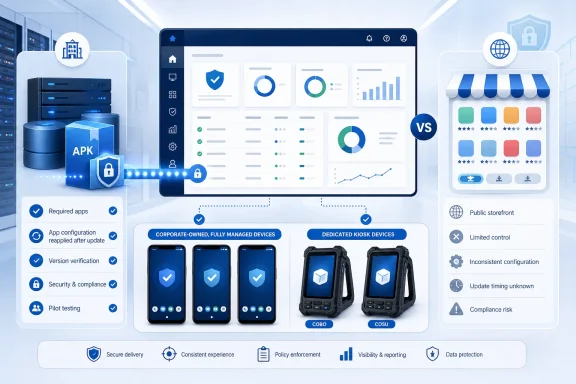 Direct APK Deployment Remains a Planned Intune Capability
Microsoft has described a future Intune capability through which administrators can upload Android APK installation files and deploy required line-of-business applications without first synchronizing those packages through Managed Google Play. The announced device scope covers Android Enterprise corporate-owned fully managed and corporate-owned dedicated devices.Microsoft’s Intune in-development documentation is a planning resource. Features can change before release, and appearing on that page does not establish that a capability is active in every tenant or ready for production use.
The documented direction supports three planning conclusions:
- Intune is expected to accept an Android LOB APK directly.
- The planned assignment scenario is described for required applications.
- The announced device scope is COBO and COSU.
This distinction reflects a recurring concern in WindowsForum’s endpoint-management coverage: an announced management direction is not the same as released, observable behavior. The practical questions begin after release—what is supported, how state is reported, what happens during an update, and how administrators prove that targeted devices reached the intended state.
Required Internal Apps Are the Prospective Target
A strong candidate is an application that the organization develops, commissions, or otherwise controls and requires on a defined corporate device population.Typical candidates may include:
- A warehouse picking client required on dedicated scanners.
- A kiosk application required on single-purpose devices.
- An internal inspection or field-service tool.
- A device companion used with organization-owned peripherals.
- A line-of-business application required on every device assigned to a particular operational role.
Use the following admission test before placing an application on the candidate list:
- Is the package internally controlled?
- Is installation mandatory?
- Are all proposed targets supported COBO or COSU devices?
- Is there an accountable business and technical owner?
- Are package identity, signing ownership, configuration dependencies, testing, support, and recovery documented?
- Is there a measurable operational benefit to changing the current channel?
Keep the Assignment Claim Narrow
Microsoft’s planned capability is described for required apps. That is the supported planning statement.Administrators should not convert that wording into broader assertions about how every other assignment type must work. It is reasonable to analyze required deployment as a better fit for mandatory software than for user-selected software, but Microsoft’s final documentation must establish which assignment options the released feature actually supports.
For now, use this policy:
- Evaluate direct deployment for required internal apps on supported COBO and COSU devices.
- Keep optional applications on their existing supported distribution channel.
- Do not promise Available assignments for directly uploaded APKs.
- Do not assume that direct APK deployment will provide a user-facing application catalog.
- Revisit the policy when Microsoft publishes the released assignment model.
Public Apps Should Stay on Their Publisher-Supported Channel
The ability to upload an APK does not make it sensible to mirror or manually maintain a public vendor application.For public software, the publisher normally controls packaging, signing, release publication, and remediation. Moving such an application into an internally managed APK workflow would require the organization to establish its own process for obtaining authentic packages, detecting new releases, validating changes, coordinating emergency updates, and resolving support disputes.
That is usually unnecessary operational ownership.
The organization’s governance standard should therefore be:
This is a governance recommendation based on package ownership and support boundaries. It does not depend on treating direct deployment as technically incapable of handling a particular package.Public applications remain on Managed Google Play unless the publisher and the organization have established a different supported enterprise-distribution arrangement.
Browsers, collaboration clients, authenticators, productivity tools, and other publisher-maintained applications should not be copied into a direct APK process merely because an upload control becomes available.
Private Play Apps Do Not Automatically Need to Move
Private Managed Google Play apps remain a valid distribution choice. A future direct Intune route does not make an existing private Play implementation obsolete.Keeping an internal app on its current private Play channel may be preferable when:
- The application is already published and maintained successfully there.
- The release team has an established Play publishing process.
- The app must reach device populations beyond the announced direct-deployment scope.
- One distribution model across several Android Enterprise enrollment types reduces support complexity.
- A channel change would introduce signing, migration, configuration, or application-data risk.
- The organization cannot identify a concrete benefit from migrating.
The right question is not “Can we move away from Play?” It is “Which approved channel creates the clearest ownership and lowest operational risk for this application?”
The App-Configuration Update Caveat Must Be in the Runbook
Directly deployed Android LOB apps have a concrete configuration limitation that must be included in every pilot and production procedure:This is not a minor documentation detail. A successful APK update does not by itself prove that the updated application has returned to its required configured state.When a directly deployed Android LOB app is updated, existing associated app configuration policies are not automatically applied to the updated version. Administrators must reapply those policies.
An update workflow must therefore include at least four separate checks:
- Upload and deploy the updated APK.
- Reapply the associated app configuration policy.
- Verify the installed application version on the target devices.
- Verify that the expected configuration is effective in the application.
This caveat also changes release planning. An organization that updates an internal APK frequently must account for a repeated configuration step rather than treating the process as a simple package replacement.
Package Updates Return Lifecycle Work to IT
For directly deployed LOB software, the organization supplies and governs the package. That creates responsibilities that should be assigned before the first production deployment.At minimum, record:
- Business owner.
- Technical owner.
- Authoritative package repository.
- Package name and identity.
- Signing owner and certificate-custody process.
- Build and release pipeline.
- Supported Android versions and device models.
- Configuration dependencies.
- Backend and network dependencies.
- Test and production approval stages.
- Support and escalation contacts.
- Recovery procedure for a defective release.
- Evidence retained for audit and change control.
WindowsForum’s reporting on Intune app auto-updates and other management changes illustrates why the update authority matters. Automated servicing can reduce repetitive work when a product and channel support it, while direct ownership requires the organization to operate its own release and verification process. Those are different governance models and should not be conflated.
Security and Access Dependencies Remain in Force
Direct deployment changes the package-delivery route. It does not isolate the application from the rest of the endpoint environment.An APK can install successfully and still fail operationally because of:
- Authentication requirements.
- Conditional Access.
- Device compliance state.
- Certificate availability.
- Network restrictions.
- Backend compatibility.
- Managed app configuration.
- Android or Company Portal dependencies.
- Peripheral or kiosk-mode requirements.
The same systems view appears in WindowsForum’s report on Teams-certified Android devices encountering lockouts after a Conditional Access policy change. The distribution mechanism was not the only moving part: identity, device state, application behavior, and access policy interacted.
The practical lesson for direct APK deployment is simple: a pilot must validate the complete business workflow, not merely confirm that an application icon appears.
Limit the Device Scope Explicitly
The planned scope covers Android Enterprise corporate-owned fully managed devices and corporate-owned dedicated devices.Application records should identify enrollment scope precisely:
- COBO: Corporate-owned fully managed.
- COSU: Corporate-owned dedicated.
- COPE: Corporate-owned work profile.
- BYOD work profile: Personally owned device with a managed work profile.
- Other Android populations: Any legacy, specialized, or unmanaged deployment in use.
An application used across multiple enrollment types may be better left on its existing channel, even if its COBO or COSU subset could use direct deployment. Maintaining one understood delivery path can be more valuable than eliminating a publishing step for only part of the estate.
Do not extend the announced scope to COPE, personally owned work profiles, unmanaged devices, or other enrollment models unless Microsoft’s released documentation explicitly adds them.
WindowsForum Reports Reinforce an Observe-and-Verify Model
WindowsForum’s endpoint-management reports provide a consistent operational frame for this feature: policy intent matters, but administrators ultimately need observable device state.The Windows 11 update-management report, Policy-Driven Windows 11 Update Management for Enterprises (Intune/OOBE), covers Microsoft’s movement away from a largely opaque, user-driven update experience toward more centrally controlled download and installation behavior. For administrators, the useful endpoint is not simply that a policy exists; it is whether managed devices reached the intended state.
The Future of Windows Updates: Microsoft-Managed Device Management Explained addresses the same shift toward declared management outcomes and Microsoft-managed controls. Applied to Android LOB deployment, that model suggests a direct question: after the APK and configuration are assigned, can the organization verify installation, version, configuration, and exceptions?
The WindowsForum report June 2026 Intune Update: App Auto-Updates, EPM Enhancements, Apple Enrollment also underscores the need to separate released capabilities from roadmap items and staged changes. Direct Android APK deployment should be handled the same way: inventory and pilot planning can begin while the feature is in development, but production procedures should follow the final availability announcement.
On mobile endpoints, Intune MAM Enforcement: Minimum SDKs for iOS and Company Portal Version for Android shows why announced requirements still require operational preparation. Enforcement can expose outdated clients and dependency gaps that were less visible while the requirement remained prospective.
Finally, Microsoft Teams Android Devices Lockout After CA Policy Change: Security vs. Usability demonstrates why an Android application cannot be evaluated only as a package. Device compliance, identity, Conditional Access, application behavior, and user or room-device workflows can converge into a single incident.
Together, these reports support a conservative deployment principle:
Define the desired state, deploy to a limited population, observe the actual state, investigate exceptions, and expand only after the complete workflow is proven.
Build an Application-Level Distribution Register
The most useful preparation is an Android application register.| Field | Question to answer |
|---|---|
| Business owner | Who is accountable for the application’s purpose and funding? |
| Technical owner | Who maintains the package, code, or vendor relationship? |
| Package source | Where does the approved APK or store listing originate? |
| Signing ownership | Who controls and protects the signing process? |
| Device scope | Which enrollment types and device groups need the app? |
| Installation intent | Is installation mandatory or optional? |
| Update authority | Who approves and deploys new versions? |
| Configuration dependencies | Which settings, certificates, URLs, identities, or services are required? |
| Testing requirements | Which devices and business workflows must be validated? |
| Recovery plan | What happens if a release is defective? |
| Current channel | How is the application distributed today? |
| Candidate channel | Should direct deployment be tested after release? |
A single managed device may legitimately receive applications through several approved channels. The channel should follow the workload and its ownership model.
What is not yet documented
Microsoft’s development description does not establish the final portal workflow, release timing, complete reporting model, migration behavior, channel precedence, conflict handling, or rollback procedure. Do not put assumptions about those items into a production runbook. Convert them into validation cases after Microsoft publishes final supported behavior.
What Administrators Should Do Now
Administrators can prepare without treating the planned feature as released:- Inventory required internal APKs on COBO and COSU devices. Separate them from public, optional, and private Play applications.
- Record ownership and provenance. Identify the package source, business owner, technical owner, signing responsibility, and support contact.
- Map configuration dependencies. Identify every app configuration policy and the settings required for a functional deployment.
- Document the update caveat. Add an explicit step requiring app configuration policies to be reapplied after an updated Android LOB APK is deployed.
- Create a pilot group. Use representative, nonproduction COBO or COSU devices and business workflows.
- Keep current production distribution intact. Do not remove existing assignments or private Play publishing arrangements based on an in-development announcement.
- Monitor Microsoft’s release documentation. Confirm availability, supported assignment behavior, update procedures, status reporting, configuration handling, and migration guidance before production adoption.
After Release: Validation Checklist
When Microsoft announces availability and publishes final instructions, use a controlled validation sequence:- Confirm that the feature is available in the test tenant and that the pilot devices use a documented supported enrollment type.
- Upload a test APK through the released Intune workflow.
- Assign the app as Required to a COBO or COSU pilot group.
- Verify installation status in Intune and confirm the installed app on each pilot device.
- Apply the associated app configuration policy and validate the resulting settings inside the app.
- Upload an updated APK.
- Reapply the associated app configuration policy after the update.
- Verify the updated application version and effective configuration on the devices.
- Review failed, pending, offline, and otherwise exceptional devices rather than relying only on the assignment state.
- Exercise authentication, Conditional Access, compliance, network, backend, peripheral, and device-mode dependencies.
- Record support and recovery results for a failed or defective test release.
- Test any channel migration only in nonproduction and only after Microsoft publishes final supported migration behavior.
- Expand deployment only after package installation, update handling, configuration reapplication, reporting, and business workflows have passed validation.
Frequently Asked Questions
Is direct Android APK deployment in Intune generally available?
Not according to the current planning status described in Microsoft’s in-development material. It remains a planned capability, and Microsoft has not committed to a production release date.Which devices are in the announced scope?
Android Enterprise corporate-owned fully managed devices and corporate-owned dedicated devices—commonly described as COBO and COSU.Which apps are the best candidates?
Internally controlled APKs that are mandatory on a defined population of supported COBO or COSU devices. The organization should also have clear package ownership, signing control, testing, configuration, support, and recovery processes.Will directly uploaded APKs support Available assignments?
The planned capability is described for required applications. Do not promise Available assignment support unless the released Microsoft documentation explicitly includes it.Should public Google Play apps be converted to directly deployed APKs?
Generally, no. The organization should keep public applications on their publisher-supported channel rather than assuming responsibility for sourcing, validating, and servicing mirrored packages.Must existing private Managed Google Play apps be migrated?
No. Private Play remains a valid distribution route. Migrate only when the released direct-deployment behavior is documented, a controlled test succeeds, and the organization has a clear operational reason to change channels.What happens to app configuration when an Android LOB APK is updated?
Existing associated app configuration policies are not automatically applied to the updated version. Administrators must reapply those policies and then verify that the updated application received the intended configuration.Can administrators write the deployment runbook now?
They can write the governance, ownership, pilot, and validation portions. They should not invent portal navigation, migration steps, precedence rules, reporting fields, or rollback behavior before Microsoft publishes the final workflow.Should organizations set a production migration date?
No. Build the inventory and pilot plan now, but set production dates only after general availability, final documentation, tenant verification, and successful nonproduction testing.What is the most important post-deployment check?
Verify actual state. Confirm the installed application version, effective app configuration, business functionality, and all exceptions. An assignment marked as created or targeted is not by itself proof of a successful deployment.References
- Primary source: learn.microsoft.com
Loading…
learn.microsoft.com - Independent coverage: support.microsoft.com
Loading…
support.microsoft.com - Independent coverage: support.google.com
Loading…
support.google.com - Independent coverage: techcommunity.microsoft.com
Loading…
techcommunity.microsoft.com - Independent coverage: github.com
Loading…
github.com - Primary source: WindowsForum
Loading…
windowsforum.com