

Microsoft resolved a Windows Update service-side caching fault on June 4, 2026, after managed Windows devices enrolled through Intune and similar services received driver and BIOS updates that administrators had not approved between roughly June 1 and June 4. The company says the updates were Microsoft-approved and signed, not malicious, but that is not the same thing as harmless. For enterprise IT, the incident is another reminder that modern Windows management is no longer just a matter of local policy; it is a dependency chain stretching from the endpoint to Microsoft’s cloud orchestration layer. When that chain loses track of which devices are actually managed, the administrative controls on the screen can become decorative.
The most important fact in this incident is not that drivers were installed. Drivers install all the time, and in the consumer Windows world that is mostly treated as background hygiene. The enterprise problem is that the wrong authority made the decision.
Microsoft’s explanation, as reported from its admin center incident MO1332784, points to a misconfiguration in the Windows Update caching service. That cache temporarily dropped device enrollment information, causing affected machines to be treated as if they were not enrolled in management. Once those devices lost their managed identity in the update service’s view of the world, driver-approval controls that should have governed them no longer applied.
That is a subtle failure with very blunt consequences. Intune driver policies exist because firmware and hardware drivers occupy a dangerous middle ground: they are routine enough to be automated, but privileged enough to break fleets at scale. A new audio driver can wreck conference rooms. A graphics driver can destabilize a CAD workstation. A BIOS update can trigger BitLocker recovery prompts, dock compatibility problems, boot issues, or support escalations that look irrational until someone reconstructs the update timeline.
Microsoft says it corrected the cache and restored the enrollment state for affected devices. That closes the immediate wound. It does not answer the larger question now facing administrators: how much confidence should they place in policy enforcement when the policy depends on a cloud-side service accurately remembering the device’s identity at update time?
In a managed environment, authorization is the point. The entire logic of Intune driver management is that Microsoft and OEMs can publish drivers, but the organization decides when—or whether—those drivers reach production machines. A driver can be legitimate, current, and cryptographically sound while still being operationally unacceptable for a particular fleet.
That distinction is often lost outside IT departments. To an end user, a new driver sounds like a fix. To an endpoint engineer, it is a hardware-specific code change deployed into a messy population of laptops, docks, monitors, peripherals, VPN clients, security agents, and line-of-business applications. The driver may be perfect in isolation and still disastrous in the environment where it lands.
The reported symptoms fit that reality. Administrators described large device populations receiving unexpected BIOS and driver updates, with some audio and video devices breaking afterward. Those are not exotic edge cases. They are exactly the kind of failures that controlled driver rings, pilot groups, and manual approvals are meant to catch before they interrupt a workday.
The uncomfortable part is that Microsoft’s modern update model asks enterprises to trust the vendor not only as a publisher of updates, but as the broker of timing, targeting, eligibility, and policy evaluation. When that broker misclassifies a device as unmanaged, the endpoint does not have much philosophical room to object.
That distinction is the operational contract. If a device is assigned to a manual approval policy, new driver updates should not install until an administrator approves them. If a device is in an automatic approval model, the organization still expects deferrals, rings, and policy state to shape the rollout. Either way, the premise is that the management layer remains in force.
The caching bug undermined that premise by removing, however temporarily, the enrollment fact that made the policy relevant. In effect, Windows Update did not need to ignore the policy; it merely had to stop seeing the device as belonging to the policy universe. That is a more troubling failure mode than a bad toggle in the Intune portal, because it suggests the visible configuration can be correct while the service-side evaluation path is wrong.
This is why enterprise administrators tend to react so strongly to update incidents that outsiders see as minor. A single surprise driver update is an annoyance. A surprise driver update across tens of thousands of endpoints is a breakdown in change control, incident response, help desk forecasting, vendor accountability, and sometimes regulatory process. The blast radius is measured not just in broken microphones, but in lost confidence.
Microsoft has said it is examining how the caching service dropped enrollment information so it can better detect, prevent, and respond to similar problems. That is the right language. But administrators will reasonably want evidence in the form of better telemetry, clearer incident reporting, and perhaps stronger client-side safeguards when cloud policy state temporarily disappears.
That creates a troubling asymmetry. If Microsoft’s service believes the device is managed, the device gets the controlled path. If Microsoft’s service temporarily loses that enrollment marker, the device may be treated as a freer agent than the administrator intended. The local machine becomes subject to a cloud memory lapse.
There are reasons for this architecture. Windows Update for Business and Intune are designed to orchestrate huge populations without every decision being hard-coded locally. The cloud can evaluate applicability, approvals, deferrals, rings, and hardware matching at scale. That is how Microsoft moves from the old world of WSUS-heavy patching to a more dynamic service model.
But the failure mode matters. A conservative update system should fail closed when it loses management context. If a device has recently been known to be enterprise-managed, and if local policy indicates that updates are controlled, a temporary absence of cloud enrollment data should not automatically make the machine eligible for unmanaged driver offers. In security language, uncertainty should reduce privileges, not expand them.
That principle is easier to write than to implement. Windows Update has to handle devices that are unenrolled, re-enrolled, retired, reset, reassigned, migrated, and misconfigured. But the direction of travel should be clear: when device identity and update governance disagree, the system should bias toward not installing firmware and driver changes until it can prove the device is eligible.
Organizations often treat BIOS updates with extra caution because rollback paths can be limited, hardware behavior can differ across model revisions, and failures can require hands-on remediation. Even successful firmware updates can trigger BitLocker recovery workflows if platform measurements change in ways the device protection stack does not expect. For remote and hybrid workforces, that can quickly become a support nightmare.
This is why many enterprises separate driver and firmware governance from ordinary quality updates. Quality updates are risky enough, but they are at least part of a monthly operating system cadence with well-understood rollback mechanisms and security imperatives. Drivers and firmware are more hardware-specific, more dependent on OEM packaging, and more likely to produce symptoms that users experience as “my laptop is broken” rather than “an update failed.”
The irony is that Microsoft’s driver management pitch is strongest precisely because unmanaged driver sprawl is so painful. Centralized approval, policy assignment, and staged rollout are supposed to reduce chaos. When the centralized system becomes the source of surprise, the damage is reputational as much as technical.
Administrators can roll back some drivers through Device Manager or OEM tooling, but that is cleanup, not control. It shifts labor back to the customer after the automation layer made the wrong decision. In large environments, even identifying which machines received which unexpected payloads can become a project.
Each incident has its own mechanics. They should not be lazily collapsed into one giant claim that Windows Update is broken. But they do rhyme. In each case, administrators who believed they had constrained update behavior found that Microsoft’s update machinery had interpreted eligibility or policy differently than expected.
That is a governance problem. Enterprise patching depends on trust that the platform will distinguish between “available,” “applicable,” “approved,” and “installed.” Those words are not interchangeable in a managed environment. Microsoft can publish an update. Windows can detect that a device could use it. Intune can display it. But installation should still reflect the administrator’s release decision.
The more Microsoft centralizes Windows lifecycle management in cloud services, the more its internal service incidents become customer change events. A bad cache entry, a flawed offer classification, or a targeting mistake is not confined to a backend dashboard. It can produce a visible state change on real machines used by real people.
For IT pros who remember the old WSUS and Configuration Manager era, the appeal of cloud update management was supposed to be less infrastructure and more intelligence. The tradeoff is that some control moves out of the building. Incidents like MO1332784 make that tradeoff feel less abstract.
Administrators need to know which device populations were affected, when the bad state began, when it ended, which update categories were eligible during the window, and how to query for machines that crossed policy boundaries. They need detection guidance that maps to Intune, Windows Update logs, Update Compliance or its successors, Defender for Endpoint advanced hunting where applicable, and OEM firmware inventories. A sentence saying the issue is resolved is not enough when the aftermath is distributed across thousands of endpoints.
The lack of disclosed scope also matters. Microsoft has not publicly said how many organizations, tenants, regions, or devices were affected. There may be good reasons for caution while telemetry is reviewed, but customers still need enough information to decide whether to investigate. If the only reliable way to learn whether you were hit is to notice broken microphones or unexpected BIOS versions, the service health model is underperforming.
This is a recurring frustration with cloud incidents that touch endpoint management. Microsoft 365 service health posts are often written for broad assurance, while endpoint engineers need forensic precision. The audience is not merely asking whether Microsoft fixed the backend. It is asking what changed on its devices.
A stronger response would include concrete hunting queries, known affected update categories, timestamps in UTC, and guidance on distinguishing intended approvals from accidental installs. The same cloud that can orchestrate driver updates should be able to help customers reconstruct what happened when orchestration failed.
Rolling back a driver may be straightforward on a single machine. At fleet scale, it is a policy and tooling exercise. Administrators need to determine whether the problematic driver can be rolled back through Device Manager, remediated through an OEM package, superseded by a known-good version, or blocked from reinstalling. BIOS rollback may be more complicated and sometimes depends on vendor settings, model-specific tooling, or firmware security restrictions.
The worst response would be to treat every unexpected driver as equally dangerous. Microsoft says the payloads were signed and approved, so the priority is not malware eradication. The priority is stability triage and change reconciliation. Which updates landed? Which models are affected? Which symptoms appeared? Which updates should remain because they fixed more than they broke?
The second-worst response would be to do nothing because Microsoft marked the incident resolved. A backend fix prevents further misclassification, but it does not automatically undo device-level changes already made. If a BIOS update altered behavior or a driver broke a peripheral, the endpoint will not become healthy simply because the cache was corrected.
Managed Windows shops should assume they need independent evidence that controls are being honored. That means comparing approved driver lists with actual installed driver versions, watching for update installs outside expected rings, and treating sudden hardware support ticket spikes as possible update events. It also means preserving enough endpoint telemetry to reconstruct what happened after the fact.
The direction of Windows management is not going back to a purely on-premises model. Intune, Autopatch, Windows Update for Business, Entra identity, and cloud service health are now part of the same operational fabric. The job for Microsoft is to make that fabric more observable and more conservative when identity or policy state is uncertain.
For customers, the job is to build guardrails around the vendor’s guardrails. That may sound redundant, but 2026 has made the case for it. A cloud-managed update platform can reduce administrative burden, yet still require external validation when the cost of surprise is high.
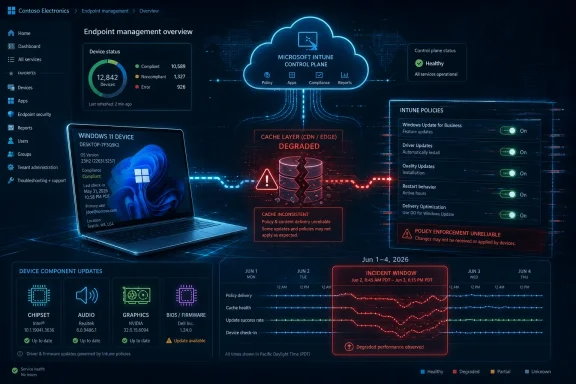 Microsoft’s Cloud Control Plane Blinked, and Windows Acted Like It Was Unmanaged
The most important fact in this incident is not that drivers were installed. Drivers install all the time, and in the consumer Windows world that is mostly treated as background hygiene. The enterprise problem is that the wrong authority made the decision.Microsoft’s explanation, as reported from its admin center incident MO1332784, points to a misconfiguration in the Windows Update caching service. That cache temporarily dropped device enrollment information, causing affected machines to be treated as if they were not enrolled in management. Once those devices lost their managed identity in the update service’s view of the world, driver-approval controls that should have governed them no longer applied.
That is a subtle failure with very blunt consequences. Intune driver policies exist because firmware and hardware drivers occupy a dangerous middle ground: they are routine enough to be automated, but privileged enough to break fleets at scale. A new audio driver can wreck conference rooms. A graphics driver can destabilize a CAD workstation. A BIOS update can trigger BitLocker recovery prompts, dock compatibility problems, boot issues, or support escalations that look irrational until someone reconstructs the update timeline.
Microsoft says it corrected the cache and restored the enrollment state for affected devices. That closes the immediate wound. It does not answer the larger question now facing administrators: how much confidence should they place in policy enforcement when the policy depends on a cloud-side service accurately remembering the device’s identity at update time?
The Driver Was Signed, but the Change Was Still Unauthorized
Microsoft’s assurance that the installed drivers were approved and signed matters, but only within a narrow frame. It means this was not a supply-chain compromise in which attackers smuggled malware into the Windows Update channel. It does not mean administrators got what they asked for.In a managed environment, authorization is the point. The entire logic of Intune driver management is that Microsoft and OEMs can publish drivers, but the organization decides when—or whether—those drivers reach production machines. A driver can be legitimate, current, and cryptographically sound while still being operationally unacceptable for a particular fleet.
That distinction is often lost outside IT departments. To an end user, a new driver sounds like a fix. To an endpoint engineer, it is a hardware-specific code change deployed into a messy population of laptops, docks, monitors, peripherals, VPN clients, security agents, and line-of-business applications. The driver may be perfect in isolation and still disastrous in the environment where it lands.
The reported symptoms fit that reality. Administrators described large device populations receiving unexpected BIOS and driver updates, with some audio and video devices breaking afterward. Those are not exotic edge cases. They are exactly the kind of failures that controlled driver rings, pilot groups, and manual approvals are meant to catch before they interrupt a workday.
The uncomfortable part is that Microsoft’s modern update model asks enterprises to trust the vendor not only as a publisher of updates, but as the broker of timing, targeting, eligibility, and policy evaluation. When that broker misclassifies a device as unmanaged, the endpoint does not have much philosophical room to object.
Intune Driver Management Was Built to Prevent This Exact Class of Surprise
Microsoft’s driver update controls in Intune are not merely cosmetic. They provide a dedicated surface for reviewing, approving, pausing, and deploying Windows driver and firmware updates to managed devices. Administrators can choose automatic approval for recommended drivers or require manual approval before a driver is offered.That distinction is the operational contract. If a device is assigned to a manual approval policy, new driver updates should not install until an administrator approves them. If a device is in an automatic approval model, the organization still expects deferrals, rings, and policy state to shape the rollout. Either way, the premise is that the management layer remains in force.
The caching bug undermined that premise by removing, however temporarily, the enrollment fact that made the policy relevant. In effect, Windows Update did not need to ignore the policy; it merely had to stop seeing the device as belonging to the policy universe. That is a more troubling failure mode than a bad toggle in the Intune portal, because it suggests the visible configuration can be correct while the service-side evaluation path is wrong.
This is why enterprise administrators tend to react so strongly to update incidents that outsiders see as minor. A single surprise driver update is an annoyance. A surprise driver update across tens of thousands of endpoints is a breakdown in change control, incident response, help desk forecasting, vendor accountability, and sometimes regulatory process. The blast radius is measured not just in broken microphones, but in lost confidence.
Microsoft has said it is examining how the caching service dropped enrollment information so it can better detect, prevent, and respond to similar problems. That is the right language. But administrators will reasonably want evidence in the form of better telemetry, clearer incident reporting, and perhaps stronger client-side safeguards when cloud policy state temporarily disappears.
The Endpoint Should Not Be So Quick to Forget Who Manages It
The incident exposes a design tension in cloud-managed Windows. The endpoint knows quite a lot about itself: it knows it is joined or registered, it knows it receives MDM policy, and it often has local policy artifacts indicating that updates are managed. Yet the decisive update authorization path can still depend on cloud-side service state.That creates a troubling asymmetry. If Microsoft’s service believes the device is managed, the device gets the controlled path. If Microsoft’s service temporarily loses that enrollment marker, the device may be treated as a freer agent than the administrator intended. The local machine becomes subject to a cloud memory lapse.
There are reasons for this architecture. Windows Update for Business and Intune are designed to orchestrate huge populations without every decision being hard-coded locally. The cloud can evaluate applicability, approvals, deferrals, rings, and hardware matching at scale. That is how Microsoft moves from the old world of WSUS-heavy patching to a more dynamic service model.
But the failure mode matters. A conservative update system should fail closed when it loses management context. If a device has recently been known to be enterprise-managed, and if local policy indicates that updates are controlled, a temporary absence of cloud enrollment data should not automatically make the machine eligible for unmanaged driver offers. In security language, uncertainty should reduce privileges, not expand them.
That principle is easier to write than to implement. Windows Update has to handle devices that are unenrolled, re-enrolled, retired, reset, reassigned, migrated, and misconfigured. But the direction of travel should be clear: when device identity and update governance disagree, the system should bias toward not installing firmware and driver changes until it can prove the device is eligible.
BIOS Updates Are Not Just Another Patch Tuesday Payload
The presence of BIOS and firmware updates in administrator reports is what turns this from a nuisance into a serious change-management story. Firmware sits below the operating system. It touches boot paths, device initialization, power management, security settings, and hardware compatibility. It is not just another software component waiting for a restart.Organizations often treat BIOS updates with extra caution because rollback paths can be limited, hardware behavior can differ across model revisions, and failures can require hands-on remediation. Even successful firmware updates can trigger BitLocker recovery workflows if platform measurements change in ways the device protection stack does not expect. For remote and hybrid workforces, that can quickly become a support nightmare.
This is why many enterprises separate driver and firmware governance from ordinary quality updates. Quality updates are risky enough, but they are at least part of a monthly operating system cadence with well-understood rollback mechanisms and security imperatives. Drivers and firmware are more hardware-specific, more dependent on OEM packaging, and more likely to produce symptoms that users experience as “my laptop is broken” rather than “an update failed.”
The irony is that Microsoft’s driver management pitch is strongest precisely because unmanaged driver sprawl is so painful. Centralized approval, policy assignment, and staged rollout are supposed to reduce chaos. When the centralized system becomes the source of surprise, the damage is reputational as much as technical.
Administrators can roll back some drivers through Device Manager or OEM tooling, but that is cleanup, not control. It shifts labor back to the customer after the automation layer made the wrong decision. In large environments, even identifying which machines received which unexpected payloads can become a project.
The 2026 Pattern Is Becoming Harder to Dismiss
This driver incident lands in a year already marked by uncomfortable Windows Update management stories. In April, Microsoft addressed a problem in which Windows Server 2019 and Windows Server 2022 systems were unexpectedly offered or upgraded toward Windows Server 2025 without the intended administrator action. Last month, another issue reportedly caused driver updates to install on Windows 11 devices managed by Autopatch in the European Union, again bypassing expected administrative controls.Each incident has its own mechanics. They should not be lazily collapsed into one giant claim that Windows Update is broken. But they do rhyme. In each case, administrators who believed they had constrained update behavior found that Microsoft’s update machinery had interpreted eligibility or policy differently than expected.
That is a governance problem. Enterprise patching depends on trust that the platform will distinguish between “available,” “applicable,” “approved,” and “installed.” Those words are not interchangeable in a managed environment. Microsoft can publish an update. Windows can detect that a device could use it. Intune can display it. But installation should still reflect the administrator’s release decision.
The more Microsoft centralizes Windows lifecycle management in cloud services, the more its internal service incidents become customer change events. A bad cache entry, a flawed offer classification, or a targeting mistake is not confined to a backend dashboard. It can produce a visible state change on real machines used by real people.
For IT pros who remember the old WSUS and Configuration Manager era, the appeal of cloud update management was supposed to be less infrastructure and more intelligence. The tradeoff is that some control moves out of the building. Incidents like MO1332784 make that tradeoff feel less abstract.
Microsoft Needs Better Incident Semantics, Not Just Faster Fixes
To Microsoft’s credit, the company acknowledged the problem, identified the caching misconfiguration, restored affected enrollment status, and stated that the installed drivers were signed and approved. That is better than silence. But modern Windows administration needs incident reporting that is operationally useful, not just reputationally reassuring.Administrators need to know which device populations were affected, when the bad state began, when it ended, which update categories were eligible during the window, and how to query for machines that crossed policy boundaries. They need detection guidance that maps to Intune, Windows Update logs, Update Compliance or its successors, Defender for Endpoint advanced hunting where applicable, and OEM firmware inventories. A sentence saying the issue is resolved is not enough when the aftermath is distributed across thousands of endpoints.
The lack of disclosed scope also matters. Microsoft has not publicly said how many organizations, tenants, regions, or devices were affected. There may be good reasons for caution while telemetry is reviewed, but customers still need enough information to decide whether to investigate. If the only reliable way to learn whether you were hit is to notice broken microphones or unexpected BIOS versions, the service health model is underperforming.
This is a recurring frustration with cloud incidents that touch endpoint management. Microsoft 365 service health posts are often written for broad assurance, while endpoint engineers need forensic precision. The audience is not merely asking whether Microsoft fixed the backend. It is asking what changed on its devices.
A stronger response would include concrete hunting queries, known affected update categories, timestamps in UTC, and guidance on distinguishing intended approvals from accidental installs. The same cloud that can orchestrate driver updates should be able to help customers reconstruct what happened when orchestration failed.
The Practical Cleanup Starts With Inventory, Not Panic
Affected organizations should begin with the narrow incident window: June 1 through June 4, 2026. The goal is to identify devices that installed unexpected drivers or BIOS updates during that period, then correlate those installs with support tickets and device health signals. Audio, video, docking, display, and firmware complaints deserve special attention.Rolling back a driver may be straightforward on a single machine. At fleet scale, it is a policy and tooling exercise. Administrators need to determine whether the problematic driver can be rolled back through Device Manager, remediated through an OEM package, superseded by a known-good version, or blocked from reinstalling. BIOS rollback may be more complicated and sometimes depends on vendor settings, model-specific tooling, or firmware security restrictions.
The worst response would be to treat every unexpected driver as equally dangerous. Microsoft says the payloads were signed and approved, so the priority is not malware eradication. The priority is stability triage and change reconciliation. Which updates landed? Which models are affected? Which symptoms appeared? Which updates should remain because they fixed more than they broke?
The second-worst response would be to do nothing because Microsoft marked the incident resolved. A backend fix prevents further misclassification, but it does not automatically undo device-level changes already made. If a BIOS update altered behavior or a driver broke a peripheral, the endpoint will not become healthy simply because the cache was corrected.
The Calendar Now Belongs to the Administrator Again, but Trust Has to Be Re-earned
For now, Microsoft says policies intended to prevent automatic driver updates should work as expected again. That is the immediate relief administrators needed. The more durable lesson is that policy verification cannot stop at policy configuration.Managed Windows shops should assume they need independent evidence that controls are being honored. That means comparing approved driver lists with actual installed driver versions, watching for update installs outside expected rings, and treating sudden hardware support ticket spikes as possible update events. It also means preserving enough endpoint telemetry to reconstruct what happened after the fact.
The direction of Windows management is not going back to a purely on-premises model. Intune, Autopatch, Windows Update for Business, Entra identity, and cloud service health are now part of the same operational fabric. The job for Microsoft is to make that fabric more observable and more conservative when identity or policy state is uncertain.
For customers, the job is to build guardrails around the vendor’s guardrails. That may sound redundant, but 2026 has made the case for it. A cloud-managed update platform can reduce administrative burden, yet still require external validation when the cost of surprise is high.
The June Driver Incident Leaves Admins With a Short, Uncomfortable Checklist
The lesson from MO1332784 is not to abandon Microsoft’s driver management stack. It is to treat it as a powerful automation system that still needs audit trails, blast-radius controls, and skepticism. The most concrete actions now are less dramatic than the incident itself, but they are the difference between a resolved Microsoft advisory and a resolved enterprise problem.- Organizations should review managed Windows devices for driver and BIOS updates installed between June 1 and June 4, 2026.
- Administrators should correlate unexpected update installs with help desk reports involving audio, video, docking, graphics, firmware, boot, or BitLocker recovery behavior.
- Devices with post-update hardware problems should be evaluated for driver rollback, OEM remediation packages, or deployment of a known-good replacement driver.
- Intune driver policies should be checked to confirm approval mode, ring assignment, and whether any devices are targeted by conflicting or unintended update policies.
- Larger environments should create monitoring that compares approved driver state with actual installed driver versions instead of relying only on portal configuration.
- Microsoft should provide customers with clearer incident telemetry when update service faults bypass management intent, including timestamps, affected categories, and practical hunting guidance.
References
- Primary source: gHacks
Published: 2026-06-05T13:22:10.634003
Microsoft Fixes Caching Bug That Caused Unauthorized Driver Updates on Managed Windows Devices - gHacks Tech News
Microsoft has resolved a Windows Update caching issue that caused managed devices to install driver updates despite policies configured to prevent auto-updates.www.ghacks.net - Related coverage: tomshardware.com
Windows Server vulnerability can grant system privileges with just a malformed packet — domain controllers are being exploited in the wild | Tom's Hardware
System administrators, run the May 12 patch immediately if you haven't already.www.tomshardware.com - Official source: learn.microsoft.com
Resolved issues in Windows Server 2022 | Microsoft Learn
Resolved issues in Windows Server 2022learn.microsoft.com - Related coverage: zcybernews.com
Microsoft Fixes Bug Causing Unplanned Windows Server 2025 Upgrades | ZCyberNews
Microsoft resolves a known issue causing Windows Server 2019 and 2022 systems to automatically and unexpectedly upgrade to Windows Server 2025, a problem linked to a flawed update channel configuration.zcybernews.com - Related coverage: notebookcheck.net
Microsoft fixes KB5082063 Windows Server domain controller reboot loops - Notebookcheck News
Microsoft has released emergency out-of-band updates KB5091157 and KB5091575 to fix LSASS crashes and domain controller reboot loops caused by the April 2026 KB5082063 update. www.notebookcheck.net
- Official source: support.microsoft.com

- Official source: techcommunity.microsoft.com
Opt-In Windows Server 2025 Feature Update from the WS 2022 and WS 2019 Settings Dialog | Microsoft Community Hub
This capability allows customers who want to in-place upgrade their servers to Windows Server 2025 to upgrade using the Windows Update service, and without... techcommunity.microsoft.com
- Related coverage: windowscentral.com
Microsoft fixes annoying BitLocker lockout — but only for Windows 11, leaving Windows 10 stuck | Windows Central
Windows 11 25H2 users get a BitLocker bug fix, while Windows 10 remains stuck with recovery headaches until Microsoft rolls out a broader solution.www.windowscentral.com - Related coverage: techradar.com
Microsoft says it will give some slow Windows users the 'gift of time' to upgrade - but it'll cost you | TechRadar
Windows 10 and Windows Server 2016 get ESU optionswww.techradar.com - Official source: cdn-dynmedia-1.microsoft.com
- Official source: microsoft.com
