

Microsoft Intune now lets administrators apply selected endpoint security policies to Microsoft Defender for Endpoint-managed devices that are not enrolled in Intune, extending cloud policy enforcement across Windows, Windows Server, macOS, and Linux through Defender rather than traditional mobile device management. That is the practical answer to the update highlighted by Petri and grounded in Microsoft’s own Intune documentation, but the larger story is not merely another checkbox in the admin center. Microsoft is continuing to blur the line between device management and security management, and for many organizations that line was already more political than technical. The result is a useful expansion of control — and another reason for IT teams to be precise about which Microsoft plane is actually managing which endpoint.
For years, Intune has been the place Microsoft wanted administrators to think about device configuration, compliance, and policy. Defender for Endpoint, meanwhile, has been the place security teams lived: alerts, incidents, vulnerability signals, investigations, and the grim satisfaction of watching an endpoint do exactly the thing the policy said it should not do.
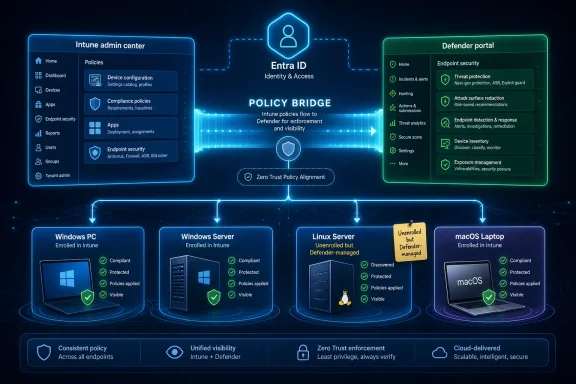
This update matters because it lets Defender-managed devices receive Intune endpoint security policies even when those devices are not formally enrolled into Intune. Microsoft’s documentation describes the capability as Defender for Endpoint security settings management, and Petri’s report rightly frames it as an expansion of Intune’s endpoint security reach beyond the conventional enrolled-device estate.
The immediate appeal is obvious. Many organizations have servers, contractor machines, developer workstations, Linux hosts, and Macs that are protected by Defender for Endpoint but not enrolled in Intune. Some cannot be enrolled cleanly, some are intentionally kept outside MDM, and some live in that familiar enterprise swamp where security coverage arrives before management hygiene.
Microsoft’s bet is that Defender is already present on many of those machines, so Defender can become the enforcement path for baseline security settings. Instead of waiting for full MDM enrollment, administrators can use Intune endpoint security policy objects and have Defender enforce them locally.
That is not the same thing as turning Defender into full Intune. It is narrower, more security-focused, and dependent on Defender for Endpoint licensing and agent support. But it is still a significant architectural shift because it gives security administrators a policy bridge into machines that were previously visible but not easily governed from the same console.
Microsoft’s model works by using a device identity in Microsoft Entra ID. If the device is not already registered, Microsoft’s documentation says the solution can create a synthetic device identity so the endpoint can receive assigned policies. Defender then enforces the settings on the endpoint and reports status back into the Microsoft Defender portal and the Intune admin center.
That synthetic identity piece is important because it reveals what Microsoft is really doing. This is not classic MDM enrollment without the enrollment ceremony. It is a security-management channel built around Defender, Entra identity, and Intune policy assignment.
The distinction matters for operations. An Intune-enrolled Windows laptop remains managed through Intune in the normal way. Microsoft explicitly says that when a device is managed by Intune, it does not process policies through Defender for Endpoint security settings management; administrators should use Intune directly for those devices.
That design avoids some policy collision, but it also forces administrators to understand their fleet’s management state. A machine may appear in Defender. It may appear in Intune. It may have an Entra identity. It may be MDE-managed rather than MDM-managed. Those differences are not cosmetic; they determine which policies apply and which console tells the truth fastest.
Microsoft’s documentation lists Windows, Windows Server 2012 R2 and later, Linux, and macOS as supported platforms for this security settings management scenario. That breadth gives the feature its weight. Windows Server and Linux support make this more than a client-device convenience.
Servers have always been awkward citizens in endpoint management. They are endpoints in the security sense, but not always in the device-management sense. Change windows, workload dependencies, fragile legacy applications, and tightly controlled operations teams all conspire against treating servers like ordinary managed clients.
Defender-based enforcement gives Microsoft a way to say: keep your operational model, but accept centrally defined security settings. That may be a compelling compromise for organizations that already use Defender for Endpoint across servers but have uneven policy enforcement.
It also fits Microsoft’s broader security packaging. Defender for Endpoint, Defender for Servers, Intune, Entra ID, and Microsoft 365 security portals increasingly operate as one cloudy administrative fabric. The boundaries between those products still matter for licensing and responsibility, but Microsoft’s interface strategy is clearly to make them feel like parts of one system.
For WindowsForum readers running mixed estates, the message is practical: if Defender is your common security sensor, Microsoft now wants it to be a common security actuator too.
But cross-platform support in Microsoft management products is rarely identical across platforms. The same portal does not always mean the same settings, the same enforcement behavior, or the same troubleshooting path. Linux and macOS depend on Defender for Endpoint agents that have their own version requirements, update channels, diagnostic tools, and platform caveats.
Microsoft’s Learn documentation calls out specific Defender agent requirements for non-Windows platforms, including minimum versions for Linux and macOS security settings management. It also documents known issues, such as Linux enrollment problems tied to specific agent behavior and system paths, and notes that some identity details may be visible in Intune or Entra even when they are not shown in the Defender portal.
That is the sort of fine print that separates a clean product announcement from a successful rollout. A Windows admin may expect Group Policy-like certainty. A Linux admin may ask what exactly is being written, where, and how it interacts with configuration management systems such as Ansible, Puppet, Chef, or Salt. A Mac admin may want to know how this behaves beside Apple’s MDM framework and existing configuration profiles.
The answer is not that Microsoft’s model is wrong. It is that it is not magically uniform. Defender is the enforcement layer, but each platform still has its own operating system realities.
Administrators should test policy types by platform rather than assuming the name of a policy profile implies identical behavior everywhere. Antivirus settings, firewall posture, attack surface reduction rules, exclusions, and EDR-related configuration all carry different meanings depending on the endpoint underneath.
The Intune portal is familiar to device-management administrators. It is where endpoint security policies, assignments, compliance views, and RBAC models already live. The Defender portal is where security teams investigate incidents and review device exposure, so placing policy visibility there reduces the handoff between detection and remediation.
This dual-portal model is useful, but it creates governance questions. If two teams can reach the same policy surface from different portals, the organization needs to know who owns policy creation, who owns assignment, and who owns exceptions. Otherwise the feature becomes another place where “centralized management” means “everyone has a console and nobody has a process.”
Role-based access control is therefore not a footnote. Petri notes that RBAC can be used to assign permissions based on job responsibilities, and Microsoft’s broader Intune model depends heavily on scoped administrative roles. For large organizations, delegation is not merely about convenience; it is the control that prevents a helpdesk role from becoming a domain-wide security policy role by accident.
The best use of the new capability will likely involve shared visibility but tightly controlled write access. Security operations may need to see policy compliance and device status. Endpoint engineering may own policy design. Server operations may approve deployment rings. Compliance teams may audit outcomes. The portal can support that split, but the tenant will not invent the governance model for you.
But speed should not be confused with completeness. Defender security settings management is not a replacement for full device enrollment where full device management is needed. It does not turn every Defender-onboarded endpoint into a fully Intune-managed asset with the entire catalog of configuration profiles, app deployment, inventory, compliance workflows, and device actions.
Microsoft’s own documentation is careful here. The scenario extends Intune’s endpoint security surface to devices that are not capable of enrolling in Intune. That phrasing is doing work. It positions the feature as a security bridge, not a new universal management mode.
The difference will show up in expectations. A security team may want antivirus policy, attack surface reduction, or EDR settings. A desktop engineering team may want certificate deployment, Wi-Fi profiles, scripts, application lifecycle management, and OS update rings. Those are not the same problem.
This is why the update should be read as part of Microsoft’s security posture story rather than as a revolution in endpoint management. The company is making it easier to apply baseline Defender-related protections broadly. It is not erasing the operational reasons organizations still need Intune enrollment, Configuration Manager, group policy, or platform-native management.
Devices receive assigned policies based on Microsoft Entra ID device objects. If a device is not already registered, the security settings management flow can create the necessary identity. Microsoft’s documentation refers to synthetic registration, and that has practical implications for grouping, targeting, quotas, and reporting.
Dynamic groups become especially important. Microsoft recommends targeting policies based on platform attributes such as device OS type — Windows, Windows Server, macOS, or Linux — so that policy delivery remains stable when devices change management type, such as during later MDM enrollment. Microsoft also documents a management type attribute, MicrosoftSense, for targeting devices managed by Defender for Endpoint through this scenario.
That advice should be taken seriously. Many organizations have old dynamic group logic that grew organically around tags, names, ownership assumptions, or half-remembered pilot projects. Security settings management can expose those assumptions quickly.
There is also a quota and hygiene angle. Microsoft warns that selecting broad enforcement scopes for entire OS fleets can create synthetic registrations that count against Microsoft Entra ID quotas in the same way as full registrations. For small tenants this may not matter. For large environments, service providers, universities, and sprawling hybrid organizations, identity object sprawl is not theoretical.
The irony is familiar: a feature designed to manage previously unmanaged devices can create a new management problem in the identity plane. That is not a reason to avoid it. It is a reason to plan the identity model before treating the enforcement scope toggle as a harmless switch.
That makes the enforcement scope the gateway between visibility and control. Defender may already see a device, but that does not mean it should automatically accept security policy through this mechanism. Enabling the scope says, in effect, that devices matching the chosen platform and targeting logic may now be managed for supported security settings.
In small environments, that may feel straightforward. In real enterprise environments, it should be treated like any other production policy change. The first test should be a constrained group, not “all Windows Server devices” across the estate. The second test should involve reporting and rollback, not just whether the policy appears as assigned.
The policy categories mentioned in Petri’s report — Antivirus, Firewall, and Attack Surface Reduction rules — are exactly the kind of settings that can produce meaningful security gains and meaningful operational pain. A stricter antivirus exclusion policy can break a workload. A firewall rule can block a monitoring path. An ASR rule can stop a script that has been quietly essential for years.
The right lesson is not to fear the feature. It is to respect that Defender is enforcing settings locally on real machines. The lack of Intune enrollment does not make the policy less real.
For security teams, this is welcome. Defender’s device inventory already gives them a threat-centered view of assets. Adding security policy status makes it easier to answer a basic question after a finding or incident: was the endpoint actually configured the way the organization thought it was?
For endpoint teams, the dual reporting path can be more complicated. Compliance in Intune has a specific meaning in many organizations, often tied to Conditional Access, device enrollment, and broader configuration state. Security settings management compliance is narrower. It tells you about supported endpoint security policy application, not the full posture of a traditionally managed device.
That distinction should be reflected in dashboards and executive reporting. A Defender-managed Linux server showing policy compliance is not equivalent to a fully managed corporate Windows laptop passing an Intune compliance policy. Both may be good news, but they are not the same category of assurance.
This is where Microsoft’s unified portal language can get ahead of operational reality. The screens may converge faster than the governance definitions. Organizations should name the difference internally: Defender-managed security compliance is a security configuration signal, not necessarily a full device-management certification.
Both readings are true.
The modern Microsoft endpoint estate is a mesh of Intune, Defender, Entra ID, Configuration Manager, Windows Autopatch, Windows Update for Business, Azure Arc, Defender for Cloud, and assorted admin centers that still occasionally feel as if they were designed by different committees because they were. Customers asked for unified management because they were tired of operating the seams.
Security settings management for unenrolled Defender devices is one of those seam-reduction features. It acknowledges that the device with Defender installed is often closer to being securable than the device waiting for a perfect enrollment state. It also acknowledges that security teams cannot always wait for endpoint management programs to finish their multiyear roadmaps.
But seam reduction is not the same as simplicity. The feature introduces its own concepts: synthetic Entra registration, management type targeting, platform-specific support, Defender agent prerequisites, enforcement scopes, and policy precedence rules. Microsoft is not removing complexity so much as moving the useful part of management closer to the devices that need it.
For administrators, that trade may be worth it. A working security policy on an unenrolled server is better than a beautifully designed management architecture that never reaches production. But nobody should mistake this for a return to simple endpoint administration.
This Intune-Defender integration fits that pattern. Defender observes and enforces. Intune defines policy. Entra supplies identity and assignment logic. The portals provide overlapping views for endpoint and security teams. Licensing supplies the commercial glue.
That is powerful for Microsoft customers already deep in the ecosystem. It reduces the number of third-party consoles needed for baseline endpoint security, especially in mixed operating system environments. It may also make Defender for Endpoint more attractive on Linux and macOS because those agents become not just detection tools but policy enforcement points.
The lock-in concern is equally real. Once security policy assignment depends on Entra groups, Defender agent state, Intune endpoint security profiles, and Defender portal enforcement scopes, the cost of unwinding the stack rises. That may be acceptable, even desirable, for organizations standardizing on Microsoft. It is still a strategic dependency.
IT leaders should be honest about the bargain. This capability is valuable because Microsoft controls enough layers to make it work. The same integration that saves time can also narrow future architectural choices.
Licensing is the second check. Petri notes that organizations need Defender for Endpoint licensing through Microsoft 365 bundles or standalone MDE licenses, and Microsoft’s documentation points to Defender for Endpoint Plan 1 or greater for relevant integrations. The exact licensing path will vary by tenant, but the operational point is simple: this is not a free management plane for arbitrary devices.
Connectivity is the third check. Microsoft documents cloud endpoint requirements, including access to Microsoft device-management service endpoints used for enrollment, check-in, and reporting. In locked-down server networks, proxy-heavy environments, and government or regulated deployments, that connectivity may be the hardest part of the rollout.
Agent health is the fourth check. Linux and macOS support depends on Defender agent versions that meet Microsoft’s prerequisites. Windows Server support also requires the right Defender onboarding and platform state. A policy engine is only as reliable as the agent receiving and applying the policy.
Finally, groups and RBAC need deliberate design. Dynamic groups should reflect platform and management type. Administrative roles should separate policy authors, policy approvers, and readers where possible. Change control should treat security settings as production-impacting configuration, because that is exactly what they are.
A good first pilot might target a small number of noncritical Windows Server or Linux systems already onboarded to Defender. The goal should not be to push the most aggressive ASR or firewall posture on day one. The goal should be to prove policy receipt, enforcement, status reporting, grouping behavior, and rollback.
Macs deserve their own pilot, not a footnote in the Windows plan. Linux deserves distribution-specific validation. Servers deserve workload-owner signoff. This sounds tedious because it is, but the alternative is discovering platform behavior during an outage.
Administrators should also decide how they will handle devices that later become Intune-enrolled. Microsoft says enrolled devices use Intune policy rather than Defender security settings management for this scenario. That is sensible, but it means migration paths need to be tested. The same endpoint changing management type should not silently lose policy coverage because a dynamic group was too clever for its own good.
The feature’s value is real, but it compounds only when the underlying operations are boring. Microsoft has provided a bridge. IT still has to decide what traffic is allowed across it.
That does not mean hiding every distinction. Some distinctions must remain visible because they affect policy precedence, platform support, and troubleshooting. But the experience should make the correct path obvious: this device is Intune-managed, use this policy route; that device is Defender-managed only, use that route; this device is neither, onboard it first.
Microsoft has improved many of these workflows over time, but the ecosystem still carries too much vocabulary. MDE-managed, Intune-enrolled, Entra-registered, synthetic device identity, endpoint security policy, device configuration profile, compliance policy, security baseline — each term has a purpose, and each term can become a trap.
For WindowsForum’s audience, this is where enthusiasm should meet skepticism. The update is useful precisely because it addresses a real operational gap. But it will not rescue a tenant with unclear ownership, stale groups, neglected Defender agents, and security policies nobody has tested since the last audit.
Microsoft’s documentation is also a reminder that this capability has been evolving for some time, including a public preview period in 2023 and later changes to behavior and grouping guidance. In other words, this is not a one-and-done feature. It is a moving part in Microsoft’s endpoint security architecture, and administrators should expect it to keep changing.
Before, those questions often led to separate tooling conversations. Now, more of them can start in Intune endpoint security policy or the Defender portal. That is a better default.
The tradeoff is that day-two operations need better labels. Device inventory views should make management channel obvious. Runbooks should say whether a setting is enforced through Intune MDM, Defender security settings management, Configuration Manager, local configuration, or another tool. Incident response should include policy-state checks as part of endpoint triage.
This is especially important for exceptions. Security teams love centralized policy until the first business-critical workload needs a carveout. If exceptions are created hastily in multiple portals, the environment becomes harder to reason about than before. If exceptions are modeled cleanly through groups and RBAC, the new capability becomes a useful control rather than another source of drift.
The feature also makes it easier to ask uncomfortable questions. If Defender can enforce baseline settings on unenrolled devices, why are certain devices still outside scope? If the answer is licensing, connectivity, unsupported platform state, or business risk, that answer can be managed. If the answer is “we do not know,” the feature has already done its job by exposing the gap.
For organizations that already pay for Microsoft’s security stack, the new path is likely to be welcomed. It offers a way to reduce unmanaged security drift without forcing every device through a full Intune enrollment model. It is especially relevant for servers and non-Windows endpoints, where MDM enrollment has never been the clean universal answer that vendors sometimes pretend it is.
The caution is that administrators should not let the word “unenrolled” lower their guard. These policies can affect production systems. They depend on identity objects and agent health. They require licensing, connectivity, grouping, RBAC, and testing. They also sit inside a Microsoft ecosystem where similar-sounding policy surfaces can overlap in ways that punish casual configuration.
The most concrete readout is this:
 Microsoft Moves the Control Plane Closer to the Sensor
For years, Intune has been the place Microsoft wanted administrators to think about device configuration, compliance, and policy. Defender for Endpoint, meanwhile, has been the place security teams lived: alerts, incidents, vulnerability signals, investigations, and the grim satisfaction of watching an endpoint do exactly the thing the policy said it should not do.This update matters because it lets Defender-managed devices receive Intune endpoint security policies even when those devices are not formally enrolled into Intune. Microsoft’s documentation describes the capability as Defender for Endpoint security settings management, and Petri’s report rightly frames it as an expansion of Intune’s endpoint security reach beyond the conventional enrolled-device estate.
The immediate appeal is obvious. Many organizations have servers, contractor machines, developer workstations, Linux hosts, and Macs that are protected by Defender for Endpoint but not enrolled in Intune. Some cannot be enrolled cleanly, some are intentionally kept outside MDM, and some live in that familiar enterprise swamp where security coverage arrives before management hygiene.
Microsoft’s bet is that Defender is already present on many of those machines, so Defender can become the enforcement path for baseline security settings. Instead of waiting for full MDM enrollment, administrators can use Intune endpoint security policy objects and have Defender enforce them locally.
That is not the same thing as turning Defender into full Intune. It is narrower, more security-focused, and dependent on Defender for Endpoint licensing and agent support. But it is still a significant architectural shift because it gives security administrators a policy bridge into machines that were previously visible but not easily governed from the same console.
Unenrolled No Longer Means Unmanaged, But It Still Means Different
The phrase “unenrolled devices” can be misleading if read casually. These are not random unmanaged endpoints magically pulled under corporate control. They are devices onboarded to Microsoft Defender for Endpoint, and that relationship is what gives Microsoft a trusted agent on the device.Microsoft’s model works by using a device identity in Microsoft Entra ID. If the device is not already registered, Microsoft’s documentation says the solution can create a synthetic device identity so the endpoint can receive assigned policies. Defender then enforces the settings on the endpoint and reports status back into the Microsoft Defender portal and the Intune admin center.
That synthetic identity piece is important because it reveals what Microsoft is really doing. This is not classic MDM enrollment without the enrollment ceremony. It is a security-management channel built around Defender, Entra identity, and Intune policy assignment.
The distinction matters for operations. An Intune-enrolled Windows laptop remains managed through Intune in the normal way. Microsoft explicitly says that when a device is managed by Intune, it does not process policies through Defender for Endpoint security settings management; administrators should use Intune directly for those devices.
That design avoids some policy collision, but it also forces administrators to understand their fleet’s management state. A machine may appear in Defender. It may appear in Intune. It may have an Entra identity. It may be MDE-managed rather than MDM-managed. Those differences are not cosmetic; they determine which policies apply and which console tells the truth fastest.
The Server Estate Is the Obvious Prize
The most natural audience for this capability is not the neatly enrolled Windows 11 laptop fleet. It is the server estate: Windows Server boxes, Linux servers, and hybrid workloads that security teams have already onboarded to Defender but never wanted to push through a full device-management enrollment process.Microsoft’s documentation lists Windows, Windows Server 2012 R2 and later, Linux, and macOS as supported platforms for this security settings management scenario. That breadth gives the feature its weight. Windows Server and Linux support make this more than a client-device convenience.
Servers have always been awkward citizens in endpoint management. They are endpoints in the security sense, but not always in the device-management sense. Change windows, workload dependencies, fragile legacy applications, and tightly controlled operations teams all conspire against treating servers like ordinary managed clients.
Defender-based enforcement gives Microsoft a way to say: keep your operational model, but accept centrally defined security settings. That may be a compelling compromise for organizations that already use Defender for Endpoint across servers but have uneven policy enforcement.
It also fits Microsoft’s broader security packaging. Defender for Endpoint, Defender for Servers, Intune, Entra ID, and Microsoft 365 security portals increasingly operate as one cloudy administrative fabric. The boundaries between those products still matter for licensing and responsibility, but Microsoft’s interface strategy is clearly to make them feel like parts of one system.
For WindowsForum readers running mixed estates, the message is practical: if Defender is your common security sensor, Microsoft now wants it to be a common security actuator too.
Cross-Platform Support Is Real, But Not Symmetrical
The supported-platform list is attractive: Windows, Windows Server, macOS, and Linux. In enterprise terms, that covers the estate that usually causes the most friction. It also lets Microsoft pitch Intune endpoint security as less Windows-centric than its history suggests.But cross-platform support in Microsoft management products is rarely identical across platforms. The same portal does not always mean the same settings, the same enforcement behavior, or the same troubleshooting path. Linux and macOS depend on Defender for Endpoint agents that have their own version requirements, update channels, diagnostic tools, and platform caveats.
Microsoft’s Learn documentation calls out specific Defender agent requirements for non-Windows platforms, including minimum versions for Linux and macOS security settings management. It also documents known issues, such as Linux enrollment problems tied to specific agent behavior and system paths, and notes that some identity details may be visible in Intune or Entra even when they are not shown in the Defender portal.
That is the sort of fine print that separates a clean product announcement from a successful rollout. A Windows admin may expect Group Policy-like certainty. A Linux admin may ask what exactly is being written, where, and how it interacts with configuration management systems such as Ansible, Puppet, Chef, or Salt. A Mac admin may want to know how this behaves beside Apple’s MDM framework and existing configuration profiles.
The answer is not that Microsoft’s model is wrong. It is that it is not magically uniform. Defender is the enforcement layer, but each platform still has its own operating system realities.
Administrators should test policy types by platform rather than assuming the name of a policy profile implies identical behavior everywhere. Antivirus settings, firewall posture, attack surface reduction rules, exclusions, and EDR-related configuration all carry different meanings depending on the endpoint underneath.
The Intune Portal and Defender Portal Are Becoming Two Doors Into One Room
Microsoft says administrators can manage these policies through the Microsoft Intune admin center or the Microsoft Defender portal. That is convenient, and it also reflects a quiet organizational truth inside many companies: endpoint security is often split between infrastructure teams and security operations teams.The Intune portal is familiar to device-management administrators. It is where endpoint security policies, assignments, compliance views, and RBAC models already live. The Defender portal is where security teams investigate incidents and review device exposure, so placing policy visibility there reduces the handoff between detection and remediation.
This dual-portal model is useful, but it creates governance questions. If two teams can reach the same policy surface from different portals, the organization needs to know who owns policy creation, who owns assignment, and who owns exceptions. Otherwise the feature becomes another place where “centralized management” means “everyone has a console and nobody has a process.”
Role-based access control is therefore not a footnote. Petri notes that RBAC can be used to assign permissions based on job responsibilities, and Microsoft’s broader Intune model depends heavily on scoped administrative roles. For large organizations, delegation is not merely about convenience; it is the control that prevents a helpdesk role from becoming a domain-wide security policy role by accident.
The best use of the new capability will likely involve shared visibility but tightly controlled write access. Security operations may need to see policy compliance and device status. Endpoint engineering may own policy design. Server operations may approve deployment rings. Compliance teams may audit outcomes. The portal can support that split, but the tenant will not invent the governance model for you.
The Policy Win Is Speed, Not Completeness
The feature’s strongest value is speed. If an organization already has Defender for Endpoint deployed to a device, it can potentially push supported security settings without waiting for a full Intune enrollment project. That can matter during audits, incident response, merger integration, or the slow cleanup of a historically unmanaged server fleet.But speed should not be confused with completeness. Defender security settings management is not a replacement for full device enrollment where full device management is needed. It does not turn every Defender-onboarded endpoint into a fully Intune-managed asset with the entire catalog of configuration profiles, app deployment, inventory, compliance workflows, and device actions.
Microsoft’s own documentation is careful here. The scenario extends Intune’s endpoint security surface to devices that are not capable of enrolling in Intune. That phrasing is doing work. It positions the feature as a security bridge, not a new universal management mode.
The difference will show up in expectations. A security team may want antivirus policy, attack surface reduction, or EDR settings. A desktop engineering team may want certificate deployment, Wi-Fi profiles, scripts, application lifecycle management, and OS update rings. Those are not the same problem.
This is why the update should be read as part of Microsoft’s security posture story rather than as a revolution in endpoint management. The company is making it easier to apply baseline Defender-related protections broadly. It is not erasing the operational reasons organizations still need Intune enrollment, Configuration Manager, group policy, or platform-native management.
Entra ID Becomes the Quiet Dependency Behind Everything
The device identity model is easy to skip over because it lacks the drama of a new portal toggle. It is also the part that administrators should understand before they enable the feature at scale.Devices receive assigned policies based on Microsoft Entra ID device objects. If a device is not already registered, the security settings management flow can create the necessary identity. Microsoft’s documentation refers to synthetic registration, and that has practical implications for grouping, targeting, quotas, and reporting.
Dynamic groups become especially important. Microsoft recommends targeting policies based on platform attributes such as device OS type — Windows, Windows Server, macOS, or Linux — so that policy delivery remains stable when devices change management type, such as during later MDM enrollment. Microsoft also documents a management type attribute, MicrosoftSense, for targeting devices managed by Defender for Endpoint through this scenario.
That advice should be taken seriously. Many organizations have old dynamic group logic that grew organically around tags, names, ownership assumptions, or half-remembered pilot projects. Security settings management can expose those assumptions quickly.
There is also a quota and hygiene angle. Microsoft warns that selecting broad enforcement scopes for entire OS fleets can create synthetic registrations that count against Microsoft Entra ID quotas in the same way as full registrations. For small tenants this may not matter. For large environments, service providers, universities, and sprawling hybrid organizations, identity object sprawl is not theoretical.
The irony is familiar: a feature designed to manage previously unmanaged devices can create a new management problem in the identity plane. That is not a reason to avoid it. It is a reason to plan the identity model before treating the enforcement scope toggle as a harmless switch.
Enforcement Scope Is the Toggle That Deserves a Change Window
Petri’s summary notes that administrators must enable enforcement scope in the Microsoft Defender portal and configure Intune to enforce endpoint security settings. Microsoft’s documentation places that configuration under Defender for Endpoint security settings management, where administrators choose which platforms and device scopes are eligible.That makes the enforcement scope the gateway between visibility and control. Defender may already see a device, but that does not mean it should automatically accept security policy through this mechanism. Enabling the scope says, in effect, that devices matching the chosen platform and targeting logic may now be managed for supported security settings.
In small environments, that may feel straightforward. In real enterprise environments, it should be treated like any other production policy change. The first test should be a constrained group, not “all Windows Server devices” across the estate. The second test should involve reporting and rollback, not just whether the policy appears as assigned.
The policy categories mentioned in Petri’s report — Antivirus, Firewall, and Attack Surface Reduction rules — are exactly the kind of settings that can produce meaningful security gains and meaningful operational pain. A stricter antivirus exclusion policy can break a workload. A firewall rule can block a monitoring path. An ASR rule can stop a script that has been quietly essential for years.
The right lesson is not to fear the feature. It is to respect that Defender is enforcing settings locally on real machines. The lack of Intune enrollment does not make the policy less real.
Compliance Reporting Becomes More Useful, and More Ambiguous
One of the update’s most practical promises is that administrators can track policy deployment, monitor compliance, and review device status from Intune and Defender management consoles. That closes a gap for devices that were security-visible but not necessarily policy-visible from Intune.For security teams, this is welcome. Defender’s device inventory already gives them a threat-centered view of assets. Adding security policy status makes it easier to answer a basic question after a finding or incident: was the endpoint actually configured the way the organization thought it was?
For endpoint teams, the dual reporting path can be more complicated. Compliance in Intune has a specific meaning in many organizations, often tied to Conditional Access, device enrollment, and broader configuration state. Security settings management compliance is narrower. It tells you about supported endpoint security policy application, not the full posture of a traditionally managed device.
That distinction should be reflected in dashboards and executive reporting. A Defender-managed Linux server showing policy compliance is not equivalent to a fully managed corporate Windows laptop passing an Intune compliance policy. Both may be good news, but they are not the same category of assurance.
This is where Microsoft’s unified portal language can get ahead of operational reality. The screens may converge faster than the governance definitions. Organizations should name the difference internally: Defender-managed security compliance is a security configuration signal, not necessarily a full device-management certification.
Microsoft Is Solving a Problem It Helped Create
There is a charitable way to read this update: Microsoft is giving administrators a pragmatic way to secure devices that are not enrolled in Intune. There is also a more skeptical reading: Microsoft’s management stack has become so sprawling that the company now needs bridges between its own control planes.Both readings are true.
The modern Microsoft endpoint estate is a mesh of Intune, Defender, Entra ID, Configuration Manager, Windows Autopatch, Windows Update for Business, Azure Arc, Defender for Cloud, and assorted admin centers that still occasionally feel as if they were designed by different committees because they were. Customers asked for unified management because they were tired of operating the seams.
Security settings management for unenrolled Defender devices is one of those seam-reduction features. It acknowledges that the device with Defender installed is often closer to being securable than the device waiting for a perfect enrollment state. It also acknowledges that security teams cannot always wait for endpoint management programs to finish their multiyear roadmaps.
But seam reduction is not the same as simplicity. The feature introduces its own concepts: synthetic Entra registration, management type targeting, platform-specific support, Defender agent prerequisites, enforcement scopes, and policy precedence rules. Microsoft is not removing complexity so much as moving the useful part of management closer to the devices that need it.
For administrators, that trade may be worth it. A working security policy on an unenrolled server is better than a beautifully designed management architecture that never reaches production. But nobody should mistake this for a return to simple endpoint administration.
The Competitive Context Is Zero Trust by Procurement
The larger market context is the steady normalization of security controls that follow identity, telemetry, and agent presence rather than network location or classic domain membership. Microsoft calls this Zero Trust when it is wearing its strategy hat. In practice, it often means buying enough of the Microsoft stack that the pieces start to reinforce one another.This Intune-Defender integration fits that pattern. Defender observes and enforces. Intune defines policy. Entra supplies identity and assignment logic. The portals provide overlapping views for endpoint and security teams. Licensing supplies the commercial glue.
That is powerful for Microsoft customers already deep in the ecosystem. It reduces the number of third-party consoles needed for baseline endpoint security, especially in mixed operating system environments. It may also make Defender for Endpoint more attractive on Linux and macOS because those agents become not just detection tools but policy enforcement points.
The lock-in concern is equally real. Once security policy assignment depends on Entra groups, Defender agent state, Intune endpoint security profiles, and Defender portal enforcement scopes, the cost of unwinding the stack rises. That may be acceptable, even desirable, for organizations standardizing on Microsoft. It is still a strategic dependency.
IT leaders should be honest about the bargain. This capability is valuable because Microsoft controls enough layers to make it work. The same integration that saves time can also narrow future architectural choices.
The Admin Checklist Hides in the Fine Print
The most successful deployments will begin with inventory, not policy creation. Administrators should first identify which devices are Defender-onboarded, which are Intune-enrolled, which are neither, and which platforms and agent versions are actually present. Without that map, policy targeting becomes guesswork.Licensing is the second check. Petri notes that organizations need Defender for Endpoint licensing through Microsoft 365 bundles or standalone MDE licenses, and Microsoft’s documentation points to Defender for Endpoint Plan 1 or greater for relevant integrations. The exact licensing path will vary by tenant, but the operational point is simple: this is not a free management plane for arbitrary devices.
Connectivity is the third check. Microsoft documents cloud endpoint requirements, including access to Microsoft device-management service endpoints used for enrollment, check-in, and reporting. In locked-down server networks, proxy-heavy environments, and government or regulated deployments, that connectivity may be the hardest part of the rollout.
Agent health is the fourth check. Linux and macOS support depends on Defender agent versions that meet Microsoft’s prerequisites. Windows Server support also requires the right Defender onboarding and platform state. A policy engine is only as reliable as the agent receiving and applying the policy.
Finally, groups and RBAC need deliberate design. Dynamic groups should reflect platform and management type. Administrative roles should separate policy authors, policy approvers, and readers where possible. Change control should treat security settings as production-impacting configuration, because that is exactly what they are.
This Is the Kind of Feature That Rewards Boring Pilots
The safest way to adopt this capability is also the least glamorous: pilot a small group of devices, pick a limited set of policies, validate reporting, expand by platform, and document exceptions. That is old-fashioned endpoint management discipline, and it remains undefeated.A good first pilot might target a small number of noncritical Windows Server or Linux systems already onboarded to Defender. The goal should not be to push the most aggressive ASR or firewall posture on day one. The goal should be to prove policy receipt, enforcement, status reporting, grouping behavior, and rollback.
Macs deserve their own pilot, not a footnote in the Windows plan. Linux deserves distribution-specific validation. Servers deserve workload-owner signoff. This sounds tedious because it is, but the alternative is discovering platform behavior during an outage.
Administrators should also decide how they will handle devices that later become Intune-enrolled. Microsoft says enrolled devices use Intune policy rather than Defender security settings management for this scenario. That is sensible, but it means migration paths need to be tested. The same endpoint changing management type should not silently lose policy coverage because a dynamic group was too clever for its own good.
The feature’s value is real, but it compounds only when the underlying operations are boring. Microsoft has provided a bridge. IT still has to decide what traffic is allowed across it.
The Real Test Is Whether Microsoft Can Make the Seam Disappear
The long-term question is not whether this feature works in isolation. It is whether Microsoft can make the Intune-Defender seam feel coherent enough that administrators stop thinking about it during routine operations.That does not mean hiding every distinction. Some distinctions must remain visible because they affect policy precedence, platform support, and troubleshooting. But the experience should make the correct path obvious: this device is Intune-managed, use this policy route; that device is Defender-managed only, use that route; this device is neither, onboard it first.
Microsoft has improved many of these workflows over time, but the ecosystem still carries too much vocabulary. MDE-managed, Intune-enrolled, Entra-registered, synthetic device identity, endpoint security policy, device configuration profile, compliance policy, security baseline — each term has a purpose, and each term can become a trap.
For WindowsForum’s audience, this is where enthusiasm should meet skepticism. The update is useful precisely because it addresses a real operational gap. But it will not rescue a tenant with unclear ownership, stale groups, neglected Defender agents, and security policies nobody has tested since the last audit.
Microsoft’s documentation is also a reminder that this capability has been evolving for some time, including a public preview period in 2023 and later changes to behavior and grouping guidance. In other words, this is not a one-and-done feature. It is a moving part in Microsoft’s endpoint security architecture, and administrators should expect it to keep changing.
The New Policy Path Changes the Day-Two Work
This update will feel most valuable after the initial setup, when administrators are handling the everyday mess of endpoint security. A new server appears in Defender but is not Intune-enrolled. A Linux fleet needs a consistent antivirus exclusion policy. A Mac group needs Defender settings reviewed. A security audit asks whether ASR policy is applied beyond the corporate laptop fleet.Before, those questions often led to separate tooling conversations. Now, more of them can start in Intune endpoint security policy or the Defender portal. That is a better default.
The tradeoff is that day-two operations need better labels. Device inventory views should make management channel obvious. Runbooks should say whether a setting is enforced through Intune MDM, Defender security settings management, Configuration Manager, local configuration, or another tool. Incident response should include policy-state checks as part of endpoint triage.
This is especially important for exceptions. Security teams love centralized policy until the first business-critical workload needs a carveout. If exceptions are created hastily in multiple portals, the environment becomes harder to reason about than before. If exceptions are modeled cleanly through groups and RBAC, the new capability becomes a useful control rather than another source of drift.
The feature also makes it easier to ask uncomfortable questions. If Defender can enforce baseline settings on unenrolled devices, why are certain devices still outside scope? If the answer is licensing, connectivity, unsupported platform state, or business risk, that answer can be managed. If the answer is “we do not know,” the feature has already done its job by exposing the gap.
The Practical Meaning of Microsoft’s Defender-to-Intune Bridge
This is not the kind of update that most end users will notice. There is no new Start menu behavior, no Copilot flourish, no visible Windows shell change. Its impact is in the administrative substrate: the place where policies, identities, agents, and reports decide whether an endpoint is merely observed or actually governed.For organizations that already pay for Microsoft’s security stack, the new path is likely to be welcomed. It offers a way to reduce unmanaged security drift without forcing every device through a full Intune enrollment model. It is especially relevant for servers and non-Windows endpoints, where MDM enrollment has never been the clean universal answer that vendors sometimes pretend it is.
The caution is that administrators should not let the word “unenrolled” lower their guard. These policies can affect production systems. They depend on identity objects and agent health. They require licensing, connectivity, grouping, RBAC, and testing. They also sit inside a Microsoft ecosystem where similar-sounding policy surfaces can overlap in ways that punish casual configuration.
The most concrete readout is this:
- Microsoft Intune endpoint security policies can now reach selected Defender for Endpoint-managed devices that are not enrolled in Intune.
- The supported platform scope includes Windows, Windows Server 2012 R2 and later, macOS, and Linux, subject to Microsoft’s agent and platform requirements.
- Defender enforces the assigned settings locally, while policy management and reporting can surface through both the Intune admin center and the Microsoft Defender portal.
- Administrators must configure the Defender enforcement scope and Intune security settings management path before eligible devices receive policy.
- The feature is best understood as a security-policy bridge, not a full replacement for Intune enrollment or broader device management.
- Dynamic groups, Entra device identity, RBAC, licensing, connectivity, and staged rollout discipline will determine whether this becomes a control improvement or another source of tenant confusion.
References
- Primary source: Petri IT Knowledgebase
Published: 2026-07-07T16:03:11.946277
Loading…
petri.com - Official source: learn.microsoft.com
Loading…
learn.microsoft.com - Official source: techcommunity.microsoft.com
Loading…
techcommunity.microsoft.com - Official source: download.microsoft.com
- Related coverage: sc1.checkpoint.com
Loading…
sc1.checkpoint.com - Related coverage: transputec.com
Loading…
www.transputec.com