

Microsoft Intune administrators should run the Permissions Assessment Report now, but leave the Scoped permissions toggle off until every reported reduction has been reconciled with the organization’s intended role design. Go to Tenant administration > Roles > Settings, generate the report, review current merged permissions against the scoped result, correct role assignments, and rerun the assessment; only then should a tenant consider enabling the irreversible, tenant-wide change.
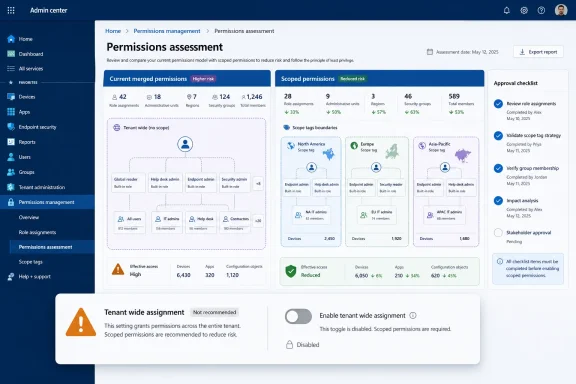
Microsoft introduced Scoped permissions as an opt-in public preview in March 2026 to correct a long-standing least-privilege problem involving role assignments and scope tags. As detailed in Microsoft Learn, the new behavior keeps permissions inside each assignment’s scope-tag context instead of allowing permissions in the same category to merge across administrative boundaries.
The immediate procedure is straightforward, but the final click carries considerably more weight than the interface suggests:
That distinction defines the right pilot. Organizations should pilot the assessment, remediation, and approval process, not the irreversible tenant switch.
The legacy permission behavior can undermine that separation when the same administrator receives multiple role assignments containing permissions from the same category. Intune merges those category permissions even when the assignments use different scope tags.
Consider an administrator who receives Read permission for a category under one tag and full Create, Read, Update, and Delete permissions under another. Under the legacy model, the more permissive action set can effectively apply in both contexts. The administrator may therefore receive CRUD capabilities in the area that was intended to remain read-only.
This is not simply a visibility problem. The administrator might be correctly limited to seeing objects carrying the relevant scope tags while still receiving broader actions against those objects than the role designer intended.
Scoped permissions changes that evaluation model. Each role assignment’s permissions remain within its associated scope-tag context, preserving Read access in the first boundary and CRUD access in the second.
That is a materially cleaner least-privilege design. It makes the effective result resemble the role assignments administrators thought they had already constructed.
An administrator may currently complete a task because a stronger permission from another assignment is being merged into the relevant category. Once Scoped permissions is enabled, Intune should remove that accidental extension. The resulting access reduction may be correct from a security perspective while still interrupting help-desk, application-management, or endpoint-administration processes.
That makes every reduction in the assessment report a design question rather than an automatic defect. Administrators need to determine whether the old access was excessive or whether the underlying role assignment was incomplete.
The review should produce a clear disposition for every reported difference:
Start with groups showing the widest difference between current and post-enable permissions. Those entries indicate places where administrators rely most heavily on permissions inherited indirectly from another scope-tag context.
The next step is to map each reduction to an operational responsibility. If an administrator is expected to update an object within a particular boundary, that capability should be represented directly in the assignment governing that boundary—not borrowed from a more permissive assignment elsewhere.
This aligns with the broader direction of Intune administration. Recent WindowsForum coverage of Microsoft’s June 2026 Intune update highlighted continuing expansion of the platform’s management and remediation capabilities. As Intune gains more operational reach, ambiguous delegated permissions become more consequential, not less.
The assessment should also be rerun after role changes. Editing one assignment can resolve a reduction while exposing another dependency, particularly where an administrator belongs to several groups. The goal is not to make the report empty at any cost; it is to ensure that every post-enable permission set matches an approved responsibility.
The lack of a published date is a reason to begin analysis, not a reason to rush activation. Tenants with complicated delegation models may need time to identify why permissions were assigned, confirm who owns each administrative boundary, and rewrite assignments that have silently depended on merging.
A sensible readiness sequence is therefore:
But the improvement also exposes every place where existing operations have grown around that flaw. Turning on Scoped permissions before examining those dependencies could convert a security correction into an avoidable access incident.
Run the report now. Use it to rewrite ambiguous assignments and document intended privilege by scope tag. Then stop before the toggle until the reported outcome is both technically correct and operationally survivable, because once the tenant adopts Scoped permissions, Microsoft says there is no switch back.
Microsoft introduced Scoped permissions as an opt-in public preview in March 2026 to correct a long-standing least-privilege problem involving role assignments and scope tags. As detailed in Microsoft Learn, the new behavior keeps permissions inside each assignment’s scope-tag context instead of allowing permissions in the same category to merge across administrative boundaries.
 Run the Assessment Before Touching the Toggle
The immediate procedure is straightforward, but the final click carries considerably more weight than the interface suggests:- Open the Microsoft Intune admin center.
- Go to Tenant administration > Roles > Settings.
- Select Generate Report to run the Permissions Assessment Report.
- Compare each administrator’s current effective permissions with the permissions that would remain after Scoped permissions is enabled.
- Review the affected roles, security groups, resources, and scope tags with the teams that own those administrative boundaries.
- Modify role assignments where the proposed result does not match operational requirements.
- Rerun the report and repeat the review until the remaining reductions are understood and accepted.
- Leave the Scoped permissions toggle disabled during the pilot.
- Enable the toggle only after the organization is ready to adopt the new model tenant-wide.
That distinction defines the right pilot. Organizations should pilot the assessment, remediation, and approval process, not the irreversible tenant switch.
The Legacy Model Crosses Scope-Tag Boundaries
Scope tags are meant to divide Intune administration into controlled areas. An organization might use them to separate regional operations, business units, support tiers, or other delegated administrative boundaries while roles determine which actions an administrator can perform.The legacy permission behavior can undermine that separation when the same administrator receives multiple role assignments containing permissions from the same category. Intune merges those category permissions even when the assignments use different scope tags.
Consider an administrator who receives Read permission for a category under one tag and full Create, Read, Update, and Delete permissions under another. Under the legacy model, the more permissive action set can effectively apply in both contexts. The administrator may therefore receive CRUD capabilities in the area that was intended to remain read-only.
This is not simply a visibility problem. The administrator might be correctly limited to seeing objects carrying the relevant scope tags while still receiving broader actions against those objects than the role designer intended.
Scoped permissions changes that evaluation model. Each role assignment’s permissions remain within its associated scope-tag context, preserving Read access in the first boundary and CRUD access in the second.
That is a materially cleaner least-privilege design. It makes the effective result resemble the role assignments administrators thought they had already constructed.
Correct Security Can Still Break Operations
The production risk is not that Scoped permissions is conceptually wrong. The risk is that years of administration under merged behavior may have allowed intended workflows to depend on access that the documented role design did not explicitly grant.An administrator may currently complete a task because a stronger permission from another assignment is being merged into the relevant category. Once Scoped permissions is enabled, Intune should remove that accidental extension. The resulting access reduction may be correct from a security perspective while still interrupting help-desk, application-management, or endpoint-administration processes.
That makes every reduction in the assessment report a design question rather than an automatic defect. Administrators need to determine whether the old access was excessive or whether the underlying role assignment was incomplete.
The review should produce a clear disposition for every reported difference:
- The reduction is intentional, and the administrator should no longer perform that action within the affected scope tag.
- The administrator still requires the action, and the corresponding role assignment must be amended explicitly.
- The requirement is unclear and needs confirmation from the service or security owner before activation.
- The assignment structure is unnecessarily complicated and should be simplified before the behavior changes.
The Report Becomes a Role-Design Audit
Microsoft’s comparison report provides something Intune teams have historically needed: a view of how their written assignments differ from the effective access created by permission merging. Even organizations that do not plan to enable the preview immediately can use that comparison to find administrative boundaries whose enforcement is weaker than expected.Start with groups showing the widest difference between current and post-enable permissions. Those entries indicate places where administrators rely most heavily on permissions inherited indirectly from another scope-tag context.
The next step is to map each reduction to an operational responsibility. If an administrator is expected to update an object within a particular boundary, that capability should be represented directly in the assignment governing that boundary—not borrowed from a more permissive assignment elsewhere.
This aligns with the broader direction of Intune administration. Recent WindowsForum coverage of Microsoft’s June 2026 Intune update highlighted continuing expansion of the platform’s management and remediation capabilities. As Intune gains more operational reach, ambiguous delegated permissions become more consequential, not less.
The assessment should also be rerun after role changes. Editing one assignment can resolve a reduction while exposing another dependency, particularly where an administrator belongs to several groups. The goal is not to make the report empty at any cost; it is to ensure that every post-enable permission set matches an approved responsibility.
Microsoft Has Already Set the Direction
Scoped permissions remains an opt-in public preview, but Microsoft says it will become the default behavior for all tenants in a future release. No date for that default transition is included in the verified material, so administrators should not invent a deadline or treat the next Intune update as an assumed cutoff.The lack of a published date is a reason to begin analysis, not a reason to rush activation. Tenants with complicated delegation models may need time to identify why permissions were assigned, confirm who owns each administrative boundary, and rewrite assignments that have silently depended on merging.
A sensible readiness sequence is therefore:
- Generate and preserve the initial assessment result.
- Identify the administrators and groups affected by permission reductions.
- Validate each reduction against actual job responsibilities.
- Correct assignments instead of preserving accidental privilege through overlapping roles.
- Rerun the report after every meaningful design change.
- Communicate the final access changes before enabling the new behavior.
- Treat activation as a formal production change with explicit approval.
Pilot the Future Model Without Committing the Tenant
Scoped permissions addresses a real flaw in Intune’s delegated administration model. Permissions assigned for one boundary should not become more powerful merely because the same administrator holds a stronger role in another boundary.But the improvement also exposes every place where existing operations have grown around that flaw. Turning on Scoped permissions before examining those dependencies could convert a security correction into an avoidable access incident.
Run the report now. Use it to rewrite ambiguous assignments and document intended privilege by scope tag. Then stop before the toggle until the reported outcome is both technically correct and operationally survivable, because once the tenant adopts Scoped permissions, Microsoft says there is no switch back.
References
- Primary source: learn.microsoft.com
Use role-based access control (RBAC) and scope tags for distributed IT - Microsoft Intune | Microsoft Learn
Use role-based access control (RBAC) and scope tags to filter configuration profiles to specific roles.learn.microsoft.com - Independent coverage: docs.mindline.com
Intune RBAC & Governance | Securing GCC High (Public Preview)
Intune RBAC, scope tags, and assignment filters: delegation model and tagging taxonomy for a well-governed Intune environmentdocs.mindline.com - Primary source: WindowsForum
Intune August 2025: App Control, OOBE Patching, Apple DDM Updates, MAA Governance | Windows Forum
Microsoft’s August 2025 Intune update materially expands the platform’s security controls and enrollment ergonomics, delivering four headline...windowsforum.com