

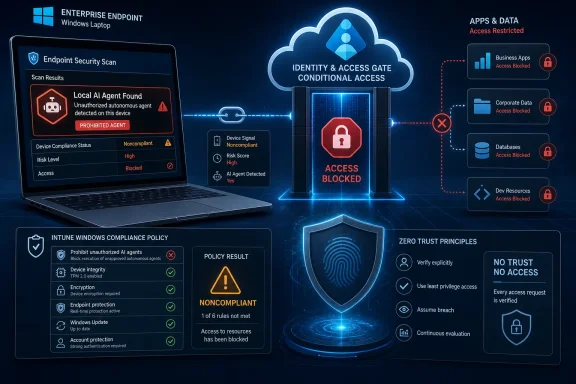
Microsoft’s Intune in-development roadmap now says Windows devices will be automatically marked noncompliant when prohibited local AI agents are discovered, with administrators able to define those prohibited agents in a Windows compliance policy. The practical consequence is immediate: once that compliance signal exists, Microsoft Entra Conditional Access can turn an unwanted local AI tool from an inventory finding into an access-control event. This is not just endpoint hygiene. It is Microsoft moving Windows AI-agent governance into the same zero-trust machinery that already decides whether a device may reach company resources.
Microsoft has not announced this as generally available, and the current public detail is thin. But the direction is clear enough to matter now: admins should start treating local AI agents as compliance-scoped software, build a provisional allow-and-deny taxonomy, and decide which access paths should close when a prohibited agent appears on a managed Windows device.
The concrete change is simple, and that simplicity is why it matters. Microsoft’s Intune “In development” page says Intune will automatically mark Windows devices as noncompliant when prohibited local AI agents are discovered. Admins will be able to configure a list of prohibited agents in a Windows compliance policy.
That means the future control surface is not merely “show me which PCs have which AI tools.” It is “deny this device access if this class of local agent is present.” Microsoft’s own Intune compliance documentation already describes the other half of the chain: compliance results can be used by Conditional Access to determine whether devices can access organizational resources.
For admins, the expected path is therefore familiar even if the AI-agent setting is not yet generally available. In the Intune admin center, the relevant control will live in the Windows compliance-policy world, not as a standalone AI dashboard. Once configured and assigned, a device that fails the prohibited-agent rule would become noncompliant, and an Entra Conditional Access policy requiring compliant devices could block access to protected apps and data.
The shortest operational answer is this: you cannot rely on this as a production control until Microsoft ships it beyond the in-development listing, but you can prepare the enforcement model now. Identify local AI agents in your estate, decide which are allowed or prohibited, map prohibited discovery to a noncompliance response, and test Conditional Access policies that require compliant devices before you attach them to broad user populations.
When Microsoft does expose the setting, the expected administrative path should be through the Intune admin center’s compliance-policy flow for Windows devices. The existing path for compliance policy work is to sign in to the Intune admin center, go to Devices, then Compliance, then create or edit a Windows compliance policy. Actions for noncompliance are configured from the policy’s properties, where Intune already includes “Mark device noncompliant” as the default action.
What changes with the AI-agent feature is the compliance rule that triggers the state. Today, admins can already use compliance policies to evaluate device posture and use Conditional Access to enforce the result. The forthcoming addition would make “a prohibited local AI agent was found” one of the reasons a Windows device can fail posture.
That distinction matters because the enforcement does not require a new access-control philosophy. It uses the one many Microsoft 365 tenants already operate: device state flows into Intune compliance, Intune compliance flows into Entra Conditional Access, and Conditional Access allows or blocks access to organizational resources.
Microsoft’s move is more consequential because it gives the discovery event a native compliance meaning. If a prohibited local AI agent is present, the device can become noncompliant. If the device is noncompliant, Conditional Access can block it from company resources where policies require a compliant device.
That turns AI-agent management into a gate rather than a report. It also puts local AI tools into a category enterprises already understand: software whose presence changes the trust level of the endpoint. The closest analogy is not a browser extension inventory or a software metering report; it is the posture logic behind encryption, firewall, antivirus, and OS-version compliance checks.
This is the right conceptual home for the problem. Local AI agents are not merely applications. They may sit near user files, clipboard contents, browser sessions, code repositories, documents, and line-of-business workflows. If an organization decides that a particular agent is not acceptable on managed Windows endpoints, the risk is not only that the software exists. The risk is that a device running it continues to hold normal access to company data.
Microsoft’s compliance documentation says each compliance policy includes actions for noncompliance, and that marking a device noncompliant is included by default with a zero-day schedule. Microsoft also states that once a device is marked noncompliant, Microsoft Entra Conditional Access can block the device. That is the enforcement bridge.
In practical terms, an admin does not need every SaaS app, file share, or cloud workload to understand AI-agent identity. The access layer only needs to understand whether the device is compliant. That abstraction is powerful because it keeps policy enforcement centralized. The AI-specific mess stays in Intune; the access decision stays in Entra.
This is where the zero-trust framing becomes more than marketing. Zero trust is supposed to make access conditional on current signals, not static enrollment alone. A Windows laptop that was acceptable yesterday but now contains a prohibited local AI agent is no longer the same risk object. The compliance state can reflect that change, and Conditional Access can respond.
This is where many organizations will discover that the technical feature is easier than the governance around it. A deny list requires classification, ownership, review cadence, and exception handling. Without those, it becomes either too narrow to matter or too broad to survive contact with real work.
The first pass should not be “ban everything unfamiliar.” That approach will push experimentation into unmanaged devices and personal accounts, which is usually worse. A better starting point is to classify local AI agents by data exposure, administrative control, business need, and vendor governance. The prohibited list should represent a documented risk decision, not a vibes-based reaction to AI branding.
WindowsForum readers have already been tracking the broader discomfort around agentic Windows features, including Microsoft’s shift toward explicit per-agent consent for local file access and the ongoing desire for durable opt-out controls around Windows AI features. This Intune development belongs in the same story: the operating system can ask for user consent, but enterprise IT still needs a device-level mechanism to say, “This endpoint no longer qualifies for corporate access.”
Microsoft’s current in-development note does not provide that workflow. It does not publicly specify detection mechanics, remediation text, agent-identification fields, reporting fields, or whether the policy will support separate audit and enforcement modes. Those details matter, and admins should not pretend they are already known.
Still, the remediation model can be planned now. A mature deployment should define who receives the noncompliance notification, how the prohibited agent is removed, whether removal is user-driven or IT-driven, how exceptions are approved, and what evidence confirms that the device has returned to compliance. If Conditional Access is part of the response, the organization also needs to decide whether the first failure blocks everything or only higher-risk resources.
Grace periods will be central. Intune already supports scheduling actions for noncompliance, including immediate noncompliance with a zero-day schedule. Microsoft’s documentation also describes how admins can use scheduling to give users time to become compliant before stricter enforcement lands. For AI agents, that grace period may be the difference between a useful control and a flood of avoidable lockouts.
The second task is classification. Admins should separate approved enterprise AI tools from unknown local agents, consumer-grade assistants, experimental developer tools, and software that creates unclear data-handling obligations. The point is not to produce a perfect taxonomy on day one. The point is to avoid writing a deny list from scratch during an incident or audit.
The third task is access mapping. Not every noncompliance reason deserves the same blast radius. A prohibited local AI agent on a kiosk, a developer workstation, and a finance laptop may carry different consequences. Conditional Access can be blunt if applied carelessly, so the policy design should reflect business impact as well as security intent.
The fourth task is communications. Users will not interpret “your device is noncompliant” as “your local AI agent is prohibited” unless the organization tells them. If Microsoft exposes user-facing remediation messages for this control, admins should write them in plain English. If it does not, the support desk will need its own runbook.
Microsoft’s separate shift toward explicit per-agent consent for local file access in Windows 11 acknowledges part of that risk. Consent helps prevent silent access, but it does not answer whether a given agent belongs on a managed corporate device at all. A user can consent to something the organization would never approve.
That is why the Intune move matters. It creates an enterprise answer at the device-compliance layer. The user’s consent decision and the organization’s access decision become separate questions, as they should be.
For enthusiasts, this may feel like another step toward locked-down Windows. For enterprise admins, it is closer to inevitability. Once AI tools can act locally, summarize locally, manipulate files locally, or broker workflows locally, endpoint posture has to include more than patch level and antivirus state.
That does not mean Microsoft will necessarily use the feature to privilege its own AI products. The public facts do not support that claim. But structurally, the control favors agents that enterprises can identify, document, justify, and manage. Vendors that want to live on corporate Windows endpoints will need to look less like clever utilities and more like governable software.
This is where security posture becomes market pressure. If an AI agent cannot explain how it handles local data, how it updates, how it authenticates, and how it can be administered, it may end up on deny lists. Intune’s compliance machinery gives that decision teeth.
The feature also gives Microsoft a way to reassure enterprises that Windows can host agentic experiences without turning every endpoint into an unmanaged automation surface. The message is implicit but obvious: Windows may become more agentic, but Intune and Entra will decide which agentic endpoints still deserve access.
The second unknown is scope. Microsoft says Windows devices, but the public wording does not provide a precise support matrix in the verified material. Admins should wait for official documentation before assuming support across every Windows SKU, enrollment type, management scenario, or tenant cloud.
The third unknown is reporting. If a device is noncompliant because of a prohibited agent, security and support teams will need a clear reason code, device details, user mapping, and remediation history. A vague compliance failure will not be enough in a large environment.
The fourth unknown is exception handling. Real organizations always have edge cases: research teams, security labs, developers, executives, legal holds, vendor demos, and temporary pilots. If Microsoft exposes only a simple prohibited-agent list, admins will have to build the exception process around assignments, groups, and Conditional Access scoping. If Microsoft exposes richer controls, the feature becomes more usable.
Start by writing down what “local AI agent” means for your organization. Do not assume every AI-branded app is the same kind of risk. A locally installed assistant that can read files, automate actions, or interact with business data deserves different scrutiny from a passive model viewer or a vendor-supported enterprise tool.
Then build an initial review board, even if it is informal. Security, endpoint management, legal, privacy, and business application owners should all have a voice. The deny list should not be owned only by the Intune admin who happens to know where the setting lives.
Finally, test the Conditional Access side separately. Microsoft’s own guidance makes clear that compliance policies and Conditional Access work together, but anyone who has operated CA at scale knows the risk of overbroad enforcement. Start with limited groups, exclude emergency access accounts, document the user experience, and verify that support can identify why a device was blocked.
That should change how organizations prepare. The old software-management question was “is this installed?” The new AI-agent question is “if this is installed, should this device still reach company data?” Those are different questions, and only the second one belongs in a zero-trust access model.
Here is the near-term operating posture WindowsForum readers should take:
Microsoft has not announced this as generally available, and the current public detail is thin. But the direction is clear enough to matter now: admins should start treating local AI agents as compliance-scoped software, build a provisional allow-and-deny taxonomy, and decide which access paths should close when a prohibited agent appears on a managed Windows device.
 Microsoft Is Turning AI-Agent Discovery Into an Access Decision
The concrete change is simple, and that simplicity is why it matters. Microsoft’s Intune “In development” page says Intune will automatically mark Windows devices as noncompliant when prohibited local AI agents are discovered. Admins will be able to configure a list of prohibited agents in a Windows compliance policy.That means the future control surface is not merely “show me which PCs have which AI tools.” It is “deny this device access if this class of local agent is present.” Microsoft’s own Intune compliance documentation already describes the other half of the chain: compliance results can be used by Conditional Access to determine whether devices can access organizational resources.
For admins, the expected path is therefore familiar even if the AI-agent setting is not yet generally available. In the Intune admin center, the relevant control will live in the Windows compliance-policy world, not as a standalone AI dashboard. Once configured and assigned, a device that fails the prohibited-agent rule would become noncompliant, and an Entra Conditional Access policy requiring compliant devices could block access to protected apps and data.
The shortest operational answer is this: you cannot rely on this as a production control until Microsoft ships it beyond the in-development listing, but you can prepare the enforcement model now. Identify local AI agents in your estate, decide which are allowed or prohibited, map prohibited discovery to a noncompliance response, and test Conditional Access policies that require compliant devices before you attach them to broad user populations.
The Setting Is Not GA, So the First Step Is Not Clicking a Toggle
The most important implementation caveat is also the easiest to miss. Microsoft’s current public wording places the feature on the Intune in-development page. That is a roadmap signal, not a production promise, and it should not be treated as a feature every tenant can configure today.When Microsoft does expose the setting, the expected administrative path should be through the Intune admin center’s compliance-policy flow for Windows devices. The existing path for compliance policy work is to sign in to the Intune admin center, go to Devices, then Compliance, then create or edit a Windows compliance policy. Actions for noncompliance are configured from the policy’s properties, where Intune already includes “Mark device noncompliant” as the default action.
What changes with the AI-agent feature is the compliance rule that triggers the state. Today, admins can already use compliance policies to evaluate device posture and use Conditional Access to enforce the result. The forthcoming addition would make “a prohibited local AI agent was found” one of the reasons a Windows device can fail posture.
That distinction matters because the enforcement does not require a new access-control philosophy. It uses the one many Microsoft 365 tenants already operate: device state flows into Intune compliance, Intune compliance flows into Entra Conditional Access, and Conditional Access allows or blocks access to organizational resources.
The Real Product Is the Compliance Signal
Security vendors love discovery because discovery demos well. Inventory screens fill with names, versions, and red badges; dashboards make the estate look knowable. But in enterprise IT, discovery without enforcement often becomes a prettier backlog.Microsoft’s move is more consequential because it gives the discovery event a native compliance meaning. If a prohibited local AI agent is present, the device can become noncompliant. If the device is noncompliant, Conditional Access can block it from company resources where policies require a compliant device.
That turns AI-agent management into a gate rather than a report. It also puts local AI tools into a category enterprises already understand: software whose presence changes the trust level of the endpoint. The closest analogy is not a browser extension inventory or a software metering report; it is the posture logic behind encryption, firewall, antivirus, and OS-version compliance checks.
This is the right conceptual home for the problem. Local AI agents are not merely applications. They may sit near user files, clipboard contents, browser sessions, code repositories, documents, and line-of-business workflows. If an organization decides that a particular agent is not acceptable on managed Windows endpoints, the risk is not only that the software exists. The risk is that a device running it continues to hold normal access to company data.
Conditional Access Becomes the AI Policy Enforcer
The phrase “deny list” can make this sound like old-fashioned application control. It is not. The novelty is that Microsoft is tying the prohibited-agent finding to a compliance result, and compliance results are already a first-class input to Conditional Access.Microsoft’s compliance documentation says each compliance policy includes actions for noncompliance, and that marking a device noncompliant is included by default with a zero-day schedule. Microsoft also states that once a device is marked noncompliant, Microsoft Entra Conditional Access can block the device. That is the enforcement bridge.
In practical terms, an admin does not need every SaaS app, file share, or cloud workload to understand AI-agent identity. The access layer only needs to understand whether the device is compliant. That abstraction is powerful because it keeps policy enforcement centralized. The AI-specific mess stays in Intune; the access decision stays in Entra.
This is where the zero-trust framing becomes more than marketing. Zero trust is supposed to make access conditional on current signals, not static enrollment alone. A Windows laptop that was acceptable yesterday but now contains a prohibited local AI agent is no longer the same risk object. The compliance state can reflect that change, and Conditional Access can respond.
The Deny List Is Going to Be a Governance Problem, Not a Checkbox
Microsoft’s wording says admins will be able to configure a list of prohibited agents. That sounds straightforward until you imagine the first policy meeting. Which agents are prohibited? Which are allowed for developers but not finance? Which are acceptable if configured one way but not another? Which are consumer tools, which are enterprise tools, and which are merely wrappers around something else?This is where many organizations will discover that the technical feature is easier than the governance around it. A deny list requires classification, ownership, review cadence, and exception handling. Without those, it becomes either too narrow to matter or too broad to survive contact with real work.
The first pass should not be “ban everything unfamiliar.” That approach will push experimentation into unmanaged devices and personal accounts, which is usually worse. A better starting point is to classify local AI agents by data exposure, administrative control, business need, and vendor governance. The prohibited list should represent a documented risk decision, not a vibes-based reaction to AI branding.
WindowsForum readers have already been tracking the broader discomfort around agentic Windows features, including Microsoft’s shift toward explicit per-agent consent for local file access and the ongoing desire for durable opt-out controls around Windows AI features. This Intune development belongs in the same story: the operating system can ask for user consent, but enterprise IT still needs a device-level mechanism to say, “This endpoint no longer qualifies for corporate access.”
The Remediation Flow Needs to Be Designed Before the Block Arrives
The dangerous version of this feature is a clean security idea deployed as a messy help-desk event. If a prohibited AI agent makes a device noncompliant and Conditional Access blocks the user, the next question is immediate: what exactly must the user or technician do to return the device to compliance?Microsoft’s current in-development note does not provide that workflow. It does not publicly specify detection mechanics, remediation text, agent-identification fields, reporting fields, or whether the policy will support separate audit and enforcement modes. Those details matter, and admins should not pretend they are already known.
Still, the remediation model can be planned now. A mature deployment should define who receives the noncompliance notification, how the prohibited agent is removed, whether removal is user-driven or IT-driven, how exceptions are approved, and what evidence confirms that the device has returned to compliance. If Conditional Access is part of the response, the organization also needs to decide whether the first failure blocks everything or only higher-risk resources.
Grace periods will be central. Intune already supports scheduling actions for noncompliance, including immediate noncompliance with a zero-day schedule. Microsoft’s documentation also describes how admins can use scheduling to give users time to become compliant before stricter enforcement lands. For AI agents, that grace period may be the difference between a useful control and a flood of avoidable lockouts.
The Smart Rollout Starts as Visibility, Then Narrows Access
Because the feature is not generally available, the first operational task is inventory rather than enforcement. Organizations should find out which local AI agents are already present on managed Windows devices, who uses them, and why. That does not require waiting for Microsoft’s final UI; it requires asking the basic asset-management question before the compliance switch exists.The second task is classification. Admins should separate approved enterprise AI tools from unknown local agents, consumer-grade assistants, experimental developer tools, and software that creates unclear data-handling obligations. The point is not to produce a perfect taxonomy on day one. The point is to avoid writing a deny list from scratch during an incident or audit.
The third task is access mapping. Not every noncompliance reason deserves the same blast radius. A prohibited local AI agent on a kiosk, a developer workstation, and a finance laptop may carry different consequences. Conditional Access can be blunt if applied carelessly, so the policy design should reflect business impact as well as security intent.
The fourth task is communications. Users will not interpret “your device is noncompliant” as “your local AI agent is prohibited” unless the organization tells them. If Microsoft exposes user-facing remediation messages for this control, admins should write them in plain English. If it does not, the support desk will need its own runbook.
This Is a Warning Shot for Shadow AI on Windows
The industry has spent years talking about shadow IT, but local AI agents make the problem stranger. A browser-based AI service is at least mediated by web controls, identity, network inspection, and SaaS governance. A local agent can sit closer to the endpoint, with a user’s files and workflows only a permission prompt away.Microsoft’s separate shift toward explicit per-agent consent for local file access in Windows 11 acknowledges part of that risk. Consent helps prevent silent access, but it does not answer whether a given agent belongs on a managed corporate device at all. A user can consent to something the organization would never approve.
That is why the Intune move matters. It creates an enterprise answer at the device-compliance layer. The user’s consent decision and the organization’s access decision become separate questions, as they should be.
For enthusiasts, this may feel like another step toward locked-down Windows. For enterprise admins, it is closer to inevitability. Once AI tools can act locally, summarize locally, manipulate files locally, or broker workflows locally, endpoint posture has to include more than patch level and antivirus state.
Microsoft Is Also Protecting Its Own AI Strategy
There is another layer here: Microsoft is not only responding to risk; it is shaping the market for acceptable AI tooling on Windows. If Intune can define prohibited local agents, then enterprise-approved agents gain a route to legitimacy, while unmanaged or poorly governed tools become access liabilities.That does not mean Microsoft will necessarily use the feature to privilege its own AI products. The public facts do not support that claim. But structurally, the control favors agents that enterprises can identify, document, justify, and manage. Vendors that want to live on corporate Windows endpoints will need to look less like clever utilities and more like governable software.
This is where security posture becomes market pressure. If an AI agent cannot explain how it handles local data, how it updates, how it authenticates, and how it can be administered, it may end up on deny lists. Intune’s compliance machinery gives that decision teeth.
The feature also gives Microsoft a way to reassure enterprises that Windows can host agentic experiences without turning every endpoint into an unmanaged automation surface. The message is implicit but obvious: Windows may become more agentic, but Intune and Entra will decide which agentic endpoints still deserve access.
The Missing Details Are the Story to Watch
The biggest unknown is detection. Microsoft has not publicly detailed, in the provided roadmap language, how Intune will identify prohibited local AI agents. Names alone are rarely enough. Enterprises will want to know whether detection is based on installed applications, executable identity, package metadata, process behavior, signatures, Defender signals, or some other inventory source.The second unknown is scope. Microsoft says Windows devices, but the public wording does not provide a precise support matrix in the verified material. Admins should wait for official documentation before assuming support across every Windows SKU, enrollment type, management scenario, or tenant cloud.
The third unknown is reporting. If a device is noncompliant because of a prohibited agent, security and support teams will need a clear reason code, device details, user mapping, and remediation history. A vague compliance failure will not be enough in a large environment.
The fourth unknown is exception handling. Real organizations always have edge cases: research teams, security labs, developers, executives, legal holds, vendor demos, and temporary pilots. If Microsoft exposes only a simple prohibited-agent list, admins will have to build the exception process around assignments, groups, and Conditional Access scoping. If Microsoft exposes richer controls, the feature becomes more usable.
The Practical Plan Before Microsoft Ships the Button
The best time to design this policy is before the setting arrives. Once it appears in tenants, the pressure will be to enable it quickly, especially in organizations already worried about shadow AI. That is how clean controls become noisy deployments.Start by writing down what “local AI agent” means for your organization. Do not assume every AI-branded app is the same kind of risk. A locally installed assistant that can read files, automate actions, or interact with business data deserves different scrutiny from a passive model viewer or a vendor-supported enterprise tool.
Then build an initial review board, even if it is informal. Security, endpoint management, legal, privacy, and business application owners should all have a voice. The deny list should not be owned only by the Intune admin who happens to know where the setting lives.
Finally, test the Conditional Access side separately. Microsoft’s own guidance makes clear that compliance policies and Conditional Access work together, but anyone who has operated CA at scale knows the risk of overbroad enforcement. Start with limited groups, exclude emergency access accounts, document the user experience, and verify that support can identify why a device was blocked.
The Access Gate Is Coming Before the Culture Is Ready
The immediate lesson for Windows admins is not that Microsoft has solved AI-agent governance. It has not. The in-development note is a signal, not a complete program. But it is a strong signal that Microsoft sees local AI-agent risk as something that belongs in compliance and access control, not merely in endpoint inventory.That should change how organizations prepare. The old software-management question was “is this installed?” The new AI-agent question is “if this is installed, should this device still reach company data?” Those are different questions, and only the second one belongs in a zero-trust access model.
Here is the near-term operating posture WindowsForum readers should take:
- Treat Microsoft’s Intune AI-agent deny-list feature as forthcoming, not generally available, until Microsoft publishes production documentation.
- Inventory local AI agents on managed Windows devices now so the first deny list is based on evidence rather than panic.
- Define prohibited agents through a documented governance process that includes security, privacy, legal, endpoint operations, and affected business teams.
- Map prohibited-agent discovery to a remediation workflow before using Conditional Access to block users.
- Pilot any compliance-to-Conditional-Access enforcement with limited groups and clear break-glass exclusions.
- Watch Microsoft’s final documentation for detection mechanics, supported Windows scenarios, reporting fields, and exception controls.
References
- Primary source: learn.microsoft.com
Configure compliance policies with actions for noncompliance in Microsoft Intune - Microsoft Intune | Microsoft Learn
Configure your compliance policies with one or more actions for noncompliance to protect devices and your organization from unprotected devices. Actions can remotely lock devices, send email or notifications to device users, and more.learn.microsoft.com - Primary source: WindowsForum
Windows 11 AI Agents Now Require Per-Agent Consent for Local Files | Windows Forum
Microsoft’s recent reversal on how AI assistants interact with user files in Windows 11 marks a decisive privacy U‑turn: the operating system will now...windowsforum.com