

Microsoft is rolling out an Exchange Online PowerShell cmdlet,
For years, the organizer field in an Outlook meeting has behaved less like a property and more like a fossil. Once a meeting was created, the organizer owned the series until cancellation, mailbox death, or organizational entropy intervened. If that person changed jobs, went on leave, or left the company, IT departments were often left with an ugly choice: cancel and recreate the meeting, impersonate or delegate around the problem, or let a zombie series continue with nobody truly in control.
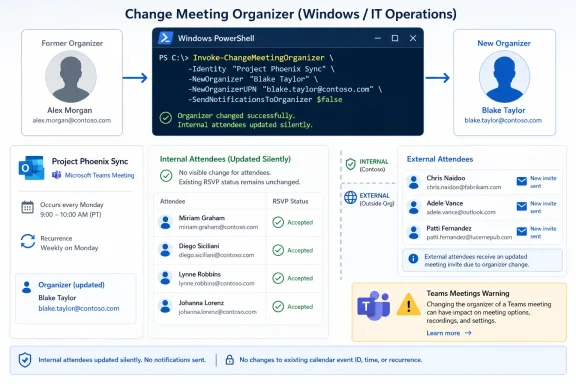
Microsoft’s new Exchange Online cmdlet changes that model. According to Microsoft’s roadmap entry and Microsoft Learn documentation, administrators can now transfer an existing meeting or meeting series from the current organizer’s mailbox to a new organizer inside the same Exchange Online organization. The new organizer can maintain the meeting time, recurrence, attendee list, and description without forcing internal attendees to re-RSVP.
That sounds mundane until you remember how many business processes live inside recurring meetings. Quarterly business reviews, incident reviews, steering committees, compliance check-ins, project standups, and customer calls often outlast the employee who created them. In many organizations, calendar continuity is not etiquette; it is operational memory.
The command supports two basic ways to find the meeting: by subject or by event ID. The subject route is convenient but intentionally cautious. If multiple meetings match the same subject, Exchange returns matches so the administrator can rerun the command with the correct event ID. That is the right design decision, because “Weekly Sync” may be the most common meeting title in corporate history.
The new organizer must be a user in the same Exchange Online organization. The documentation also notes that the new organizer does not need to already be an attendee, which is important for offboarding and role transitions. IT can transfer the meeting to the person who now owns the business process, not merely to someone who happened to be invited.
This is not a general-purpose calendar teleportation system. It does not transfer meetings in group or shared mailboxes, and Microsoft advises adding the new organizer to those mailboxes instead. It also applies only to meetings on the user’s default calendar, a limitation that will catch some administrators who rely on secondary calendars for departmental rituals.
Microsoft says attendees inside the same Exchange Online organization will see their existing calendar entries silently updated with the new organizer information. They do not need to re-RSVP, and their local meeting properties — such as reminders, categories, free/busy state, and private markings — are preserved. For large internal recurring meetings, that is the difference between a clean administrative operation and a week of calendar noise.
This is where Microsoft’s implementation shows an understanding of the real support burden. Recreating a recurring meeting is easy in the abstract. In practice, it creates duplicate entries, missed declines, broken room bookings, stale Teams links, confused executives, and users who swear Outlook “lost” something. A quiet internal transfer avoids turning one organizer change into hundreds of user-facing calendar events.
The feature also gives offboarding teams a less destructive option. Microsoft already has
That is not a failure so much as a reminder that calendaring is a federation of compromises. Exchange can silently rewrite state it controls. It cannot safely mutate every external calendar system’s copy of a meeting without sending messages that those systems understand. The result is a two-tier experience: elegant for internal recipients, conventional and noisy for everyone else.
For IT teams, this means the cmdlet should not be treated as invisible when meetings include customers, partners, vendors, or hybrid users. A transferred internal staff meeting may require no announcement. A transferred recurring customer call probably does. The administrative operation may be a one-line command, but the communication plan still belongs to humans.
There is also a subtle governance issue here. If a meeting series has many exceptions — rescheduled instances, special descriptions, altered attendees — Microsoft says additional cancellation and invitation messages are sent for those exceptions after the effective date. That is technically correct behavior, but it can become visible churn. Administrators should test complex series before assuming a perfectly quiet transition.
That warning is the sharp edge of the feature. In Microsoft 365, a “meeting” is not one thing. It is an Exchange calendar item, a Teams online meeting, sometimes a chat thread, maybe a recording permission boundary, perhaps a OneDrive or SharePoint link, and occasionally a compliance object. Moving the Exchange organizer does not magically reassign every connected service’s concept of ownership.
For administrators, the practical lesson is simple: calendar transfer is not the same as collaboration transfer. If the recurring meeting includes a Teams link, the new organizer may need to replace it. If the invitation contains OneDrive attachments or links owned by the old organizer, the new organizer may not have access and may need to remove and re-add copies.
That limitation does not make the cmdlet unimportant. It makes it honest. Exchange can preserve the calendar shell, but the modern Microsoft 365 meeting is a bundle of dependencies. Admins who treat
Organizer transfer is an administrative operation with audit, identity, and timing implications. If someone is leaving the company tomorrow, HR and IT may need to move a dozen recurring meetings quickly and consistently. A cmdlet is scriptable, reviewable, and automatable in a way a calendar UI is not.
PowerShell also lets organizations wrap the feature in their own controls. A mature tenant can build a departure checklist that identifies recurring meetings, routes approval to a manager, transfers the right series, and logs what happened. A smaller tenant can still run a one-off command when the office manager who owned every standing meeting retires.
The eventual user-facing version will be useful for routine handoffs. But for offboarding, leave coverage, reorganizations, and executive support, the administrative path is the more important first release. Microsoft is not just adding a button; it is giving Exchange admins a supported primitive they can build around.
That history is particularly important in regulated or security-sensitive environments. A compliance review series, incident response checkpoint, or access governance meeting may have value precisely because it is continuous. If ownership changes every time someone changes role, the meeting history becomes fragmented across old and new series.
The new cmdlet does not turn Outlook into a records management system. It does, however, reduce needless fragmentation. It lets the organization preserve the continuity of the event while changing the person responsible for maintaining it.
There is a cultural point here as well. Microsoft 365 has spent years encouraging organizations to embed work in shared digital spaces, but many core controls still inherit assumptions from personal productivity software. A calendar item created by one person can become institutional infrastructure. This cmdlet is an acknowledgment that Exchange needs tools for that reality.
That staggered rollout means administrators should verify availability before publishing internal procedures. The cmdlet may exist in documentation before it works in a given tenant. As with many Exchange Online features, the calendar date on the roadmap is not always the same thing as universal tenant readiness.
Permissions are another operational detail. Microsoft Learn says administrators need the appropriate assigned permissions to run the cmdlet, though the exact access depends on role assignments in the organization. In practice, this should be limited to people who already handle mailbox lifecycle, Exchange administration, or executive support—not handed out broadly because a department dislikes asking IT for calendar help.
The safest early pattern is a controlled pilot. Test with a simple recurring internal meeting, then with a meeting that has rooms, then with a Teams-enabled meeting, then with a series containing exceptions. Only after those tests should the cmdlet become part of offboarding automation.
That is sensible from a records and calendar-state perspective. Rewriting the past would raise messy questions about history, auditability, and attendee copies. But it also means administrators need to be precise about timing, especially for series that meet frequently or have near-term exceptions.
There is also a one-way nuance. Microsoft says that after a meeting is transferred, admins cannot transfer again any portion of the series that remains on the original organizer’s calendar. Future instances from the new organizer’s calendar can still be transferred again, including back to the original organizer. That makes the effective date more than a scheduling detail; it defines which side of the series remains movable.
The command’s
That distinction matters because brute-force cancellation has always been a blunt instrument. It solves the mailbox problem by creating a business problem. A manager may not want every meeting canceled just because an employee left; they want the recurring operating rhythm to continue under the new owner.
The cmdlet also helps with less dramatic events. Parental leave, medical leave, reorganizations, project handoffs, and executive assistant changes all produce the same calendar problem. The old organizer may not be gone, but they are no longer the right person to own the series. Now IT has a supported answer.
That is probably the right sequence. Admins need reliable primitives before Microsoft paints a friendly UI over them. If the PowerShell behavior proves predictable, a user-initiated transfer flow in OWA, new Outlook, and Teams can build on a tested backend rather than inventing a separate experience.
Still, the Teams caveat shows how much work remains. Microsoft 365 users do not experience a recurring meeting as “an Exchange object plus an online meeting object plus file links.” They experience it as one meeting. The more Microsoft integrates its productivity stack, the less acceptable those ownership seams become.
The next phase should be deeper cross-service transfer. If a meeting has a Teams link, the organizer transfer should at least offer a guided remediation path. If it has OneDrive attachments, the new organizer should get a clear warning before the first post-transfer update fails to solve the actual access problem.
Invoke-ChangeMeetingOrganizer, that lets Microsoft 365 administrators transfer ownership of an existing meeting or recurring series to another organizer, with general availability beginning in June 2026 across commercial and government clouds. The feature, listed on the Microsoft 365 Roadmap as ID 554937 and detailed in Microsoft Learn, fixes one of Exchange calendaring’s most stubborn administrative gaps. It is a small command with outsized implications: Microsoft is finally treating meeting ownership as operational data, not a fragile personal artifact.
 Microsoft Finally Admits the Calendar Is Infrastructure
For years, the organizer field in an Outlook meeting has behaved less like a property and more like a fossil. Once a meeting was created, the organizer owned the series until cancellation, mailbox death, or organizational entropy intervened. If that person changed jobs, went on leave, or left the company, IT departments were often left with an ugly choice: cancel and recreate the meeting, impersonate or delegate around the problem, or let a zombie series continue with nobody truly in control.Microsoft’s new Exchange Online cmdlet changes that model. According to Microsoft’s roadmap entry and Microsoft Learn documentation, administrators can now transfer an existing meeting or meeting series from the current organizer’s mailbox to a new organizer inside the same Exchange Online organization. The new organizer can maintain the meeting time, recurrence, attendee list, and description without forcing internal attendees to re-RSVP.
That sounds mundane until you remember how many business processes live inside recurring meetings. Quarterly business reviews, incident reviews, steering committees, compliance check-ins, project standups, and customer calls often outlast the employee who created them. In many organizations, calendar continuity is not etiquette; it is operational memory.
The New Cmdlet Solves the Right Problem, but Only for the Right Tenants
The cmdlet is cloud-only. Microsoft Learn states thatInvoke-ChangeMeetingOrganizer is available only in the cloud-based Exchange service, which means Exchange Online tenants get the new behavior while on-premises Exchange organizations should not expect the same native escape hatch. That distinction matters because calendar pain is especially visible in hybrid environments, where the old and new Exchange worlds already meet awkwardly at mailbox boundaries.The command supports two basic ways to find the meeting: by subject or by event ID. The subject route is convenient but intentionally cautious. If multiple meetings match the same subject, Exchange returns matches so the administrator can rerun the command with the correct event ID. That is the right design decision, because “Weekly Sync” may be the most common meeting title in corporate history.
The new organizer must be a user in the same Exchange Online organization. The documentation also notes that the new organizer does not need to already be an attendee, which is important for offboarding and role transitions. IT can transfer the meeting to the person who now owns the business process, not merely to someone who happened to be invited.
This is not a general-purpose calendar teleportation system. It does not transfer meetings in group or shared mailboxes, and Microsoft advises adding the new organizer to those mailboxes instead. It also applies only to meetings on the user’s default calendar, a limitation that will catch some administrators who rely on secondary calendars for departmental rituals.
The Silent Internal Update Is the Feature Admins Actually Wanted
The most valuable part of the rollout is not that a meeting can be moved. It is that internal attendees do not have to participate in the move.Microsoft says attendees inside the same Exchange Online organization will see their existing calendar entries silently updated with the new organizer information. They do not need to re-RSVP, and their local meeting properties — such as reminders, categories, free/busy state, and private markings — are preserved. For large internal recurring meetings, that is the difference between a clean administrative operation and a week of calendar noise.
This is where Microsoft’s implementation shows an understanding of the real support burden. Recreating a recurring meeting is easy in the abstract. In practice, it creates duplicate entries, missed declines, broken room bookings, stale Teams links, confused executives, and users who swear Outlook “lost” something. A quiet internal transfer avoids turning one organizer change into hundreds of user-facing calendar events.
The feature also gives offboarding teams a less destructive option. Microsoft already has
Remove-CalendarEvents, a cmdlet used to cancel future meetings organized by a departing user. That tool remains useful when meetings should disappear. But many meetings should not disappear; they should survive the person who scheduled them. Invoke-ChangeMeetingOrganizer fills that missing middle ground.External Attendees Still Live in the Messy Real World
The clean experience stops at the tenant boundary. Microsoft’s documentation says attendees outside the Exchange Online organization — including external recipients and attendees with on-premises mailboxes in hybrid deployments — receive a message from the old organizer ending the series, followed by a new invitation from the new organizer. External attendees need to re-RSVP and recreate local changes.That is not a failure so much as a reminder that calendaring is a federation of compromises. Exchange can silently rewrite state it controls. It cannot safely mutate every external calendar system’s copy of a meeting without sending messages that those systems understand. The result is a two-tier experience: elegant for internal recipients, conventional and noisy for everyone else.
For IT teams, this means the cmdlet should not be treated as invisible when meetings include customers, partners, vendors, or hybrid users. A transferred internal staff meeting may require no announcement. A transferred recurring customer call probably does. The administrative operation may be a one-line command, but the communication plan still belongs to humans.
There is also a subtle governance issue here. If a meeting series has many exceptions — rescheduled instances, special descriptions, altered attendees — Microsoft says additional cancellation and invitation messages are sent for those exceptions after the effective date. That is technically correct behavior, but it can become visible churn. Administrators should test complex series before assuming a perfectly quiet transition.
Teams Meetings Reveal the Boundary Between Calendar Ownership and Meeting Ownership
The biggest caveat is Teams. Microsoft’s documentation warns that for Teams-enabled meetings, changing the Exchange meeting organizer does not update the organizer of the associated Teams online meeting. The new organizer should manually update the series with new Teams meeting information so they can join and manage the online meeting.That warning is the sharp edge of the feature. In Microsoft 365, a “meeting” is not one thing. It is an Exchange calendar item, a Teams online meeting, sometimes a chat thread, maybe a recording permission boundary, perhaps a OneDrive or SharePoint link, and occasionally a compliance object. Moving the Exchange organizer does not magically reassign every connected service’s concept of ownership.
For administrators, the practical lesson is simple: calendar transfer is not the same as collaboration transfer. If the recurring meeting includes a Teams link, the new organizer may need to replace it. If the invitation contains OneDrive attachments or links owned by the old organizer, the new organizer may not have access and may need to remove and re-add copies.
That limitation does not make the cmdlet unimportant. It makes it honest. Exchange can preserve the calendar shell, but the modern Microsoft 365 meeting is a bundle of dependencies. Admins who treat
Invoke-ChangeMeetingOrganizer as a complete offboarding workflow will eventually discover the missing pieces in the middle of a live call.PowerShell First Is Sensible, Even If It Looks Unfriendly
Microsoft says a later feature will let users change the organizer through Modern Calendar in Outlook on the web, the new Outlook, and Teams. For user-initiated transfers, the new organizer must accept before the transfer completes. That future UX matters, but Microsoft was right to start with PowerShell.Organizer transfer is an administrative operation with audit, identity, and timing implications. If someone is leaving the company tomorrow, HR and IT may need to move a dozen recurring meetings quickly and consistently. A cmdlet is scriptable, reviewable, and automatable in a way a calendar UI is not.
PowerShell also lets organizations wrap the feature in their own controls. A mature tenant can build a departure checklist that identifies recurring meetings, routes approval to a manager, transfers the right series, and logs what happened. A smaller tenant can still run a one-off command when the office manager who owned every standing meeting retires.
The eventual user-facing version will be useful for routine handoffs. But for offboarding, leave coverage, reorganizations, and executive support, the administrative path is the more important first release. Microsoft is not just adding a button; it is giving Exchange admins a supported primitive they can build around.
The Calendar Has Always Been a Records System in Disguise
Microsoft’s roadmap language emphasizes continuity and history, and that is the right framing. A long-running meeting series is often a record of who was invited, when the cadence changed, what topics were discussed, and how an organization coordinated around a function. Deleting and recreating the series loses more than convenience.That history is particularly important in regulated or security-sensitive environments. A compliance review series, incident response checkpoint, or access governance meeting may have value precisely because it is continuous. If ownership changes every time someone changes role, the meeting history becomes fragmented across old and new series.
The new cmdlet does not turn Outlook into a records management system. It does, however, reduce needless fragmentation. It lets the organization preserve the continuity of the event while changing the person responsible for maintaining it.
There is a cultural point here as well. Microsoft 365 has spent years encouraging organizations to embed work in shared digital spaces, but many core controls still inherit assumptions from personal productivity software. A calendar item created by one person can become institutional infrastructure. This cmdlet is an acknowledgment that Exchange needs tools for that reality.
Admins Should Treat the Rollout as a Workflow Change, Not a Toy
The Microsoft 365 Roadmap lists the feature as rolling out, with general availability in June 2026 and support across Worldwide, GCC, GCC High, and DoD cloud instances. A Message Center archive for MC1227623 reported that rollout was expected to begin in late June 2026 and complete by August 2026. Microsoft Learn also notes that tenants where the feature has not yet arrived may see a “Transfer meeting action is disabled” message.That staggered rollout means administrators should verify availability before publishing internal procedures. The cmdlet may exist in documentation before it works in a given tenant. As with many Exchange Online features, the calendar date on the roadmap is not always the same thing as universal tenant readiness.
Permissions are another operational detail. Microsoft Learn says administrators need the appropriate assigned permissions to run the cmdlet, though the exact access depends on role assignments in the organization. In practice, this should be limited to people who already handle mailbox lifecycle, Exchange administration, or executive support—not handed out broadly because a department dislikes asking IT for calendar help.
The safest early pattern is a controlled pilot. Test with a simple recurring internal meeting, then with a meeting that has rooms, then with a Teams-enabled meeting, then with a series containing exceptions. Only after those tests should the cmdlet become part of offboarding automation.
The Small Print Is Where the Incidents Will Hide
The limitations are not footnotes; they are the difference between a clean transfer and a help desk spike. The effective transfer starts from the next instance unless an administrator specifies a future date withTransferSeriesStartDate. Past instances remain with the original organizer, and previous instances cannot be retroactively transferred.That is sensible from a records and calendar-state perspective. Rewriting the past would raise messy questions about history, auditability, and attendee copies. But it also means administrators need to be precise about timing, especially for series that meet frequently or have near-term exceptions.
There is also a one-way nuance. Microsoft says that after a meeting is transferred, admins cannot transfer again any portion of the series that remains on the original organizer’s calendar. Future instances from the new organizer’s calendar can still be transferred again, including back to the original organizer. That makes the effective date more than a scheduling detail; it defines which side of the series remains movable.
The command’s
WhatIf support is welcome, but it should not lull anyone into skipping validation. Calendar operations are emotionally visible. Users may ignore an email outage for five minutes; they will notice immediately if a board meeting or customer call appears wrong.This Is the Cmdlet Offboarding Scripts Were Missing
A good offboarding process already disables sign-in, handles mail forwarding or delegation, preserves data according to policy, transfers OneDrive ownership where appropriate, and removes or reassigns licenses. Meetings have often sat awkwardly outside that process. They were visible, important, and annoyingly personal.Invoke-ChangeMeetingOrganizer gives offboarding runbooks a cleaner branch. If a departing user’s future meetings are obsolete, cancel them. If they are business-critical, transfer them. If they contain external attendees or Teams links, communicate and remediate accordingly.That distinction matters because brute-force cancellation has always been a blunt instrument. It solves the mailbox problem by creating a business problem. A manager may not want every meeting canceled just because an employee left; they want the recurring operating rhythm to continue under the new owner.
The cmdlet also helps with less dramatic events. Parental leave, medical leave, reorganizations, project handoffs, and executive assistant changes all produce the same calendar problem. The old organizer may not be gone, but they are no longer the right person to own the series. Now IT has a supported answer.
Microsoft’s Calendar Fix Is Narrow, but It Points in the Right Direction
The most interesting thing about this release is how modest it is. Microsoft is not promising a grand rearchitecture of Outlook, Exchange, and Teams meeting ownership. It is delivering a targeted Exchange Online cmdlet with clear constraints, then promising user-facing transfer later.That is probably the right sequence. Admins need reliable primitives before Microsoft paints a friendly UI over them. If the PowerShell behavior proves predictable, a user-initiated transfer flow in OWA, new Outlook, and Teams can build on a tested backend rather than inventing a separate experience.
Still, the Teams caveat shows how much work remains. Microsoft 365 users do not experience a recurring meeting as “an Exchange object plus an online meeting object plus file links.” They experience it as one meeting. The more Microsoft integrates its productivity stack, the less acceptable those ownership seams become.
The next phase should be deeper cross-service transfer. If a meeting has a Teams link, the organizer transfer should at least offer a guided remediation path. If it has OneDrive attachments, the new organizer should get a clear warning before the first post-transfer update fails to solve the actual access problem.
The Practical Calendar Doctrine for 2026
This rollout is not a reason to casually reshuffle every recurring meeting in the tenant. It is a reason to formalize how meeting ownership changes are requested, approved, executed, and communicated. The organizations that benefit most will be the ones that treat the cmdlet as part of lifecycle management rather than a magic wand.- Administrators can now use
Invoke-ChangeMeetingOrganizerin Exchange Online to transfer an existing meeting or recurring series to a new organizer in the same organization. - Internal Exchange Online attendees keep their RSVP state and see their existing calendar entries silently updated with the new organizer information.
- External attendees and some hybrid recipients receive cancellation and invitation messages, so customer-facing and partner-facing meetings still need communication planning.
- Teams-enabled meetings require extra care because changing the Exchange organizer does not change the organizer of the associated Teams online meeting.
- The cmdlet applies to default-calendar meetings and does not support group or shared mailboxes.
- Offboarding runbooks should distinguish between meetings that should be canceled and meetings that should be preserved under a new owner.
References
- Primary source: Microsoft 365 Roadmap
Published: 2026-07-06T23:00:50.6928566Z
Microsoft 365 Roadmap | Microsoft 365
The Microsoft 365 Roadmap lists updates that are currently planned for applicable subscribers. Check here for more information on the status of new features and updates.www.microsoft.com
- Official source: learn.microsoft.com
Invoke-ChangeMeetingOrganizer (ExchangePowerShell) | Microsoft Learn
This cmdlet changes the organizer of a meeting or meeting series. The change is effective starting from the next instance of the series or from a specified future date. Meeting instances before the effective date remain unchanged in the original organizer's calendar. Meeting instances after...learn.microsoft.com - Related coverage: blog.admindroid.com
Change Meeting Organizer in Microsoft 365 Via PowerShell
Discover more about the new Exchange Online PowerShell cmdlet that lets admins change meeting organizer without recreating meetings.blog.admindroid.com - Related coverage: c-sharpcorner.com
Understanding the Set-CalendarProcessing Cmdlet in Exchange Online
Learn how to use the Set-CalendarProcessing cmdlet in Exchange Online to manage calendar settings, auto-accept meetings, configure booking options and streamline scheduling with PowerShell.www.c-sharpcorner.com - Related coverage: stackoverflow.com
exchange server - Find m365 meeting organizer using PowerShell - Stack Overflow
We have an issue with people who move on from our workplace, meaning they end the employement for some reason. When they do, we move their user to a OU outside normal operations and disable it.
The...stackoverflow.com
- Related coverage: m365simple.de
Exchange Online - Meeting Organisatoren per Powershell ändern | M365simple
Ein Mitarbeiter scheidet aus oder ist nicht erreichbar und ein Termin oder eine Terminserie muss dringend geändert werden? Administratoren kennen diese Herausforderung vermutlich zu gut. Bisherige Lösungsansätze sahen z.B. Vollzugriffe auf das betroffene Postfach und Löschung der Terminserie mit... m365simple.de