

Apple released iOS 27 developer beta 3 on July 6, 2026, with build 24A5380h for eligible iPhones, alongside third developer betas for iPadOS 27, macOS 27 Golden Gate, watchOS 27, tvOS 27, and visionOS 27. The release is not the public beta Apple has promised for July, but it is the first checkpoint where the company’s next operating-system cycle starts to look less like a keynote demo and more like a shipping platform. As 9to5Mac reported while cataloging the first visible changes, beta 3 is a small-looking update wrapped around a much larger question: whether Apple can make its ambitious Siri AI rebuild feel dependable before millions of users install it this fall.
The third developer beta of a major Apple operating system rarely gets remembered for a single blockbuster feature. It usually exists in the unglamorous middle of the cycle, after the WWDC glow has faded and before the public beta wave turns early bugs into household complaints. That makes iOS 27 beta 3 more important than its changelog suggests.
Apple is trying to do two things at once. It is refining the visible parts of iOS — icons, Safari prompts, Control Center behavior, Camera hooks, and Liquid Glass polish — while also asking testers to believe that the deepest change in the system, the Siri AI rebuild, is progressing underneath. That combination is inherently awkward: the parts users can see are often incremental, while the part Apple most needs to prove is hard to evaluate in one afternoon of testing.
9to5Mac’s two reports on the release capture that tension neatly. One article frames beta 3 as a conventional developer build with the usual warnings about battery life, app compatibility, and rough edges. The other frames the same release around Apple’s broader Siri AI push, including richer conversations, personal context, on-screen awareness, deeper app actions, and a new visual experience connected to the Dynamic Island.
That is the story. Beta 3 is not merely another seed in Apple’s summer schedule. It is the point where Apple’s AI promises begin colliding with the mundane realities of Settings text, asset downloads, hardware gating, and UI affordances that either make a system feel intentional or make it feel half-plumbed.
That distinction matters because Apple’s old Siri problem was not simply that it answered fewer trivia questions than rivals. The deeper problem was that Siri often felt detached from the state of the device in front of you. A truly useful assistant on a phone should know what app you are using, what you are trying to do, which permission boundary it is about to cross, and when to stay out of the way.
Beta 3 hints at that transition through small pieces of interface evidence. 9to5Mac notes that a Siri Mode in Camera now requires the updated Siri, according to the Camera app’s own UI. Siri voice customization sliders for Pace and Expressivity also reportedly work when accessing the updated Siri. These are not world-changing changes by themselves, but they show Apple wiring the assistant into places where older Siri would have felt like an interruption rather than an operating mode.
The Camera integration is especially telling. Apple has spent years turning the iPhone camera into a computational interface rather than a simple capture tool. If Siri can operate inside that context — interpreting what the user is looking at, connecting Visual Intelligence to commands, and navigating app-specific actions — then Apple’s assistant becomes less of a chatbot and more of a control surface.
That is the optimistic reading. The cautious reading is that all of this depends on latency, reliability, privacy boundaries, and hardware availability. An AI assistant that works brilliantly only on the newest phones, only after assets download correctly, and only when the right on-device models are available will feel less like a system upgrade and more like a tiered product demo.
Modern AI features are not just toggles in Settings. They rely on models, indexes, permissions, cloud routing, device eligibility checks, and local storage of supporting assets. When those assets redownload or reset, users do not experience that as an elegant machine-learning pipeline. They experience it as a feature that was there yesterday and is missing today.
That matters because Apple has built much of its AI positioning around trust. Private Cloud Compute, on-device processing, and tight system integration are all part of the company’s argument that it can deliver AI without making the iPhone feel like an extraction machine. But trust is not only about privacy architecture. It is also about whether the feature appears when expected and behaves the same way twice.
The Settings text change from indexing to “Optimizing Search and Siri,” reported by 9to5Mac, is another small but meaningful clue. Apple is trying to explain background work in terms that users associate with outcomes rather than technical processes. “Indexing” is accurate, but cold. “Optimizing Search and Siri” tells users why their phone may be busy after installation.
That kind of language will become more important as AI features spread through the OS. Users have tolerated post-update indexing for years because the payoff was familiar: Spotlight gets faster, Photos search improves, battery life settles down. With Siri AI, the payoff is more abstract. Apple needs to teach users that the phone may need time to prepare intelligence features without making the device feel unfinished.
Liquid Glass has become the visual shorthand for Apple’s current design direction. The company is again leaning into depth, translucency, reflection, and material effects — the kind of design language that can look premium in a keynote and busy on a real home screen. A softer highlight is a small adjustment, but it suggests Apple is still tuning how far the effect should go.
That tuning is not cosmetic trivia. Interface materials influence legibility, perceived performance, and accessibility. A clear icon treatment that looks beautiful against Apple’s selected wallpapers may be harder to parse against a user’s family photo, a dark gradient, or a cluttered home screen. A tinted icon system that feels coherent in screenshots can become fatiguing when every third-party app joins the palette.
Apple has lived through this cycle before. Major visual changes arrive with confidence, developers and testers complain, and later betas sand down the sharpest edges. The lesson is not that Apple should avoid visual ambition. It is that Apple’s design systems now operate at an enormous scale, across phones, tablets, watches, TVs, headsets, and Macs, and even small adjustments ripple widely.
Beta 3 is therefore the start of negotiation. Apple is not abandoning the look, but it appears to be adjusting the intensity. That is exactly what third betas are for: not wholesale retreat, but evidence that the company is listening before the public beta turns design objections into viral screenshots.
Automatic tab organization is the most obviously consumer-facing piece. Browser tabs have become a kind of ambient digital debt, especially on phones where dozens or hundreds of open pages can disappear into a grid nobody wants to manage. If Safari can make that mess more navigable without feeling presumptuous, it solves a real problem.
Browsing bookmarks by topic points in the same direction. Bookmarks have long been a feature that power users maintain and normal users neglect. Topic-based organization could make saved pages feel more like a living library and less like a filing cabinet from a desktop computing era.
“Notify Me” is more interesting because page-change tracking moves Safari closer to the territory occupied by RSS readers, shopping trackers, research tools, and monitoring utilities. Apple has often preferred to absorb common third-party workflows into first-party features when they become mainstream enough. Page-change alerts fit that pattern neatly.
Extensions remain the long-term platform story. If Safari on iOS becomes a more capable extension host, Apple gives developers more room to customize browsing while retaining App Store and platform control. That balance will be watched closely by developers, regulators, and users who want desktop-class flexibility without turning the mobile browser into a security free-for-all.
Siri on Apple Watch has always had an obvious job: set timers, start workouts, send messages, control devices, and answer quick questions without making the user pull out a phone. The problem has been that voice assistants are least forgivable when users are in motion. A failed command during a run or while cooking feels more irritating than the same failure at a desk.
If Siri AI improves context and action handling on the watch, the payoff could be immediate. A better assistant could make the watch feel less like a notification mirror and more like a lightweight agent for routine tasks. That is exactly the sort of AI use case that does not require science-fiction rhetoric; it just needs to work reliably in seconds.
The standalone Siri app also points to Apple’s broader cross-device ambition. 9to5Mac has reported that iOS 27 includes a dedicated Siri app for revisiting conversations across devices. Bringing that idea to watchOS suggests Apple wants Siri interactions to persist as part of a user’s personal computing history rather than vanish after a spoken exchange.
That raises obvious questions about privacy, discoverability, and clutter. Users may appreciate being able to revisit an assistant conversation, but they will also need clear controls over what is retained, where it appears, and how it syncs. Apple’s advantage is that it can build those controls into the OS. Its burden is that users will expect them to be understandable.
This is the new operating-system split. In the past, older iPhones might miss a camera feature, a graphics effect, or a performance-heavy capability. Now they may miss the core narrative of the release. If iOS 27 is “the Siri AI update,” then an iPhone that receives iOS 27 without the new Siri is getting the platform shell without the marquee act.
Apple can justify some of this technically. On-device AI models need memory bandwidth, neural processing performance, thermal headroom, and storage. A feature that runs poorly on older devices is worse than no feature at all, especially when it involves personal data and system actions. There is no point in shipping a personal assistant that times out or hallucinates because the hardware cannot keep pace.
But the marketing problem remains. Users do not buy operating systems; they buy phones. If the most visible features increasingly map to the newest and most expensive hardware, iOS updates become part of the upgrade funnel rather than merely an annual gift to the installed base.
That is not necessarily sinister. Apple has always used software to showcase new hardware. The difference now is that AI features may feel less optional than cinematic video modes or LiDAR tricks. If the assistant becomes the interface, hardware eligibility becomes a much more sensitive line.
That synchronized cadence matters. Apple’s software strategy is no longer about one flagship platform dragging the others along. The company wants features, design language, identity systems, and AI capabilities to travel across devices. The iPhone may be the center of gravity, but it is not the only stage.
The macOS 27 Golden Gate beta reportedly adds new Golden Gate Bridge wallpapers and screen savers. That is the kind of change that gets a quick mention in beta roundups, but even it serves the broader narrative. Apple is still trying to give each platform a distinctive identity while sharing a cross-device design and intelligence layer.
For iPadOS, the stakes are different. The iPad’s persistent challenge has been explaining whether it is a consumption device, a laptop alternative, a creative studio, or all of the above. AI features that can act across apps and understand on-screen content could help the iPad more than the iPhone if Apple exposes enough power without burying it under simplicity.
For visionOS and tvOS, the immediate user base is smaller, but the strategic question is just as large. Ambient computing devices need interfaces that reduce friction. Voice, context, and intelligent action are not bonus features on a headset or living-room screen; they are often the difference between a device that feels futuristic and one that feels exhausting.
Developer betas attract people who expect breakage, or at least claim they do. Public betas attract enthusiasts who want early access but often run the software on daily devices. The difference is not just scale; it is tolerance. A developer may file a bug report. A public beta user may post a screenshot and declare the release doomed.
That is why beta 3’s rough edges matter. Apple can warn users not to install pre-release software on primary iPhones, and it should. But once the public beta is available through Settings, the barrier feels low enough that many users will ignore the warning. The modern beta program is partly a test system and partly a marketing channel.
The risk is amplified by AI. A broken widget is annoying. A broken assistant that claims to understand personal context is unsettling. If Siri AI misses commands, loses access after asset redownloads, or behaves inconsistently across devices, the problem will not be perceived as a normal beta bug. It will be perceived as evidence that Apple’s AI story is not ready.
Apple’s best path is therefore boring: make the setup clear, make eligibility obvious, explain background optimization honestly, and keep the early public beta conservative. The company does not need every AI feature to feel magical in July. It needs the experience to feel coherent enough that testers believe the magic might arrive by September.
The first practical issue is device eligibility. If organizations have mixed fleets of iPhones, some users will receive the new AI capabilities and others will not. That complicates training, support documentation, and policy enforcement. It also creates an executive support problem when senior staff expect the feature they saw in Apple’s keynote but their assigned device does not support it.
The second issue is data governance. Apple’s Private Cloud Compute story is designed to reassure users and administrators, but AI features that understand personal context and perform app actions still require careful policy review. Enterprises will want to know what data is processed on-device, what is routed to Apple’s cloud infrastructure, how logs are handled, and which controls are exposed through mobile device management.
The third issue is user behavior. When an assistant becomes more capable, users naturally try to delegate more sensitive tasks to it. That may include summarizing work messages, acting on calendar events, searching documents, or navigating business apps. Even when the underlying privacy model is strong, organizations need to decide what forms of AI assistance are acceptable in regulated workflows.
This is where Apple’s polished consumer framing can obscure enterprise friction. A feature that feels like convenience to a personal user can become an audit question in a managed environment. The more Siri AI reaches across apps, the more IT teams will need clear documentation, predictable controls, and stable behavior across beta and release builds.
The Shortcuts change is a good example. 9to5Mac reports that Shortcuts now includes an option to launch into the action view for editing, rather than only the newer natural-language input method. That sounds minor until you remember that power users have spent years building workflows through explicit actions. Natural language may be the future, but existing muscle memory is still the present.
Apple has sometimes been too eager to hide complexity in the name of elegance. Shortcuts is one of the places where complexity is the product. If Apple wants AI to help users create automations, it should not remove the direct manipulation tools that advanced users rely on to understand and debug them.
The Control Center status bar change is similarly practical. Showing cellular network signal and type even when on Wi-Fi gives users better situational awareness. It is not glamorous, but it reflects the kind of everyday information people check when calls fail, hotspots misbehave, or travel connectivity gets weird.
These are the changes that make a beta feel like an operating system rather than a concept video. They do not win the keynote. They prevent the keynote from collapsing on contact with reality.
Here is the practical shape of iOS 27 beta 3 as it stands now:
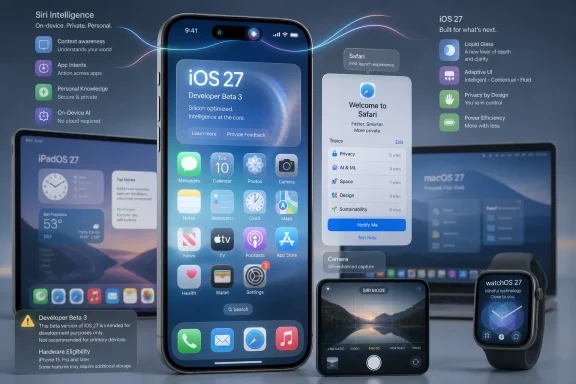 Apple’s Third Beta Is Really a Trust Exercise
The third developer beta of a major Apple operating system rarely gets remembered for a single blockbuster feature. It usually exists in the unglamorous middle of the cycle, after the WWDC glow has faded and before the public beta wave turns early bugs into household complaints. That makes iOS 27 beta 3 more important than its changelog suggests.Apple is trying to do two things at once. It is refining the visible parts of iOS — icons, Safari prompts, Control Center behavior, Camera hooks, and Liquid Glass polish — while also asking testers to believe that the deepest change in the system, the Siri AI rebuild, is progressing underneath. That combination is inherently awkward: the parts users can see are often incremental, while the part Apple most needs to prove is hard to evaluate in one afternoon of testing.
9to5Mac’s two reports on the release capture that tension neatly. One article frames beta 3 as a conventional developer build with the usual warnings about battery life, app compatibility, and rough edges. The other frames the same release around Apple’s broader Siri AI push, including richer conversations, personal context, on-screen awareness, deeper app actions, and a new visual experience connected to the Dynamic Island.
That is the story. Beta 3 is not merely another seed in Apple’s summer schedule. It is the point where Apple’s AI promises begin colliding with the mundane realities of Settings text, asset downloads, hardware gating, and UI affordances that either make a system feel intentional or make it feel half-plumbed.
Siri AI Moves From Keynote Fiction to System Plumbing
Apple’s pitch for iOS 27 is that Siri is no longer just a voice assistant bolted onto the side of the operating system. According to 9to5Mac’s summary of the release, Siri AI is meant to understand richer conversations, personal context, broader knowledge, what is on screen, and more complex actions inside apps. In platform terms, that is not a feature; it is an attempt to reposition Siri as a system layer.That distinction matters because Apple’s old Siri problem was not simply that it answered fewer trivia questions than rivals. The deeper problem was that Siri often felt detached from the state of the device in front of you. A truly useful assistant on a phone should know what app you are using, what you are trying to do, which permission boundary it is about to cross, and when to stay out of the way.
Beta 3 hints at that transition through small pieces of interface evidence. 9to5Mac notes that a Siri Mode in Camera now requires the updated Siri, according to the Camera app’s own UI. Siri voice customization sliders for Pace and Expressivity also reportedly work when accessing the updated Siri. These are not world-changing changes by themselves, but they show Apple wiring the assistant into places where older Siri would have felt like an interruption rather than an operating mode.
The Camera integration is especially telling. Apple has spent years turning the iPhone camera into a computational interface rather than a simple capture tool. If Siri can operate inside that context — interpreting what the user is looking at, connecting Visual Intelligence to commands, and navigating app-specific actions — then Apple’s assistant becomes less of a chatbot and more of a control surface.
That is the optimistic reading. The cautious reading is that all of this depends on latency, reliability, privacy boundaries, and hardware availability. An AI assistant that works brilliantly only on the newest phones, only after assets download correctly, and only when the right on-device models are available will feel less like a system upgrade and more like a tiered product demo.
The Asset Download Glitch Is a Warning, Not a Footnote
One of the more revealing notes in 9to5Mac’s beta 3 findings is that Apple Intelligence assets were redownloaded for some users between beta 2 and beta 3, temporarily resetting access to the new Siri. In a normal beta cycle, that might be dismissed as an expected rough edge. In an AI-centered OS cycle, it deserves more attention.Modern AI features are not just toggles in Settings. They rely on models, indexes, permissions, cloud routing, device eligibility checks, and local storage of supporting assets. When those assets redownload or reset, users do not experience that as an elegant machine-learning pipeline. They experience it as a feature that was there yesterday and is missing today.
That matters because Apple has built much of its AI positioning around trust. Private Cloud Compute, on-device processing, and tight system integration are all part of the company’s argument that it can deliver AI without making the iPhone feel like an extraction machine. But trust is not only about privacy architecture. It is also about whether the feature appears when expected and behaves the same way twice.
The Settings text change from indexing to “Optimizing Search and Siri,” reported by 9to5Mac, is another small but meaningful clue. Apple is trying to explain background work in terms that users associate with outcomes rather than technical processes. “Indexing” is accurate, but cold. “Optimizing Search and Siri” tells users why their phone may be busy after installation.
That kind of language will become more important as AI features spread through the OS. Users have tolerated post-update indexing for years because the payoff was familiar: Spotlight gets faster, Photos search improves, battery life settles down. With Siri AI, the payoff is more abstract. Apple needs to teach users that the phone may need time to prepare intelligence features without making the device feel unfinished.
Liquid Glass Gets Softer Because Design Controversies Don’t Wait for September
9to5Mac reports that specular highlights appear softer on app icons in beta 3, noticeably changing the appearance of clear and tinted icons. That may sound like inside baseball, but visual polish is one of the first places public beta users form an opinion. If the interface looks fussy, inconsistent, or too clever by half, the rest of the release inherits that skepticism.Liquid Glass has become the visual shorthand for Apple’s current design direction. The company is again leaning into depth, translucency, reflection, and material effects — the kind of design language that can look premium in a keynote and busy on a real home screen. A softer highlight is a small adjustment, but it suggests Apple is still tuning how far the effect should go.
That tuning is not cosmetic trivia. Interface materials influence legibility, perceived performance, and accessibility. A clear icon treatment that looks beautiful against Apple’s selected wallpapers may be harder to parse against a user’s family photo, a dark gradient, or a cluttered home screen. A tinted icon system that feels coherent in screenshots can become fatiguing when every third-party app joins the palette.
Apple has lived through this cycle before. Major visual changes arrive with confidence, developers and testers complain, and later betas sand down the sharpest edges. The lesson is not that Apple should avoid visual ambition. It is that Apple’s design systems now operate at an enormous scale, across phones, tablets, watches, TVs, headsets, and Macs, and even small adjustments ripple widely.
Beta 3 is therefore the start of negotiation. Apple is not abandoning the look, but it appears to be adjusting the intensity. That is exactly what third betas are for: not wholesale retreat, but evidence that the company is listening before the public beta turns design objections into viral screenshots.
Safari’s New Welcome Screen Says Apple Still Wants the Browser to Be a Platform
Safari’s beta 3 first-launch screen, as described by 9to5Mac, highlights four features: automatic tab organization, browsing bookmarks by topic, page-change notifications through “Notify Me,” and expanded extension capabilities. None of those items has the mass-market appeal of a new Siri animation. Together, they show Apple continuing to push Safari as a productivity surface rather than just a standards-compliant browser.Automatic tab organization is the most obviously consumer-facing piece. Browser tabs have become a kind of ambient digital debt, especially on phones where dozens or hundreds of open pages can disappear into a grid nobody wants to manage. If Safari can make that mess more navigable without feeling presumptuous, it solves a real problem.
Browsing bookmarks by topic points in the same direction. Bookmarks have long been a feature that power users maintain and normal users neglect. Topic-based organization could make saved pages feel more like a living library and less like a filing cabinet from a desktop computing era.
“Notify Me” is more interesting because page-change tracking moves Safari closer to the territory occupied by RSS readers, shopping trackers, research tools, and monitoring utilities. Apple has often preferred to absorb common third-party workflows into first-party features when they become mainstream enough. Page-change alerts fit that pattern neatly.
Extensions remain the long-term platform story. If Safari on iOS becomes a more capable extension host, Apple gives developers more room to customize browsing while retaining App Store and platform control. That balance will be watched closely by developers, regulators, and users who want desktop-class flexibility without turning the mobile browser into a security free-for-all.
The Apple Watch Finally Joins the Siri AI Story
According to 9to5Mac and MacRumors, watchOS 27 beta 3 introduces Siri AI support and a standalone Siri app. That is a crucial development because the Apple Watch may be the device where a better assistant has the clearest everyday purpose. A watch is too small for complex navigation and too personal to tolerate clumsy interactions.Siri on Apple Watch has always had an obvious job: set timers, start workouts, send messages, control devices, and answer quick questions without making the user pull out a phone. The problem has been that voice assistants are least forgivable when users are in motion. A failed command during a run or while cooking feels more irritating than the same failure at a desk.
If Siri AI improves context and action handling on the watch, the payoff could be immediate. A better assistant could make the watch feel less like a notification mirror and more like a lightweight agent for routine tasks. That is exactly the sort of AI use case that does not require science-fiction rhetoric; it just needs to work reliably in seconds.
The standalone Siri app also points to Apple’s broader cross-device ambition. 9to5Mac has reported that iOS 27 includes a dedicated Siri app for revisiting conversations across devices. Bringing that idea to watchOS suggests Apple wants Siri interactions to persist as part of a user’s personal computing history rather than vanish after a spoken exchange.
That raises obvious questions about privacy, discoverability, and clutter. Users may appreciate being able to revisit an assistant conversation, but they will also need clear controls over what is retained, where it appears, and how it syncs. Apple’s advantage is that it can build those controls into the OS. Its burden is that users will expect them to be understandable.
The Hardware Divide Is Becoming the Real Upgrade Prompt
The broad iOS 27 compatibility story sounds generous at first glance. As 9to5Mac reports, iOS 27 supports iPhone 11 and later, plus the second-generation iPhone SE and newer. But the headline Siri AI and Apple Intelligence features require newer hardware, and 9to5Mac says Apple’s most powerful on-device AI model has even stricter requirements, including iPhone 17 Pro and iPhone Air.This is the new operating-system split. In the past, older iPhones might miss a camera feature, a graphics effect, or a performance-heavy capability. Now they may miss the core narrative of the release. If iOS 27 is “the Siri AI update,” then an iPhone that receives iOS 27 without the new Siri is getting the platform shell without the marquee act.
Apple can justify some of this technically. On-device AI models need memory bandwidth, neural processing performance, thermal headroom, and storage. A feature that runs poorly on older devices is worse than no feature at all, especially when it involves personal data and system actions. There is no point in shipping a personal assistant that times out or hallucinates because the hardware cannot keep pace.
But the marketing problem remains. Users do not buy operating systems; they buy phones. If the most visible features increasingly map to the newest and most expensive hardware, iOS updates become part of the upgrade funnel rather than merely an annual gift to the installed base.
That is not necessarily sinister. Apple has always used software to showcase new hardware. The difference now is that AI features may feel less optional than cinematic video modes or LiDAR tricks. If the assistant becomes the interface, hardware eligibility becomes a much more sensitive line.
iPadOS, tvOS, visionOS, and macOS Are Part of the Same Summer Bet
Apple did not release iOS 27 beta 3 in isolation. As 9to5Mac reported, developer beta 3 also arrived for iPadOS 27, tvOS 27, visionOS 27, and other platforms, alongside macOS 27 Golden Gate. AppleInsider and other outlets also noted the broader third-beta rollout across Apple’s OS family.That synchronized cadence matters. Apple’s software strategy is no longer about one flagship platform dragging the others along. The company wants features, design language, identity systems, and AI capabilities to travel across devices. The iPhone may be the center of gravity, but it is not the only stage.
The macOS 27 Golden Gate beta reportedly adds new Golden Gate Bridge wallpapers and screen savers. That is the kind of change that gets a quick mention in beta roundups, but even it serves the broader narrative. Apple is still trying to give each platform a distinctive identity while sharing a cross-device design and intelligence layer.
For iPadOS, the stakes are different. The iPad’s persistent challenge has been explaining whether it is a consumption device, a laptop alternative, a creative studio, or all of the above. AI features that can act across apps and understand on-screen content could help the iPad more than the iPhone if Apple exposes enough power without burying it under simplicity.
For visionOS and tvOS, the immediate user base is smaller, but the strategic question is just as large. Ambient computing devices need interfaces that reduce friction. Voice, context, and intelligent action are not bonus features on a headset or living-room screen; they are often the difference between a device that feels futuristic and one that feels exhausting.
Public Beta Users Are About to Become Apple’s Real QA Story
Apple has said public betas for the iOS 27 cycle will arrive in July, with a final release expected in the fall alongside the new iPhone lineup. Based on Apple’s historical cadence, 9to5Mac suggests the first public betas could appear soon after developer beta 3. That makes this release a staging ground for a much larger audience.Developer betas attract people who expect breakage, or at least claim they do. Public betas attract enthusiasts who want early access but often run the software on daily devices. The difference is not just scale; it is tolerance. A developer may file a bug report. A public beta user may post a screenshot and declare the release doomed.
That is why beta 3’s rough edges matter. Apple can warn users not to install pre-release software on primary iPhones, and it should. But once the public beta is available through Settings, the barrier feels low enough that many users will ignore the warning. The modern beta program is partly a test system and partly a marketing channel.
The risk is amplified by AI. A broken widget is annoying. A broken assistant that claims to understand personal context is unsettling. If Siri AI misses commands, loses access after asset redownloads, or behaves inconsistently across devices, the problem will not be perceived as a normal beta bug. It will be perceived as evidence that Apple’s AI story is not ready.
Apple’s best path is therefore boring: make the setup clear, make eligibility obvious, explain background optimization honestly, and keep the early public beta conservative. The company does not need every AI feature to feel magical in July. It needs the experience to feel coherent enough that testers believe the magic might arrive by September.
Windows IT Should Pay Attention, Even If the Device Is an iPhone
A Windows-focused audience might be tempted to treat iOS 27 beta 3 as Apple ecosystem weather: interesting, but someone else’s forecast. That would be a mistake. iPhones and iPads are managed endpoints in Windows-heavy organizations, and Apple’s AI direction will land on the desks of sysadmins, security teams, compliance officers, and help desks long before the cultural debate settles.The first practical issue is device eligibility. If organizations have mixed fleets of iPhones, some users will receive the new AI capabilities and others will not. That complicates training, support documentation, and policy enforcement. It also creates an executive support problem when senior staff expect the feature they saw in Apple’s keynote but their assigned device does not support it.
The second issue is data governance. Apple’s Private Cloud Compute story is designed to reassure users and administrators, but AI features that understand personal context and perform app actions still require careful policy review. Enterprises will want to know what data is processed on-device, what is routed to Apple’s cloud infrastructure, how logs are handled, and which controls are exposed through mobile device management.
The third issue is user behavior. When an assistant becomes more capable, users naturally try to delegate more sensitive tasks to it. That may include summarizing work messages, acting on calendar events, searching documents, or navigating business apps. Even when the underlying privacy model is strong, organizations need to decide what forms of AI assistance are acceptable in regulated workflows.
This is where Apple’s polished consumer framing can obscure enterprise friction. A feature that feels like convenience to a personal user can become an audit question in a managed environment. The more Siri AI reaches across apps, the more IT teams will need clear documentation, predictable controls, and stable behavior across beta and release builds.
The Small Changes Tell Us Where Apple Is Nervous
The most interesting thing about iOS 27 beta 3 is not any one feature. It is the pattern. Apple is adjusting visual intensity, clarifying background optimization language, wiring Siri into Camera, restoring practical Shortcuts editing paths, and exposing more system status in Control Center. These are the moves of a company trying to make a big conceptual update feel ordinary enough to ship.The Shortcuts change is a good example. 9to5Mac reports that Shortcuts now includes an option to launch into the action view for editing, rather than only the newer natural-language input method. That sounds minor until you remember that power users have spent years building workflows through explicit actions. Natural language may be the future, but existing muscle memory is still the present.
Apple has sometimes been too eager to hide complexity in the name of elegance. Shortcuts is one of the places where complexity is the product. If Apple wants AI to help users create automations, it should not remove the direct manipulation tools that advanced users rely on to understand and debug them.
The Control Center status bar change is similarly practical. Showing cellular network signal and type even when on Wi-Fi gives users better situational awareness. It is not glamorous, but it reflects the kind of everyday information people check when calls fail, hotspots misbehave, or travel connectivity gets weird.
These are the changes that make a beta feel like an operating system rather than a concept video. They do not win the keynote. They prevent the keynote from collapsing on contact with reality.
The July Beta Is Where Apple’s AI Story Gets Less Theoretical
The next few weeks will tell us more than the WWDC keynote did. Once the public beta lands, Apple will no longer be managing feedback from developers and dedicated testers alone. It will be introducing its most AI-forward iPhone release yet to users who expect the usual Apple bargain: new capabilities without visible complexity.Here is the practical shape of iOS 27 beta 3 as it stands now:
- Apple released iOS 27 developer beta 3 on July 6, 2026, with build 24A5380h, and the update is available through the Developer Beta channel in Settings on eligible iPhones.
- The release arrived alongside third developer betas for iPadOS 27, macOS 27 Golden Gate, watchOS 27, tvOS 27, and visionOS 27.
- The visible beta 3 changes are mostly refinements, including softer icon highlights, updated Settings language, Safari feature prompts, Control Center status details, and Shortcuts editing behavior.
- Siri AI remains the strategic center of iOS 27, with Camera integration, voice customization controls, Apple Intelligence dependencies, and watchOS support showing how broadly Apple wants the assistant to operate.
- Hardware eligibility will be one of the release’s most important user-facing boundaries, because iOS 27 support does not guarantee access to the most significant Apple Intelligence features.
- Public beta testers should still treat this as pre-release software, especially on primary devices where battery life, app compatibility, indexing, and AI asset availability can affect daily use.
References
- Primary source: 9to5Mac
Published: 2026-07-06T18:40:16.174113
Here's what's new with iOS 27 beta 3 - 9to5Mac
Apple released iOS 27 beta 3 today, giving developers the second follow-up update since iOS 27 debuted at WWDC. Developers...9to5mac.com - Related coverage: appleinsider.com
Apple rolls out the third iOS 27, macOS 27 developer betas
Apple has now moved to the third round for the developer betas of iOS 27, macOS 27, and others of the 27 generation. Expect more to come before the eventual fall releases.appleinsider.com - Related coverage: appleosophy.com
Apple rolls out the third developer betas of iOS 27 and more
Apple has started rolling out the second betas of iOS 27, iPadOS 27, macOS Tahoe 27, tvOS 27, and visionOS 27 to developers. appleosophy.com
- Official source: developer.apple.com
Releases - Apple Developer
Get the latest operating system releases and learn about updates to App Store Connect, TestFlight, and other developer tools.developer.apple.com
- Related coverage: macobserver.com
iOS 27 Developer Beta 3 Released: Here's Everything New
Apple has released iOS 27 Developer Beta 3 with bug fixes, performance improvements, and stability updates for eligible iPhone developers.www.macobserver.com - Related coverage: macworld.com
iOS 27 beta 3 is out now for developers as Apple approaches the first public release | Macworld
Apple is getting its big new fall update in shape, but it's not ready for public beta testing just yet.www.macworld.com
- Related coverage: neowin.net
Apple releases Beta 3 for iOS 27 and iPadOS 27 to developers and early testers | Neowin
The third beta for iOS 27 and iPadOS 27 brings new features, fixes know issues, but also brings its own extensive list of bugs for developers to play with. www.neowin.net
- Related coverage: igen.fr
iOS 27 et macOS 27 : la bêta 3 disponible pour les développeurs - iGeneration
Apple ne perd pas le rythme. Deux semaines après la bêta 2, voici la bêta 3 d’iOS 27, macOS 27, watchOS 27, tvOS 27 et visionOS 27. Ce lot de bêtas est toujours réservé aux développeurs. Voici les numéros de build pour chaque système : ...www.igen.fr - Related coverage: tuttotech.net
Apple ha rilasciato le Beta 3 “per lo sviluppo” di iOS 27 e degli altri OS 27
Apple ha rilasciato le beta 3 per lo sviluppo di iOS 27, iPadOS 27, macOS 27 Golden Gate, tvOS 27 e visionOS 27 su tutti i dispositivi supportati.www.tuttotech.net - Official source: apple.com