

iTop’s new iTop Voicy promises to put a powerful, 100% free, real‑time AI voice changer on every Windows PC — but the product’s marketing claims, technical tradeoffs, and the broader risks around voice synthesis deserve a careful, practical look before users adopt it for streaming, gaming, or production work.
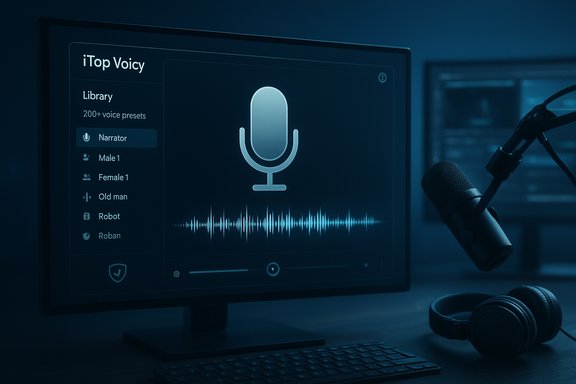
iTop — best known for utilities such as iTop VPN, iTop Screen Recorder and a collection of Windows tools — has published a product page announcing iTop Voicy, described as a real‑time AI voice changer for Windows with a large built‑in voice library, instant low‑latency processing, and support for transforming recorded audio as well as live speech. The vendor page lists platform support (Windows 10 and Windows 11), claims of ultra‑low latency, extensive preset libraries and customization (including the ability to import and generate custom voice models), and positions Voicy as a tool for gaming, streaming, podcasting and remote meetings. Industry products that perform similar work typically use a combination of a local audio pipeline (virtual microphone device) and either on‑device or cloud AI models to perform pitch/formant modification, neural voice conversion or neural TTS-style generation; examples and vendor docs show this is the standard approach for real‑time voice transformation and routing into apps like Discord, Zoom, OBS and games. This piece summarizes the available vendor claims, verifies what can be independently corroborated, explains how this category of software works on Windows PCs, and highlights practical strengths, likely limitations, and safety/legal considerations every user should understand before downloading or deploying iTop Voicy.
Source: Union-Bulletin iTop Launches iTop Voicy: Free Real-Time AI Voice Changer for Windows PCs
 Background
iTop — best known for utilities such as iTop VPN, iTop Screen Recorder and a collection of Windows tools — has published a product page announcing iTop Voicy, described as a real‑time AI voice changer for Windows with a large built‑in voice library, instant low‑latency processing, and support for transforming recorded audio as well as live speech. The vendor page lists platform support (Windows 10 and Windows 11), claims of ultra‑low latency, extensive preset libraries and customization (including the ability to import and generate custom voice models), and positions Voicy as a tool for gaming, streaming, podcasting and remote meetings. Industry products that perform similar work typically use a combination of a local audio pipeline (virtual microphone device) and either on‑device or cloud AI models to perform pitch/formant modification, neural voice conversion or neural TTS-style generation; examples and vendor docs show this is the standard approach for real‑time voice transformation and routing into apps like Discord, Zoom, OBS and games. This piece summarizes the available vendor claims, verifies what can be independently corroborated, explains how this category of software works on Windows PCs, and highlights practical strengths, likely limitations, and safety/legal considerations every user should understand before downloading or deploying iTop Voicy.Overview: What iTop Voicy claims
- Free for Windows — the iTop product page clearly markets iTop Voicy as a free real‑time voice changer for Windows 10/11.
- Real‑time, low latency — the page emphasizes instant transformation with no loading delays and “ultra‑low latency” suitable for live streams and games.
- Large voice library and customization — iTop claims “more than 200 voices,” presets for gender/age/character, and the ability to create or import custom voices and tune tone, timbre and emotion.
- File conversion and recording — the app is said to convert audio/video files with a single click and includes a recorder and noise reduction features for podcasting and dubbing.
- Privacy and encryption statements — iTop’s page asserts data encryption and local privacy protections for user files and voice data.
How real‑time voice changers work on Windows
Core technical components
Real‑time voice changers typically combine several building blocks:- A capture device (the physical microphone).
- A processing engine that applies DSP (classic pitch/formant shifting, vocoders) and/or neural voice conversion models (which map the input speaker’s acoustics toward target timbres).
- A virtual audio device (virtual microphone / virtual audio cable) that routes the processed audio into other apps as if it were a standard microphone.
- Optional cloud inference for heavier neural models or local inference for privacy and lower latency.
Latency considerations
Claims of no latency or zero delay should be read as marketing shorthand. In practice, end‑to‑end latency is the sum of:- Microphone capture and OS audio buffering.
- Processing time for DSP or neural inference (CPU/GPU).
- Driver/virtual device buffering and target app input handling.
- Network latency if cloud inference is used.
Verification: what can be independently confirmed
- iTop’s product materials explicitly state features such as Windows 10/11 support, file conversion capability, a voice library, and low‑latency claims — these are visible on the vendor product pages.
- The technical approach (using a virtual microphone/virtual audio device and either local or cloud processing) is consistent with established vendor implementations such as Altered and Voicemod, which publicly document the same routing model and low‑latency goals for real‑time uses. This supports the plausibility of iTop Voicy’s architecture if implemented in the same way.
- Precise latency numbers on typical hardware, and whether all preset voices deliver identical real‑time performance. The claim of “no latency” is hyperbolic and should be treated as marketing language until benchmarked.
- The true privacy model: whether voice processing happens fully on‑device or whether some features (custom voice generation or high‑fidelity conversions) require cloud uploads/processing. The vendor page asserts encryption and privacy; independent verification requires a product install and network inspection or vendor transparency on data flows.
Strengths: what iTop Voicy could offer users
- Low barrier to entry — if iTop’s free model is genuine, the price point is attractive for casual streamers, role‑players, and educators who otherwise would pay for pro voice services. The vendor page positions Voicy as easy to set up and user friendly.
- Feature breadth — support for both live transformation and file conversion in a single tool is convenient for creators who need both live effects and recorded voiceovers.
- Custom voice creation — the ability to import or generate custom voices and save profiles is a practical feature for podcasters, dubbing artists and educators who want repeatable character voices.
- Local usability model — many successful real‑time voice changers use a local virtual microphone approach to minimize latency and increase compatibility with existing apps; if Voicy follows this pattern, it will integrate well with the Windows ecosystem.
Risks and caveats users should not ignore
1. Performance and hardware tradeoffs
- Neural voice conversion and high‑fidelity synthesis can be CPU/GPU intensive on desktops. On lower‑end machines the result may be increased latency, CPU spikes, or audio artifacts — especially when using complex custom voices. Vendor claims of ultra‑low latency need practical verification on target hardware.
2. Virtual audio drivers and game anti‑cheat systems
- Voice changers commonly install virtual audio drivers or kernel‑level components to create virtual microphones. Some anti‑cheat and security systems see unfamiliar drivers or audio hooks as suspicious; there are community reports and vendor notes about compatibility issues in specific games and platforms. For competitive play, check the game publisher’s policies and test in safe environments.
3. Privacy and cloud processing uncertainty
- If parts of the voice transformation pipeline require cloud inference (for high‑fidelity clones or third‑party voice model generation), voice samples or uploaded audio may leave the device. The iTop page asserts encryption and privacy, but absent a clear technical whitepaper or independent network audit, treat vendor privacy claims as statements to be validated by inspection. Users with sensitive audio (work calls, client interviews, patient data) should confirm local processing or enterprise controls.
4. Ethical, legal and fraud risks
- AI voice cloning has real‑world misuse cases — from vishing and fraud to political misinformation. Security firms and incident databases have tracked an increase in voice‑deepfake incidents used in scams and targeted campaigns, and lawmakers and regulators are increasingly scrutinizing synthetic media. Using a voice changer responsibly means avoiding impersonation, obtaining consent for voice samples, and disclosing synthetic content where legally or ethically required.
5. Quality vs realism tradeoffs
- Extremely realistic voice clones can be misused and may also require more computing resources. Many real‑time systems offer a family of voices: lightweight presets for low latency, and higher‑quality models that may need more resources or cloud acceleration. Expect tradeoffs between realism and responsiveness.
Practical setup: how to test iTop Voicy safely on Windows
- Prepare a test environment:
- Use a secondary PC or create a restore point before installing software that adds virtual drivers. This reduces the risk to a production machine.
- Install and inspect:
- Download iTop Voicy from the official vendor page and, before running it, scan the installer with local antivirus tools and check vendor digital signatures if present. Begin the install with standard Windows admin privileges.
- Audio device routing:
- Typical setup: set your physical microphone as the input for Voicy, enable the Voicy engine, then select Voicy Virtual Microphone as the input device inside apps like Discord, Zoom, OBS or the game. This is the same approach recommended by other vendors.
- Latency and quality checks:
- Join a private voice channel or record locally. Test a range of voices (lightweight vs high‑fidelity) and measure perceived latency and CPU usage (Task Manager). Adjust buffer sizes and select the simplest voice that meets your needs for live use.
- Privacy test:
- Run network monitoring (e.g., Wireshark or resource monitor) during a sample session to confirm whether audio data leaves the device. If an option exists in Voicy for local vs cloud processing, test both modes and prefer local operation for sensitive audio.
Troubleshooting quick wins
- If chat apps can’t see the virtual microphone: reinstall the virtual audio driver as admin, check Windows Sound privacy settings, and reboot. Many tools require a restart after driver installation.
- If audio sounds robotic or unnatural: try a different preset or enable formant‑preserving modes (if available); aggressive pitch shifting commonly causes artifacts. Lower CPU load and increase buffer size to reduce chop or dropouts.
- If a game flags the installer or blocks the virtual microphone: disable overlays, test in a non‑competitive match first, and remove kernel‑level components if required by the anti‑cheat policy. Confirm with the game publisher when in doubt.
Alternatives and ecosystem context
The real‑time voice changer market includes both consumer and professional players. Recognizable alternatives include:- Voicemod — consumer‑focused, well‑known virtual mic model with broad app support and polished UX; widely used for streaming and gaming.
- Altered — professional real‑time voice conversion and virtual microphone workflows designed for high fidelity and enterprise use; documents CPU and platform requirements for best performance.
- Smaller free tools (Clownfish, VB‑Cable, VoiceMeeter) provide basic functionality or virtual audio routing, but may lack advanced AI voices or ongoing maintenance. Community experiences show mixed compatibility with modern apps.
Security, legal and ethical checklist (what to verify before use)
- Confirm whether voice processing is local or requires cloud upload. Prefer local processing for sensitive voice data.
- Review the vendor’s privacy policy and EULA for data retention, sharing and model‑training clauses. If the vendor trains models on uploaded samples, ensure you have the right to use those samples.
- Avoid impersonating real people without explicit permission — many jurisdictions are updating laws around nonconsensual synthetic media, and misuse has led to fraud and legal enforcement actions. Track evolving local regulations and policy guidance.
- Check game and platform policies if planning to use a voice changer in competitive play or monetized streaming — driver injection or audio hooks can trigger moderation or bans. Test in private environments first.
Final verdict and practical recommendation
iTop Voicy arrives at a moment when desktop voice‑modulation technology has matured and become accessible to mainstream creators. The vendor’s product page presents a compelling package — free, feature‑rich, and built for real‑time use — and the described architecture aligns with established designs used by other vendors. However, several important questions remain unanswered without hands‑on testing and transparency from the vendor:- Does iTop Voicy truly process the full real‑time pipeline locally for all voice models, or do some features rely on cloud inference?
- How does end‑to‑end latency look on midrange and budget Windows PCs when using complex, high‑fidelity voices?
- Are any installed drivers or components likely to trigger anti‑cheat or corporate‑security controls in common gaming or enterprise environments?
- Treat the installer like any system‑level change: back up, scan, and test on a non‑production machine.
- Verify local processing and watch network traffic during sample runs to confirm the privacy posture.
- Start with lightweight presets for live use; reserve highest‑quality models for recorded workflows.
- Respect legal and ethical boundaries: obtain consent for cloning voices and avoid impersonation scenarios that could facilitate fraud.
Quick reference: resources to read before installing
- iTop product page and feature list for iTop Voicy (vendor claims and download).
- Vendor documentation from real‑time voice changer makers that explain the virtual mic routing and latency tradeoffs.
- Community and security reporting on synthesized‑voice misuse and regulatory responses to deepfakes and vishing incidents.
- Windows Forum community threads and product roundups discussing voice changer compatibility, driver issues and practical tips for streamers and gamers.
Source: Union-Bulletin iTop Launches iTop Voicy: Free Real-Time AI Voice Changer for Windows PCs
